0. Introduction
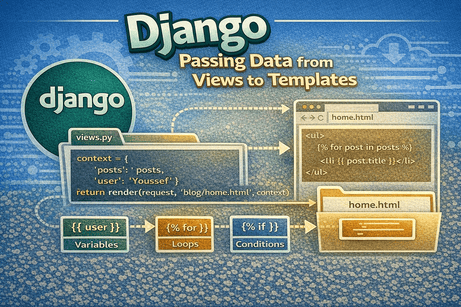
One of the most powerful features in Django is the ability to send data from your Python views to your HTML templates. This is what makes your pages dynamic. Instead of showing fixed content, you can display names, lists, articles, products, user information, and much more.
In this tutorial, you will learn how to pass data from views to templates using the context dictionary, how to display that data in HTML, and how to work with strings, numbers, lists, dictionaries, and objects inside templates.
1. Why Passing Data Matters
Without passing data, your templates would only show static HTML.
Example of static HTML:
<h1>Welcome</h1>
<p>This is my website.</p>
This never changes.
But with Django, you can send dynamic data such as:
- the current user name
- a list of blog posts
- a product price
- a student’s grade
- the number of comments
This allows your web pages to change depending on the data coming from the backend.
2. The Basic Idea
The flow is simple:
- a user visits a URL
- Django calls a view
- the view prepares data
- the view sends that data to the template
- the template displays the data
So the view acts like the bridge between Python logic and HTML display.
3. Using a Context Dictionary
In Django, data is usually passed to a template through a context dictionary.
Example view
from django.shortcuts import render

def home(request):
    context = {
        'name': 'Youssef'
    }
    return render(request, 'blog/home.html', context)
Example template
<h1>Hello {{ name }}</h1>Output
<h1>Hello Youssef</h1>Here:
contextis a Python dictionary'name'is the key'Youssef'is the value{{ name }}accesses that value in the template
4. Passing Multiple Values
You are not limited to one variable. You can pass as many values as you want.
View
def home(request):
    context = {
        'name': 'Youssef',
        'age': 25,
        'city': 'Tetouan'
    }
    return render(request, 'blog/home.html', context)
Template
<h1>Hello {{ name }}</h1>
<p>Age: {{ age }}</p>
<p>City: {{ city }}</p>
This makes your page more informative and dynamic.
5. Passing Strings and Numbers
You can pass simple data types like strings and numbers very easily.
View
def profile(request):
    context = {
        'username': 'youssef123',
        'score': 92
    }
    return render(request, 'blog/profile.html', context)
Template
<h2>User: {{ username }}</h2>
<p>Score: {{ score }}</p>
Django templates automatically display these values.
6. Passing a List
Lists are very common when you want to display multiple items.
View
def posts(request):
    context = {
        'posts': ['Post 1', 'Post 2', 'Post 3']
    }
    return render(request, 'blog/posts.html', context)
Template
<h1>Posts</h1>
<ul>
    {% for post in posts %}
        <li>{{ post }}</li>
    {% endfor %}
</ul>
Output idea
- Post 1
- Post 2
- Post 3
This is very useful for blog posts, products, comments, or any list of items.
7. Passing a Dictionary
You can also pass a dictionary and access its values in the template.
View
def student(request):
    context = {
        'student': {
            'name': 'Sara',
            'grade': 18,
            'city': 'Tangier'
        }
    }
    return render(request, 'blog/student.html', context)
Template
<h1>{{ student.name }}</h1>
<p>Grade: {{ student.grade }}</p>
<p>City: {{ student.city }}</p>
In templates, dictionary keys can often be accessed using dot notation.
8. Passing a List of Dictionaries
This is one of the most useful patterns in Django.
View
def products(request):
    context = {
        'products': [
            {'name': 'Laptop', 'price': 800},
            {'name': 'Mouse', 'price': 20},
            {'name': 'Keyboard', 'price': 45}
        ]
    }
    return render(request, 'blog/products.html', context)
Template
<h1>Products</h1>
<ul>
    {% for product in products %}
        <li>{{ product.name }} - ${{ product.price }}</li>
    {% endfor %}
</ul>
This pattern is very common in real applications.
9. Passing Objects from Models
In real Django projects, you often pass database objects instead of manual dictionaries.
Example model
from django.db import models

class Post(models.Model):
    title = models.CharField(max_length=200)
    content = models.TextField()
Example view
from .models import Post

def post_list(request):
    posts = Post.objects.all()
    return render(request, 'blog/post_list.html', {'posts': posts})
Template
<h1>All Posts</h1>
<ul>
    {% for post in posts %}
        <li>{{ post.title }}</li>
    {% endfor %}
</ul>
This is how Django becomes connected to real database data.
10. Accessing Object Attributes in Templates
When you pass objects to templates, you can access their attributes using dot notation.
Example
{{ post.title }}
{{ post.content }}
This works for:
- model fields
- dictionary keys
- object attributes
- methods without parentheses in some cases
11. Using Conditions with Passed Data
Once data is passed to the template, you can use conditions.
View
def dashboard(request):
    context = {
        'is_logged_in': True,
        'username': 'Youssef'
    }
    return render(request, 'blog/dashboard.html', context)
Template
{% if is_logged_in %}
    <h1>Welcome {{ username }}</h1>
{% else %}
    <h1>Please log in</h1>
{% endif %}
This makes the page responsive to the data it receives.
12. Using Filters on Passed Data
You can combine passed data with template filters.
View
def user_info(request):
    return render(request, 'blog/user.html', {'name': 'youssef'})
Template
<p>{{ name|upper }}</p>
<p>{{ name|title }}</p>
<p>{{ name|length }}</p>
This allows you to format data before displaying it.
13. Passing Empty Data
Sometimes a list may be empty.
View
def notifications(request):
    return render(request, 'blog/notifications.html', {'messages': []})
Template
{% if messages %}
    <ul>
        {% for message in messages %}
            <li>{{ message }}</li>
        {% endfor %}
    </ul>
{% else %}
    <p>No messages available.</p>
{% endif %}
This is a practical way to handle empty results.
14. Inline Context vs Separate Variable
You can pass the dictionary directly inside render():
def home(request):
    return render(request, 'blog/home.html', {
        'name': 'Youssef',
        'city': 'Tetouan'
    })
Or you can define it first:
def home(request):
    context = {
        'name': 'Youssef',
        'city': 'Tetouan'
    }
    return render(request, 'blog/home.html', context)
Which is better?
- For small data, inline is fine
- For more complex views, using
contextis cleaner
15. Real Example: Blog Homepage
View
def home(request):
    posts = [
        {'title': 'Introduction to Django', 'author': 'Youssef'},
        {'title': 'Understanding Templates', 'author': 'Sara'},
        {'title': 'Working with Views', 'author': 'Ali'},
    ]
    return render(request, 'blog/home.html', {'posts': posts})
Template
<h1>Latest Blog Posts</h1>
<ul>
    {% for post in posts %}
        <li>{{ post.title }} by {{ post.author }}</li>
    {% endfor %}
</ul>
This is a simple but realistic example of passing dynamic data.
16. Common Beginner Mistakes
Mistake 1: Forgetting to pass the context
return render(request, 'blog/home.html')If the template expects variables, they will not exist.
Mistake 2: Using the wrong variable name
If you pass:
{'username': 'Youssef'}but in the template write:
{{ name }}nothing useful will appear.
Mistake 3: Forgetting loops for lists
If posts is a list, you usually need {% for %} to display each item.
Mistake 4: Using Python syntax in templates
This is wrong:
{{ posts[0] }}Django templates are more limited than Python. Use template-friendly structures.
Mistake 5: Confusing object fields and dictionary keys
Be consistent in how you structure your data.
17. Best Practices
- use clear and meaningful variable names
- keep the context organized
- avoid sending unnecessary data
- use templates for display, not heavy logic
- keep views readable and simple
For example:
context = {
    'posts': posts,
    'page_title': 'Blog Home',
}
This is clearer than vague names.
18. Beginner Analogy
Think of the view as a teacher preparing materials for a classroom.
- the view prepares the data
- the template is the board where the data is shown
- the user is the student reading the board
Without the teacher bringing information, the board stays empty.
19. Summary
In this tutorial, you learned how to pass data from Django views to templates using the context dictionary. You saw how to send simple values like strings and numbers, more complex values like lists and dictionaries, and even model objects from the database. You also learned how templates can display this data using variables, loops, conditions, and filters.
This concept is essential because it is what transforms static pages into dynamic web applications.
20. Key Takeaways
- views send data to templates using a context dictionary
- template variables use
{{ }} - lists can be displayed with
{% for %} - conditions can be used with
{% if %} - model objects can be passed directly to templates
- dot notation helps access fields and keys
- passing data is the foundation of dynamic pages
21. Small Knowledge Check
- What is a context dictionary in Django?
- How do you display a passed variable in a template?
- How do you display a list of items in a template?
- Can you pass model objects to templates?
- Why is passing data from views to templates important?
22. Conclusion
Passing data from views to templates is one of the most important Django skills for beginners. It allows you to create pages that adapt to real data instead of showing fixed text. Once you understand this concept, you are ready to build more useful and realistic applications.













💬 Comments
No comments yet. Be the first to comment!
Login to comment.