0. Introduction
Models are the foundation of any Django application that works with data. They define how your data is structured, stored, and retrieved from the database. In simple terms, models are the bridge between your Python code and your database.
In this tutorial, you will learn what Django models are, how to create them, how they map to database tables, and how to perform basic database operations using Django’s ORM.
1. What Is a Django Model?
A model is a Python class that represents a table in your database.
Example idea
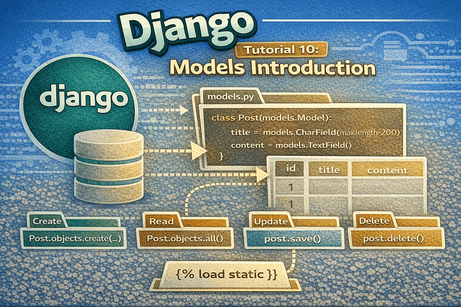
If you create a Post model:
class Post(models.Model):
    title = models.CharField(max_length=200)
    content = models.TextField()
Django will create a database table like:
| id | title | content |
|---|
So:
- Model → Python class
- Table → Database structure
- Fields → Columns
2. Why Models Are Important
Models allow you to:
- store data in a database
- retrieve data easily
- update records
- delete records
- define relationships between data
Without models, your Django app cannot handle dynamic data like:
- blog posts
- users
- products
- orders
- comments
3. Django ORM (Object-Relational Mapper)
Django uses an ORM to interact with the database.
What does ORM do?
Instead of writing SQL like:
SELECT * FROM posts;You write Python:
Post.objects.all()Benefits
- easier to read
- safer (prevents SQL injection)
- database-independent
- faster development
4. Creating Your First Model
Open your app file:
blog/models.pyExample
from django.db import models

class Post(models.Model):
    title = models.CharField(max_length=200)
    content = models.TextField()
Explanation
models.Model→ base classCharField→ short textTextField→ long text
5. Common Field Types
Django provides many field types.
Text fields
name = models.CharField(max_length=100)
description = models.TextField()
Numbers
price = models.FloatField()
quantity = models.IntegerField()
Dates
created_at = models.DateTimeField()
published_date = models.DateField()
Boolean
is_published = models.BooleanField()Images and files
image = models.ImageField(upload_to='images/')
file = models.FileField(upload_to='files/')
6. Adding __str__ Method
It is a good practice to define how your model appears in the admin panel.
class Post(models.Model):
    title = models.CharField(max_length=200)

    def __str__(self):
        return self.title
This makes objects more readable.
7. Registering Models in Admin
Open:
blog/admin.pyAdd:
from django.contrib import admin
from .models import Post

admin.site.register(Post)
Now you can manage posts from the admin panel.
8. Creating Migrations
After defining a model, you must apply migrations.
Step 1: Create migration
python manage.py makemigrationsStep 2: Apply migration
python manage.py migrateWhat happens?
- Django creates database tables
- fields become columns
- your model becomes real in the database
9. Creating Data (Insert)
You can create data using Django shell.
python manage.py shellExample
from blog.models import Post

post = Post(title="First Post", content="Hello Django")
post.save()
Now the data is stored in the database.
10. Retrieving Data
Get all records
Post.objects.all()Get one record
Post.objects.get(id=1)Filter records
Post.objects.filter(title="First Post")11. Updating Data
post = Post.objects.get(id=1)
post.title = "Updated Title"
post.save()
12. Deleting Data
post = Post.objects.get(id=1)
post.delete()
13. Using Models in Views
You can pass model data to templates.
View
from .models import Post
from django.shortcuts import render

def post_list(request):
    posts = Post.objects.all()
    return render(request, 'blog/posts.html', {'posts': posts})
Template
<ul>
{% for post in posts %}
    <li>{{ post.title }}</li>
{% endfor %}
</ul>
14. Model Relationships (Introduction)
Models can be linked together.
Example: Post and Author
class Author(models.Model):
    name = models.CharField(max_length=100)

class Post(models.Model):
    title = models.CharField(max_length=200)
    author = models.ForeignKey(Author, on_delete=models.CASCADE)
Meaning
- one author → many posts
- deleting author → deletes posts
15. Common Field Options
You can customize fields with options.
title = models.CharField(max_length=200, null=True, blank=True)Common options
null=True→ database allows NULLblank=True→ form allows emptydefault=→ default valueunique=True→ unique field
16. Example: Complete Blog Model
class Post(models.Model):
    title = models.CharField(max_length=200)
    content = models.TextField()
    created_at = models.DateTimeField(auto_now_add=True)
    is_published = models.BooleanField(default=True)

    def __str__(self):
        return self.title
17. Common Beginner Mistakes
Mistake 1: Forgetting migrations
After editing models, always run:
makemigrations
migrate
Mistake 2: Not registering model in admin
Without this, you cannot manage data easily.
Mistake 3: Using wrong field types
Example:
price = models.CharField() ❌
price = models.FloatField() ✅
Mistake 4: Forgetting max_length
CharField requires it.
Mistake 5: Confusing null and blank
null→ databaseblank→ forms
18. Best Practices
- use meaningful field names
- choose correct field types
- keep models simple
- separate logic when needed
- always define
__str__ - organize relationships clearly
19. Beginner Analogy
Think of a Django model like an Excel table.
- the model = the table structure
- the fields = columns
- the rows = data entries
- Django ORM = the tool you use to read/write data
20. Summary
In this tutorial, you learned that Django models define how data is structured and stored in the database. You created models, applied migrations, inserted, retrieved, updated, and deleted data, and used models inside views and templates.
Models are essential because they allow your Django application to work with real data instead of static content.
21. Key Takeaways
- models define database structure
- each model = one table
- fields = columns
- Django ORM replaces SQL
- migrations create database tables
- models can be used in views and templates
- relationships connect data
22. Small Knowledge Check
- What is a Django model?
- What does ORM stand for?
- Which command creates migrations?
- How do you retrieve all objects?
- What is the purpose of
__str__?
23. Conclusion
Django models are the backbone of data-driven applications. Once you understand models, you can build real-world applications like blogs, e-commerce platforms, dashboards, and APIs.













💬 Comments
No comments yet. Be the first to comment!
Login to comment.