0. Introduction
As your Django project evolves, your database structure also needs to change. You may add new fields, modify existing ones, or create new models. Django handles these changes using a powerful system called migrations.
In this tutorial, you will learn what migrations are, why they are important, how to create and apply them, and how Django keeps your database synchronized with your models.
1. What Are Migrations?
A migration is a file that describes changes to your database structure.
When you modify your models, Django does not automatically update the database. Instead, it creates migration files that define what should change.
Example
If you add a new field:
class Post(models.Model):
    title = models.CharField(max_length=200)
    content = models.TextField()
    published = models.BooleanField(default=True)
Django generates a migration that says:
➡️ “Add a new column published to the Post table”
2. Why Migrations Are Important
Migrations allow you to:
- keep your database structure in sync with your models
- track changes over time
- collaborate with teams safely
- avoid manual SQL queries
- rollback changes if needed
Without migrations, managing database updates would be complex and error-prone.
3. The Migration Workflow
Django migrations follow a simple workflow:
- Modify your models
- Create migration files
- Apply migrations to the database
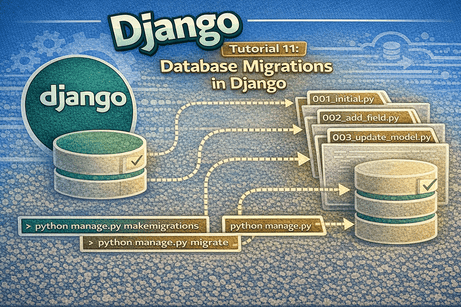
4. Creating a Migration
After changing your models, run:
python manage.py makemigrationsWhat this does
- Django detects changes in your models
- It creates a migration file in:
blog/migrations/Example file
0001_initial.py
0002_add_published_field.py
These files contain instructions for modifying the database.
5. Applying Migrations
To apply changes to the database, run:
python manage.py migrateWhat this does
- reads migration files
- executes SQL commands
- updates the database structure
6. Example: Adding a New Field
Step 1: Update model
class Post(models.Model):
    title = models.CharField(max_length=200)
    content = models.TextField()
    published = models.BooleanField(default=True)
Step 2: Create migration
python manage.py makemigrationsStep 3: Apply migration
python manage.py migrateNow your database includes the new column.
7. Viewing Migration Status
To see which migrations are applied:
python manage.py showmigrationsOutput example
blog
 [X] 0001_initial
[X] 0002_add_field[X]= applied[ ]= not applied
8. Understanding Migration Files
Migration files are Python files that describe database operations.
Example
operations = [
    migrations.AddField(
        model_name='post',
        name='published',
        field=models.BooleanField(default=True),
    ),
]
You usually do not need to edit these manually.
9. Rolling Back Migrations
You can undo migrations if needed.
Example
python manage.py migrate blog 0001This will revert the database to migration 0001.
10. Migrating a Specific App
python manage.py migrate blogThis applies migrations only for the blog app.
11. Resetting Migrations (Advanced)
Sometimes during development, you may want to reset migrations.
Steps:
- Delete migration files (except
__init__.py) - Delete database (e.g.,
db.sqlite3) - Run:
python manage.py makemigrations
python manage.py migrate
⚠️ Only do this in development, not in production.
12. Automatic vs Manual Changes
Django migrations are automatic, but they rely on detecting model changes.
Example
If you rename a field:
title → nameDjango may treat it as:
- remove
title - add
name
This may lead to data loss if not handled carefully.
13. Common Migration Operations
Migrations can:
- create tables (
CreateModel) - add fields (
AddField) - remove fields (
RemoveField) - rename fields (
RenameField) - alter fields (
AlterField) - delete tables (
DeleteModel)
14. Dependencies Between Migrations
Migration files are ordered and depend on each other.
Example:
0001_initial → 0002_add_field → 0003_update_modelDjango applies them in order to maintain consistency.
15. Using Migrations with Git
Migration files should be committed to version control.
Why?
- team members need the same database structure
- ensures consistency across environments
- avoids conflicts
16. Common Beginner Mistakes
Mistake 1: Forgetting to run migrations
Changing models without running:
makemigrations
migrate
will cause errors.
Mistake 2: Deleting migration files randomly
This can break your database history.
Mistake 3: Editing migration files manually
Only do this if you understand what you are doing.
Mistake 4: Not committing migrations
Leads to inconsistent databases in teams.
Mistake 5: Confusing makemigrations and migrate
makemigrations→ creates filesmigrate→ applies changes
17. Best Practices
- always run migrations after model changes
- keep migration files in version control
- avoid editing migration files manually
- test migrations before deployment
- use descriptive commit messages
18. Real Example Workflow
# Step 1: Modify models
# Step 2:
python manage.py makemigrations# Step 3:
python manage.py migrate# Step 4:
python manage.py runserverThis is the standard workflow in Django development.
19. Beginner Analogy
Think of migrations like a version history for your database.
- your models = blueprint
- migration files = change instructions
- database = building
Each migration is like a renovation plan applied step by step.
20. Summary
In this tutorial, you learned how Django migrations manage database changes. You saw how to create migrations, apply them, view their status, and roll them back. Migrations are essential for keeping your database synchronized with your models.
21. Key Takeaways
- migrations track database changes
makemigrationscreates migration filesmigrateapplies them- migration files are stored in
migrations/ - you can rollback migrations
- always keep migrations in version control
22. Small Knowledge Check
- What is a migration in Django?
- What does
makemigrationsdo? - What does
migratedo? - Where are migration files stored?
- How can you rollback a migration?
23. Conclusion
Migrations are a core part of Django development. They allow you to safely evolve your database structure over time without writing raw SQL. Once you master migrations, you can confidently manage changes in real-world projects.













💬 Comments
No comments yet. Be the first to comment!
Login to comment.