0. Introduction
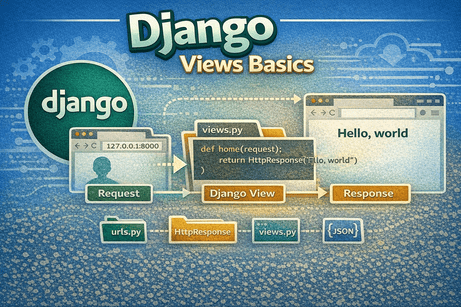
Views are one of the most important parts of a Django application. They contain the logic that processes user requests and returns responses. In simple terms, views are the “brain” of your web application.
In this tutorial, you will learn what Django views are, how they work, how to create them, and how to return different types of responses.
1. What Is a Django View?
A view is a Python function or class that receives a request and returns a response.
Basic idea:
User Request → View → ResponseThe response can be:
- HTML page
- plain text
- JSON data
- redirect
- file download
2. How Views Work in Django
When a user visits a URL:
- Django checks
urls.py - It finds the matching route
- It calls the corresponding view
- The view processes the request
- The view returns a response
- The browser displays the result
So, views connect URLs to actual functionality.
3. Creating Your First View
Open your app file:
blog/views.pyExample 1: Simple text response
from django.http import HttpResponse

def home(request):
    return HttpResponse("Hello, this is my first view!")
What this does
request→ contains information about the user requestHttpResponse()→ sends a response back to the browser
4. Connecting the View to a URL
In blog/urls.py:
from django.urls import path
from . import views

urlpatterns = [
    path('', views.home, name='home'),
]
Now when you visit:
You will see:
Hello, this is my first view!
5. Understanding the request Object
Every view receives a parameter called request.
def home(request):What does it contain?
- request method (GET, POST)
- user information
- session data
- headers
- form data
Example
def info(request):
    return HttpResponse(f"Method: {request.method}")
6. Returning HTML with render()
Most of the time, you don’t return plain text. You return HTML pages.
Using render()
from django.shortcuts import render

def home(request):
    return render(request, 'blog/home.html')
What render() does
- loads an HTML template
- combines it with data
- returns an HTTP response
7. Passing Data to Templates
You can send data from views to templates using a context dictionary.
Example
def home(request):
    context = {
        'name': 'Youssef',
        'age': 25
    }
    return render(request, 'blog/home.html', context)
In template (home.html)
<h1>Hello {{ name }}</h1>
<p>Age: {{ age }}</p>
8. Dynamic Views with URL Parameters
Views can receive parameters from URLs.
urls.py
path('post/<int:id>/', views.post_detail)views.py
def post_detail(request, id):
    return HttpResponse(f"Post ID: {id}")
Result
/post/5/→ "Post ID: 5"
9. Different Types of Responses
Django views can return different types of responses.
9.1 HttpResponse
from django.http import HttpResponse

return HttpResponse("Hello World")
9.2 JsonResponse
from django.http import JsonResponse

def api(request):
    data = {'name': 'Django', 'type': 'framework'}
    return JsonResponse(data)
9.3 Redirect
from django.shortcuts import redirect

def go_home(request):
    return redirect('home')
9.4 File Response (advanced)
from django.http import FileResponseUsed for downloading files.
10. Handling GET and POST Requests
Views can behave differently depending on the request type.
Example
def example(request):
    if request.method == 'GET':
        return HttpResponse("This is a GET request")
    elif request.method == 'POST':
        return HttpResponse("This is a POST request")
11. Using Forms Data in Views
When a user submits a form, data is available in:
request.POSTExample
def submit(request):
    name = request.POST.get('name')
    return HttpResponse(f"Hello {name}")
12. Multiple Views in One File
You can define multiple views in views.py.
def home(request):
    return HttpResponse("Home")

def about(request):
    return HttpResponse("About")

def contact(request):
    return HttpResponse("Contact")
And in urls.py
path('', views.home),
path('about/', views.about),
path('contact/', views.contact),
13. Function-Based vs Class-Based Views
Function-Based Views (FBV)
def home(request):
    return HttpResponse("Hello")
Class-Based Views (CBV)
from django.views import View

class HomeView(View):
    def get(self, request):
        return HttpResponse("Hello")
Beginner recommendation
Start with function-based views.
Later, you can learn class-based views.
14. Best Practices for Views
- keep views simple
- avoid putting too much logic inside views
- use templates for display
- use models for data
- use clear function names
Good example
def post_list(request):
    posts = Post.objects.all()
    return render(request, 'blog/list.html', {'posts': posts})
15. Common Beginner Mistakes
Mistake 1: Forgetting to import HttpResponse
from django.http import HttpResponseMistake 2: Wrong template path
render(request, 'home.html')  ❌
render(request, 'blog/home.html') ✅
Mistake 3: Missing return
def home(request):
    HttpResponse("Hello")  ❌
Must be:
return HttpResponse("Hello") ✅Mistake 4: URL not connected to view
Always check urls.py.
16. Real Example: Blog View
views.py
from django.shortcuts import render

def home(request):
    posts = [
        {'title': 'Post 1'},
        {'title': 'Post 2'},
    ]
    return render(request, 'blog/home.html', {'posts': posts})
home.html
<h1>Blog</h1>
<ul>
  {% for post in posts %}
    <li>{{ post.title }}</li>
  {% endfor %}
</ul>
17. Beginner Analogy
Think of a Django view as a waiter in a restaurant.
- the user places an order (request)
- the view (waiter) takes the order
- the kitchen (models/templates) prepares the food
- the view returns the dish (response)
18. Summary
In this tutorial, you learned that Django views are responsible for handling requests and returning responses. You created simple views, connected them to URLs, rendered templates, passed data, and handled different types of responses.
Views are a core part of Django and are essential for building dynamic applications.
19. Key Takeaways
- Views handle user requests
- They return responses (HTML, JSON, text, etc.)
HttpResponsesends basic responsesrender()returns HTML templates- Views can receive URL parameters
requestcontains user data- Function-based views are easier for beginners
20. Small Knowledge Check
- What is a Django view?
- What does
render()do? - What is the role of the
requestobject? - How do you pass data to a template?
- What is the difference between GET and POST?
21. Conclusion
Django views are where your application logic lives. Once you understand views, you can start building real features like blogs, dashboards, and APIs.













💬 Comments
No comments yet. Be the first to comment!
Login to comment.