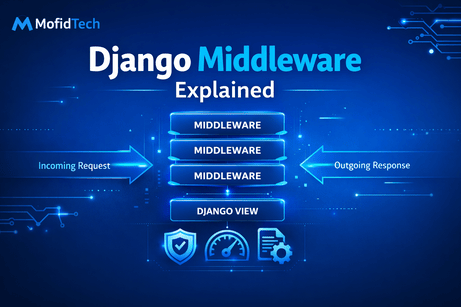
Django middleware is one of the most important concepts to understand when you move from beginner Django projects to more professional applications. At first, many developers use Django without paying much attention to middleware because the framework already provides a lot of useful functionality out of the box. However, once you begin working on authentication flows, security improvements, logging systems, rate limiting, language switching, request tracking, or performance monitoring, middleware becomes much more than a theoretical topic. It becomes part of how your application actually behaves on every request. In simple terms, middleware is a layer of code that sits between the incoming HTTP request and the Django view, and also between the Django view and the outgoing HTTP response. It acts like a chain of processing steps. Each middleware can inspect, modify, or even stop a request before it reaches the view, and it can also inspect or modify the response before it is sent back to the browser. This makes middleware extremely powerful because it allows you to apply behavior globally across the whole project instead of repeating the same logic in many views. For example, instead of checking something in every single view function, you can create one middleware class that handles it for all requests automatically.
To understand middleware clearly, you should imagine the lifecycle of a request inside Django. When a user opens a page in their browser, a request is sent to the server. Django receives that request and passes it through the middleware stack in the order defined in the MIDDLEWARE setting. Each middleware gets the request and decides what to do with it. It can let the request continue, modify it, or return a response immediately. If the request reaches the view, the view generates a response. Then, on the way back out, the response passes again through the middleware stack, but this time in reverse order. This means middleware participates twice in the lifecycle: once before the view runs and once after the view runs. That is why middleware is perfect for things like logging request times, attaching headers, checking authentication-related rules, or measuring performance. It gives you a centralized place to hook into the request/response cycle without cluttering your views with repetitive cross-cutting concerns.
Let us start by looking at the MIDDLEWARE setting in a typical Django project. In settings.py, you usually see something like this:
MIDDLEWARE = [
    'django.middleware.security.SecurityMiddleware',
    'django.contrib.sessions.middleware.SessionMiddleware',
    'django.middleware.common.CommonMiddleware',
    'django.middleware.csrf.CsrfViewMiddleware',
    'django.contrib.auth.middleware.AuthenticationMiddleware',
    'django.contrib.messages.middleware.MessageMiddleware',
    'django.middleware.clickjacking.XFrameOptionsMiddleware',
]
This list defines the middleware chain that Django will execute for every request. The order matters a lot. Middleware placed near the top runs earlier on the way in and later on the way out. Middleware placed near the bottom runs later on the way in and earlier on the way out. This order is not arbitrary, because some middleware depends on work done by previous middleware. For example, AuthenticationMiddleware depends on session data, so SessionMiddleware must come before it. If you change the order incorrectly, features may stop working or produce subtle bugs. Understanding that middleware order is meaningful is one of the first professional habits to build when working with Django.
Now let us understand what some built-in middleware actually do. SecurityMiddleware helps enforce security-related settings such as HTTPS redirects, secure cookies, and other protections. SessionMiddleware adds session support so Django can store user-specific data between requests. CommonMiddleware provides several common improvements such as APPEND_SLASH behavior and some URL normalization. CsrfViewMiddleware protects against cross-site request forgery attacks by verifying CSRF tokens on unsafe requests like POST. AuthenticationMiddleware associates the currently logged-in user with the request object so you can use request.user in your views and templates. MessageMiddleware supports Django’s messages framework, which allows you to show success or error messages to users after redirects. XFrameOptionsMiddleware helps protect against clickjacking by controlling whether your site can be embedded in frames. Even without writing custom middleware, you are already depending heavily on middleware every time you use Django.
To make middleware less abstract, let us examine the request/response flow with a simple example. Suppose a user visits /dashboard/. The browser sends a GET request. Django receives it, and the middleware stack begins processing. First, SecurityMiddleware checks whether security rules should be applied. Next, SessionMiddleware loads the session. Then, AuthenticationMiddleware uses the session to determine who the current user is. If everything continues normally, Django resolves the URL and calls the dashboard view. That view creates an HTTP response containing HTML. On the return path, middleware runs again in reverse order. Another middleware may add headers, save session changes, or modify the response content. Finally, Django sends the response back to the browser. This flow explains why middleware is a great place for project-wide behavior that is not directly part of business logic but still affects how the application works.
In modern Django, a middleware is usually written as a class with an __init__ method and a __call__ method. Here is the simplest possible custom middleware:
class SimpleMiddleware:
    def __init__(self, get_response):
        self.get_response = get_response

    def __call__(self, request):
        print("Before the view is executed")

        response = self.get_response(request)

        print("After the view is executed")
        return response
This example is very important because it shows the heart of middleware. Django passes a get_response callable when the middleware is initialized. Inside __call__, the middleware receives the request. Code written before self.get_response(request) runs before the view. Code written after that line runs after the view has returned a response. This pattern is simple, but it gives you enormous control. You can log requests, add timing logic, inspect headers, or even stop the request entirely by returning an HttpResponse before calling self.get_response(request).
To use this middleware, you place it in a Python file such as core/middleware.py, then add it to the MIDDLEWARE list in settings.py:
MIDDLEWARE = [
    'django.middleware.security.SecurityMiddleware',
    'django.contrib.sessions.middleware.SessionMiddleware',
    'django.middleware.common.CommonMiddleware',
    'core.middleware.SimpleMiddleware',
    'django.middleware.csrf.CsrfViewMiddleware',
    'django.contrib.auth.middleware.AuthenticationMiddleware',
    'django.contrib.messages.middleware.MessageMiddleware',
    'django.middleware.clickjacking.XFrameOptionsMiddleware',
]
When your project runs, Django loads that middleware and executes it on each request. If you visit a page, the console will display the two messages before and after the view is executed. This is a basic demonstration, but it helps you feel the request lifecycle in a concrete way.
A more practical middleware example is logging request paths. Imagine that you want to monitor which URLs users are visiting. Instead of adding print statements to every view, you can create one middleware:
class RequestLogMiddleware:
    def __init__(self, get_response):
        self.get_response = get_response

    def __call__(self, request):
        print(f"Request method: {request.method}")
        print(f"Request path: {request.path}")

        response = self.get_response(request)

        print(f"Response status code: {response.status_code}")
        return response
This middleware logs the HTTP method, the requested path, and the response status code. It is already more useful because it gives you insight into application activity without touching any individual view. In a real production system, you would usually replace print() with Python logging so the information is stored more professionally in log files or monitoring systems.
Another very common use case is measuring how long requests take. Performance monitoring is an excellent example of middleware because the timing concern applies globally, not only to one view. Here is a timing middleware:
import time

class RequestTimingMiddleware:
    def __init__(self, get_response):
        self.get_response = get_response

    def __call__(self, request):
        start_time = time.time()

        response = self.get_response(request)

        duration = time.time() - start_time
        print(f"{request.path} took {duration:.4f} seconds")
        return response
This middleware records the time before the request continues and calculates the duration after the response comes back. This is useful for identifying slow pages. You can later improve it by storing the duration in logs, adding it to a custom response header, or sending it to a monitoring dashboard. Notice again how middleware gives you a single central location to apply performance logic to your whole site.
Middleware can also stop a request before it reaches the view. This is a very powerful capability and must be used carefully. Suppose you want to block access to a maintenance-only mode for everyone except administrators. You could write something like this
from django.http import HttpResponse

class MaintenanceModeMiddleware:
    def __init__(self, get_response):
        self.get_response = get_response

    def __call__(self, request):
        maintenance_mode = False  # Change this to True when needed

        if maintenance_mode and not request.user.is_staff:
            return HttpResponse("The site is temporarily under maintenance.", status=503)

        response = self.get_response(request)
        return response
In this example, if maintenance mode is active, the middleware returns an HttpResponse immediately. The view is never called. This shows another key concept: middleware can either pass the request onward or interrupt the flow. That makes it useful for access restrictions, maintenance pages, IP blocking, and some forms of security filtering.
However, there is an important subtle point here. The code above uses request.user, which depends on AuthenticationMiddleware. That means your custom middleware must be placed after AuthenticationMiddleware in the MIDDLEWARE list if you want request.user to be available. This is a perfect example of why middleware order matters. Many middleware problems in Django happen not because the middleware code is wrong, but because its position in the stack is wrong.
You should also understand that middleware is not the same as decorators, context processors, signals, or model methods. All of these tools have different roles. A view decorator applies logic to selected views only, such as login_required. A context processor injects common variables into templates. Signals react to model-related events like saving or deleting objects. Model methods encapsulate business logic inside models. Middleware, on the other hand, operates at the request/response level for the whole application or a large portion of it. This means you should choose middleware only when your logic truly belongs to request processing. If the logic is specific to a particular view or template, middleware may not be the right tool. Professional Django development often depends less on writing code and more on placing code in the correct layer.
Now let us discuss some advanced middleware hooks. In older Django styles, middleware could define methods like process_view, process_exception, and process_template_response. Django still supports these patterns via middleware mixins and compatible middleware styles in some cases, and conceptually they remain useful to understand. process_view runs just before the view is called and can inspect the view function and its arguments. process_exception runs if the view raises an exception. process_template_response runs when a response supports deferred template rendering. While the modern middleware approach with __call__ is the main one you should learn first, knowing that middleware can interact with specific stages of processing helps you understand how flexible Django’s architecture is.
Let us create a more real-world custom middleware example that adds a custom header to every response. This is useful for debugging, tracking versions, or attaching metadata:
class CustomHeaderMiddleware:
    def __init__(self, get_response):
        self.get_response = get_response

    def __call__(self, request):
        response = self.get_response(request)
        response['X-App-Name'] = 'MofidTech Django Tutorial Project'
        return response
This middleware modifies the outgoing response by adding a custom HTTP header. If you inspect the network tab in your browser developer tools, you will see that header in the response. This type of middleware is lightweight and practical. It can be used to identify environments, add security headers, or include request identifiers for tracing.
A very educational example is restricting requests based on IP address. Although production-ready IP filtering usually requires more robust infrastructure or proxy-aware handling, a simple tutorial version can help explain the concept:
from django.http import HttpResponseForbidden

class BlockIPMiddleware:
    def __init__(self, get_response):
        self.get_response = get_response
        self.blocked_ips = ['127.0.0.2']

    def __call__(self, request):
        user_ip = request.META.get('REMOTE_ADDR')

        if user_ip in self.blocked_ips:
            return HttpResponseForbidden("Access denied.")

        return self.get_response(request)
This middleware checks the client IP address in the request metadata. If the IP is blocked, it returns a 403 Forbidden response. Otherwise, it continues normally. This demonstrates how middleware can use low-level request information to make decisions before a view is reached. In real deployments, you must be careful with reverse proxies and forwarded headers, but as a learning example this clearly illustrates the power of middleware.
When writing custom middleware, one of the best practices is to keep it focused and small. Middleware should ideally do one thing well. If you try to pack many unrelated responsibilities into one middleware, debugging becomes difficult and the code becomes harder to maintain. For example, one middleware can handle timing, another can add security headers, and another can implement request logging. This separation makes each piece of middleware easier to test and understand. It also reflects a general Django design principle: keep responsibilities clear and isolated.
Another best practice is to avoid placing heavy database queries or expensive computations inside middleware unless absolutely necessary. Remember that middleware runs on every request, including requests for pages that may not need that logic. If your middleware performs slow operations globally, it can harm the performance of the whole application. This is especially dangerous in production. Developers sometimes create middleware that queries the database on every request for configuration values, tenant data, or notifications. While sometimes necessary, such designs should be optimized carefully, cached when possible, and reviewed critically. Global code has global cost.
Error handling is another important area. Middleware can be used to catch and process exceptions globally, but you must be careful not to hide errors in a way that makes debugging harder. During development, you usually want Django’s detailed error pages. In production, you may want cleaner custom responses and proper logging. This is why middleware often works together with Django settings such as DEBUG, logging configuration, and custom error views. The goal is not merely to intercept problems, but to do so in a way that improves reliability without making diagnosis impossible.
Testing middleware is also an important professional skill. Since middleware affects requests globally, you should verify that it behaves correctly under different scenarios. Django’s test client can help simulate requests and check responses. For example, if you write middleware that adds a custom header, you can test whether that header appears in the response. If you write middleware that blocks certain requests, you can test whether blocked users receive the expected status code. Here is a small example:
from django.test import TestCase, Client

class MiddlewareTests(TestCase):
    def setUp(self):
        self.client = Client()

    def test_custom_header_exists(self):
        response = self.client.get('/')
        self.assertIn('X-App-Name', response)
This kind of testing is very useful because middleware bugs can affect the whole site. A small mistake may suddenly break authentication, sessions, or routing for every page.
Now let us discuss the difference between request modification and response modification more deeply. When you modify the request, you are preparing information or enforcing rules before the view executes. For example, you might attach a custom attribute to request, such as a timestamp, a tenant identifier, or a correlation ID. The view can then use that data later. When you modify the response, you are changing what goes back to the client. For example, you might add headers, compress content, or inject caching instructions. Understanding this two-phase role of middleware helps you think clearly about where your logic should happen.
Here is an example where middleware attaches a custom value to the request:
import uuid

class RequestIDMiddleware:
    def __init__(self, get_response):
        self.get_response = get_response

    def __call__(self, request):
        request.request_id = str(uuid.uuid4())

        response = self.get_response(request)
        response['X-Request-ID'] = request.request_id
        return response
This middleware creates a unique request ID, stores it on the request object, and also includes it in the response headers. This is very useful in debugging and monitoring because you can track a specific request across logs and systems. It is a strong example of middleware as a bridge between inbound and outbound processing.
You may now ask: when should I use middleware and when should I not? You should use middleware when the logic applies to many or all requests, and when that logic belongs naturally to request/response processing. Good examples include authentication context preparation, global redirects, request logging, performance timing, security headers, language detection, maintenance mode, request tracing, or multi-tenant resolution. You should avoid middleware when the logic is specific to one page, one model, one form, or one template. For example, validating a blog post form does not belong in middleware. Calculating the price of an order does not belong in middleware. Displaying a sidebar variable in all templates usually belongs in a context processor, not middleware. Choosing the correct abstraction is a sign of Django maturity.
One common beginner mistake is assuming middleware is executed only once when the server starts. That is not true. The middleware class is initialized once when Django starts, but its __call__ method runs for every request. This means you should be careful with mutable shared state on the middleware instance. For example, if you store changing request-specific data on self, you may create unsafe behavior, especially under concurrency. Request-specific data should usually stay in the local scope of __call__ or be attached to the request object.
Another common mistake is using middleware for features that can be handled more simply with built-in Django tools. For instance, if you only want to protect one view so that users must be logged in, using @login_required is clearer than inventing custom middleware. If you want to add one common variable to templates, a context processor is more appropriate. Middleware is powerful, but it should not become your first solution for every reusable behavior. Good architecture comes from using the right tool, not the most global one.
Let us build one last full example that feels close to a real project: a middleware that logs slow requests only when they exceed a threshold.
import time
import logging

logger = logging.getLogger(__name__)

class SlowRequestMiddleware:
    def __init__(self, get_response):
        self.get_response = get_response
        self.threshold = 1.0  # seconds

    def __call__(self, request):
        start_time = time.time()
        response = self.get_response(request)
        duration = time.time() - start_time

        if duration > self.threshold:
            logger.warning(
                f"Slow request detected: {request.method} {request.path} took {duration:.2f} seconds"
            )

        return response
This middleware is practical because it does not flood logs with every request. Instead, it focuses on potentially problematic slow ones. It introduces a more production-minded idea: middleware is not only for functionality, but also for observability. In real applications, understanding what is happening is almost as important as the logic itself.
In conclusion, Django middleware is a system for inserting global request/response processing logic into your project. It sits between the browser and your views, allowing you to inspect, modify, block, or enhance requests before they reach the view, and also modify or enrich responses before they return to the user. Built-in Django middleware powers many essential features such as sessions, authentication, CSRF protection, messages, and security handling. Custom middleware lets you implement project-wide behavior like logging, timing, maintenance mode, custom headers, request IDs, IP blocking, and much more. The most important ideas to remember are that middleware runs on every request, that the order in MIDDLEWARE matters, and that middleware should be used only for concerns that truly belong to the request/response lifecycle. Once you understand middleware well, you begin to see Django less as a set of views and templates only, and more as a structured web framework with many clean layers of responsibility. That is exactly the mindset needed to move from beginner Django development to advanced professional practice.
What you learned in this tutorial
In this tutorial, you learned what Django middleware is, where it sits in the request/response cycle, how the MIDDLEWARE setting works, why middleware order is important, how built-in middleware supports core Django features, and how to create custom middleware for logging, timing, headers, maintenance mode, blocked IPs, and request IDs. You also learned best practices, common mistakes, and how middleware compares to decorators, context processors, and other Django tools.













💬 Comments
No comments yet. Be the first to comment!
Login to comment.