0. Introduction
A category and tag system is one of the most useful content-organization features you can build in Django. It may look simple on the surface, but it has a huge impact on how users browse, discover, filter, and understand your content. Whether you are building a blog, a tutorial platform, a documentation website, an e-commerce catalog, or a news portal, categories and tags help transform a flat list of content into a structured and searchable experience.
This topic is especially important because it sits at the intersection of data modeling, navigation design, SEO, and user experience. A well-designed category and tag system makes your website easier to explore, helps users find related content, improves URL structure, supports archive pages, and can even strengthen internal linking and search engine visibility. A poorly designed one, however, can create duplicate structures, messy navigation, confusing content relationships, and difficult maintenance.
In this tutorial, we will build category and tag systems in Django with a deep explanation. We will study what categories and tags really mean, how they differ, how to model them properly, how to connect them to posts, how to build views and templates for browsing them, and how to think about slugs, hierarchy, SEO, and good architectural decisions. The goal is not just to make the feature work, but to understand the logic behind it like a real Django developer.
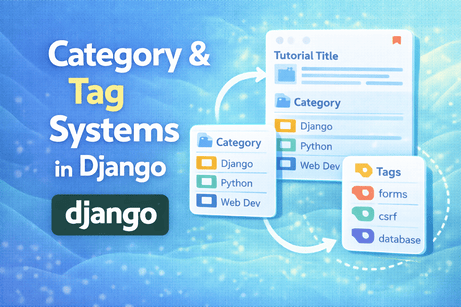
1. What Are Categories and Tags?
Before writing any code, it is important to understand the conceptual difference.
Categories
A category is usually a broad grouping that helps organize content into larger sections. Categories are often few in number and more stable over time.
Examples:
- Python
- Django
- Web Development
- DevOps
- Security
Categories answer the question:
What general section does this content belong to?
A category is often used as part of the main site navigation.
Tags
A tag is usually more specific and descriptive. Tags are often more numerous, flexible, and detailed than categories.
Examples:
- forms
- authentication
- docker-compose
- csrf
- django-admin
- bootstrap
Tags answer the question:
What specific topics, attributes, or keywords are associated with this content?
A tag is often used to connect related pieces of content across categories.
2. Why Categories and Tags Are Not the Same Thing
A common beginner mistake is treating categories and tags as identical. Technically they can look similar in code, but they have different meaning.
A category is often about structure. It defines where the content belongs in the main organization of the site.
A tag is often about description. It describes what the content is about in more detailed terms.
For example, imagine a tutorial titled:
“How to Build a Contact Form in Django”
Its category might be:
- Django
Its tags might be:
- forms
- validation
- csrf
- beginners
So categories provide the larger folder-like structure, while tags provide the detailed keyword-like connections.
This distinction is very important because good architecture begins with correct meaning.
3. Why These Systems Matter in Real Projects
A category and tag system is not just about decoration. It affects real usability and maintainability.
It helps you:
- organize content clearly
- create better navigation menus
- build archive pages
- show related posts
- support filtering and browsing
- improve internal linking
- improve URL clarity
- strengthen SEO with topical grouping
- manage content growth over time
Without categories and tags, your content can quickly become a long, flat, difficult-to-browse list.
With them, your site becomes more structured and more useful.
4. A Blog Example Context
To make everything concrete, let us assume we have a blog or tutorial website in Django.
We begin with a simple Post model.
models.py
from django.db import models
from django.conf import settings

class Post(models.Model):
    title = models.CharField(max_length=200)
    slug = models.SlugField(unique=True)
    content = models.TextField()
    author = models.ForeignKey(settings.AUTH_USER_MODEL, on_delete=models.CASCADE)
    created_at = models.DateTimeField(auto_now_add=True)

    def __str__(self):
        return self.title
Now we want to add category and tag support to this content.
5. Designing the Category Model
A first version of the category model might look like this:
models.py
from django.db import models
from django.utils.text import slugify

class Category(models.Model):
    name = models.CharField(max_length=100, unique=True)
    slug = models.SlugField(unique=True, blank=True)
    description = models.TextField(blank=True)

    def save(self, *args, **kwargs):
        if not self.slug:
            self.slug = slugify(self.name)
        super().save(*args, **kwargs)

    def __str__(self):
        return self.name
6. Deep Explanation of the Category Model
This model may look small, but every field has a role.
name
This is the human-readable label, such as “Django” or “Python.”
We make it unique because usually you do not want duplicate categories with the same name.
slug
This is the URL-friendly version of the category name.
Examples:
Django Forms→django-formsWeb Development→web-development
The slug is important because it lets you build clean URLs like:
/category/django/instead of using numeric IDs.
description
This is optional, but very useful. It allows category archive pages to have introductory text, which improves usability and SEO.
For example, a category page for “Django” might include a short explanation of what kinds of articles appear in that section.
save() with slugify
This automatically generates a slug if one is not provided.
That is convenient because admins do not have to type the slug manually every time.
7. Why Categories Often Use ForeignKey
Now we must decide how a post relates to categories.
A very common structure is:
- one post belongs to one main category
- one category contains many posts
That suggests a ForeignKey.
Update Post model
class Post(models.Model):
    title = models.CharField(max_length=200)
    slug = models.SlugField(unique=True)
    content = models.TextField()
    author = models.ForeignKey(settings.AUTH_USER_MODEL, on_delete=models.CASCADE)
    category = models.ForeignKey(
        Category,
        on_delete=models.SET_NULL,
        null=True,
        blank=True,
        related_name='posts'
    )
    created_at = models.DateTimeField(auto_now_add=True)

    def __str__(self):
        return self.title
8. Why ForeignKey Makes Sense for Categories
Using ForeignKey means:
- one category can have many posts
- each post has one main category
This fits many real projects because categories are usually broad and hierarchical. A post usually has one dominant home.
For example, an article about Django forms probably belongs mainly in the “Django” category, even if it also touches HTML and validation.
This is why category is often modeled as a main structural parent rather than a free-floating label.
9. Why SET_NULL Can Be a Good Choice
Notice this:
on_delete=models.SET_NULL,
null=True,
blank=True
This means if a category is deleted, the post is not deleted. Instead, its category field becomes NULL.
That can be a good choice because the post itself may still be valuable even if the category structure changes.
This is often safer than CASCADE for categories.
Imagine deleting a category called “Old Tutorials.” You probably do not want all related posts to disappear automatically.
So SET_NULL is often a wise and cautious design decision.
10. Designing the Tag Model
Tags are different. A post can have many tags, and a tag can belong to many posts.
That means a many-to-many relationship is usually the right choice.
models.py
from django.db import models
from django.utils.text import slugify

class Tag(models.Model):
    name = models.CharField(max_length=50, unique=True)
    slug = models.SlugField(unique=True, blank=True)

    def save(self, *args, **kwargs):
        if not self.slug:
            self.slug = slugify(self.name)
        super().save(*args, **kwargs)

    def __str__(self):
        return self.name
Now update Post:
class Post(models.Model):
    title = models.CharField(max_length=200)
    slug = models.SlugField(unique=True)
    content = models.TextField()
    author = models.ForeignKey(settings.AUTH_USER_MODEL, on_delete=models.CASCADE)
    category = models.ForeignKey(
        Category,
        on_delete=models.SET_NULL,
        null=True,
        blank=True,
        related_name='posts'
    )
    tags = models.ManyToManyField(
        Tag,
        blank=True,
        related_name='posts'
    )
    created_at = models.DateTimeField(auto_now_add=True)

    def __str__(self):
        return self.title
11. Why ManyToManyField Fits Tags Perfectly
Tags are naturally many-to-many because:
- one post can have many tags
- one tag can describe many posts
For example, a single tutorial may have tags like:
- django
- forms
- validation
- bootstrap
And the tag “forms” may belong to many tutorials.
This is exactly the kind of relationship ManyToManyField was designed for.
Django automatically creates the intermediate join table for this relationship, which makes implementation clean and readable.
12. Running Migrations
After adding these models and fields, run:
python manage.py makemigrations
python manage.py migrate
This creates:
- the
Categorytable - the
Tagtable - the updated
Postschema - the many-to-many join table for post-tag relationships
This is where the conceptual relationships become real database structure.
13. Registering Category and Tag in Django Admin
To manage categories and tags easily, register them in the admin panel.
admin.py
from django.contrib import admin
from .models import Post, Category, Tag

@admin.register(Category)
class CategoryAdmin(admin.ModelAdmin):
    list_display = ('name', 'slug')
    prepopulated_fields = {'slug': ('name',)}

@admin.register(Tag)
class TagAdmin(admin.ModelAdmin):
    list_display = ('name', 'slug')
    prepopulated_fields = {'slug': ('name',)}

@admin.register(Post)
class PostAdmin(admin.ModelAdmin):
    list_display = ('title', 'category', 'author', 'created_at')
    list_filter = ('category', 'tags', 'created_at')
    search_fields = ('title', 'content')
    prepopulated_fields = {'slug': ('title',)}
14. Why the Admin Matters So Much Here
Categories and tags are often editorial data. That means site administrators or content editors need to create and manage them frequently.
The Django admin is especially useful for:
- creating category lists
- editing descriptions
- managing tags
- attaching categories and tags to posts
- filtering posts by taxonomy
This is a good example of Django admin being not just a developer tool, but a real content-management interface.
15. Displaying Categories and Tags in Templates
Once the models are connected, the next step is to show them.
Example in a post detail template
<h1>{{ post.title }}</h1>

{% if post.category %}
    <p>Category:
        <a href="{% url 'category_detail' post.category.slug %}">
            {{ post.category.name }}
        </a>
    </p>
{% endif %}

{% if post.tags.exists %}
    <p>Tags:
        {% for tag in post.tags.all %}
            <a href="{% url 'tag_detail' tag.slug %}">{{ tag.name }}</a>{% if not forloop.last %}, {% endif %}
        {% endfor %}
    </p>
{% endif %}

<div>
    {{ post.content }}
</div>
16. Why Showing Categories and Tags Improves UX
Displaying categories and tags is not just informative. It creates navigation opportunities.
When users see a category link, they can move to broader related content.
When they see tag links, they can explore more specific related content.
So categories and tags are not only metadata. They are interactive browsing tools.
That is why they should usually be visible in post detail pages, cards, or archive layouts.
17. Building the Category Detail View
A category page should show the category itself and the posts that belong to it.
views.py
from django.shortcuts import render, get_object_or_404
from .models import Category

def category_detail(request, slug):
    category = get_object_or_404(Category, slug=slug)
    posts = category.posts.all().order_by('-created_at')

    return render(request, 'blog/category_detail.html', {
        'category': category,
        'posts': posts,
    })
18. Deep Explanation of the Category View
This view works because we defined:
related_name='posts'on the category foreign key.
So we can now access:
category.posts.all()This is one of the benefits of good related_name choices. It makes reverse lookups natural and readable.
The category page becomes a curated archive of all posts in that section.
19. Category Template Example
category_detail.html
<h1>Category: {{ category.name }}</h1>

{% if category.description %}
    <p>{{ category.description }}</p>
{% endif %}

{% for post in posts %}
    <article>
        <h2>
            <a href="{% url 'post_detail' post.slug %}">{{ post.title }}</a>
        </h2>
        <p>{{ post.created_at }}</p>
    </article>
{% empty %}
    <p>No posts found in this category.</p>
{% endfor %}
This gives the user a clean category archive page.
20. Building the Tag Detail View
A tag page is similar, but it gathers posts connected by a more specific keyword.
views.py
from .models import Tag

def tag_detail(request, slug):
    tag = get_object_or_404(Tag, slug=slug)
    posts = tag.posts.all().order_by('-created_at')

    return render(request, 'blog/tag_detail.html', {
        'tag': tag,
        'posts': posts,
    })
21. Why Tag Pages Are Different in Meaning
Even though the code is similar to category pages, the meaning is different.
A category page is usually a structured section of the site.
A tag page is usually a thematic collection across sections.
For example:
- Category: Django
- Tag: authentication
The “authentication” tag may include articles from Django, Flask, APIs, or security-related areas, depending on your content model.
So categories and tags can have similar implementation patterns while still playing different organizational roles.
22. Building URLs
urls.py
from django.urls import path
from .views import category_detail, tag_detail

urlpatterns = [
    path('category/<slug:slug>/', category_detail, name='category_detail'),
    path('tag/<slug:slug>/', tag_detail, name='tag_detail'),
]
This creates clean and readable archive URLs:
/category/django//tag/forms/
This kind of URL design is good both for users and for SEO.
23. Why Slugs Matter So Much
A slug is more than a convenient URL piece. It improves:
- readability
- memorability
- SEO
- user trust
- link sharing
Compare:
/category/3/with:
/category/django/The second URL is much clearer.
That is why slugs are standard in category and tag systems.
24. Showing Categories in Navigation Menus
Categories are often useful in top navigation or sidebars.
Example template:
<ul>
    {% for category in categories %}
        <li>
            <a href="{% url 'category_detail' category.slug %}">
                {{ category.name }}
            </a>
        </li>
    {% endfor %}
</ul>
To support this globally, you might use a context processor or include categories in selected views.
This turns categories into part of the main structure of the site.
25. Showing Popular Tags
Tags are often shown as a “tag cloud” or sidebar list.
Example:
<div class="tag-list">
    {% for tag in tags %}
        <a href="{% url 'tag_detail' tag.slug %}">{{ tag.name }}</a>
    {% endfor %}
</div>
You may later sort them by popularity or usage count.
This helps users discover themes quickly.
26. Counting Posts per Category or Tag
Sometimes you want to show how many posts belong to each category or tag.
For example:
- Django (12)
- Python (8)
- Security (5)
With annotation:
from django.db.models import Count
from .models import Category

categories = Category.objects.annotate(num_posts=Count('posts'))
Then in the template:
{% for category in categories %}
    <a href="{% url 'category_detail' category.slug %}">
        {{ category.name }} ({{ category.num_posts }})
    </a>
{% endfor %}
This is especially useful for sidebars and archive pages.
27. Why Annotation Is Better Than Repeated Counting
If you do this in a loop:
category.posts.count()for many categories, you may create many extra queries.
annotate() helps compute counts more efficiently in one larger query.
This is one of the performance lessons hidden inside content systems: clean data architecture also needs efficient query patterns.
28. Adding Hierarchical Categories
In some projects, categories are not flat. They may have parent-child relationships.
For example:
- Programming
- Python
- JavaScript
- Web Development
- Django
- Flask
This can be modeled with a self-referential foreign key.
models.py
class Category(models.Model):
    name = models.CharField(max_length=100, unique=True)
    slug = models.SlugField(unique=True, blank=True)
    description = models.TextField(blank=True)
    parent = models.ForeignKey(
        'self',
        null=True,
        blank=True,
        on_delete=models.CASCADE,
        related_name='children'
    )

    def save(self, *args, **kwargs):
        if not self.slug:
            self.slug = slugify(self.name)
        super().save(*args, **kwargs)

    def __str__(self):
        return self.name
29. Deep Explanation of Hierarchical Categories
This line is the key:
parent = models.ForeignKey('self', ...)It means a category can optionally point to another category as its parent.
So:
- if
parentisNone, it is a top-level category - if
parentis set, it is a subcategory
This design is useful when your site needs deeper structure.
For example, a large tutorial site may need:
- Programming → Python → Django
instead of one flat list of categories.
30. When Hierarchy Is Useful and When It Is Overkill
Hierarchical categories are powerful, but they add complexity.
Use them when:
- your content library is large
- top-level categories would become too broad
- navigation benefits from nested structure
Avoid them when:
- your site is still small
- the content can be organized clearly with flat categories
- complexity would not bring real value
A common mistake is overengineering the taxonomy too early. Simpler structure is often better at the beginning.
31. Category vs Tag: Data Design Summary
A strong default pattern is:
- Category →
ForeignKey - Tag →
ManyToManyField
Why?
Because each post usually has one main structural home, but many descriptive keywords.
That is not a universal law, but it is an excellent default design for blogs, tutorial websites, and content platforms.
This pattern keeps the taxonomy easy to understand and practical to manage.
32. Can a Post Belong to Multiple Categories?
Yes, technically you could model categories as many-to-many too.
For example:
categories = models.ManyToManyField(Category, blank=True)But you should ask whether that makes sense for your project.
Multiple categories can be useful if content genuinely belongs equally to several major sections. But it can also weaken the meaning of categories and make the site structure less clear.
If everything belongs to several categories, categories start behaving like tags.
So while multi-category systems are possible, they should be used carefully.
33. SEO Benefits of Categories and Tags
A category and tag system can strengthen SEO when used properly.
Benefits include:
- clean archive URLs
- topical grouping of related posts
- better internal linking
- archive pages with useful content
- stronger information architecture
For example, a category page for “Django” containing many well-related articles can help users and search engines understand that your site has a strong cluster around that topic.
But this only helps if the pages are useful and not thin or duplicated.
34. SEO Risks and Thin Archive Pages
There is also a danger.
If you create too many tags with only one post each, you may generate many weak archive pages with little value.
For example, tags like:
- form
- forms
- django-form
- django-forms
- form-tutorial
may create duplicate or near-duplicate archive pages.
This weakens structure instead of helping it.
So tags should be curated thoughtfully, not created randomly without discipline.
This is where technical structure and editorial discipline must work together.
35. Best Practices for Tag Management
Good tag systems usually follow these principles:
- use tags consistently
- avoid duplicates with slightly different spelling
- avoid creating unnecessary one-off tags
- normalize naming style
- merge similar tags when needed
- keep tags descriptive but not too broad
For example, decide whether you will use:
django-forms
orforms
and stay consistent.
A messy tag system becomes difficult for users and admins alike.
36. Building Related Posts Using Categories or Tags
One of the biggest practical benefits of categories and tags is related-content suggestions.
For example, if a user is reading a Django article, you can suggest other posts in the same category.
Example using category
related_posts = Post.objects.filter(category=post.category).exclude(id=post.id)[:4]Or using tags:
related_posts = Post.objects.filter(tags__in=post.tags.all()).exclude(id=post.id).distinct()[:4]This is a powerful feature for engagement and session depth.
37. Why distinct() Is Needed with Tags
When using:
tags__in=post.tags.all()a related post may match multiple tags. That can create duplicate rows in the query result.
So we use:
.distinct()to ensure each related post appears only once.
This is a small but important ORM detail.
38. Filtering Posts by Category or Tag in List Views
You may also want one main post list view that supports filtering.
Example:
def post_list(request):
    posts = Post.objects.all().order_by('-created_at')
    category_slug = request.GET.get('category')
    tag_slug = request.GET.get('tag')

    if category_slug:
        posts = posts.filter(category__slug=category_slug)

    if tag_slug:
        posts = posts.filter(tags__slug=tag_slug)

    return render(request, 'blog/post_list.html', {'posts': posts})
This creates flexible archive behavior.
39. Performance Considerations
Once your content grows, categories and tags influence performance too.
Useful optimizations include:
select_related('category')for category accessprefetch_related('tags')for many-to-many tags- annotation for counts
- avoiding unnecessary repeated queries in templates
Example:
posts = Post.objects.select_related('category').prefetch_related('tags')This is especially useful for post listing pages where many posts and their metadata are rendered together.
40. Common Beginner Mistakes
Here are some common mistakes when building category and tag systems.
Mistake 1: Treating categories and tags as identical
This usually leads to confusing taxonomy.
Mistake 2: Using too many categories
If categories become too numerous and specific, they start acting like tags.
Mistake 3: Creating too many one-off tags
This creates thin and messy archive pages.
Mistake 4: Hardcoding URLs without slugs
Slugs make archive pages cleaner and more meaningful.
Mistake 5: Forgetting reverse relationship names
Good related_name choices make the code much easier to read.
Mistake 6: Ignoring editorial consistency
Even technically correct systems become messy if naming is inconsistent.
These mistakes show that taxonomy is not only a coding task. It is also a content-organization task.
41. A Clean Complete Example
Here is a strong practical version of the core models.
models.py
from django.db import models
from django.conf import settings
from django.utils.text import slugify

class Category(models.Model):
    name = models.CharField(max_length=100, unique=True)
    slug = models.SlugField(unique=True, blank=True)
    description = models.TextField(blank=True)

    def save(self, *args, **kwargs):
        if not self.slug:
            self.slug = slugify(self.name)
        super().save(*args, **kwargs)

    def __str__(self):
        return self.name


class Tag(models.Model):
    name = models.CharField(max_length=50, unique=True)
    slug = models.SlugField(unique=True, blank=True)

    def save(self, *args, **kwargs):
        if not self.slug:
            self.slug = slugify(self.name)
        super().save(*args, **kwargs)

    def __str__(self):
        return self.name


class Post(models.Model):
    title = models.CharField(max_length=200)
    slug = models.SlugField(unique=True)
    content = models.TextField()
    author = models.ForeignKey(settings.AUTH_USER_MODEL, on_delete=models.CASCADE)
    category = models.ForeignKey(
        Category,
        on_delete=models.SET_NULL,
        null=True,
        blank=True,
        related_name='posts'
    )
    tags = models.ManyToManyField(
        Tag,
        blank=True,
        related_name='posts'
    )
    created_at = models.DateTimeField(auto_now_add=True)

    def __str__(self):
        return self.title
42. What You Learned in This Tutorial
In this tutorial, you learned that category and tag systems are much more than labels attached to content. They are part of the information architecture of a Django site. You learned the conceptual difference between categories and tags, why categories are usually broad structural groups while tags are more specific descriptive keywords, and how that difference affects model design. You saw how to build a Category model with a ForeignKey relationship from posts, how to build a Tag model with a ManyToManyField, and why slugs, descriptions, and reverse relationship names matter. You also explored archive views, templates, navigation menus, post counts, hierarchical categories, related posts, SEO implications, performance optimizations, and common mistakes in taxonomy design.
That is what makes this topic so valuable: it combines database structure, editorial logic, navigation design, and user experience all in one feature.
43. Conclusion
A good category and tag system can completely change the quality of a Django content website. It makes your content easier to organize, easier to browse, easier to connect, and easier to grow over time. More importantly, it gives your site structure. And structure is one of the biggest differences between a small demo project and a real content platform.
The best approach is usually to keep categories broad and meaningful, keep tags specific and controlled, use slugs for clean URLs, and think of the whole system as both a technical taxonomy and an editorial strategy. Once you understand that balance, you can design category and tag systems that are not only functional, but truly useful and scalable.













💬 Comments
No comments yet. Be the first to comment!
Login to comment.