Subject
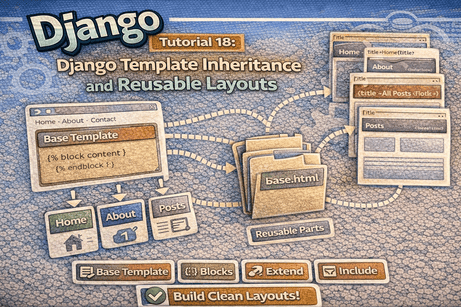
Using base templates, blocks, and reusable partials to build cleaner, more maintainable Django interfaces.
As your Django project grows, creating every page from scratch becomes inefficient. Repeating the same header, footer, navigation bar, and page structure in multiple templates makes your project harder to maintain. Django solves this problem with template inheritance and reusable layouts.
In this tutorial, you will learn how to create a base template, extend it in other pages, define content blocks, and reuse shared sections like navbars and footers. This is one of the most important steps for building clean and professional Django frontends.
1. Why Template Inheritance Matters
Imagine you have five pages:
- home
- about
- contact
- post list
- post detail
If every page contains the same HTML structure, you may repeat:
<!DOCTYPE html><html><head>- site title
- navigation bar
- footer
This repetition creates problems:
- more code to maintain
- harder updates
- inconsistent layouts
- greater chance of mistakes
Template inheritance solves this by allowing one main layout to be reused across many pages.
2. What Is Template Inheritance?
Template inheritance is a Django feature that lets one template inherit structure from another.
Usually, you create:
- one base template
- several child templates
The base template contains the common layout. Child templates fill specific content areas.
3. The Main Idea
The pattern looks like this:
base.html→ shared structurehome.html→ extendsbase.htmlabout.html→ extendsbase.htmlpost_list.html→ extendsbase.html
So instead of duplicating the whole page, you only write the unique content for each page.
4. Creating a Base Template
Let us create a reusable base layout.
blog/templates/blog/base.html
<!DOCTYPE html>
<html>
<head>
<title>{% block title %}My Django Site{% endblock %}</title>
</head>
<body>
<header>
<h1>My Django Site</h1>
<nav>
<a href="{% url 'blog:post_list' %}">Home</a>
<a href="#">About</a>
<a href="#">Contact</a>
</nav>
<hr>
</header>
<main>
{% block content %}
{% endblock %}
</main>
<footer>
<hr>
<p>© 2026 My Django Site</p>
</footer>
</body>
</html>
ExplanationThis template contains:
- the HTML structure
- page title
- site header
- navigation links
- footer
- blocks that child templates can replace
5. What Is a Block?
A block is a placeholder inside a template.
Example:
{% block content %}
{% endblock %}This tells Django:
“Child templates can put their own content here.”
Blocks make template inheritance possible.
6. Common Blocks
The most common blocks are:
titlecontentheadersidebarscripts
You can choose any block names you want, as long as they are meaningful.
Example:
<title>{% block title %}My Site{% endblock %}</title>This lets each page define its own title while keeping the same overall structure.
7. Extending the Base Template
Now let us create a page that extends the base.
blog/templates/blog/home.html
{% extends 'blog/base.html' %}

{% block title %}Home{% endblock %}

{% block content %}
    <h2>Welcome to the homepage</h2>
    <p>This page uses template inheritance.</p>
{% endblock %}
What happens here?
{% extends 'blog/base.html' %}tells Django to inherit from the base template- the
titleblock is replaced withHome - the
contentblock is filled with page-specific content
Everything else comes from base.html.
8. Another Example Page
blog/templates/blog/about.html
{% extends 'blog/base.html' %}

{% block title %}About{% endblock %}

{% block content %}
    <h2>About Us</h2>
    <p>This is the about page of the website.</p>
{% endblock %}
This page automatically gets:
- the same header
- the same navigation
- the same footer
- the same page structure
Only the unique part changes.
9. Why This Is Better Than Repetition
Without inheritance, every page might repeat:
<!DOCTYPE html>
<html>
<head>
    <title>...</title>
</head>
<body>
    <header>...</header>
    <footer>...</footer>
</body>
</html>
With inheritance:
- the shared structure is written once
- pages stay shorter and cleaner
- updating the layout becomes easy
For example, if you change the footer in base.html, all pages update automatically.
10. Using More Than One Block
You are not limited to one block. You can define several.
Example base.html
<!DOCTYPE html>
<html>
<head>
<title>{% block title %}My Site{% endblock %}</title>
</head>
<body>
<header>
{% block header %}
<h1>My Django Site</h1>
{% endblock %}
</header>
<main>
{% block content %}
{% endblock %}
</main>
<footer>
{% block footer %}
<p>© 2026 My Site</p>
{% endblock %}
</footer>
</body>
</html>This gives you more flexibility.
11. Reusing the Base Template in Blog Pages
Suppose you already have a CRUD blog app. You can update your blog templates to use inheritance.
post_list.html
{% extends 'blog/base.html' %}

{% block title %}All Posts{% endblock %}

{% block content %}
    <h2>All Posts</h2>

    <p>
        <a href="{% url 'blog:post_create' %}">➕ Create New Post</a>
    </p>

    {% if posts %}
        <ul>
            {% for post in posts %}
                <li>
                    <a href="{% url 'blog:post_detail' post.id %}">
                        {{ post.title }}
                    </a>
                    by {{ post.author }}
                </li>
            {% endfor %}
        </ul>
    {% else %}
        <p>No posts available.</p>
    {% endif %}
{% endblock %}
post_detail.html
{% extends 'blog/base.html' %}

{% block title %}{{ post.title }}{% endblock %}

{% block content %}
    <h2>{{ post.title }}</h2>
    <p><strong>Author:</strong> {{ post.author }}</p>
    <p>{{ post.content }}</p>

    <p>
        <a href="{% url 'blog:post_update' post.id %}">Edit</a>
        <a href="{% url 'blog:post_delete' post.id %}">Delete</a>
    </p>
{% endblock %}
This keeps your blog templates consistent and clean.
<hr>
12. What Is a Reusable Partial Template?
A partial template is a smaller template included inside other templates.
Examples:
- navbar
- footer
- sidebar
- message alerts
- pagination section
Django provides the {% include %} tag for this.
13. Using {% include %}
Suppose you want to separate the navigation bar into its own file.
Create navbar.html
blog/templates/blog/partials/navbar.html
<nav>
    <a href="{% url 'blog:post_list' %}">Home</a>
    <a href="#">About</a>
    <a href="#">Contact</a>
</nav>
Now include it inside base.html.
Update base.html
<!DOCTYPE html>
<html>
<head>
<title>{% block title %}My Django Site{% endblock %}</title>
</head>
<body>
<header>
<h1>My Django Site</h1>
{% include 'blog/partials/navbar.html' %}
<hr>
</header>
<main>
{% block content %}
{% endblock %}
</main>
<footer>
<hr>
<p>© 2026 My Django Site</p>
</footer>
</body>
</html>Now the navbar is reusable and easier to manage.
14. Why Use Partial Templates?
Using partials has many benefits:
- separates responsibilities
- keeps templates shorter
- makes code easier to read
- allows reuse in many pages
- simplifies maintenance
For example, if your navbar changes, you only edit one file.
15. Example: Reusable Footer Partial
blog/templates/blog/partials/footer.html
<footer>
<hr>
<p>© 2026 My Django Site. All rights reserved.</p>
</footer>Then include it in base.html:
{% include 'blog/partials/footer.html' %}Now both navbar and footer are reusable.
16. Organizing Template Folders
A clean structure can look like this:
blog/
└── templates/
    └── blog/
        ├── base.html
        ├── home.html
        ├── about.html
        ├── post_list.html
        ├── post_detail.html
        └── partials/
            ├── navbar.html
            └── footer.html
This keeps shared layout files clearly separated.
17. Adding Static Files to the Base Template
A big advantage of template inheritance is that CSS and JavaScript can be loaded once in the base layout.
Example base.html
{% load static %}
<!DOCTYPE html>
<html>
<head>
    <title>{% block title %}My Site{% endblock %}</title>
    <link rel="stylesheet" href="{% static 'blog/css/style.css' %}">
</head>
<body>
    {% include 'blog/partials/navbar.html' %}

    <main>
        {% block content %}
        {% endblock %}
    </main>

    {% include 'blog/partials/footer.html' %}
</body>
</html>
Now all child templates automatically use the same CSS.
18. Adding a Block for Page-Specific CSS or JS
Sometimes a specific page needs extra CSS or JavaScript.
You can create optional blocks for that.
Example
{% load static %}
<!DOCTYPE html>
<html>
<head>
    <title>{% block title %}My Site{% endblock %}</title>
    <link rel="stylesheet" href="{% static 'blog/css/style.css' %}">
    {% block extra_css %}{% endblock %}
</head>
<body>
    {% include 'blog/partials/navbar.html' %}

    <main>
        {% block content %}
        {% endblock %}
    </main>

    {% include 'blog/partials/footer.html' %}

    {% block extra_js %}{% endblock %}
</body>
</html>
Now a child template can add extra files if needed.
19. Example of Using extra_css
Child template
{% extends 'blog/base.html' %}

{% block title %}Special Page{% endblock %}

{% block extra_css %}
<link rel="stylesheet" href="{% static 'blog/css/special.css' %}">
{% endblock %}

{% block content %}
    <h2>Special Page</h2>
    <p>This page has extra styling.</p>
{% endblock %}
This is a clean way to support page-specific design.
20. Common Beginner Mistakes
Mistake 1: Forgetting {% extends %} at the top
{% extends %} should usually be the first template tag in the file.
Mistake 2: Writing content outside blocks
If content is not inside a block, it may not appear as expected.
Wrong:
{% extends 'blog/base.html' %}
<h1>Hello</h1>
Correct:
{% extends 'blog/base.html' %}

{% block content %}
<h1>Hello</h1>
{% endblock %}
Mistake 3: Using the wrong template path in {% include %}
Make sure the included template path is correct.
Mistake 4: Repeating content that should be shared
If the same section appears on many pages, move it to the base template or a partial.
Mistake 5: Creating too many unnecessary blocks
Use blocks when they are truly helpful. Too many blocks can make templates harder to understand.
21. Best Practices
- create one clear
base.html - define only meaningful blocks
- keep shared elements in partial templates
- use
{% include %}for navbars, footers, and reusable sections - keep child templates short and focused
- load static files in the base layout when possible
22. Real Example: A Cleaner Blog Layout
base.html
{% load static %}
<!DOCTYPE html>
<html>
<head>
    <title>{% block title %}Django Blog{% endblock %}</title>
    <link rel="stylesheet" href="{% static 'blog/css/style.css' %}">
</head>
<body>
    {% include 'blog/partials/navbar.html' %}

    <div class="container">
        {% block content %}
        {% endblock %}
    </div>

    {% include 'blog/partials/footer.html' %}
</body>
</html>
partials/navbar.html
<header>
    <h1><a href="{% url 'blog:post_list' %}">Django Blog</a></h1>
    <nav>
        <a href="{% url 'blog:post_list' %}">Home</a>
        <a href="{% url 'blog:post_create' %}">Create Post</a>
    </nav>
    <hr>
</header>
partials/footer.html
<footer>
<hr>
<p>© 2026 Django Blog</p>
</footer>
This structure is much cleaner than repeating the same code in every page.
23. Beginner Analogy
Think of template inheritance like building apartments in the same building.
- the base template is the main building structure
- each child template is one apartment
- all apartments share the same walls, roof, and entrance
- each apartment changes only its own inside content
That is exactly how Django template inheritance works.
24. Summary
In this tutorial, you learned how Django template inheritance helps you avoid repetition by using a shared base template. You also learned how to define blocks, extend templates, include reusable partials like navbars and footers, and build cleaner layouts that are easier to maintain.
This is a crucial skill for Django development because it makes your frontend more organized, scalable, and professional.
25. Key Takeaways
- template inheritance reduces repeated HTML
base.htmlholds the shared layout{% block %}defines replaceable sections{% extends %}allows child templates to inherit from the base template{% include %}helps reuse smaller template parts- navbars and footers are great candidates for reusable partials
- static files are often loaded once in the base template
26. Small Knowledge Check
- What is the purpose of a base template in Django?
- What does
{% extends 'blog/base.html' %}do? - What is a block in Django templates?
- Why is
{% include %}useful? - Which page elements are commonly turned into partial templates?
- Why is template inheritance better than repeating full HTML on every page?
27. Conclusion
Template inheritance and reusable layouts are essential for building clean Django interfaces. Once you start using a base template and partials correctly, your templates become much easier to maintain and your project becomes more professional.













💬 Comments
No comments yet. Be the first to comment!
Login to comment.