Subject
Using Django’s messages framework to show success, error, warning, and informational feedback to users after actions like create, update, delete, login, or form submission.
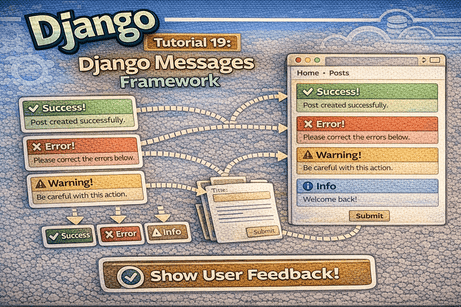
When users interact with a website, they need feedback. If they create a post, they should know it was saved successfully. If a form fails, they should see an error. If an action needs attention, a warning message can help. Django provides a built-in system for this called the messages framework.
In this tutorial, you will learn what the Django messages framework is, why it is useful, how to configure it, how to send messages from views, and how to display them in templates with reusable layouts.
1. What Is the Django Messages Framework?
The Django messages framework is a built-in feature that allows you to temporarily store and display messages to users.
These messages are usually shown after an action, such as:
- creating a record
- updating a post
- deleting an item
- submitting a form
- logging in or logging out
- encountering an error
Messages are typically displayed once and then disappear after the next page load.
2. Why Messages Matter
Without messages, users may not know what happened after they submit a form or click a button.
For example:
- Did the post save successfully?
- Was the item deleted?
- Did the login fail?
- Is the form invalid?
Messages improve user experience because they provide immediate and clear feedback.
3. Types of Messages in Django
Django supports several standard message levels:
successerrorwarninginfodebug
The most commonly used ones are:
- success → action completed successfully
- error → something went wrong
- warning → user should be careful
- info → neutral information
4. Is the Messages Framework Enabled by Default?
In a standard Django project, yes. It is usually already configured.
Check settings.py.
settings.py
INSTALLED_APPS = [
    'django.contrib.admin',
    'django.contrib.auth',
    'django.contrib.contenttypes',
    'django.contrib.sessions',
    'django.contrib.messages',
    'django.contrib.staticfiles',
]
Also make sure the middleware includes:
MIDDLEWARE = [
    'django.middleware.security.SecurityMiddleware',
    'django.contrib.sessions.middleware.SessionMiddleware',
    'django.middleware.common.CommonMiddleware',
    'django.middleware.csrf.CsrfViewMiddleware',
    'django.contrib.auth.middleware.AuthenticationMiddleware',
    'django.contrib.messages.middleware.MessageMiddleware',
    'django.middleware.clickjacking.XFrameOptionsMiddleware',
]
And in the template context processors:
'OPTIONS': {
    'context_processors': [
        'django.template.context_processors.request',
        'django.contrib.auth.context_processors.auth',
        'django.contrib.messages.context_processors.messages',
    ],
},
If these are present, the framework is ready to use.
5. Importing Messages in Views
To use messages in a view, import Django’s messages module.
Example
from django.contrib import messagesNow you can send feedback messages inside your views.
6. Sending a Success Message
Suppose a user creates a post successfully.
Example view
from django.shortcuts import render, redirect
from django.contrib import messages
from .forms import PostForm

def post_create(request):
    if request.method == 'POST':
        form = PostForm(request.POST)
        if form.is_valid():
            form.save()
            messages.success(request, "Post created successfully.")
            return redirect('blog:post_list')
    else:
        form = PostForm()

    return render(request, 'blog/post_form.html', {'form': form})
Explanation
messages.success(request, "...")stores a success message- after redirect, the message will be available in the template
7. Sending an Error Message
You can also send an error message if something goes wrong.
Example
from django.contrib import messages

def post_create(request):
    if request.method == 'POST':
        form = PostForm(request.POST)
        if form.is_valid():
            form.save()
            messages.success(request, "Post created successfully.")
            return redirect('blog:post_list')
        else:
            messages.error(request, "Please correct the errors below.")
    else:
        form = PostForm()

    return render(request, 'blog/post_form.html', {'form': form})
This helps users understand that the form failed validation.
8. Other Message Types
Info message
messages.info(request, "You are viewing draft posts.")Warning message
messages.warning(request, "This action cannot be undone.")Debug message
messages.debug(request, "Debug message example.")In real beginner projects, success, error, warning, and info are the most useful.
<hr>
9. Displaying Messages in Templates
Messages sent from views do not appear automatically. You need to render them in your templates.
A common place to display them is inside base.html so they appear on all pages.
Example base.html
<!DOCTYPE html>
<html>
<head>
    <title>{% block title %}My Site{% endblock %}</title>
</head>
<body>
    <h1>My Django Site</h1>

    {% if messages %}
        <ul>
            {% for message in messages %}
                <li>{{ message }}</li>
            {% endfor %}
        </ul>
    {% endif %}

    {% block content %}
    {% endblock %}
</body>
</html>
Now any message sent from a view will be displayed.
10. Using Message Tags
Each Django message has a tag that shows its type.
For example:
- success →
success - error →
error - warning →
warning - info →
info
You can use this tag in the template to style messages differently.
Example
{% if messages %}
    <ul>
        {% for message in messages %}
            <li class="{{ message.tags }}">{{ message }}</li>
        {% endfor %}
    </ul>
{% endif %}
This lets you add CSS classes based on message type.
11. Styling Messages with CSS
Here is a better and more realistic version using classes.
base.html
{% if messages %}
    <div class="messages">
        {% for message in messages %}
            <div class="alert {{ message.tags }}">
                {{ message }}
            </div>
        {% endfor %}
    </div>
{% endif %}
Example CSS
.messages {
    margin: 20px 0;
}

.alert {
    padding: 12px;
    margin-bottom: 10px;
    border-radius: 6px;
    font-weight: bold;
}

.success {
    background-color: #d4edda;
    color: #155724;
}

.error {
    background-color: #f8d7da;
    color: #721c24;
}

.warning {
    background-color: #fff3cd;
    color: #856404;
}

.info {
    background-color: #d1ecf1;
    color: #0c5460;
}
Now messages will look much better.
12. Example: Messages in CRUD Views
Messages are especially useful in CRUD applications.
Create view
def post_create(request):
    if request.method == 'POST':
        form = PostForm(request.POST)
        if form.is_valid():
            form.save()
            messages.success(request, "Post created successfully.")
            return redirect('blog:post_list')
        else:
            messages.error(request, "Please fix the form errors.")
    else:
        form = PostForm()

    return render(request, 'blog/post_form.html', {'form': form})
Update view
def post_update(request, post_id):
    post = get_object_or_404(Post, id=post_id)

    if request.method == 'POST':
        form = PostForm(request.POST, instance=post)
        if form.is_valid():
            form.save()
            messages.success(request, "Post updated successfully.")
            return redirect('blog:post_detail', post_id=post.id)
        else:
            messages.error(request, "Please fix the form errors.")
    else:
        form = PostForm(instance=post)

    return render(request, 'blog/post_form.html', {'form': form})
Delete view
def post_delete(request, post_id):
    post = get_object_or_404(Post, id=post_id)

    if request.method == 'POST':
        post.delete()
        messages.warning(request, "Post deleted successfully.")
        return redirect('blog:post_list')

    return render(request, 'blog/post_confirm_delete.html', {'post': post})
Now users receive clear feedback after every action.
13. Why Redirects Are Common with Messages
Messages are often used together with redirect().
Why?
Because the common pattern is:
- user submits a form
- server processes the request
- message is added
- user is redirected to another page
- the new page displays the message
This pattern avoids duplicate submissions and improves user flow.
14. Messages After Login or Logout
Messages are also useful in authentication.
Example login success
messages.success(request, "You have logged in successfully.")Example logout info
messages.info(request, "You have been logged out.")Example invalid login
messages.error(request, "Invalid username or password.")This makes authentication flows much clearer for users.
<hr>
15. Showing Form Errors and Messages Together
It is common to use both:
- form field errors
- general messages
For example:
if form.is_valid():
    form.save()
    messages.success(request, "Your feedback was submitted.")
else:
    messages.error(request, "Please correct the errors below.")
And in the template:
<form method="POST">
    {% csrf_token %}
    {{ form.as_p }}
    <button type="submit">Submit</button>
</form>
This gives users both:
- global feedback
- detailed field-level errors
16. Reusable Messages Partial
If you are already using reusable layouts, a nice practice is to move message display into a partial template.
Create partial
blog/templates/blog/partials/messages.html
{% if messages %}
    <div class="messages">
        {% for message in messages %}
            <div class="alert {{ message.tags }}">
                {{ message }}
            </div>
        {% endfor %}
    </div>
{% endif %}
Then include it in base.html.
base.html
<!DOCTYPE html>
<html>
<head>
    <title>{% block title %}My Site{% endblock %}</title>
</head>
<body>
    <h1>My Django Site</h1>

    {% include 'blog/partials/messages.html' %}

    {% block content %}
    {% endblock %}
</body>
</html>
This keeps your layout cleaner.
17. Custom Message Text Tips
Good messages should be:
- clear
- short
- helpful
- action-focused
Good examples
- “Post created successfully.”
- “Please fix the errors below.”
- “You have been logged out.”
- “This item was deleted.”
Avoid vague messages like
- “Done.”
- “Something happened.”
- “Success.”
Specific messages improve usability.
18. Common Beginner Mistakes
Mistake 1: Forgetting to import messages
Wrong:
messages.success(request, "Saved!")without importing:
from django.contrib import messagesMistake 2: Sending messages but not displaying them in templates
If you do not render messages, users will never see them.
Mistake 3: Putting message HTML in every template
It is usually better to place message display in base.html or a partial.
Mistake 4: Using success message for errors
Choose the correct message level for each situation.
Mistake 5: Writing overly long messages
Messages should be short and easy to scan.
19. Best Practices
- display messages in the base layout
- use the correct message level
- keep text simple and clear
- combine messages with redirects
- use CSS classes for styling
- use a reusable partial if your project is growing
20. Real Example: Complete CRUD with Messages
views.py
from django.shortcuts import render, get_object_or_404, redirect
from django.contrib import messages
from .models import Post
from .forms import PostForm

def post_list(request):
    posts = Post.objects.all().order_by('-created_at')
    return render(request, 'blog/post_list.html', {'posts': posts})

def post_create(request):
    if request.method == 'POST':
        form = PostForm(request.POST)
        if form.is_valid():
            form.save()
            messages.success(request, "Post created successfully.")
            return redirect('blog:post_list')
        else:
            messages.error(request, "Please correct the errors below.")
    else:
        form = PostForm()

    return render(request, 'blog/post_form.html', {'form': form})

def post_update(request, post_id):
    post = get_object_or_404(Post, id=post_id)

    if request.method == 'POST':
        form = PostForm(request.POST, instance=post)
        if form.is_valid():
            form.save()
            messages.success(request, "Post updated successfully.")
            return redirect('blog:post_detail', post_id=post.id)
        else:
            messages.error(request, "Please correct the errors below.")
    else:
        form = PostForm(instance=post)

    return render(request, 'blog/post_form.html', {'form': form})

def post_delete(request, post_id):
    post = get_object_or_404(Post, id=post_id)

    if request.method == 'POST':
        post.delete()
        messages.warning(request, "Post deleted successfully.")
        return redirect('blog:post_list')

    return render(request, 'blog/post_confirm_delete.html', {'post': post})
This is a practical real-world pattern.
21. Beginner Analogy
Think of the messages framework like notifications from a receptionist.
- you submit a request
- the receptionist tells you what happened
- “Your request was accepted”
- “Please correct this information”
- “The file was deleted”
Without these notifications, users would feel lost.
22. Summary
In this tutorial, you learned how Django’s messages framework helps you provide feedback to users after important actions. You saw how to send success, error, warning, and info messages from views, display them in templates, style them with CSS, and reuse message display through a partial template.
This is an important skill because professional applications always need clear user feedback.
23. Key Takeaways
- Django messages provide temporary user feedback
- common levels are
success,error,warning, andinfo - messages are sent from views using
messages.success(),messages.error(), and similar functions - messages should be rendered in templates
- using
message.tagshelps style them with CSS - base templates or partials are ideal places to display messages
24. Small Knowledge Check
- What is the purpose of the Django messages framework?
- What are the most common message levels?
- How do you import messages in a view?
- Why is
base.htmla good place to display messages? - What does
message.tagsprovide? - Why are messages often used together with redirects?
25. Conclusion
The Django messages framework is a simple but powerful feature that greatly improves user experience. Once you start using it, your application becomes clearer, more interactive, and more professional.













💬 Comments
No comments yet. Be the first to comment!
Login to comment.