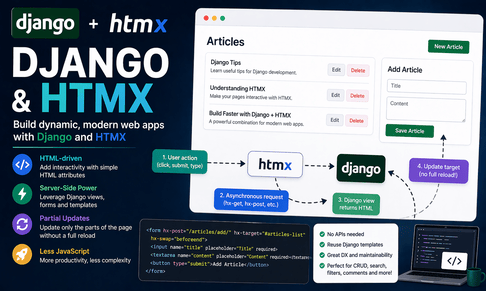
Django and HTMX form one of the most elegant combinations for building modern web applications while keeping the development style simple, server-driven, and highly maintainable. Django is already excellent at rendering HTML on the server, handling forms, managing models, enforcing permissions, validating data, and organizing views and URLs. HTMX enhances this traditional strength instead of replacing it. Rather than forcing you to build a separate frontend application with a JavaScript framework, HTMX lets you make parts of your page dynamic by adding small HTML attributes directly to your templates. With HTMX, the browser can send requests to Django, receive HTML fragments in response, and update only specific parts of the page without reloading the whole page. This approach gives you much of the interactivity people often want from modern interfaces while preserving the simplicity and productivity of classic Django development.
To understand HTMX well, it helps to first compare it with traditional AJAX and with modern frontend frameworks. In a classic Django app, when the user clicks a link or submits a form, the browser sends a request to Django, Django renders a full page, and the browser reloads the page completely. With AJAX, you usually write JavaScript that sends asynchronous requests and processes JSON responses manually, then updates the DOM yourself. This works, but it can lead to a lot of frontend code for relatively small interactions. HTMX simplifies that process. Instead of writing JavaScript to send requests and then manually insert new content into the page, HTMX lets you declare behavior in HTML attributes such as hx-get, hx-post, hx-target, and hx-swap. Django can then return HTML fragments directly, and HTMX automatically inserts them into the page. In other words, HTMX keeps your application server-centered and HTML-driven.
This is a very natural fit for Django because Django is already built around templates. You already know how to render a full page using a template. HTMX simply encourages you to also render smaller template fragments for dynamic page updates. The result is often simpler than building JSON APIs and JavaScript rendering logic for every interaction. Instead of thinking “I need an API endpoint that returns JSON, and then I need JavaScript to build the HTML,” you can think “I need a Django view that returns the HTML snippet this part of the page should become.” That mindset is powerful because it keeps your presentation logic where Django developers are already comfortable: inside templates.
The philosophy of HTMX is important. It promotes the idea that HTML is not just a static document but also a language for user interaction. By attaching special attributes to buttons, forms, inputs, and links, you can tell the browser to fetch content, submit data asynchronously, replace specific elements, append content, trigger updates on events, or refresh parts of the page. This means you can build interactive search boxes, live comment forms, inline editing, delete buttons, toggles, filtering systems, tabs, modal content, lazy loading sections, and dependent dropdowns with surprisingly little JavaScript. In many cases, you can build rich interactions with almost no custom JavaScript at all.
To begin using HTMX in Django, the first step is to include HTMX in your base template. The simplest way is to load it from a CDN. In a basic tutorial or development project, that can look like this:
<!DOCTYPE html>
<html lang="en">
<head>
    <meta charset="UTF-8">
    <meta name="viewport" content="width=device-width, initial-scale=1.0">
    <title>{% block title %}My Django HTMX Site{% endblock %}</title>
    <script src="https://unpkg.com/htmx.org@1.9.12"></script>
</head>
<body>
    {% block content %}{% endblock %}
</body>
</html>
Once HTMX is loaded, you can start using its attributes directly in your templates. Let us begin with a very simple example: loading content into a page without reloading the whole page. Suppose you want a button that fetches a message from Django and inserts it into a specific <div>.
In views.py:
from django.shortcuts import render
from django.http import HttpResponse

def home(request):
    return render(request, "core/home.html")

def load_message(request):
    return HttpResponse("<p>Hello from Django via HTMX!</p>")
In urls.py:
from django.urls import path
from .views import home, load_message

urlpatterns = [
    path("", home, name="home"),
    path("load-message/", load_message, name="load_message"),
]
In templates/core/home.html:
{% extends "base.html" %}

{% block content %}
    <h1>Welcome</h1>

    <button
        hx-get="/load-message/"
        hx-target="#message-box"
        hx-swap="innerHTML">
        Load Message
    </button>

    <div id="message-box"></div>
{% endblock %}
This tiny example shows the core HTMX pattern. The button uses hx-get to send a GET request to Django. The hx-target attribute tells HTMX where to put the response. The hx-swap="innerHTML" setting says the target’s contents should be replaced with the returned HTML. When the user clicks the button, the request happens asynchronously, Django returns a small HTML snippet, and HTMX inserts it into the page. No full reload. No manual JavaScript. No JSON parsing. This is the heart of why HTMX feels so good in Django projects.
Now let us take this further with a more realistic example: rendering a list of articles and allowing a section of the page to update dynamically. Suppose you have an Article model:
from django.db import models

class Article(models.Model):
    title = models.CharField(max_length=200)
    content = models.TextField()

    def __str__(self):
        return self.title
You can create a normal page that loads a subset of content with HTMX. In views.py:
from django.shortcuts import render
from .models import Article

def article_page(request):
    return render(request, "core/article_page.html")

def article_list_partial(request):
    articles = Article.objects.all()
    return render(request, "core/partials/article_list.html", {"articles": articles})
In urls.py:
path("articles-page/", article_page, name="article_page"),
path("articles-partial/", article_list_partial, name="article_list_partial"),
Full page template:
{% extends "base.html" %}

{% block content %}
    <h1>Articles</h1>

    <button
        hx-get="{% url 'article_list_partial' %}"
        hx-target="#article-results"
        hx-swap="innerHTML">
        Load Articles
    </button>

    <div id="article-results"></div>
{% endblock %}
Partial template templates/core/partials/article_list.html:
<ul>
    {% for article in articles %}
        <li>
            <strong>{{ article.title }}</strong><br>
            {{ article.content|truncatewords:20 }}
        </li>
    {% empty %}
        <li>No articles found.</li>
    {% endfor %}
</ul>
This is a key HTMX concept: the distinction between full-page templates and partial templates. In Django with HTMX, you often render full pages for normal navigation and smaller partial templates for dynamic updates. This pattern is extremely maintainable because your backend remains clear and your templates stay reusable. Instead of writing complicated frontend rendering code, you let Django do what it already does well: produce HTML.
One of the strongest uses of HTMX in Django is handling forms asynchronously. Normally, when a form is submitted, the browser reloads the page. With HTMX, the form can be submitted in the background and the server can return either a success message, an updated object list, a validation form with errors, or a replacement UI fragment. This feels much smoother to the user and is often much simpler than writing AJAX form code manually.
Suppose you want to create comments dynamically. A simple model:
from django.db import models

class Comment(models.Model):
    author = models.CharField(max_length=100)
    text = models.TextField()
    created_at = models.DateTimeField(auto_now_add=True)

    def __str__(self):
        return self.author
A form in forms.py:
from django import forms
from .models import Comment

class CommentForm(forms.ModelForm):
    class Meta:
        model = Comment
        fields = ["author", "text"]
Views:
from django.shortcuts import render
from .forms import CommentForm
from .models import Comment

def comment_page(request):
    form = CommentForm()
    comments = Comment.objects.order_by("-created_at")
    return render(request, "core/comment_page.html", {
        "form": form,
        "comments": comments,
    })

def add_comment_htmx(request):
    if request.method == "POST":
        form = CommentForm(request.POST)
        if form.is_valid():
            form.save()
            comments = Comment.objects.order_by("-created_at")
            return render(request, "core/partials/comment_list.html", {
                "comments": comments
            })
        return render(request, "core/partials/comment_form.html", {
            "form": form
        })

    form = CommentForm()
    return render(request, "core/partials/comment_form.html", {"form": form})
URLs:
path("comments/", comment_page, name="comment_page"),
path("comments/add/", add_comment_htmx, name="add_comment_htmx"),
Full page template:
{% extends "base.html" %}

{% block content %}
    <h1>Comments</h1>

    <div id="comment-form">
        {% include "core/partials/comment_form.html" %}
    </div>

    <hr>

    <div id="comment-list">
        {% include "core/partials/comment_list.html" %}
    </div>
{% endblock %}
Partial form template comment_form.html:
<form
    hx-post="{% url 'add_comment_htmx' %}"
    hx-target="#comment-list"
    hx-swap="innerHTML">
    {% csrf_token %}
    {{ form.as_p }}
    <button type="submit">Submit Comment</button>
</form>
Partial comment list template comment_list.html:
<ul>
    {% for comment in comments %}
        <li>
            <strong>{{ comment.author }}</strong>: {{ comment.text }}
        </li>
    {% empty %}
        <li>No comments yet.</li>
    {% endfor %}
</ul>
This example introduces an important design pattern. When the form is valid, the server returns the updated comment list and HTMX replaces the contents of #comment-list. The page does not refresh. The user sees the new comment instantly. If the form has errors, you could instead target the form itself and re-render the form with validation messages. This is one of the biggest advantages of Django with HTMX: you can reuse Django’s existing forms and validation system with very little extra code.
A more refined version would separate form errors from list updates. For example, you may want the form to replace itself when invalid, but update the list when valid. HTMX offers several ways to handle such patterns, and Django’s flexible rendering model makes it easy to choose a clean structure. This highlights a general principle: HTMX does not remove Django patterns; it extends them in a very natural way.
Another very powerful use case is live search. In a traditional Django form submission, the user types a search term, submits the form, and the page reloads with results. With HTMX, results can update as the user types. This creates a much more fluid interface, especially for tutorials, products, articles, categories, or users.
In views.py:
from django.shortcuts import render
from .models import Article

def search_page(request):
    return render(request, "core/search_page.html")

def article_search_htmx(request):
    query = request.GET.get("q", "")
    articles = Article.objects.filter(title__icontains=query) if query else Article.objects.none()
    return render(request, "core/partials/search_results.html", {
        "articles": articles
    })
URLs:
path("search/", search_page, name="search_page"),
path("search/articles/", article_search_htmx, name="article_search_htmx"),
Full page template:
{% extends "base.html" %}

{% block content %}
    <h1>Search Articles</h1>

    <input
        type="text"
        name="q"
        placeholder="Search..."
        hx-get="{% url 'article_search_htmx' %}"
        hx-trigger="keyup changed delay:300ms"
        hx-target="#search-results"
        hx-swap="innerHTML">

    <div id="search-results"></div>
{% endblock %}
Partial template:
<ul>
    {% for article in articles %}
        <li>{{ article.title }}</li>
    {% empty %}
        <li>No matching articles.</li>
    {% endfor %}
</ul>
This is a perfect example of HTMX elegance. The hx-trigger="keyup changed delay:300ms" attribute means HTMX will wait until typing changes, then send a request after a short delay. That delay acts like debouncing, reducing unnecessary requests. The result is a live search box with almost no JavaScript. Django receives the query, filters the database, renders HTML, and HTMX updates the target area.
Another important feature of HTMX is hx-swap. It controls how returned content is inserted into the DOM. We already used innerHTML, but there are other modes such as outerHTML, beforebegin, afterbegin, beforeend, and afterend. These allow you to prepend items, append new content, replace entire elements, or insert content around existing elements. This is very useful for infinite scrolling, activity feeds, adding new list items, or progressive content loading.
For example, imagine a button that loads more posts and appends them at the end of a list:
<div id="post-list">
    {% include "core/partials/post_list.html" %}
</div>

<button
    hx-get="/posts/more/"
    hx-target="#post-list"
    hx-swap="beforeend">
    Load More
</button>
If Django returns additional post items, HTMX adds them to the end of the existing list. Again, Django simply renders HTML and HTMX places it where needed.
HTMX is also extremely good for inline editing. Suppose you want a user to click an “Edit” button next to a field, replace the display text with a small form, submit the form asynchronously, and then replace it again with the updated display. This kind of interaction normally requires significant JavaScript or a frontend framework, but with HTMX it becomes quite manageable because Django just returns different HTML fragments depending on the mode.
For example, you can have one view render the display fragment and another render the edit form fragment. Clicking the edit button fetches the form into the same target area. Submitting the form posts back to Django, which saves the object and returns the updated display fragment. The browser never leaves the page. This pattern is particularly powerful in admin-style tools, dashboards, settings pages, or content management systems.
Another major benefit of HTMX in Django is that it plays very well with permissions, authentication, and server-side business logic. With a large JavaScript frontend, developers often move too much logic to the client side. With HTMX, the server remains fully in charge. Django still checks whether a user can edit an object, delete a comment, or view a section. The browser simply asks for HTML, and Django decides what to return. This leads to a more secure and consistent design because authorization remains on the backend, where it belongs.
At this point, it is also useful to talk about CSRF protection. Since HTMX often submits forms or sends POST requests, CSRF still matters exactly as it does in regular Django forms. If your form uses {% csrf_token %} inside a normal Django template, that token will be submitted with the form. So in many form-based HTMX interactions, CSRF is automatically handled as long as you use Django forms correctly. This is another reason Django and HTMX work so naturally together.
HTMX can also detect request context. A very useful technique in Django is to return different templates depending on whether the request came from HTMX or a normal browser navigation. Some developers use middleware or check the HX-Request header to distinguish the two cases. For example:
def example_view(request):
    context = {"message": "Hello"}

    if request.headers.get("HX-Request"):
        return render(request, "core/partials/example_fragment.html", context)

    return render(request, "core/example_page.html", context)
This allows the same URL to behave differently depending on whether it is accessed normally or through HTMX. That can help avoid duplication and keep your URL design simple.
Another common pattern is using HTMX for delete buttons. Suppose you have a list of comments and want each comment to have a delete button. Clicking the button can send a POST request to Django, Django deletes the object if allowed, and returns either an updated list or an empty response that removes the comment from the DOM. This is very effective for admin panels, user dashboards, and moderation interfaces.
For example:
<button
    hx-post="/comments/5/delete/"
    hx-target="#comment-5"
    hx-swap="outerHTML">
    Delete
</button>
If Django returns an empty response, the targeted element can effectively disappear. This makes deletions feel instant and smooth.
HTMX is also excellent for dependent dropdowns. A country selector can trigger a request that loads a city selector. A category selector can update available subcategories. A product type can load relevant configuration fields. In traditional Django, such dynamic form dependencies often require custom JavaScript and AJAX endpoints. With HTMX, you can often do this using only a few attributes on the parent field and a partial template for the child field.
Here is a simplified example:
<select
    name="category"
    hx-get="/load-subcategories/"
    hx-target="#subcategory-container"
    hx-trigger="change">
    <option value="">Select category</option>
    <option value="1">Programming</option>
    <option value="2">Design</option>
</select>

<div id="subcategory-container">
    <!-- subcategory select appears here -->
</div>
Django receives the selected category, filters the related subcategories, renders a small <select> fragment, and HTMX inserts it into the page. This is exactly the sort of interaction that HTMX makes refreshingly straightforward.
Now let us talk about why HTMX is often simpler than a JavaScript framework in Django projects. Many applications do not actually need a full frontend architecture with client-side routing, large state management systems, API serialization, and separate build pipelines. A blog, dashboard, admin tool, internal business app, portal, learning platform, or CRUD-heavy application often works beautifully as a server-rendered Django project with some dynamic enhancements. In these cases, HTMX gives you a sweet spot: more interactivity than plain page reloads, but far less complexity than a full SPA architecture. You write less JavaScript, maintain fewer moving parts, and stay closer to Django’s strengths.
That said, HTMX is not a universal replacement for all frontend tools. If you are building a highly complex real-time interface with heavy client-side state, drag-and-drop workflows, advanced chart interaction, or a completely app-like frontend independent from the backend, then a JavaScript framework may still be the better fit. HTMX shines most when the server should remain the source of truth and when HTML fragments are a natural response format. For many Django apps, that is exactly the case.
It is also worth discussing project organization. When using HTMX in Django, it is a very good practice to create a clear folder for partial templates, such as templates/core/partials/. This keeps your code structured and makes it obvious which templates are used for full-page rendering and which are used for fragment updates. It is also helpful to name views clearly, such as article_list_page for full pages and article_list_partial or article_search_htmx for HTMX fragment responses. Good naming makes large projects much easier to maintain.
You should also think carefully about response granularity. Sometimes it is best to return just the smallest changing piece of HTML. Other times, returning a larger surrounding section keeps your templates simpler. For example, after submitting a form, you may choose to re-render the entire card that contains the form and related data rather than only one tiny element. There is no single rule; the goal is to find a balance between template simplicity and efficient updates.
Testing also remains important. Since HTMX endpoints are just Django views returning HTML, you can test them with Django’s normal test tools. You can verify status codes, template usage, permissions, and content structure. This is another benefit of HTMX: it does not require an entirely separate testing strategy. It stays close to the Django model of development.
In summary, Django and HTMX work exceptionally well together because both embrace a server-driven, HTML-centered approach to web development. Django already excels at rendering templates, processing forms, validating data, handling models, and enforcing permissions. HTMX adds asynchronous interaction directly in HTML through simple attributes, allowing parts of the page to update without full reloads. Instead of writing large amounts of custom JavaScript or building a separate frontend application, you can keep your logic in Django views and your presentation in Django templates, while still delivering modern user experiences such as live search, inline editing, partial updates, asynchronous forms, dependent dropdowns, load-more buttons, and dynamic content sections.
When you master HTMX in Django, you gain the ability to build applications that feel much more interactive while preserving the clarity and speed of server-rendered development. You reduce frontend complexity, reuse Django’s strengths, and often end up with code that is easier to understand and maintain than an equivalent AJAX-heavy or SPA-based solution. That is why Django and HTMX have become such a compelling pair for developers who want modern behavior without unnecessary complexity.













💬 Comments
No comments yet. Be the first to comment!
Login to comment.