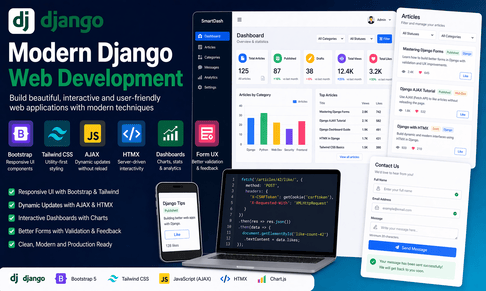
What is covered in each tutorial?
Tutorial 1 — Django with Bootstrap
This tutorial explains how to use Bootstrap inside a Django project to create clean, responsive, and professional web pages quickly. It covers how Django templates can be combined with Bootstrap classes to build modern layouts without writing a large amount of custom CSS. The tutorial introduces Bootstrap integration through CDN, explains how to structure a base.html template, and shows how to create common interface elements such as navigation bars, cards, buttons, alerts, forms, tables, and pagination.
A major part of this tutorial focuses on Django template inheritance. You learn how to create a reusable base layout that contains the navbar, footer, Bootstrap CSS, Bootstrap JavaScript, and content blocks. This makes the project easier to maintain because every page can extend the same layout instead of repeating the same HTML structure.
The tutorial also explains how Bootstrap improves Django forms. It shows how to add classes like form-control, form-select, btn, alert, and card to make forms more user-friendly. It also covers how Bootstrap alerts can be used with Django’s messages framework to display success, warning, and error messages after user actions.
In short, this tutorial teaches how to use Bootstrap as a practical frontend framework for Django projects, especially when building blogs, dashboards, admin pages, contact forms, article lists, and business websites.
Tutorial 2 — Django with Tailwind CSS
This tutorial introduces Tailwind CSS as a modern utility-first CSS framework for Django projects. Unlike Bootstrap, which provides ready-made components, Tailwind gives small utility classes that allow developers to build fully customized designs directly inside Django templates. The tutorial explains the difference between Bootstrap and Tailwind and why Tailwind is useful when you want more control over spacing, typography, colors, borders, shadows, responsiveness, and layout.
The tutorial covers how Tailwind can be integrated into Django using a build workflow. It explains the role of tailwind.config.js, the input CSS file, the output CSS file, and the importance of scanning Django templates so Tailwind can generate only the required CSS. It also discusses why using the Tailwind CDN is acceptable for quick testing but not recommended for production.
A large part of the lesson focuses on styling Django templates with Tailwind utility classes. It shows how to create responsive home pages, cards, article lists, forms, buttons, and dashboards using classes such as flex, grid, rounded-xl, shadow-sm, bg-blue-600, text-gray-700, and responsive prefixes like md: and lg:.
This tutorial also explains how Tailwind improves form design by allowing precise control over input fields, labels, focus states, and error messages. It teaches how to create clean, modern interfaces while still keeping Django responsible for backend logic, validation, and security.
Tutorial 3 — AJAX in Django
This tutorial explains how to use AJAX in Django to create interactive web pages without refreshing the whole page. AJAX allows JavaScript to send requests to Django views in the background and receive data, usually in JSON format. This makes the user experience smoother because only part of the page changes instead of reloading everything.
The tutorial explains the difference between normal Django requests and AJAX requests. In a normal request, Django returns a full HTML page. In an AJAX request, Django often returns a JsonResponse containing data that JavaScript uses to update the interface. This is useful for features such as like buttons, live search, comment submission, filters, notifications, and dynamic updates.
A key part of the tutorial focuses on the JavaScript fetch() API. You learn how to send GET and POST requests from the browser to Django, how to process JSON responses, and how to update the DOM using JavaScript. The tutorial also explains how to use data-id attributes to connect HTML elements with database objects.
The tutorial also covers CSRF protection, which is essential when sending POST requests in Django. It explains how to send the CSRF token in AJAX headers using X-CSRFToken. Without this, Django will reject unsafe requests with a 403 error.
Overall, this tutorial teaches how to make Django applications more dynamic while still using Django views, models, forms, and templates.
Tutorial 4 — Django and HTMX
This tutorial introduces HTMX as a simpler alternative to writing large amounts of JavaScript for dynamic behavior. HTMX allows you to add interactivity directly inside HTML using attributes such as hx-get, hx-post, hx-target, hx-trigger, and hx-swap. This fits very naturally with Django because Django already works by rendering HTML templates.
The tutorial explains that HTMX is different from AJAX in the way it usually handles responses. With AJAX, the server commonly returns JSON, and JavaScript manually updates the page. With HTMX, Django can return an HTML fragment, and HTMX automatically places it into the correct part of the page. This allows developers to reuse Django templates and partial templates instead of writing complex frontend rendering logic.
The tutorial covers partial templates, which are small reusable pieces of HTML returned by Django views. These partials can update article lists, forms, comments, tables, filters, and dashboard sections without refreshing the page. This makes Django applications feel modern while keeping the code simple and server-driven.
It also explains common HTMX use cases such as live search, form submission, dependent dropdowns, inline editing, delete buttons, load-more buttons, and dynamic filters. The lesson shows how HTMX preserves Django’s strengths: server-side validation, permissions, authentication, templates, and business logic.
In short, this tutorial teaches how to build interactive Django applications with less JavaScript and more reusable server-rendered HTML.
Tutorial 5 — Building Interactive Dashboards
This tutorial focuses on building professional dashboards in Django. A dashboard is a central interface where users can view statistics, charts, tables, recent activity, filters, and important application data. Dashboards are useful in blogs, e-commerce websites, admin panels, SaaS platforms, learning platforms, project management systems, and business applications.
The tutorial explains how to collect data using Django ORM methods such as count(), aggregate(), annotate(), Sum, and Count. These tools allow you to calculate statistics such as total articles, published articles, draft articles, total views, total likes, top articles, and category distribution.
It also covers how to display dashboard data using cards, tables, badges, filters, and charts. Chart.js is introduced as a frontend library for visualizing data. The tutorial explains how Django can prepare chart labels and values, then pass them safely to JavaScript using json_script.
Another important topic is filtering. The tutorial shows how users can filter dashboard data by status, category, date, or keyword. It also explains how AJAX or HTMX can make dashboards more interactive by updating only part of the page instead of reloading the whole dashboard.
The tutorial also discusses permissions and performance. Since dashboards often contain sensitive data, access should be protected using login requirements, staff checks, or custom permissions. For performance, it recommends using select_related, prefetch_related, caching, slicing, pagination, and optimized queries.
Tutorial 6 — Django Form UX Improvements
This tutorial focuses on improving the user experience of Django forms. Forms are one of the most important parts of any web application because users use them to register, log in, contact support, submit comments, search content, update profiles, upload files, and manage data. A form that is confusing or poorly designed can frustrate users, while a good form can make the application feel professional and trustworthy.
The tutorial begins with basic Django forms and explains why {{ form.as_p }} is not enough for professional projects. It then shows how to improve forms using custom labels, placeholders, help text, widgets, validation messages, and better layout. It explains how to style forms with Bootstrap classes like form-control, form-select, and btn, or with Tailwind classes for more custom designs.
A large part of the tutorial focuses on error handling. Users should clearly understand what went wrong and how to fix it. The tutorial explains field errors, non-field errors, custom error messages, and validation methods such as clean_field() and clean().
It also covers better feedback after submission using Django’s messages framework, loading states, disabled submit buttons to prevent duplicate submissions, mobile-friendly design, accessibility, file upload UX, and reusable form field templates.
The tutorial also introduces modern improvements using AJAX or HTMX, allowing forms to submit without full page reloads. Finally, it emphasizes that good form UX must also be secure: CSRF protection, backend validation, permission checks, safe file handling, and not trusting frontend validation alone.













💬 Comments
No comments yet. Be the first to comment!
Login to comment.