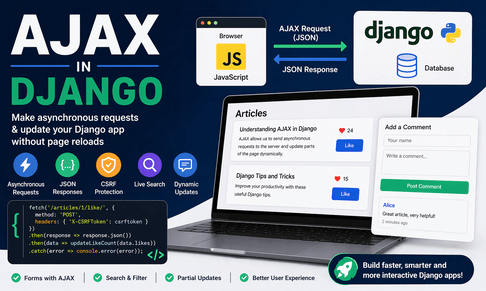
AJAX in Django is one of the most useful topics for building modern, interactive web applications without requiring full page reloads every time the user performs an action. The term AJAX stands for Asynchronous JavaScript and XML, although in modern development it usually means sending asynchronous HTTP requests with JavaScript and receiving JSON rather than XML. In the context of Django, AJAX allows the browser to communicate with Django views in the background, fetch or send data, and then update only part of the page dynamically. This creates a faster, smoother, and more professional user experience. Instead of refreshing the whole page to submit a form, load comments, toggle a like button, filter results, or perform search, AJAX enables you to interact with the Django backend silently and update the interface immediately.
To understand AJAX deeply, it is important to first recall how a normal Django request works. In a classic server-rendered Django app, the browser sends a request to a URL, Django receives it, processes the logic in the view, renders an HTML template, and sends the complete page back to the browser. Then the browser replaces the current page with the new one. This works very well and remains one of Django’s greatest strengths. However, for certain interactions, reloading the entire page is unnecessary and can feel slow or disruptive. Suppose a user clicks a “like” button on an article, submits a comment, filters products by category, or checks whether a username is available. Reloading the whole page for such small actions is inefficient. AJAX solves this by sending a background request from JavaScript to Django and then updating only the relevant part of the page.
This is what makes AJAX so powerful in Django applications. It does not replace Django’s normal rendering model; rather, it enhances it. You can still use Django templates, models, forms, authentication, permissions, and URL routing exactly as usual. AJAX simply gives you another way to communicate with your Django views. Some views can return full HTML pages, while others can return JSON data for asynchronous requests. In fact, many modern Django applications mix both approaches: full server-rendered pages for core navigation and AJAX for dynamic actions inside those pages.
A helpful way to think about AJAX is as a conversation between the frontend and the backend happening after the page is already loaded. Imagine a page that displays articles. The HTML page is first rendered by Django in the normal way. Then, once the page is visible, JavaScript can send requests to Django whenever the user interacts with buttons, filters, forms, or search fields. Django responds with JSON data, and JavaScript updates the visible content accordingly. This makes the page feel more responsive because only the necessary data moves between browser and server.
In older tutorials, AJAX was often written using jQuery and $.ajax(). That approach is still found in legacy code and is useful to understand, but modern JavaScript often uses the built-in fetch() API instead. The fetch() API is cleaner, more modern, and does not require an external library. In this tutorial, the main examples will focus on fetch() because it is now the standard way to write AJAX in many Django projects.
Before jumping into code, let us define a simple real-world use case: an article list page with a “like” button. When the user clicks the button, JavaScript sends a POST request to Django, Django updates the database, and the new like count appears immediately on the page without reloading it. This is a perfect AJAX scenario because the action is small, specific, and easy to reflect visually.
Suppose you have the following model:
from django.db import models

class Article(models.Model):
    title = models.CharField(max_length=200)
    content = models.TextField()
    likes = models.PositiveIntegerField(default=0)

    def __str__(self):
        return self.title
This model stores the article title, content, and a like count. Now let us create a normal Django view that renders a page of articles:
from django.shortcuts import render
from .models import Article

def article_list(request):
    articles = Article.objects.all()
    return render(request, "core/article_list.html", {"articles": articles})
And a URL pattern:
from django.urls import path
from .views import article_list

urlpatterns = [
    path("articles/", article_list, name="article_list"),
]
The corresponding template might look like this:
<!DOCTYPE html>
<html>
<head>
    <title>Articles</title>
</head>
<body>
    <h1>Articles</h1>

    {% for article in articles %}
        <div style="border:1px solid #ccc; padding:15px; margin-bottom:15px;">
            <h2>{{ article.title }}</h2>
            <p>{{ article.content }}</p>

            <button class="like-button" data-id="{{ article.id }}">
                Like
            </button>

            <span id="like-count-{{ article.id }}">{{ article.likes }}</span> likes
        </div>
    {% endfor %}

    <script>
        const buttons = document.querySelectorAll(".like-button");

        buttons.forEach(button => {
            button.addEventListener("click", function() {
                const articleId = this.dataset.id;
                console.log("Clicked article:", articleId);
            });
        });
    </script>
</body>
</html>
At this point, the button does nothing except print the article ID in the browser console. But it already shows an important principle: JavaScript can read the article ID from the rendered template using data-id. Django renders the article list and embeds the necessary identifiers into the HTML. JavaScript then uses those identifiers when sending AJAX requests.
Now let us create a Django view that handles the AJAX request. Since the action modifies data, it should use POST. The view will fetch the article, increase the like count, save the object, and return JSON.
from django.http import JsonResponse
from django.shortcuts import get_object_or_404
from .models import Article

def like_article(request, article_id):
    if request.method == "POST":
        article = get_object_or_404(Article, id=article_id)
        article.likes += 1
        article.save()

        return JsonResponse({
            "success": True,
            "likes": article.likes
        })

    return JsonResponse({
        "success": False,
        "error": "Invalid request method"
    }, status=400)
And the URL:
from django.urls import path
from .views import article_list, like_article

urlpatterns = [
    path("articles/", article_list, name="article_list"),
    path("articles/<int:article_id>/like/", like_article, name="like_article"),
]
This introduces one of the most important tools when working with AJAX in Django: JsonResponse. Unlike render(), which returns a full HTML page, JsonResponse returns structured JSON data. JavaScript can then read this data and use it to update the page. In this case, the response includes whether the operation succeeded and the new number of likes.
Now let us connect the frontend button to this AJAX view using fetch():
<script>
    const buttons = document.querySelectorAll(".like-button");

    buttons.forEach(button => {
        button.addEventListener("click", function() {
            const articleId = this.dataset.id;

            fetch(`/articles/${articleId}/like/`, {
                method: "POST",
                headers: {
                    "X-Requested-With": "XMLHttpRequest"
                }
            })
            .then(response => response.json())
            .then(data => {
                if (data.success) {
                    document.getElementById(`like-count-${articleId}`).textContent = data.likes;
                } else {
                    alert(data.error);
                }
            })
            .catch(error => {
                console.error("Error:", error);
            });
        });
    });
</script>
This script listens for clicks, sends a POST request to the correct URL, receives JSON, and updates the displayed like count. This is already a working AJAX pattern, but there is an important issue missing here: CSRF protection.
Django protects POST requests with CSRF tokens. This is a security feature that prevents malicious websites from sending unwanted POST requests on behalf of authenticated users. When you submit a normal Django form, the CSRF token is included automatically using {% csrf_token %}. But with AJAX, you must send the token manually in the request headers. If you do not, Django will reject the request with a 403 Forbidden error.
A common way to include the CSRF token in AJAX requests is to place it in the template and then send it as the X-CSRFToken header. For example:
{% csrf_token %}
<script>
    function getCookie(name) {
        let cookieValue = null;
        if (document.cookie && document.cookie !== "") {
            const cookies = document.cookie.split(";");
            for (let i = 0; i < cookies.length; i++) {
                const cookie = cookies[i].trim();
                if (cookie.substring(0, name.length + 1) === (name + "=")) {
                    cookieValue = decodeURIComponent(cookie.substring(name.length + 1));
                    break;
                }
            }
        }
        return cookieValue;
    }

    const csrftoken = getCookie("csrftoken");

    const buttons = document.querySelectorAll(".like-button");

    buttons.forEach(button => {
        button.addEventListener("click", function() {
            const articleId = this.dataset.id;

            fetch(`/articles/${articleId}/like/`, {
                method: "POST",
                headers: {
                    "X-CSRFToken": csrftoken,
                    "X-Requested-With": "XMLHttpRequest"
                }
            })
            .then(response => response.json())
            .then(data => {
                if (data.success) {
                    document.getElementById(`like-count-${articleId}`).textContent = data.likes;
                } else {
                    alert(data.error);
                }
            })
            .catch(error => {
                console.error("Error:", error);
            });
        });
    });
</script>
This pattern is very important in real Django applications. Whenever your AJAX request performs a POST, PUT, PATCH, or DELETE action, you usually need CSRF protection. Learning this early will save a lot of debugging time.
Another common AJAX use case is form submission without page reload. Imagine a contact form or comment form. Normally, the browser submits the form and loads a new page or refreshes the current one. With AJAX, JavaScript intercepts the form submission, sends the data using fetch(), and then updates the page dynamically based on the server response.
Here is a simple comment model:
from django.db import models

class Comment(models.Model):
    author_name = models.CharField(max_length=100)
    text = models.TextField()
    created_at = models.DateTimeField(auto_now_add=True)

    def __str__(self):
        return self.author_name
View to handle AJAX submission:
from django.http import JsonResponse
from .models import Comment

def add_comment(request):
    if request.method == "POST":
        author_name = request.POST.get("author_name")
        text = request.POST.get("text")

        if author_name and text:
            comment = Comment.objects.create(author_name=author_name, text=text)
            return JsonResponse({
                "success": True,
                "author_name": comment.author_name,
                "text": comment.text,
                "created_at": comment.created_at.strftime("%Y-%m-%d %H:%M:%S")
            })

        return JsonResponse({
            "success": False,
            "error": "All fields are required."
        }, status=400)

    return JsonResponse({
        "success": False,
        "error": "Invalid request."
    }, status=400)
URL:
path("comments/add/", add_comment, name="add_comment"),Template:
<form id="comment-form">
    {% csrf_token %}
    <input type="text" name="author_name" placeholder="Your name">
    <textarea name="text" placeholder="Your comment"></textarea>
    <button type="submit">Submit</button>
</form>

<div id="comments-list"></div>

<script>
    function getCookie(name) {
        let cookieValue = null;
        if (document.cookie && document.cookie !== "") {
            const cookies = document.cookie.split(";");
            for (let i = 0; i < cookies.length; i++) {
                const cookie = cookies[i].trim();
                if (cookie.substring(0, name.length + 1) === (name + "=")) {
                    cookieValue = decodeURIComponent(cookie.substring(name.length + 1));
                    break;
                }
            }
        }
        return cookieValue;
    }

    const csrftoken = getCookie("csrftoken");

    document.getElementById("comment-form").addEventListener("submit", function(e) {
        e.preventDefault();

        const formData = new FormData(this);

        fetch("/comments/add/", {
            method: "POST",
            headers: {
                "X-CSRFToken": csrftoken
            },
            body: formData
        })
        .then(response => response.json())
        .then(data => {
            if (data.success) {
                const commentsList = document.getElementById("comments-list");

                const newComment = document.createElement("div");
                newComment.innerHTML = `
                    <h4>${data.author_name}</h4>
                    <p>${data.text}</p>
                    <small>${data.created_at}</small>
                    <hr>
                `;

                commentsList.prepend(newComment);
                document.getElementById("comment-form").reset();
            } else {
                alert(data.error);
            }
        })
        .catch(error => {
            console.error("Error:", error);
        });
    });
</script>
This is a very practical AJAX form example. The form never reloads the page. Instead, JavaScript sends the form data, Django validates and saves it, and then JavaScript inserts the new comment into the page. This creates a smoother user experience, especially in interactive applications.
Another very common AJAX pattern in Django is live search. Suppose you want users to type into a search bar and see matching results instantly. This is especially useful for product lists, articles, tutorials, tags, users, or categories. Instead of submitting the whole form and reloading the page, JavaScript can send the query as the user types and Django can return matching items in JSON format.
For example, suppose you have the same Article model. The AJAX search view might look like this:
from django.http import JsonResponse
from .models import Article

def search_articles(request):
    query = request.GET.get("q", "")
    articles = Article.objects.filter(title__icontains=query)[:10]

    results = []
    for article in articles:
        results.append({
            "id": article.id,
            "title": article.title,
            "likes": article.likes
        })

    return JsonResponse({"results": results})
URL:
path("articles/search/", search_articles, name="search_articles"),Template:
<input type="text" id="search-input" placeholder="Search articles...">
<div id="search-results"></div>

<script>
    document.getElementById("search-input").addEventListener("input", function() {
        const query = this.value;

        fetch(`/articles/search/?q=${encodeURIComponent(query)}`)
            .then(response => response.json())
            .then(data => {
                const resultsBox = document.getElementById("search-results");
                resultsBox.innerHTML = "";

                data.results.forEach(article => {
                    const item = document.createElement("div");
                    item.innerHTML = `<strong>${article.title}</strong> (${article.likes} likes)`;
                    resultsBox.appendChild(item);
                });
            })
            .catch(error => {
                console.error("Search error:", error);
            });
    });
</script>
This shows how AJAX can make Django interfaces feel much more dynamic. However, real live search implementations often include debouncing to avoid sending a request for every single keystroke. Debouncing means waiting a short amount of time after the user stops typing before sending the request. This reduces server load and improves efficiency.
A simple debounce example:
<script>
    let timeout = null;

    document.getElementById("search-input").addEventListener("input", function() {
        const query = this.value;

        clearTimeout(timeout);

        timeout = setTimeout(() => {
            fetch(`/articles/search/?q=${encodeURIComponent(query)}`)
                .then(response => response.json())
                .then(data => {
                    const resultsBox = document.getElementById("search-results");
                    resultsBox.innerHTML = "";

                    data.results.forEach(article => {
                        const item = document.createElement("div");
                        item.innerHTML = `<strong>${article.title}</strong> (${article.likes} likes)`;
                        resultsBox.appendChild(item);
                    });
                });
        }, 300);
    });
</script>
This small improvement makes a big difference in real applications.
When working with AJAX in Django, it is also important to think carefully about what the server should return. Sometimes you return only JSON data, and JavaScript builds the HTML. Other times, Django can render a partial template and return HTML inside the response. Both approaches are valid. JSON is more flexible and structured, while HTML partials can be easier when the frontend markup is complex and you want Django templates to remain responsible for presentation.
For example, instead of returning article data as JSON, you might render a small template snippet on the server and send back rendered HTML. This approach is especially useful when you already have a good template structure in Django and do not want to recreate large chunks of HTML in JavaScript. In such cases, AJAX becomes a way to fetch rendered fragments rather than raw data.
There is also an important distinction between AJAX and full frontend frameworks. AJAX in Django does not mean turning your project into a single-page application. You are still in a server-rendered Django project. You are simply adding targeted asynchronous interactions. This is often the best balance for many websites and business applications because you keep Django’s productivity and SEO-friendly template rendering while improving interactivity where it matters most.
Now let us discuss best practices. One of the most important best practices is to keep your views clear and specific. If a view is meant for AJAX, design it intentionally. Return consistent JSON structures, handle errors properly, check request methods, and protect sensitive actions with authentication and permissions. For example, if only logged-in users should like an article, do not rely on frontend logic. Use Django decorators or checks in the view:
from django.contrib.auth.decorators import login_required
from django.http import JsonResponse

@login_required
def like_article(request, article_id):
    if request.method == "POST":
        # logic here
        return JsonResponse({"success": True})

    return JsonResponse({"success": False}, status=400)
This is crucial. AJAX does not change security rules. Every request still reaches the server and must be validated there.
Another best practice is to return meaningful error messages. Do not simply return generic errors. If something fails because fields are missing, the object was not found, the user is unauthorized, or the request method is wrong, make the response informative. That makes debugging easier and improves frontend behavior.
For example:
return JsonResponse({
    "success": False,
    "error": "You must be logged in to like this article."
}, status=403)
On the frontend, you can then show a friendly alert or message. Good AJAX design is not only about success paths but also about clear failure handling.
Another important principle is progressive enhancement. Your Django app should not completely break if JavaScript fails or is disabled unless the feature truly depends on it. For example, a like button could still work as a normal form submission in a simpler version, and AJAX could enhance it for a smoother experience. This is not always necessary, but it is a good design mindset because it makes your application more robust.
Let us also mention older jQuery AJAX syntax, since many Django projects still use it. A like request with jQuery might look like this:
<script src="https://code.jquery.com/jquery-3.6.0.min.js"></script>
<script>
    $(".like-button").click(function() {
        const articleId = $(this).data("id");

        $.ajax({
            url: `/articles/${articleId}/like/`,
            type: "POST",
            headers: {
                "X-CSRFToken": "{{ csrf_token }}"
            },
            success: function(data) {
                $(`#like-count-${articleId}`).text(data.likes);
            },
            error: function(xhr) {
                alert("Something went wrong.");
            }
        });
    });
</script>
This works, but modern Django development generally favors fetch() because it avoids dependency on jQuery unless jQuery is already required for other reasons.
Another advanced use of AJAX in Django is dependent dropdowns. For example, selecting a country could dynamically load cities, or selecting a category could dynamically load subcategories. In this case, the browser sends the selected value to Django, Django filters related objects, and JSON is returned. This creates a much more fluid user experience than reloading the page every time the user changes one field.
AJAX is also useful for infinite scroll, notification polling, cart updates, toggling favorites, bookmark systems, vote buttons, availability checks, auto-save features, and dashboard refresh panels. In all these cases, Django remains the server-side engine, while AJAX provides a lightweight communication channel for interactive behavior.
However, you should also know when not to use AJAX. If a page transition is perfectly normal and expected, such as going from a list page to a detail page or submitting a major multi-step form, a full page request is often better and simpler. Overusing AJAX can make the codebase harder to maintain if every action becomes fragmented into custom JavaScript logic. Good Django development means choosing AJAX where it genuinely improves the experience, not using it everywhere.
Testing AJAX features is also important. On the backend, Django views returning JSON can be tested with Django’s test client. For example:
from django.test import TestCase
from django.urls import reverse
from .models import Article

class LikeArticleTest(TestCase):
    def setUp(self):
        self.article = Article.objects.create(title="Test", content="Test content")

    def test_like_article(self):
        response = self.client.post(reverse("like_article", args=[self.article.id]))
        self.assertEqual(response.status_code, 200)
        self.article.refresh_from_db()
        self.assertEqual(self.article.likes, 1)
This kind of testing helps ensure your AJAX endpoints behave correctly independently of the frontend JavaScript.
In summary, AJAX in Django is a powerful way to make applications more interactive by allowing JavaScript to communicate with Django views in the background. Instead of refreshing the entire page, the browser can send asynchronous requests, Django can process them and return JSON, and JavaScript can update the page instantly. This improves user experience for actions such as liking content, submitting comments, searching, filtering, loading dynamic data, and handling small updates. The key ideas are understanding how Django views return JSON with JsonResponse, how JavaScript uses fetch() to send requests, how CSRF protection works with asynchronous POST requests, and how to update the DOM safely and clearly when responses arrive.
When learned properly, AJAX becomes one of the most practical tools in Django development. It helps bridge the gap between classic server-rendered applications and modern interactive interfaces without forcing you to adopt a heavy frontend framework. Django stays in control of models, security, views, forms, and business logic, while AJAX adds flexibility and responsiveness exactly where you need it. That is why mastering AJAX is such an important step in building modern Django applications.













💬 Comments
No comments yet. Be the first to comment!
Login to comment.