Introduction
APIs are now at the center of modern software. Websites, mobile apps, dashboards, SaaS platforms, AI tools, automation workflows, internal systems, and third-party integrations all depend on APIs to exchange data and trigger actions.
This makes APIs extremely valuable, but it also makes them attractive targets.
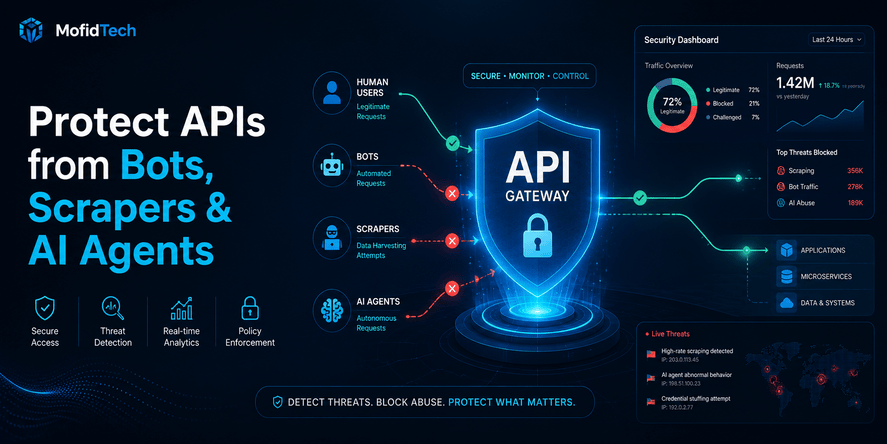
In the past, many developers mainly worried about direct attacks such as stolen passwords, SQL injection, or broken authentication. Today, API abuse is broader. A system can be harmed by bots, scrapers, automated scripts, fake users, aggressive crawlers, misconfigured integrations, and AI agents that call endpoints repeatedly at machine speed.
API abuse does not always look like a traditional hack. Sometimes it looks like too many search requests. Sometimes it looks like repeated password reset attempts. Sometimes it looks like a third-party application pulling large amounts of data. Sometimes it looks like an AI agent that keeps retrying failed operations until it consumes expensive resources.
OWASP includes Unrestricted Resource Consumption in its API Security Top 10 because API requests consume resources such as network bandwidth, CPU, memory, storage, and sometimes paid third-party services. Abuse can cause denial of service, degraded performance, and increased operational cost.
This article explains how developers can protect APIs from bots, scrapers, AI agents, and excessive usage without relying only on basic rate limiting. It focuses on concepts, architecture, strategy, monitoring, risks, and practical decision-making without using code.
Table of Contents
- Why API Abuse Is Becoming a Bigger Problem
- What API Abuse Really Means
- Bots, Scrapers, AI Agents, and Human Users
- Why Traditional API Security Is Not Enough
- Rate Limiting, Throttling, and Quotas
- Common API Abuse Scenarios
- How to Design an API Protection Strategy
- Protecting APIs from AI Agents
- API Authentication and Authorization Controls
- Endpoint Risk Classification
- Monitoring, Logging, and Abuse Detection
- Performance and Cost Considerations
- Common Mistakes Developers Make
- API Abuse Protection Checklist
- Comparison Table: Protection Methods
- FAQ
- Conclusion
Why API Abuse Is Becoming a Bigger Problem
APIs used to be mostly consumed by known clients: a frontend application, a mobile app, a partner integration, or an internal service. Today, the API landscape is more open and more automated.
Modern APIs may be accessed by:
- Public users
- Mobile apps
- Browser clients
- Partner platforms
- Automation tools
- No-code applications
- AI assistants
- AI coding agents
- Monitoring systems
- Scrapers
- Bots
- Attackers
- Misconfigured third-party services
This means API traffic is no longer only human-driven. It is increasingly machine-driven.
A human user may search a product catalog a few times. A bot can search it thousands of times. A human may request a password reset once. An attacker can trigger hundreds of password reset attempts. A normal user may download one report. An automated scraper may attempt to download every available record.
AI agents add another layer. They can interpret goals, call tools, retry actions, chain requests, and interact with APIs without direct human supervision. Security guidance for AI-agent API access increasingly emphasizes strong authorization, strict scopes, short-lived credentials, and context-aware access decisions.
The result is simple: APIs need protection not only from attackers, but also from excessive automation.
What API Abuse Really Means
API abuse happens when an API is used in a way that violates the intended purpose, expected volume, business rules, or resource limits of the system.
It is important to understand that abuse is not always the same as unauthorized access. A user may be authenticated and still abuse an API. A bot may use a valid account. A third-party integration may use a legitimate token but consume too many resources. An AI agent may follow its assigned goal but produce harmful traffic patterns.
API abuse can include:
- Sending too many requests in a short period
- Repeatedly calling expensive endpoints
- Scraping public or semi-public data
- Creating fake accounts
- Testing stolen credentials
- Triggering email or SMS systems repeatedly
- Downloading large files excessively
- Submitting oversized payloads
- Bypassing frontend limits
- Calling internal-style endpoints from external clients
- Automating actions intended for humans
- Using AI agents to perform repeated tool calls without guardrails
The key idea is that API abuse is about misuse of capability.
A secure API does not only ask, “Is this user authenticated?” It also asks:
- Should this user be allowed to perform this action now?
- How many times should this action be allowed?
- Is this endpoint expensive?
- Is the request pattern normal?
- Is the client behaving like a real user, a bot, or an automated agent?
- Could this request increase cloud costs or third-party service bills?
- Could this action harm another user or the platform?
Bots, Scrapers, AI Agents, and Human Users
To protect APIs properly, developers must understand the difference between common traffic types.
| Traffic Type | Typical Behavior | Main Risk |
|---|---|---|
| Human user | Slow, interactive, limited volume | Usually low risk unless account is compromised |
| Basic bot | Repetitive, predictable, high frequency | Brute force, spam, fake accounts |
| Scraper | Systematic data extraction | Data theft, competitive scraping, server load |
| AI agent | Goal-driven, adaptive, may retry and chain actions | Uncontrolled automation, excessive API calls, privilege misuse |
| Partner integration | Legitimate but automated | Overuse, poor error handling, accidental spikes |
| Malicious client | Intentional abuse | Account takeover, fraud, denial of service |
A common mistake is treating all automated traffic as malicious. Some automation is useful and expected. Search engines, monitoring systems, integrations, and internal tools may rely on automation. The goal is not to block every machine request. The goal is to identify which traffic is legitimate, controlled, and safe.
Why Traditional API Security Is Not Enough
Traditional API security often focuses on authentication, authorization, validation, and encryption. These are essential, but they do not fully solve API abuse.
For example:
- Authentication proves who is calling the API.
- Authorization decides what the caller can access.
- Input validation checks whether the request format is acceptable.
- Encryption protects data in transit.
- Logging helps investigate activity.
But none of these automatically answer:
- How often can the user call the endpoint?
- How much data can be requested at once?
- How expensive is the request to process?
- Is this traffic normal for this account?
- Is a bot using valid credentials?
- Is an AI agent making too many tool calls?
- Is the system sending too many emails, SMS messages, or paid verification requests?
OWASP highlights that satisfying API requests may require network bandwidth, CPU, memory, storage, or paid integrations such as emails, SMS, phone calls, or biometric validation. Successful abuse can lead to denial of service or increased operational costs.
That is why modern API protection must combine security, performance, cost control, and behavior monitoring.
Rate Limiting, Throttling, and Quotas
Many developers use the terms rate limiting, throttling, and quotas interchangeably. They are related, but they are not the same.
Rate Limiting
Rate limiting controls how many requests a client can make within a short time window.
For example, a system may allow a limited number of login attempts, search requests, or password reset requests during a specific period. The goal is to stop bursts of abusive traffic.
Rate limiting is useful for:
- Login endpoints
- Password reset endpoints
- Search endpoints
- Signup endpoints
- Comment or message submission
- Public API endpoints
- File upload endpoints
Throttling
Throttling slows down traffic instead of simply blocking it.
This is useful when traffic may be legitimate but too intense. Instead of rejecting requests immediately, the system can delay, reduce priority, or progressively slow down repeated actions.
Throttling is useful for:
- Heavy analytics endpoints
- Export features
- Partner integrations
- Report generation
- Background processing
- Search operations
Quotas
Quotas define longer-term usage limits.
A quota may apply per day, per month, per account, per plan, per organization, or per API key. Quotas are common in SaaS platforms and developer APIs.
Quotas are useful for:
- Subscription-based APIs
- Paid API access
- AI tool usage
- File processing
- Email sending
- SMS sending
- Data exports
- Third-party integrations
Why You Need All Three
Rate limiting protects against short bursts. Throttling protects system stability. Quotas protect business resources over time.
A mature API protection strategy usually combines all three.
Common API Abuse Scenarios
Login Abuse
Login endpoints are attractive targets because attackers may try credential stuffing, brute force attempts, or automated account testing.
Protection should consider:
- Repeated failures
- Unusual IP addresses
- Repeated attempts against one account
- Attempts across many accounts
- Known compromised credential patterns
- Suspicious device or location changes
The goal is not only to block attackers, but also to avoid locking out real users unfairly.
Password Reset and OTP Abuse
Password reset and OTP endpoints are often abused because they may trigger email, SMS, or verification services. These actions may cost money and may also annoy or harass users.
Protection should include:
- Limits per account
- Limits per email address or phone number
- Limits per IP address
- Cooldown periods
- Abuse monitoring
- Clear but safe error messages
This is especially important for systems that send institutional emails, SMS codes, or authentication links.
Search Endpoint Abuse
Search APIs can become expensive very quickly. A search endpoint may query large indexes, filter large datasets, or trigger complex ranking logic.
Scrapers often target search endpoints because they can discover content systematically.
Protection should include:
- Pagination limits
- Query complexity limits
- Result-size limits
- User-based rate limits
- Bot detection
- Monitoring for sequential scraping patterns
Data Export Abuse
Export endpoints are dangerous because they can expose large volumes of data and consume significant resources.
Examples include:
- Exporting users
- Exporting orders
- Exporting reports
- Downloading invoices
- Downloading logs
- Exporting analytics
These endpoints should usually have stricter controls than normal read endpoints.
File Upload Abuse
File upload endpoints can be abused through large files, repeated uploads, unsupported formats, or files designed to consume processing resources.
Protection should consider:
- File size
- File type
- Number of uploads
- Processing cost
- Storage consumption
- Virus scanning
- User permissions
- Retention rules
Public Content Scraping
Public APIs often expose content that appears harmless, but large-scale scraping can harm performance, steal value, or create competitive risk.
Examples include:
- Product listings
- Articles
- profiles
- comments
- prices
- public directories
- educational resources
Even public data needs reasonable access controls.
AI Agent Overuse
AI agents can call APIs repeatedly while attempting to complete a task. If not controlled, they may retry failed requests, explore endpoints, trigger side effects, or consume resources unexpectedly.
This is why AI-agent access should be designed with strict identity, permissions, scopes, usage limits, and monitoring. Modern guidance for AI-agent API access emphasizes delegated authorization, strict scopes, contextual claims, and audience restrictions.
How to Design an API Protection Strategy
A good API protection strategy starts before implementation. Developers should not wait until abuse happens.
Step 1: Map Your API Surface
List the main API areas:
- Authentication
- User profile
- Search
- Content
- Admin actions
- Payments
- Uploads
- Exports
- Reports
- Notifications
- Integrations
- AI-agent access
- Internal services
Then identify which endpoints are public, authenticated, admin-only, partner-facing, or internal.
Step 2: Classify Endpoint Risk
Not every endpoint needs the same protection.
A simple public read endpoint may be low risk. A password reset endpoint is higher risk. A payment endpoint is critical. A bulk export endpoint may be extremely sensitive.
Classify endpoints by:
- Data sensitivity
- Business impact
- Processing cost
- Abuse likelihood
- User impact
- Financial cost
- Legal or privacy risk
- Authentication requirements
Step 3: Define Normal Usage
You cannot detect abnormal behavior if you do not understand normal behavior.
Ask:
- How many requests should a normal user make?
- How often should this endpoint be called?
- What is a reasonable request size?
- What is a reasonable result size?
- Should this action happen once, several times, or many times?
- Should this endpoint be called by humans, machines, or both?
Step 4: Apply Layered Limits
Do not rely on one limit.
Use a combination of:
- IP-based limits
- User-based limits
- Account-based limits
- Organization-based limits
- API-key limits
- Endpoint-specific limits
- Action-specific limits
- Cost-based limits
- Daily or monthly quotas
Step 5: Monitor Before Blocking Aggressively
Blocking too aggressively can harm legitimate users. A better approach is to monitor suspicious activity, create thresholds, and gradually enforce stricter controls.
A mature system may move through stages:
- Observe traffic
- Identify patterns
- Add soft limits
- Add warnings
- Add stricter limits for risky behavior
- Block confirmed abuse
- Review false positives
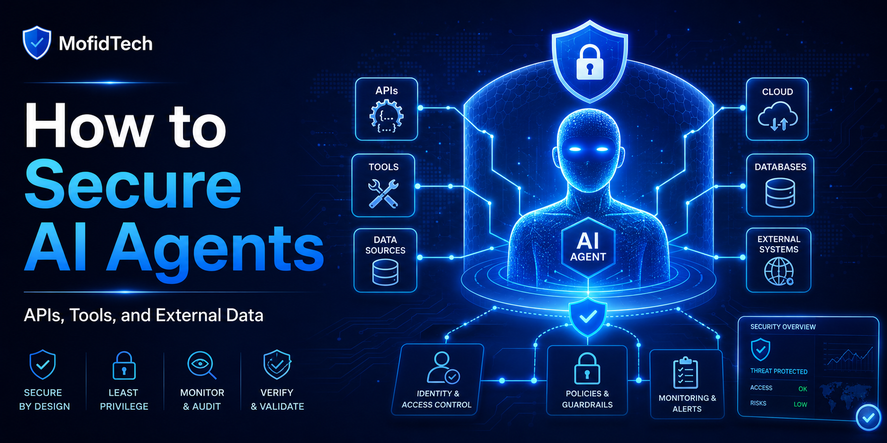
Protecting APIs from AI Agents
AI agents are different from traditional API clients because they may make decisions dynamically. They can chain actions, retry operations, interpret responses, and act on behalf of users.
This creates new questions:
- Is the agent acting for a real user?
- What exactly is the agent allowed to do?
- Can the agent access sensitive data?
- Can the agent trigger irreversible actions?
- Can the agent make purchases, delete records, or change permissions?
- Can the agent call expensive endpoints repeatedly?
- Can the agent continue acting after the user is no longer present?
Give AI Agents Their Own Identity
One of the biggest mistakes is treating an AI agent as if it were just a normal user session or a shared service account.
AI agents should have clear identity boundaries. A system should be able to tell whether an action came from a human user, a backend service, a partner integration, or an AI agent.
This improves:
- Auditing
- Rate limiting
- Access control
- Incident response
- Usage tracking
- Cost attribution
Use Limited Permissions
AI agents should not receive broad access by default.
They should be limited by:
- Scope
- User consent
- Organization policy
- Endpoint type
- Data sensitivity
- Time period
- Action risk
For example, an AI assistant may be allowed to summarize data but not delete records. It may be allowed to draft an action but not execute it without human approval.
Control Side Effects
A side effect is any action that changes something.
Examples include:
- Sending an email
- Creating a user
- Updating a profile
- Deleting a file
- Changing a password
- Making a payment
- Publishing content
- Modifying permissions
AI agents should be especially restricted around side effects. For high-risk actions, human confirmation may be necessary.
Limit Retry Behavior
AI systems often retry when they fail. This can become dangerous if the failure triggers repeated API calls.
For example:
- Repeated payment attempts
- Repeated login attempts
- Repeated email sending
- Repeated file processing
- Repeated report generation
API protection should detect repeated failures and stop unsafe retry loops.
Audit Agent Activity
Every AI-agent action should be traceable.
Useful audit information includes:
- Which user authorized the action
- Which agent performed the action
- Which endpoint was called
- What permission was used
- When the action happened
- Whether the action succeeded or failed
- Whether the action changed data
- Whether the action triggered external services
API Authentication and Authorization Controls
Authentication Is Not Enough
Authentication answers: “Who are you?”
Authorization answers: “What are you allowed to do?”
API abuse prevention also asks: “How often, how much, under what conditions, and with what risk?”
A user may be authenticated and still perform abusive actions. A valid API key may still be overused. A legitimate integration may still create dangerous load.
Use Strong Authorization Boundaries
Authorization should consider:
- User role
- Organization membership
- Ownership of the resource
- Sensitivity of the data
- Action type
- Endpoint risk
- Client type
- Session context
- Agent identity
Avoid Over-Permissioned Tokens
Tokens or API keys should not grant more access than necessary.
Over-permissioned access is dangerous because if the key is leaked, stolen, or misused, the attacker gains broad power.
For AI agents and third-party integrations, narrower permissions are especially important. API security guidance for AI agents commonly recommends OAuth-based delegated authorization, strict scopes, claims, and audience restrictions.
Endpoint Risk Classification
A practical API security strategy should classify endpoints by risk.
| Endpoint Type | Risk Level | Why It Matters |
|---|---|---|
| Public content read | Low to Medium | Can be scraped or overloaded |
| Authenticated profile read | Medium | May expose personal data |
| Search | Medium to High | Often expensive and scrape-friendly |
| Login | High | Target for credential attacks |
| Password reset | High | Can trigger user harassment or email/SMS cost |
| File upload | High | Can consume storage and processing resources |
| Payment | Critical | Financial and fraud risk |
| Admin action | Critical | Can affect many users |
| Bulk export | Critical | Large data exposure and heavy processing |
| AI-agent action | Medium to Critical | Depends on permissions and side effects |
This classification helps developers apply stronger controls where they matter most.
Monitoring, Logging, and Abuse Detection
You cannot protect what you cannot observe.
API monitoring should not only measure uptime. It should also reveal suspicious behavior.
Important Signals to Monitor
Track patterns such as:
- Requests per user
- Requests per IP address
- Requests per API key
- Failed login attempts
- Password reset attempts
- OTP attempts
- Search volume
- Export volume
- Upload volume
- Error rates
- Repeated failed requests
- Unusual geographic patterns
- Sudden traffic spikes
- Requests to sensitive endpoints
- Requests from new or unknown clients
- Repeated access to sequential records
- AI-agent usage patterns
Behavioral Anomaly Detection
Modern bot protection increasingly uses behavior-based analysis because sophisticated bots may rotate IP addresses, mimic browsers, or avoid simple rules. Cloudflare has described behavioral anomaly detection as part of its bot management approach.
For developers, the lesson is simple: do not rely only on static rules. Watch behavior.
Alerting
Alerts should be meaningful. Too many alerts create noise. Too few alerts allow abuse to continue.
Useful alerts include:
- Sudden increase in failed logins
- Unusual password reset volume
- Unexpected export activity
- High request volume from one user
- High request volume from one API key
- Expensive endpoints being called repeatedly
- Repeated failed AI-agent actions
- Third-party service cost spikes
Performance and Cost Considerations
API abuse is not only a security issue. It can directly affect performance and cost.
Server Load
High-volume requests can increase:
- CPU usage
- Memory usage
- Database load
- Cache pressure
- Queue backlog
- Network bandwidth
- Storage consumption
Even if no data is stolen, the application may become slow or unavailable.
Database Pressure
Search, filtering, reporting, and export endpoints can be database-heavy. A small number of abusive clients may create large database load.
Developers should pay attention to:
- Large result sets
- Unbounded pagination
- Complex filters
- Expensive sorting
- Repeated queries
- Bulk exports
- Aggregated reports
Third-Party Costs
Some API actions trigger paid services.
Examples:
- Email delivery
- SMS OTP
- Identity verification
- AI model calls
- Image processing
- File scanning
- Payment checks
- Map or geolocation services
OWASP specifically notes that APIs may consume paid resources such as email, SMS, phone calls, or biometric validation, and abuse can increase operational costs.
Cloud Billing Risk
In cloud environments, excessive API usage can increase:
- Compute costs
- Database costs
- Storage costs
- Bandwidth costs
- Logging costs
- Queue processing costs
- Third-party integration costs
An API protection strategy should therefore be part of cost management.
Common Mistakes Developers Make
Mistake 1: Only Limiting by IP Address
IP-based limits are useful, but not enough.
Bots can rotate IP addresses. Real users may share IP addresses. Mobile networks and corporate networks may place many legitimate users behind the same IP.
A better approach combines IP-based limits with user, account, token, endpoint, and behavior-based controls.
Mistake 2: Applying the Same Limit Everywhere
A login endpoint, a search endpoint, a public article endpoint, and an admin export endpoint should not have the same limits.
Different endpoints have different risk levels and resource costs.
Mistake 3: Forgetting Password Reset and OTP Endpoints
Password reset and OTP systems are often abused because they are easy to trigger and may involve external services.
These endpoints need strong protection, careful messaging, and monitoring.
Mistake 4: Allowing Unlimited Pagination
Unlimited or very large result sets can make scraping easier and overload the database.
APIs should define reasonable maximum result sizes.
Mistake 5: Trusting the Frontend
Frontend limits are not security controls. Attackers and bots can call APIs directly.
Every important limit must be enforced on the server side.
Mistake 6: Ignoring Expensive Operations
Some requests are more expensive than others. A report generation endpoint may be far more costly than a basic profile lookup.
Cost-based limits are often more effective than simple request counts.
Mistake 7: Not Separating AI Agents from Human Users
AI agents should not be invisible inside normal user traffic. They need clear identity, limited permissions, and separate monitoring.
Mistake 8: Poor Error Messages
Error messages should help legitimate users but not guide attackers.
Avoid revealing whether an account exists, which part of authentication failed, or exactly how to bypass limits.
Mistake 9: No Incident Response Plan
When abuse happens, developers often react manually and under pressure.
A better plan defines:
- Who receives alerts
- Which limits can be tightened
- Which keys can be disabled
- Which accounts can be reviewed
- Which logs should be inspected
- How to communicate with affected users
- How to restore normal service
Best Practices for API Abuse Protection
Use Layered Defense
No single control is enough.
A strong API protection strategy combines:
- Authentication
- Authorization
- Rate limits
- Throttling
- Quotas
- Bot detection
- Endpoint classification
- Logging
- Monitoring
- Alerting
- Input limits
- Pagination limits
- Cost controls
- Human approval for sensitive actions
- AI-agent-specific restrictions
Protect High-Risk Endpoints First
Start with the endpoints most likely to be abused:
- Login
- Password reset
- OTP
- Signup
- Search
- Upload
- Export
- Payment
- Admin actions
- AI-agent tool actions
Define Safe Defaults
New endpoints should not be unlimited by default.
Every new API endpoint should answer:
- Who can call it?
- How often can it be called?
- How much data can it return?
- How much resource can it consume?
- What happens when the limit is exceeded?
- How will abuse be detected?
Use Progressive Enforcement
Not every suspicious request should be blocked immediately.
Possible responses include:
- Allow and monitor
- Slow down
- Require stronger verification
- Reduce response size
- Temporarily block
- Disable the token
- Lock risky actions
- Require admin review
Review API Logs Regularly
Logs are useful only if someone looks at them.
Regular reviews can reveal:
- Endpoints receiving unexpected traffic
- Users consuming abnormal resources
- Bots discovering hidden paths
- Third-party integrations behaving badly
- AI agents producing repeated failures
- Search endpoints being scraped
Troubleshooting API Abuse
Problem: The API Suddenly Becomes Slow
Possible causes:
- Traffic spike
- Scraper activity
- Expensive endpoint abuse
- Database overload
- Large exports
- Repeated failed requests
- Misconfigured integration
- AI-agent retry loop
Recommended response:
- Identify the highest-traffic endpoints
- Check whether the traffic comes from users, IPs, API keys, or agents
- Review error rates
- Inspect expensive operations
- Apply temporary limits to risky endpoints
- Separate legitimate traffic from abusive traffic
Problem: Email or SMS Costs Increase
Possible causes:
- Password reset abuse
- OTP abuse
- Fake signup attempts
- Notification endpoint misuse
- Automated testing left active
- Compromised API key
Recommended response:
- Review endpoints that trigger paid communication
- Add stricter limits
- Add cooldown periods
- Monitor per-user and per-recipient activity
- Review suspicious accounts
- Add alerts for cost-related spikes
Problem: Search Endpoint Is Being Scraped
Possible causes:
- Public search access
- Predictable pagination
- No result limits
- No user-based limits
- No bot detection
- Public data valuable to competitors
Recommended response:
- Limit result sizes
- Monitor sequential access patterns
- Add endpoint-specific limits
- Review whether all fields should be public
- Detect unusual search frequency
- Consider different limits for anonymous and authenticated users
Problem: AI Agent Calls Too Many Endpoints
Possible causes:
- No agent-specific identity
- Broad permissions
- No retry limits
- No action budget
- No human approval for sensitive operations
- Weak monitoring
Recommended response:
- Separate agent traffic from human traffic
- Restrict permissions
- Add usage budgets
- Monitor repeated failures
- Require confirmation for risky side effects
- Review agent audit logs
Comparison Table: API Protection Methods
| Protection Method | Best For | Limitation |
|---|---|---|
| IP-based rate limiting | Basic traffic control | Weak against IP rotation |
| User-based rate limiting | Authenticated actions | Requires reliable identity |
| API-key limits | Partner and developer APIs | Keys can be shared or leaked |
| Endpoint-specific limits | Sensitive or expensive endpoints | Requires careful classification |
| Quotas | Monthly or daily usage control | Does not stop short bursts alone |
| Throttling | Slowing heavy but possibly legitimate traffic | May not stop malicious traffic |
| Bot detection | Automated abuse | Can produce false positives |
| Pagination limits | Preventing large data extraction | Does not stop all scraping |
| Cost-based limits | Expensive operations | Requires cost awareness |
| AI-agent scopes | Agent permission control | Needs strong identity design |
| Audit logs | Investigation and compliance | Useful only if reviewed |
API Abuse Protection Checklist
Before Deployment
- Classify all API endpoints by risk.
- Identify expensive endpoints.
- Identify endpoints that trigger email, SMS, payments, AI calls, or file processing.
- Define rate limits for sensitive endpoints.
- Define quotas for high-cost actions.
- Add pagination limits.
- Add upload limits.
- Separate public, authenticated, admin, partner, and internal APIs.
- Ensure server-side validation.
- Avoid relying on frontend restrictions.
- Create safe error messages.
- Plan monitoring and alerting.
After Deployment
- Review traffic patterns.
- Monitor failed authentication attempts.
- Track password reset and OTP volume.
- Watch search and export endpoints.
- Monitor API keys and partner integrations.
- Review cloud and third-party service costs.
- Investigate unusual spikes.
- Tune limits based on real usage.
- Document abuse response procedures.
For AI-Agent Access
- Give agents clear identity.
- Use limited permissions.
- Restrict sensitive actions.
- Apply separate rate limits.
- Add retry controls.
- Require human approval for high-risk side effects.
- Log all agent actions.
- Monitor repeated failures.
- Review agent access regularly.
During an Abuse Incident
- Identify affected endpoints.
- Separate legitimate traffic from abusive traffic.
- Apply temporary stricter limits.
- Disable suspicious API keys if necessary.
- Review logs and user activity.
- Monitor infrastructure health.
- Communicate with affected users if needed.
- Record lessons learned.
- Update long-term protections.
Real-World Use Cases
SaaS Dashboard API
A SaaS dashboard may expose analytics, billing, user management, and export features. The most sensitive endpoints are usually admin actions, billing operations, user exports, and report generation.
Protection should focus on:
- Organization-level quotas
- Admin action auditing
- Export limits
- Report generation throttling
- Role-based authorization
- Suspicious login detection
E-Commerce API
An e-commerce platform may expose products, carts, orders, search, discounts, and payment workflows.
Common abuse includes:
- Price scraping
- Inventory scraping
- Fake cart creation
- Checkout abuse
- Coupon abuse
- Payment testing
- Account takeover attempts
Protection should focus on:
- Search and product scraping controls
- Cart and checkout rate limits
- Payment abuse detection
- Account protection
- Bot detection
Educational Platform API
An educational website may expose articles, courses, quizzes, student profiles, and downloadable resources.
Common abuse includes:
- Content scraping
- Fake registrations
- Credential attacks
- Excessive downloads
- Abuse of certificate or progress endpoints
Protection should focus on:
- Login protection
- Content scraping detection
- Download limits
- Account-based quotas
- Monitoring suspicious learning progress patterns
AI Tool API
An AI-powered tool may expose generation, analysis, summarization, or automation features.
Common abuse includes:
- Excessive AI requests
- Prompt automation loops
- High-cost model usage
- Account sharing
- API key leakage
- Automated content generation abuse
Protection should focus on:
- Usage budgets
- Per-user quotas
- Per-organization quotas
- Cost monitoring
- API key restrictions
- Abuse review workflows
Security Considerations
API abuse protection should align with broader security goals.
Important security principles include:
- Least privilege
- Defense in depth
- Secure defaults
- Strong identity
- Clear audit trails
- Safe error handling
- Sensitive endpoint protection
- Monitoring and response
- Regular review
APIs should never assume that a client behaves honestly. Any API visible to the internet can be called directly, tested, scripted, and automated.
Performance Considerations
Security controls should not make the API unnecessarily slow. Developers need a balance between protection and performance.
Performance-friendly strategies include:
- Applying stricter checks only to high-risk endpoints
- Using lightweight checks for normal requests
- Caching safe public responses
- Limiting expensive operations
- Using background processing for heavy tasks
- Monitoring database pressure
- Avoiding unnecessary response data
- Keeping logs useful but not excessive
The goal is not to add complexity everywhere. The goal is to place the right controls at the right points.
Business Considerations
API abuse can affect business outcomes.
It can lead to:
- Higher infrastructure costs
- Higher third-party service bills
- Poor user experience
- Downtime
- Data scraping by competitors
- Reduced trust
- Security incidents
- Support workload
- Compliance risks
For SaaS platforms, APIs are often part of the product. Protecting them is not only a technical decision; it is a business requirement.
FAQ
1. What is API abuse?
API abuse is the misuse of an API in a way that exceeds intended usage, violates business rules, consumes excessive resources, extracts data unfairly, or causes harm to users, systems, or costs.
2. Is API abuse always a cyberattack?
No. Some API abuse is malicious, but some comes from misconfigured integrations, poorly designed automation, aggressive scrapers, or AI agents that make too many requests.
3. What is API rate limiting?
API rate limiting controls how many requests a client can make within a specific time period. It helps reduce brute force attempts, traffic bursts, scraping, and excessive usage.
4. Is rate limiting enough to stop bots?
No. Rate limiting is important, but advanced bots can rotate IP addresses, use many accounts, or mimic normal traffic. Strong protection also needs monitoring, behavior analysis, quotas, authorization, and endpoint-specific controls.
5. What is the difference between throttling and rate limiting?
Rate limiting usually blocks or rejects requests after a limit is reached. Throttling slows traffic down or reduces request priority to protect system stability.
6. What are API quotas?
API quotas define longer-term usage limits, such as daily or monthly limits per user, account, organization, or API key. They are useful for cost control and subscription-based systems.
7. Why are AI agents a new API security concern?
AI agents can call APIs repeatedly, retry failed actions, chain multiple operations, and perform actions on behalf of users. Without limits and permissions, they can create security, cost, and reliability risks.
8. Should AI agents use the same permissions as users?
Not always. AI agents should usually have limited, explicit permissions. Sensitive actions may require human approval, separate scopes, clear identity, and detailed audit logs.
9. Which API endpoints need the strictest protection?
High-risk endpoints include login, password reset, OTP, payment, file upload, search, export, admin actions, and any endpoint that triggers expensive processing or third-party service costs.
10. How can API abuse increase cloud costs?
Abusive traffic can increase compute usage, database load, bandwidth, storage, logging volume, queue processing, and third-party service usage such as email, SMS, AI model calls, or verification services.
11. What is unrestricted resource consumption?
Unrestricted resource consumption occurs when an API does not properly limit how much CPU, memory, bandwidth, storage, or paid service usage a client can consume. OWASP lists it as a major API security risk.
12. How should small websites protect APIs?
Small websites should start with the basics: protect login and password reset endpoints, limit search and uploads, avoid unlimited pagination, monitor suspicious traffic, use safe error messages, and review logs regularly.
Conclusion
APIs are no longer simple backend connectors. They are the operational surface of modern applications. They connect users, mobile apps, dashboards, partners, automation platforms, AI tools, and internal services.
That makes API protection essential.
Developers should not think of API security only as authentication and authorization. A modern API must also defend against bots, scrapers, excessive traffic, expensive requests, fake automation, and AI-agent misuse.
The strongest approach is layered:
- Classify endpoint risk.
- Protect sensitive actions.
- Apply rate limits, throttling, and quotas.
- Monitor behavior.
- Control expensive operations.
- Separate human, bot, partner, and AI-agent traffic.
- Use least privilege.
- Audit important actions.
- Prepare an incident response plan.
API abuse protection is not only about stopping attackers. It is about keeping applications reliable, affordable, trustworthy, and scalable.
For MofidTech readers, this topic is especially important because it connects cybersecurity, backend development, DevOps, cloud cost control, AI tools, and software architecture in one practical engineering problem.










💬 Comments
No comments yet. Be the first to comment!
Login to comment.