Introduction
AI agents are no longer just chatbots that answer questions. Modern AI agents can read documents, call APIs, use tools, search databases, send messages, update tasks, analyze logs, summarize tickets, trigger workflows, and interact with cloud services. This makes them powerful, but it also makes them risky.
The main security challenge is simple: when an AI system can take actions, it becomes part of the application architecture. It must be secured like any other software component, API client, automation tool, or privileged internal user.
A normal chatbot may produce a wrong answer. An AI agent with tool access may send the wrong email, expose private data, update the wrong record, call an expensive API repeatedly, delete important information, or follow malicious instructions hidden inside external content.
That is why AI agent security is becoming a serious concern for developers and organizations. OWASP’s LLM security guidance highlights risks such as prompt injection, sensitive information disclosure, insecure plugin design, and excessive agency. OWASP’s API Security Project also emphasizes that APIs expose large attack surfaces, especially when authorization, authentication, and resource limits are weak.
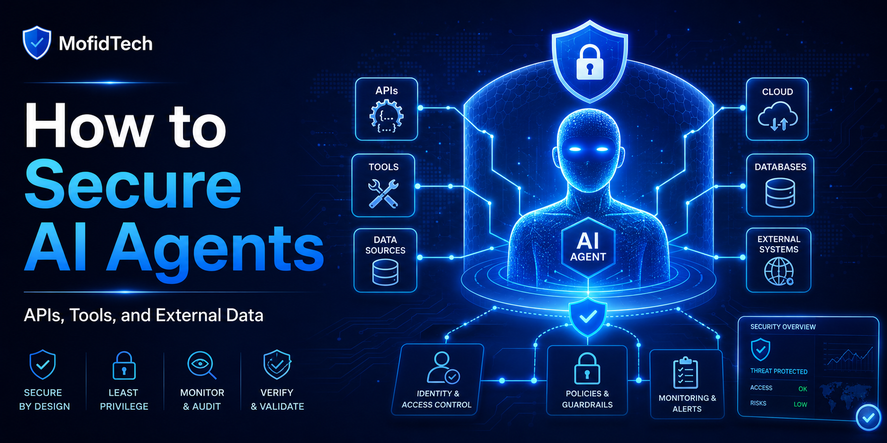
This article explains how to secure AI agents that use APIs, tools, and external data. It focuses on practical architecture, permissions, workflows, security reviews, monitoring, and mistakes to avoid. It does not include code. Instead, it explains what developers should design, verify, and control before allowing an AI agent to operate in real systems.
Table of Contents
- What Is an AI Agent?
- What Does It Mean to Secure an AI Agent?
- Why AI Agents Create a New Security Problem
- The Main Security Risks of AI Agents
- How AI Agents Use APIs, Tools, and External Data
- API Security Principles for AI Agents
- How to Prevent Prompt Injection
- How to Control Agent Permissions
- Human Approval and Safe Automation
- Data Protection for AI Agents
- Monitoring, Logging, and Audit Trails
- Real-World Use Cases
- Common Mistakes Developers Make
- Best Practices for Secure AI Agent Design
- Security Checklist Before Deployment
- Troubleshooting AI Agent Security Problems
- Comparison Tables
- FAQ
- Conclusion
What Is an AI Agent?
An AI agent is a software system that uses artificial intelligence to understand a goal, decide what steps to take, and perform actions through tools, APIs, or connected services.
A simple chatbot responds to a prompt. An AI agent can do more. It may decide to search a knowledge base, call an internal API, analyze the response, ask another tool for more information, prepare a recommendation, and then trigger a workflow.
The difference is action.
An AI agent does not only generate text. It can interact with systems.
For example, an AI agent may:
| Agent Type | Possible Actions |
|---|---|
| Customer support agent | Read tickets, summarize complaints, suggest replies, escalate urgent cases |
| DevOps agent | Analyze logs, detect incidents, recommend rollback steps, notify teams |
| Sales agent | Read CRM data, draft follow-up emails, classify leads |
| Database assistant | Analyze records, detect anomalies, explain trends |
| Security agent | Review alerts, classify threats, suggest remediation |
| Productivity agent | Schedule tasks, summarize meetings, update project boards |
These capabilities make AI agents useful, but they also increase risk. Every external system connected to the agent becomes part of its security boundary.
What Does It Mean to Secure an AI Agent?
Securing an AI agent means controlling what the agent can see, what it can decide, what tools it can use, what actions it can perform, and how its behavior is monitored.
A secure AI agent should not be trusted blindly. It should operate inside clear boundaries.
A secure AI agent should have:
- Limited access to data
- Limited access to APIs
- Clear permissions
- Safe tool design
- Human approval for risky actions
- Input validation
- Output validation
- Audit logs
- Monitoring
- Rate limits
- Error handling
- Strong authentication
- Strong authorization
- Clear rollback procedures
The goal is not to stop AI agents from being useful. The goal is to prevent one wrong instruction, one malicious document, one unsafe API call, or one excessive permission from becoming a serious incident.
The best way to think about AI agent security is this:
An AI agent should be treated like a junior automated employee with access to software systems. It can help, but it must not receive unlimited trust, unlimited data, or unlimited authority.
Why AI Agents Create a New Security Problem
AI agents create new risks because they combine three powerful elements:
- Language understanding
- External data access
- Automated action
Each element has its own risk. Together, they create a larger attack surface.
From Passive Answers to Automated Actions
Traditional software follows predictable logic. Developers define input, processing, and output. AI agents are different because they may interpret instructions, reason over incomplete information, and decide which tool to use.
This flexibility is useful, but it also means behavior can be harder to predict.
A chatbot may misunderstand a question. An AI agent may misunderstand a question and call an API.
That difference matters.
External Content Can Influence Agent Behavior
AI agents often read external content such as emails, web pages, support tickets, documents, comments, logs, or database records. That content may contain malicious instructions.
For example, a document could include hidden or visible instructions telling the agent to ignore previous rules, reveal private data, or call a dangerous tool. This is one form of prompt injection, a risk highlighted in OWASP’s LLM security guidance.
Permissions Can Become Too Broad
If an AI agent has access to many tools, many APIs, and many records, a small mistake can have a large impact.
This problem is often called excessive agency. OWASP describes excessive agency as a vulnerability where damaging actions can happen because an LLM has too much autonomy, too many permissions, or unsafe access to tools.
AI Systems Can Move Faster Than Humans
An AI agent can call APIs repeatedly, process large amounts of data, and make decisions faster than a human user. Without limits, one mistake can become many mistakes quickly.
This is why rate limits, quotas, approval gates, and monitoring are essential.
The Main Security Risks of AI Agents
AI agent security is not one single problem. It is a combination of application security, API security, data security, identity management, AI safety, and operational monitoring.
1. Prompt Injection
Prompt injection happens when user input or external content manipulates the AI agent’s behavior.
A malicious user may directly instruct the agent to ignore rules. A malicious document may contain hidden instructions. A support ticket may include text designed to make the agent reveal information or perform an unauthorized action.
The key risk is that the agent may treat untrusted content as instructions.
2. Sensitive Information Disclosure
AI agents often access private data. This may include customer records, internal documents, credentials, personal information, logs, contracts, support tickets, or financial details.
If the agent summarizes, exports, or shares this data incorrectly, sensitive information may be exposed. OWASP identifies sensitive information disclosure as a major LLM application risk.
3. Excessive Agency
Excessive agency happens when an AI agent has more authority than it needs.
Examples include:
- An agent that can delete records when it only needs to read them
- An agent that can send emails without approval
- An agent that can access all users instead of only relevant users
- An agent that can call expensive APIs without limits
- An agent that can modify production settings
The problem is not only that the model may make mistakes. The problem is that the system gives those mistakes too much power.
4. Unsafe API Calls
AI agents often depend on APIs. If the API layer is weak, the agent can become a path to abuse.
Common API risks include broken authorization, weak authentication, excessive data exposure, missing rate limits, and unrestricted resource consumption. OWASP lists broken object-level authorization as the top API security risk in its 2023 API Security Top 10.
5. Insecure Tool Design
Tools are functions or services that agents can use. A tool may search a database, send a message, create a ticket, update a record, or retrieve a document.
If tools are designed too broadly, the agent may misuse them.
A safe tool should do one clear job, enforce permissions, validate input, and return only necessary information.
6. External Data Manipulation
Agents that read external data can be influenced by poisoned, outdated, misleading, or malicious content.
This is especially important for agents that use retrieval systems, knowledge bases, web search, document uploads, or customer-submitted content.
7. Supply-Chain Risks
AI agents often depend on third-party models, libraries, plugins, packages, browser extensions, data connectors, and hosted tools. Each dependency can introduce risk.
Supply-chain security matters because an attacker may compromise the tools around the agent, not only the agent itself.
8. Poor Monitoring
If an AI agent performs actions but nobody can review what happened, security teams lose visibility.
A secure agent should leave a clear trail:
- What instruction was received
- What data was accessed
- What tools were called
- What actions were taken
- What user or system authorized the action
- What result was produced
Without logs, troubleshooting and incident response become difficult.
How AI Agents Use APIs, Tools, and External Data
To secure an AI agent, developers must understand the agent’s operating environment.
Most AI agents have four layers:
| Layer | Purpose | Security Question |
|---|---|---|
| User input | Gives the agent a goal or question | Is the input trusted or untrusted? |
| Model reasoning | Interprets the task and chooses steps | Can reasoning cause unsafe actions? |
| Tools and APIs | Allow the agent to retrieve data or act | Are permissions limited and validated? |
| External data | Provides context from documents, systems, or databases | Can the data manipulate the agent? |
The most dangerous layer is usually not the AI model itself. The most dangerous layer is the connection between the model and real systems.
An AI model without tools can produce incorrect text. An AI model with powerful tools can produce real-world consequences.
API Security Principles for AI Agents
AI agents should not bypass normal API security. They should be treated as API clients with limited, auditable, and revocable access.
Use Strong Authentication
Every agent should have a clear identity. It should not share a broad admin credential with humans or other services.
The system should know:
- Which agent made the request
- Which user initiated the request
- Which tool was used
- Which permission allowed the action
Shared credentials make accountability difficult. Separate identities make auditing and revocation easier.
Enforce Authorization on Every Request
Authorization must happen at the API level, not only inside the AI prompt.
A prompt instruction such as “do not access private records” is not enough. The API must enforce whether the agent is allowed to access a specific object, user, file, tenant, or action.
This is especially important because broken object-level authorization is a major API risk. OWASP explains that attackers can exploit APIs by manipulating object identifiers when authorization checks are missing.
Apply Least Privilege
The agent should only have the permissions required for its task.
If an agent only needs to summarize support tickets, it should not be able to delete them. If it only needs to classify alerts, it should not be able to change firewall rules. If it only needs to read public documentation, it should not access private customer records.
Least privilege is one of the most important security principles for AI agents.
Limit Data Returned by APIs
APIs should return only the data needed for the agent’s task.
Do not send full user profiles if the agent only needs a name and ticket status. Do not send credentials, tokens, personal identifiers, or hidden internal notes unless absolutely necessary.
Data minimization reduces the damage if the agent is manipulated or behaves incorrectly.
Add Rate Limits and Quotas
AI agents can make repeated requests quickly. This can create performance problems, cost problems, and abuse risks.
OWASP’s API guidance includes unrestricted resource consumption as a major API concern, especially when requests consume CPU, memory, storage, bandwidth, or paid third-party services.
Rate limits should apply to:
- API calls
- Tool usage
- File processing
- Email sending
- Search requests
- Database reads
- Expensive AI model calls
- Third-party service requests
Separate Read and Write Permissions
Reading data and changing data are different risk levels.
A secure architecture should separate:
| Permission Type | Risk Level | Example |
|---|---|---|
| Read-only | Lower | Summarize a ticket |
| Suggest action | Medium | Recommend a response |
| Draft action | Medium | Prepare an email draft |
| Execute action | High | Send the email |
| Modify system state | High | Update records or settings |
| Destructive action | Very high | Delete data or revoke access |
The agent should start with read-only or suggestion-level permissions. Higher-risk actions should require approval.
How to Prevent Prompt Injection
Prompt injection is one of the most important AI agent security risks because agents often process untrusted language.
Treat External Content as Data, Not Instructions
The agent may read emails, documents, web pages, comments, tickets, or logs. These sources should be treated as untrusted data.
A secure agent should not follow instructions found inside external content unless those instructions come from an authorized source.
For example, a support ticket should be treated as a customer message, not as a system command.
Separate System Instructions from Retrieved Data
The agent’s core rules should be separated from retrieved content. Retrieved content should provide context, not authority.
This distinction is critical:
- System rules define what the agent is allowed to do.
- User requests define what the user wants.
- Retrieved documents provide information.
- Tool outputs provide facts or results.
The agent should not allow retrieved documents to override system rules.
Validate Before Tool Use
Before calling a tool, the system should check whether the action is allowed.
Useful validation questions include:
- Is the requested action within the agent’s role?
- Is the target object allowed?
- Is the user authorized?
- Is the data source trusted?
- Is the action reversible?
- Does this action require human approval?
- Is the request unusually broad?
- Could the request expose sensitive information?
Use Allowlists for Tools
An agent should not have access to every possible tool. It should have access only to tools required for its specific purpose.
A customer support agent may need ticket search and draft reply tools. It does not need cloud infrastructure tools. A log analysis agent may need read-only observability tools. It does not need payment system access.
Restrict Actions Based on Context
The agent’s allowed actions should depend on context.
For example:
- A low-risk support question may allow an automatic draft.
- A billing complaint may require human review.
- A request involving personal data may require strict verification.
- A request involving account closure should never be fully automated without confirmation.
- A production incident recommendation should be reviewed before execution.
Security should adapt to risk level.
How to Control Agent Permissions
Permission control is the heart of AI agent security.
Give Each Agent a Specific Role
An agent should have a clear job description. A vague “general assistant” with broad access is dangerous.
Better roles include:
- Support ticket summarizer
- Documentation search assistant
- Incident analysis assistant
- Security alert classifier
- Database insight assistant
- SEO content planning assistant
- Internal policy Q&A assistant
The narrower the role, the easier it is to secure.
Use Role-Based Access
The agent should receive permissions based on its role.
A support agent may read support tickets but not payroll records. A DevOps assistant may read logs but not change production settings. A finance assistant may analyze invoices but not approve payments.
Role-based access helps prevent accidental privilege expansion.
Use Temporary and Scoped Access
Long-lived credentials create long-term risk.
A safer design uses temporary, scoped access for specific actions. Access should expire when the task is complete.
Scoped access means the credential is limited by:
- Time
- Action type
- Data category
- User
- Project
- Environment
- Risk level
Avoid Admin-Level Access
AI agents should not use administrator accounts for normal work.
Admin-level access increases the blast radius of mistakes, prompt injection, tool misuse, or compromised dependencies.
If an agent truly needs high-risk permissions, it should operate behind strong approval workflows and detailed monitoring.
Design for Revocation
Security teams should be able to disable an agent quickly.
A secure system should allow:
- Turning off a specific agent
- Revoking one tool
- Revoking one credential
- Blocking one action type
- Disabling external data access
- Freezing agent activity during investigation
Revocation is essential for incident response.
Human Approval and Safe Automation
Not every AI agent action should be automatic.
The safest systems separate thinking, recommending, drafting, and executing.
Use Human-in-the-Loop for Risky Actions
A human should approve actions that are:
- Destructive
- Expensive
- Irreversible
- Sensitive
- Legal or compliance-related
- Customer-facing
- Security-critical
- Production-impacting
Examples include deleting records, changing permissions, sending official emails, updating production infrastructure, issuing refunds, closing accounts, or modifying security policies.
Use Approval Levels
Not all approvals need the same level of review.
| Action | Suggested Approval |
|---|---|
| Summarize a public document | No approval |
| Draft a support reply | Optional review |
| Send a customer email | Human approval |
| Modify customer data | Strong approval |
| Delete records | Multi-step approval |
| Change production settings | Senior approval |
| Access sensitive personal data | Strict policy-based approval |
This approach preserves productivity while reducing risk.
Keep Humans Responsible for Final Decisions
AI agents can assist with analysis, but responsibility should remain with authorized humans.
This is especially important in cybersecurity, legal, financial, medical, educational, and administrative workflows.
Data Protection for AI Agents
AI agents often interact with sensitive information. Data protection must be designed from the beginning.
Minimize Data Access
The agent should access only the data necessary for the current task.
For example, if the agent is classifying a ticket, it may need the ticket text and category. It may not need the customer’s full address, payment history, or internal account notes.
Mask Sensitive Fields
Sensitive data should be masked or removed when possible.
Examples include:
- Passwords
- Access tokens
- API keys
- Personal identifiers
- Financial information
- Private health information
- Internal security notes
- Confidential contracts
- Authentication secrets
The agent should not receive sensitive values unless there is a clear and justified need.
Protect Training and Retrieval Data
If an agent uses a knowledge base or retrieval system, that data should be reviewed and protected.
Risks include:
- Outdated documents
- Incorrect internal policies
- Confidential files indexed by mistake
- Poisoned content
- Documents with hidden instructions
- User data mixed with public documentation
Retrieval quality is not only an accuracy issue. It is also a security issue.
Separate Tenants and Users
In multi-user systems, the agent must not mix data between users, customers, departments, or organizations.
Tenant isolation should be enforced at the application and API level. The AI model should not be trusted to remember isolation rules by itself.
Monitoring, Logging, and Audit Trails
AI agents need strong observability because their actions may be complex.
What Should Be Logged?
A secure AI agent system should log:
- User request
- Agent identity
- User identity
- Selected tools
- API calls
- Data sources accessed
- Permission checks
- Approval decisions
- Final action
- Errors and blocked actions
- Unusual behavior
- Sensitive data access events
Logs should be detailed enough for investigation but designed carefully to avoid storing unnecessary sensitive information.
Why Audit Trails Matter
Audit trails help answer important questions:
- What happened?
- Who initiated the action?
- What did the agent access?
- Which tool was used?
- Was approval required?
- Was approval granted?
- Did the agent follow policy?
- Was sensitive data exposed?
- Should the action be reversed?
Without audit trails, it becomes difficult to debug mistakes or prove compliance.
Monitor for Abnormal Behavior
AI agents should be monitored for unusual patterns such as:
- Sudden increase in tool calls
- Repeated failed permission checks
- Attempts to access unrelated data
- Large exports
- Unusual API costs
- Repeated prompt injection patterns
- Actions outside normal working hours
- Unexpected write operations
- Repeated requests for sensitive data
Monitoring helps detect both attacks and design flaws.
Real-World Use Cases
Use Case 1: Customer Support AI Agent
A support agent may summarize tickets, classify issues, suggest replies, and escalate urgent cases.
Security risks include exposing customer data, following malicious instructions in a ticket, sending incorrect replies, or accessing unrelated accounts.
Safe design should include:
- Read-only ticket access by default
- Draft replies instead of automatic sending
- Human approval for refunds or account changes
- Data masking for sensitive fields
- Clear audit logs
- Strong tenant isolation
Use Case 2: DevOps AI Agent
A DevOps agent may analyze logs, summarize incidents, suggest root causes, or recommend deployment actions.
Security risks include exposing secrets in logs, triggering unsafe production changes, or misinterpreting incident data.
Safe design should include:
- Read-only access to logs first
- No direct production modification without approval
- Strong separation between development and production
- Secret detection in logs
- Escalation workflows
- Incident audit trails
Use Case 3: Database Analysis Agent
A database assistant may answer questions about data quality, trends, missing records, or anomalies.
Security risks include exposing personal data, running broad queries, mixing tenant data, or suggesting destructive changes.
Safe design should include:
- Read-only access
- Aggregated results where possible
- Row-level and tenant-level authorization
- Approval before any data modification
- Strict data minimization
- Clear separation between analysis and action
Use Case 4: Cybersecurity Monitoring Agent
A security agent may classify alerts, summarize suspicious activity, and recommend mitigation steps.
Security risks include false positives, false negatives, attacker manipulation, or excessive access to sensitive infrastructure.
Safe design should include:
- Strong logging
- Human approval for blocking users or systems
- Clear escalation rules
- Limited access to production controls
- Integration with existing security policies
- Continuous review of agent decisions
Use Case 5: AI Agent for SEO and Content Planning
A content planning agent may analyze trends, suggest article topics, create outlines, and recommend internal links.
Security risks are lower than production infrastructure agents, but still important.
Risks include inaccurate claims, copyright problems, poor source quality, and publishing unreviewed content.
Safe design should include:
- Source verification
- Editorial review
- No automatic publishing
- Clear content quality rules
- Avoidance of fake statistics
- Human approval before publication
Common Mistakes Developers Make
Mistake 1: Giving the Agent Too Much Access
The most common mistake is giving an AI agent broad access because it is convenient.
Convenience should not override security. Start with minimal permissions and expand only when necessary.
Mistake 2: Trusting Prompt Instructions as Security Controls
A prompt rule is not a security boundary.
Telling an agent “do not reveal secrets” is useful, but it is not enough. Secrets should be removed, masked, or blocked at the data and API layers.
Mistake 3: Skipping API Authorization
Some teams assume that because the agent is internal, API authorization can be relaxed. This is dangerous.
Every API call should still enforce identity, permissions, object access, and rate limits.
Mistake 4: Allowing Direct Write Access Too Early
Agents should not begin with write access to important systems.
Start with read-only access. Then allow suggestions. Then allow drafts. Only after testing and review should limited actions be considered.
Mistake 5: Ignoring External Data Risks
External content can contain malicious instructions, false information, or hidden manipulation.
Agents should not treat retrieved content as trusted instructions.
Mistake 6: No Human Approval for High-Risk Actions
Automation is useful, but not every action should be automated.
High-risk actions need approval gates.
Mistake 7: No Logs
If the agent acts but nothing is logged, security teams cannot investigate problems.
Logs are not optional for production AI agents.
Mistake 8: No Incident Response Plan
Teams should plan what happens if an AI agent behaves unexpectedly.
They should know how to disable the agent, revoke credentials, review logs, notify stakeholders, and reverse actions where possible.
Best Practices for Secure AI Agent Design
1. Start With a Clear Threat Model
Before building an AI agent, define what could go wrong.
Ask:
- What data can the agent access?
- What tools can it use?
- What actions can it perform?
- Who can instruct it?
- What external content can it read?
- What happens if the agent is manipulated?
- What is the worst possible outcome?
- How can the system detect and stop unsafe behavior?
2. Use Least Privilege Everywhere
Least privilege should apply to data, tools, APIs, credentials, users, environments, and actions.
The agent should receive the minimum access required to complete the task.
3. Separate Analysis From Execution
A secure agent should not automatically execute every recommendation.
A good workflow is:
- Read data
- Analyze context
- Suggest action
- Request approval
- Execute only if allowed
- Log the result
4. Validate Inputs and Outputs
Inputs should be treated as untrusted. Outputs should be checked before they are used in tools or shown to users.
Validation should include:
- Permission checks
- Data type checks
- Scope checks
- Policy checks
- Sensitive data checks
- Business rule checks
5. Use Safe Tool Design
Tools should be narrow, predictable, and permission-aware.
A safe tool should:
- Perform one clear function
- Require explicit parameters
- Validate access
- Return limited data
- Avoid hidden side effects
- Log usage
- Fail safely
6. Build Approval Gates
Approval gates should be added for risky actions.
Examples include:
- Sending external messages
- Updating user records
- Accessing sensitive documents
- Triggering paid services
- Changing infrastructure
- Deleting data
- Exporting large datasets
7. Monitor Continuously
Agent behavior should be monitored like any production system.
Teams should track:
- Usage volume
- Error rates
- Tool calls
- Blocked actions
- Sensitive data access
- Unexpected patterns
- Cost anomalies
- User complaints
- Security alerts
8. Review the Agent Regularly
AI agent security is not a one-time task.
Review should happen when:
- New tools are added
- New data sources are connected
- Permissions change
- Business workflows change
- Incidents occur
- Models are upgraded
- APIs are modified
- Compliance requirements change
Security Considerations
Security should be included from the design phase, not added after deployment.
Important security controls include:
- Authentication for agent identities
- Authorization for every API request
- Object-level access control
- Data minimization
- Prompt injection defenses
- Tool allowlists
- Human approval
- Rate limits
- Logging and monitoring
- Credential rotation
- Secret management
- Incident response procedures
- Environment separation
- Vendor and dependency review
The most important principle is this:
Never rely on the AI model alone to enforce security. Security must be enforced by the surrounding application, API, infrastructure, and governance layers.
Performance Considerations
AI agents can affect performance because they may call multiple tools, process large data, and repeat tasks.
Performance risks include:
- Too many API calls
- Large document processing
- Expensive model usage
- Repeated retries
- Slow external services
- Large database reads
- Uncontrolled background tasks
- High memory usage
- Third-party rate limits
To reduce performance risk:
- Limit tool calls per task
- Use quotas
- Cache safe repeated results
- Avoid unnecessary data retrieval
- Use summaries instead of full documents where appropriate
- Monitor latency and cost
- Set clear timeout rules
- Stop loops early
- Use smaller scopes for each task
Performance is also a security issue. If an attacker can make the agent consume excessive resources, the system may become slow, expensive, or unavailable.
Troubleshooting AI Agent Security Problems
Problem: The Agent Accesses Too Much Data
Possible causes:
- Permissions are too broad
- API responses include unnecessary fields
- Tenant isolation is weak
- The agent uses a general-purpose data tool
Recommended fix:
- Reduce permissions
- Limit returned fields
- Enforce object-level authorization
- Separate tools by data category
- Add approval for sensitive access
Problem: The Agent Follows Malicious Instructions in Documents
Possible causes:
- External content is treated as instructions
- Prompt injection defenses are weak
- Retrieved content is not isolated from system rules
Recommended fix:
- Treat documents as untrusted data
- Separate instructions from retrieved content
- Add validation before tool use
- Block suspicious instruction patterns
- Use human review for risky actions
Problem: The Agent Calls APIs Too Often
Possible causes:
- No rate limits
- Poor task planning
- Looping behavior
- Retry logic without limits
- Expensive tools exposed too freely
Recommended fix:
- Add quotas
- Limit tool calls per task
- Monitor repeated calls
- Add cost controls
- Require approval for expensive actions
Problem: The Agent Makes Incorrect Recommendations
Possible causes:
- Poor data quality
- Outdated knowledge base
- Ambiguous user request
- Missing context
- Hallucination
- Weak validation
Recommended fix:
- Improve data sources
- Add confidence indicators
- Require citations or evidence
- Use human review
- Add feedback loops
- Restrict high-risk recommendations
Problem: Security Teams Cannot Investigate an Incident
Possible causes:
- Logs are missing
- Tool calls are not recorded
- Agent identity is unclear
- Approval history is unavailable
- Sensitive data access is not tracked
Recommended fix:
- Improve audit logs
- Record agent identity and user identity
- Track tool usage
- Store approval decisions
- Add incident review procedures
Comparison Tables
Chatbot vs AI Agent Security
| Area | Chatbot | AI Agent |
|---|---|---|
| Main function | Answers questions | Performs tasks |
| External tools | Usually limited | Common |
| API access | Often none | Often required |
| Risk level | Lower | Higher |
| Main risk | Wrong or misleading answer | Wrong or unsafe action |
| Security need | Content safety and data protection | Full application, API, and workflow security |
| Human approval | Useful | Essential for risky actions |
| Logging | Helpful | Critical |
Read-Only Agent vs Action Agent
| Feature | Read-Only Agent | Action Agent |
|---|---|---|
| Can access data | Yes | Yes |
| Can modify data | No | Yes |
| Can send messages | No or draft only | Possibly |
| Risk level | Lower | Higher |
| Best for | Search, summarization, analysis | Workflow automation |
| Required controls | Access control and data protection | Access control, approval, logging, rollback |
| Deployment maturity needed | Moderate | High |
Low-Risk vs High-Risk Agent Actions
| Action | Risk Level | Recommended Control |
|---|---|---|
| Summarizing public documentation | Low | Basic logging |
| Classifying support tickets | Low to medium | Role-based access |
| Drafting an email | Medium | Human review |
| Sending an email to a customer | High | Approval required |
| Updating user data | High | Strong authorization |
| Accessing sensitive records | High | Policy-based access |
| Deleting records | Very high | Multi-step approval |
| Changing production infrastructure | Very high | Senior approval and audit logs |
AI Agent Security Checklist
Before Deployment
- Define the agent’s exact role
- Identify all tools and APIs
- Map all data sources
- Classify sensitive data
- Apply least privilege
- Separate read and write permissions
- Add object-level authorization
- Add prompt injection defenses
- Define approval rules
- Add rate limits
- Add audit logging
- Test with malicious inputs
- Review third-party dependencies
- Create an incident response plan
During Production Use
- Monitor tool usage
- Review blocked actions
- Track sensitive data access
- Watch for unusual API activity
- Monitor costs and resource usage
- Review user feedback
- Update knowledge sources
- Rotate credentials
- Review permissions regularly
- Investigate anomalies quickly
After an Incident
- Disable risky tools if needed
- Revoke affected credentials
- Preserve logs
- Identify the source of the issue
- Review user requests and external data
- Check what data was accessed
- Check what actions were taken
- Notify affected parties if required
- Update permissions and policies
- Improve testing and monitoring
FAQ
1. What is AI agent security?
AI agent security is the practice of protecting AI systems that can use tools, call APIs, access data, and perform actions. It includes permission control, API security, prompt injection defense, data protection, human approval, logging, monitoring, and incident response.
2. Why are AI agents more risky than normal chatbots?
AI agents are more risky because they can act. A chatbot usually produces text, but an AI agent may access private data, call APIs, send messages, modify records, or trigger workflows. This means a mistake or manipulation can affect real systems.
3. What is prompt injection in AI agents?
Prompt injection is an attack where user input or external content manipulates the AI agent’s behavior. For example, a malicious document may tell the agent to ignore rules or reveal private information. The main defense is to treat external content as untrusted data, not as instructions.
4. What is excessive agency?
Excessive agency means an AI agent has too much autonomy, too many permissions, or access to tools that are too powerful for its task. This can allow damaging actions if the agent misunderstands a request, follows malicious instructions, or produces unsafe output. OWASP identifies excessive agency as an important LLM application risk.
5. Should AI agents be allowed to call APIs?
Yes, but only with strong controls. AI agents should call APIs through authenticated identities, limited permissions, object-level authorization, rate limits, validation, and audit logs. They should not bypass normal API security.
6. Should AI agents have access to production systems?
AI agents should not receive direct production access unless the use case is mature, well-tested, and protected by strict approval workflows. Most agents should begin with read-only access and recommendation capabilities before being allowed to perform production actions.
7. How can developers reduce AI agent risk?
Developers can reduce risk by applying least privilege, separating read and write permissions, validating tool use, protecting APIs, masking sensitive data, using human approval for high-risk actions, monitoring behavior, and logging every important action.
8. Can AI agents leak sensitive data?
Yes. AI agents can leak sensitive data if they access too much information, return unnecessary fields, summarize private content for the wrong user, or follow malicious instructions. Data minimization, masking, authorization, and output review reduce this risk.
9. What is the safest way to start using AI agents?
The safest approach is to start with read-only agents that summarize, classify, search, or recommend. After testing, teams can add draft actions. Fully automated actions should come later and only with strong approval, monitoring, and rollback procedures.
10. How should AI agents be monitored?
AI agents should be monitored through logs, tool usage records, API call tracking, permission checks, approval history, sensitive data access alerts, cost monitoring, and anomaly detection. Monitoring is essential for debugging and incident response.
11. Are AI agent risks only an AI problem?
No. AI agent security is also an API security, application security, identity management, data governance, and DevOps problem. The model is only one part of the system. The surrounding architecture must enforce security.
12. What is the most important rule for securing AI agents?
The most important rule is to never rely on the AI model alone as the security boundary. Security must be enforced through permissions, APIs, validation, monitoring, approval workflows, and infrastructure controls.
Conclusion
AI agents are becoming a powerful part of modern software systems. They can help developers, support teams, security teams, DevOps teams, and businesses automate complex work. But the moment an AI agent can access tools, call APIs, or act on external data, it becomes a security-sensitive component.
The safest approach is not to block AI agents completely. The safest approach is to design them carefully.
A secure AI agent should have a narrow role, limited permissions, safe tools, strong API controls, data minimization, prompt injection defenses, human approval for risky actions, and detailed audit logs. It should be monitored like a production system and reviewed whenever its tools, data sources, or permissions change.
For developers, the key lesson is clear: AI agent security is not only about better prompts. It is about better architecture.
Prompts can guide behavior, but permissions enforce boundaries. Models can reason, but APIs must authorize. Agents can recommend, but humans should approve high-risk actions. Automation can improve productivity, but only when it is built on strong security foundations.
As AI agents become more common, developers who understand secure agent design will be better prepared to build reliable, safe, and professional systems.










💬 Comments
No comments yet. Be the first to comment!
Login to comment.