Introduction
Platform engineering for AI workloads is the practice of building internal systems, workflows, standards, and self-service capabilities that help teams deploy, monitor, secure, and operate AI applications reliably in production.
This matters because AI is no longer limited to prototypes, experiments, chat demos, or isolated machine learning notebooks. Modern teams are now building AI-powered applications, internal copilots, retrieval-augmented generation systems, AI agents, document processing pipelines, model APIs, recommendation services, and automation workflows that must operate with reliability, security, cost control, and clear ownership.
Traditional application platforms were usually designed for web applications, APIs, databases, background jobs, and static services. AI workloads add new challenges. They may need GPUs or specialized accelerators. They may process sensitive data. They may depend on external model providers. They may generate unpredictable outputs. They may require vector databases, prompt management, model evaluation, human review, monitoring of quality, and detailed cost visibility.
This is why platform engineering is becoming important for AI teams. A strong platform does not simply give developers infrastructure. It gives them safe, repeatable, observable, and governed ways to build AI systems without forcing every team to become infrastructure experts.
The cloud native ecosystem is already moving in this direction. CNCF’s State of Cloud Native Development Q1 2026 report highlights platform engineering, hybrid cloud, and AI workloads as important themes, with nearly 20 million developers adopting and scaling cloud native technologies. CNCF also reported that 35% of organizations use a hybrid platform approach to integrate AI workloads with existing developer platforms and specialized AI tooling.
For MofidTech readers, this topic is valuable because it connects AI, DevOps, cloud computing, software architecture, observability, security, cost optimization, and developer productivity in one practical engineering guide.
Table of Contents
- What Is Platform Engineering for AI Workloads?
- Why AI Workloads Need a Platform Engineering Approach
- How AI Workloads Differ from Traditional Web Workloads
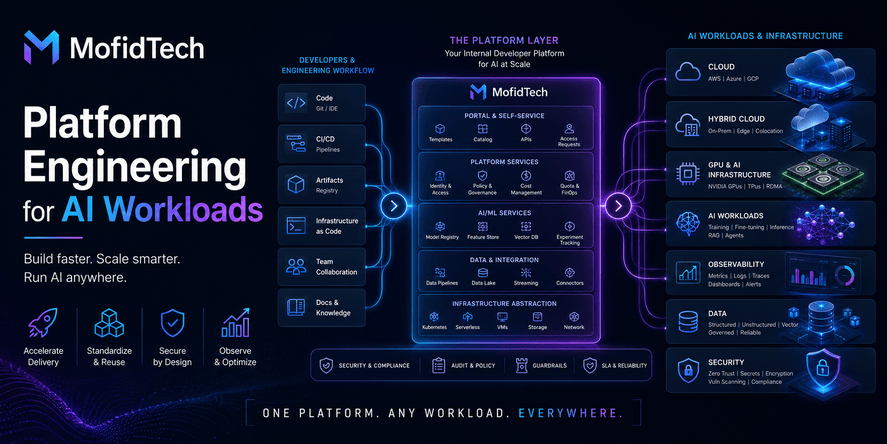
- Core Components of an AI-Ready Internal Platform
- AI Workload Types Your Platform Should Support
- Platform Architecture for Production AI Systems
- Developer Self-Service for AI Teams
- AI Workload Placement: Cloud, Hybrid Cloud, Edge, or On-Premises
- GPU and Accelerator Planning
- Cost Control for AI Workloads
- Security and Governance for AI Platforms
- Observability and Reliability for AI Systems
- Data Management for AI Workloads
- Model Lifecycle and Evaluation
- Performance Considerations
- Real-World Use Cases
- Common Mistakes
- Best Practices
- Troubleshooting AI Platform Problems
- AI Platform Readiness Checklist
- Comparison Tables
- FAQ
- Conclusion
What Is Platform Engineering for AI Workloads?
Platform engineering for AI workloads means designing an internal technical platform that allows teams to build, deploy, secure, observe, and manage AI systems in a consistent and reusable way.
The goal is not to hide all complexity. The goal is to reduce unnecessary complexity for developers while preserving the controls needed by operations, security, compliance, and architecture teams.
In a traditional software team, a platform may provide deployment pipelines, environment templates, logging, monitoring, secrets management, service catalogs, and infrastructure standards. For AI workloads, the platform must go further. It must also support model access, data pipelines, vector search, GPU or accelerator resources, prompt lifecycle, model evaluation, AI safety checks, usage tracking, latency monitoring, and cost visibility.
A good AI platform answers practical questions such as:
- Where should this AI workload run?
- Which model or service should it use?
- What data is it allowed to access?
- How will prompts, outputs, and decisions be monitored?
- How will cost be tracked?
- Who owns the workload?
- How will failures be detected?
- How will unsafe or low-quality behavior be handled?
- How will teams move from experiment to production?
Platform engineering is especially important because AI workloads often involve multiple teams. Developers build product features. Data teams prepare knowledge sources. Security teams define access rules. Operations teams manage reliability. Legal or compliance teams may care about sensitive data and auditability. Business teams care about value and cost.
Without a platform, each AI project invents its own infrastructure, its own security practices, its own monitoring strategy, and its own deployment process. That leads to duplication, risk, inconsistent quality, and high operational cost.
Why AI Workloads Need a Platform Engineering Approach
AI workloads need platform engineering because production AI systems are more complex than simple experiments. They combine software, data, models, infrastructure, security, monitoring, governance, and human feedback.
A prototype can be built quickly with a model API, a small dataset, and a simple interface. Production is different. A production AI system must be reliable when users depend on it. It must be secure when it touches sensitive information. It must be observable when something goes wrong. It must be cost-aware when usage grows. It must be governed when outputs affect business decisions.
From AI Experiment to Production System
Many teams begin AI adoption with experimentation. They test a chatbot, summarize documents, generate text, classify support tickets, or search internal knowledge. The first version may be manually configured and used by a small group.
Problems appear when the workload becomes important:
- The system must serve more users.
- The cost grows unexpectedly.
- The AI output quality changes.
- Different teams want similar AI features.
- Security teams ask how data is protected.
- Operations teams ask how failures are detected.
- Managers ask who owns the system.
- Developers struggle to reproduce environments.
- The organization wants standard practices.
This is where platform engineering becomes useful. It turns repeated AI infrastructure work into reusable capabilities.
Why One-Off AI Infrastructure Does Not Scale
One-off infrastructure may work for a single project, but it does not scale across an organization. Every team may choose different tools, naming conventions, model providers, deployment patterns, access rules, evaluation methods, and monitoring practices.
This creates several risks:
- No standard way to deploy AI workloads.
- No central view of cost.
- No consistent security model.
- No reliable audit trail.
- No shared observability strategy.
- No reusable templates for new projects.
- No clear ownership of production systems.
- No consistent way to evaluate model quality.
Platform engineering solves this by creating paved roads. A paved road is a recommended, supported, and secure path that developers can use without needing to design everything from zero. Developers can still innovate, but they start from a reliable foundation.
How AI Workloads Differ from Traditional Web Workloads
AI workloads are different from traditional web workloads because they depend heavily on data, models, inference latency, specialized resources, quality evaluation, and governance.
A normal web application usually follows a predictable pattern. A user sends a request, the backend applies business logic, the database returns data, and the frontend displays a result. Performance, security, and reliability are still important, but the output is usually deterministic.
AI systems are often less deterministic. A language model may produce slightly different answers. A retrieval system may return different documents depending on indexing quality. A recommendation system may behave differently as user behavior changes. An AI agent may call tools, reason through multiple steps, and produce outcomes that require safety controls.
Key Differences
| Area | Traditional Web Workload | AI Workload |
|---|---|---|
| Output behavior | Usually deterministic | Often probabilistic or model-dependent |
| Infrastructure needs | CPU, memory, storage, network | May need GPUs, accelerators, vector databases, model gateways |
| Data dependency | Structured application data | Structured, unstructured, embeddings, documents, prompts, feedback |
| Monitoring focus | Latency, errors, uptime, resource usage | Latency, errors, cost, model quality, output safety, drift, retrieval quality |
| Security risk | Authentication, authorization, data protection | Plus prompt injection, data leakage, unsafe tool access, model misuse |
| Cost pattern | Often predictable | Can grow quickly with tokens, inference, GPUs, storage, and retrieval |
| Release strategy | Application version releases | Application, model, prompt, retrieval, and data changes |
| Quality testing | Functional and integration tests | Evaluation datasets, human review, model comparisons, output scoring |
Why This Difference Matters
If teams treat AI workloads exactly like normal web services, they miss important risks. They may monitor uptime but ignore answer quality. They may secure APIs but forget prompt injection. They may track infrastructure usage but ignore model usage cost. They may deploy quickly but fail to evaluate whether the system still produces useful results.
An AI-ready platform must support both software reliability and AI-specific reliability.
Core Components of an AI-Ready Internal Platform
An AI-ready internal platform should provide reusable services, workflows, templates, policies, and visibility for teams building AI systems.
The platform does not need to be perfect on day one. It should evolve based on the organization’s maturity. However, several components are especially important.
1. Internal Developer Portal
An internal developer portal gives teams a single place to discover services, create new workloads, view ownership, read documentation, request resources, and understand platform standards.
For AI workloads, the portal may include:
- Approved AI service templates.
- Model access request workflows.
- Data access rules.
- Workload ownership information.
- Cost dashboards.
- Observability links.
- Security guidance.
- Evaluation requirements.
- Documentation for approved patterns.
The portal improves developer experience because teams do not need to search across many tools or ask platform engineers for every small task.
2. Service Catalog
A service catalog records what exists in the platform. It should answer who owns each workload, what it does, where it runs, what data it uses, what model it depends on, and how to contact the responsible team.
For AI systems, the catalog should also track:
- Model provider or model family.
- Data sources used for retrieval or training.
- Sensitivity level of processed data.
- Business criticality.
- Human review requirements.
- Cost owner.
- Evaluation status.
- Security classification.
This information becomes essential when an AI service causes an incident, consumes too much budget, accesses sensitive data, or needs to be updated.
3. Standard Deployment Workflows
AI teams need reliable ways to move from development to staging and production. Standard deployment workflows reduce errors and make security checks repeatable.
A strong platform should define:
- How AI services are promoted between environments.
- What approvals are required.
- What evaluation checks must happen before production.
- How rollbacks are handled.
- How configuration changes are reviewed.
- How sensitive credentials and model keys are managed.
- How production access is controlled.
The goal is to make safe deployment easier than unsafe deployment.
4. Environment Management
AI workloads often behave differently across environments because of data, model configuration, memory limits, external APIs, or retrieval indexes.
The platform should help teams keep environments consistent while still separating development, testing, staging, and production. Each environment should have clear rules for data sensitivity, cost limits, model access, logging, and human review.
5. Model and Provider Access Layer
Many AI applications depend on external model providers, internal models, open-weight models, or specialized inference services. Without a standard access layer, every team may integrate models differently.
A platform-level access layer can help with:
- Centralized model access.
- Usage tracking.
- Rate limits.
- Cost attribution.
- Logging rules.
- Fallback strategies.
- Policy enforcement.
- Provider abstraction.
- Security controls.
This is often called an AI gateway, model gateway, or inference gateway. It does not replace the model. It manages access to models in a controlled and observable way.
6. Observability Stack
Observability helps teams understand what is happening inside a system. For AI workloads, standard observability should include application metrics, infrastructure metrics, model usage, latency, errors, retrieval behavior, and output quality signals.
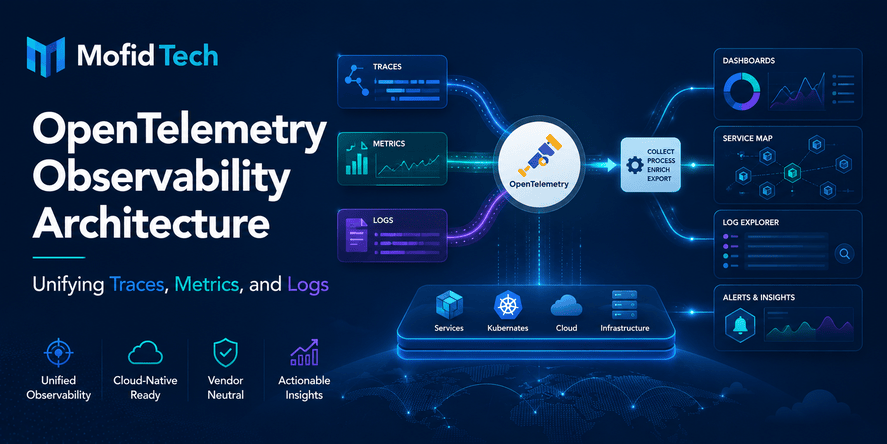
OpenTelemetry is a widely used vendor-neutral observability framework for generating, collecting, and exporting telemetry data such as traces, metrics, and logs. This type of standardization is valuable because AI platforms often include many services and tools that must be observed together.
7. Security and Policy Layer
AI platforms need security controls that cover identity, access, data, secrets, model usage, network boundaries, and output behavior.
The platform should define:
- Who can create AI workloads.
- Who can access production data.
- Which models are approved.
- Which tools an AI agent can call.
- How secrets are stored.
- What data can be sent to external providers.
- What outputs require review.
- What logs may contain sensitive information.
- How incidents are escalated.
NIST’s AI Risk Management Framework focuses on helping organizations manage risks associated with artificial intelligence systems. Platform teams can use this type of risk-based thinking to connect engineering controls with governance needs.
8. Cost Management
AI workloads can become expensive quickly. Costs may come from model inference, token usage, GPU time, vector databases, data pipelines, storage, logging, and overprovisioned infrastructure.
The platform should provide cost visibility by team, project, environment, model, feature, and workload. Developers should understand the cost impact of design decisions before the system reaches production scale.
9. Documentation and Golden Paths
Golden paths are recommended ways to build and operate services. For AI workloads, golden paths may describe how to create a retrieval-based assistant, how to deploy a model-backed API, how to monitor AI outputs, how to request data access, or how to review model changes.
Good documentation reduces dependency on platform engineers and helps teams avoid repeated mistakes.
AI Workload Types Your Platform Should Support
A strong AI platform should support different workload types because not all AI systems have the same infrastructure, security, and performance needs.
1. AI-Powered Web Features
These are features inside existing applications. Examples include smart search, content recommendations, automatic summaries, language translation, customer support suggestions, and document classification.
These workloads usually need:
- Stable APIs.
- Low or moderate latency.
- Clear user permissions.
- Cost limits.
- Output quality checks.
- Integration with existing application logs and metrics.
2. Retrieval-Augmented Generation Systems
Retrieval-augmented generation systems use external knowledge sources to improve AI answers. Instead of relying only on the model’s general knowledge, the system retrieves relevant documents, records, or knowledge base entries and uses them to produce a response.
These workloads need:
- Document ingestion.
- Indexing pipelines.
- Vector search or hybrid search.
- Access control for documents.
- Freshness checks.
- Retrieval quality monitoring.
- Source attribution.
- Evaluation of answer relevance.
3. AI Agents
AI agents can reason across multiple steps and use tools to perform actions. For example, an internal agent may search documents, update tickets, check system status, summarize alerts, or prepare reports.
These workloads need stricter controls because they can act, not only answer. The platform should limit available tools, enforce permissions, log decisions, add approval gates for risky actions, and detect abnormal behavior.
4. Batch AI Processing
Batch workloads process large amounts of data asynchronously. Examples include classification of historical documents, extraction of information from files, large-scale embedding generation, and offline recommendation updates.
These workloads need:
- Scheduling.
- Queue management.
- Data pipeline monitoring.
- Cost controls.
- Failure recovery.
- Resource planning.
- Clear data retention rules.
5. Real-Time Inference
Real-time inference workloads serve predictions or AI responses during user interactions. They are sensitive to latency, availability, and scaling behavior.
These workloads need:
- Fast response times.
- Load balancing.
- Autoscaling.
- Caching strategies.
- Fallback behavior.
- Strict monitoring.
- Capacity planning.
6. Edge AI Workloads
Edge AI workloads run near devices, sensors, industrial systems, cameras, robots, or local gateways. They are common in IoT, robotics, smart systems, manufacturing, and field environments.
These workloads need:
- Low latency.
- Local processing.
- Offline tolerance.
- Secure updates.
- Device monitoring.
- Efficient models.
- Strong data privacy controls.
Platform Architecture for Production AI Systems
A production AI platform should be designed as a layered architecture. Each layer has a clear responsibility.
Layer 1: Developer Experience Layer
This is where developers interact with the platform. It includes the internal portal, documentation, templates, workload creation workflows, service catalog, and self-service requests.
The developer experience layer should make it easy to start new AI projects without sacrificing governance. Developers should not need to understand every detail of infrastructure just to deploy a safe prototype.
Layer 2: Application and Workload Layer
This layer contains the actual AI applications, APIs, agents, batch jobs, and user-facing features. It is where product logic lives.
The platform should help teams define workload ownership, dependencies, environments, scaling expectations, and operational requirements.
Layer 3: AI Capability Layer
This layer includes model access, prompt management, retrieval systems, vector databases, evaluation workflows, and model routing.
It should make AI capabilities reusable. For example, multiple teams may need document retrieval, summarization, classification, or chatbot capabilities. The platform can standardize these capabilities instead of forcing every team to build them separately.
Layer 4: Data Layer
The data layer includes structured databases, documents, object storage, data warehouses, knowledge bases, metadata stores, vector indexes, and feedback datasets.
AI systems are only as useful as the data they can access. The platform must manage data quality, access permissions, lineage, freshness, and privacy.
Layer 5: Infrastructure Layer
This layer includes compute, networking, storage, containers, orchestration, GPUs, accelerators, cloud services, edge infrastructure, and hybrid environments.
For AI workloads, the infrastructure layer must be flexible enough to support different workload profiles. A small chatbot does not need the same infrastructure as a high-volume inference service or an offline embedding pipeline.
Layer 6: Security and Governance Layer
Security and governance should not be added at the end. They must cross all layers.
This layer includes identity, access control, secrets management, audit logs, data policies, model usage policies, approval workflows, compliance requirements, and incident response.
Layer 7: Observability and Operations Layer
This layer provides visibility into health, performance, reliability, cost, usage, and quality.
It should help teams answer:
- Is the system available?
- Is it slow?
- Is it expensive?
- Are users receiving useful answers?
- Are errors increasing?
- Are retrieval results relevant?
- Is a model provider failing?
- Are outputs becoming unsafe or low quality?
- Is infrastructure underused or overloaded?
Developer Self-Service for AI Teams
Developer self-service means developers can perform common tasks safely without opening manual tickets for every action.
For AI workloads, self-service should be carefully designed. The platform should not simply give unrestricted access to infrastructure, models, data, and external APIs. It should give developers approved paths.
What Developers Should Be Able to Do
Developers should be able to:
- Create a new AI workload from an approved template.
- Request model access.
- Request access to approved data sources.
- View cost and usage.
- Connect to observability dashboards.
- Register a workload in the service catalog.
- Configure environment-specific settings.
- Request GPU or accelerator resources.
- Review deployment readiness.
- Understand security requirements.
- Access evaluation guidance.
- Find documentation and examples without needing copy-paste snippets.
Why Self-Service Matters
Without self-service, platform teams become bottlenecks. Developers wait for infrastructure, security reviews, monitoring setup, access approvals, and deployment support.
With uncontrolled self-service, teams may create insecure, expensive, or unobservable systems.
The best approach is governed self-service. Developers move quickly, but within safe boundaries.
Good Self-Service Is Opinionated
A platform should not offer unlimited choices for every decision. Too many choices create confusion. Instead, the platform should recommend a few supported patterns.
For example:
- A standard pattern for AI APIs.
- A standard pattern for retrieval-based assistants.
- A standard pattern for batch document processing.
- A standard pattern for internal AI agents.
- A standard pattern for AI observability.
- A standard pattern for sensitive data handling.
This improves consistency and reduces operational risk.
AI Workload Placement: Cloud, Hybrid Cloud, Edge, or On-Premises?
AI workload placement means deciding where an AI system should run. The right location depends on latency, cost, data sensitivity, model requirements, scalability, regulatory needs, and operational maturity.
There is no single best placement for every AI workload.
Public Cloud
Public cloud is often a good choice when teams need fast experimentation, managed services, global availability, flexible scaling, and access to AI services.
Public cloud may be suitable for:
- AI-powered web features.
- Managed model APIs.
- Rapid prototypes.
- Applications with variable traffic.
- Teams without specialized infrastructure staff.
- Workloads that do not require strict local data residency.
However, public cloud can create challenges around cost predictability, data control, provider dependency, and complex networking.
Hybrid Cloud
Hybrid cloud combines public cloud with private infrastructure, on-premises systems, or specialized environments.
Hybrid cloud may be useful when:
- Some data must stay on-premises.
- Some workloads need public cloud AI services.
- Existing systems are not cloud-ready.
- Latency requirements vary.
- Cost optimization requires multiple environments.
- The organization wants flexibility across providers.
CNCF’s 2026 cloud native research highlights hybrid cloud as a major deployment model in the context of platform engineering and AI workloads.
On-Premises
On-premises deployment may be appropriate when organizations need strong control over data, infrastructure, network boundaries, or hardware.
It may be suitable for:
- Highly sensitive data.
- Regulated environments.
- Industrial systems.
- Local inference needs.
- Large predictable workloads where owned hardware may be cost-effective.
- Organizations with existing data center expertise.
The challenge is that on-premises AI infrastructure requires strong operational discipline. GPUs, storage, networking, monitoring, upgrades, security, and capacity planning must be managed carefully.
Edge
Edge deployment runs AI workloads near where data is generated. This is common in IoT, robotics, manufacturing, transportation, healthcare devices, and smart systems.
Edge AI may be suitable when:
- Latency must be very low.
- Network connectivity is unreliable.
- Data should not leave the local environment.
- Devices need real-time decisions.
- Bandwidth is limited.
- Local autonomy is required.
Edge AI requires special attention to updates, device security, monitoring, and model efficiency.
Workload Placement Decision Table
| Decision Factor | Public Cloud | Hybrid Cloud | On-Premises | Edge |
|---|---|---|---|---|
| Fast experimentation | Excellent | Good | Medium | Low |
| Sensitive data control | Medium | Good | Excellent | Excellent |
| Low latency near users | Good | Good | Medium | Excellent |
| Specialized hardware access | Good | Good | Excellent if available | Limited |
| Operational simplicity | Good with managed services | Medium | Complex | Complex |
| Cost predictability | Medium | Medium | Good for stable workloads | Depends on device scale |
| Regulatory control | Medium | Good | Excellent | Good |
| Offline operation | Low | Medium | Good | Excellent |
GPU and Accelerator Planning
AI workloads may require GPUs or specialized accelerators, especially for model training, fine-tuning, large-scale inference, embedding generation, computer vision, robotics perception, and high-throughput batch processing.
Platform teams must plan GPU usage carefully because accelerators are expensive and can easily become underused, overused, or poorly allocated.
Why GPU Planning Is Different
Traditional application infrastructure is usually planned around CPU, memory, storage, and network. AI workloads add accelerator availability, memory constraints, model size, inference throughput, and scheduling complexity.
A platform should help answer:
- Which workloads truly need GPUs?
- Can some workloads use CPU instead?
- Can managed inference reduce operational burden?
- Are GPUs being used efficiently?
- Are jobs waiting for resources?
- Are expensive accelerators idle?
- Which teams consume the most GPU time?
- Are batch jobs interfering with real-time workloads?
Kubernetes and Dynamic Resource Allocation
Kubernetes has been evolving to support more flexible resource management for attached devices such as hardware accelerators. Its Dynamic Resource Allocation feature allows workloads to request and share resources such as accelerators through device classes and claims.
This matters because AI workloads often need more precise control over accelerator access than traditional CPU-based applications. Platform teams should understand how their orchestration layer manages specialized hardware, even if they choose a managed platform.
Practical GPU Planning Principles
A good AI platform should:
- Separate experimentation from production workloads.
- Prioritize critical inference services over low-priority batch jobs.
- Track usage by team and project.
- Avoid giving expensive resources to workloads that do not need them.
- Provide quotas or approval workflows for high-cost resources.
- Monitor idle time.
- Evaluate managed inference when operational complexity is too high.
- Use workload profiles to match resource needs with business value.
Avoiding GPU Waste
GPU waste often happens when teams reserve powerful resources for workloads that run only occasionally. It also happens when batch jobs are poorly scheduled or when real-time inference services are overprovisioned.
Platform teams should treat accelerator planning as a financial and operational discipline, not only a technical task.
Cost Control for AI Workloads
Cost control is one of the most important responsibilities of platform engineering for AI workloads.
AI costs can grow from many sources:
- Model inference.
- Token usage.
- External API calls.
- GPU time.
- Vector database storage.
- Embedding generation.
- Data ingestion.
- Logging and tracing.
- Experimentation environments.
- Overprovisioned infrastructure.
- Repeated evaluation runs.
- Inefficient prompts.
- Uncontrolled agents.
Why AI Cost Is Hard to Predict
Traditional software cost often grows with traffic, storage, and compute. AI cost can grow with less obvious factors, such as prompt length, output length, number of model calls per user request, retrieval strategy, agent tool calls, and evaluation frequency.
For example, an AI assistant may look simple from the user’s perspective, but one answer may involve document retrieval, multiple model calls, reranking, safety checks, summarization, and logging. Each step can add cost.
Cost Visibility Should Be Built In
The platform should show cost by:
- Team.
- Application.
- Environment.
- Model.
- Provider.
- Feature.
- User group.
- Time period.
- Workload type.
- Business unit.
Cost visibility helps teams make better decisions. Developers should be able to see when a design choice increases cost. Engineering leaders should be able to identify which AI projects deliver value and which consume resources without clear impact.
Cost Control Techniques
AI platform teams should use several techniques:
- Usage quotas for experimentation.
- Budget alerts.
- Model selection guidance.
- Caching where appropriate.
- Prompt length governance.
- Efficient retrieval design.
- Workload scheduling for batch tasks.
- Idle resource detection.
- Environment cleanup.
- Separate cost tracking for development and production.
- Review of high-volume features.
- Approval workflows for expensive models or accelerators.
Cost and User Experience Must Be Balanced
Cost optimization should not destroy product quality. Choosing the cheapest model or smallest infrastructure may reduce cost but increase latency, errors, or poor output quality.
The platform should help teams compare options based on cost, quality, latency, security, and maintainability.
Security and Governance for AI Platforms
AI platform security must protect systems, users, data, models, prompts, outputs, secrets, and connected tools.
AI systems introduce new risks because they may process unstructured data, accept natural language input, call external services, generate content, and interact with sensitive business workflows.
Main Security Risks in AI Workloads
Important risks include:
- Sensitive data leakage.
- Prompt injection.
- Unauthorized data retrieval.
- Unsafe tool access.
- Excessive permissions for AI agents.
- Weak audit trails.
- Uncontrolled model provider usage.
- Insecure handling of model credentials.
- Logging sensitive prompts or outputs.
- Poor separation between environments.
- Overtrust in AI-generated decisions.
- Lack of human approval for risky actions.
Identity and Access Control
AI workloads should follow least privilege. Each service, agent, user, and tool should have only the permissions needed for its role.
For example, an internal support assistant should not automatically have access to all company documents. It should retrieve only documents the user is allowed to see. A code assistant should not be able to modify production systems without approval. A financial analysis agent should not send sensitive data to unapproved external services.
Data Protection
Data protection is central to AI platform design. The platform must define what types of data can be used, where they can be processed, how long they can be stored, and who can access them.
Important practices include:
- Data classification.
- Access control at the source.
- Redaction of sensitive information where appropriate.
- Clear retention rules.
- Secure storage for prompts and outputs.
- Restrictions on external model providers.
- Audit logs for sensitive actions.
- Approval workflows for high-risk data use.
Prompt Injection and Tool Abuse
Prompt injection happens when malicious or misleading input attempts to override system instructions, expose data, or manipulate an AI system’s behavior.
This risk becomes more serious when AI systems can call tools, access documents, trigger workflows, or make decisions.
A platform should reduce this risk by:
- Limiting available tools.
- Separating instructions from user content.
- Applying permission checks before actions.
- Logging tool usage.
- Adding human approval for sensitive operations.
- Testing prompts against known attack patterns.
- Designing retrieval systems with access control.
- Avoiding blind trust in model output.
Governance Without Blocking Innovation
Governance should not be a slow manual process for every small AI experiment. The best platform approach is risk-based governance.
Low-risk prototypes may follow lightweight rules. Production systems that handle sensitive data or affect users should require stronger review, monitoring, and documentation.
NIST’s AI Risk Management Framework is useful as a reference because it encourages organizations to manage AI risks in a structured way.
Observability and Reliability for AI Systems
AI observability means understanding the health, behavior, quality, cost, and performance of AI systems in production.
Traditional observability focuses on metrics, logs, traces, errors, and infrastructure health. AI observability adds model behavior, prompt performance, retrieval quality, output usefulness, token usage, safety signals, and user feedback.
What Should Be Monitored?
AI platforms should monitor:
- Request volume.
- Latency.
- Error rates.
- Model provider failures.
- Timeout frequency.
- Cost per request.
- Token usage or equivalent usage measures.
- GPU utilization.
- Queue delays.
- Retrieval success.
- Source document relevance.
- Output quality.
- User feedback.
- Safety filter triggers.
- Human review outcomes.
- Drift in data or behavior.
- Fallback usage.
- Rate limit events.
Why Output Quality Monitoring Matters
A system can be technically healthy but still produce poor AI results. The API may return successful responses, infrastructure may be available, and logs may look clean, but users may receive irrelevant, incomplete, unsafe, or outdated answers.
This is why AI observability must include quality signals. Teams should measure whether the system is useful, not only whether it is running.
AI Reliability Is More Than Uptime
Reliability for AI systems includes:
- Availability.
- Latency.
- Correctness.
- Relevance.
- Safety.
- Cost predictability.
- User trust.
- Recovery behavior.
- Degraded mode behavior.
- Data freshness.
- Provider resilience.
A production AI platform should support fallback strategies. For example, if a model provider is unavailable, the system may switch to another provider, use a smaller model, disable advanced features, or return a clear message instead of failing silently.
Observability for AI Agents
AI agents require deeper observability because they may perform multi-step actions. The platform should track the reasoning path at a safe level, tool calls, permissions, intermediate decisions, failures, and human approvals.
The goal is not to expose sensitive internal details to everyone. The goal is to make agent behavior understandable enough for debugging, auditing, and improvement.
Data Management for AI Workloads
Data is the foundation of most AI systems. Poor data quality creates poor AI output, even if the model is powerful.
AI platforms should provide clear patterns for data ingestion, cleaning, indexing, access control, retention, and freshness.
Data Sources
AI workloads may use:
- Application databases.
- Document repositories.
- Knowledge bases.
- User uploads.
- Support tickets.
- Logs.
- Product documentation.
- Data warehouses.
- APIs.
- Sensor data.
- Images, audio, or video.
- Human feedback.
Each data source has different sensitivity, structure, update frequency, and access requirements.
Data Quality
Data quality affects AI output directly. Outdated documents, duplicate content, inconsistent naming, missing metadata, and poor formatting can reduce answer quality.
The platform should encourage teams to define:
- Source ownership.
- Update frequency.
- Data freshness expectations.
- Metadata requirements.
- Access rules.
- Quality checks.
- Retention policies.
- Review responsibilities.
Retrieval Quality
For retrieval-augmented generation systems, retrieval quality is often more important than model choice. If the system retrieves irrelevant documents, the final answer will be weak.
The platform should support evaluation of retrieval quality, including whether the right documents are found, whether access control is respected, and whether source attribution is clear.
Data Privacy
AI systems may process sensitive personal, business, financial, medical, legal, or operational information. The platform should define how sensitive data is handled before it enters prompts, embeddings, logs, or model providers.
Privacy should be designed into the platform, not added after deployment.
Model Lifecycle and Evaluation
Production AI systems need a lifecycle for models, prompts, data, and evaluation. A model change can affect output quality. A prompt change can alter behavior. A data update can change retrieval results. A provider change can affect latency and cost.
What Should Be Evaluated?
Teams should evaluate:
- Answer accuracy.
- Relevance.
- Completeness.
- Safety.
- Bias risk where applicable.
- Refusal behavior.
- Source grounding.
- Latency.
- Cost.
- Consistency.
- Performance across user groups.
- Behavior on edge cases.
- Failure handling.
- Resistance to prompt injection.
Evaluation Should Happen Before and After Release
Pre-release evaluation helps catch issues before production. Post-release monitoring helps detect problems that appear with real users and real data.
A good platform should support both.
Human Review
Some AI systems require human review, especially when outputs affect legal, financial, medical, academic, employment, security, or business-critical decisions.
Human review should be designed as a workflow, not an afterthought. The platform should define when review is required, who reviews, what information is shown, and how feedback improves the system.
Prompt Lifecycle
Prompts should be treated as important system assets. They influence behavior and should be versioned, reviewed, tested, and monitored.
Even without showing code, the principle is clear: prompt changes should not be random edits in production. They should follow a controlled lifecycle.
Performance Considerations
AI performance includes latency, throughput, scalability, resource efficiency, and user experience.
A system that produces high-quality answers but takes too long may fail in real usage. A system that is fast but inaccurate may damage trust.
Latency
Latency is affected by:
- Model size.
- Provider response time.
- Network distance.
- Prompt length.
- Output length.
- Retrieval steps.
- Reranking.
- Tool calls.
- Safety checks.
- Queue delays.
- Cold starts.
- Infrastructure saturation.
The platform should help teams measure latency at each step, not only total response time.
Throughput
Throughput matters when many users or batch jobs use the system. The platform should support scaling strategies, rate limits, queue management, and workload prioritization.
Caching
Caching can improve performance and reduce cost, but it must be used carefully. AI responses may depend on user permissions, context, freshness, and sensitive data. Incorrect caching can expose information or return outdated answers.
Model Selection
Bigger models are not always better. Some tasks can use smaller or cheaper models with acceptable quality. Other tasks require more capable models.
The platform should help teams choose models based on task complexity, quality needs, latency, cost, and security.
Degraded Mode
Production systems should define what happens when AI functionality is slow or unavailable. A good degraded mode may include a simpler search experience, a clear user message, a fallback model, or delayed processing.
Real-World Use Cases
Use Case 1: Internal Knowledge Assistant
A company wants an internal assistant that answers employee questions from documentation, policies, and project knowledge.
The platform should provide:
- Secure document ingestion.
- Access control based on user permissions.
- Retrieval quality monitoring.
- Source attribution.
- Usage tracking.
- Feedback collection.
- Cost visibility.
- Human escalation for uncertain answers.
Use Case 2: AI Support Ticket Triage
A software company wants to classify support tickets, detect urgency, summarize customer issues, and suggest responses.
The platform should provide:
- Integration with ticketing systems.
- Sensitive data handling.
- Quality evaluation.
- Human review before customer-facing responses.
- Monitoring of misclassification.
- Cost tracking by ticket volume.
- Clear ownership by support and engineering teams.
Use Case 3: AI Code Review Assistant
A development team wants AI assistance for reviewing code changes, identifying risks, and improving quality.
The platform should provide:
- Secure repository access.
- Permissions based on team ownership.
- Logging of suggestions.
- Clear separation between suggestions and automatic actions.
- Human approval before changes.
- Evaluation of false positives and missed risks.
- Protection against leaking proprietary code.
Use Case 4: Document Processing Pipeline
An organization wants to process large volumes of documents, extract key information, classify documents, and store structured results.
The platform should provide:
- Batch processing workflows.
- Queue monitoring.
- Data validation.
- Error handling.
- Human review for uncertain extraction.
- Cost controls.
- Retention policies.
- Auditability.
Use Case 5: Edge AI for IoT or Robotics
An engineering team wants AI to process sensor data or camera input near devices.
The platform should provide:
- Secure model updates.
- Local monitoring.
- Offline tolerance.
- Lightweight models.
- Device identity.
- Remote diagnostics.
- Data synchronization rules.
- Safety controls for physical systems.
Common Mistakes When Building Platforms for AI Workloads
Mistake 1: Treating AI Like a Normal Web Feature
AI features often need special attention to data, quality, cost, prompts, and governance. Treating them as normal web features can leave serious gaps.
Mistake 2: Building Too Much Too Early
Some teams overengineer the platform before understanding real AI workload needs. A better approach is to start with a few high-value golden paths and expand based on demand.
Mistake 3: Ignoring Cost Until Production
AI cost problems often appear after usage grows. Cost tracking should be designed from the beginning.
Mistake 4: Giving AI Agents Too Many Permissions
Agents should not have broad access by default. Tool access should be limited, logged, and approved based on risk.
Mistake 5: Monitoring Only Infrastructure
Infrastructure health is not enough. Teams must also monitor output quality, retrieval quality, user feedback, and model behavior.
Mistake 6: Weak Data Governance
AI systems can expose or misuse sensitive data if access rules are unclear. Data governance must be part of platform design.
Mistake 7: No Clear Ownership
Every AI workload should have an owner responsible for quality, cost, security, and operations.
Mistake 8: No Evaluation Process
Without evaluation, teams cannot know whether changes improve or damage the AI system.
Mistake 9: Vendor Lock-In Without Strategy
Using external model providers can be effective, but the platform should understand dependency risks, fallback options, and portability needs.
Mistake 10: Poor Documentation
A platform without documentation becomes a hidden system that only a few people understand. Good documentation is essential for adoption.
Best Practices for Platform Engineering for AI Workloads
Start With Workload Patterns
Do not begin by choosing tools only. Begin by identifying common AI workload patterns in your organization:
- AI assistant.
- Retrieval-based search.
- Batch document processing.
- Real-time inference.
- AI agent.
- Recommendation system.
- Edge AI workload.
Then design supported paths for the most common patterns.
Build Golden Paths
Create recommended workflows that include deployment, monitoring, security, evaluation, and cost tracking.
Golden paths should be easy enough that developers prefer them over custom solutions.
Add Governance Into the Workflow
Governance should be part of normal development. Security reviews, data checks, model approval, and evaluation should be integrated into platform workflows.
Make Cost Visible
Every team should understand the cost of its AI workloads. Cost visibility changes behavior and encourages better design decisions.
Standardize Observability
Use consistent observability practices across AI workloads. Teams should not invent a different monitoring strategy for every project.
Separate Experimentation From Production
Experiments need speed. Production needs reliability and control. The platform should support both but avoid mixing them carelessly.
Design for Human Review
Some AI systems should not act automatically. Human review is essential for sensitive, uncertain, or high-impact decisions.
Use Risk-Based Controls
Not every AI feature needs the same governance. A low-risk internal summarization tool does not need the same controls as an AI system that affects customer accounts or financial decisions.
Keep the Platform Product-Oriented
Platform engineering works best when the platform is treated as a product. Developers are users. Their experience matters. The platform team should collect feedback, measure adoption, and improve usability.
Troubleshooting AI Platform Problems
Problem 1: AI Workloads Are Too Expensive
Possible causes:
- Too many model calls per user request.
- Prompts are too long.
- Expensive models are used for simple tasks.
- GPUs are underused.
- Batch jobs are inefficient.
- Development environments are left running.
- Logs and traces store too much data.
- No cost ownership exists.
Recommended response:
- Add cost dashboards.
- Review high-cost workloads.
- Compare model options.
- Apply quotas.
- Improve retrieval efficiency.
- Clean up unused environments.
- Track cost by team and feature.
Problem 2: AI Responses Are Low Quality
Possible causes:
- Poor retrieval results.
- Outdated documents.
- Weak prompts.
- Wrong model choice.
- Missing evaluation data.
- No user feedback loop.
- Poor handling of edge cases.
Recommended response:
- Evaluate retrieval quality.
- Improve source data.
- Add human feedback.
- Compare model behavior.
- Review prompt strategy.
- Create test datasets.
- Monitor quality over time.
Problem 3: AI Services Are Slow
Possible causes:
- Large models.
- Long prompts.
- Too many sequential steps.
- Slow external provider.
- Inefficient retrieval.
- Cold starts.
- Underprovisioned infrastructure.
- Queue delays.
Recommended response:
- Measure latency by step.
- Reduce unnecessary calls.
- Optimize retrieval.
- Consider caching carefully.
- Use fallback models.
- Improve workload placement.
- Review scaling settings.
Problem 4: Developers Avoid the Platform
Possible causes:
- The platform is too complex.
- Documentation is weak.
- Self-service is limited.
- Approval processes are slow.
- The platform does not solve real developer problems.
- Teams prefer direct cloud access.
Recommended response:
- Interview developers.
- Improve the portal.
- Create better golden paths.
- Reduce manual steps.
- Add templates for common workloads.
- Measure developer experience.
- Treat the platform as a product.
Problem 5: Security Teams Block AI Projects
Possible causes:
- No clear data classification.
- No model provider policy.
- No audit trail.
- No prompt or output logging strategy.
- No access control model.
- No incident response plan.
- No risk-based governance.
Recommended response:
- Define AI security standards.
- Create approved patterns.
- Add data access workflows.
- Document model usage rules.
- Build auditability into the platform.
- Add human approval for high-risk actions.
AI Platform Readiness Checklist
Strategy Readiness
- The organization knows which AI workload patterns it wants to support.
- AI platform goals are connected to business and engineering needs.
- The platform team understands developer pain points.
- There is a clear difference between experimentation and production.
- AI workloads have ownership and lifecycle expectations.
Developer Experience Readiness
- Developers can discover approved AI patterns.
- Developers can create workloads through self-service.
- Documentation is clear and practical.
- The internal portal includes AI-specific guidance.
- Teams can view ownership, cost, and monitoring links.
- Common tasks do not require repeated manual tickets.
Infrastructure Readiness
- The platform supports the required workload types.
- Compute, storage, and networking are planned.
- GPU or accelerator usage is controlled.
- Environments are separated.
- Scaling behavior is understood.
- Batch and real-time workloads do not interfere without policy.
Security Readiness
- Data access rules are defined.
- Sensitive data handling is documented.
- Model provider usage is governed.
- Secrets are managed securely.
- AI agents have limited permissions.
- Tool access is controlled.
- Prompt injection risk is considered.
- Audit logs exist for important actions.
Observability Readiness
- Logs, metrics, and traces are available.
- AI-specific metrics are monitored.
- Cost per workload is visible.
- Quality signals are collected.
- User feedback is tracked.
- Provider failures are detected.
- Retrieval quality can be evaluated.
- Incident response processes are defined.
Cost Readiness
- AI costs are attributed to teams or projects.
- Budgets and alerts exist.
- Expensive resources require review.
- Idle resources are detected.
- Model usage is tracked.
- Development and production costs are separated.
- Teams understand cost trade-offs.
Governance Readiness
- AI risk levels are defined.
- High-risk workloads require stronger review.
- Human approval exists where needed.
- Evaluation is part of release readiness.
- Ownership is recorded.
- Documentation is maintained.
- Compliance requirements are mapped to platform controls.
Comparison Tables
Platform Engineering vs MLOps
| Aspect | Platform Engineering | MLOps |
|---|---|---|
| Primary focus | Developer experience, infrastructure, self-service, standards | Model lifecycle, training, evaluation, deployment, monitoring |
| Main users | Developers, platform teams, DevOps, cloud teams | Data scientists, ML engineers, AI engineers |
| Scope | Broad engineering platform | AI and ML lifecycle |
| AI relevance | Provides the foundation for running AI workloads | Manages model and data workflows |
| Best approach | Works with MLOps, not against it | Benefits from strong platform support |
Platform engineering and MLOps should complement each other. Platform engineering provides the paved roads, while MLOps handles model-specific lifecycle needs.
AI Gateway vs Direct Model Integration
| Area | AI Gateway | Direct Model Integration |
|---|---|---|
| Cost tracking | Centralized | Fragmented |
| Security policies | Easier to enforce | Repeated per team |
| Provider switching | Easier | Harder |
| Observability | Standardized | Inconsistent |
| Developer speed | Faster after setup | Fast initially, harder later |
| Governance | Stronger | Weaker unless carefully designed |
Experimentation Platform vs Production Platform
| Area | Experimentation | Production |
|---|---|---|
| Goal | Learn quickly | Serve reliably |
| Data | Usually limited or synthetic | Real or sensitive data |
| Governance | Lightweight | Stronger controls |
| Cost control | Basic limits | Detailed attribution |
| Monitoring | Minimal | Full observability |
| Security | Controlled sandbox | Production-grade |
| Evaluation | Exploratory | Required and repeatable |
FAQ
1. What is platform engineering for AI workloads?
Platform engineering for AI workloads is the practice of building internal platforms that help teams deploy, monitor, secure, govern, and scale AI systems. It combines developer self-service, infrastructure standards, observability, security controls, cost management, and AI-specific workflows.
2. Why do AI workloads need a special platform?
AI workloads need special platform support because they involve models, prompts, data pipelines, vector search, GPUs, external providers, evaluation, and output quality monitoring. These needs go beyond traditional web application infrastructure.
3. Is Kubernetes required for AI workloads?
Kubernetes is not always required, but it can be useful for teams that need container orchestration, scaling, workload scheduling, and infrastructure standardization. Smaller teams may start with managed services before adopting more complex orchestration.
4. What is the difference between platform engineering and MLOps?
Platform engineering focuses on the internal platform, developer experience, infrastructure, standards, and self-service. MLOps focuses on the model lifecycle, including training, evaluation, deployment, monitoring, and model governance. In mature organizations, both should work together.
5. What should an AI-ready internal developer platform include?
An AI-ready platform should include an internal portal, service catalog, deployment workflows, environment management, model access controls, observability, security policies, cost dashboards, data access workflows, evaluation guidance, and documentation.
6. How can teams control AI infrastructure cost?
Teams can control AI cost by tracking usage by workload, setting budgets, using quotas, choosing the right models, reducing unnecessary model calls, optimizing prompts and retrieval, monitoring GPU usage, cleaning unused environments, and reviewing high-cost features.
7. How should AI workloads be monitored?
AI workloads should be monitored for latency, errors, availability, model usage, cost, token or inference consumption, retrieval quality, output quality, safety signals, user feedback, provider failures, and infrastructure health.
8. What are the biggest security risks in AI platforms?
Major risks include sensitive data leakage, prompt injection, unauthorized data access, unsafe tool use by agents, excessive permissions, weak audit trails, insecure model credentials, and uncontrolled use of external model providers.
9. Should AI agents be allowed to perform actions automatically?
AI agents should only perform automatic actions when the risk is low and permissions are clearly controlled. Sensitive actions should require approval, logging, policy checks, and human oversight.
10. How can small teams start with platform engineering for AI?
Small teams should start with simple golden paths, clear security rules, basic cost tracking, standard observability, approved model usage, and documentation. They should avoid building a complex platform before they understand real workload needs.
11. What is the role of an AI gateway in platform engineering?
An AI gateway centralizes access to models and providers. It can help with authentication, rate limits, cost tracking, logging, provider routing, policy enforcement, and fallback strategies.
12. How does platform engineering improve developer productivity?
Platform engineering improves productivity by giving developers self-service workflows, reusable templates, clear documentation, standard deployment paths, built-in monitoring, and approved security patterns. This reduces repeated manual infrastructure work.
Conclusion
Platform engineering for AI workloads is becoming essential because AI systems are moving from experiments to production. Production AI requires more than model access. It requires reliable infrastructure, secure data handling, observability, cost control, governance, evaluation, and developer-friendly workflows.
A strong AI platform helps teams move faster without creating chaos. It gives developers self-service capabilities while giving security, operations, and leadership the visibility and control they need.
The best approach is practical and incremental. Start with the most common AI workload patterns. Build golden paths. Add observability and cost visibility early. Define security and governance rules before sensitive data is involved. Treat the platform as a product. Improve it based on real developer needs.
For modern software teams, AI success will not depend only on choosing the best model. It will depend on building the right engineering foundation around AI systems. Platform engineering is that foundation.










💬 Comments
No comments yet. Be the first to comment!
Login to comment.