Introduction
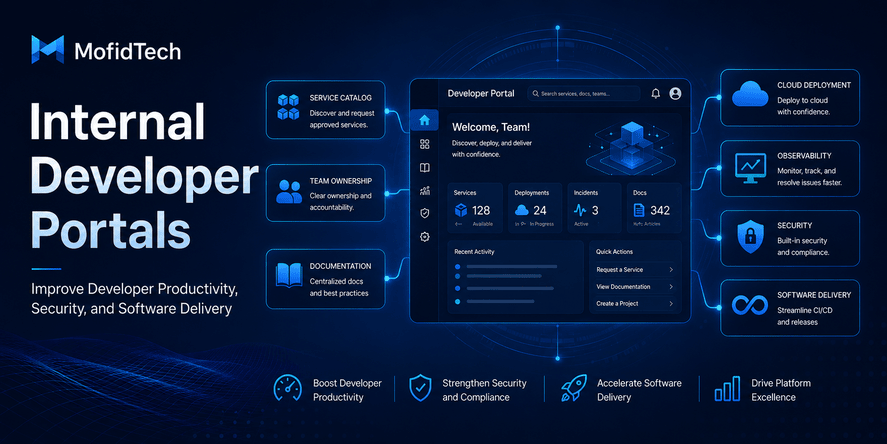
An internal developer portal is a centralized place where engineering teams can find services, documentation, ownership information, deployment status, security checks, operational resources, and self-service workflows. In simple terms, it helps developers understand what exists inside a software organization, who owns it, how it works, how healthy it is, and how to work with it safely.
Modern software teams often move fast, but speed can create confusion. Developers may spend too much time searching for documentation, asking who owns a service, waiting for DevOps support, checking deployment rules, or trying to understand production incidents. As applications grow, the difficulty is no longer only writing code. The bigger challenge becomes managing knowledge, standards, ownership, security, and delivery across many services and teams.
This is where internal developer portals become valuable.
A well-designed developer portal can reduce cognitive load, improve onboarding, strengthen security, make software ownership clearer, and help teams deliver faster without creating chaos. It does not replace DevOps, documentation, observability tools, or cloud platforms. Instead, it connects them into a single developer-friendly experience.
For MofidTech readers, this topic is important because it sits at the intersection of software engineering, DevOps, cloud computing, cybersecurity, developer productivity, documentation, and platform engineering. It is especially relevant in an era where AI coding tools can generate software faster, but organizations still need strong systems to govern, document, secure, and operate that software responsibly.
Table of Contents
- What Is an Internal Developer Portal?
- Why Developer Productivity Is Not Only About Writing Code Faster
- Internal Developer Portal vs Internal Developer Platform
- Core Components of an Internal Developer Portal
- How Internal Developer Portals Improve Developer Productivity
- How Developer Portals Improve Software Delivery
- How Internal Developer Portals Improve Security
- Developer Portals and Platform Engineering
- Internal Developer Portals in the Age of AI Coding Tools
- Real-World Use Cases
- What Should Be Included in a Developer Portal?
- Comparison Table: Without Portal vs With Portal
- Common Mistakes When Building a Developer Portal
- Best Practices for Building an Internal Developer Portal
- Security Considerations
- Performance and Reliability Considerations
- Troubleshooting Developer Portal Problems
- Internal Developer Portal Planning Checklist
- FAQ
- Conclusion
What Is an Internal Developer Portal?
An internal developer portal is a centralized interface that helps developers discover, understand, manage, and operate software systems inside an organization. It usually includes a service catalog, ownership information, documentation, deployment links, security status, observability resources, and self-service workflows.
The main purpose of an internal developer portal is to make engineering work easier, safer, and more consistent.
Instead of forcing developers to search through chat messages, outdated documents, cloud dashboards, deployment tools, monitoring systems, and team spreadsheets, the portal brings essential information together in one place.
A developer should be able to answer questions such as:
- What services exist in our organization?
- Who owns this service?
- Where is the documentation?
- What environment is currently deployed?
- Is this service healthy?
- Does it meet security standards?
- What dependencies does it use?
- Where are the dashboards and logs?
- How do I request a new service, database, environment, or access?
- What standards should I follow before production deployment?
When these answers are easy to find, developers spend less time searching and more time building.
A Simple Definition
An internal developer portal is a private website or platform used by engineering teams to centralize service information, documentation, ownership, operational visibility, and self-service workflows.
Why the Word “Internal” Matters
The portal is usually not public. It is designed for employees, developers, DevOps teams, platform engineers, security teams, SRE teams, and technical managers inside an organization.
Unlike public developer portals, which are often used by external API consumers, an internal developer portal is focused on internal software delivery and engineering productivity.
For example, a company may have a public API documentation website for external developers. That is not the same as an internal developer portal. The internal portal is used by the company’s own teams to manage services, standards, deployments, ownership, security, and operational knowledge.
Why Developer Productivity Is Not Only About Writing Code Faster
Developer productivity is often misunderstood. Many people think productivity means writing more code in less time. In reality, modern developer productivity is much broader.
A productive developer is not only someone who writes code quickly. A productive developer can understand systems, make safe decisions, collaborate effectively, deploy confidently, troubleshoot problems, follow standards, and avoid unnecessary rework.
Internal developer portals support this broader definition of productivity.
The Hidden Cost of Searching for Information
In many teams, developers lose time because important information is scattered across many tools. Documentation may live in one place, deployment status in another, security reports somewhere else, and ownership information inside team memory.
This creates unnecessary friction.
A developer may need to ask several people before finding the owner of a service. A new team member may need days or weeks to understand how systems are connected. A DevOps engineer may receive repeated questions that could have been answered through a self-service portal.
This wasted time is rarely visible in project planning, but it affects delivery speed and team morale.
Cognitive Load Slows Teams Down
Cognitive load means the amount of mental effort required to understand and complete a task. In software engineering, high cognitive load appears when developers must remember too many tools, rules, systems, dependencies, and undocumented processes.
A developer portal reduces cognitive load by making important information accessible, structured, and connected.
Instead of remembering where everything is, developers can use the portal as a map of the engineering ecosystem.
Productivity Also Means Reducing Waiting Time
In many organizations, developers wait for infrastructure access, deployment approvals, environment creation, security reviews, or documentation from another team. Some waiting is necessary, but much of it can be reduced with clear standards and self-service workflows.
A developer portal can help by showing approved processes, providing request forms, connecting to automation, and making requirements clear before a developer needs help.
The result is not only faster development. It is also better coordination between developers, DevOps, security, and platform teams.
Internal Developer Portal vs Internal Developer Platform
An internal developer portal and an internal developer platform are related, but they are not exactly the same.
An internal developer portal is the interface where developers discover information, documentation, services, ownership, and workflows.
An internal developer platform is the underlying system of tools, automation, infrastructure, templates, policies, and workflows that supports software delivery.
The portal is often the visible front door. The platform is the engine behind it.
| Aspect | Internal Developer Portal | Internal Developer Platform |
|---|---|---|
| Main role | Central interface for developers | Technical foundation for delivery |
| Focus | Discovery, documentation, ownership, visibility, self-service | Automation, infrastructure, deployment, environments, standards |
| Users | Developers, DevOps, platform teams, managers, security teams | Developers, platform engineers, DevOps, SRE teams |
| Example value | Find service owner and production dashboard | Create standardized environments and deployment workflows |
| Relationship | Front door to engineering resources | System powering engineering workflows |
A strong platform without a portal may be powerful but difficult to use. A portal without a real platform may look good but provide limited value.
The best approach is to connect both. The portal should make the platform easier to discover, understand, and use.
Core Components of an Internal Developer Portal
A useful internal developer portal should not be just a collection of links. It should organize engineering knowledge around services, teams, ownership, standards, and workflows.
The most valuable components usually include the following.
Service Catalog
A service catalog is the foundation of many developer portals. It lists the software systems, applications, APIs, databases, jobs, libraries, and infrastructure components that exist inside an organization.
For each service, the catalog should answer:
- What is this service?
- What business or technical purpose does it serve?
- Who owns it?
- What team maintains it?
- What dependencies does it have?
- What environments does it run in?
- Where are its dashboards, logs, documentation, and alerts?
- What is its security and operational status?
Without a service catalog, engineering organizations often depend on tribal knowledge. People know things because they have been around long enough, not because the information is documented.
That becomes risky when teams grow, people change roles, or systems become more complex.
Ownership Information
Every important service should have a clear owner. Ownership does not mean one person is blamed for every problem. It means there is a responsible team or group that understands the service and can make decisions about it.
Ownership information is critical during incidents, security reviews, architecture planning, and maintenance work.
A developer portal should make ownership visible and easy to update.
Useful ownership details include:
- Owning team
- Technical contact
- Business contact if relevant
- Escalation path
- On-call or support responsibility
- Maintenance status
Clear ownership prevents confusion. It also helps security and operations teams know who to contact when action is required.
Documentation Hub
Documentation is one of the most common pain points in software teams. It may be outdated, scattered, incomplete, or disconnected from real services.
A developer portal should not only store documentation. It should connect documentation to the services, teams, and workflows it describes.
Good portal documentation includes:
- Service purpose
- Architecture overview
- Deployment process
- Environment information
- Dependency explanations
- Operational notes
- Security requirements
- Troubleshooting guidance
- Known limitations
- Maintenance responsibilities
Documentation becomes more useful when it is close to the system it explains.
Deployment and Environment Visibility
Developers need to know where software is deployed, which version is running, and whether the environment is healthy. Without visibility, teams may waste time asking basic operational questions.
A developer portal can show:
- Development, testing, staging, and production environments
- Deployment status
- Release history
- Change ownership
- Approval requirements
- Production readiness status
- Links to deployment tools
The goal is not necessarily to replace deployment systems. The goal is to make deployment information easy to find and understand.
Observability Links
Observability helps teams understand how systems behave in production. A developer portal should connect services to their monitoring dashboards, logs, traces, alerts, and incident history.
Useful observability information includes:
- Health dashboards
- Error rate dashboards
- Performance dashboards
- Logs
- Tracing views
- Recent incidents
- Service-level objectives if used
- Alert ownership
This helps developers move from “something is broken” to “we know where to look.”
Security and Compliance Status
Security should not be hidden inside separate reports that developers never see. A developer portal can make security status visible and actionable.
For example, a service page may show whether the service has:
- Clear ownership
- Updated dependencies
- Required security review
- Approved authentication method
- Data classification
- Access control rules
- Incident contact
- Backup policy
- Production readiness checks
This does not replace security teams. It helps developers understand security expectations earlier in the development process.
Self-Service Workflows
Self-service is one of the strongest benefits of internal developer portals. It allows developers to request or create common resources using approved workflows instead of waiting for manual support.
Self-service workflows may include:
- Requesting a new service
- Requesting access
- Creating documentation pages
- Registering a service in the catalog
- Requesting infrastructure resources
- Starting a security review
- Requesting a deployment environment
- Creating a project template
- Requesting operational support
The goal is not to remove human judgment from important decisions. The goal is to reduce repetitive manual work and make standard processes easier.
How Internal Developer Portals Improve Developer Productivity
Internal developer portals improve productivity by reducing friction, improving discoverability, standardizing workflows, and making engineering knowledge easier to use.
Faster Onboarding
New developers often struggle because they do not know where things are. They need to understand systems, teams, tools, environments, deployment processes, security expectations, and communication channels.
A developer portal can become the first place a new engineer visits.
It can provide:
- A map of services
- Team ownership details
- Required documentation
- Development workflow explanations
- Security expectations
- Deployment rules
- Links to tools and dashboards
- Onboarding checklists
This helps new team members become productive faster and reduces the burden on senior developers.
Less Time Asking Repeated Questions
In many organizations, the same questions are asked repeatedly:
- Who owns this service?
- Where is the documentation?
- Which environment should I use?
- How do I request access?
- Where are the logs?
- Is this service still active?
- What should I check before deployment?
A developer portal answers these questions in a consistent place. This reduces interruptions and allows experienced engineers to focus on deeper work.
Better Developer Experience
Developer experience is about how easy and pleasant it is for developers to do their work. Poor developer experience creates frustration, delays, mistakes, and lower morale.
A portal improves developer experience by giving developers a clear path through complex systems.
Instead of forcing developers to understand the entire organization manually, the portal gives them a guided view of services, standards, and workflows.
Reduced Context Switching
Context switching happens when developers move between too many tools and communication channels. They may need to check a documentation system, a cloud console, a deployment tool, a monitoring dashboard, a chat conversation, and a spreadsheet just to understand one service.
A portal reduces context switching by connecting these resources from one place.
The portal does not need to replace every tool. It only needs to provide a useful starting point.
More Consistent Engineering Practices
When each team follows different practices, the organization becomes harder to manage. Some teams may document well, others may not. Some services may have clear ownership, others may be unknown. Some deployments may follow security standards, others may not.
A developer portal helps standardize expectations.
It can make engineering standards visible and measurable. For example, each service can be evaluated against documentation, ownership, observability, and security requirements.
This helps teams improve without relying only on meetings and reminders.
How Developer Portals Improve Software Delivery
Software delivery is not just the act of releasing code. It includes planning, development, review, testing, deployment, monitoring, incident response, documentation, and maintenance.
An internal developer portal supports the full delivery lifecycle.
Better Visibility Across Services
As organizations grow, software systems become harder to understand. A single feature may depend on multiple services, databases, APIs, queues, cloud resources, and third-party systems.
A portal gives teams visibility into this ecosystem.
When service relationships are documented and searchable, developers can better understand the impact of changes.
Clearer Production Readiness
Production readiness means a service is prepared to run safely in a live environment. A developer portal can help teams check readiness before deployment.
Production readiness may include:
- Ownership is defined
- Documentation exists
- Monitoring is available
- Alerts are configured
- Security requirements are reviewed
- Dependencies are known
- Backup and recovery expectations are understood
- Incident response path is clear
By making these expectations visible, teams can avoid releasing fragile systems.
Faster Collaboration Between Teams
Software delivery often requires collaboration across development, DevOps, security, QA, product, and management teams.
A portal provides shared context.
Instead of each team maintaining separate views of the system, the portal becomes a common reference point. This reduces misunderstandings and improves decision-making.
Better Maintenance Over Time
Many teams focus heavily on launching new systems but struggle to maintain them. Over time, services may become outdated, undocumented, or ownerless.
A developer portal can show service health and maintenance status.
This helps teams identify systems that need attention before they become serious risks.
How Internal Developer Portals Improve Security
Internal developer portals improve security by making ownership, standards, risks, and security responsibilities visible to developers.
Security is stronger when it is integrated into engineering workflows instead of treated as a separate final step.
Clear Ownership Improves Security Response
When a vulnerability is found, the security team must know who owns the affected service. If ownership is unclear, response time becomes slower.
A portal solves this by connecting every service to an owner.
This is especially important for:
- Vulnerability remediation
- Incident response
- Access reviews
- Dependency updates
- Data protection reviews
- Compliance checks
Clear ownership turns security from a guessing game into an organized process.
Security Standards Become Easier to Follow
Developers are more likely to follow security standards when those standards are clear, accessible, and connected to their work.
A portal can show security expectations for different types of systems:
- Public web applications
- Internal APIs
- Data processing services
- Cloud workloads
- Administrative tools
- Authentication systems
- Customer-facing platforms
Instead of searching through policy documents, developers can find relevant guidance directly from the service page or workflow.
Earlier Security Awareness
Security problems are more expensive and disruptive when discovered late. A developer portal can bring security awareness earlier into the development lifecycle.
For example, before a service goes to production, the portal can remind teams to check authentication, access control, logging, data sensitivity, dependency risk, and operational readiness.
This creates a more proactive security culture.
Better Auditability
Security audits are difficult when information is scattered. A portal helps centralize evidence about ownership, documentation, security reviews, operational status, and production readiness.
This can help organizations answer questions such as:
- Which services handle sensitive data?
- Which services are externally exposed?
- Which services have missing owners?
- Which systems do not meet monitoring requirements?
- Which teams need to update documentation?
- Which services require security review?
The portal does not automatically make an organization compliant, but it makes compliance work more visible and manageable.
Developer Portals and Platform Engineering
Platform engineering is the practice of building internal systems that help developers deliver software more efficiently and safely. Internal developer portals are often a key part of platform engineering.
Why Platform Teams Build Developer Portals
Platform teams often receive repeated requests from developers. These may include environment setup, deployment help, access requests, infrastructure questions, and documentation support.
A developer portal allows platform teams to turn repeated requests into self-service workflows.
This improves both sides:
- Developers get faster access to approved processes.
- Platform teams spend less time on repetitive manual work.
Portal as the Front Door to the Platform
The developer portal can act as the front door to the internal developer platform.
Developers should not need to understand every detail of cloud infrastructure, deployment automation, monitoring tools, or security systems. They need a clear and safe way to use them.
The portal provides that entry point.
Platform Engineering Is Not Only for Large Companies
Large companies often need developer portals because they have many teams and services. However, smaller teams can also benefit from portal thinking.
A small team may not need a complex platform, but it still needs:
- Clear documentation
- Service ownership
- Deployment standards
- Security checklists
- Incident response notes
- Environment visibility
- Reliable onboarding
The key is to start small and solve real problems.
Internal Developer Portals in the Age of AI Coding Tools
AI coding tools can help developers write, review, and understand software faster. However, faster code creation also increases the need for stronger engineering governance.
Internal developer portals become more important when AI-assisted development grows.
AI Can Generate Code, but It Does Not Own Systems
AI tools can suggest implementations, explain errors, or generate technical content, but they do not take responsibility for production systems.
A developer portal helps ensure that every service still has:
- Human ownership
- Documentation
- Security standards
- Operational visibility
- Maintenance responsibility
- Deployment rules
This is important because productivity without governance can create technical debt.
AI-Assisted Development Needs Strong Context
AI tools are more useful when engineering knowledge is organized. If documentation, ownership, standards, and service relationships are scattered, AI tools may provide incomplete or risky suggestions.
A developer portal can become a structured knowledge base that improves how teams understand their systems.
Even when AI is not directly connected to the portal, the portal improves human decision-making by making context easier to find.
Portals Help Control Quality
When developers use AI tools, teams still need consistent quality rules. A portal can define what must be checked before release, what documentation is required, and what security standards apply.
This helps organizations benefit from AI speed without losing control over software quality.
Real-World Use Cases
Internal developer portals can support many practical use cases across software teams.
Use Case 1: New Developer Onboarding
A new developer joins the team and needs to understand the company’s systems. Instead of receiving many disconnected links, they start from the developer portal.
They can see services, teams, documentation, deployment processes, security rules, and common workflows. This reduces confusion and helps them become productive sooner.
Use Case 2: Finding the Owner of a Production Service
An incident occurs in production. The operations team needs to know who owns the affected service.
With a developer portal, they can search for the service, identify the owner, find escalation contacts, and access dashboards or incident notes.
This improves incident response.
Use Case 3: Preparing a Service for Production
A team wants to deploy a new service. The portal shows production readiness requirements.
The team checks documentation, monitoring, ownership, security review, backup expectations, and incident response information before release.
This reduces deployment risk.
Use Case 4: Security Review
The security team needs to identify services that handle sensitive data or lack required security checks.
The portal provides a structured view of services and their security status.
This helps security teams prioritize work and contact the right owners.
Use Case 5: Reducing Repetitive DevOps Requests
Developers repeatedly ask for similar resources or guidance. The platform team converts common requests into portal-based self-service workflows.
This reduces manual work and improves developer satisfaction.
What Should Be Included in a Developer Portal?
A developer portal should include the information and workflows that developers need most often. It should not become a random collection of links.
The best starting point is usually a service catalog.
Essential Elements
A useful portal should include:
- Service catalog
- Ownership details
- Documentation links
- Deployment information
- Environment information
- Observability links
- Security status
- Dependency information
- Support and escalation contacts
- Self-service workflows
- Engineering standards
- Onboarding resources
Optional Advanced Elements
As the portal matures, it may include:
- Scorecards for service health
- Production readiness checks
- Compliance tracking
- Cost visibility
- API ownership mapping
- Dependency risk indicators
- Incident history
- Architecture diagrams
- Lifecycle status
- AI-assisted documentation search
- Developer productivity metrics
Advanced features should only be added when the basics are useful and trusted.
Comparison Table: Without Portal vs With Portal
| Area | Without Internal Developer Portal | With Internal Developer Portal |
|---|---|---|
| Service discovery | Developers ask around or search manually | Services are searchable in one catalog |
| Ownership | Often unclear or outdated | Owners are visible and maintained |
| Documentation | Scattered across tools | Connected to services and teams |
| Onboarding | Slow and dependent on people | Guided and more consistent |
| Security checks | Often late or separate from development | Visible earlier in the workflow |
| Deployment visibility | Requires checking multiple tools | Centralized links and status |
| Incident response | Contact paths may be unclear | Escalation and dashboards are easier to find |
| DevOps requests | Many repeated manual requests | Common workflows become self-service |
| Standards | Hard to enforce consistently | Standards are visible and measurable |
| Maintenance | Old services may be forgotten | Service lifecycle is easier to track |
Common Mistakes When Building a Developer Portal
A developer portal can fail if it is built as a tool-first project instead of a developer experience project.
Mistake 1: Starting With Tools Instead of Problems
Some teams begin by choosing a portal tool before understanding developer pain points. This can lead to a portal that looks impressive but does not solve real problems.
The better approach is to ask:
- What information do developers struggle to find?
- What repeated questions slow teams down?
- Which workflows create waiting time?
- Where do security or deployment mistakes happen?
- What would make onboarding easier?
The portal should solve real friction.
Mistake 2: Creating a Link Directory Instead of a Portal
A list of links is not enough. Developers need context.
A good portal explains what a service is, who owns it, how it is operated, and what actions developers can take.
A weak portal only says, “Here are some links.”
Mistake 3: Ignoring Ownership
If nobody owns the data inside the portal, it becomes outdated quickly.
Each service should have an owner responsible for keeping information accurate. Portal maintenance should be part of normal engineering work, not an occasional cleanup activity.
Mistake 4: Adding Too Many Features Too Early
A complex portal can overwhelm developers. Teams should start with the most useful features and expand gradually.
A simple, accurate service catalog is more valuable than an advanced portal full of outdated information.
Mistake 5: Treating the Portal as a Management Dashboard Only
A developer portal should primarily serve developers. Managers may benefit from visibility, but the portal should not become only a reporting tool.
If developers do not find it useful, they will not use it.
Mistake 6: Failing to Integrate With Existing Workflows
A portal should fit naturally into engineering workflows. If developers must manually duplicate information, adoption will suffer.
The portal should connect to existing documentation, ownership processes, deployment tools, monitoring systems, and security workflows where possible.
Best Practices for Building an Internal Developer Portal
A successful developer portal starts small, solves real problems, and grows based on developer needs.
Start With a Clear Purpose
Before building the portal, define its purpose.
Good purposes include:
- Help developers find services and owners
- Improve onboarding
- Reduce repeated DevOps questions
- Make production readiness visible
- Improve security awareness
- Centralize operational context
- Standardize engineering practices
A vague purpose leads to a vague portal.
Start With the Service Catalog
The service catalog is often the most valuable first feature. It creates the foundation for ownership, documentation, observability, security, and lifecycle management.
Each service entry should be simple but useful.
At minimum, it should include:
- Service name
- Description
- Owner
- Team
- Documentation
- Environment information
- Operational links
- Security classification if relevant
- Lifecycle status
Make Ownership Mandatory
Every service should have an owner. If ownership is unknown, that should be visible as a problem to fix.
Ownership creates accountability and improves communication.
Connect Documentation to Real Systems
Documentation should not live separately from the services it explains. Each service page should link to its documentation, architecture notes, operational guidance, and troubleshooting information.
This makes documentation easier to find and more likely to stay relevant.
Add Security Gradually
Security features can begin with simple indicators:
- Does the service have an owner?
- Is authentication documented?
- Is sensitive data involved?
- Are dependencies maintained?
- Is monitoring available?
- Is incident response defined?
Later, the portal can include more advanced security and compliance information.
Measure Usefulness
A portal should be measured by usefulness, not only by the number of pages or features.
Useful questions include:
- Are developers using it?
- Are repeated questions decreasing?
- Is onboarding faster?
- Are services better documented?
- Are owners easier to find?
- Are security reviews more organized?
- Are deployment problems reduced?
The best portal is the one developers actually trust.
Security Considerations
A developer portal contains sensitive internal information. It should be designed with security in mind.
Access Control
Not every user needs access to every detail. The portal should respect internal access rules.
Some information may be visible to all engineering employees, while other information may be restricted to specific teams.
Sensitive details should be handled carefully.
Data Classification
Services that handle personal, financial, health, authentication, or confidential business data should be clearly classified.
Data classification helps developers understand risk and follow appropriate security practices.
Avoid Exposing Secrets
A developer portal must never become a place where secrets, passwords, private keys, or sensitive tokens are stored in plain text.
It should link to approved secret management processes instead of exposing sensitive values.
Audit and Change History
Important changes to ownership, service classification, production readiness, or security status should be traceable.
Auditability helps teams understand who changed what and when.
Secure Integrations
If the portal connects to deployment tools, cloud systems, monitoring platforms, or security scanners, integrations must be secured carefully.
Poorly secured integrations can create new risks.
Performance and Reliability Considerations
A developer portal becomes part of the engineering workflow. If it is slow, unreliable, or outdated, developers will stop trusting it.
The Portal Should Be Fast Enough for Daily Use
Developers should be able to search services, open service pages, and find information quickly.
A slow portal creates frustration and reduces adoption.
Reliability Matters
If the portal is used during incidents, it must be available when teams need it. If the portal goes down during a production problem, response may become harder.
Important operational information should remain accessible.
Avoid Overloading the Portal
The portal should not try to become every tool at once. It should connect to specialized tools where appropriate.
For example, it may link to monitoring dashboards instead of duplicating every monitoring feature.
Keep Information Fresh
Outdated information is one of the biggest threats to portal trust.
Developers will stop using the portal if service owners, documentation, or dashboards are wrong.
A good portal needs maintenance processes, ownership rules, and regular review.
Troubleshooting Developer Portal Problems
Even a well-planned developer portal can face adoption and quality problems.
Problem: Developers Do Not Use the Portal
Possible causes:
- The portal does not solve real problems
- Information is outdated
- Developers were not involved in design
- The portal is hard to search
- It adds extra work without clear value
- Teams still rely on chat and tribal knowledge
Recommended solution:
Start by interviewing developers. Identify the top repeated questions and make the portal answer them better than existing channels. Improve search, remove outdated content, and focus on high-value workflows.
Problem: Information Becomes Outdated
Possible causes:
- No ownership for portal content
- Manual updates are too difficult
- Teams do not see value in maintaining data
- Portal updates are not part of normal workflows
Recommended solution:
Make service owners responsible for accuracy. Add review reminders. Connect portal data to existing systems where possible. Keep required fields simple and meaningful.
Problem: The Portal Is Too Complex
Possible causes:
- Too many features were added too early
- The portal tries to serve every team equally
- Navigation is confusing
- The service catalog is not well organized
Recommended solution:
Simplify the portal around the most common developer tasks. Focus on service discovery, ownership, documentation, and operational links before adding advanced features.
Problem: Security Teams Do Not Trust the Portal
Possible causes:
- Security information is incomplete
- Data classification is inconsistent
- Ownership is unclear
- Security status is manually entered and rarely updated
Recommended solution:
Define minimum security fields. Connect security requirements to service ownership. Establish a review process for sensitive systems.
Problem: Managers Use It, but Developers Do Not
Possible causes:
- The portal became a reporting dashboard
- It does not help daily development work
- It measures teams without helping them
Recommended solution:
Refocus on developer experience. Add practical workflows, useful documentation, and fast service discovery. Management visibility should be a benefit, not the main purpose.
Internal Developer Portal Planning Checklist
Use this checklist before building or improving an internal developer portal.
Strategy Checklist
- The main purpose of the portal is clearly defined.
- The portal solves real developer pain points.
- Developers have been asked what information they struggle to find.
- The portal is not being built only because it is trendy.
- Success criteria are defined.
- The first version is intentionally simple.
Service Catalog Checklist
- Each service has a clear name.
- Each service has a useful description.
- Each service has an owner.
- Each service has a team.
- Documentation is connected to the service.
- Environment information is available.
- Operational links are easy to find.
- Lifecycle status is clear.
Documentation Checklist
- Documentation is linked to real services.
- Documentation explains purpose, ownership, and operation.
- Outdated documentation can be identified.
- Important services have troubleshooting notes.
- New developers can use the documentation without relying only on senior engineers.
Security Checklist
- Services have ownership.
- Sensitive data handling is identified where relevant.
- Security expectations are visible.
- Access control is considered.
- Secrets are not exposed in the portal.
- Security review status can be tracked.
- Incident contacts are clear.
Developer Experience Checklist
- Search is easy to use.
- Navigation is simple.
- Developers can find common answers quickly.
- The portal reduces repeated questions.
- Self-service workflows are easy to understand.
- Developers trust the information.
- Feedback is collected regularly.
Platform Engineering Checklist
- Repetitive requests are identified.
- Common workflows are candidates for self-service.
- The portal connects to existing tools where useful.
- Platform teams maintain standards.
- Developers are not forced to understand unnecessary infrastructure complexity.
- The portal supports safe autonomy.
Decision Framework: When Does a Team Need an Internal Developer Portal?
Not every team needs a complex developer portal immediately. The need grows with team size, service complexity, operational risk, and delivery friction.
A Team Probably Needs a Portal If:
- Developers often ask who owns a service.
- Documentation is scattered or outdated.
- Production systems lack clear ownership.
- Onboarding takes too long.
- DevOps teams receive repeated manual requests.
- Security teams struggle to identify service owners.
- Teams use many deployment, monitoring, and cloud tools.
- Incidents are slowed by missing information.
- There are many services, APIs, or environments.
- Engineering standards are inconsistent.
A Team May Not Need a Full Portal Yet If:
- It has only a few developers.
- It has a very small number of services.
- Documentation is already simple and trusted.
- Ownership is obvious.
- Deployment workflows are straightforward.
- Operational risk is low.
Even in smaller teams, portal thinking is still useful. A simple service catalog and documentation hub can provide many benefits without requiring a large platform investment.
Internal Developer Portal Maturity Model
Teams can build developer portals gradually.
| Maturity Level | Description | Typical Features |
|---|---|---|
| Level 1: Basic documentation | Centralized links and basic guides | Onboarding docs, team pages, service notes |
| Level 2: Service catalog | Services are listed and searchable | Service ownership, descriptions, documentation links |
| Level 3: Operational visibility | Services connect to runtime information | Dashboards, alerts, environments, incident links |
| Level 4: Security and standards | Portal shows quality and risk indicators | Security status, readiness checks, ownership scorecards |
| Level 5: Self-service platform | Developers can perform approved actions | Requests, templates, automation, workflow integration |
| Level 6: Intelligent engineering hub | Portal becomes a knowledge and decision system | AI-assisted search, recommendations, advanced governance |
Most teams should not start at Level 6. They should begin with Level 1 or Level 2 and grow based on real needs.
Best Practices for Long-Term Success
A developer portal is not a one-time project. It is a living engineering product.
Treat the Portal as a Product
The portal has users, problems, feedback, adoption challenges, and improvement cycles. It should be managed like a product, not like a static internal website.
This means:
- Understand user needs
- Prioritize features
- Measure adoption
- Improve usability
- Remove unused features
- Keep information accurate
- Communicate value clearly
Assign Ownership
The portal itself needs an owner. This may be a platform engineering team, DevOps team, developer experience team, or shared engineering group.
Without ownership, the portal will decay.
Keep the First Version Simple
A simple portal that answers important questions is better than a complex portal nobody trusts.
Start with the basics:
- Services
- Owners
- Documentation
- Operational links
- Security notes
- Support contacts
Then expand.
Make It Part of Engineering Culture
Developers should naturally think, “Check the portal first.”
For that to happen, the portal must be reliable, useful, and easier than asking in chat.
Cultural adoption happens when the portal saves time.
FAQ About Internal Developer Portals
1. What is an internal developer portal?
An internal developer portal is a private platform where engineering teams can find service catalogs, documentation, ownership information, deployment visibility, security status, observability links, and self-service workflows. It helps developers work faster and more safely by centralizing important engineering knowledge.
2. How does an internal developer portal improve developer productivity?
It improves productivity by reducing the time developers spend searching for information, asking repeated questions, waiting for manual support, and switching between tools. It gives developers a clear place to find services, owners, documentation, deployment details, and operational resources.
3. What is the difference between an internal developer portal and an internal developer platform?
The portal is the developer-facing interface. The platform is the underlying system of tools, automation, infrastructure, and workflows. The portal helps developers discover and use the platform more easily.
4. Is an internal developer portal only for large companies?
No. Large companies often need full-featured portals, but small and medium teams can still benefit from portal concepts such as service catalogs, ownership records, documentation hubs, and deployment checklists.
5. What should be included first in a developer portal?
The best first feature is usually a service catalog. It should include service names, descriptions, owners, teams, documentation links, environment information, operational dashboards, and support contacts.
6. How does a developer portal improve security?
It improves security by making service ownership, security requirements, sensitive data classification, dependency status, and incident contacts easier to find. This helps teams respond faster to vulnerabilities and apply security standards earlier.
7. Does a developer portal replace documentation?
No. A developer portal does not replace documentation. It organizes documentation and connects it to services, teams, ownership, environments, and workflows. It makes documentation easier to discover and maintain.
8. Does a developer portal replace DevOps?
No. A developer portal supports DevOps by reducing repetitive questions, standardizing workflows, and enabling self-service. DevOps and platform teams still design, maintain, and improve the systems behind the portal.
9. What is a service catalog?
A service catalog is a structured list of software systems, applications, APIs, databases, jobs, or components inside an organization. It usually includes ownership, documentation, dependencies, operational links, and lifecycle status.
10. How can teams measure developer portal success?
Teams can measure success by tracking adoption, reduced repeated questions, faster onboarding, improved documentation coverage, clearer ownership, fewer production readiness gaps, and improved developer satisfaction.
11. What are common mistakes when building a developer portal?
Common mistakes include starting with tools instead of problems, creating only a link directory, ignoring ownership, adding too many features too early, failing to maintain data, and building a portal for managers instead of developers.
12. How are developer portals related to AI coding tools?
AI coding tools can accelerate software creation, but teams still need ownership, documentation, security, deployment standards, and operational visibility. Developer portals provide the structure needed to manage AI-assisted software delivery responsibly.
Conclusion
Internal developer portals are becoming an important part of modern software engineering because they solve a real problem: engineering knowledge is often scattered, outdated, and difficult to use.
A good developer portal gives teams a central place to understand services, ownership, documentation, security, deployment status, observability, and self-service workflows. It improves developer productivity not by forcing developers to write more code, but by reducing friction around the entire software delivery process.
The strongest developer portals are not just link collections. They are engineering knowledge hubs connected to real systems, real ownership, and real workflows.
For small teams, the journey can begin with a simple service catalog and documentation hub. For larger teams, the portal can evolve into a full platform engineering front door with security checks, operational visibility, and self-service workflows.
In the age of AI coding tools, internal developer portals become even more valuable. AI can help generate software faster, but organizations still need human ownership, governance, documentation, security, and production readiness. A developer portal helps connect speed with responsibility.
For MofidTech readers, the key lesson is clear: developer productivity is not only about tools that write code faster. It is also about building systems that help developers understand, deliver, secure, and operate software with confidence.










💬 Comments
No comments yet. Be the first to comment!
Login to comment.