Introduction
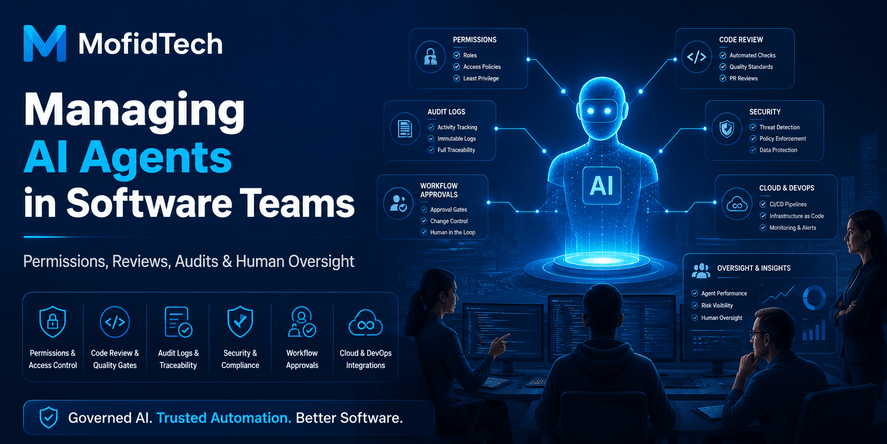
AI agents are becoming part of modern software teams. They can summarize issues, review documentation, generate implementation ideas, inspect logs, suggest fixes, help write tests, create project plans, analyze requirements, and connect different tools together. For many teams, this is no longer only a productivity experiment. AI agents are starting to behave like digital assistants inside real development workflows.
That creates a new challenge.
A normal AI chatbot gives suggestions. An AI agent may take action. It may read repositories, open tickets, modify documentation, interact with project management tools, inspect monitoring dashboards, analyze security reports, or recommend deployment decisions. As soon as an AI system can access tools, data, workflows, or production-related context, it becomes a governance problem, not just a productivity tool.
AI agent governance means defining what AI agents are allowed to access, what they are allowed to change, who must review their work, how their actions are logged, and who remains responsible for the final decision.
Software teams should not treat AI agents as magical automation. They should treat them like digital team members with limited permissions, clear responsibilities, human supervision, audit trails, and security boundaries.
A well-managed AI agent can improve productivity. A poorly managed AI agent can introduce insecure changes, expose sensitive data, create technical debt, recommend dangerous shortcuts, or make actions that nobody can properly trace later.
This guide explains how software teams can manage AI agents safely using permissions, reviews, audits, human oversight, security controls, and practical governance workflows.
Table of Contents
- What Is AI Agent Governance?
- Why AI Agents Need Management in Software Teams
- How AI Agents Differ from Traditional AI Tools
- The Core Principle: Treat AI Agents Like Digital Team Members
- AI Agent Permission Levels
- Human-in-the-Loop Review Workflows
- Audit Trails and Traceability
- Security Controls for AI Agents
- AI Agents and Software Quality
- AI Agents in DevOps and Cloud Workflows
- AI Agents and Sensitive Data
- Governance Models for Small Teams
- Governance Models for Larger Engineering Teams
- Common Mistakes When Managing AI Agents
- Practical AI Agent Governance Checklist
- Comparison: Unmanaged AI Agents vs Governed AI Agents
- FAQ
- Conclusion
What Is AI Agent Governance?
AI agent governance is the process of controlling, supervising, reviewing, and auditing how AI agents operate inside a software team.
It answers important questions:
- What can the AI agent access?
- What can it read?
- What can it change?
- What actions require human approval?
- Who reviews its output?
- Who owns the final decision?
- How are its actions logged?
- How can the team detect mistakes?
- How can the team roll back a bad decision?
- How can the organization prevent misuse?
In software engineering, governance is not only about rules. It is about creating safe workflows. A good governance model allows teams to benefit from AI speed while keeping human control over quality, security, architecture, and business decisions.
AI agents should not operate in a vague environment where everyone assumes the tool is helpful and nobody knows exactly what it changed. Every meaningful AI action should have context, limits, review, and accountability.
Direct Answer: How Do You Manage AI Agents in Software Teams?
To manage AI agents safely in software teams, define clear permissions, limit access using least privilege, require human review for important changes, log all agent actions, protect sensitive data, create approval workflows, monitor agent behavior, and assign human ownership for every final decision.
The most important rule is simple:
AI agents can assist, but humans must remain accountable.
An AI agent may suggest a solution, analyze an issue, or prepare a change. But the team should decide when a human must approve the result before it affects code, users, infrastructure, security, or business operations.
Why AI Agents Need Management in Software Teams
AI agents can improve productivity, but they also introduce new risks. The more access they have, the more governance they need.
A simple AI assistant that only explains concepts has limited risk. An AI agent connected to repositories, issue trackers, cloud dashboards, documentation systems, or deployment workflows has much higher risk.
AI Agents Can Influence Real Engineering Decisions
Software teams may use agents to:
- Analyze bug reports
- Summarize incident logs
- Suggest code changes
- Propose architecture decisions
- Review pull requests
- Generate test plans
- Write documentation
- Prioritize tickets
- Explain monitoring alerts
- Recommend deployment actions
- Support security triage
These tasks influence real systems. If the AI misunderstands context, gives incomplete advice, or misses security implications, the team may make poor decisions faster.
AI Agents Can Scale Mistakes
A human developer may make one mistake slowly. An AI agent can repeat the same mistake across multiple files, tickets, documents, or workflows quickly.
This is why review gates are essential. Speed is useful only when the team can control quality.
AI Agents Can Access Sensitive Context
AI agents may process:
- Internal documentation
- Source code
- Security policies
- Customer support tickets
- Logs
- Error traces
- Database schemas
- Cloud architecture notes
- Incident reports
- Business requirements
Even if the agent does not intentionally leak data, unsafe configuration can expose sensitive information to systems, users, tools, or prompts that should not receive it.
AI Agents Can Create Accountability Gaps
If an AI agent recommends a change and a human applies it without review, who is responsible when the change causes a failure?
The answer should always be clear before the team adopts AI agents. Responsibility cannot be delegated to a tool. A human owner must approve important decisions.
How AI Agents Differ from Traditional AI Tools
Traditional AI tools usually respond to a single prompt. AI agents are different because they may plan, use tools, remember context, interact with systems, and perform multi-step tasks.
| Area | Traditional AI Assistant | AI Agent |
|---|---|---|
| Main function | Answers questions or generates content | Performs tasks through connected tools |
| Access level | Often limited to user input | May access repositories, tickets, files, or systems |
| Risk level | Lower when isolated | Higher when connected to workflows |
| Review need | Useful but sometimes optional | Required for important actions |
| Governance need | Basic usage policy | Permissions, audits, approvals, monitoring |
| Accountability | User interprets output | Team must control actions and decisions |
The risk increases when AI moves from “suggesting” to “acting.”
For example, an AI assistant may explain how to improve a deployment workflow. An AI agent may inspect the workflow, suggest changes, open a task, modify documentation, or prepare an update. That extra ability creates value, but it also creates risk.
The Core Principle: Treat AI Agents Like Digital Team Members
The safest way to manage AI agents is to treat them like digital team members with controlled responsibilities.
A new human employee does not receive unlimited access on the first day. They receive access based on their role, team, responsibility, trust level, and review process.
AI agents should be managed the same way.
Each AI Agent Should Have a Clear Role
Avoid creating vague agents with broad instructions like “help the engineering team.” Instead, define specific roles.
Examples of better roles:
- Documentation assistant
- Pull request review assistant
- Security checklist assistant
- Incident summary assistant
- Test planning assistant
- Product requirement analysis assistant
- Technical SEO assistant
- Dependency review assistant
- Support ticket summarization assistant
A narrow role makes the agent easier to supervise.
Each AI Agent Should Have an Owner
Every AI agent should have a human owner. This owner is responsible for:
- Defining the agent’s purpose
- Approving its access level
- Reviewing its usefulness
- Monitoring failures
- Updating its instructions
- Removing access when no longer needed
Without ownership, AI agents can become unmanaged automation inside the organization.
Each AI Agent Should Have Boundaries
Boundaries should define what the agent must not do.
Examples:
- Must not access production secrets
- Must not approve its own changes
- Must not modify security policies without review
- Must not make deployment decisions alone
- Must not process personal data unless approved
- Must not communicate with customers without human supervision
- Must not create final architecture decisions without review
Clear boundaries reduce ambiguity.
AI Agent Permission Levels
Permissions are one of the most important parts of AI agent governance. The principle of least privilege should apply.
Least privilege means an AI agent should only have the minimum access needed to perform its specific task.
Level 1: No System Access
At this level, the AI agent only answers questions based on user-provided input. It cannot connect to repositories, files, tickets, cloud services, or internal systems.
This is the safest level and is suitable for learning, brainstorming, writing explanations, summarizing public concepts, and preparing checklists.
Level 2: Read-Only Access
The agent can read selected information but cannot modify anything.
Suitable for:
- Documentation search
- Code explanation
- Log summarization
- Ticket summarization
- Architecture review
- Security policy review
- Knowledge base assistance
Read-only access is useful, but it still requires care. Reading sensitive data can still create privacy and security risks.
Level 3: Suggestion Access
The agent can generate suggested changes, but humans must apply them manually or approve them through a controlled workflow.
Suitable for:
- Suggested documentation edits
- Suggested test plans
- Suggested issue classifications
- Suggested pull request comments
- Suggested refactoring plans
- Suggested security improvements
This is often the best balance for many teams. The AI improves speed, but humans remain in control.
Level 4: Limited Write Access
The agent can create or modify low-risk items under strict rules.
Examples:
- Draft documentation updates
- Create internal tickets
- Label issues
- Prepare draft release notes
- Generate draft checklists
- Suggest non-production configuration notes
This level requires logging and review.
Level 5: High-Risk Operational Access
The agent can interact with critical systems, production workflows, deployment processes, infrastructure, customer data, or security-sensitive tools.
This level should be rare and heavily controlled.
It requires:
- Strong human approval
- Detailed audit logs
- Restricted scope
- Security review
- Rollback process
- Monitoring
- Clear accountability
- Regular access reviews
Most teams should avoid giving AI agents direct high-risk operational access unless they have mature governance.
Recommended AI Agent Permission Matrix
| AI Agent Task | Recommended Permission Level | Human Review Needed? | Risk Level |
|---|---|---|---|
| Summarize public documentation | No system access | Optional | Low |
| Summarize internal documentation | Read-only | Recommended | Medium |
| Explain source code | Read-only | Recommended | Medium |
| Suggest code improvements | Suggestion access | Required | Medium |
| Draft documentation updates | Limited write access | Required before publishing | Medium |
| Label issues | Limited write access | Periodic review | Low to medium |
| Review security reports | Read-only or suggestion access | Required | High |
| Suggest deployment changes | Suggestion access | Required | High |
| Modify production settings | High-risk operational access | Mandatory | Very high |
| Access secrets | Usually not allowed | Mandatory exception process | Very high |
The safest default is simple: AI agents should suggest; humans should approve.
Human-in-the-Loop Review Workflows
Human-in-the-loop review means a person reviews and approves important AI-generated output before it affects real systems.
This is not a sign of mistrust. It is a normal engineering control.
Software teams already use code reviews, security reviews, architecture reviews, and deployment approvals. AI agent output should fit into these existing workflows.
When Human Review Is Required
Human review should be required when AI output affects:
- Source code
- Security controls
- Authentication or authorization
- Infrastructure
- Deployment
- User data
- Production systems
- Database structure
- Performance-critical workflows
- Legal or compliance-sensitive content
- Customer-facing communication
- Architecture decisions
AI can accelerate preparation, but humans should approve final changes.
Review Should Match the Risk
Not every AI action needs the same level of review.
A draft internal note may need light review. A security-related recommendation needs deeper review. A production deployment suggestion needs strict approval.
| Risk Level | Example | Review Type |
|---|---|---|
| Low | Drafting internal documentation | Quick human check |
| Medium | Suggesting code improvement | Peer review |
| High | Security-related recommendation | Security-aware review |
| Very high | Production-impacting action | Formal approval |
The review process should be practical. If it is too heavy, teams will bypass it. If it is too weak, risk increases.
AI Should Not Approve Its Own Work
An important rule is that an AI agent should not be the final reviewer of its own output.
AI can help prepare a checklist. AI can help identify possible issues. AI can compare options. But the final approval should come from a responsible human.
This avoids circular validation, where the same system creates and approves a decision without independent judgment.
Audit Trails and Traceability
Audit trails are essential for managing AI agents.
An audit trail records what happened, when it happened, which agent was involved, what data was used, what output was generated, what human approved it, and what action followed.
What Should Be Logged?
Teams should log meaningful AI agent activity, especially when the agent interacts with internal tools.
Useful audit information includes:
- Agent name or identifier
- Agent role
- Date and time of activity
- User who initiated the task
- Systems accessed
- Type of data accessed
- Output generated
- Suggested action
- Human reviewer
- Approval status
- Final action taken
- Rollback information if relevant
The goal is not to collect unnecessary noise. The goal is to make important actions traceable.
Why Audit Trails Matter
Audit trails help teams answer critical questions:
- Why was this change made?
- Was the change AI-generated?
- Who approved it?
- What information did the AI use?
- Did the AI access sensitive data?
- Was the recommendation reviewed?
- Can we reproduce the decision?
- Can we roll back the change?
Without audit trails, AI-assisted work becomes difficult to investigate.
Audit Trails Improve Trust
Developers may be more comfortable using AI agents when the system is transparent. Managers and security teams may also trust AI workflows more when they can inspect behavior.
Governance is not only about restriction. It is also about confidence.
Security Controls for AI Agents
Security must be part of AI agent adoption from the beginning. Teams should not wait for an incident before defining controls.
Use Least Privilege Access
AI agents should only have access to what they need.
A documentation assistant does not need production access. A ticket summarization assistant does not need deployment permissions. A test planning assistant does not need customer data.
Broad access creates unnecessary risk.
Separate Environments
AI agents should be managed differently across environments.
| Environment | Recommended AI Access |
|---|---|
| Public documentation | Low restriction |
| Development environment | Controlled access |
| Staging environment | Limited and reviewed access |
| Production environment | Highly restricted |
| Security-sensitive systems | Exceptional access only |
Production should be protected with stricter approval.
Protect Secrets
AI agents should not have direct access to secrets unless there is a strong reason and a mature control process.
Secrets include:
- API keys
- Passwords
- Tokens
- Private keys
- Database credentials
- Cloud credentials
- Internal service credentials
Even if the agent is trusted, prompts, logs, integrations, or connected tools may create exposure risks.
Watch for Prompt Injection
Prompt injection happens when malicious or untrusted content tries to manipulate the AI agent’s behavior.
For example, an AI agent reading an issue, document, webpage, or support ticket might encounter instructions written by an attacker. The attacker may try to make the AI ignore rules, expose data, or perform unsafe actions.
Software teams should assume that any content coming from users, external systems, websites, logs, or tickets may be untrusted.
Validate AI Output Before Action
AI output should be treated as a recommendation, not as proof.
Before applying AI-generated suggestions, teams should check:
- Is the recommendation technically correct?
- Does it match project architecture?
- Does it introduce security risks?
- Does it affect performance?
- Does it handle edge cases?
- Does it conflict with business rules?
- Does it require tests?
- Does it require documentation updates?
AI can be helpful and still be wrong.
AI Agents and Software Quality
AI agents can improve software quality when used correctly. They can also create quality problems when used carelessly.
How AI Agents Can Improve Quality
AI agents can help teams:
- Detect missing test scenarios
- Summarize complex requirements
- Review documentation consistency
- Identify unclear acceptance criteria
- Suggest edge cases
- Explain legacy code
- Create checklists for review
- Compare architectural options
- Improve onboarding materials
These tasks are valuable because they support human thinking.
How AI Agents Can Reduce Quality
Problems appear when teams accept AI output too quickly.
AI-generated work may be:
- Plausible but incorrect
- Too generic for the project
- Inconsistent with architecture
- Missing security concerns
- Missing business context
- Verbose but shallow
- Overconfident
- Based on incomplete assumptions
The danger is not only that AI makes mistakes. The danger is that AI can make mistakes in a confident and polished way.
Quality Rule for AI Agents
A practical rule is:
AI agents can accelerate the first draft, but they should not replace engineering judgment.
The best teams use AI to reduce repetitive work while keeping humans responsible for decisions that require context, trade-offs, and accountability.
AI Agents in DevOps and Cloud Workflows
DevOps and cloud workflows require special care because mistakes can affect availability, cost, security, and production stability.
AI agents may help summarize incidents, analyze monitoring data, prepare deployment notes, or suggest infrastructure improvements. These are useful tasks. But direct operational access should be restricted.
Safe DevOps Use Cases
Safer AI agent use cases include:
- Summarizing incident timelines
- Explaining alert patterns
- Drafting post-incident reports
- Preparing deployment checklists
- Reviewing documentation gaps
- Suggesting monitoring improvements
- Comparing cloud cost optimization options
- Helping classify operational tickets
These tasks assist human operators without giving the AI full control.
High-Risk DevOps Use Cases
High-risk use cases include:
- Changing production infrastructure
- Modifying access policies
- Restarting services
- Changing deployment workflows
- Updating security settings
- Altering database configuration
- Changing cloud permissions
- Managing secrets
These actions should require strong human approval.
DevOps Governance Rule
For DevOps workflows, teams should follow this rule:
AI may analyze and recommend, but production-impacting actions require human approval and audit logs.
This keeps AI useful without creating uncontrolled operational risk.
AI Agents and Sensitive Data
Sensitive data is one of the biggest concerns in AI agent adoption.
AI agents may interact with internal systems that contain personal, business, technical, or security-sensitive information. Teams must decide what data the agent can process and what data must remain restricted.
Types of Sensitive Data
Sensitive data may include:
- Personal user data
- Customer records
- Authentication data
- Financial data
- Employee information
- Security vulnerabilities
- Internal architecture diagrams
- Private source code
- Incident reports
- Business strategy documents
- Legal or compliance documents
Not all sensitive data has the same risk, but all sensitive data requires careful handling.
Data Minimization
Data minimization means giving the AI only the information needed for the task.
For example, if an AI agent summarizes a bug report, it may not need customer email addresses, internal credentials, or full database records.
Teams should remove unnecessary sensitive details before AI processing whenever possible.
Access Should Be Purpose-Based
AI agents should access data because it is necessary for a specific purpose, not because it is convenient.
A good governance question is:
Why does this agent need this data?
If the team cannot answer clearly, the agent probably should not have access.
Governance Models for Small Teams
Small teams often need practical, lightweight governance. They may not have dedicated security staff or formal compliance processes, but they still need rules.
Simple AI Agent Governance for Small Teams
A small team can start with five rules:
- AI agents cannot access secrets.
- AI agents cannot make production changes directly.
- AI-generated code or architecture suggestions must be reviewed.
- AI actions that affect users must be approved by a human.
- Important AI-assisted decisions must be documented.
These rules are simple but powerful.
Recommended Small Team Workflow
A practical workflow for small teams:
| Step | Action |
|---|---|
| 1 | Define the AI agent’s role |
| 2 | Give read-only or suggestion-level access first |
| 3 | Use the agent for low-risk tasks |
| 4 | Review all important output manually |
| 5 | Keep notes about AI-assisted decisions |
| 6 | Increase access only when necessary |
| 7 | Remove access when the agent is no longer useful |
Small teams should avoid overengineering governance. The goal is to create enough control without slowing down useful work.
Governance Models for Larger Engineering Teams
Larger teams need more formal governance because they usually have more repositories, more systems, more developers, more sensitive data, and more production risk.
Larger Teams Need Role-Based AI Management
Each AI agent should have a defined role and access level.
Examples:
| AI Agent Role | Access Scope | Required Review |
|---|---|---|
| Documentation assistant | Documentation repository | Editorial review |
| Issue triage assistant | Issue tracker | Team lead review |
| Pull request assistant | Code review comments | Developer review |
| Security assistant | Security reports and policies | Security team review |
| Incident assistant | Logs and monitoring summaries | Operations review |
| Architecture assistant | Design documents | Architect review |
This prevents one general-purpose agent from gaining too much access.
Larger Teams Need Policy
A larger organization should define an AI usage policy that explains:
- Approved AI tools
- Approved use cases
- Restricted use cases
- Data handling rules
- Review requirements
- Security controls
- Logging requirements
- Human responsibility
- Incident response process
- Vendor and integration rules
The policy should be understandable. If the policy is too abstract, developers will ignore it.
Larger Teams Need Regular Reviews
AI agent access should be reviewed regularly.
Review questions:
- Is this agent still needed?
- Does it still have the correct access?
- Has its role changed?
- Has it produced useful output?
- Has it caused problems?
- Are logs being reviewed?
- Are humans still approving important decisions?
- Should access be reduced?
AI governance is not a one-time setup. It is an ongoing process.
Common Mistakes When Managing AI Agents
Mistake 1: Giving Too Much Access Too Early
Some teams connect AI agents to many systems before defining limits. This is risky.
Start with minimal access. Increase access only when there is a clear need.
Mistake 2: Treating AI Output as Automatically Correct
AI can produce confident answers that are incomplete or wrong.
Every important AI output should be reviewed by someone who understands the project.
Mistake 3: No Human Owner
An unmanaged AI agent can become invisible infrastructure.
Every agent should have a human owner responsible for its purpose, permissions, and behavior.
Mistake 4: No Audit Logs
Without logs, teams cannot investigate what happened.
AI-assisted work should be traceable, especially when it affects code, security, infrastructure, or users.
Mistake 5: Letting AI Approve Its Own Work
AI can assist with review, but it should not be the final authority on its own output.
Independent human review is necessary for important decisions.
Mistake 6: Ignoring Sensitive Data
Teams sometimes focus on productivity and forget data exposure.
Before connecting an AI agent to internal systems, ask what sensitive data it may see.
Mistake 7: No Rollback Plan
If an AI-assisted change causes a problem, the team should know how to reverse it.
Rollback planning is part of responsible automation.
Mistake 8: Using One Agent for Everything
A single broad agent is harder to control than several narrow agents.
Specific agents are easier to manage, audit, and improve.
Best Practices for AI Agent Governance
1. Start with Low-Risk Use Cases
Begin with tasks such as summarization, documentation review, test planning, and checklist generation.
Avoid giving agents access to critical systems at the beginning.
2. Define Agent Roles Clearly
Each agent should have a specific purpose. Avoid vague roles.
Good role definition improves security and output quality.
3. Apply Least Privilege
Give the agent the minimum access required.
Review permissions regularly.
4. Require Human Approval for Important Actions
Any action affecting code, users, infrastructure, security, or production should require human review.
5. Log Important Activity
Important AI actions should be traceable.
Logs should show what happened, who initiated it, what the AI suggested, and who approved the final decision.
6. Separate Suggestion from Execution
Whenever possible, let AI prepare suggestions while humans execute approved actions.
This reduces risk while preserving productivity.
7. Protect Secrets and Sensitive Data
Avoid exposing credentials, private keys, personal data, and confidential business information.
Use data minimization.
8. Train Developers to Review AI Output
Developers should know how to evaluate AI-generated recommendations.
AI review is now becoming part of modern software engineering skill.
9. Monitor Failure Patterns
Track where AI agents make mistakes.
Use those patterns to improve instructions, reduce access, or change workflows.
10. Keep Governance Practical
Governance should protect the team without blocking useful work.
The best governance model is clear, simple, and followed consistently.
Practical AI Agent Governance Checklist
Before Introducing an AI Agent
- Define the agent’s purpose.
- Assign a human owner.
- Identify systems the agent may access.
- Classify the data it may process.
- Decide the permission level.
- Define what the agent must not do.
- Create review rules.
- Decide what must be logged.
- Prepare a rollback process.
- Communicate the rules to the team.
During Daily Use
- Review important AI output.
- Check whether the agent stays within scope.
- Watch for incorrect assumptions.
- Avoid sharing unnecessary sensitive data.
- Keep human approval for important changes.
- Document major AI-assisted decisions.
- Report recurring mistakes.
- Update the agent’s instructions when needed.
Before Production-Related Use
- Confirm that the AI agent has no unnecessary access.
- Require human approval.
- Review security implications.
- Review performance implications.
- Confirm rollback options.
- Check audit logs.
- Ensure the final decision has a human owner.
During Periodic Review
- Remove unused agents.
- Reduce unnecessary permissions.
- Review logs.
- Update policies.
- Evaluate output quality.
- Check for sensitive data exposure.
- Confirm that owners are still assigned.
- Improve workflows based on incidents or mistakes.
Comparison: Unmanaged AI Agents vs Governed AI Agents
| Area | Unmanaged AI Agents | Governed AI Agents |
|---|---|---|
| Access | Broad or unclear | Limited and role-based |
| Ownership | No clear owner | Human owner assigned |
| Review | Informal or skipped | Required based on risk |
| Security | Reactive | Designed from the start |
| Logs | Missing or incomplete | Important actions recorded |
| Accountability | Confusing | Human responsibility defined |
| Data handling | Uncontrolled | Purpose-based and minimized |
| Production impact | Risky | Restricted and approved |
| Team trust | Low over time | Higher and more sustainable |
| Long-term scalability | Weak | Stronger and safer |
Governance does not prevent productivity. It makes AI adoption more sustainable.
Real-World Use Cases
Use Case 1: AI Agent for Pull Request Review
A software team uses an AI agent to review pull requests and suggest possible issues. The agent can read the proposed changes and comment on style, complexity, missing tests, and possible edge cases.
Safe governance approach:
- The agent has read-only access to pull requests.
- It can suggest comments but cannot approve changes.
- A human developer makes the final review decision.
- Security-related suggestions require extra attention.
- Repeated false positives are tracked and improved.
This is a useful and relatively safe use case because the AI supports review but does not control the merge decision.
Use Case 2: AI Agent for Incident Summaries
A DevOps team uses an AI agent to summarize monitoring alerts and incident timelines.
Safe governance approach:
- The agent has read-only access to selected logs and alerts.
- Sensitive data is filtered when possible.
- The agent prepares a summary, but humans validate it.
- The final incident report is approved by the operations team.
- The agent cannot restart services or change infrastructure.
This improves speed during stressful incidents while keeping operational control with humans.
Use Case 3: AI Agent for Documentation Maintenance
A team uses an AI agent to identify outdated documentation and draft updates.
Safe governance approach:
- The agent can read documentation and related project notes.
- It can draft changes.
- A human reviewer approves publication.
- The agent cannot publish external-facing documentation alone.
- Changes are logged.
This is a strong early use case because documentation tasks are valuable but usually lower risk than production operations.
Use Case 4: AI Agent for Security Checklist Preparation
A security-aware AI agent helps developers prepare checklists before release.
Safe governance approach:
- The agent uses approved security guidelines.
- It suggests checks for authentication, authorization, data validation, logging, and dependency risks.
- Developers and security reviewers validate the checklist.
- The AI does not decide that the release is safe.
- Final approval remains human.
This use case improves consistency without replacing security review.
Security Considerations
Security should be built into AI agent workflows, not added later.
Identity and Access Control
Each AI agent should have a unique identity. Teams should avoid shared, anonymous, or unclear access.
A unique identity makes it easier to track what the agent did.
Authentication Boundaries
AI agents should not share human accounts. They should use controlled access mechanisms where possible.
This helps separate human activity from AI activity.
Authorization Rules
Authorization should answer:
- What can the agent read?
- What can the agent write?
- What systems are forbidden?
- What actions require approval?
- What happens when the agent exceeds scope?
Clear authorization prevents accidental overreach.
Sensitive Output Review
AI agents may accidentally include sensitive details in summaries, documentation, reports, or comments.
Human reviewers should check whether AI-generated output contains information that should not be shared.
Incident Response
Teams should prepare for AI-related incidents.
Possible incidents include:
- Agent accessed data it should not access
- Agent generated unsafe recommendation
- Agent exposed sensitive information
- Agent created misleading documentation
- Agent caused workflow confusion
- Agent produced repeated incorrect output
Incident response should include investigation, access review, correction, and prevention.
Performance and Productivity Considerations
AI agents can improve productivity, but only if their workflows are well-designed.
Avoid Review Bottlenecks
If every small AI action requires heavy review, teams may stop using the agent.
Match review depth to risk.
Avoid Low-Value Automation
Not every task deserves an AI agent. Some automation creates more noise than value.
Before creating an agent, ask:
- Does this task happen often?
- Does it consume meaningful time?
- Can AI improve it?
- Can the output be reviewed easily?
- Is the risk acceptable?
- Is there a clear owner?
Measure Usefulness
Teams should evaluate AI agents based on practical outcomes.
Useful measures include:
- Time saved
- Review quality improvement
- Reduced documentation gaps
- Faster incident summaries
- Better test planning
- Fewer repeated questions
- Developer satisfaction
- Reduced manual triage
Do not measure AI success only by how much content it generates. Measure whether it improves engineering outcomes.
Troubleshooting AI Agent Problems
Problem: The AI Agent Gives Generic Answers
Possible causes:
- The agent has weak instructions.
- The agent lacks project context.
- The task is too broad.
- The role is unclear.
Practical fix:
- Narrow the agent’s role.
- Provide better context.
- Define the expected output.
- Add examples of good and bad results.
Problem: The AI Agent Makes Confident Mistakes
Possible causes:
- The agent lacks full context.
- It is reasoning from patterns instead of project facts.
- It is not being reviewed.
- It has access to outdated information.
Practical fix:
- Require human review.
- Ask the agent to identify assumptions.
- Connect it only to approved, current knowledge sources.
- Track recurring failure patterns.
Problem: Developers Ignore the AI Agent
Possible causes:
- The output is noisy.
- The agent creates extra work.
- It comments too often.
- It does not understand team standards.
Practical fix:
- Reduce unnecessary output.
- Improve instructions.
- Limit the agent to high-value tasks.
- Ask developers where it helps and where it hurts.
Problem: The AI Agent Accesses Too Much Data
Possible causes:
- Permissions were too broad.
- Access was copied from a human role.
- No one reviewed data exposure.
Practical fix:
- Reduce permissions.
- Apply least privilege.
- Separate roles.
- Review data access regularly.
Problem: No One Knows Who Approved an AI-Assisted Change
Possible causes:
- Missing audit logs.
- Informal workflow.
- No ownership.
- AI output was copied into work without documentation.
Practical fix:
- Require approval records.
- Assign human owners.
- Record AI-assisted decisions for important changes.
- Add review gates.
AI Agent Governance Framework
A practical AI agent governance framework can be built around six pillars.
1. Purpose
Every AI agent must have a defined purpose.
A clear purpose prevents uncontrolled expansion.
2. Permissions
Every AI agent must have limited access based on its role.
Permissions should be reviewed regularly.
3. Review
Important AI output must be reviewed by humans.
Review depth should match risk.
4. Audit
Important AI actions must be traceable.
Logs should support investigation and accountability.
5. Security
AI agents must follow security rules for secrets, sensitive data, production access, and prompt injection risks.
Security should be designed from the start.
6. Accountability
A human remains responsible for final decisions.
AI can assist, but it should not become an accountability shield.
Decision Framework: Should an AI Agent Be Allowed to Do This?
Before allowing an AI agent to perform a task, ask these questions:
| Question | Why It Matters |
|---|---|
| Is the task clearly defined? | Vague tasks create unpredictable behavior |
| Does the agent need system access? | Access increases risk |
| Is the data sensitive? | Sensitive data requires stronger controls |
| Can the output be reviewed? | Unreviewable output is dangerous |
| Could this affect users? | User-impacting actions need approval |
| Could this affect production? | Production actions need strict control |
| Is there a rollback plan? | Mistakes must be recoverable |
| Who owns the final decision? | Accountability must remain human |
If the team cannot answer these questions, the AI agent should not receive additional access.
FAQ: Managing AI Agents in Software Teams
1. What is AI agent governance?
AI agent governance is the process of defining permissions, responsibilities, review rules, audit trails, security controls, and human oversight for AI agents used inside a software team.
It helps teams use AI productively without losing control over code quality, security, infrastructure, or accountability.
2. Should AI agents have access to production systems?
In most cases, AI agents should not have direct access to production systems. If production access is necessary, it should be highly restricted, logged, reviewed, and protected by mandatory human approval.
For many teams, the safer model is to let AI agents analyze and recommend while humans perform production-impacting actions.
3. Who is responsible for AI-generated code or recommendations?
A human is responsible for the final decision. AI agents can assist, but they cannot take accountability.
If a developer accepts AI-generated code, the developer and the team remain responsible for reviewing, testing, securing, and maintaining it.
4. How should teams review AI agent work?
Teams should review AI agent work based on risk. Low-risk documentation drafts may need light review. Code, security, infrastructure, and production-related suggestions need stronger review.
The review should check correctness, security, architecture fit, performance, edge cases, and maintainability.
5. What permissions should AI agents have?
AI agents should have the minimum permissions needed for their role.
A good starting point is read-only or suggestion-level access. Write access should be limited, and production access should be exceptional.
6. Can AI agents replace code reviewers?
No. AI agents can support code review by identifying possible issues, missing tests, unclear logic, or documentation gaps. However, they should not replace human reviewers.
Human reviewers understand business context, architecture trade-offs, team standards, and long-term maintainability.
7. How can teams prevent AI agents from exposing sensitive data?
Teams can reduce the risk by limiting access, filtering unnecessary data, avoiding secrets, applying data minimization, reviewing AI-generated output, and logging important actions.
AI agents should not process sensitive data unless there is a clear purpose and approved control process.
8. What is the safest first use case for AI agents?
Good first use cases include documentation review, issue summarization, test planning, checklist generation, and internal knowledge search.
These tasks can provide value while keeping risk relatively low.
9. What is the biggest mistake teams make with AI agents?
The biggest mistake is giving AI agents broad access before defining governance.
Teams should first define the agent’s role, owner, permissions, review process, data boundaries, and audit requirements.
10. How often should AI agent permissions be reviewed?
AI agent permissions should be reviewed regularly, especially when the team changes tools, repositories, workflows, security policies, or production environments.
Unused agents should be removed, and unnecessary permissions should be reduced.
11. Can AI agents improve developer productivity?
Yes, AI agents can improve productivity by reducing repetitive work, summarizing information, preparing drafts, suggesting checks, and helping developers reason through complex tasks.
However, productivity gains are safest when combined with review, limits, and accountability.
12. What is human-in-the-loop AI?
Human-in-the-loop AI means that humans remain involved in reviewing, approving, or correcting AI output before important actions are taken.
In software teams, this is essential for code quality, security, architecture, and production safety.
Conclusion
AI agents can become valuable members of modern software workflows, but they must be managed carefully.
The teams that benefit most from AI agents will not be the teams that give them unlimited access. They will be the teams that define clear roles, limit permissions, require human review, protect sensitive data, log important actions, and keep humans accountable for final decisions.
AI agent governance is not about blocking innovation. It is about making AI adoption safe, scalable, and trustworthy.
A responsible software team should treat AI agents like digital team members: useful, fast, and powerful, but still limited by permissions, supervision, review, and accountability.
The best practical rule is:
Let AI agents assist with speed and analysis, but keep humans responsible for judgment, approval, and production impact.










💬 Comments
No comments yet. Be the first to comment!
Login to comment.