Introduction
Modern software teams are expected to move fast. Developers build new features, fix bugs, improve performance, strengthen security, and respond to user feedback continuously. At the same time, users expect applications to remain stable, fast, secure, and available.
This creates a serious engineering challenge: how can a team release software quickly without increasing the risk of breaking production?
The traditional answer was simple: test carefully, deploy during a quiet period, and prepare a rollback plan. That approach is still useful, but it is no longer enough for many modern applications. Today, software systems are more complex. Applications rely on APIs, cloud infrastructure, background jobs, databases, authentication systems, third-party services, analytics tools, and user-specific experiences. A small release can affect thousands or millions of users in unexpected ways.
Feature flags and progressive delivery solve this problem by changing how teams think about releases.
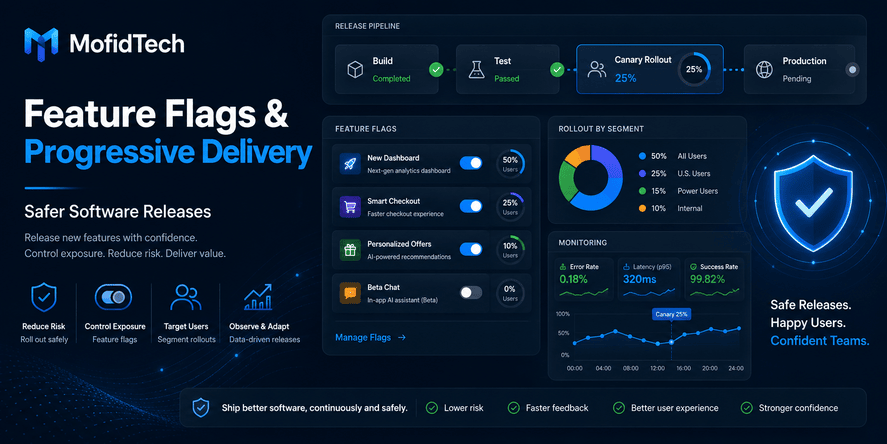
Instead of treating deployment as one big event where everyone receives a new feature at once, teams can release functionality gradually, monitor the impact, and react quickly if something goes wrong. A feature can be deployed to production but hidden from users. It can be enabled for internal testers first, then a small group of users, then a larger audience, and finally everyone.
This approach reduces risk because the team is no longer forced to choose between “release everything” and “release nothing.” They can control exposure, measure behavior, pause rollout, disable a feature, or continue gradually based on real evidence.
Feature flags are not only a DevOps technique. They are part of modern software engineering discipline. They affect architecture, testing, product management, security, observability, team communication, rollback strategy, and long-term code quality.
For teams using AI-assisted development tools, feature flags are even more important. AI can help developers move faster, but faster code generation does not automatically guarantee safer releases. The more quickly a team produces changes, the more important it becomes to manage release risk carefully.
This article explains what feature flags are, how progressive delivery works, why these practices matter, what mistakes to avoid, and how developers can use them to release software more safely without relying on code examples.
Table of Contents
- What Are Feature Flags?
- What Is Progressive Delivery?
- Deployment vs Release: The Key Difference
- Why Safe Releases Matter More Than Ever
- How Feature Flags Reduce Deployment Risk
- Main Types of Feature Flags
- Progressive Delivery Workflow
- Feature Flags vs Canary Releases vs Blue-Green Deployments
- Real-World Use Cases
- Security Considerations
- Performance Considerations
- Common Mistakes
- Best Practices Checklist
- Troubleshooting Release Problems
- When to Remove Feature Flags
- FAQ
- Conclusion
What Are Feature Flags?
Feature flags are controls that allow teams to turn software behavior on or off without deploying new code.
A simple way to understand a feature flag is to imagine a switch. The feature may already exist inside the application, but users will only see it when the switch is enabled. If the switch is disabled, the feature stays hidden or inactive.
This means developers can deploy code to production before making the feature available to all users. The release becomes controlled, gradual, and reversible.
Feature flags are also called feature toggles, release toggles, feature switches, or flags. The terminology may vary, but the core idea is the same: separate the act of putting code into production from the act of exposing that functionality to users.
Simple Definition
A feature flag is a release control that lets a team enable, disable, or limit a software feature without redeploying the application.
Why Feature Flags Matter
Feature flags matter because they reduce the pressure of all-or-nothing deployments. Without feature flags, a team usually deploys code and releases it at the same time. If the new feature has a problem, every affected user may experience it immediately.
With feature flags, the team can deploy the code but keep the feature disabled. They can enable it only for selected users, internal staff, beta testers, a specific region, or a small percentage of traffic. If something goes wrong, the feature can be turned off quickly.
This makes releases safer, more flexible, and easier to manage.
Feature Flags Are Not Only for Big Companies
Some developers think feature flags are only useful for large technology companies. That is not true.
Small teams also benefit from feature flags because small teams often have fewer people available to handle production incidents. If a small team releases a risky feature to everyone and it fails, the damage can be difficult to control. A feature flag gives that team a safety mechanism.
Feature flags are useful for startups, SaaS products, internal tools, e-commerce platforms, educational platforms, mobile applications, APIs, and enterprise systems.
What Is Progressive Delivery?
Progressive delivery is a software release strategy where new functionality is delivered gradually instead of being released to everyone at once.
The goal is to reduce risk by exposing changes to a limited audience first, observing the results, and expanding only when the system behaves correctly.
Progressive delivery often uses feature flags, canary releases, monitoring, user segmentation, automated checks, and rollback planning.
Simple Definition
Progressive delivery is the practice of releasing software changes gradually, monitoring their impact, and expanding availability only when the release proves safe.
Why Progressive Delivery Is Useful
Progressive delivery helps teams answer important questions before a full release:
- Does the feature work correctly in production?
- Are users experiencing errors?
- Is performance stable?
- Are database operations behaving as expected?
- Are APIs responding normally?
- Are support tickets increasing?
- Are business metrics moving in the expected direction?
- Should the rollout continue, pause, or be reversed?
Instead of discovering problems after all users are affected, the team can detect issues early with limited exposure.
Progressive Delivery Is About Control
The main value of progressive delivery is control.
Traditional deployment often creates a large moment of risk. Progressive delivery breaks that moment into smaller, safer steps. The team controls who sees the change, when they see it, and how quickly the rollout expands.
This approach is especially useful for high-risk features, user interface changes, payment flows, authentication changes, database-related releases, performance-sensitive updates, AI-powered features, and API behavior changes.
Deployment vs Release: The Key Difference
One of the most important ideas behind feature flags is the difference between deployment and release.
Deployment means placing new code into a production environment.
Release means making a feature available to users.
In traditional workflows, deployment and release often happen at the same time. When the application is deployed, users immediately receive the new behavior. This creates risk because any bug or unexpected behavior becomes visible immediately.
Feature flags separate these two actions.
A team can deploy code today but release the feature tomorrow. They can release it to internal users first, then a small group of customers, then everyone. They can also deploy a feature and never release it if testing shows it is not ready.
Why This Difference Matters
Separating deployment from release helps teams reduce stress and make better decisions.
Deployment becomes a technical operation. Release becomes a controlled product and engineering decision.
This distinction improves collaboration between developers, DevOps teams, QA testers, product managers, support teams, and security teams. Everyone can participate in deciding when a feature should become visible.
Practical Example Without Code
Imagine a team building a new checkout experience for an e-commerce website.
Without feature flags, deploying the new checkout means every customer may see it immediately. If the new flow has a bug, sales may be affected.
With feature flags, the team can deploy the new checkout while keeping the existing checkout active. The new checkout can be enabled only for internal staff first. Then it can be enabled for one percent of visitors. If payment errors increase, the team can disable the feature and return users to the old checkout experience.
This is safer than exposing the change to all customers at once.
Why Safe Releases Matter More Than Ever
Software release safety has always mattered, but it is becoming more important because modern applications are changing quickly.
Teams are now influenced by several trends:
- Faster development cycles
- Continuous delivery expectations
- Cloud-native infrastructure
- Microservices and API-based systems
- Third-party integrations
- AI-assisted coding tools
- Remote engineering teams
- Higher user expectations
- More security and privacy risks
- More complex deployment environments
A release failure today can affect user trust, revenue, data security, support workload, and brand reputation.
Faster Development Can Increase Release Risk
AI tools and modern developer platforms can help teams produce code faster. This is useful, but it also creates a new challenge: if code is produced faster than it can be reviewed, tested, monitored, and released safely, production risk increases.
Feature flags do not solve every quality problem, but they help teams manage exposure. They allow developers to move quickly while still maintaining control over production behavior.
Users Expect Stability
Users do not care whether a team uses modern tools, AI coding assistants, cloud services, or advanced deployment pipelines. They care about whether the application works.
If a login page fails, a payment process breaks, a dashboard becomes slow, or a user loses access to important data, the user experience is damaged.
Safe release practices protect users from unnecessary disruption.
Production Is Different from Testing
Even with strong testing, production can reveal problems that test environments do not catch.
Production includes real users, real devices, real network conditions, real data volume, real third-party service behavior, real permissions, and real business pressure.
Feature flags and progressive delivery help teams observe how a change behaves under real conditions without exposing everyone at once.
How Feature Flags Reduce Deployment Risk
Feature flags reduce risk by limiting exposure, improving reversibility, and giving teams more time to observe production behavior.
They do not eliminate the need for testing, code review, security review, or good architecture. Instead, they add another layer of safety.
1. They Limit the Blast Radius
The blast radius is the amount of damage a problem can cause.
If a broken feature is released to every user, the blast radius is large. If the same feature is released to one percent of users, the blast radius is smaller.
Feature flags make it easier to limit exposure. Teams can start with internal users, beta testers, selected customers, or small traffic percentages.
2. They Enable Faster Disablement
When a feature causes problems, a team may need to disable it quickly.
Without feature flags, the team may need to prepare a rollback deployment, restore a previous version, or create an emergency fix. That can take time and may introduce more risk.
With feature flags, the team can disable the feature while keeping the rest of the application running.
This is especially useful for user-facing features, experiments, external integrations, and risky changes.
3. They Support Real Production Validation
Some problems only appear in production. Feature flags allow teams to validate behavior under real conditions while keeping exposure controlled.
This does not mean testing in production carelessly. It means using production validation responsibly, with monitoring, limited rollout, and rollback options.
4. They Improve Product Flexibility
Feature flags allow product teams to coordinate releases more precisely.
A feature can be technically deployed before a marketing launch, partner announcement, customer onboarding plan, or documentation update. This reduces last-minute pressure.
5. They Reduce Deployment Anxiety
Large releases often create stress. Developers may worry about breaking production. Operations teams may worry about incidents. Product teams may worry about user complaints.
Feature flags make releases less dramatic because changes can be introduced gradually and reversed more easily.
Main Types of Feature Flags
Not all feature flags serve the same purpose. Understanding the different types helps teams manage them correctly.
Release Flags
Release flags are used to hide incomplete or unreleased features.
They allow developers to merge and deploy work before the feature is ready for all users. This supports smaller, more frequent deployments.
Release flags are usually temporary. Once the feature is fully released and stable, the flag should be removed.
Experiment Flags
Experiment flags are used for A/B testing, product experiments, and user behavior analysis.
For example, a team may show one version of a feature to one group of users and another version to a different group. The goal is to compare outcomes such as engagement, conversion, retention, or satisfaction.
Experiment flags should be managed carefully because they can affect analytics, user experience, and product decisions.
Permission Flags
Permission flags control access based on user roles, subscription plans, customer groups, regions, or account types.
For example, a feature may be available only to administrators, premium users, enterprise customers, or beta program members.
Permission flags may last longer than release flags because they are part of product access control. However, they still require documentation and governance.
Operational Flags
Operational flags are used to control system behavior during incidents, traffic spikes, or performance problems.
They may disable non-essential features, reduce expensive operations, pause background processing, or switch behavior during degraded service conditions.
Operational flags are sometimes called kill switches because they can quickly shut off risky or costly functionality.
Migration Flags
Migration flags help teams move gradually from one system behavior to another.
They can be useful during database changes, infrastructure transitions, API upgrades, search engine changes, authentication flow updates, or payment provider migrations.
Migration flags are valuable because migrations often involve hidden risk. A gradual transition helps teams detect issues before fully switching over.
Feature Flags vs Canary Releases vs Blue-Green Deployments
Feature flags, canary releases, and blue-green deployments are related, but they are not the same.
| Strategy | Main Purpose | Best For | Main Risk Reduced |
|---|---|---|---|
| Feature flags | Control feature visibility | User-facing features, experiments, permissions, kill switches | Functional and product risk |
| Canary releases | Gradually expose a new version | Infrastructure, service, or application version changes | Deployment and performance risk |
| Blue-green deployment | Switch between two environments | Fast environment-level rollback | Environment and release transition risk |
| Progressive delivery | Gradually deliver changes with monitoring | Modern release management | Overall production release risk |
Feature Flags
Feature flags control behavior inside the application. They are useful when the same deployed version can serve different experiences to different users.
They are especially useful for product features, interface changes, account-based access, and gradual activation.
Canary Releases
A canary release exposes a new version of the application to a small percentage of users or traffic first. If the new version works correctly, the rollout expands.
Canary releases are useful for detecting performance problems, infrastructure issues, and version-level defects.
Blue-Green Deployments
Blue-green deployment uses two production-like environments. One environment is active while the other is prepared with the new version. When ready, traffic switches to the new environment.
This approach allows fast switching, but it may not provide the same user-level control as feature flags.
Progressive Delivery
Progressive delivery is the broader strategy. It may include feature flags, canary releases, monitoring, automated checks, and controlled rollout rules.
In practice, strong teams often combine these approaches.
Progressive Delivery Workflow for Developers
A safe progressive delivery process should be planned before deployment begins.
The workflow does not need to be complicated, but it should be intentional. The team should know what is being released, who will see it first, what metrics will be monitored, and what action should be taken if problems appear.
Step 1: Define the Release Goal
Before using a feature flag, the team should define the goal of the release.
Important questions include:
- What problem does this feature solve?
- Who should receive it first?
- What behavior should change?
- What business or technical metric should improve?
- What would count as a failed rollout?
- What risks are known before release?
Clear goals prevent confusion during rollout.
Step 2: Identify the Risk Level
Not all releases have the same risk.
A small text change may require less control than a new payment flow. A new dashboard filter may be safer than a database migration. A change to authentication deserves more caution than a visual improvement.
Risk factors include:
- Does the change affect login or account access?
- Does it affect payments or billing?
- Does it change user data?
- Does it affect security or privacy?
- Does it change public APIs?
- Does it affect performance-sensitive areas?
- Does it rely on a third-party service?
- Is rollback easy or difficult?
- Is monitoring available?
Higher-risk changes need more careful rollout.
Step 3: Choose the Initial Audience
The first audience should be small and appropriate.
Common rollout stages include:
- Development team
- Internal employees
- QA testers
- Beta users
- Trusted customers
- Low-risk user segments
- Small traffic percentage
- Specific region or organization
- Full audience
The right first audience depends on the feature and business context.
Step 4: Monitor Technical Metrics
Progressive delivery depends on observation. A gradual rollout is not useful if the team is not watching the right signals.
Important technical metrics may include:
- Error rate
- Response time
- Page load performance
- API latency
- Database load
- Memory usage
- CPU usage
- Failed background jobs
- Authentication failures
- Payment failures
- Third-party service errors
The team should decide which metrics matter before rollout begins.
Step 5: Monitor User and Business Signals
Technical metrics are not enough. A feature can be technically stable but still harm the user experience.
Useful product and business signals may include:
- Conversion rate
- Signup completion
- Checkout completion
- Search success
- Support requests
- User engagement
- Drop-off rate
- Form completion
- Customer complaints
- Retention behavior
Good release decisions combine technical and user-focused evidence.
Step 6: Expand Gradually
If the feature performs well, the team can expand the rollout.
Expansion should be deliberate. The team should avoid jumping from a small audience to everyone without reviewing data.
A mature team may define rollout stages such as internal users, five percent, twenty-five percent, fifty percent, and one hundred percent. The exact numbers matter less than the discipline of checking results before expanding.
Step 7: Pause or Roll Back When Needed
A safe release process must include a clear stop condition.
The team should know when to pause rollout, disable the feature, or investigate further. This prevents emotional decision-making during incidents.
Examples of stop conditions include:
- Error rate increases above an acceptable threshold
- Checkout failures increase
- Login failures appear
- API latency becomes unacceptable
- Support tickets rise quickly
- Security concerns are detected
- Data integrity concerns appear
- User complaints show a repeated pattern
A rollback plan is not a sign of failure. It is part of professional release management.
Real-World Use Cases
Feature flags and progressive delivery are useful in many real-world scenarios.
Releasing a New Dashboard
A team building a new analytics dashboard can deploy it behind a feature flag. Internal users test it first. Then selected customers receive access. If reports are slow or confusing, the team can disable the new dashboard while keeping the existing dashboard available.
Updating a Payment Flow
Payment flows are high risk because they affect revenue and trust. A team can release a new checkout experience gradually and monitor payment completion, failed transactions, support tickets, and user drop-off.
If problems appear, the team can return users to the old flow quickly.
Introducing a New Search Experience
Search changes can affect user satisfaction. A new search ranking system may seem better in testing but behave differently with real user queries.
Feature flags allow the team to compare the new search experience against the existing one and monitor success signals before full release.
Migrating to a New API Integration
When replacing a third-party provider, a team can route a small amount of traffic to the new integration first. If the new provider behaves correctly, the rollout expands. If failures appear, traffic can return to the previous provider.
Testing AI-Powered Features
AI-powered features can behave unpredictably because outputs may vary. Feature flags are useful for limiting access, testing with trusted users, monitoring quality, and disabling the feature if outputs are inaccurate, slow, expensive, or unsafe.
Launching Premium Features
A SaaS product may use feature flags to enable features only for specific subscription plans. This supports controlled access, beta testing, and staged commercial launches.
Security Considerations
Feature flags improve release safety, but they also introduce security considerations.
A poorly managed feature flag system can expose hidden functionality, create inconsistent access control, or allow unauthorized changes to production behavior.
Feature Flags Are Not a Security Boundary by Themselves
A feature flag should not be treated as the only protection for sensitive functionality.
If a feature is restricted to administrators, premium users, or internal staff, proper authorization still matters. A flag may hide the interface, but backend permissions and access rules must still be enforced.
This is especially important for admin panels, billing systems, private data, user management, internal tools, and security-sensitive operations.
Access to Flag Controls Must Be Restricted
Not everyone should be able to enable or disable production features.
Feature flag management should have clear permissions. High-risk flags should be controlled by authorized team members only. Changes should be reviewed, logged, and auditable.
A careless flag change can affect thousands of users.
Flag Changes Should Be Auditable
Teams should know who changed a flag, when it changed, and why it changed.
Auditability is important for security, incident response, compliance, and operational learning.
Without audit history, it becomes difficult to understand why production behavior changed.
Avoid Exposing Sensitive Information
Feature names, internal labels, and flag descriptions should not reveal sensitive business or security information.
For example, a flag name should not expose confidential product plans, security weaknesses, internal customer names, or private infrastructure details.
Remove Risky Temporary Paths
Temporary release paths can become permanent security liabilities if they are not removed.
Once a feature is stable, old paths and temporary logic should be cleaned up. Otherwise, the application may accumulate hidden complexity and forgotten behavior.
Performance Considerations
Feature flags can affect performance if they are poorly designed or overused.
A mature feature flag strategy should consider how flags are evaluated, how often they change, and whether they add unnecessary complexity to critical user paths.
Avoid Excessive Runtime Decisions
Every feature flag adds a decision point. A few decision points are manageable. Too many can make the application harder to reason about and potentially slower.
Performance-sensitive areas require special care. These may include checkout flows, search systems, authentication, API gateways, high-traffic pages, and real-time features.
Keep Flag Evaluation Reliable
If a feature flag system becomes unavailable, the application should have a safe default behavior.
For critical features, the team should decide what happens if flag information cannot be loaded. The safest behavior may be to disable the new feature and keep the stable path active.
Monitor Flagged Features Separately
When rolling out a feature gradually, teams should monitor the flagged experience separately from the old experience.
If all users are mixed together in the same metrics, problems may be hidden. Separate observation helps the team compare old and new behavior more accurately.
Avoid Long-Term Complexity
Feature flags are useful, but each flag adds complexity.
Old flags should be removed after they are no longer needed. Otherwise, the application becomes harder to test, slower to understand, and more expensive to maintain.
Common Mistakes with Feature Flags
Feature flags are powerful, but they can cause problems when teams use them without discipline.
Mistake 1: Leaving Flags Forever
The most common mistake is creating temporary flags and never removing them.
Old flags create confusion. Developers may not know whether a flag is still active, what it controls, or whether removing it is safe.
Every long-lived flag should have a clear reason to exist.
Mistake 2: Not Assigning Ownership
A feature flag should have an owner.
The owner is responsible for knowing why the flag exists, when it should be enabled, when it should be removed, and what risks it controls.
Without ownership, flags become abandoned.
Mistake 3: Rolling Out Without Monitoring
Progressive delivery only works when teams monitor impact.
If a team enables a feature gradually but does not watch errors, performance, user behavior, or support signals, the rollout is only pretending to be safe.
Monitoring is not optional.
Mistake 4: Treating Feature Flags as a Replacement for Testing
Feature flags do not replace testing.
They reduce exposure if problems occur, but they do not guarantee quality. Teams still need requirements review, design review, quality assurance, security checks, performance evaluation, and user experience validation.
Mistake 5: Creating Too Many Flags
Too many flags make the system difficult to understand.
Developers may struggle to know which combinations are possible. Testing becomes harder because each flag can create different behavior.
Teams should avoid creating flags for every tiny change.
Mistake 6: Using Unclear Names
Flag names should be understandable.
A vague flag name creates confusion during incidents. A clear name helps developers, product managers, support teams, and DevOps engineers understand what the flag controls.
Mistake 7: Not Planning Rollback
A feature flag is only useful if the team knows what to do when problems appear.
Before release, the team should define rollback conditions and responsibility. During an incident, there should be no confusion about who can disable the feature.
Mistake 8: Forgetting User Experience Consistency
Gradual rollouts can create different experiences for different users.
This may be acceptable, but teams should consider support, documentation, screenshots, training materials, and customer communication. If two users see different interfaces, support teams need to understand why.
Best Practices Checklist for Safe Software Releases
Use this checklist before, during, and after releasing a feature with flags or progressive delivery.
Before Release
| Check | Why It Matters |
|---|---|
| Define the release goal | Prevents unclear rollout decisions |
| Identify the risk level | Helps choose the right rollout strategy |
| Assign a flag owner | Ensures accountability |
| Define the initial audience | Limits exposure |
| Choose success metrics | Makes release evaluation objective |
| Choose stop conditions | Helps the team react quickly |
| Prepare support communication | Reduces confusion if users report issues |
| Confirm rollback path | Improves incident response |
| Review security impact | Prevents unsafe exposure |
| Plan flag removal | Avoids long-term technical debt |
During Rollout
| Check | Why It Matters |
|---|---|
| Start with limited exposure | Reduces blast radius |
| Monitor errors and latency | Detects technical problems |
| Monitor user behavior | Detects experience problems |
| Watch support channels | Captures human feedback |
| Expand gradually | Avoids sudden large-scale failure |
| Document flag changes | Helps incident review |
| Pause when signals are unclear | Prevents risky assumptions |
| Keep stakeholders informed | Improves coordination |
After Release
| Check | Why It Matters |
|---|---|
| Confirm full rollout stability | Ensures release success |
| Review incidents or warnings | Improves future releases |
| Remove temporary flags | Reduces technical debt |
| Update documentation | Keeps knowledge accurate |
| Share lessons learned | Improves team maturity |
| Review monitoring gaps | Strengthens future observability |
How Feature Flags Help AI-Assisted Development
AI-assisted development tools can help developers write, refactor, explain, and review code faster. However, production release safety still depends on human engineering discipline.
Feature flags are valuable in AI-assisted workflows because they allow teams to control the exposure of AI-generated or AI-assisted changes.
AI Can Increase Speed, But Not Automatically Reliability
A team may generate changes faster with AI, but those changes still need review, testing, security evaluation, and production monitoring.
Feature flags give teams a safer way to introduce such changes gradually.
AI-Generated Changes May Have Hidden Assumptions
AI tools can produce solutions that look reasonable but may not fully understand the application’s business rules, data model, user permissions, or production constraints.
A feature flag does not fix these problems, but it limits the damage if a hidden assumption appears after deployment.
AI Features Themselves Need Controlled Rollout
Applications increasingly include AI-powered features such as recommendations, summaries, search, chat interfaces, classification, or automation.
These features should often be released gradually because they may involve cost, latency, accuracy, privacy, and user trust concerns.
Feature flags allow teams to test AI behavior with selected users before exposing it widely.
Troubleshooting Release Problems
Even with feature flags and progressive delivery, problems can happen. A good release process includes a troubleshooting mindset.
Problem: Errors Increase After Enabling a Feature
The team should first determine whether the errors are isolated to users receiving the new feature. If they are, the flag should be paused or disabled while investigation continues.
The team should review affected user segments, recent changes, logs, monitoring data, and support reports.
Problem: Performance Becomes Slower
A feature may work correctly but make the application slower.
The team should compare performance between users with the feature enabled and users without it. If the new feature creates unacceptable latency, the rollout should stop until the performance issue is understood.
Problem: Users Are Confused
Sometimes the technical release works, but users do not understand the change.
In this case, the team should review user interface clarity, onboarding, documentation, support messages, and product communication. A feature flag allows the team to pause expansion while improving the experience.
Problem: Support Tickets Increase
A rise in support tickets may indicate a hidden usability or reliability problem.
The team should categorize the tickets. Are users reporting bugs, confusion, missing functionality, account issues, payment issues, or performance problems? The answer determines whether to continue, pause, or roll back.
Problem: Metrics Look Good But Feedback Is Negative
Quantitative metrics do not always tell the full story.
A feature may improve one metric while damaging trust or satisfaction. Teams should combine analytics with qualitative feedback, especially for major workflow changes.
Problem: The Team Does Not Know Whether to Continue
If the team cannot confidently decide whether the rollout is safe, the rollout should pause.
Progressive delivery is not about rushing. It is about making informed decisions.
When Should Feature Flags Be Removed?
Temporary feature flags should be removed after they have served their purpose.
A release flag should not stay in the application forever. Once the feature is fully released, stable, and no longer needs controlled exposure, the flag should be removed.
Why Removing Flags Matters
Old feature flags create technical debt.
They make the application harder to understand, harder to test, and harder to maintain. They can also create security and reliability risks if forgotten behavior remains hidden inside the system.
Signs a Flag Should Be Removed
A flag should likely be removed when:
- The feature is fully released to all intended users
- The old behavior is no longer needed
- The rollback window has passed
- The flag has not changed in a long time
- No active experiment depends on it
- No customer-specific access rule requires it
- The team cannot clearly explain why it still exists
Flag Removal Should Be Planned
Flag cleanup should be part of the release lifecycle.
A good team does not only ask, “How do we release this feature?” It also asks, “When will we remove the temporary release controls?”
Decision Framework: Should You Use a Feature Flag?
Not every change needs a feature flag. Teams should use judgment.
| Question | If Yes, Feature Flag May Help |
|---|---|
| Does the change affect many users? | Yes |
| Is the feature business-critical? | Yes |
| Is rollback difficult? | Yes |
| Does the change affect payments, login, or user data? | Yes |
| Does the release depend on timing or marketing? | Yes |
| Is the feature experimental? | Yes |
| Does the team need beta testing? | Yes |
| Could performance be affected? | Yes |
| Is the change small and low-risk? | Maybe not |
| Is the change purely internal and easy to reverse? | Maybe not |
Feature flags are most useful when the cost of a failed release is high.
Best Practices for Naming and Managing Feature Flags
A feature flag should be easy to understand.
Good naming and management help teams avoid confusion, especially during incidents.
Use Clear Names
A flag name should communicate what it controls. Avoid vague names that only make sense to one developer.
For example, a clear flag name should suggest the feature, purpose, or release area.
Document the Purpose
Each important flag should have a short explanation:
- What does this flag control?
- Who owns it?
- Why does it exist?
- When should it be enabled?
- When should it be removed?
- What happens if it is disabled?
Documentation is especially important for teams with multiple developers or rotating responsibilities.
Set an Expiration Plan
Temporary flags should have a cleanup plan.
This does not need to be complicated. The team simply needs to decide when the flag should be reviewed and removed.
Review Flags Regularly
Teams should review active flags periodically.
A monthly or release-cycle review can help identify old flags, abandoned experiments, unclear ownership, and risky permanent toggles.
Feature Flags and Observability
Feature flags and observability work best together.
A feature flag controls exposure. Observability tells the team what happens after exposure.
Without observability, a team may enable a feature and miss early warning signs. With observability, the team can make evidence-based decisions.
What to Monitor
A strong release monitoring plan should include:
- Application errors
- API errors
- Response time
- Page performance
- Database behavior
- Background task failures
- User actions
- Conversion metrics
- Support requests
- Security alerts
- Infrastructure health
Compare Flagged and Unflagged Users
Whenever possible, compare users who received the feature with users who did not.
This helps isolate whether a problem is related to the new feature or part of a broader system issue.
Make Rollout Decisions Based on Signals
The team should decide rollout progress based on evidence, not optimism.
If signals are healthy, continue gradually. If signals are negative, pause or roll back. If signals are unclear, investigate before expanding.
Feature Flags and Team Collaboration
Feature flags are technical tools, but their value depends on collaboration.
A release often involves developers, testers, DevOps engineers, product managers, support staff, security reviewers, and business stakeholders.
Developers
Developers implement the feature and ensure it behaves correctly when enabled or disabled.
They should also think about cleanup and avoid creating unnecessary complexity.
DevOps Engineers
DevOps engineers help manage deployment safety, monitoring, infrastructure impact, and rollback planning.
They may also help define rollout strategies and incident response procedures.
Product Managers
Product managers decide which users should receive a feature, what success means, and when the release should expand.
Feature flags help product teams release with more control.
Support Teams
Support teams need to know when users may see different experiences.
If support teams are unaware of a gradual rollout, they may struggle to explain user reports.
Security Teams
Security teams should review flags that affect access control, sensitive data, authentication, authorization, or operational behavior.
Common Misconceptions About Feature Flags
“Feature Flags Are Only for Experiments”
Feature flags can support experiments, but they are also useful for release management, permissions, migration, operational safety, and incident response.
“Feature Flags Mean We Can Test Less”
This is false.
Feature flags reduce exposure, but they do not replace quality assurance. A broken feature is still broken, even if only a few users see it.
“Feature Flags Are Too Complex for Small Teams”
Small teams can benefit greatly from feature flags because they often have limited incident response capacity. A simple, disciplined flag strategy can make releases safer without creating unnecessary overhead.
“Disabling a Flag Is Always a Complete Rollback”
Not always.
Some features change data, trigger workflows, or interact with external services. Disabling the feature may stop new exposure, but it may not undo everything that already happened. High-risk releases still need rollback planning.
“All Flags Can Stay Forever”
Temporary release flags should not stay forever. Long-lived flags should be intentional, documented, and reviewed.
Practical Release Checklist
Before publishing a feature, ask these questions:
- What exactly is changing?
- Who will see the change first?
- What is the safest initial rollout group?
- What metrics will prove the release is healthy?
- What warning signs should pause the rollout?
- Who owns the feature flag?
- Who can disable it during an incident?
- What is the rollback plan?
- What support or documentation changes are needed?
- When will the flag be removed?
This checklist helps teams turn feature flags from a casual technique into a professional release practice.
FAQ
What are feature flags?
Feature flags are controls that allow teams to enable or disable software features without redeploying code. They help separate deployment from release, reduce risk, support gradual rollouts, and make it easier to disable problematic features quickly.
What is progressive delivery?
Progressive delivery is a release strategy where software changes are delivered gradually to users. Teams start with limited exposure, monitor the impact, and expand only when the release appears safe.
What is the difference between deployment and release?
Deployment means putting code into a production environment. Release means making a feature available to users. Feature flags separate these two actions so teams can deploy code without immediately exposing it to everyone.
Are feature flags and canary releases the same?
No. Feature flags control feature behavior inside the application, while canary releases gradually expose a new application version or service version to a portion of traffic. They can be used together as part of progressive delivery.
Do feature flags replace testing?
No. Feature flags do not replace testing, code review, quality assurance, security review, or performance checks. They reduce production exposure if something goes wrong, but the feature still needs to be properly validated.
Are feature flags useful for small teams?
Yes. Small teams can benefit from feature flags because they provide safer releases, easier rollback, and controlled exposure. This is especially helpful when a small team has limited time or staff to handle production incidents.
When should a feature flag be removed?
A temporary feature flag should be removed once the feature is fully released, stable, and no longer needs controlled exposure. Keeping old flags creates technical debt and makes the application harder to maintain.
How do feature flags help DevOps teams?
Feature flags help DevOps teams reduce deployment risk, support gradual rollouts, improve rollback options, and connect release decisions with monitoring. They make production changes more controlled and observable.
Can feature flags improve security?
Feature flags can improve operational safety, but they are not a replacement for proper security controls. Sensitive features still need authorization, access control, audit logging, and security review.
Why are feature flags important for AI-assisted development?
AI-assisted development can increase the speed of code creation, but faster development can also increase release risk if review and testing do not keep up. Feature flags help teams expose AI-assisted changes gradually and disable them quickly if problems appear.
Conclusion
Feature flags and progressive delivery help teams release software with more confidence, less risk, and better control.
They allow developers to separate deployment from release, limit exposure, test behavior in real production conditions, and respond quickly when something goes wrong. Instead of treating every deployment as a high-pressure event, teams can release gradually, observe carefully, and expand based on evidence.
The real value of feature flags is not only technical. They improve collaboration between engineering, DevOps, product, support, and security teams. They help organizations move faster without ignoring reliability. They also make release management more professional by replacing guesswork with controlled rollout decisions.
However, feature flags must be managed carefully. Teams should avoid leaving old flags forever, creating too many unmanaged toggles, skipping monitoring, or treating flags as a replacement for testing. A strong feature flag strategy includes ownership, documentation, cleanup, observability, security review, and rollback planning.
As software teams adopt faster development workflows and AI-assisted coding tools, safe release practices become even more important. The future of software delivery is not only about writing code faster. It is about releasing change responsibly.
Feature flags and progressive delivery give teams a practical way to do exactly that.











💬 Comments
No comments yet. Be the first to comment!
Login to comment.