Introduction
Database imports look simple from the outside. You export data from one system, import it into another, and expect the result to be identical. In reality, database imports are one of the most common places where hidden data problems appear.
A table may import successfully but still contain broken names, unreadable Arabic text, damaged French accents, invalid dates, duplicate identifiers, missing values, or silent data loss. The import may finish without an error, but the data may no longer be trustworthy.
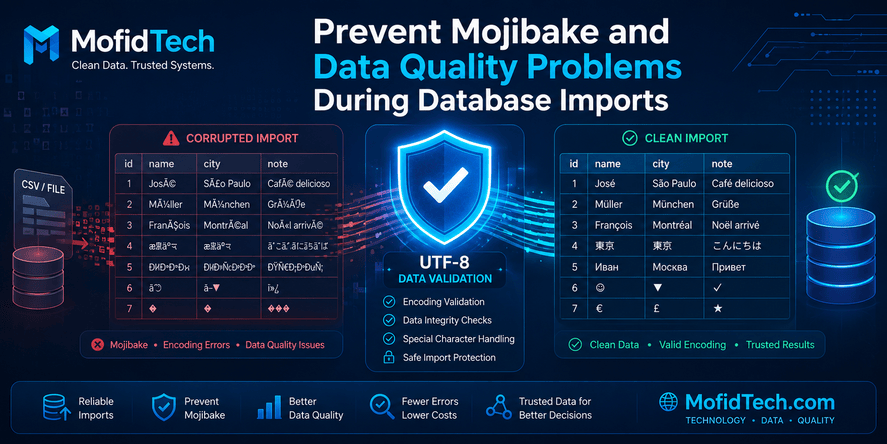
One of the most visible signs of this problem is mojibake. Mojibake happens when text is decoded using the wrong character encoding. Instead of seeing readable characters, you may see symbols such as é, Â, �, or unreadable Arabic. For example, a French name containing an accented character may become corrupted. Arabic text may become a sequence of strange Latin symbols. Spaces may not behave like normal spaces because they are actually non-breaking spaces or invisible characters.
For developers, database administrators, and data engineers, this is more than a cosmetic issue. Corrupted text can break search, matching, reporting, user profiles, official records, analytics, and application logic. In multilingual datasets, especially those containing Arabic, French, and English together, encoding problems can quickly become serious.
This guide explains how to prevent mojibake and data quality problems during database imports. It focuses on concepts, workflows, validation steps, common mistakes, and practical decision-making. It does not include code, terminal commands, SQL queries, or configuration snippets. Instead, it gives you a clear framework for importing data safely.
Table of Contents
- What Is Mojibake in Database Imports?
- Why Mojibake Happens
- Why Database Imports Create Data Quality Problems
- Encoding, Collation, and Character Sets Explained
- Common Signs of Broken Imported Data
- Why Arabic and French Text Often Break During Imports
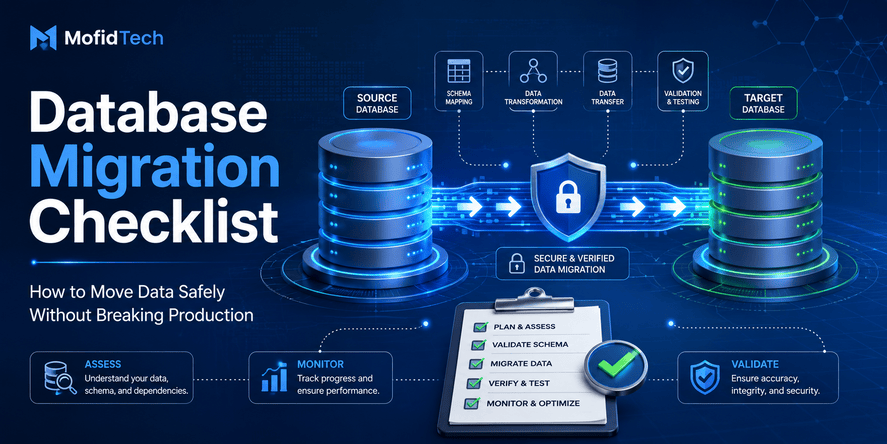
- The Safe Database Import Workflow
- Pre-Import Validation Checklist
- Import Strategy: Why Staging Tables Matter
- Post-Import Verification Checklist
- Handling Dates, Duplicates, and Missing Values
- Common Mistakes to Avoid
- Best Practices for Multilingual Database Imports
- Security and Privacy Considerations
- Performance Considerations
- Troubleshooting Guide
- Comparison Tables
- Practical Database Import Checklist
- FAQ
- Conclusion
What Is Mojibake in Database Imports?
Mojibake is corrupted text caused by reading characters with the wrong encoding. It usually appears when text stored in one encoding is interpreted as another encoding during export, import, conversion, or display.
For example, a character that should appear as a normal accented French letter may appear as several strange characters. Arabic text may become unreadable. A normal-looking space may not behave like a real space. This happens because computers store text as bytes, and those bytes need the correct encoding rules to become readable characters.
In database imports, mojibake often appears when data moves between:
- MySQL and PostgreSQL
- CSV files and databases
- Excel files and databases
- Legacy systems and modern applications
- Latin1 databases and UTF-8 databases
- Old web applications and new web platforms
- Multilingual datasets containing Arabic, French, and English
The dangerous part is that mojibake does not always stop the import. Your database may accept the corrupted text. The table may contain the expected number of rows. The application may even run normally. But the content itself may be damaged.
Why Mojibake Happens
Mojibake happens because the same bytes can produce different characters depending on the encoding used to read them.
A database import usually involves several layers:
- The original database encoding
- The export tool encoding
- The file encoding
- The import tool encoding
- The target database encoding
- The application display encoding
- The browser or interface rendering
If one layer misunderstands the encoding, the text can break.
For example, a legacy MySQL table may use Latin1. The data inside may actually contain text that was originally UTF-8 but incorrectly stored as Latin1. When exported and imported into PostgreSQL as UTF-8, the target database may preserve the wrong interpretation instead of the intended text.
This is why the question is not only “What is the source database encoding?” The better question is:
What encoding was the text originally written in, how was it stored, and how is it being interpreted during export and import?
That difference matters.
Why Database Imports Create Data Quality Problems
Encoding is only one part of the problem. Database imports also reveal data quality issues that were hidden in the source system.
A source system may contain:
- Duplicate student or customer records
- Invalid date formats
- Empty required fields
- Extra spaces before or after names
- Non-breaking spaces
- Mixed uppercase and lowercase values
- Inconsistent province, city, or category names
- Old codes that no longer exist
- Foreign key values that do not match reference tables
- Text stored in the wrong column
- Numbers stored as text
- Missing identifiers
- Different formats for the same information
During migration, these issues become more visible because the target database may have stricter rules. PostgreSQL, for example, is often stricter than older or loosely configured systems. A value that was accepted in a legacy table may fail when moved into a cleaner schema with proper data types and constraints.
A successful migration is not only about moving rows. It is about preserving meaning.
Encoding, Collation, and Character Sets Explained
Many developers confuse encoding, character set, and collation. They are related, but they are not the same.
| Concept | Meaning | Why It Matters |
|---|---|---|
| Encoding | Defines how characters are stored as bytes | Wrong encoding causes mojibake |
| Character set | The collection of characters a system can represent | Limited character sets may not support Arabic or special symbols |
| Collation | Rules for sorting and comparing text | Affects search, ordering, uniqueness, and case sensitivity |
| Normalization | Different ways to represent visually similar characters | Affects matching and duplicate detection |
| Display rendering | How text appears in an application or browser | Text may be stored correctly but displayed incorrectly |
The safest modern choice for multilingual data is usually UTF-8. It supports Arabic, French accents, English, symbols, and many other writing systems. However, simply saying “use UTF-8” is not enough. You must ensure that the full pipeline uses UTF-8 correctly.
A common mistake is converting the target database to UTF-8 while the exported file is still incorrectly encoded. In that case, the target database may store corrupted text perfectly. The database will be valid, but the content will still be wrong.
Common Signs of Broken Imported Data
You should suspect encoding or import problems when you see:
- Accented letters displayed as é, è, ê, ô, or similar patterns
- Extra  characters before spaces or punctuation
- The replacement character �
- Arabic text displayed as strange Latin symbols
- Names that look correct in one tool but broken in another
- Question marks replacing real letters
- Text that sorts unexpectedly
- Search results that fail even when the visible text looks correct
- Duplicate-looking values that are not actually equal
- Spaces that do not behave like normal spaces
- CSV files that open correctly in one application and incorrectly in another
One of the most important signs is inconsistency. If some rows are correct and other rows are broken, your dataset may contain mixed encodings or data that passed through different systems before reaching the current database.
Why Arabic and French Text Often Break During Imports
Multilingual datasets are more vulnerable to encoding problems because they often combine characters from different writing systems.
Arabic Text
Arabic requires proper Unicode handling. If Arabic text is stored, exported, or imported using an encoding that does not support it correctly, it can become unreadable. Arabic text may also be affected by directionality, invisible marks, and display rendering issues.
Sometimes Arabic text is correctly stored in the database but appears wrong in the application because the interface, font, or page encoding is incorrect. In other cases, the corruption already exists in the database.
The first step is always to identify where the corruption begins:
- Is the text correct in the source database?
- Is it correct in the exported file?
- Is it correct after import?
- Is it correct when displayed in the application?
French Accents
French text often breaks when Latin1, Windows-1252, and UTF-8 are mixed. Names and labels containing characters such as é, è, à, ç, ï, and ô can become corrupted when interpreted using the wrong encoding.
A typical pattern is when a UTF-8 character is read as Latin1 or Windows-1252. This creates multi-character sequences that look strange but are actually signs of misinterpreted bytes.
French mojibake can often be repaired if the original corruption path is known. However, repeated conversions can make repair much harder.
Mixed Arabic and French Data
Mixed-language data is especially sensitive because different columns may have different histories. A table may contain Arabic names, French names, codes, dates, and administrative labels. Some columns may be clean while others are corrupted.
That is why you should validate important columns separately instead of assuming the whole table has one consistent problem.
The Safe Database Import Workflow
A safe database import should follow a controlled workflow.
1. Understand the Source
Before importing anything, identify the source system, table structure, column meanings, data volume, and known problems. Do not rely only on the schema. Inspect real values.
Ask:
- What database or file format is the source?
- What encoding does it claim to use?
- Does the visible data look correct in the source?
- Are there Arabic or accented characters?
- Are there date fields stored as text?
- Are identifiers unique?
- Are there columns that should become foreign keys?
2. Export Carefully
Export is where many encoding problems begin. A good export should preserve the original text without forcing a wrong conversion.
You should know:
- The export format
- The file encoding
- The delimiter if using CSV or TSV
- How quotes and line breaks are handled
- Whether the export tool changes character encoding
- Whether the exported file opens correctly in a trusted text viewer
Avoid judging the file only by opening it in spreadsheet software. Spreadsheet tools may guess the encoding incorrectly and hide the real problem.
3. Import Into a Staging Area
Do not import directly into final production tables. Use a staging area where data can be inspected, cleaned, and validated before becoming part of the main application.
A staging area gives you freedom to:
- Keep original text values
- Detect corrupted characters
- Normalize fields
- Compare counts
- Check duplicates
- Validate dates
- Map old codes to new reference tables
- Reject problematic rows safely
4. Validate Before Transformation
Before converting values into stricter types, validate them. For example, if a date column is stored as text, inspect all date patterns before converting it to a real date type.
If you transform too early, you may lose useful diagnostic information.
5. Move Clean Data Into Final Tables
Only after validation should the data move into final tables. At this stage, constraints, relationships, and application rules should be enforced.
6. Compare Results
After import, compare the target database with the source. Row counts are useful but not enough. You also need column-level checks, sample checks, duplicate checks, and business logic validation.
Pre-Import Validation Checklist
Before importing data, review the following checklist.
Encoding Checklist
- Confirm the source database encoding.
- Confirm whether the visible data is actually correct in the source.
- Check whether the exported file is UTF-8, Latin1, Windows-1252, or another encoding.
- Inspect multilingual columns separately.
- Look for common mojibake patterns such as Ã, Â, �, and question marks.
- Test a small sample before importing the full dataset.
- Keep an untouched backup of the original export.
Structure Checklist
- Confirm all required columns exist.
- Confirm column names are mapped correctly.
- Identify primary keys and unique identifiers.
- Identify columns that should reference other tables.
- Check whether text columns contain values that should become dates or numbers.
- Check whether some columns contain mixed formats.
Data Quality Checklist
- Check duplicate identifiers.
- Check empty required fields.
- Check invalid dates.
- Check unexpected values in category or code columns.
- Check leading and trailing spaces.
- Check invisible characters.
- Check inconsistent capitalization.
- Check rows with unusually long or unusually short values.
Business Logic Checklist
- Confirm that each record represents the correct entity.
- Confirm that old codes match new reference tables.
- Confirm that year, category, province, academy, or status values are consistent.
- Confirm that the number of imported records matches expectations.
- Confirm that important fields still have the same meaning after migration.
Import Strategy: Why Staging Tables Matter
A staging table is a temporary or intermediate table used to receive raw imported data before it enters the final schema.
Staging tables are important because real-world data is rarely clean. If you import directly into final tables, you may face errors, partial imports, or silent corruption. A staging table lets you separate three concerns:
- Receiving the raw data
- Cleaning and validating the data
- Loading trusted data into final tables
This separation reduces risk.
For example, a staging table can keep dates as text until they are validated. It can keep old codes before mapping them to new codes. It can preserve corrupted text for analysis before deciding whether it can be repaired.
A good staging process should preserve the original imported values. If you clean data, keep a way to trace what changed. This is especially important for official, academic, financial, medical, or administrative datasets.
Post-Import Verification Checklist
After importing data, do not assume success only because the import completed. Verify the result.
Row Count Checks
Compare:
- Number of rows in the source
- Number of rows in the exported file
- Number of rows in the staging table
- Number of rows in the final table
- Number of rejected or skipped rows
A row count mismatch does not always mean failure, but it must be explained.
Text Quality Checks
Inspect important text columns:
- Names
- Addresses
- Arabic labels
- French labels
- Email fields
- Institution names
- City or province names
- Descriptions and notes
Look for broken characters, unreadable text, and unexpected symbols.
Identifier Checks
Check whether identifiers remain unique and meaningful. For example:
- Student codes
- Customer IDs
- Product references
- National IDs
- Email addresses
- External system keys
Duplicate identifiers may indicate source duplication, import repetition, or incorrect mapping.
Date Checks
Check date fields for:
- Invalid dates
- Year-only values
- Mixed formats
- Empty dates
- Dates stored as text
- Future dates that should not exist
- Impossible birth dates or event dates
Relationship Checks
If data is split into multiple tables, validate relationships:
- Every child record should point to an existing parent record.
- Reference codes should exist in reference tables.
- Historical records should link to the correct entity.
- No important records should become orphaned.
Handling Dates, Duplicates, and Missing Values
Encoding problems often appear together with other data quality issues. A safe import plan should handle all of them.
Dates
Dates are dangerous because they can look simple but carry hidden ambiguity. A value such as 03/04/2024 may mean March 4 or April 3 depending on the system. Some datasets mix formats such as day/month/year and year-month-day. Others contain invalid values, year-only values, or text placeholders.
Best practice:
- Identify all date formats before conversion.
- Treat suspicious values as data quality issues, not as technical annoyances.
- Keep invalid original values available for review.
- Avoid guessing when the meaning is ambiguous.
- Define a clear rule for empty, invalid, and partial dates.
Duplicates
Duplicates are not always errors. Sometimes they represent repeated attempts, historical changes, or multiple records for the same entity. But during migration, duplicates can break unique constraints and create confusion.
Best practice:
- Identify which column represents the real unique entity.
- Distinguish exact duplicates from business duplicates.
- Decide whether to keep, merge, reject, or review duplicates.
- Keep an audit trail of decisions.
- Never remove duplicates blindly.
Missing Values
Missing values may be acceptable in some fields and unacceptable in others. A missing phone number may be acceptable. A missing unique identifier may not be.
Best practice:
- Classify fields as required, optional, or conditionally required.
- Count missing values before import.
- Decide whether missing values should become empty, null, unknown, or rejected.
- Avoid replacing missing values with misleading defaults.
Common Mistakes Developers Make During Database Imports
Mistake 1: Trusting the Import Tool Too Much
Import tools can move data, but they cannot always understand whether the content is meaningful. A tool may say the import succeeded even when text is corrupted.
Mistake 2: Checking Only Row Counts
Row counts are important, but they do not prove data quality. A table can have the exact expected number of rows and still contain corrupted text, invalid dates, and broken relationships.
Mistake 3: Importing Directly Into Production Tables
Direct production imports increase the risk of damaging live data. Always use a staging process when the dataset is important.
Mistake 4: Opening CSV Files in Spreadsheet Software Without Care
Spreadsheet tools may guess encodings, change dates, remove leading zeros, or alter large numbers. This can silently damage data before it reaches the database.
Mistake 5: Fixing Text Without Understanding the Original Encoding
Blind text replacement can make corruption worse. For example, replacing all strange characters may hide the symptoms but not restore the original text.
Mistake 6: Ignoring Invisible Characters
Invisible characters can break search, matching, and uniqueness checks. Non-breaking spaces, hidden direction marks, and unusual whitespace can make two values look identical while they are technically different.
Mistake 7: Assuming All Columns Have the Same Encoding Problem
In real datasets, different columns may have different histories. Arabic names may be correct while French names are corrupted, or the reverse. Validate each important column separately.
Mistake 8: Not Keeping the Original Export
Always keep the original source export untouched. If cleaning goes wrong, you need a reliable starting point.
Best Practices for Multilingual Database Imports
Use UTF-8 Throughout the Pipeline
UTF-8 is the safest general choice for multilingual data. But the entire pipeline must respect it: source, export, file, import, database, application, and browser display.
Validate Arabic and French Separately
Do not assume that because Arabic is correct, French is correct too. Each language may expose different problems.
Preserve Original Values
When cleaning data, preserve original values in a staging or audit process. This allows later review and correction.
Normalize Text Carefully
Text normalization can help with search and matching, but it must be used carefully. Removing accents or changing case may be useful for search fields, but official names should usually preserve their original form.
Handle Spaces and Invisible Characters
Clean leading and trailing spaces where appropriate. Detect non-breaking spaces and unusual whitespace. Be careful with Arabic direction marks because some may affect display.
Validate With Real Examples
Choose representative sample rows:
- Arabic names
- French names with accents
- Long names
- Empty values
- Dates in different formats
- Records with special punctuation
- Records with old codes
A small clean-looking sample is not enough.
Security and Privacy Considerations
Database imports often involve sensitive data. Even when the main focus is encoding or data quality, security must not be ignored.
Protect Personal Data
If the dataset contains names, emails, national identifiers, addresses, birth dates, student records, or customer information, treat it as sensitive. Limit access to only the people who need it.
Avoid Sharing Raw Data Publicly
When asking for help online, never paste real personal records. Use anonymized examples that preserve the technical problem without exposing private information.
Secure Temporary Files
Exported CSV, Excel, or dump files may contain the entire dataset. Temporary files should be stored securely and deleted when no longer needed.
Control Access to Staging Tables
Staging tables can contain raw, uncleaned, and sensitive data. They should not be exposed to application users or unnecessary team members.
Keep Auditability
For important datasets, keep records of import decisions: what was imported, what was rejected, what was transformed, and why.
Performance Considerations
Large imports can be slow and resource-intensive. Performance planning matters, especially when importing hundreds of thousands or millions of rows.
Import in Controlled Steps
Do not combine export, cleaning, transformation, and final loading into one uncontrolled operation. Separate stages make performance problems easier to identify.
Validate Samples Before Full Import
A small test import can reveal encoding and structure problems before wasting time on a full import.
Avoid Heavy Transformations During Initial Loading
The first goal is to receive the raw data safely. Complex transformations can happen after staging, where they are easier to monitor and repeat.
Index After Bulk Loading When Appropriate
Indexes improve search but can slow large imports. In many workflows, it is better to load data first and then prepare performance structures after validation. The exact choice depends on the database and production requirements.
Monitor Import Logs
Import logs can reveal skipped rows, conversion warnings, truncation, and unexpected behavior. Do not ignore warnings.
Troubleshooting Guide
| Problem | Likely Cause | What to Check |
|---|---|---|
| French accents appear as é or è | UTF-8 text interpreted as Latin1 or Windows-1252 | Source encoding, export encoding, file encoding |
| Arabic text is unreadable | Unsupported or wrong encoding conversion | Source display, export file, target database encoding |
| Text contains � | Unknown or invalid character decoding | Original file, conversion process, replacement behavior |
| Extra  appears in text | Non-breaking spaces or encoding mismatch | Whitespace characters and file encoding |
| Row count is correct but data looks wrong | Import succeeded technically but content was misread | Column-level validation |
| Dates fail during import | Mixed or invalid date formats | Date patterns and invalid values |
| Duplicate key errors appear | Source contains duplicates or wrong unique mapping | Identifier uniqueness |
| Search does not find visible values | Invisible characters, normalization, collation differences | Whitespace, accents, case, normalization |
| Some rows are clean and others corrupted | Mixed data origins or repeated conversions | Row history and column-specific validation |
Comparison: Direct Import vs Staging Import
| Approach | Advantages | Risks | Best For |
|---|---|---|---|
| Direct import into final tables | Faster for very clean data | High risk if data is dirty or multilingual | Small trusted datasets |
| Staging import first | Safer, easier to validate, better for cleaning | Requires more planning | Real-world migrations |
| Manual spreadsheet cleanup | Easy for small files | Can silently change encoding, dates, and identifiers | Very small non-critical datasets |
| Automated validation workflow | Repeatable and reliable | Requires design effort | Professional migrations |
For most serious database migrations, staging import is the safest option.
Practical Database Import Checklist
Before Import
- Identify source encoding.
- Inspect multilingual text.
- Check important columns.
- Keep an untouched backup.
- Define required fields.
- Identify unique identifiers.
- Detect date formats.
- Plan a staging process.
- Prepare validation rules.
- Decide how to handle rejected rows.
During Import
- Import a small sample first.
- Check text quality immediately.
- Confirm row counts.
- Watch for warnings.
- Avoid transforming too much too early.
- Keep raw values available.
- Record any manual decisions.
After Import
- Compare source and target counts.
- Inspect Arabic and French columns.
- Check duplicates.
- Validate dates.
- Validate relationships.
- Review rejected rows.
- Test application search and display.
- Confirm reports and filters behave correctly.
- Document the final import process.
Real-World Use Cases
Student Records Migration
A university may need to import student records from an old MySQL database into PostgreSQL. The data may contain Arabic names, French names, birth dates, student codes, national identifiers, province codes, and academic year information.
In this case, mojibake is not just a display issue. A corrupted student name can affect official documents, search, identity matching, and reporting.
E-Commerce Product Catalog Import
An online store may import product names and descriptions from suppliers. If accents, symbols, or Arabic descriptions break, product search and SEO can suffer. Customers may see unprofessional text, and search engines may index corrupted content.
Government or Administrative Data Migration
Administrative datasets often contain official names, locations, codes, and personal identifiers. Data must remain accurate. Every transformation should be validated and documented.
CRM or Customer Database Import
Customer names, emails, addresses, and notes may come from different systems. Encoding issues can damage personalization, email campaigns, support history, and duplicate detection.
FAQ
1. What causes mojibake in database imports?
Mojibake is caused by reading text using the wrong character encoding. It usually happens when data is exported from one system and imported into another without preserving the correct encoding across the full pipeline.
2. Can mojibake be fixed after import?
Sometimes yes, but not always. If the original bytes or original export are still available, repair may be possible. If the text has been repeatedly converted or overwritten, full recovery may be difficult or impossible.
3. Why do French accents become é or è?
This often happens when UTF-8 text is interpreted as Latin1 or Windows-1252. The original accented character is split into a sequence of characters that look strange.
4. Why does Arabic text become unreadable after import?
Arabic text becomes unreadable when it is stored, exported, imported, or displayed using an encoding that does not correctly support the original Arabic characters. The issue may happen in the source database, export file, target database, or application display layer.
5. Is UTF-8 always the solution?
UTF-8 is usually the best modern encoding for multilingual data, but simply setting the target database to UTF-8 is not enough. The source, export file, import process, and application must all handle UTF-8 correctly.
6. Should I clean data before or after importing?
For serious migrations, import raw data into a staging area first, then clean and validate it before moving it into final tables. This preserves the original values and reduces the risk of losing information.
7. Why should I avoid opening CSV files directly in Excel?
Spreadsheet software may guess the wrong encoding, change date formats, remove leading zeros, or transform values automatically. This can damage data before it reaches the database.
8. What is the safest way to import old MySQL data into PostgreSQL?
The safest approach is to inspect the source data, export carefully, import into staging tables, validate encoding and data quality, clean problems, then move verified data into the final PostgreSQL schema.
9. How do I know if my imported data is correct?
Check more than row counts. Inspect important text fields, validate dates, detect duplicates, compare source and target samples, verify relationships, and test application search and display.
10. What should I do if only some rows are corrupted?
This may indicate mixed encodings or data from different origins. Analyze corrupted rows separately and compare them with clean rows. Do not apply a global fix until you understand the pattern.
Conclusion
Database imports are not only technical transfer operations. They are data preservation operations. The goal is not simply to move rows from one place to another. The goal is to preserve meaning, readability, relationships, and trust.
Mojibake is one of the clearest warning signs that something went wrong in the encoding pipeline. But it often appears together with other issues such as duplicate records, invalid dates, invisible characters, missing fields, and broken relationships.
The safest approach is to slow down before importing, inspect the source carefully, use staging tables, validate multilingual text, compare results, and document every important decision.
For modern multilingual applications, especially those handling Arabic, French, and English data together, UTF-8 should be treated as a full workflow requirement, not just a database setting.
A clean database import is not judged only by whether it finishes. It is judged by whether the imported data remains accurate, searchable, readable, and useful.










💬 Comments
No comments yet. Be the first to comment!
Login to comment.