Introduction
Database migrations are among the most sensitive operations in software engineering. A normal application deployment can often be fixed by redeploying an earlier version. A database migration is different. It can change schemas, transform data, rebuild indexes, modify relationships, remove fields, or move data between systems. If something goes wrong, the impact can be serious: broken pages, failed logins, missing records, corrupted reports, slow queries, incomplete transactions, or even data loss.
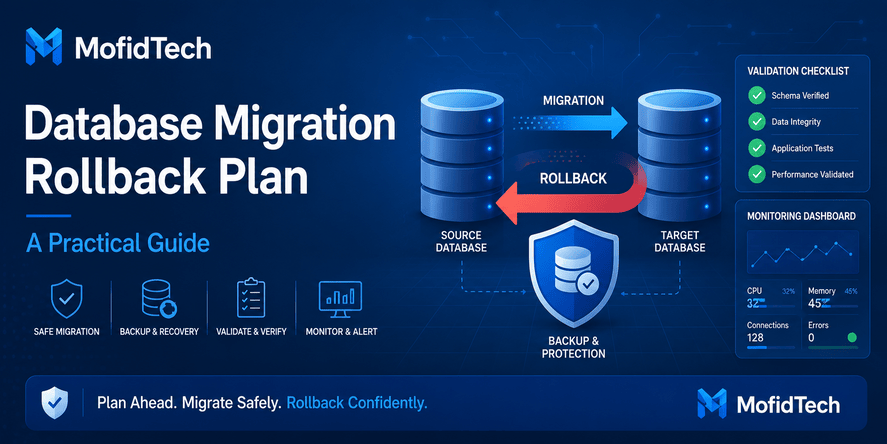
A database migration rollback plan is the safety system that protects a team from turning a technical change into a production incident. It explains what should happen if the migration fails, who makes the decision, how the database can be restored or corrected, how the application should behave, and how the team confirms that the system is safe again.
Many developers think rollback means “restore the backup.” That is only one option. In real production systems, rollback can mean several things. It may mean undoing a schema change, restoring a backup, switching traffic back to an old database, disabling a new feature, running a forward correction, or keeping both old and new database structures compatible until the migration is verified.
This guide explains how to design a safe database migration rollback plan before production deployment. It focuses on practical reasoning, risk checks, validation workflows, communication, monitoring, and decision-making. It does not include code, commands, database queries, or configuration snippets.
Table of Contents
- What Is a Database Migration Rollback Plan?
- Why Database Migrations Fail in Real Projects
- Rollback, Restore, and Forward-Fix: What Is the Difference?
- The Core Elements of a Safe Rollback Plan
- Pre-Migration Risk Assessment
- Database Backup Strategy Before Migration
- Application Compatibility Planning
- Data Validation Before and After Migration
- Migration Testing Before Production
- Rollback Decision Framework
- Production Migration Execution Plan
- Post-Migration Monitoring
- Common Mistakes to Avoid
- Best Practices for Safer Database Migrations
- Security Considerations
- Performance Considerations
- Troubleshooting Failed Migrations
- Practical Migration Readiness Checklist
- FAQ
- Conclusion
What Is a Database Migration Rollback Plan?
A database migration rollback plan is a documented strategy for returning a database-backed application to a safe and usable state if a migration causes problems. It defines the recovery path before the migration starts.
A good rollback plan answers these questions:
| Question | Why It Matters |
|---|---|
| What exactly is changing? | The team must know whether the migration affects schema, data, indexes, constraints, permissions, or application behavior. |
| What could fail? | Different failures require different responses. |
| What is the rollback trigger? | The team needs clear criteria for stopping or reversing the migration. |
| Who decides to roll back? | Production incidents should not depend on confusion or unclear ownership. |
| How will data be protected? | The plan must reduce the risk of data loss or corruption. |
| How will the team verify recovery? | A rollback is not complete until the system is validated. |
| What happens to users during recovery? | Communication and availability planning are part of migration safety. |
A rollback plan is not just a technical document. It is an operational agreement between developers, database administrators, DevOps engineers, support teams, product owners, and sometimes business stakeholders.
Why Rollback Planning Matters
Database migrations are risky because databases are stateful. Application files can usually be replaced quickly, but data changes are harder to reverse. Once records are transformed, deleted, merged, split, or moved, the team must know exactly how to recover.
Rollback planning matters because it helps teams:
- Avoid panic during production incidents.
- Reduce downtime.
- Protect user data.
- Preserve business continuity.
- Make safer deployment decisions.
- Detect problems earlier.
- Improve team coordination.
- Build confidence before production release.
A team that prepares a rollback plan is not expecting failure. It is preparing for professional production operations.
Why Database Migrations Fail in Real Projects
Database migrations fail for many reasons. Some are technical, while others are organizational. The most dangerous failures usually happen when teams assume that a migration is simple because it worked on a small test dataset.
Schema Changes That Break Applications
A schema migration can fail when the application expects one database structure but finds another. This may happen when:
- A column is renamed before the application is updated.
- A field becomes required while old records still contain missing values.
- A relationship changes and old application logic cannot handle it.
- A table is split into multiple tables without compatibility planning.
- An index or constraint changes the behavior of existing writes.
- A field type changes and the application cannot process the new format.
Schema changes should be planned together with application deployment. A database migration is rarely isolated from the software using the database.
Data Transformation Errors
Data migrations can fail because real production data is messy. Developers may expect clean dates, consistent names, valid identifiers, correct encoding, or unique values. In reality, old databases often contain incomplete, duplicated, inconsistent, or incorrectly encoded records.
Common data problems include:
- Invalid dates.
- Duplicate identifiers.
- Unexpected empty values.
- Text encoding problems.
- Truncated fields.
- Inconsistent capitalization.
- Records that violate new constraints.
- Historical data that does not match modern rules.
A migration that works on ideal test data can fail badly on real production data.
Performance Problems
A migration can be logically correct but operationally unsafe. For example, it may lock important tables, consume too much memory, rebuild indexes during peak traffic, slow down user requests, or overload the database server.
Performance-related migration failures often happen because teams test correctness but not scale. The migration may work on 5,000 rows but become dangerous on 50 million rows.
Missing Dependency Awareness
Databases are connected to many systems. A migration can break:
- Web applications.
- Admin dashboards.
- Reporting tools.
- Background jobs.
- Analytics pipelines.
- Search indexes.
- External integrations.
- Data exports.
- Scheduled tasks.
- Internal scripts.
A rollback plan must consider every system that reads from or writes to the affected database.
Rollback, Restore, and Forward-Fix: What Is the Difference?
Teams often use the word “rollback” for every recovery action, but different recovery strategies have different meanings.
| Strategy | Meaning | Best Used When | Main Risk |
|---|---|---|---|
| Rollback | Undo the migration change while keeping the system running or returning it to the previous expected state. | The change is reversible and the application can safely return to the old structure. | May not work if new data has already been written in the new format. |
| Restore | Recover the database from a backup or point-in-time recovery. | Data is corrupted, lost, or too risky to repair manually. | Data written after the backup point may be lost or require reconciliation. |
| Forward-fix | Keep the migration and apply a corrective fix. | Rolling back would be more dangerous than fixing the issue forward. | Requires confidence that the fix will not create more damage. |
| Feature disablement | Turn off the feature that depends on the migration. | The database is healthy but the new application feature is broken. | The database may still contain partially migrated structures. |
| Blue-green switchback | Return traffic to the previous environment or database version. | The system has been designed for environment-level switching. | Data synchronization can be complex. |
A mature rollback plan does not assume only one path. It identifies the safest recovery option for each type of failure.
The Core Elements of a Safe Rollback Plan
A strong database migration rollback plan should include the following elements.
Migration Scope
The plan should clearly define what will change. This includes:
- Tables affected.
- Columns affected.
- Relationships affected.
- Indexes affected.
- Constraints affected.
- Data transformations.
- Application features affected.
- External services affected.
- Reporting or analytics impact.
- Estimated migration duration.
A vague migration scope creates rollback confusion. The more precise the scope, the easier it is to recover.
Risk Classification
Not all migrations have the same risk level.
| Migration Type | Typical Risk Level | Reason |
|---|---|---|
| Adding a nullable field | Low | Usually does not break existing data or application behavior. |
| Adding an index | Low to Medium | Can affect performance during creation, especially on large tables. |
| Renaming a field | Medium | Can break application logic if not coordinated. |
| Changing a field type | Medium to High | Can cause data conversion issues. |
| Splitting a table | High | Requires application and data relationship changes. |
| Deleting data | Very High | May be irreversible without backup restore. |
| Migrating between database engines | Very High | Involves schema, data type, encoding, performance, and behavior differences. |
The rollback plan should match the risk level. A small schema addition may need a simple verification plan. A production data migration between MySQL and PostgreSQL needs a much deeper recovery strategy.
Backup and Recovery Method
A rollback plan should describe how the database can be recovered. This can include logical backups, physical backups, snapshots, replicas, point-in-time recovery, or managed database recovery tools.
For PostgreSQL, point-in-time recovery depends on having a continuous sequence of archived write-ahead log files, according to the official PostgreSQL documentation. This is important because a backup is only useful if it can actually restore the database to the required safe point.
Rollback Trigger
A rollback trigger is the condition that tells the team to stop and recover. Examples include:
- Critical application errors after deployment.
- Data validation mismatch.
- Unexpected missing records.
- Severe database performance degradation.
- Failed integrity checks.
- Migration taking longer than the allowed window.
- User-facing workflows failing.
- Business-critical reports becoming incorrect.
- Security or permission problems.
Without rollback triggers, teams often wait too long and make recovery harder.
Owner and Decision Maker
Every rollback plan needs named responsibilities. The plan should define:
- Who starts the migration.
- Who monitors the database.
- Who monitors the application.
- Who validates business workflows.
- Who communicates with stakeholders.
- Who has authority to roll back.
- Who confirms recovery.
A production migration should not depend on informal guessing.
Validation Plan
Validation is the proof that the migration worked or that the rollback succeeded. The plan should include checks for:
- Row counts.
- Required records.
- Relationships.
- Application workflows.
- Authentication and permissions.
- Reports.
- Background jobs.
- Performance.
- Error logs.
- User-facing pages.
- Data quality.
Validation should happen before, during, and after migration.
Pre-Migration Risk Assessment
Before a production migration, the team should classify the change and identify failure scenarios.
Key Questions to Ask Before Migration
| Question | Why It Matters |
|---|---|
| Is this migration reversible? | Some changes cannot be undone safely without restoring from backup. |
| Does the application support both old and new structures? | Compatibility reduces downtime and rollback risk. |
| Will users write new data during migration? | New writes can complicate rollback. |
| Are background jobs active? | They may write data in unexpected formats during migration. |
| Are reports or dashboards dependent on the affected data? | Business users may notice incorrect results before developers do. |
| Is there a tested backup? | Untested backups create false confidence. |
| How long does recovery take? | Backup restore time affects business continuity. |
| What is the maximum acceptable downtime? | Recovery options must fit business constraints. |
Migration Risk Matrix
| Risk Area | Low Risk | Medium Risk | High Risk |
|---|---|---|---|
| Data volume | Small table | Medium table | Large production table |
| Data change | No data transformation | Some transformation | Complex transformation or deletion |
| App dependency | Rarely used feature | Normal feature | Critical user workflow |
| Reversibility | Easy to undo | Partially reversible | Hard or impossible to reverse |
| Downtime tolerance | Flexible | Limited | Very low |
| Testing quality | Tested on realistic data | Tested on partial data | Not tested properly |
| Backup confidence | Restore tested | Backup exists only | Backup unclear or untested |
If a migration is high risk in multiple areas, it should not be treated as a simple deployment task.
Database Backup Strategy Before Migration
A backup is not a rollback plan by itself, but it is one of the most important parts of rollback planning.
What Makes a Backup Useful?
A useful migration backup must be:
- Recent enough.
- Complete enough.
- Restorable.
- Protected from accidental deletion.
- Accessible to the recovery team.
- Documented.
- Tested before production.
- Compatible with the target recovery method.
- Securely stored.
OWASP’s database security guidance recommends regular database backups and protecting those backups with appropriate permissions, ideally including encryption. This matters during migrations because backup files may contain sensitive production data.
Backup Questions Before Migration
Before starting a migration, answer these questions:
| Backup Question | Required Answer |
|---|---|
| When was the last backup created? | The team should know the exact recovery point. |
| Has the backup been restored in a test environment? | A backup is not reliable until restoration is tested. |
| How long does restoration take? | Recovery time must fit business needs. |
| Where is the backup stored? | The team must know how to access it quickly. |
| Who can access the backup? | Access should be limited but available to authorized recovery owners. |
| Is the backup encrypted? | Production data must be protected. |
| Can the team recover to a specific time? | Point-in-time recovery may be needed for active systems. |
| What data could be lost during restore? | Writes after the backup point may require reconciliation. |
Backup Restore Is Not Always the Best Rollback
Restoring a full backup may be necessary when data is corrupted, but it may also cause problems:
- New user activity after the backup may be lost.
- External systems may have received data that no longer matches the restored database.
- Orders, payments, messages, or audit logs may need reconciliation.
- The restore may take longer than the outage window.
- Application versions may not match the restored schema.
For that reason, teams should consider whether a reversible migration, phased deployment, or forward-fix is safer than full restore.
Application Compatibility Planning
A database migration is safe only if the application can handle the database state before, during, and after migration.
The Compatibility Problem
A common production failure happens when the application and database are deployed in the wrong order. For example:
- The new application expects a new field, but the database does not have it yet.
- The database removes an old field, but the old application still uses it.
- The application writes data in a new format, but old background jobs still expect the old format.
- A reporting tool depends on an old table structure.
To reduce this risk, teams should design migrations so that old and new versions can temporarily coexist.
Expand-and-Contract Strategy
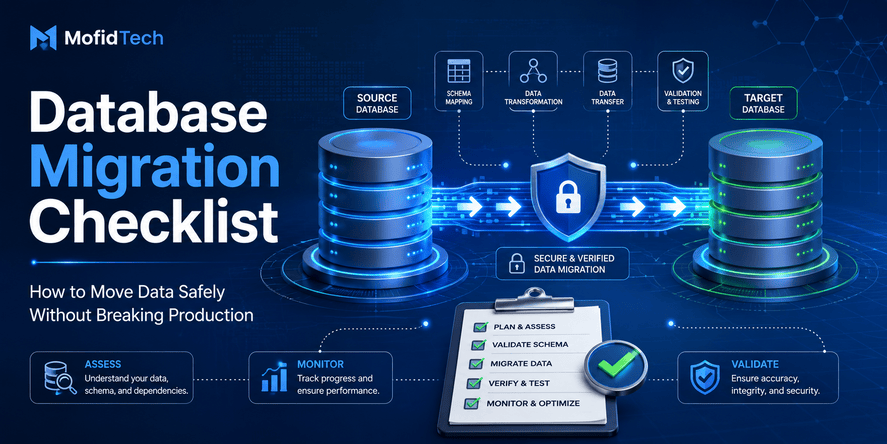
A safe migration often follows an expand-and-contract approach:
| Phase | Goal |
|---|---|
| Expand | Add new structures without breaking old behavior. |
| Dual compatibility | Allow old and new application logic to work during transition. |
| Migrate data | Move or transform data while preserving validation paths. |
| Switch usage | Make the application use the new structure. |
| Observe | Monitor errors, performance, and data correctness. |
| Contract | Remove old structures only after confidence is high. |
This strategy reduces rollback risk because the old path remains available during the transition.
Feature Flags and Controlled Release
Feature flags can reduce migration risk by separating database changes from user-facing activation. A team can prepare the database first, then gradually enable the application behavior that depends on it.
This is useful when:
- The migration affects important workflows.
- The new feature can be enabled for a small user group first.
- The team wants to test production behavior without exposing all users.
- Rollback can be achieved by disabling the feature rather than restoring the database.
Feature flags are not a replacement for database recovery, but they can reduce the chance that a database issue becomes a full production incident.
Data Validation Before and After Migration
Data validation is one of the most important parts of migration safety. Without validation, a migration may appear successful while silently damaging data quality.
What Should Be Validated?
A strong validation plan should include:
- Total row counts.
- Counts by important categories.
- Unique identifiers.
- Required fields.
- Foreign key relationships.
- Duplicate records.
- Date formats.
- Numeric ranges.
- Text encoding.
- Special characters.
- Business rules.
- User-facing workflows.
- Reports and dashboards.
- Search results.
- Permissions and ownership fields.
Validation Before Migration
Before migration, teams should understand the current data state. This includes identifying messy data before it breaks the migration.
Pre-migration validation should detect:
| Data Issue | Why It Matters |
|---|---|
| Duplicate keys | Can break uniqueness rules in the target database. |
| Invalid dates | Can fail conversion or produce wrong results. |
| Empty required fields | Can violate new constraints. |
| Broken relationships | Can fail foreign key checks. |
| Encoding problems | Can corrupt names, addresses, or multilingual content. |
| Unexpected values | Can break application logic. |
| Large outlier records | Can cause field length or performance problems. |
Validation After Migration
Post-migration validation confirms whether the migration achieved the expected result.
Post-migration checks should answer:
- Did all expected records move?
- Are key fields still correct?
- Are relationships preserved?
- Are user-facing workflows working?
- Are search and reports still accurate?
- Are background jobs processing correctly?
- Are there new errors in logs?
- Did performance degrade?
- Are permissions still correct?
- Is the application using the expected database structure?
Validation should not be limited to technical checks. Business-level validation matters too.
Migration Testing Before Production
A migration should be tested before production with data that is realistic enough to expose real risks.
Why Small Test Data Is Not Enough
A migration may work perfectly on a development database but fail in production because production has:
- More rows.
- Older records.
- More inconsistent values.
- Larger text fields.
- Historical edge cases.
- Different indexes.
- Different permissions.
- Different traffic patterns.
- Different database settings.
- Active users and background jobs.
Testing should include realistic data volume and realistic data quality.
What to Test
| Test Type | Purpose |
|---|---|
| Dry run | Confirms the migration logic can complete in a safe environment. |
| Restore test | Confirms that backup recovery actually works. |
| Performance test | Measures migration duration and database load. |
| Compatibility test | Confirms old and new application versions can work safely. |
| Failure test | Simulates what happens if the migration stops midway. |
| Validation test | Confirms that checks detect real problems. |
| Rollback test | Confirms that the recovery path is realistic. |
Testing Partial Failure
Partial failure is one of the most dangerous scenarios. It happens when a migration changes some data but fails before completion.
The rollback plan should explain:
- How to detect partial completion.
- Whether the migration can safely resume.
- Whether changed data can be identified.
- Whether duplicate processing is possible.
- Whether the application can run in the partial state.
- Whether the safest action is rollback, restore, or forward-fix.
A migration is not truly tested until failure behavior is understood.
Rollback Decision Framework
A rollback decision should be based on clear criteria, not panic.
When Rollback Is Usually Safer
Rollback is often safer when:
- The migration breaks a critical user workflow.
- The database state is still close to the previous version.
- New writes have not significantly changed the data.
- The old application version still works.
- The rollback path has been tested.
- The failure is understood and reversible.
- The business impact of staying on the new version is high.
When Forward-Fix May Be Safer
Forward-fix may be safer when:
- The migration is mostly successful.
- Rolling back would lose important new data.
- The issue is limited and well understood.
- A correction can be applied quickly and safely.
- The old system is no longer compatible.
- Restoring backup would create greater business damage.
- The team can validate the correction confidently.
When Restore May Be Necessary
Backup restore may be necessary when:
- Data has been corrupted.
- Important records were deleted.
- The database cannot reach a consistent state.
- The migration caused widespread integrity problems.
- The team cannot identify the exact damage.
- The system cannot safely continue.
- A tested point-in-time recovery path exists.
Decision Table
| Situation | Preferred Response |
|---|---|
| Minor non-critical display issue | Monitor or forward-fix |
| New feature fails but old workflows work | Disable feature |
| Migration causes severe application errors | Rollback or switch back |
| Data transformation produced incorrect results | Restore or corrective forward-fix, depending on scope |
| Data deletion occurred unexpectedly | Restore from backup or point-in-time recovery |
| Migration is slow but safe | Pause, monitor, or continue depending on window |
| Migration locks critical tables | Stop and recover if business impact is high |
| Validation mismatch is small and explainable | Investigate before rollback |
| Validation mismatch is large or unexplained | Rollback or restore |
Production Migration Execution Plan
A production migration should follow a controlled sequence.
Before the Migration Window
The team should confirm:
- The migration scope is documented.
- The rollback plan is approved.
- Backups are available and tested.
- The application compatibility plan is clear.
- Monitoring dashboards are ready.
- Stakeholders know the migration window.
- The team knows who is responsible for each action.
- The validation checklist is ready.
- The expected duration is known.
- The maximum allowed delay is defined.
- The rollback trigger is defined.
During the Migration
During execution, the team should monitor:
- Database health.
- Application errors.
- User-facing workflows.
- Migration progress.
- Resource usage.
- Background jobs.
- Locking or blocking behavior.
- Unexpected slowdowns.
- Validation checkpoints.
- External integrations.
The team should avoid making unrelated changes during the migration window. The more changes happen at once, the harder it becomes to identify the cause of a problem.
After the Migration
After migration, the team should:
- Validate data integrity.
- Confirm application workflows.
- Review error logs.
- Monitor performance.
- Check reports.
- Confirm background jobs.
- Keep rollback readiness for a defined observation period.
- Document any issues.
- Update operational documentation.
- Communicate completion to stakeholders.
A migration is not finished when the technical change ends. It is finished when the system is stable and validated.
Post-Migration Monitoring
Monitoring is essential because some migration problems appear after users interact with the system.
What to Monitor
| Monitoring Area | What to Watch |
|---|---|
| Application errors | New exceptions, failed requests, broken workflows |
| Database performance | Slow queries, locks, CPU, memory, storage, connection usage |
| Data quality | Unexpected nulls, duplicates, missing records, incorrect relationships |
| Background jobs | Failed tasks, retries, delayed queues |
| User behavior | Failed logins, failed submissions, abandoned actions |
| Business metrics | Orders, registrations, payments, reports, search results |
| Security logs | Permission errors, suspicious access, unexpected privilege issues |
Observation Window
The observation window depends on the risk level. A small low-risk migration may need short monitoring. A high-risk migration involving important business data may need several hours or days of careful observation.
The rollback plan should define how long the team remains ready to recover.
Common Mistakes to Avoid
Mistake 1: Treating Backup as the Whole Rollback Plan
A backup is necessary, but it does not answer all recovery questions. The team still needs to know how long restore takes, what data may be lost, who performs recovery, how the application is handled, and how the system is validated afterward.
Mistake 2: Not Testing the Restore Process
An untested backup is a hope, not a guarantee. Teams should test restoration before relying on backup recovery.
Mistake 3: Running Large Migrations During Peak Traffic
Large migrations can increase load, lock tables, slow down requests, or affect user experience. High-risk migrations should be scheduled when impact can be controlled.
Mistake 4: Combining Too Many Changes
If a deployment changes the application, database, background jobs, infrastructure, and external integrations at the same time, troubleshooting becomes difficult. Safer migrations separate concerns.
Mistake 5: Ignoring Encoding and Data Quality
Text encoding problems are common during database migrations, especially when moving between systems with different character sets or historical configurations. Names, addresses, multilingual fields, and imported data should be validated carefully.
Mistake 6: Removing Old Structures Too Early
Deleting old columns, tables, or compatibility paths immediately after migration increases risk. It is usually safer to keep old structures until the new system is stable.
Mistake 7: Forgetting Background Jobs
Background jobs may continue reading or writing data during migration. If they are not included in the plan, they can corrupt assumptions or recreate old data patterns.
Mistake 8: No Clear Rollback Owner
When nobody has authority to call rollback, teams lose time debating during incidents. Ownership should be defined before the migration begins.
Best Practices for Safer Database Migrations
Use Small, Reversible Changes
Small migrations are easier to test, monitor, and roll back. Large changes should be split into controlled phases whenever possible.
Separate Schema Changes from Data Changes
Schema changes and data transformations have different risks. Separating them makes it easier to detect problems and recover safely.
Keep Old and New Versions Compatible
Compatibility reduces pressure. If the old application can still work with the new database structure, rollback becomes easier.
Validate With Realistic Data
Production-like data exposes issues that small development datasets cannot reveal. This is especially important for old records, multilingual content, historical formats, and large tables.
Define Rollback Triggers Before Deployment
The team should know exactly when to stop, roll back, restore, or forward-fix.
Monitor More Than Technical Success
A migration can complete successfully while business workflows fail. Monitor both technical and user-facing outcomes.
Document the Result
After the migration, document what happened, what changed, what issues appeared, and what should be improved next time.
Security Considerations
Database migrations can expose security risks if handled carelessly.
Protect Backups
Backups often contain sensitive production data. They should be protected with strict access control, secure storage, and encryption where appropriate. OWASP recommends protecting database backups with appropriate permissions and ideally encryption.
Limit Migration Access
Only authorized team members should have migration and recovery privileges. Temporary elevated access should be reviewed and removed when no longer needed.
Validate Permissions After Migration
Migrations can accidentally change ownership, roles, or access paths. After migration, verify that users and services have only the permissions they need.
Avoid Exposing Production Data in Test Environments
Testing with realistic data is important, but production data should be handled carefully. Sensitive fields may need masking, anonymization, or restricted access depending on legal and organizational requirements.
Maintain Auditability
The team should be able to answer:
- Who approved the migration?
- Who executed it?
- When did it start and end?
- What changed?
- Were there errors?
- Was rollback needed?
- What validation was performed?
Auditability matters for security, compliance, and incident review.
Performance Considerations
A migration can affect performance even when it is functionally correct.
Watch for Locking
Some migrations may block reads or writes. If a critical table is locked, users may experience slow pages, failed submissions, or timeouts.
Watch for Index Impact
Adding, removing, or rebuilding indexes can affect database load. Missing indexes after migration can make previously fast application pages slow.
Watch for Query Plan Changes
A schema or data distribution change can affect how the database retrieves data. Even if the application logic is unchanged, performance may change after migration.
Watch for Storage Growth
Some migrations temporarily require extra storage. Large transformations, new indexes, and backup files can increase disk usage.
Watch for Background Workload
Background jobs, analytics processes, and scheduled tasks may compete with migration operations for database resources.
Troubleshooting Failed Migrations
When a migration fails, the team should avoid random fixes. A structured troubleshooting process reduces damage.
Step 1: Stop and Stabilize
The first priority is to prevent additional damage. This may mean pausing the migration, disabling affected features, stopping background jobs, or restricting writes temporarily.
Step 2: Identify the Failure Type
Classify the failure:
| Failure Type | Example |
|---|---|
| Schema failure | A required structure was not created correctly. |
| Data failure | Records were transformed incorrectly. |
| Performance failure | The database became too slow or locked. |
| Compatibility failure | The application does not match the database state. |
| Permission failure | The application cannot access required data. |
| Integration failure | External systems no longer match the database. |
Step 3: Check Whether the Database Is Consistent
Before choosing rollback or forward-fix, determine whether the database is in a consistent state. If consistency is unknown, avoid making additional changes until the scope is understood.
Step 4: Choose the Recovery Path
Use the decision framework:
- Rollback if the change is reversible and the old path is safe.
- Restore if data integrity is seriously damaged.
- Forward-fix if rollback creates greater risk.
- Disable the feature if the database is healthy but the new feature is broken.
Step 5: Validate Recovery
After recovery, validate:
- Data correctness.
- Application workflows.
- Performance.
- Background jobs.
- Reports.
- User-facing pages.
- Logs and alerts.
Step 6: Document the Incident
Document what failed, why it failed, how it was recovered, and how to prevent recurrence.
Practical Migration Readiness Checklist
Use this checklist before production deployment.
Planning Checklist
| Item | Status |
|---|---|
| Migration scope is documented | To check |
| Affected tables and fields are identified | To check |
| Application dependencies are identified | To check |
| Background jobs are reviewed | To check |
| External integrations are reviewed | To check |
| Rollback trigger is defined | To check |
| Recovery owner is assigned | To check |
| Communication plan is ready | To check |
Backup Checklist
| Item | Status |
|---|---|
| Recent backup exists | To check |
| Backup restore has been tested | To check |
| Recovery time is known | To check |
| Backup access is confirmed | To check |
| Backup is protected | To check |
| Point-in-time recovery requirements are understood | To check |
Data Validation Checklist
| Item | Status |
|---|---|
| Row counts are known before migration | To check |
| Duplicate records are checked | To check |
| Required fields are checked | To check |
| Relationships are checked | To check |
| Encoding-sensitive fields are reviewed | To check |
| Business rules are validated | To check |
| Post-migration validation steps are ready | To check |
Application Checklist
| Item | Status |
|---|---|
| Old and new application compatibility is reviewed | To check |
| Feature flags are considered | To check |
| User-facing workflows are listed | To check |
| Admin workflows are listed | To check |
| Reports are reviewed | To check |
| Background jobs are included | To check |
Production Execution Checklist
| Item | Status |
|---|---|
| Migration window is approved | To check |
| Monitoring is ready | To check |
| Team members are available | To check |
| Rollback decision maker is available | To check |
| Stakeholders are informed | To check |
| Validation owner is assigned | To check |
| Observation period is defined | To check |
Database Migration Rollback Plan Template
A practical rollback plan can be organized as follows.
| Section | What to Include |
|---|---|
| Migration summary | Explain what will change and why. |
| Risk level | Classify the migration as low, medium, high, or critical. |
| Systems affected | List applications, jobs, reports, and integrations. |
| Backup plan | Define backup type, time, access, restore test, and recovery target. |
| Rollback trigger | Define measurable failure conditions. |
| Rollback method | Explain whether recovery uses undo, restore, switchback, feature disablement, or forward-fix. |
| Owner | Identify who executes and who approves rollback. |
| Validation plan | Define technical and business checks. |
| Communication plan | Define who must be informed and when. |
| Observation period | Define how long the system will be monitored after migration. |
| Post-migration review | Document lessons learned and future improvements. |
FAQ
What is a database migration rollback plan?
A database migration rollback plan is a documented recovery strategy that explains how a team will return a database and application to a safe state if a migration fails. It includes backup strategy, rollback triggers, responsibilities, validation steps, communication, and monitoring.
Can every database migration be rolled back?
No. Some migrations are difficult or impossible to roll back directly, especially if they delete data, transform records destructively, or allow new data to be written in a new format. In those cases, teams may need backup restore, point-in-time recovery, forward-fix, or phased compatibility planning.
Is restoring a backup the same as rolling back?
No. Restoring a backup returns the database to a previous saved state. Rolling back may mean undoing a specific change without restoring the entire database. Restore is one recovery method, but it is not the only rollback strategy.
What should be checked before a production database migration?
Before a production migration, check backups, restore testing, affected tables, row counts, data quality, constraints, relationships, indexes, application compatibility, background jobs, external integrations, monitoring, rollback triggers, and team responsibilities.
How do you know when to roll back a migration?
A team should roll back when the migration causes serious application failures, data integrity issues, severe performance problems, failed validation checks, or business-critical workflow disruption. The exact trigger should be defined before the migration starts.
What is the safest way to perform a database migration?
The safest approach is to use small reversible changes, test with realistic data, prepare a verified backup, keep old and new application versions compatible, validate data before and after migration, monitor production carefully, and define a rollback plan before deployment.
Why do database migrations fail?
Database migrations fail because of unexpected data quality issues, schema incompatibility, missing constraints, invalid formats, encoding problems, performance bottlenecks, table locks, application mismatch, untested backups, and lack of rollback planning.
Should database migrations be done during low-traffic hours?
High-risk migrations are often safer during low-traffic periods because fewer users are affected if performance drops or rollback is needed. However, the best timing depends on business requirements, support availability, recovery time, and monitoring readiness.
What is a forward-fix in database migration?
A forward-fix means keeping the migration in place and applying a corrective change instead of reverting to the old state. It is useful when rollback would cause more risk than fixing the problem forward.
How long should a rollback window be?
The rollback window should be long enough to detect critical issues, decide on recovery, and complete the rollback or restore process within the business’s acceptable downtime. High-risk migrations need a longer observation period than simple changes.
Conclusion
A database migration rollback plan is not optional for serious production systems. It is one of the most important safeguards a technical team can prepare before changing live data. The goal is not only to undo a failed migration. The real goal is to protect data, users, business workflows, and team confidence.
A safe rollback plan starts with understanding the migration scope. It includes tested backups, clear rollback triggers, application compatibility planning, validation checks, monitoring, ownership, communication, and recovery documentation. It also recognizes that rollback is not always the same as restore. Sometimes the safest response is a direct rollback, sometimes it is a backup restore, sometimes it is a feature disablement, and sometimes it is a forward-fix.
The best teams do not wait for failure to decide what to do. They decide before production deployment. That preparation is what turns database migration from a risky event into a controlled engineering process.










💬 Comments
No comments yet. Be the first to comment!
Login to comment.