Introduction
Database migration is one of the most sensitive operations in software development. A normal feature bug may affect one page, one button, or one workflow. A failed database migration can affect the entire application, corrupt business records, break user accounts, damage reporting, cause downtime, and create serious recovery problems.
A database migration can look simple from the outside. You may think the task is only to move tables from one database to another, upgrade a schema, import an old dataset, or switch from MySQL to PostgreSQL. In reality, migration is not only a technical copy operation. It is a full engineering process that involves data quality, schema design, application behavior, security, performance, backups, rollback planning, monitoring, and communication.
Many database migration problems happen because teams focus only on the transfer itself. They prepare the export, import the data, and assume the work is complete. Later, they discover missing rows, invalid dates, broken foreign keys, duplicated users, corrupted Arabic or French characters, missing indexes, slow queries, wrong permissions, or application errors that appear only after users start working with the migrated system.
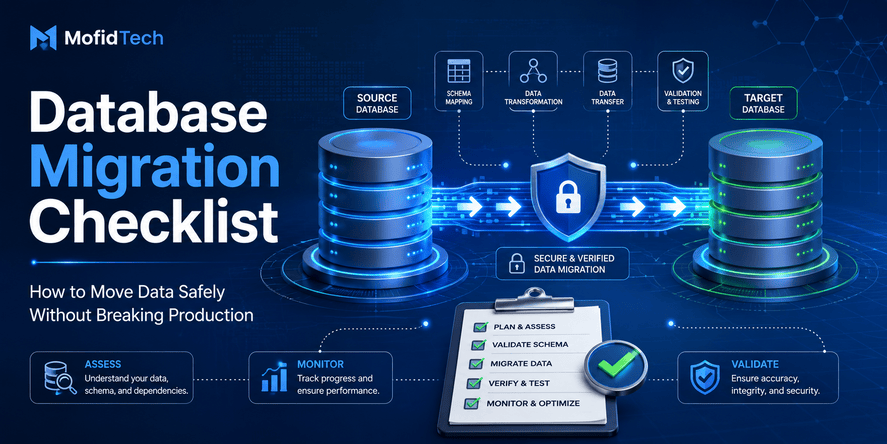
A safe database migration starts before the first record is moved. It begins with understanding the data, mapping the schema, identifying risks, testing with realistic copies, validating results, and preparing a rollback plan. The goal is not only to move data. The goal is to move data safely, accurately, securely, and with minimum disruption.
This guide gives you a complete database migration checklist for developers, database administrators, DevOps engineers, and technical teams. It focuses on practical decisions and production risks, without using code snippets or command examples. You can use it for MySQL to PostgreSQL migration, PostgreSQL to PostgreSQL migration, legacy database cleanup, cloud database migration, application refactoring, or production deployment preparation.
Table of Contents
- What Is a Database Migration Checklist?
- Why Database Migrations Fail
- Common Types of Database Migration
- Pre-Migration Planning Checklist
- Data Quality Checklist Before Migration
- Schema Mapping Checklist
- MySQL to PostgreSQL Migration Considerations
- Security and Privacy Checklist
- Backup and Rollback Checklist
- Testing the Migration Before Production
- Performance Checklist
- Application Compatibility Checklist
- Production Migration Checklist
- Post-Migration Validation Checklist
- Troubleshooting Common Migration Problems
- Common Database Migration Mistakes
- Practical Database Migration Checklist
- Real-World Use Cases
- Best Practices
- FAQ
- Conclusion
What Is a Database Migration Checklist?
A database migration checklist is a structured set of steps used to move data safely from one database system, schema, server, or environment to another. It helps teams verify that data, relationships, security rules, application behavior, performance, and recovery plans are ready before migration begins.
A good checklist does not only ask, “Was the data copied?” It asks deeper questions:
- Is the source data clean?
- Are there duplicate records?
- Are there invalid dates?
- Are character encoding issues fixed?
- Are table relationships preserved?
- Are primary keys and foreign keys correct?
- Are indexes recreated?
- Are permissions configured?
- Has the migration been tested?
- Can the team roll back safely?
- Has the application been tested with the migrated data?
- Are users protected from downtime or data loss?
The checklist is important because database migrations often involve hidden complexity. Data that looks correct in one system may behave differently in another. A text column may contain corrupted characters. A date may be stored as text. A numeric field may contain spaces. A table may have duplicate identifiers. A foreign key relationship may exist logically but not be enforced by the source database.
A checklist makes these risks visible before they become production incidents.
Why Database Migrations Fail
Database migrations usually fail because teams underestimate the quality, structure, and behavior of real data. The migration process may work perfectly on a small sample, but fail when applied to production data with years of inconsistencies.
The most common reasons include:
| Failure Cause | What Happens | Business Risk |
|---|---|---|
| Poor data quality | Invalid, duplicated, or incomplete records are migrated | Reports and workflows become unreliable |
| Encoding issues | Names, Arabic text, French accents, or symbols become corrupted | User data becomes unreadable |
| Wrong schema mapping | Data types do not match the target database | Import errors or silent data loss |
| Missing relationships | Foreign keys or references are broken | Application pages fail or show wrong data |
| No rollback plan | Team cannot return to the old state quickly | Long downtime and emergency recovery |
| Insufficient testing | Problems are found only after production migration | Users experience errors |
| Missing indexes | Application becomes slow after migration | Poor performance and user frustration |
| Security gaps | Sensitive exports are exposed or permissions are too broad | Data leak risk |
| Application mismatch | The app expects old behavior but the database changed | Runtime errors and broken features |
A database migration is successful only when the application, users, and business workflows continue to work correctly after the data has moved.
Common Types of Database Migration
Database migration is not always about changing database engines. There are several types, and each has different risks.
1. Database Engine Migration
This happens when you move from one database technology to another, such as MySQL to PostgreSQL or SQLite to PostgreSQL.
This type requires special attention because different database systems handle data types, text encoding, indexes, constraints, case sensitivity, date formats, and transactions differently.
2. Server Migration
This happens when you move the same database engine from one server to another. For example, moving PostgreSQL from a local server to a cloud server.
The main risks are network access, permissions, backups, performance, storage, firewall rules, and application connection settings.
3. Cloud Database Migration
This happens when you move a database to a managed cloud service. The benefit is easier scaling and maintenance, but the risks include cost control, security configuration, network latency, backups, and vendor-specific settings.
4. Schema Migration
This happens when you change the structure of tables, columns, relationships, constraints, or indexes.
Schema migrations are common during application development. They can be risky when they affect existing production data.
5. Data Cleanup Migration
This happens when you clean, normalize, or transform messy data. For example, converting text dates into real date fields, fixing broken names, removing duplicates, or standardizing country codes.
This type is often more difficult than a simple database copy because the migration must decide how to handle imperfect records.
6. Legacy System Migration
This happens when old application data is imported into a new system.
Legacy migrations are risky because the old system may not enforce modern data rules. There may be missing identifiers, inconsistent formats, obsolete fields, and undocumented business logic.
Pre-Migration Planning Checklist
A safe migration begins with planning. Before moving data, the team must understand what is being moved, why it is being moved, and what could go wrong.
Define the Migration Objective
Start by answering one direct question: why is this migration necessary?
Common objectives include:
- Moving from MySQL to PostgreSQL
- Improving performance
- Preparing a production deployment
- Consolidating multiple databases
- Cleaning legacy data
- Moving to a cloud database
- Supporting a new application architecture
- Improving security and backup management
- Preparing for analytics or reporting
A clear objective helps the team decide what success means. Without a clear objective, the migration may become a vague technical task with no measurable result.
Identify the Source and Target Systems
Document the source database and target database clearly.
You should know:
- Database engine
- Database version
- Hosting environment
- Character encoding
- Collation rules
- Storage size
- Number of tables
- Number of rows
- Critical business tables
- Existing indexes
- Existing constraints
- Backup strategy
- Application dependencies
This information helps estimate migration complexity.
Classify the Data
Not all data has equal importance. Some tables are critical, while others can be rebuilt or regenerated.
Classify data into categories:
| Data Type | Example | Migration Priority |
|---|---|---|
| Critical business data | Users, orders, payments, academic records | Very high |
| Operational data | Sessions, logs, notifications | Medium |
| Historical data | Archives, old reports | Medium or high |
| Temporary data | Cache, short-lived records | Low |
| Rebuildable data | Search indexes, calculated summaries | Low |
Critical data deserves the strongest validation.
Define Downtime Tolerance
Before migration, decide how much downtime is acceptable.
Some applications can be offline for a short maintenance window. Others must stay available continuously.
Ask:
- Can users stop using the system during migration?
- Can the migration happen at night or during low traffic?
- Is read-only mode acceptable?
- Can new records be temporarily blocked?
- Is a zero-downtime strategy required?
- What is the maximum acceptable outage?
Downtime tolerance affects the migration strategy. A small internal application may allow planned downtime. A public platform, e-commerce site, or institutional system may need a more careful approach.
Identify Stakeholders
Database migration is not only a developer task. Depending on the system, stakeholders may include:
- Backend developers
- DevOps engineers
- Database administrators
- Security team
- Product owner
- Support team
- Business users
- External clients
- Compliance officer
Stakeholders should know when the migration happens, what could be affected, and how problems will be handled.
Data Quality Checklist Before Migration
Data quality is one of the biggest reasons migrations fail. If bad data exists in the source database, migration can expose it, amplify it, or make it harder to fix later.
A strong migration process includes data profiling and cleaning before production migration.
Check for Missing Values
Missing values can break the target system if the new schema requires mandatory fields.
Examples of risky missing values:
- User email missing
- Student identifier missing
- Product price missing
- Order status missing
- Foreign key reference missing
- Date of birth missing where required
- Category name missing
Before migration, decide how to handle missing values:
| Situation | Possible Decision |
|---|---|
| Field is optional | Allow null or empty value |
| Field is required but missing | Fix manually or apply business rule |
| Field is critical and cannot be guessed | Exclude record temporarily and review |
| Field can be derived | Generate from another trusted field |
Never guess critical data without business validation.
Check for Duplicate Records
Duplicates are common in legacy databases. They may appear because old systems did not enforce unique constraints.
Examples include:
- Same user registered twice
- Same student identifier repeated
- Same email used by multiple accounts
- Duplicate product names
- Duplicate invoice numbers
- Duplicate records with slight spelling differences
Duplicates must be handled before migration if the target database enforces uniqueness.
A duplicate strategy may include:
- Keeping the newest record
- Keeping the most complete record
- Merging records
- Marking duplicates for review
- Creating a temporary mapping table
- Asking business users to validate sensitive duplicates
The best choice depends on the business meaning of the data.
Check Invalid Dates
Dates are often problematic during migration, especially when the source database stores dates as text.
Common date issues include:
- Empty dates
- Year-only values
- Invalid day or month
- Mixed formats
- Text inside date fields
- Dates stored with inconsistent separators
- Old placeholder values
- Different regional formats
For example, one system may store dates in day-month-year format, while another expects year-month-day format. If this is not handled carefully, dates can be rejected or misinterpreted.
Before migration, classify date values into:
- Valid dates
- Empty dates
- Invalid dates
- Ambiguous dates
- Placeholder dates
- Dates requiring manual review
Check Encoding and Character Problems
Character encoding problems can destroy the readability of names, addresses, descriptions, Arabic text, French accents, and special symbols.
This is especially important when migrating data from older MySQL databases, legacy systems, spreadsheets, or files exported with the wrong encoding.
Common signs of encoding problems include:
- Arabic text displayed as strange Latin symbols
- French accents appearing as broken characters
- Extra symbols inside names
- Replacement characters
- Non-breaking spaces mixed with normal spaces
- Invisible characters
- Text that looks correct in one tool but wrong in another
Encoding must be tested before the final migration. Do not assume that text is safe because it appears correct in one interface.
Check Whitespace and Invisible Characters
Data may contain invisible formatting problems:
- Leading spaces
- Trailing spaces
- Multiple spaces
- Non-breaking spaces
- Tab characters
- Hidden control characters
- Line breaks inside fields
These issues can break search, matching, deduplication, and validation.
For example, two student names may look identical but not match because one contains a non-breaking space. Two email addresses may appear the same but differ because one has a hidden character.
Check Broken Relationships
A relational database depends on relationships between tables. Migration can fail if child records reference missing parent records.
Examples:
- Orders linked to missing customers
- Comments linked to deleted articles
- Payments linked to missing invoices
- Student records linked to missing academic records
- Product variants linked to missing products
Before migration, verify that relationships are complete and meaningful.
Check Business Rules
Technical validation is not enough. Data may be technically valid but logically wrong.
Examples:
- A user account has a future creation date
- A payment is marked complete but has no amount
- A student record has an invalid academic year
- A product is active but has no price
- A loan return date is before the loan date
Business rules should be included in migration validation.
Schema Mapping Checklist
Schema mapping means deciding how each source table, column, data type, relationship, and constraint will be represented in the target database.
This is one of the most important parts of migration.
Map Tables Carefully
For each table, decide whether it will be:
- Migrated exactly
- Renamed
- Split into multiple tables
- Merged with another table
- Archived
- Ignored
- Rebuilt from other data
Not every source table must move to the target system. Some tables may contain old logs, temporary data, unused fields, or obsolete structures.
Map Columns Clearly
For each column, document:
- Source column name
- Target column name
- Source data type
- Target data type
- Whether the field is required
- Transformation rule
- Default value
- Validation rule
- Notes about risks
This prevents confusion during testing and review.
Review Data Type Differences
Different database systems handle data types differently.
Important areas include:
| Data Type Area | Migration Risk |
|---|---|
| Text fields | Encoding, length limits, collation differences |
| Numbers | Precision, rounding, invalid numeric text |
| Dates | Format differences, invalid dates, timezone issues |
| Boolean values | Different representations of true and false |
| Auto-increment IDs | Sequence behavior may differ |
| JSON fields | Structure and validation may differ |
| Large text | Size limits and performance concerns |
| Binary data | Storage and transfer complexity |
A field that works in the source database may fail or behave differently in the target database.
Preserve Primary Keys
Primary keys uniquely identify records. Losing or changing them without planning can break relationships.
Before migration, decide:
- Will old primary keys be preserved?
- Will new primary keys be generated?
- How will child tables reference parent records?
- Are there conflicts between old and new identifiers?
- Will the application depend on old IDs?
Preserving primary keys is often safer when migrating a complete system. Generating new keys may be acceptable when importing legacy data into a redesigned application, but it requires a mapping strategy.
Preserve Foreign Keys
Foreign keys represent relationships between tables.
Before migration:
- Identify all parent-child relationships
- Check whether source relationships are enforced or only implied
- Decide the order of migration
- Validate that child records point to existing parents
- Recreate constraints in the target database where appropriate
If relationships are broken, the application may show missing data or crash when loading related records.
Review Indexes
Indexes are often forgotten during migration. The data may move successfully, but the application becomes slow because indexes were not recreated.
Review indexes used for:
- Login lookups
- Search pages
- Foreign key relationships
- Filtering
- Sorting
- Reporting
- Unique constraints
- Frequently used queries
Indexes should be recreated intentionally, not blindly copied. Some old indexes may be useless, while new indexes may be needed because the target database or application behavior is different.
Review Constraints
Constraints protect data integrity. They include:
- Required fields
- Unique rules
- Foreign keys
- Valid value restrictions
- Default values
- Relationship rules
If the source database had weak constraints, the target database may reject dirty data. This is not a migration failure; it is a signal that the source data needs cleaning.
MySQL to PostgreSQL Migration Considerations
MySQL to PostgreSQL migration is common, but it requires careful planning because the two systems have important differences.
Data Types May Not Match Perfectly
A MySQL column type may not have an exact PostgreSQL equivalent. Even when the names look similar, behavior can differ.
Important areas include:
- Auto-increment behavior
- Text and character fields
- Numeric precision
- Date and time handling
- Boolean fields
- JSON storage
- Case sensitivity
- Default values
The migration plan should define how each type will be converted.
Encoding and Collation Need Special Attention
Older MySQL databases may use legacy collations or character sets. Some data may appear correct in one tool but become corrupted after export or import.
This is especially important for multilingual data, including Arabic names, French accents, and mixed-language records.
Before migration:
- Identify the source character set
- Identify the target encoding
- Test export and import using real multilingual data
- Inspect the result in the target database
- Validate text in the application interface
- Check names, addresses, titles, descriptions, and user-generated content
Case Sensitivity Can Change Behavior
MySQL and PostgreSQL may handle case sensitivity differently depending on configuration, collation, and query behavior.
This can affect:
- Search results
- Login matching
- Unique values
- Slug matching
- Email comparison
- Category names
- Tags
Applications that worked with case-insensitive assumptions may behave differently after migration.
Date Handling Can Expose Bad Data
MySQL installations sometimes allow invalid or flexible date values depending on configuration. PostgreSQL is usually stricter about date validity.
This means a migration may fail when the target database rejects values that were tolerated by the source database.
The solution is not to weaken the target database. The solution is to clean and classify bad dates before migration.
Queries May Need Review
Even if the data migrates successfully, application queries may behave differently.
Review areas such as:
- Text search
- Sorting
- Grouping
- Date comparison
- Null handling
- Aggregation behavior
- Pagination performance
- Case-insensitive matching
A migration is not complete until the application has been tested against the target database.
Security and Privacy Checklist
Database migration often involves copying sensitive data outside its normal environment. This creates security risks.
A migration checklist must include privacy and access control.
Identify Sensitive Data
Sensitive data may include:
- Personal names
- Emails
- Phone numbers
- Addresses
- National identifiers
- Student records
- Financial records
- Health-related records
- Authentication data
- Logs containing private information
The team must know what sensitive data exists before exporting or transferring it.
Limit Access
Only people who need access should be able to view or handle migration data.
Avoid giving broad database access to everyone involved in the project. Use temporary access when possible and remove it after migration.
Protect Exported Files
Exported database files can be dangerous if stored carelessly.
Risks include:
- Files left on developer machines
- Backups stored without protection
- Data sent through insecure channels
- Old exports forgotten on servers
- Temporary files not removed
- Sensitive data used in test environments without controls
Exported data should be handled like production data.
Avoid Using Real Sensitive Data Unnecessarily
For testing, use anonymized or masked data when possible. If realistic production data is required for migration testing, protect the test environment carefully.
Review Credentials
Migration often requires temporary database credentials.
After migration:
- Remove temporary users
- Rotate exposed credentials
- Review database permissions
- Disable unused access
- Confirm that application users have only required privileges
Keep an Audit Trail
Document who performed the migration, when it happened, what data was moved, what validation was performed, and what issues were found.
An audit trail is useful for debugging, compliance, and accountability.
Backup and Rollback Checklist
A migration without a rollback plan is a production risk.
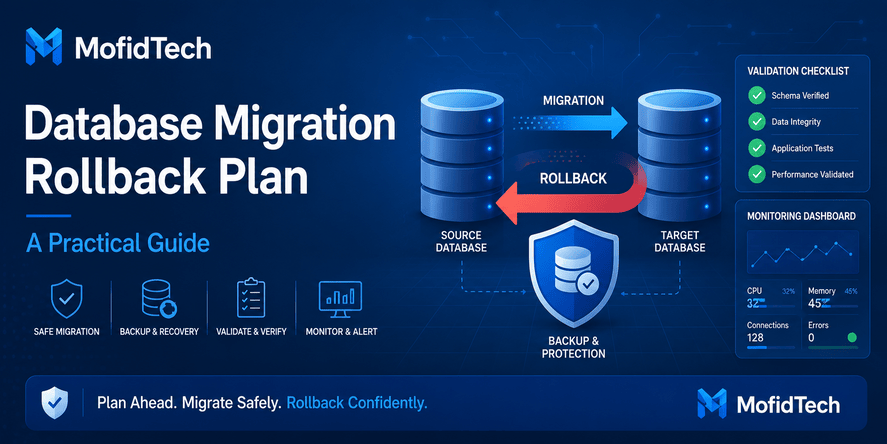
A rollback plan explains how to return to a safe previous state if the migration fails.
Create a Reliable Backup
Before production migration, create a complete backup of the source database.
A backup is useful only if it can be restored. Do not assume a backup is valid without testing.
Test Backup Restoration
Many teams create backups but never test restoration. This is dangerous.
A backup restoration test confirms that:
- The backup is complete
- The file is not corrupted
- The restore process is understood
- The team knows how long restoration takes
- The restored database is usable
Define Rollback Conditions
Before migration, decide when rollback should happen.
Examples of rollback conditions:
- Migration fails before completion
- Critical tables have missing records
- Login system does not work
- Application cannot start correctly
- Major performance degradation appears
- Data validation shows unacceptable differences
- Users cannot complete essential workflows
Rollback should not be improvised during panic. The decision rules should be prepared in advance.
Plan the Rollback Process
The rollback plan should define:
- Who decides to roll back
- Who performs the rollback
- Which backup is used
- What happens to new data created during migration
- How users are informed
- How the application is pointed back to the old database
- How the failed migration is analyzed
Consider Data Created During Migration
Rollback becomes more complicated if users continue creating data during the migration window.
If users can write new data during migration, you must decide how to handle records created in the old or new system during the transition.
For simpler migrations, a maintenance window or read-only mode may reduce risk.
Testing the Migration Before Production
Never test a database migration for the first time on production.
A proper test migration helps discover problems before users are affected.
Test on a Copy of Realistic Data
Small sample data is not enough. A migration may work on 100 records but fail on 500,000 records.
Use realistic data volume and real data patterns when possible.
Testing should include:
- Large tables
- Special characters
- Empty fields
- Old records
- Duplicates
- Invalid records
- Multilingual text
- Long text fields
- Critical relationships
Compare Row Counts
Row count comparison is a basic but important validation step.
For each important table, compare:
- Number of source records
- Number of migrated records
- Number of rejected records
- Number of transformed records
- Number of duplicates removed
- Number of records requiring manual review
Row counts do not prove that data is correct, but they help detect obvious problems.
Validate Important Fields
Do not validate only table counts. Check field-level accuracy.
Important fields may include:
- IDs
- Names
- Emails
- Dates
- Status values
- Foreign keys
- Amounts
- Category references
- Slugs
- User roles
- Created and updated timestamps
Field-level validation is especially important when data transformations are applied.
Test Application Workflows
After migration, the application must be tested with the target database.
Test workflows such as:
- User login
- Search
- Filtering
- Creating records
- Editing records
- Deleting records
- Admin dashboard
- Reports
- File uploads
- Permissions
- Notifications
- API responses
- Background tasks
- Public pages
The database may look correct, but the application may still fail because it expects old assumptions.
Test Error Cases
Test not only happy paths. Also test:
- Missing data
- Invalid input
- Old records
- Records with special characters
- Empty optional fields
- Deleted relationships
- Large result sets
- Slow pages
- Permission-restricted records
Production users will eventually reach edge cases.
Performance Checklist
A successful migration must preserve or improve performance.
Moving data to a new database without performance planning can create slow pages, timeouts, and poor user experience.
Review Indexes Before Migration
Indexes help the database find records quickly.
Important indexes usually support:
- Login by email
- Search by identifier
- Article slug lookup
- Category filtering
- Foreign key relationships
- Date-based reports
- Admin filters
- API pagination
- Frequently used dashboards
After migration, missing indexes can make the application dramatically slower.
Check Query Behavior
Different databases optimize queries differently. A query that was fast in one system may be slow in another.
Focus on:
- Frequently used pages
- Dashboard reports
- Search features
- Admin lists
- API endpoints
- Heavy filtering
- Sorting on large tables
- Joins between large tables
Performance testing should happen before production.
Consider Data Volume
Migration strategy depends on data size.
| Data Volume | Main Concern |
|---|---|
| Small database | Correctness and simplicity |
| Medium database | Testing, indexing, downtime |
| Large database | Batch planning, performance, monitoring, rollback |
| Very large database | Advanced migration strategy, incremental transfer, strict coordination |
Large databases require extra planning because migration time, validation time, and rollback time can be significant.
Monitor During Migration
During production migration, monitor:
- Database CPU
- Memory usage
- Disk usage
- Connection count
- Import progress
- Error rate
- Application logs
- Slow queries
- Storage growth
Monitoring helps detect problems early.
Rebuild or Refresh Statistics
After a large migration, the target database may need updated internal statistics so it can optimize queries correctly.
This is often forgotten. The result can be poor query planning even when indexes exist.
Application Compatibility Checklist
A database migration affects the application layer. The app may depend on database-specific behavior.
Review Application Settings
The application must be configured to connect to the new database correctly.
Review:
- Database host
- Database name
- Username
- Password
- Port
- SSL settings
- Environment variables
- Connection pooling
- Timeout settings
- Read replica settings
- Backup configuration
Test Authentication
Authentication is critical. If user records, passwords, sessions, or permissions are affected, users may be locked out.
Test:
- Login
- Logout
- Password reset
- Admin access
- User roles
- Permission checks
- Account activation
- Email-based workflows
Test Search and Filtering
Search behavior can change after migration because of collation, case sensitivity, accents, and indexing.
Test:
- Search by name
- Search by email
- Search by identifier
- Search by Arabic text
- Search by French accents
- Search by partial words
- Search with uppercase and lowercase
- Category filtering
- Tag filtering
Test Admin Interfaces
Admin interfaces often expose problems that normal pages hide.
Check:
- List pages
- Filters
- Sorting
- Editing records
- Bulk actions
- Image fields
- Rich text fields
- Foreign key dropdowns
- Date filters
Test API Behavior
If the application has APIs, test:
- Response format
- Pagination
- Filtering
- Authentication
- Error responses
- Sorting
- Rate limits
- Data serialization
- Timezone representation
API consumers may depend on stable behavior.
Production Migration Checklist
Production migration requires discipline. By this stage, the migration should already have been tested.
Before Production Migration
Confirm the following:
- Migration objective is clear
- Stakeholders are informed
- Maintenance window is planned
- Backup is complete
- Backup restoration has been tested
- Rollback plan is documented
- Test migration has succeeded
- Data quality issues are resolved or documented
- Schema mapping is approved
- Security controls are in place
- Target database is ready
- Application configuration is ready
- Monitoring is enabled
- Communication plan is prepared
During Production Migration
During migration:
- Stop or control write activity if required
- Confirm the correct source and target
- Start migration according to the tested plan
- Monitor progress
- Record errors
- Avoid unnecessary changes
- Keep communication open
- Do not improvise major decisions
- Validate critical tables before reopening the system
After Production Migration
After migration:
- Confirm application connection
- Validate row counts
- Validate critical fields
- Test core workflows
- Check logs
- Monitor performance
- Confirm backups of the new database
- Confirm user access
- Keep the old system available until confidence is high
- Document issues and fixes
Post-Migration Validation Checklist
Post-migration validation proves that the migration worked.
Validate Table Counts
Compare source and target counts for all important tables.
For each table, document:
- Source count
- Target count
- Difference
- Reason for difference
- Records excluded
- Records transformed
- Records merged
Not every difference is wrong. Some differences are expected when duplicates are removed or invalid records are excluded. The important point is that differences must be explained.
Validate Data Samples
Check samples from:
- Oldest records
- Newest records
- Random records
- Critical users
- Large records
- Records with special characters
- Records with Arabic text
- Records with French accents
- Records with empty optional fields
- Records with relationships
Manual review is useful for detecting issues automated checks may miss.
Validate Relationships
Confirm that related records still connect correctly.
Examples:
- Users and profiles
- Articles and categories
- Orders and customers
- Payments and invoices
- Students and academic records
- Comments and parent comments
- Files and owners
Broken relationships can cause application errors.
Validate Business Reports
Reports are excellent migration validation tools because they reveal aggregate differences.
Compare important reports before and after migration:
- Total users
- Total orders
- Total revenue
- Total articles
- Active accounts
- Students by year
- Records by category
- Monthly statistics
- Status distributions
Large differences must be investigated.
Validate User Workflows
Ask real users or testers to perform important actions.
Examples:
- Search for a record
- Update a profile
- Create a new record
- Generate a report
- Review an old record
- Upload a file
- Approve a request
- Use the admin interface
Technical success is not enough. The system must work for users.
Troubleshooting Common Migration Problems
Problem 1: The Migration Completes but Text Looks Corrupted
This usually indicates an encoding mismatch.
Possible causes:
- Source database uses an old character set
- Export file was created with the wrong encoding
- Import process interpreted text incorrectly
- Application displays text using different assumptions
- Data was already corrupted before migration
What to do:
- Inspect the source text carefully
- Compare source and target samples
- Test with multilingual records
- Identify whether corruption happened before or during migration
- Avoid running multiple blind conversions on the same data
- Keep backups before attempting fixes
Problem 2: Target Database Rejects Some Records
This often happens because the target schema is stricter than the source.
Possible causes:
- Required fields are empty
- Dates are invalid
- Numeric fields contain text
- Duplicate values violate unique rules
- Foreign keys reference missing records
- Text exceeds target column limits
What to do:
- Separate rejected records
- Classify the error type
- Fix source data or adjust mapping rules
- Do not remove constraints without understanding why records failed
- Re-run tests after cleaning
Problem 3: Row Counts Do Not Match
Row count differences may be expected or unexpected.
Possible causes:
- Duplicates were removed
- Invalid records were excluded
- Filters were applied during export
- Some tables were intentionally skipped
- Migration failed partially
- Source data changed during migration
What to do:
- Compare table by table
- Identify expected differences
- Review migration logs
- Validate critical records
- Repeat migration in a controlled test if needed
Problem 4: Application Becomes Slow After Migration
This usually means performance preparation was incomplete.
Possible causes:
- Missing indexes
- Different query planner behavior
- Large tables without proper filtering
- Outdated database statistics
- Slow joins
- Different collation behavior
- Network latency to the new database
What to do:
- Identify slow pages
- Review heavy queries conceptually
- Check indexes
- Monitor database load
- Compare performance against the old system
- Optimize gradually based on evidence
Problem 5: Users Cannot Log In After Migration
Authentication issues are critical.
Possible causes:
- User table migrated incorrectly
- Password fields changed or were truncated
- Email case sensitivity changed
- Related profile or permission data missing
- Application connects to the wrong database
- Session or token data was not handled correctly
What to do:
- Test admin login
- Test normal user login
- Validate user identifiers
- Check permission relationships
- Confirm application settings
- Review authentication-related tables
Problem 6: Foreign Key Errors Appear
Foreign key errors mean relationships are not consistent.
Possible causes:
- Child records migrated before parent records
- Parent records missing in source
- IDs changed without mapping
- Some tables were filtered incorrectly
- Duplicate records caused wrong references
What to do:
- Review relationship mapping
- Validate parent records
- Create an ID mapping strategy if needed
- Fix missing references
- Re-test migration order
Common Database Migration Mistakes
Mistake 1: Migrating Without Understanding the Data
A team may understand the schema but not the actual data. Real data often contains exceptions, old formats, and hidden problems.
Before migration, inspect real records, not only table definitions.
Mistake 2: Trusting the Source Database Too Much
The source database may contain invalid data because old applications allowed it. Do not assume that existing data is clean simply because the application has been running for years.
Mistake 3: Ignoring Encoding Until the End
Encoding problems are easier to prevent than to repair. Always test multilingual text early.
Mistake 4: Forgetting Rollback
Without rollback, every error becomes a crisis. Rollback planning is not pessimism; it is professional engineering.
Mistake 5: Testing Only Small Samples
A small test may hide problems that appear only in large tables, old records, or rare data patterns.
Mistake 6: Forgetting Indexes
Data can migrate successfully while performance fails. Indexes are part of migration quality.
Mistake 7: Not Testing the Application
Database validation alone is not enough. The application must be tested with the migrated database.
Mistake 8: Making Manual Fixes Without Documentation
Manual fixes during migration can create confusion. Every change should be documented so the team can reproduce, review, and debug the process.
Mistake 9: Changing Too Many Things at Once
Avoid combining database migration, application redesign, server migration, and major feature release in one risky operation unless absolutely necessary.
Mistake 10: Deleting the Old System Too Quickly
Keep the old system and backups available until the new system is stable and validated.
Practical Database Migration Checklist
Before Migration
| Checklist Item | Status |
|---|---|
| Define migration goal | Pending |
| Identify source and target database | Pending |
| Document database versions | Pending |
| List critical tables | Pending |
| Classify sensitive data | Pending |
| Review schema mapping | Pending |
| Check missing values | Pending |
| Check duplicates | Pending |
| Check invalid dates | Pending |
| Check encoding problems | Pending |
| Validate relationships | Pending |
| Prepare backup | Pending |
| Test backup restoration | Pending |
| Prepare rollback plan | Pending |
| Run test migration | Pending |
| Validate test results | Pending |
| Test application workflows | Pending |
| Prepare production window | Pending |
| Inform stakeholders | Pending |
During Migration
| Checklist Item | Status |
|---|---|
| Confirm backup exists | Pending |
| Confirm target database is ready | Pending |
| Control user write activity if needed | Pending |
| Start migration using tested process | Pending |
| Monitor progress | Pending |
| Record errors | Pending |
| Validate critical tables | Pending |
| Confirm application connection | Pending |
| Test core workflows | Pending |
| Decide whether to continue or roll back | Pending |
After Migration
| Checklist Item | Status |
|---|---|
| Compare row counts | Pending |
| Validate important fields | Pending |
| Validate relationships | Pending |
| Test login and permissions | Pending |
| Test search and filters | Pending |
| Test admin workflows | Pending |
| Check application logs | Pending |
| Monitor performance | Pending |
| Confirm new backups | Pending |
| Remove temporary access | Pending |
| Document final result | Pending |
| Keep old system available temporarily | Pending |
Real-World Use Cases
Use Case 1: Moving a Django Application from SQLite to PostgreSQL
A developer starts a Django project with SQLite during development and later moves to PostgreSQL for production.
The migration must check:
- User accounts
- Admin permissions
- Article content
- Uploaded media references
- Date and time fields
- Slugs
- Categories and tags
- Comments and replies
- Search behavior
- Production database settings
The main risk is assuming that development data and production data behave the same. PostgreSQL is stricter and better suited for production, but the application must be tested properly.
Use Case 2: Migrating from MySQL to PostgreSQL
A team decides to move from MySQL to PostgreSQL for stronger relational integrity, advanced features, or better long-term architecture.
The migration must check:
- Data type mapping
- Encoding and collation
- Date validity
- Auto-increment behavior
- Foreign keys
- Unique constraints
- Application queries
- Index strategy
- Performance after migration
This type of migration requires careful testing because behavior differences may affect application logic.
Use Case 3: Importing Legacy Academic Records
An institution wants to import old student records into a modern system.
The migration must check:
- Student identifiers
- Arabic and French names
- Date of birth formats
- Duplicate students
- Missing national IDs
- Academic year consistency
- School or province codes
- Relationship between student and exam records
This type of migration requires strong data cleaning because legacy data may contain inconsistent formatting.
Use Case 4: Moving to a Managed Cloud Database
A company moves its database from a self-managed server to a managed cloud database.
The migration must check:
- Network access
- Security groups
- SSL settings
- Backup policies
- Cost implications
- Performance
- Monitoring
- User permissions
- Maintenance windows
- Disaster recovery
The main risk is focusing only on data transfer and forgetting operational differences.
Use Case 5: Cleaning Data During a System Redesign
A team redesigns an application and decides to clean the database at the same time.
The migration must check:
- Which old fields are still needed
- Which tables should be removed
- How to merge duplicates
- How to map old statuses to new statuses
- How to preserve historical records
- How to explain differences in reports
This type of migration is powerful but risky because it changes both structure and meaning.
Best Practices for Safe Database Migration
Start With Discovery
Before changing anything, understand the source database. Review tables, data volume, relationships, data quality, and business rules.
Separate Migration From Cleanup When Possible
If the migration is already risky, avoid adding too many cleanup rules at the same time. Sometimes it is safer to migrate first, then clean gradually. In other cases, cleaning before migration is necessary because the target database will reject bad data.
The right decision depends on risk.
Use a Repeatable Process
A migration should be repeatable. If a test migration fails, the team should be able to fix the issue and run it again consistently.
Avoid undocumented manual steps.
Validate More Than Counts
Row counts are useful, but they are not enough. Validate fields, relationships, reports, and application workflows.
Protect Sensitive Data
Migration data is production data. Treat it with the same level of security.
Keep Users Informed
For production systems, communicate clearly. Users should know if maintenance, read-only mode, or temporary unavailability is expected.
Keep the Old Database Until Stability Is Confirmed
Do not destroy the old system immediately. Keep backups and the previous database available until the new system is stable.
Document Everything
Good documentation helps future debugging and future migrations.
Document:
- Migration goal
- Source and target systems
- Schema mapping
- Known data issues
- Cleaning decisions
- Test results
- Production steps
- Validation results
- Problems found
- Final outcome
Comparison: Simple Migration vs Production Migration
| Area | Simple Migration | Production Migration |
|---|---|---|
| Data volume | Small | Medium to very large |
| Users affected | Few or none | Many real users |
| Downtime risk | Low | Medium to high |
| Security risk | Lower | High if sensitive data exists |
| Testing need | Basic | Strong and repeated |
| Rollback need | Recommended | Mandatory |
| Validation | Counts and samples | Counts, fields, relationships, workflows, reports |
| Monitoring | Minimal | Required |
| Communication | Informal | Planned |
| Documentation | Helpful | Essential |
Comparison: Migration Before Cleanup vs Cleanup Before Migration
| Strategy | Best For | Advantage | Risk |
|---|---|---|---|
| Clean before migration | Target database has strict rules | Prevents import errors | Cleanup may delay migration |
| Migrate before cleanup | Need fast move with low transformation | Preserves original data | Bad data moves into new system |
| Clean during migration | Need structured transformation | Efficient if well tested | Complex and harder to debug |
| Hybrid approach | Large legacy systems | Balances safety and progress | Requires careful documentation |
In many real projects, a hybrid approach works best. Critical errors are cleaned before migration, while lower-priority cleanup is handled after the system is stable.
Database Migration Decision Framework
Before choosing a migration strategy, answer these questions:
1. How Critical Is the Data?
If the data is critical, use stronger validation, backups, and rollback planning.
2. How Clean Is the Source Data?
If the data is messy, plan for profiling and cleanup before production migration.
3. How Much Downtime Is Acceptable?
If downtime must be minimal, consider a more advanced phased migration or controlled cutover.
4. How Different Are the Source and Target Systems?
A MySQL to PostgreSQL migration usually needs more planning than PostgreSQL to PostgreSQL migration.
5. Can the Migration Be Repeated?
A repeatable process is safer than manual one-time work.
6. Can the Team Roll Back?
If rollback is unclear, production migration is not ready.
7. Has the Application Been Tested?
If the application has not been tested with the target database, the migration is incomplete.
Security Considerations During Database Migration
Security must be part of the migration plan from the beginning.
Protect Database Credentials
Migration credentials should not be shared casually. They should have limited permissions and should be removed after migration.
Avoid Exposing Backups
Backups often contain the full database. They must be protected, stored securely, and deleted when no longer needed.
Limit Test Data Exposure
If real production data is used in testing, the test environment must be secured like production.
Review User Permissions After Migration
After migration, confirm that database users have the correct permissions. Avoid leaving administrator-level permissions in application accounts.
Protect Personal Data
If the database contains personal data, migration must respect privacy and legal obligations. Avoid unnecessary copies and document access.
Performance Considerations During Database Migration
Performance matters during and after migration.
Migration Speed
Large migrations can take time. Estimate duration during test runs. Production migration should not start without knowing approximately how long the process may take under realistic conditions.
Application Speed After Migration
Performance after migration depends on indexes, query behavior, hardware, database configuration, and network latency.
Storage Growth
Migration can temporarily require extra storage for backups, exports, logs, and target database files. Running out of disk space during migration can cause failure.
Monitoring
Monitor database and application performance after migration. Some problems appear only under real user traffic.
Troubleshooting Section: What to Check When Migration Goes Wrong
When migration fails, avoid random fixes. Use a structured troubleshooting process.
Step 1: Identify the Failure Stage
Did the problem happen during:
- Export
- Transfer
- Import
- Transformation
- Validation
- Application startup
- User testing
- Performance testing
Knowing the stage helps narrow the cause.
Step 2: Check Error Type
Classify the error:
- Data type error
- Constraint error
- Encoding error
- Permission error
- Connection error
- Storage error
- Performance issue
- Application compatibility issue
Step 3: Compare Source and Target
Inspect the same records in both databases. Look for differences in values, formats, missing fields, and relationships.
Step 4: Review Recent Changes
Check whether schema changes, application changes, permissions, or environment settings changed during migration.
Step 5: Decide Fix or Rollback
If the issue is minor and understood, fixing may be safe. If the issue is critical, unclear, or affects important data, rollback may be the better decision.
FAQ
1. What is the safest way to migrate a database?
The safest way to migrate a database is to plan the migration, clean critical data issues, test on a realistic copy, create and test backups, prepare a rollback plan, validate results, and test the application before switching production users to the new database.
2. What is a database migration checklist?
A database migration checklist is a structured list of steps used to move data safely from one database, schema, server, or environment to another. It covers planning, data quality, schema mapping, security, testing, backup, rollback, performance, and post-migration validation.
3. How do I migrate from MySQL to PostgreSQL safely?
To migrate from MySQL to PostgreSQL safely, review data types, encoding, collation, date formats, primary keys, foreign keys, indexes, constraints, and application queries. Test the migration with realistic data before production and validate both the database and application afterward.
4. Why do database migrations fail?
Database migrations fail because of poor data quality, invalid formats, encoding problems, broken relationships, missing indexes, weak testing, wrong schema mapping, missing backups, and no rollback plan. Many failures happen because teams test only the transfer and not the full application behavior.
5. How do I check if migrated data is correct?
Check migrated data by comparing row counts, validating important fields, reviewing random samples, checking relationships, comparing reports, testing application workflows, and inspecting logs. For critical systems, validation should include both automated checks and manual review.
6. Should I clean data before or after migration?
Clean critical data before migration if the target database will reject bad records or if the errors could damage business workflows. Less critical cleanup can sometimes happen after migration. The best approach depends on data quality, risk level, and project deadlines.
7. How do I avoid downtime during database migration?
To reduce downtime, test the migration in advance, estimate migration duration, choose a low-traffic window, control write activity, prepare rollback, and use a staged or phased strategy when necessary. For complex systems, zero-downtime migration requires advanced planning and careful synchronization.
8. What is a rollback plan in database migration?
A rollback plan explains how to return to the previous safe state if the migration fails. It includes backup restoration, decision criteria, responsible people, application reconnection steps, user communication, and handling of data created during the migration window.
9. How do I handle encoding issues during migration?
Handle encoding issues by identifying the source character set, testing multilingual data, validating exported files, importing into the target database carefully, and comparing text before and after migration. Pay special attention to Arabic text, French accents, non-breaking spaces, and legacy encodings.
10. Why is my application slow after database migration?
An application may become slow after migration because indexes are missing, query behavior changed, database statistics are outdated, network latency increased, or the target database handles sorting and filtering differently. Performance testing should be part of the migration plan.
11. Is row count comparison enough after migration?
No. Row count comparison is useful but not enough. You must also validate field values, relationships, important workflows, reports, permissions, search behavior, and application performance.
12. What should I do before deleting the old database?
Before deleting the old database, confirm that the new system is stable, backups are working, users can complete essential workflows, reports are correct, performance is acceptable, and all stakeholders approve the migration result. Keep the old database available until confidence is high.
Conclusion
Database migration is not just a technical transfer. It is a complete engineering process that protects data, users, applications, and business continuity.
A successful migration requires planning before execution, testing before production, validation after transfer, and rollback readiness in case something goes wrong. The most dangerous migration mistakes usually come from assumptions: assuming the source data is clean, assuming encoding will work, assuming row counts are enough, assuming the application will behave the same, or assuming rollback will be easy.
The safest approach is to treat migration as a controlled project. Understand the source database, map the target schema, clean critical data issues, protect sensitive information, test with realistic data, validate results deeply, monitor performance, and document every important decision.
Whether you are moving from MySQL to PostgreSQL, importing legacy records, preparing a Django application for production, moving to a cloud database, or redesigning your data model, a database migration checklist helps you reduce risk and avoid production surprises.
For developers and technical teams, this checklist is not only a database task. It is a software quality practice. Good migration planning protects users, improves system reliability, and builds confidence in your application’s future growth.










💬 Comments
No comments yet. Be the first to comment!
Login to comment.