Introduction
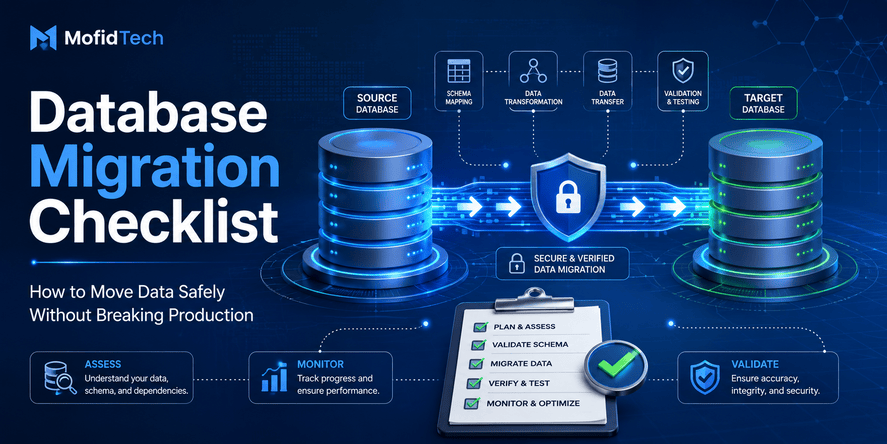
A database migration is not complete when the data appears in the new database. It is complete only when you can prove that the migrated data is accurate, complete, consistent, usable, secure, and ready for the application that depends on it.
Many teams make the mistake of treating migration as a simple transfer operation. They export data from one system, import it into another, check that the tables exist, and assume the work is finished. In real projects, this is risky. A migration can appear successful while still hiding serious problems: missing rows, duplicate records, damaged characters, broken relationships, invalid dates, inconsistent business rules, slow queries, or incomplete indexes.
This is especially important when moving data between systems such as MySQL and PostgreSQL. Even when both databases store similar information, they may handle character encoding, collations, date formats, constraints, indexes, data types, and uniqueness rules differently. A migration that looks correct at first can later create errors in search, reporting, authentication, forms, dashboards, analytics, or production workflows.
Data quality validation after database migration is the process of checking whether the target database truly matches the expected source data and business requirements. It is not only a technical exercise. It is also a reliability process that protects users, applications, reporting systems, and decision-making.
This guide explains how to validate database migration quality without focusing on copy-paste commands. Instead, it gives you the concepts, checks, workflows, risks, and decision frameworks needed to verify a migration professionally.
Table of Contents
- What data quality validation means after migration
- Why database migration problems happen
- The difference between migration, validation, and reconciliation
- Pre-migration preparation checklist
- Row count validation
- Duplicate record validation
- Null value and required field validation
- Encoding and character validation
- Date, number, and format validation
- Relationship and foreign key validation
- Business rule validation
- Performance validation after migration
- Security and privacy considerations
- Troubleshooting migration problems
- Migration validation report
- Final checklist
- FAQ
- Conclusion
What Is Data Quality Validation After Database Migration?
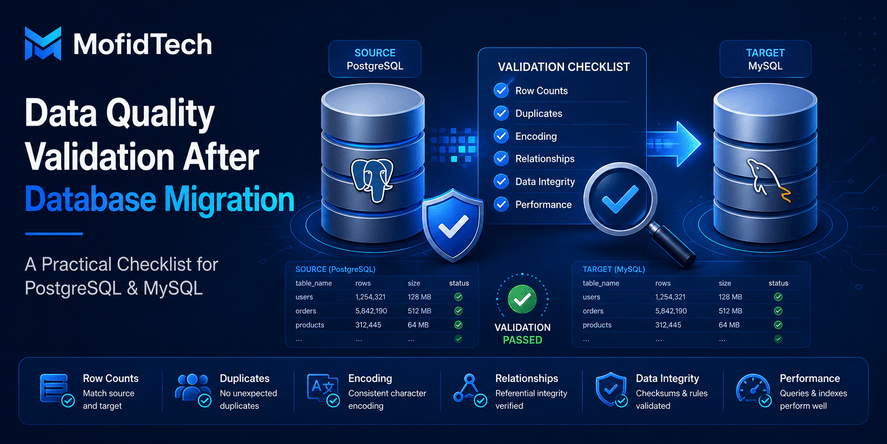
Data quality validation after database migration is the process of confirming that the data moved from a source system to a target system is complete, accurate, consistent, readable, correctly structured, and usable by the application.
A good migration validation process answers these questions:
| Question | Why It Matters |
|---|---|
| Did all expected rows migrate? | Prevents missing users, orders, students, products, or records. |
| Are there unexpected duplicates? | Prevents wrong reporting, repeated records, and application conflicts. |
| Are important fields still correct? | Protects identity, names, dates, emails, statuses, and business data. |
| Are multilingual characters readable? | Prevents mojibake and damaged French, Arabic, or special characters. |
| Are relationships preserved? | Prevents orphan records and broken application logic. |
| Are constraints respected? | Protects data integrity in the target database. |
| Is performance acceptable? | Ensures the application remains usable after migration. |
| Is rollback possible? | Reduces risk if the migration must be reversed. |
Migration validation is not a single check. It is a series of checks that compare the source, the target, and the expected business meaning of the data.
Why Database Migration Problems Happen
Database migration problems usually happen because the source and target systems do not interpret data in exactly the same way.
A table may look simple, but it contains many hidden assumptions: character encoding, data types, constraints, default values, relationships, indexes, date formats, empty values, and business rules. When data moves from one system to another, those assumptions can change.
Common Causes of Migration Errors
| Cause | Example Risk |
|---|---|
| Different data types | A text date becomes invalid in a real date column. |
| Different character encoding | French accents or Arabic text become unreadable. |
| Missing constraints | Duplicate values enter a column that should be unique. |
| Changed column names | Data is imported into the wrong field or ignored. |
| Different null handling | Empty values become null, or null values become empty strings. |
| Broken relationships | Child records no longer match parent records. |
| Incomplete export | Some rows are skipped before import. |
| Import interruption | The migration stops before all rows are inserted. |
| Collation differences | Sorting, comparison, and uniqueness behavior changes. |
| Index differences | Queries become slow after migration. |
A successful migration requires more than moving rows. It requires preserving meaning.
Migration, Validation, and Reconciliation: What Is the Difference?
These three terms are related, but they are not the same.
Database Migration
Database migration is the process of moving data from one location, system, schema, or database engine to another. For example, a team may move data from MySQL to PostgreSQL, from an old server to a new server, or from a legacy schema to a redesigned schema.
Migration focuses on transfer.
Data Validation
Data validation checks whether the migrated data respects expected rules. It asks whether the target data is acceptable, readable, complete, and logically correct.
Validation focuses on correctness.
Data Reconciliation
Data reconciliation compares source and target data to confirm that they match according to defined criteria. It may compare row counts, totals, identifiers, important fields, relationships, and business-level summaries.
Reconciliation focuses on comparison and proof.
A professional migration process needs all three. You migrate the data, validate the target, and reconcile the result with the source.
Pre-Migration Preparation Checklist
The best migration validation starts before the migration happens. If you wait until after the import to decide what to check, you may not know what “correct” means.
Before migration, define what success looks like.
1. Identify Critical Tables
Not every table has the same importance. Some tables are central to the application, while others are temporary, historical, or replaceable.
Critical tables often include:
- Users or students
- Orders or payments
- Products or inventory
- Authentication records
- Customer profiles
- Academic records
- Audit logs
- Configuration tables
- Relationship tables
- Transaction history
A migration validation plan should prioritize tables that directly affect application behavior, reporting, legal obligations, or user trust.
2. Understand Primary Keys and Business Keys
A primary key is a technical identifier used by the database. A business key is a meaningful identifier used by the organization.
For example, a technical database ID may change during migration, but a student code, product reference, invoice number, email address, or national identifier may need to remain stable.
You should know which identifiers must remain exactly the same and which identifiers may be regenerated safely.
3. Document Important Columns
Some columns deserve special validation because they are sensitive or business-critical.
Examples include:
- Names
- Email addresses
- Phone numbers
- Dates of birth
- Identification numbers
- Status values
- Category codes
- Foreign keys
- Financial amounts
- Academic years
- Product prices
- Language-specific text fields
These fields should be part of your validation sample, not ignored.
4. Define Acceptable Differences
Not every difference is an error. Some migrations intentionally transform data.
For example:
| Source Value | Target Value | Acceptable? |
|---|---|---|
| Empty text | Null | Maybe, if planned |
| Old category name | New category name | Yes, if mapped |
| Text date | Real date | Yes, if parsed correctly |
| Legacy status code | New status code | Yes, if documented |
| Duplicate records removed | Fewer rows | Yes, if deduplication was intended |
A validation process should distinguish between expected transformations and unexpected data loss.
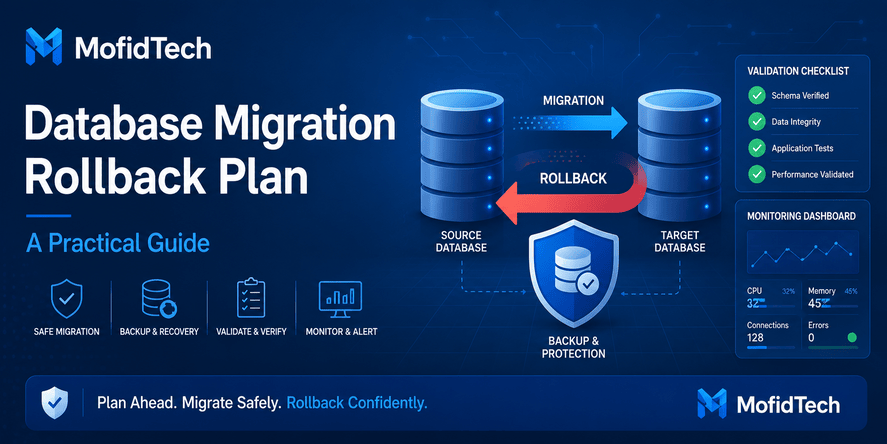
5. Prepare a Rollback Plan
A migration should never rely on hope. If validation fails, the team must know what to do next.
A rollback plan should answer:
- Can the old database still be used?
- Is the source data backed up?
- Can the target database be restored to its previous state?
- Who decides whether rollback is necessary?
- What is the maximum acceptable downtime?
- What happens if only part of the migration fails?
Rollback planning is part of data quality because it protects the project from irreversible mistakes.
Row Count Validation
Row count validation is the first and simplest migration check. It compares how many records exist in the source and target datasets.
A row count check helps detect missing imports, duplicated imports, filters applied incorrectly, interrupted migration processes, and unexpected transformations.
Why Row Counts Matter
If the source table contains 500,000 records and the target table contains 420,000 records, something needs explanation. The difference may be valid if the migration intentionally filtered old records. But if no filtering was planned, the migration likely failed or skipped data.
Row count validation should be done at multiple levels:
| Level | Example |
|---|---|
| Whole database | Total number of migrated records across all key tables |
| Per table | Source table count compared with target table count |
| Per category | Count by year, status, region, type, or group |
| Per migration batch | Count imported in each stage |
| Per business condition | Count of active users, completed orders, valid students, etc. |
Why Row Counts Are Not Enough
Row counts can match while the data is still wrong.
For example:
- The same number of rows may exist, but some rows may be duplicated and others missing.
- Text fields may be damaged by encoding problems.
- Foreign keys may point to the wrong records.
- Dates may be converted incorrectly.
- Columns may be shifted or mapped incorrectly.
- Business rules may be broken.
Row count validation is necessary, but it is not sufficient.
Best Practice for Row Count Validation
Start with global counts, then move to grouped counts. Grouped counts are more useful because they can reveal hidden differences.
For example, instead of checking only the total number of records, compare counts by academic year, customer status, product category, province, country, order status, or user role. This makes it easier to locate where a migration problem happened.
Duplicate Record Validation
Duplicate records are one of the most common migration problems. They can appear when import processes are repeated, when source data already contains duplicates, when uniqueness constraints are missing, or when business keys are not understood correctly.
What Is a Duplicate Record?
A duplicate record is not always an identical row. In real systems, duplicates can appear in several forms.
| Duplicate Type | Description |
|---|---|
| Exact duplicate | Every field is repeated. |
| Key duplicate | The same business identifier appears more than once. |
| Semantic duplicate | Two records represent the same real-world entity but differ slightly. |
| Import duplicate | A migration process inserted the same record twice. |
| Historical duplicate | Multiple records are valid because they represent different years or periods. |
The most dangerous duplicate is the one that looks technically valid but breaks business logic.
Business Keys Matter More Than Technical IDs
Technical IDs may change during migration, especially when importing into a new database. Business keys are often more important for validation.
Examples of business keys include:
- Student code
- Email address
- Invoice number
- Product SKU
- Employee number
- National identifier
- Order reference
- Customer account number
A duplicate check should focus on the identifiers that the business uses to recognize unique entities.
When Duplicates Are Acceptable
Not all repeated values are errors. A student may appear in multiple academic years. A customer may have multiple orders. A product may appear in multiple invoices.
The key question is: repeated according to what rule?
For example, one student code repeated across different years may be valid. The same student code repeated twice in the same year may be a problem. A migration validation plan must understand these rules before labeling duplicates as errors.
Null Value and Required Field Validation
Null values are another common source of migration problems. A null value means that the database has no value for a field. In some cases, this is normal. In other cases, it is a serious error.
Why Unexpected Null Values Are Dangerous
Unexpected null values can break:
- Login workflows
- User profiles
- Reports
- Search filters
- Dashboards
- Relationship mapping
- Financial calculations
- Academic records
- Notification systems
- Data exports
For example, if email addresses become null after migration, users may not receive notifications. If birth dates become null, identity verification may fail. If status fields become null, the application may not know whether a record is active, pending, archived, or rejected.
Required Fields Must Be Checked Carefully
Important required fields often include:
- Primary identifiers
- Names
- Email addresses
- Status values
- Dates
- Foreign keys
- Type codes
- Category codes
- Created dates
- Updated dates
A good validation process compares null counts before and after migration. If a column had no null values in the source but has many null values in the target, this is a strong warning.
Empty String Versus Null
One subtle migration issue is the difference between an empty string and a null value.
An empty string means the value exists but contains no characters. A null value means the value is unknown or absent. Some systems treat these as different. Others convert one into the other during migration.
This matters because search, filtering, validation rules, and application forms may behave differently depending on whether a field is empty or null.
Encoding and Character Validation
Encoding validation is essential when migrating multilingual data. It is especially important for databases containing French accents, Arabic text, names, addresses, special symbols, or imported legacy data.
What Is Mojibake?
Mojibake is the appearance of garbled text caused by character encoding problems. It happens when text encoded in one character set is interpreted using another character set.
For example, accented French characters may appear as strange sequences, and Arabic text may become unreadable. This is not only a visual problem. It can break search, sorting, user identity, reporting, and data trust.
Why Encoding Problems Happen During Migration
Encoding problems can happen because of:
- Source database collation
- Target database encoding
- Export file encoding
- Import tool settings
- Database client encoding
- Incorrect assumptions about legacy data
- Mixed encodings inside the same table
- Text already damaged before migration
A migration may technically succeed while silently damaging text.
How to Validate Multilingual Text
For multilingual databases, validation should include:
| Check | Purpose |
|---|---|
| Sample names manually | Confirm that real human-readable names are correct. |
| Check accents | Validate French characters such as é, è, à, ç, ï, and ô. |
| Check Arabic text | Confirm that Arabic names and places are readable and correctly oriented. |
| Search for suspicious patterns | Detect common mojibake sequences. |
| Compare source and target samples | Verify that important text fields remain equivalent. |
| Check sorting behavior | Ensure collation differences do not break expected ordering. |
Encoding Validation Should Not Be Delayed
Encoding errors become harder to fix after users begin editing the migrated data. Once new correct data mixes with old damaged data, cleaning becomes more complex.
For this reason, encoding validation should happen immediately after migration and before production use.
Date, Number, and Format Validation
Dates and numbers often cause migration errors because different systems store and interpret them differently.
A date may be stored as text in the source database and as a real date in the target database. A number may use different decimal separators depending on locale. A field may contain invalid values that were accepted by the old system but rejected by the new one.
Common Date Migration Problems
Date migration problems include:
- Day and month reversed
- Invalid dates
- Year-only values
- Empty dates
- Text values inside date fields
- Different separators
- Time zone shifts
- Lost time information
- Default dates inserted accidentally
For example, a value that looks like a date may not be a valid date. A system may accept it as text, but the target database may require a real date type.
Number Format Problems
Number problems may include:
- Decimal separator differences
- Thousand separator differences
- Currency symbols
- Negative number formatting
- Rounding changes
- Precision loss
- Text stored as numbers
- Numbers stored as text
These issues are especially serious in financial, scientific, academic, inventory, and reporting systems.
Best Practice for Format Validation
Do not only check whether the target column accepts the value. Check whether the value still means the same thing.
For dates, validate realistic ranges. For numbers, validate totals, averages, minimums, maximums, and important business thresholds.
Relationship and Foreign Key Validation
Relationships are the structure that gives meaning to database records. If relationships break during migration, the application may still show data, but the data may no longer be connected correctly.
What Is an Orphan Record?
An orphan record is a child record that points to a parent record that does not exist.
For example:
- An order without a customer
- A comment without an article
- A payment without an invoice
- A student record without a student profile
- A product image without a product
- A loan without a book
Orphan records are dangerous because they create inconsistent application behavior.
Why Relationships Break During Migration
Relationships may break because:
- IDs changed during migration
- Parent tables were not migrated first
- Mapping tables were incomplete
- Foreign key constraints were disabled
- Some rows were filtered out
- Duplicate parent records confused the mapping
- Source data already contained invalid relationships
How to Validate Relationships
A good relationship validation process checks:
| Relationship Check | Why It Matters |
|---|---|
| Every child has a valid parent | Prevents orphan records. |
| Every required parent exists | Protects application workflows. |
| Many-to-many links still work | Preserves categories, roles, permissions, and tags. |
| Mapping tables are complete | Avoids silent data loss. |
| Cascading rules are understood | Prevents accidental deletions or updates. |
Foreign key validation is not only about database constraints. It is about ensuring that the application’s real-world relationships still make sense.
Business Rule Validation
Technical validation can say that a migration succeeded while the business still says the data is wrong.
Business rule validation checks whether the migrated data respects the rules of the organization, domain, or application.
Examples of Business Rules
| Domain | Business Rule Example |
|---|---|
| Education | A student should not have two active records for the same academic year. |
| E-commerce | A paid order should have at least one payment record. |
| SaaS | An active subscription should belong to an existing customer. |
| Inventory | A product quantity should not be negative unless backorders are allowed. |
| HR | An employee should belong to a valid department. |
| Finance | Invoice totals should match line item totals. |
| Blog platform | A published article should have a title, slug, category, and publication date. |
These checks depend on the project. The database alone cannot always know what is correct.
Involve Domain Experts
Developers understand structure. Domain experts understand meaning.
For important migrations, involve people who know the data: administrators, business users, support teams, accountants, academic staff, analysts, or product managers. They can identify problems that technical validation may miss.
Performance Validation After Migration
A migrated database can be correct but slow. Performance validation checks whether the target database can support real application usage.
Why Performance Can Change After Migration
Performance may change because:
- Indexes were not migrated
- Query plans changed
- Data types changed
- Statistics are outdated
- Collation changed
- Table sizes changed
- Relationships changed
- The new database engine optimizes differently
- Application queries were designed for the old database
For example, a search that was fast in MySQL may become slow in PostgreSQL if the indexing strategy was not adapted. The opposite can also happen.
What to Validate
Performance validation should include:
| Area | What to Check |
|---|---|
| Search speed | Can users search quickly? |
| Login speed | Are authentication queries fast? |
| Admin pages | Do large tables load acceptably? |
| Reports | Are dashboards and summaries usable? |
| Filters | Do common filters respond quickly? |
| Joins | Are relationship-heavy pages efficient? |
| Imports | Can future data updates be handled? |
| Backups | Can backup and restore operations complete safely? |
Data Correctness and Performance Are Connected
Poor performance can cause timeouts, partial exports, failed reports, repeated imports, or interrupted jobs. In that sense, performance problems can become data quality problems.
Security and Privacy Considerations
Database migration often involves sensitive data. Validation should not ignore security.
Protect Sensitive Data During Migration
Sensitive data may include:
- Personal names
- Email addresses
- Phone numbers
- National identifiers
- Student identifiers
- Customer addresses
- Payment-related data
- Authentication-related data
- Health or legal information
- Internal business records
During migration, this data may pass through export files, temporary folders, logs, backups, staging environments, or external tools. Each location increases risk.
Security Checks After Migration
Security validation should confirm:
| Security Area | Validation Question |
|---|---|
| Access control | Who can access the migrated database? |
| Temporary files | Were export files removed or protected? |
| Logs | Did logs accidentally store sensitive data? |
| Backups | Are backups encrypted or access-controlled? |
| User permissions | Did database roles change safely? |
| Application access | Can only authorized users view sensitive records? |
| Auditability | Can important changes be traced? |
Do Not Validate Production Data Carelessly
When using real user data for validation, avoid exposing it unnecessarily. Limit access, use secure environments, and avoid sharing sensitive samples in public tools, screenshots, or unsecured files.
Real-World Use Cases
Use Case 1: MySQL to PostgreSQL Migration
A team moves a web application from MySQL to PostgreSQL. The tables appear in PostgreSQL, and the application starts. However, users report that some names display incorrectly and some search results are missing.
A proper validation process would check:
- Row counts by table
- Critical user identifiers
- Accented characters
- Arabic or multilingual text
- Null values in required fields
- Duplicate emails or usernames
- Foreign key relationships
- Indexes used by search pages
This prevents the team from discovering problems only after users complain.
Use Case 2: Importing Academic Records
An institution imports student records from a legacy database. The total number of rows looks correct, but some students appear twice for the same year, and some dates of birth are invalid.
A good validation plan would include:
- Count by academic year
- Duplicate check by student identifier and year
- Date format validation
- Null checks for critical fields
- Name encoding validation
- Province, academy, or department mapping checks
- Manual review of suspicious records
Use Case 3: Migrating an E-Commerce Database
An e-commerce website migrates products, customers, orders, and payments. The migration seems complete, but some orders no longer connect to customers.
Validation should include:
- Orders matched to customers
- Payments matched to orders
- Product references preserved
- Prices and totals reconciled
- Product images linked correctly
- Customer emails checked for duplicates
- Order statuses validated
Without this, the store may lose trust, reporting accuracy, or customer support reliability.
Common Mistakes to Avoid
Mistake 1: Trusting Row Counts Only
Matching row counts are useful, but they do not prove data correctness. Two tables can have the same number of rows while containing different records.
Mistake 2: Ignoring Encoding Problems
Encoding problems are often visible only in text fields. If the team does not check names, addresses, descriptions, and multilingual content, damaged characters may reach production.
Mistake 3: Not Checking Business Keys
Technical IDs may not be enough. Always validate important business identifiers such as emails, student codes, invoice numbers, or product references.
Mistake 4: Forgetting Relationships
A migration that imports all tables but breaks relationships is not successful. Parent-child consistency is essential.
Mistake 5: Ignoring Performance
A correct but slow database can still fail in production. Performance validation must be part of migration readiness.
Mistake 6: No Rollback Plan
If validation fails and there is no rollback plan, the team may be forced to fix a broken production system under pressure.
Mistake 7: Not Documenting Transformations
If values are intentionally changed during migration, document them. Otherwise, future reviewers may treat expected differences as errors or miss real problems.
Mistake 8: Validating Only Technical Data
Business meaning matters. A database may be technically valid but still wrong for the organization.
Best Practices for Data Quality Validation
1. Validate in Layers
Start simple, then go deeper:
- Table existence
- Row counts
- Critical column checks
- Duplicate checks
- Null checks
- Encoding checks
- Relationship checks
- Business rule checks
- Performance checks
- User acceptance review
Layered validation makes the process easier to manage.
2. Prioritize Critical Data
Do not spend the same amount of time on every field. Focus on the data that affects users, security, reporting, compliance, and application workflows.
3. Compare Source and Target Samples
Manual sampling is still useful. Choose records from different categories, years, statuses, regions, languages, or user types. Compare them carefully.
4. Use Grouped Validation
Grouped validation helps detect hidden differences. Compare counts and summaries by year, category, status, type, province, department, role, or business unit.
5. Keep a Validation Log
Document every check, result, issue, decision, and fix. This creates confidence and helps future migrations.
6. Separate Expected Differences From Errors
If the migration intentionally changes values, write this down. Clear documentation prevents confusion.
7. Validate Before Production Switch
Do not wait until users are already using the migrated database. Validation should happen in staging or a controlled environment first.
8. Review With Stakeholders
Technical teams should validate structure. Business users should validate meaning. Both are necessary.
Comparison Table: Basic Validation vs Professional Validation
| Area | Basic Validation | Professional Validation |
|---|---|---|
| Row counts | Checks total rows only | Checks total, grouped, filtered, and critical counts |
| Duplicates | Rarely checked | Validates business keys and uniqueness rules |
| Encoding | Checked only if obvious | Actively searches for mojibake and multilingual issues |
| Null values | Checked only after errors | Validates required and optional fields systematically |
| Relationships | Assumed correct | Checks parent-child consistency |
| Business rules | Often ignored | Validated with domain-specific expectations |
| Performance | Checked after complaints | Tested before production switch |
| Documentation | Minimal | Includes validation report and decision log |
| Rollback | Not prepared | Planned before migration |
| Confidence level | Low | High |
Troubleshooting: What to Do When Validation Fails
Validation failure is not always a disaster. It is useful because it reveals problems before they become production incidents.
Problem: Row Counts Do Not Match
Possible causes:
- Source export was incomplete
- Target import stopped early
- Filters were applied unintentionally
- Some rows were rejected
- Duplicate removal was performed
- Transformation rules changed the number of rows
What to do:
- Compare counts by group, not only total count
- Identify which table or category differs
- Review migration logs
- Check whether differences were expected
- Re-run only the affected part if possible
- Update the validation report
Problem: Duplicate Records Exist
Possible causes:
- Import ran twice
- Source already had duplicates
- Unique constraints were not applied
- Business key was misunderstood
- Data from multiple sources overlapped
What to do:
- Identify the duplicate rule
- Separate exact duplicates from business duplicates
- Confirm whether duplicates are valid historical records
- Decide whether to merge, remove, or keep them
- Add prevention rules for future imports
Problem: Text Is Garbled
Possible causes:
- Wrong export encoding
- Wrong import encoding
- Legacy database collation mismatch
- Text was already damaged in the source
- Client tool interpreted data incorrectly
What to do:
- Compare source and target text samples
- Identify whether the source is correct
- Check whether the damage happened before or during migration
- Avoid editing damaged production data before cleanup
- Re-import from a clean source if necessary
Problem: Dates Are Invalid or Missing
Possible causes:
- Mixed date formats
- Invalid date strings
- Year-only values
- Empty values converted incorrectly
- Day and month reversed
What to do:
- Classify date patterns
- Decide how to handle incomplete dates
- Validate critical date ranges
- Document values that cannot be safely converted
- Involve business users for ambiguous cases
Problem: Application Is Slow After Migration
Possible causes:
- Missing indexes
- Different database optimizer behavior
- Large tables without proper statistics
- Inefficient relationships
- Queries not adapted to the new database engine
What to do:
- Identify the slowest application workflows
- Review indexes and relationships
- Test real user scenarios
- Validate reporting and dashboard performance
- Optimize based on actual usage, not assumptions
Final Database Migration Validation Checklist
Use this checklist before approving a migrated database for production.
Source and Target Readiness
- The source database is backed up.
- The target database is backed up or restorable.
- The migration scope is documented.
- Critical tables are identified.
- Expected transformations are documented.
- Rollback criteria are defined.
Structure Validation
- Expected tables exist.
- Expected columns exist.
- Data types are appropriate.
- Required constraints are present.
- Indexes are reviewed.
- Primary keys are valid.
- Foreign keys are reviewed.
Count Validation
- Total row counts are compared.
- Table-level counts are compared.
- Grouped counts are compared.
- Filtered counts are compared where relevant.
- Differences are explained and documented.
Duplicate Validation
- Primary key duplicates are checked.
- Business key duplicates are checked.
- Historical duplicates are classified.
- Unexpected duplicates are investigated.
- Deduplication decisions are documented.
Null and Required Field Validation
- Required fields are not unexpectedly null.
- Optional fields are understood.
- Empty string and null behavior is reviewed.
- Critical identifiers are present.
- Status fields are valid.
Encoding Validation
- French accents are readable.
- Arabic text is readable.
- Special characters are preserved.
- Suspicious mojibake patterns are investigated.
- Source and target samples are compared.
- Sorting and search behavior are reviewed.
Format Validation
- Dates are valid.
- Date ranges make sense.
- Numbers keep expected precision.
- Decimal separators are handled correctly.
- Currency or measurement fields remain meaningful.
- Invalid legacy values are documented.
Relationship Validation
- Child records have valid parents.
- Many-to-many relationships are preserved.
- Mapping tables are complete.
- Orphan records are identified.
- Cascading behavior is understood.
Business Rule Validation
- Domain-specific rules are checked.
- Critical workflows are tested.
- Business stakeholders review samples.
- Reports and dashboards are verified.
- Expected exceptions are documented.
Performance Validation
- Common searches are tested.
- Admin pages load acceptably.
- Reports are usable.
- Indexes support important workflows.
- Backups and restores are practical.
- Application response time is acceptable.
Security Validation
- Access permissions are correct.
- Temporary files are protected or removed.
- Sensitive data is not exposed in logs.
- Backups are secured.
- Production credentials are protected.
- User access is tested.
Final Approval
- Validation report is complete.
- Known issues are classified.
- Critical issues are resolved.
- Acceptable differences are approved.
- Rollback plan is ready.
- Production switch decision is documented.
How to Create a Migration Validation Report
A migration validation report is the document that proves the migration was checked professionally.
It should include:
| Section | Description |
|---|---|
| Migration scope | What was migrated and from where to where |
| Source system | Database type, important tables, known issues |
| Target system | Database type, schema, environment |
| Validation date | When the checks were performed |
| Validation team | Who performed and reviewed the checks |
| Count results | Source and target comparisons |
| Duplicate results | Duplicate checks and decisions |
| Encoding results | Character validation findings |
| Relationship results | Parent-child consistency checks |
| Business rule results | Domain-specific validation |
| Performance results | Application and query behavior |
| Security review | Access, backups, and sensitive data handling |
| Issues found | Problems, severity, and status |
| Final decision | Approved, approved with conditions, or rejected |
A validation report is useful for developers, managers, auditors, and future maintenance teams.
FAQ
1. How do I know if a database migration was successful?
A database migration is successful when the target database contains the expected data, preserves important relationships, respects business rules, keeps text readable, performs acceptably, and can support the application without critical errors. Matching row counts are important, but they are not enough.
2. What should I check first after database migration?
Start with table existence and row counts, then check critical fields, duplicates, null values, encoding, relationships, business rules, and performance. The first checks help identify large migration failures, while deeper checks reveal hidden quality problems.
3. Are row counts enough to validate a database migration?
No. Row counts only confirm the number of records. They do not prove that the correct records migrated, that text is readable, that relationships are valid, or that business rules are respected.
4. How do I detect encoding problems after migration?
Check multilingual text fields, accented characters, Arabic text, names, addresses, and descriptions. Look for garbled sequences, unreadable symbols, or characters that changed after migration. Compare source and target samples manually and systematically.
5. What is data reconciliation in database migration?
Data reconciliation is the process of comparing source and target data to confirm that the migrated data matches expected results. It may include row counts, grouped totals, field comparisons, duplicate checks, relationship validation, and business-level summaries.
6. Why do duplicates appear after migration?
Duplicates may appear because the import process ran more than once, the source already contained duplicates, uniqueness rules were not enforced, or the migration did not correctly identify business keys.
7. What is an orphan record?
An orphan record is a child record that points to a parent record that does not exist. For example, an order without a customer or a comment without an article. Orphan records often indicate broken relationships after migration.
8. Should I validate data before or after migration?
Both. Before migration, define success criteria, document critical fields, and understand transformations. After migration, compare the source and target, validate data quality, and confirm application readiness.
9. How do I validate business rules after migration?
Identify the rules that matter to the organization, such as valid statuses, unique records per period, correct totals, required relationships, or acceptable date ranges. Then review migrated data against those rules with both technical and domain experts.
10. What should I do if validation fails?
Classify the issue, identify its cause, decide whether it is critical, fix the affected data or migration process, and validate again. If the issue is severe and production is at risk, use the rollback plan.
11. Why is performance validation part of data migration?
A migrated database must not only be correct; it must also be usable. Missing indexes, changed data types, or different database behavior can make an application slow even when the data itself is accurate.
12. What is the most overlooked migration validation problem?
Encoding is one of the most overlooked problems, especially in multilingual databases. Teams often notice it only after users see damaged names, addresses, or descriptions in production.
Conclusion
Database migration is not finished when the import process ends. It is finished when the data has been validated, reconciled, documented, and approved for real use.
A strong validation process checks more than row counts. It verifies duplicates, null values, encoding, formats, relationships, business rules, performance, security, and rollback readiness. This is especially important when migrating between systems such as MySQL and PostgreSQL, where differences in encoding, data types, constraints, and indexing can affect the final result.
For developers and technical teams, the goal is not only to move data. The goal is to preserve trust. Users expect their names, records, orders, accounts, reports, and histories to remain correct. A professional validation checklist helps protect that trust.
The best migration teams treat validation as a core part of the project, not as a final optional step. They define success before migration, validate in layers, document results, involve domain experts, and approve production only when the data is truly ready.










💬 Comments
No comments yet. Be the first to comment!
Login to comment.