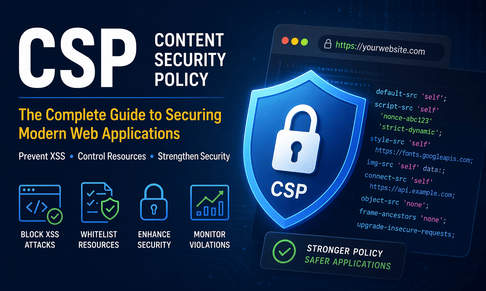
1. Reframing Web Security: Why CSP is Not Optional Anymore
Modern web applications—especially platforms like your MofidTech tools—are no longer simple server-rendered pages. They are ecosystems of APIs, CDNs, dynamic JavaScript, user-generated content, and third-party integrations. Traditional defenses like input validation and output escaping are essential, but they operate under the assumption that your application is always perfectly coded. In reality, even well-audited systems can contain subtle vulnerabilities. CSP changes the model entirely: instead of trusting your code, it restricts what the browser is allowed to execute, effectively turning the browser into an enforcement engine. This means even if an attacker finds a way to inject malicious content, the browser itself refuses to execute it unless it complies with your explicitly defined rules. CSP is therefore not just a feature—it is a security boundary.
2. CSP as a Browser-Level Firewall
Think of CSP as a firewall, but instead of filtering network packets, it filters browser-executed resources. When a browser receives a CSP header, it builds an internal policy map. Every resource request—script, image, AJAX call—is checked against this map before being executed. If it doesn't match, it is silently blocked or reported. This shifts security enforcement from your backend to the user’s browser, which is extremely powerful because it prevents exploitation even after your server has already responded.
Example:
Content-Security-Policy: default-src 'self'; script-src 'self' https://cdn.example.com;Here, the browser enforces:
- Only scripts from your domain and the CDN are allowed
- Any injected
<script>tag from an attacker’s domain is blocked instantly
This eliminates an entire class of runtime attacks.
3. Deep Understanding of CSP Execution Flow
To truly master CSP, you need to understand its lifecycle:
- Server sends response with CSP header
- Browser parses and stores policy
- DOM is built progressively
- Each resource request is validated against CSP
- Violation → Block + optional report
This happens in real time, meaning CSP is continuously active during page execution—not just at load time. This is critical for modern apps where scripts dynamically load other scripts.
4. Directive Granularity and Control Strategy
CSP is powerful because of its granularity. You can define rules per resource type, and even per behavior. A strong strategy is to start restrictive and open only what is necessary.
Example:
Content-Security-Policy:
  default-src 'none';
  script-src 'self';
  style-src 'self';
  img-src 'self';
This blocks everything except explicitly allowed resources. From here, you incrementally allow trusted domains. This approach is called deny-by-default, and it is the cornerstone of secure CSP design.
5. Advanced XSS Mitigation Beyond Basics
Most developers understand CSP blocks inline scripts, but advanced XSS attacks go beyond simple <script> injection. Attackers may use:
- Event handlers:
<img onerror="alert(1)"> - JavaScript URLs:
<a href="javascript:alert(1)"> - DOM-based XSS via dynamic JS execution
CSP mitigates these by:
- Blocking inline execution (
'unsafe-inline'absent) - Blocking
eval()unless'unsafe-eval'is allowed - Restricting script origins strictly
This means CSP doesn’t just block basic XSS—it disrupts entire exploitation chains.
6. The Power of Nonces in Dynamic Applications
For dynamic platforms like Django dashboards or tool-based websites, nonces are essential. They allow you to keep CSP strict while still supporting dynamic inline scripts.
Django example:
# middleware example
import secrets

def csp_nonce_middleware(get_response):
    def middleware(request):
        request.csp_nonce = secrets.token_urlsafe(16)
        response = get_response(request)
        response['Content-Security-Policy'] = f"script-src 'self' 'nonce-{request.csp_nonce}'"
        return response
    return middleware
Template usage:
<script nonce="{{ request.csp_nonce }}">
  console.log("Secure script");
</script>
This ensures:
- Only scripts generated by your server can run
- Injected scripts are rejected
7. Hash-Based CSP for Static Integrity
Hashes are ideal when scripts are static and rarely change. The browser computes the hash of the script content and compares it to the allowed value.
Example:
Content-Security-Policy: script-src 'sha256-abc123...';This guarantees content integrity, not just origin trust. Even if a trusted CDN is compromised, modified scripts won’t execute.
8. strict-dynamic: The Next-Level Security Feature
One of the most advanced CSP features is strict-dynamic. It allows trusted scripts to load additional scripts dynamically without explicitly listing all domains.
Content-Security-Policy: script-src 'nonce-abc123' 'strict-dynamic';This means:
- If a script is trusted (via nonce), anything it loads is also trusted
- Eliminates the need to whitelist every CDN or subdomain
This is especially useful for modern JS-heavy applications.
9. CSP in Django: Production-Ready Setup
The best way to implement CSP in Django is via:
- django-csp
Example:
CSP_DEFAULT_SRC = ("'none'",)
CSP_SCRIPT_SRC = ("'self'", "https://cdn.jsdelivr.net")
CSP_STYLE_SRC = ("'self'", "https://fonts.googleapis.com")
CSP_IMG_SRC = ("'self'", "data:")
CSP_CONNECT_SRC = ("'self'", "https://api.mofidtech.fr")
CSP_OBJECT_SRC = ("'none'",)
CSP_FRAME_ANCESTORS = ("'none'",)
This configuration:
- Blocks dangerous features (plugins, framing)
- Restricts APIs and scripts
- Supports modern frontend needs
10. Handling Third-Party Scripts Securely
Every third-party script is a potential attack vector. CSP forces you to explicitly trust them, which is good practice.
Instead of:
script-src *;Use:
script-src 'self' https://trusted-analytics.com;Even better: use Subresource Integrity (SRI) alongside CSP for maximum protection.
11. CSP Reporting and Monitoring Pipeline
CSP is not just about blocking—it’s also about visibility. You can collect violation reports:
Content-Security-Policy: default-src 'self'; report-uri /csp-report/In Django:
from django.views.decorators.csrf import csrf_exempt
import json

@csrf_exempt
def csp_report(request):
    data = json.loads(request.body)
    print("CSP Violation:", data)
This allows you to:
- Detect attacks in real time
- Identify misconfigurations
- Improve your policy continuously
12. CSP and API Security (Critical for Tools Platforms)
For platforms like MofidTech with many tools, APIs are heavily used. CSP protects against data exfiltration:
connect-src 'self' https://api.mofidtech.fr;Even if malicious JS runs, it cannot send data to attacker servers.
13. Preventing Clickjacking with CSP
CSP replaces older headers like X-Frame-Options:
frame-ancestors 'none';This prevents your site from being embedded in iframes, blocking clickjacking attacks.
14. CSP for Full-Stack Apps (React + Django)
When using React/Vite with Django:
- Avoid inline scripts
- Use hashed builds
- Serve static files via trusted domains
- Configure CSP to match build output
CSP must align with your frontend build system.
15. Debugging CSP Without Breaking Your App
Always start with:
Content-Security-Policy-Report-Only: default-src 'self';This logs violations without blocking. Once stable, switch to enforcement mode.
16. Common Real-World Pitfalls
- Overly permissive policies (
*) - Using
'unsafe-inline'out of convenience - Forgetting WebSocket (
connect-src ws:) - Breaking fonts or images unintentionally
- Ignoring CSP reports
CSP requires iterative tuning.
17. CSP and Performance Considerations
CSP adds negligible runtime cost, but:
- Complex policies increase debugging overhead
- Strict rules may require architectural changes
Security always comes with design trade-offs.
18. Enterprise-Level CSP Strategy
For large systems:
- Use automated CSP generation tools
- Integrate CSP checks into CI/CD
- Monitor violations centrally
- Combine with security scanners
CSP becomes part of your DevSecOps pipeline.
19. Real-World Hardened CSP Example
Content-Security-Policy:
  default-src 'none';
  script-src 'self' 'nonce-xyz' 'strict-dynamic';
  style-src 'self' https://fonts.googleapis.com;
  font-src https://fonts.gstatic.com;
  img-src 'self' data:;
  connect-src 'self' https://api.mofidtech.fr;
  frame-ancestors 'none';
  object-src 'none';
  base-uri 'self';
  upgrade-insecure-requests;
This is close to production-grade security.
20. Final Insight: CSP as a Security Mindset
CSP is not just a header—it is a philosophy of control. It forces you to:
- Know every external dependency
- Minimize trust boundaries
- Design applications with security in mind
👉 Want to check if your site is properly secured with CSP? Try our CSP & CORS Policy Visualizer tool to instantly analyze and understand your security policies.












💬 Comments
No comments yet. Be the first to comment!
Login to comment.