Introduction
AI applications are no longer experimental side projects. Developers now build chatbots, internal copilots, document assistants, AI search tools, support automation systems, recommendation engines, and agentic workflows that interact with real business data. These systems often process user prompts, uploaded documents, internal knowledge bases, embeddings, logs, feedback records, third-party tool responses, and generated outputs.
That creates a serious security challenge: AI applications do not only need model accuracy. They need data protection.
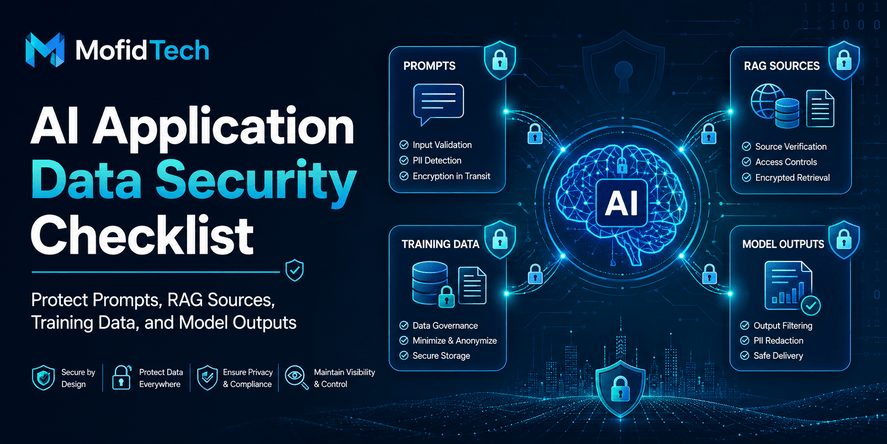
AI application data security is the practice of protecting every type of data that enters, moves through, influences, or leaves an AI system. This includes prompts, retrieved documents, training datasets, fine-tuning data, vector database records, agent memory, logs, monitoring traces, feedback data, and model-generated responses.
This topic matters because modern AI systems combine traditional software risks with new risks such as prompt injection, sensitive information disclosure, insecure output handling, training data poisoning, unauthorized retrieval, and excessive model agency. OWASP’s LLM Top 10 highlights risks including prompt injection, insecure output handling, training data poisoning, supply chain vulnerabilities, and excessive agency in LLM applications.
For developers, the most important lesson is simple: an AI feature should not be treated as a black box connected to production data. It should be designed like a security-sensitive application layer with clear data boundaries, permission checks, monitoring, review workflows, and failure controls.
This article provides a practical AI application data security checklist for developers. It explains where sensitive data appears, what can go wrong, how to secure RAG systems, how to handle model outputs, what mistakes to avoid, and how to prepare AI features for production without relying on code examples.
Table of Contents
- What Is AI Application Data Security?
- Why AI Applications Create New Data Risks
- Where Sensitive Data Appears in AI Systems
- AI Application Data Security Checklist for Developers
- How to Protect User Prompts and Uploaded Data
- How to Secure RAG Sources and Embeddings
- How to Protect Training and Fine-Tuning Data
- How to Handle Model Outputs Safely
- Logging, Monitoring, and AI Observability Risks
- Security Considerations for Third-Party AI APIs
- Common Mistakes Developers Should Avoid
- Practical AI Data Security Workflow Before Production
- Comparison Table: Traditional App Security vs AI Data Security
- Best Practices Checklist
- Troubleshooting AI Data Security Problems
- FAQ
- Conclusion
What Is AI Application Data Security?
AI application data security is the process of protecting sensitive, private, business-critical, or regulated information across the full lifecycle of an AI-powered system.
In a traditional web application, developers usually protect databases, authentication flows, API endpoints, sessions, files, and server logs. In an AI application, those concerns still exist, but the data surface becomes wider. A single AI feature may involve user prompts, uploaded files, retrieved documents, vector embeddings, system instructions, tool calls, generated answers, conversation history, and analytics logs.
A strong AI data security approach answers these questions:
| Security Question | Why It Matters |
|---|---|
| What data can users submit to the AI system? | Prevents sensitive or unnecessary data from entering the model workflow. |
| What data can the model retrieve? | Prevents unauthorized access to internal documents or private records. |
| What data can the model output? | Reduces leakage, unsafe recommendations, and harmful instructions. |
| Where are prompts and responses logged? | Prevents sensitive data from being stored accidentally. |
| Who can access AI conversations and traces? | Protects user privacy and internal information. |
| What happens when the model is wrong or manipulated? | Reduces security, business, and compliance impact. |
AI data security should be designed before production deployment, not added after a leak, hallucinated answer, or unauthorized retrieval incident.
Why AI Applications Create New Data Risks
AI applications create new data risks because they transform unstructured input into actions, answers, summaries, recommendations, and decisions. Unlike traditional applications, where most data flows follow predictable rules, AI systems interpret language, infer context, and generate responses probabilistically.
This does not mean AI is unsafe by default. It means developers must design AI systems with stricter data boundaries.
The UK National Cyber Security Centre has warned that as LLMs are increasingly connected to third-party services and applications, prompt injection risks grow, and there are no failsafe measures that remove the risk completely.
This is why secure architecture matters. Developers should assume that AI systems can be confused, manipulated, or given malicious instructions through normal-looking input. The safest design does not depend on the model always behaving correctly. It limits what the model can access, what it can do, what it can reveal, and what downstream systems will accept from it.
Where Sensitive Data Appears in AI Systems
Sensitive data in AI applications can appear in more places than developers expect. A secure AI checklist must cover the entire data path.
User Prompts
Prompts may contain names, emails, addresses, credentials, financial information, customer records, medical details, private business context, internal decisions, confidential documents, or personal messages.
A user may intentionally submit sensitive data, but they may also do it by mistake. For example, an employee using an internal assistant may paste a customer complaint, contract, database export, HR document, or incident report without thinking about where the data will be stored.
Uploaded Files
Many AI applications allow users to upload PDFs, spreadsheets, reports, images, transcripts, legal documents, technical files, or support tickets. Uploaded files may contain sensitive content hidden in metadata, tables, comments, attachments, scanned pages, or document history.
Developers should treat uploaded files as high-risk input, especially when the AI system extracts, indexes, summarizes, or stores them.
RAG Knowledge Bases
Retrieval-Augmented Generation, commonly known as RAG, allows an AI system to retrieve information from documents or databases before generating an answer. RAG is powerful, but it is not automatically secure.
A RAG system may expose confidential documents if permissions are not enforced during retrieval. It may also retrieve outdated, incorrect, or manipulated content if the knowledge base is not governed properly.
Embeddings and Vector Databases
Embeddings are numerical representations of text, but they still represent meaning. Developers should not assume that embeddings are harmless simply because they are not readable like normal text.
If embeddings are linked to private documents, internal records, customer data, or confidential files, the vector database must be protected with access control, retention rules, and monitoring.
Training and Fine-Tuning Data
Training and fine-tuning datasets can contain sensitive or copyrighted content, personal data, secrets, biased information, or manipulated examples. OWASP identifies training data poisoning as a security risk because tampered training data can influence model behavior and compromise reliability or safety.
System Prompts and Internal Instructions
System prompts often define how the AI application should behave. They may include business rules, tool descriptions, internal policy logic, security instructions, or hidden operational details.
System prompt leakage is dangerous when the prompt reveals sensitive architecture, private instructions, hidden controls, internal tool names, or security assumptions.
Model Outputs
AI responses may reveal sensitive data, generate unsafe advice, summarize private content for the wrong user, produce misleading answers, or create content that downstream systems treat as trusted.
OWASP’s LLM risk categories include insecure output handling, which focuses on insufficient validation and handling of model-generated outputs.
Logs, Analytics, and Monitoring Traces
Logs are one of the most overlooked AI data risks. Prompts, responses, retrieved document fragments, file names, user IDs, error messages, and tool results may be captured in monitoring systems.
A secure AI application should avoid storing unnecessary sensitive data in logs. When logging is necessary, access should be restricted, retention should be limited, and sensitive information should be masked where appropriate.
AI Application Data Security Checklist for Developers
The following checklist gives developers a practical framework for reviewing AI features before production deployment.
1. Classify AI Data Before Building the Feature
Before connecting an AI model to real data, classify the types of information the system will process.
Ask:
- Is the data public, internal, confidential, or regulated?
- Does it include personal information?
- Does it include business secrets?
- Does it include credentials, tokens, or private keys?
- Does it include customer data?
- Does it include legal, financial, medical, HR, or security information?
- Does it include content from third-party sources?
Data classification helps developers decide what the AI system is allowed to access, store, retrieve, summarize, and output.
2. Apply Data Minimization
Data minimization means sending the AI system only what it needs to complete the task.
Instead of giving the model an entire document library, provide only the relevant sections. Instead of storing full conversations forever, keep only necessary metadata or summaries when appropriate. Instead of sending full customer records, send the smallest safe subset.
This reduces the damage if a prompt injection, logging mistake, retrieval error, or third-party exposure occurs.
3. Separate Public, Internal, and Confidential AI Workflows
Not all AI workflows should use the same data pipeline.
A public chatbot answering website visitors should not access the same knowledge base as an internal employee assistant. A customer support assistant should not automatically retrieve HR documents. A student learning assistant should not have access to administrator-only records.
Separate AI workflows by sensitivity level:
| AI Workflow Type | Data Access Level |
|---|---|
| Public website assistant | Public content only |
| Customer support assistant | Customer-specific support data with strict permissions |
| Internal knowledge assistant | Internal documents based on employee role |
| Executive assistant | Highly restricted confidential data |
| Security operations assistant | Sensitive logs and incident data with strong monitoring |
4. Enforce Permission-Aware Retrieval
A RAG system must check user permissions before retrieving documents.
The key rule is simple: the AI system should not retrieve data that the user is not allowed to access outside the AI interface.
If a user cannot open a document directly, the AI assistant should not summarize it indirectly. AI must not become a shortcut around access control.
5. Treat Prompts as Untrusted Input
Prompts should be handled like untrusted input because users can make mistakes, paste sensitive content, or attempt to manipulate the model.
Prompt injection is not just a strange AI trick. It is a real class of vulnerability where input attempts to override instructions, change behavior, reveal hidden data, or influence tool usage. OWASP describes prompt injection as manipulation of model responses through specific inputs that alter model behavior.
6. Protect System Prompts and Internal Instructions
System prompts should not contain secrets, private credentials, hidden API keys, or sensitive internal information.
Even if the system prompt is not shown directly to users, developers should assume that a determined user may attempt to extract or infer it. Security should not depend on the secrecy of the prompt alone.
7. Validate Model Outputs Before Trusting Them
Model outputs should not be treated as trusted data.
Before using AI-generated content in another system, developers should consider whether the output needs review, validation, filtering, policy checks, or human approval.
This is especially important when AI output influences:
- User accounts
- Payments
- Access permissions
- Legal documents
- Medical information
- Security decisions
- Customer communications
- Database updates
- Workflow automation
- External messages
8. Control What the AI System Can Do
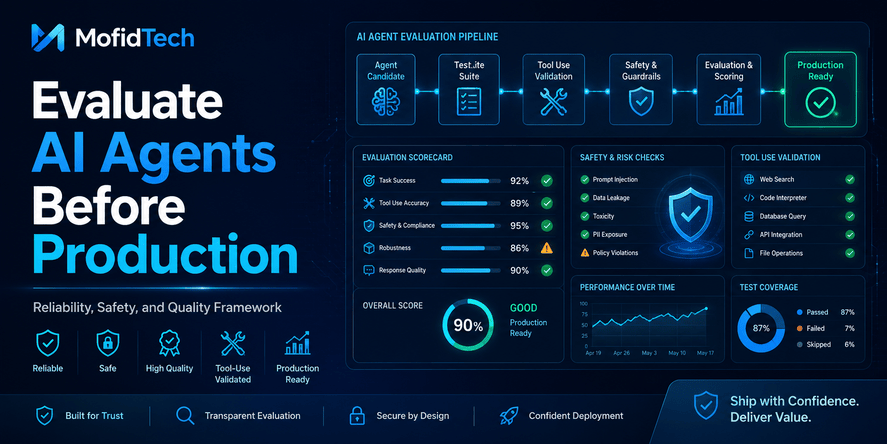
An AI system with tool access is more powerful and more dangerous than a simple chatbot.
If an AI assistant can send emails, update tickets, search private files, call internal services, create reports, or trigger workflows, developers must limit its permissions.
The model should not have broad access “just in case.” Give it the minimum capabilities needed for the task.
9. Secure Logs and Monitoring Data
Prompts, outputs, retrieval traces, and tool results should not be logged carelessly.
Developers should review:
- What is logged
- Why it is logged
- Who can access logs
- How long logs are retained
- Whether sensitive data is masked
- Whether logs are exported to third-party services
- Whether logs contain full prompts or only metadata
10. Review Third-Party AI API Usage
If the application uses external AI APIs, developers should understand the provider’s data handling policies, retention settings, enterprise controls, privacy guarantees, regional availability, access controls, and compliance options.
Do not send sensitive production data to an AI provider without understanding how that data is processed, stored, protected, and governed.
11. Monitor for Abnormal AI Behavior
AI systems need monitoring beyond uptime and latency.
Monitor for signs such as:
- Repeated prompt injection attempts
- Unusual retrieval patterns
- Sensitive data appearing in outputs
- Large prompts with suspicious instructions
- Unexpected tool usage
- Repeated policy bypass attempts
- Excessive token usage
- Unusual document access
- High error rates
- User reports of incorrect or unsafe responses
12. Create a Human Review Path
Some AI outputs should be reviewed by humans before action.
Human review is especially important when decisions involve security, finance, legal matters, hiring, healthcare, education records, account access, or irreversible business actions.
Human-in-the-loop design is not a weakness. It is a safety control.
How to Protect User Prompts and Uploaded Data
User prompts are one of the most sensitive parts of an AI application because they can contain unpredictable information. Developers cannot fully control what users type, paste, or upload.
Use Clear Data Warnings
The user interface should explain what users should not submit. For example, users should be warned not to paste passwords, private keys, payment card details, confidential customer data, medical records, or legal documents unless the system is designed and approved to process them.
A good warning is specific. A vague warning such as “Do not enter sensitive information” is less useful than explaining the exact types of information that should be avoided.
Limit Input Scope
A secure AI feature should guide users toward the intended task.
For example, if the AI assistant is designed to summarize public documentation, it should not encourage users to upload unrelated private documents. If the assistant is designed for technical troubleshooting, it should not request unnecessary personal information.
Detect Obvious Sensitive Data Patterns
Developers can add detection layers for common sensitive data types. The goal is not to catch everything perfectly, but to reduce obvious mistakes.
Examples of high-risk prompt content include credentials, access tokens, private keys, financial identifiers, national identity numbers, internal database exports, and confidential customer records.
Decide What Happens to Prompts After Processing
Every AI application should define a prompt retention policy.
Important questions include:
- Are prompts stored?
- Are prompts used for analytics?
- Are prompts visible to administrators?
- Are prompts shared with third-party providers?
- Are prompts used for future training or evaluation?
- Can users delete their prompt history?
- How long are prompts retained?
Without a clear policy, prompt data can quietly become a privacy and compliance risk.
How to Secure RAG Sources and Embeddings
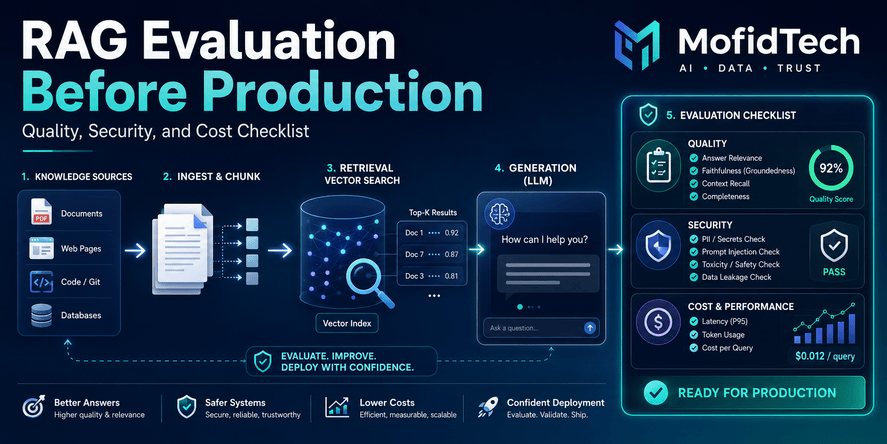
RAG is one of the most popular AI architecture patterns, but it is also one of the easiest places to introduce data leakage.
A RAG system retrieves relevant content from a knowledge source and gives it to the model as context. If retrieval is not permission-aware, the model may answer using documents the user should never have seen.
RAG Is Not Secure by Default
RAG improves factual grounding, but it does not automatically enforce access control. Developers must explicitly design retrieval rules.
The safest principle is: retrieval should follow the same access permissions as the original data source.
If a user has access to only five documents in a repository, the AI assistant should retrieve only from those five documents. It should not retrieve from the full index and then rely on the model to hide restricted information.
Protect the Source Documents
Before indexing documents for RAG, review the source content.
Ask:
- Who owns this document?
- Is it public, internal, confidential, or regulated?
- Who should be allowed to retrieve it?
- Is it up to date?
- Does it contain secrets?
- Does it contain personal information?
- Does it include hidden metadata?
- Should it be excluded from AI search?
Bad source governance leads to bad AI answers.
Protect the Vector Database
A vector database may not store normal readable text in the same way as a document database, but it still represents sensitive meaning.
Protect vector stores with:
- Authentication
- Access control
- Environment separation
- Encryption where appropriate
- Restricted admin access
- Retention policies
- Backup controls
- Monitoring
- Document-level metadata permissions
Use Metadata for Access Control
Each indexed document should carry metadata that helps enforce permissions.
Useful metadata may include:
- Owner
- Department
- Sensitivity level
- Document type
- Allowed roles
- Allowed users
- Expiration date
- Source system
- Last updated date
- Region or compliance scope
Metadata helps the retrieval system decide whether a document is eligible before it is sent to the model.
Prevent Cross-Tenant Leakage
For SaaS applications, multi-tenant isolation is critical.
A user from one organization should never retrieve documents from another organization. This seems obvious, but AI search features can accidentally break tenant isolation if all embeddings are stored in one index without strict filtering.
Cross-tenant leakage is one of the highest-risk RAG failures because it can expose customer data and damage trust immediately.
How to Protect Training and Fine-Tuning Data
Training and fine-tuning data directly influence model behavior. If this data is sensitive, biased, outdated, or manipulated, the AI system may become unreliable or unsafe.
Review Dataset Sources
Developers and AI teams should know where training or fine-tuning data comes from.
Important questions include:
- Is the data legally usable?
- Does it contain personal information?
- Does it contain secrets or credentials?
- Does it include copyrighted or licensed material?
- Is the data accurate?
- Is the data representative?
- Has the data been cleaned?
- Has the data been reviewed for harmful content?
- Has the data been manipulated?
Watch for Data Poisoning
Data poisoning occurs when training, fine-tuning, feedback, or retrieval data is corrupted intentionally or accidentally. The result may be biased answers, unsafe behavior, hidden triggers, poor accuracy, or policy bypasses.
The NCSC’s secure AI development guidance identifies deliberate corruption of training data or user feedback as data poisoning, and groups it with other AI-specific attack methods.
Keep Dataset Lineage
Dataset lineage means keeping a record of where data came from, how it was transformed, who approved it, when it was updated, and why it was included.
This is important for debugging, compliance, model evaluation, and incident response.
If an AI model starts producing problematic answers, teams need to trace whether the issue came from the model, prompts, retrieval source, fine-tuning data, or user feedback.
Avoid Training on Sensitive User Data Without Approval
Do not automatically use user conversations, uploaded files, or customer interactions for training or fine-tuning unless the organization has clear consent, legal approval, privacy review, and security controls.
Using user data for improvement may sound helpful, but it can create serious privacy, compliance, and trust issues.
How to Handle Model Outputs Safely
AI output is not guaranteed to be correct, safe, private, or appropriate. Developers must decide how much trust the application gives to generated responses.
Treat AI Responses as Generated Suggestions
An AI answer should usually be treated as a generated suggestion, not as verified truth.
This is especially important when the system answers questions about security, law, finance, health, user accounts, internal policies, or technical operations.
Check for Sensitive Information Disclosure
AI outputs can accidentally reveal:
- Private document content
- User data
- Internal policy details
- System prompt fragments
- Debug information
- Retrieved context that should not be visible
- Confidential business logic
- Information from another user or tenant
Sensitive information disclosure is a central concern in LLM security, and OWASP’s 2025 risk set includes sensitive information disclosure as a major LLM application risk.
Prevent Unsafe Downstream Use
The danger increases when AI output is passed into another system.
For example, if AI output is used to generate customer emails, update records, trigger workflows, classify users, approve actions, or guide security decisions, a wrong or manipulated output can cause real damage.
Developers should add validation layers between the model and any sensitive downstream action.
Use Human Approval for High-Impact Actions
Human approval should be required when AI output may cause irreversible, sensitive, or high-impact consequences.
Examples include:
- Sending external communications
- Changing access permissions
- Making financial decisions
- Updating legal documents
- Modifying customer records
- Closing support cases
- Taking security actions
- Triggering operational workflows
Logging, Monitoring, and AI Observability Risks
AI observability is important, but it can become a data security problem if implemented carelessly.
Developers often log prompts and responses to debug quality, evaluate model behavior, monitor costs, detect abuse, and improve user experience. However, those logs may contain sensitive information.
What AI Logs May Contain
AI logs may include:
- Full user prompts
- Model responses
- Retrieved document chunks
- Tool call results
- Uploaded file names
- User IDs
- IP addresses
- Session identifiers
- Error messages
- Token usage
- System instructions
- Moderation decisions
- Feedback comments
This information can be valuable for debugging, but dangerous if exposed.
Reduce Log Sensitivity
A secure logging strategy should prefer minimal, structured, and masked logs where possible.
Instead of storing everything, developers should decide what is truly necessary for security, quality, analytics, and support.
Restrict Access to AI Logs
AI logs should not be visible to every developer, administrator, support agent, or analyst by default.
Access should be based on role, need, and sensitivity. Logs containing user prompts or retrieved document fragments may deserve stronger protection than ordinary application logs.
Define Log Retention
Keeping AI logs forever increases risk.
Retention should be based on business need, legal requirements, security monitoring requirements, and user privacy expectations.
Security Considerations for Third-Party AI APIs
Many AI applications rely on external providers for model inference, embeddings, speech processing, document extraction, or evaluation. Third-party APIs can be valuable, but they introduce data governance questions.
Review Provider Data Handling
Before sending production data to a third-party AI provider, teams should understand:
- Whether prompts are stored
- Whether outputs are stored
- Whether data is used for training
- Whether enterprise privacy controls exist
- Where data is processed
- How long data is retained
- Who can access provider-side logs
- What compliance options are available
- Whether data can be deleted
- What security certifications or assurances exist
Separate Development and Production Data
Developers should avoid testing AI features with real sensitive production data unless the environment is approved for it.
Development, staging, and demonstration environments often have weaker controls than production. That makes them risky places to expose confidential prompts, documents, or customer records.
Vendor Risk Is AI Risk
AI APIs should be reviewed like other critical vendors, but with extra attention to data flow.
The AI provider may process some of the most sensitive information in the application, including prompts, retrieved context, uploaded files, and generated responses.
Common Mistakes Developers Should Avoid
Mistake 1: Sending Too Much Data to the Model
Many AI systems send large amounts of unnecessary context to improve answer quality. This may work technically, but it increases leakage risk.
The better approach is to send the minimum safe context required for the task.
Mistake 2: Treating RAG as Automatically Secure
RAG can improve answers, but it does not replace access control.
A RAG system without permission-aware retrieval can become a private data exposure engine.
Mistake 3: Storing Full Prompts Without Review
Full prompt logs may contain secrets, customer data, private messages, or confidential documents.
Logging should be intentional, minimized, protected, and reviewed.
Mistake 4: Putting Secrets in System Prompts
System prompts should not contain API keys, passwords, private tokens, hidden credentials, or confidential operational details.
A system prompt is not a secure secret store.
Mistake 5: Trusting Model Output Without Validation
AI output can be wrong, manipulated, incomplete, or unsafe.
Applications should validate outputs before using them in sensitive workflows.
Mistake 6: Giving AI Tools Too Much Permission
An AI assistant should not have broad access to email, files, databases, tickets, workflows, and user accounts unless every capability is necessary and controlled.
The safer design is least privilege.
Mistake 7: Ignoring Prompt Injection
Prompt injection is not only a theoretical risk. It is a core AI application security concern. NCSC guidance emphasizes that prompt injection is still not well understood by many developers and requires awareness and secure design rather than blind trust in simple fixes.
Mistake 8: Forgetting About Data Retention
If teams do not define retention, AI data may remain stored long after it is needed.
Retention rules should cover prompts, responses, uploaded files, embeddings, logs, evaluation datasets, feedback, and conversation history.
Practical AI Data Security Workflow Before Production
A secure production workflow should include design review, data review, security review, testing, deployment controls, and monitoring.
Step 1: Define the AI Feature Purpose
Write a clear description of what the AI feature is supposed to do.
A vague AI feature becomes difficult to secure because the model may be expected to answer anything, retrieve anything, and perform too many actions.
Step 2: Map the Data Flow
Identify every place where data enters, moves, transforms, and leaves the AI system.
Include:
- User input
- Uploaded files
- Retrieval sources
- Vector databases
- Model providers
- Logs
- Monitoring tools
- Analytics platforms
- Human review systems
- Output destinations
Step 3: Classify the Data
Label the data by sensitivity.
At minimum, separate:
- Public data
- Internal data
- Confidential data
- Regulated data
- Customer data
- Personal data
- Security-sensitive data
Step 4: Define Access Rules
Decide who can access what.
The access rules should apply before retrieval, during output generation, in logs, and in administrative interfaces.
Step 5: Review Prompt and Output Risks
Consider how users might manipulate prompts, extract information, bypass policies, or cause unsafe output.
This review should include direct prompt injection, indirect prompt injection through retrieved documents, and malicious content hidden in uploaded files.
Step 6: Review Third-Party Data Exposure
Document which AI providers or external services receive data.
This includes model APIs, embedding services, logging platforms, analytics tools, file parsing services, monitoring tools, and evaluation systems.
Step 7: Add Human Review Where Needed
For high-impact actions, require human approval.
Human review is especially important when AI output affects users, finances, legal matters, security, or business-critical decisions.
Step 8: Monitor After Deployment
Deployment is not the end of AI security.
Teams should continuously monitor prompt injection attempts, abnormal retrieval, unsafe outputs, sensitive data leakage, user feedback, high-cost behavior, and unexpected tool usage.
Comparison Table: Traditional App Security vs AI Data Security
| Area | Traditional Application Security | AI Application Data Security |
|---|---|---|
| Main input risk | Forms, files, API requests | Prompts, documents, conversations, tool results |
| Main output risk | Web pages, API responses, files | Generated text, summaries, recommendations, decisions |
| Access control | Database and endpoint permissions | Retrieval permissions, model context boundaries, tool permissions |
| Data storage | Databases and object storage | Databases, vector stores, logs, model traces, prompt history |
| Injection risk | SQL injection, command injection, XSS | Prompt injection, indirect prompt injection, tool manipulation |
| Logging risk | Sensitive request or error logs | Full prompts, responses, retrieved chunks, conversation history |
| Validation need | Validate user input and output formats | Validate prompts, retrieved context, model outputs, and tool actions |
| Human review | Usually for admin or business workflows | Needed for high-impact AI-generated actions |
| Failure mode | Bugs, unauthorized access, data leaks | Leaks, hallucinations, unsafe actions, manipulated outputs, wrong retrieval |
Best Practices Checklist
Use this checklist before deploying an AI-powered feature.
Data Classification
- Identify all data types processed by the AI system.
- Separate public, internal, confidential, and regulated data.
- Identify personal information and customer data.
- Identify secrets, credentials, and security-sensitive content.
- Decide which data types are prohibited.
Prompt Security
- Treat prompts as untrusted input.
- Warn users not to submit sensitive information unnecessarily.
- Detect obvious sensitive data where possible.
- Avoid storing full prompts unless necessary.
- Restrict access to prompt history.
- Define prompt retention rules.
RAG Security
- Enforce permission-aware retrieval.
- Keep document metadata for access control.
- Separate tenants and organizations.
- Exclude sensitive documents that should not be indexed.
- Review document freshness and accuracy.
- Protect vector databases.
- Monitor unusual retrieval patterns.
Training and Fine-Tuning Security
- Review dataset sources.
- Remove secrets and unnecessary personal data.
- Track dataset lineage.
- Watch for data poisoning.
- Avoid using user data for training without approval.
- Review legal and compliance requirements.
Output Security
- Treat model responses as untrusted until validated.
- Filter sensitive information where appropriate.
- Use human review for high-impact decisions.
- Prevent model output from directly triggering dangerous actions.
- Add controls for unsafe or policy-violating responses.
Logging and Monitoring
- Minimize stored prompt and response data.
- Mask sensitive information where possible.
- Restrict access to AI logs.
- Define retention periods.
- Monitor for injection attempts and abnormal behavior.
- Review logs for sensitive leakage.
Third-Party AI API Security
- Review data handling terms.
- Understand retention and training policies.
- Use enterprise privacy controls when needed.
- Avoid sending unnecessary sensitive data.
- Separate development and production data.
- Document vendor risk.
Governance
- Assign ownership for AI security.
- Define approval workflows.
- Create incident response procedures.
- Review AI features before launch.
- Reassess risks after major changes.
- Educate developers and users.
Troubleshooting AI Data Security Problems
Problem: The AI Assistant Reveals Information from Restricted Documents
This usually means retrieval permissions are not strict enough.
Review whether the RAG system filters documents before retrieval. Check whether document metadata includes user roles, tenant IDs, departments, and sensitivity labels. Do not rely on the model to hide restricted information after retrieval. Restricted content should not enter the model context in the first place.
Problem: Sensitive Data Appears in Logs
This usually means logging was added before data classification.
Review prompt logs, response logs, retrieval traces, error logs, monitoring records, and analytics events. Reduce logging detail where possible, mask sensitive fields, restrict access, and define retention periods.
Problem: Users Paste Secrets into Prompts
This is partly a user education issue and partly a product design issue.
Add clear warnings, detect obvious secret-like patterns where possible, and design the interface so users understand what should and should not be submitted.
Problem: The Model Follows Malicious Instructions in Retrieved Documents
This is a form of indirect prompt injection.
Retrieved documents should be treated as data, not trusted instructions. Developers should design the system so retrieved content cannot override system behavior, access rules, or tool permissions. The NCSC has specifically warned that prompt injection risks grow as LLMs connect to third-party applications and services.
Problem: The AI Feature Works in Testing but Fails in Production
Production data is more diverse, sensitive, noisy, and unpredictable than test data.
Before launch, test with realistic but safe data. Review edge cases, permissions, malicious inputs, large documents, outdated content, ambiguous prompts, and multi-user scenarios.
Problem: The AI Assistant Has Too Many Capabilities
This is an excessive agency problem.
Reduce what the AI system can do. Remove unnecessary tools, add approval steps, restrict access, and separate low-risk answers from high-risk actions.
Security Considerations for Developers
AI security should be part of the development lifecycle, not a final checklist before deployment.
CISA states that AI should be secure by design and that manufacturers of AI systems should prioritize security throughout the product lifecycle.
For developers, this means AI security decisions should appear during:
- Product planning
- Data modeling
- Architecture design
- Vendor selection
- RAG implementation
- User interface design
- Logging design
- Testing
- Deployment
- Monitoring
- Incident response
NIST’s Generative AI Profile is designed as a companion to the AI Risk Management Framework and focuses on incorporating trustworthiness considerations into the design, development, use, and evaluation of generative AI systems.
The practical message is clear: secure AI systems require architecture, governance, testing, and monitoring. They cannot depend only on model quality.
Performance Considerations
Security controls should not make AI applications unusable, but performance should not override safety.
Retrieval Filtering Can Affect Speed
Permission-aware retrieval may require metadata filtering, tenant separation, or access checks. These controls can add complexity, but they are essential when private data is involved.
Logging Less Can Improve Privacy and Cost
Reducing unnecessary prompt and response logs can improve privacy and reduce storage costs. However, teams still need enough observability to investigate abuse, quality problems, and security incidents.
Human Review Adds Friction
Human review can slow workflows, but it should be reserved for high-impact actions. Low-risk answers may not need review, while sensitive actions should not be fully automated without safeguards.
Data Minimization Can Improve Both Security and Cost
Sending less context to the model can reduce exposure and may also reduce processing cost. Developers should aim for the smallest useful context, not the largest possible context.
Real-World Use Cases
Use Case 1: Internal Company Knowledge Assistant
An internal assistant helps employees find information from policies, documentation, onboarding guides, and project notes.
Main risks:
- Employees retrieve documents outside their department.
- Old policies appear in answers.
- Confidential management documents enter the RAG index.
- Prompts and responses are logged with sensitive information.
Recommended controls:
- Permission-aware retrieval
- Document sensitivity labels
- Source freshness checks
- Restricted logs
- Clear user warnings
- Human review for sensitive HR, legal, or financial answers
Use Case 2: Customer Support AI Assistant
A support assistant summarizes tickets, suggests responses, and helps agents answer customer questions.
Main risks:
- One customer’s data appears in another customer’s answer.
- AI generates incorrect policy promises.
- Sensitive ticket history is stored in logs.
- Support agents over-trust generated responses.
Recommended controls:
- Strong tenant isolation
- Customer-level access control
- Agent review before sending replies
- Output validation
- Prompt and response retention rules
- Monitoring for data leakage
Use Case 3: AI Document Search Tool
A document search tool allows users to upload files and ask questions.
Main risks:
- Uploaded files contain personal or confidential data.
- File metadata exposes hidden information.
- Documents are indexed without expiration.
- Users assume deleted files are removed from the vector store.
Recommended controls:
- Upload warnings
- File classification
- Document expiration policies
- Deletion propagation to indexes
- Vector database access control
- User-controlled document removal
Use Case 4: AI Agent with Tool Access
An AI agent can search data, prepare reports, send notifications, and interact with internal systems.
Main risks:
- Prompt injection causes unsafe tool use.
- The agent performs unauthorized actions.
- The agent leaks retrieved information.
- The agent acts without human approval.
Recommended controls:
- Least privilege tool access
- Action approval workflows
- Tool usage monitoring
- Strict permission checks
- Separation between suggestion and execution
- Incident response procedures
FAQ
1. What is AI application data security?
AI application data security is the practice of protecting data across AI workflows, including prompts, uploaded files, RAG sources, embeddings, training data, logs, model outputs, and third-party AI services. It ensures that AI systems do not expose, misuse, store, or retrieve sensitive information improperly.
2. Why is AI data security important for developers?
AI data security is important because developers often connect AI features to real user data, internal documents, customer records, and business workflows. Without proper controls, an AI system can leak sensitive data, retrieve unauthorized content, generate unsafe outputs, or store private prompts in logs.
3. Is RAG secure by default?
No. RAG is not secure by default. RAG improves answer grounding by retrieving relevant documents, but developers must still enforce access control, document permissions, tenant isolation, metadata filtering, and source governance.
4. Can embeddings leak sensitive data?
Embeddings are not readable like normal text, but they still represent the meaning of sensitive content. If embeddings are created from confidential documents or customer data, the vector database should be protected with access control, monitoring, retention rules, and tenant isolation.
5. What is prompt injection?
Prompt injection is a technique where malicious or manipulative input attempts to change the behavior of an AI model. It may try to override instructions, reveal hidden information, misuse tools, or produce unsafe output. OWASP identifies prompt injection as a major LLM application risk.
6. Should developers store AI prompts?
Developers should store AI prompts only when there is a clear need, such as debugging, abuse detection, quality improvement, or user history. Prompt storage should be minimized, protected, access-controlled, and governed by a retention policy.
7. What data should not be sent to an AI model?
Developers should avoid sending passwords, private keys, access tokens, payment card data, confidential customer records, medical information, legal documents, HR records, security incident details, and regulated data unless the system is specifically designed and approved to handle that information.
8. How can developers secure AI model outputs?
Developers can secure AI outputs by treating them as untrusted, validating them before use, filtering sensitive information, limiting downstream automation, requiring human approval for high-impact actions, and monitoring for unsafe or abnormal responses.
9. What is the biggest AI data security mistake?
One of the biggest mistakes is giving the AI system access to too much data and trusting the model to behave correctly. Secure design should prevent unauthorized data from entering the model context in the first place.
10. How often should AI data security be reviewed?
AI data security should be reviewed before launch, after major feature changes, after adding new data sources, after changing model providers, after expanding tool access, and during regular security audits.
Conclusion
AI application data security is now a core developer responsibility. As AI features move from prototypes to production systems, they increasingly handle prompts, files, documents, embeddings, logs, training data, and generated outputs that may contain sensitive information.
The safest AI systems are not built by trusting the model blindly. They are built by controlling data flow, minimizing exposure, enforcing permissions, validating outputs, protecting logs, reviewing third-party providers, and monitoring behavior after deployment.
For developers, the practical rule is simple: every AI feature should have a data security checklist before production.
A secure AI application should answer these questions clearly:
- What data enters the system?
- What data can the model access?
- Who is allowed to retrieve which documents?
- What data is stored in logs?
- What outputs need validation?
- What actions require human approval?
- What happens when the model is manipulated or wrong?
AI can improve productivity, search, support, documentation, automation, and decision-making. But without data security, the same AI system can become a source of leaks, unsafe actions, and trust problems.
MofidTech readers should treat AI data security as a practical engineering discipline: design it early, document it clearly, test it seriously, and monitor it continuously.










💬 Comments
No comments yet. Be the first to comment!
Login to comment.