Introduction
AI applications can become expensive faster than traditional web applications. A normal web project usually spends money on servers, databases, storage, caching, monitoring, and network traffic. An AI-powered application may require all of that plus model inference, GPUs, vector databases, embeddings, larger logs, background processing, prompt management, model evaluation, and experiment environments.
For developers, this creates a new challenge: building useful AI features is not only about accuracy and performance. It is also about cost control.
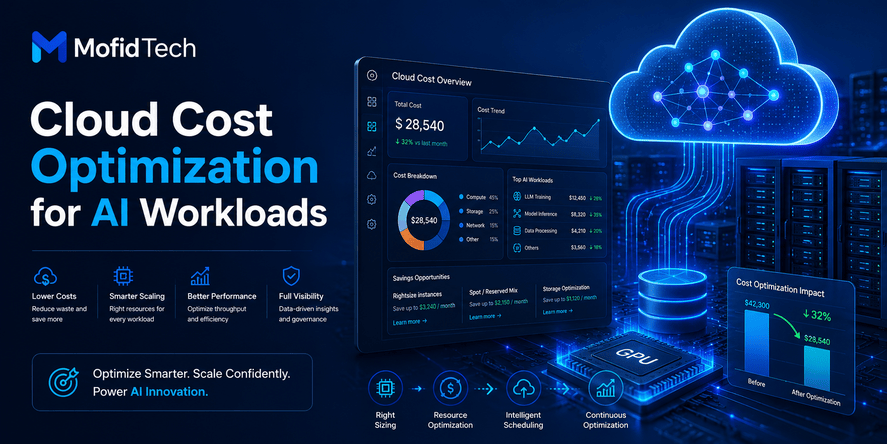
Cloud cost optimization for AI workloads means designing, deploying, monitoring, and improving AI systems so they deliver the required business value without wasting compute, storage, memory, network, or model-processing resources. The goal is not to make the system as cheap as possible. The real goal is to make the system cost-efficient.
A cost-efficient AI workload gives users good answers, acceptable latency, reliable availability, and safe behavior while avoiding unnecessary cloud spending. This requires technical decisions at every layer: architecture, model selection, deployment strategy, observability, caching, scaling, storage, data pipelines, and team workflow.
Many developers think cost optimization is only a finance problem. In AI projects, that is a dangerous mistake. Developers influence cost every time they choose a model, design a workflow, store embeddings, retry failed requests, keep logs, scale services, or decide how much context to send to an AI system.
This guide explains how developers can reduce cloud costs for AI workloads without hurting performance, security, or scalability. It is written for practical software teams that want to build AI-powered applications responsibly and sustainably.
Table of Contents
- What Is Cloud Cost Optimization for AI Workloads?
- Why AI Workloads Become Expensive
- The Main Cost Drivers in AI Applications
- Cost Optimization Versus Performance Optimization
- FinOps Principles Developers Should Understand
- How Architecture Choices Affect AI Cloud Costs
- Model Selection and Cost Efficiency
- Inference Cost Optimization
- Training and Fine-Tuning Cost Optimization
- Vector Databases, Embeddings, and Storage Costs
- Observability and Monitoring for AI Cost Control
- Security Considerations in AI Cost Optimization
- Performance Considerations
- Real-World Use Cases
- Common Mistakes That Increase AI Cloud Costs
- Developer Checklist for AI Cloud Cost Optimization
- Troubleshooting High AI Cloud Bills
- Comparison Tables
- FAQ
- Conclusion
What Is Cloud Cost Optimization for AI Workloads?
Cloud cost optimization for AI workloads is the process of reducing waste in AI infrastructure while preserving the performance, reliability, security, and quality that users need.
In simple terms, it means asking:
Can this AI feature deliver the same or better value using fewer resources?
For developers, this includes decisions such as:
- Choosing the right model size for each task.
- Avoiding unnecessary use of expensive compute.
- Reducing repeated AI requests through caching.
- Designing prompts and context carefully.
- Monitoring cost per request, user, feature, and workflow.
- Removing idle resources.
- Separating experiments from production.
- Using scalable infrastructure only when it is truly needed.
- Avoiding excessive storage of embeddings, logs, and temporary data.
Cloud cost optimization is not the same as cutting costs blindly. A team can reduce cloud bills by removing monitoring, weakening security, delaying responses, or using models that produce poor results. That is not optimization. That is technical debt.
True optimization balances cost, value, quality, and risk.
Direct Answer: How Can Developers Reduce AI Cloud Costs?
Developers can reduce AI cloud costs by choosing smaller models when possible, caching repeated results, limiting unnecessary context, batching background tasks, monitoring cost per feature, removing idle resources, optimizing storage, using clear scaling rules, and designing AI workflows around business value instead of unlimited compute.
This answer is important because most AI cost problems are not caused by one single mistake. They are usually caused by many small decisions that compound over time.
Why AI Workloads Become Expensive
AI workloads become expensive because they often require more compute, memory, storage, and data movement than traditional application workloads. They also introduce new cost categories that many development teams are not used to tracking.
A traditional application may process a user request by reading data from a database, applying business logic, and returning a response. An AI application may need to retrieve relevant documents, generate embeddings, send context to a model, process a model response, validate the result, log the interaction, and possibly trigger additional background tasks.
Each step has a cost.
AI Workloads Often Need Specialized Compute
Some AI workloads require GPUs or high-performance accelerators. These resources are more expensive than standard compute instances because they are designed for parallel processing, model training, deep learning, and high-volume inference.
Even when a team uses managed AI services instead of managing GPUs directly, the cost still exists. It may appear as usage-based model charges, token-based billing, inference pricing, embedding costs, or managed platform fees.
AI Applications Can Multiply Requests
A single user action may trigger multiple AI operations. For example, a support assistant may classify a question, retrieve documents, generate an answer, check safety, summarize the conversation, and store analytics. The user sees one response, but the system may perform several expensive operations behind the scenes.
This is one reason AI costs can grow faster than expected.
AI Systems Often Store More Data
AI applications may store:
- User prompts.
- Model responses.
- Conversation history.
- Embeddings.
- Retrieved documents.
- Evaluation results.
- Audit logs.
- Safety checks.
- Feedback signals.
- Experiment outputs.
This data can be useful, but if it is stored without a retention strategy, it can increase storage costs and create privacy or compliance risks.
AI Experiments Can Become Permanent Costs
Many teams create test environments, model experiments, evaluation pipelines, and proof-of-concept deployments. These resources are useful during development, but they often remain active after the experiment ends.
A forgotten experiment can become a silent monthly cost.
The Main Cost Drivers in AI Applications
To optimize AI cloud costs, developers must first understand what drives the bill. AI costs usually come from several layers, not just one service.
Model Inference
Model inference is the process of using an AI model to produce an output from an input. For many AI applications, inference is the largest recurring cost because it happens every time users interact with the system.
Inference cost is influenced by:
- Number of requests.
- Model size.
- Input length.
- Output length.
- Context window usage.
- Latency requirements.
- Retry behavior.
- Parallel processing.
- Safety and validation steps.
A chat assistant with long conversations may become expensive because each request can include a large amount of context. A document analysis tool may become expensive because each uploaded file requires multiple AI operations.
Training and Fine-Tuning
Training and fine-tuning can be expensive because they require compute-intensive processing over large datasets. Not every AI application needs custom training. Many teams can achieve good results with prompt design, retrieval-augmented generation, model selection, and careful workflow design.
Fine-tuning should be treated as a strategic decision, not a default step.
Embeddings
Embeddings convert text, images, or other content into numerical representations that can be used for search, recommendation, clustering, and retrieval. They are extremely useful for AI applications, especially retrieval-augmented generation systems.
However, embeddings create costs in several ways:
- Generating embeddings.
- Storing embeddings.
- Updating embeddings.
- Searching embeddings.
- Re-indexing data.
- Keeping multiple versions of embedding indexes.
A poorly planned embedding strategy can become expensive over time.
Vector Databases
Vector databases help AI applications find semantically relevant information. They are powerful, but they add infrastructure, storage, memory, and operational costs.
The cost depends on:
- Number of vectors.
- Vector size.
- Indexing strategy.
- Query volume.
- Replication.
- Availability requirements.
- Retention policy.
- Update frequency.
Not every AI feature needs a large vector database. Some use cases can start with simpler search strategies and evolve only when needed.
Storage and Logs
AI applications often generate large amounts of logs and stored data. Logging is important for debugging, safety, evaluation, and compliance, but excessive logging can create unnecessary cost.
Developers should decide what must be stored, for how long, and at what level of detail.
Data Transfer
Cloud costs can also increase through network traffic. AI workloads may move large files, model artifacts, datasets, embeddings, logs, and monitoring data between services or regions.
A system that frequently moves data across regions or services may become more expensive than expected.
Monitoring and Observability
Monitoring is necessary, but it also has a cost. High-cardinality metrics, excessive log retention, and detailed tracing for every request can increase bills.
The solution is not to remove observability. The solution is to design observability intelligently.
Cost Optimization Versus Performance Optimization
Cost optimization and performance optimization are connected, but they are not the same.
Performance optimization focuses on speed, responsiveness, throughput, and reliability. Cost optimization focuses on reducing waste and improving value per unit of spending.
A system can be fast but wasteful. A system can be cheap but unusable. The best AI systems are cost-aware and performance-aware at the same time.
The Main Trade-Offs
| Decision Area | Lower-Cost Choice | Higher-Performance Choice | Risk |
|---|---|---|---|
| Model size | Smaller model | Larger model | Smaller models may be less capable |
| Scaling | Conservative scaling | Aggressive scaling | Conservative scaling may increase latency |
| Context size | Shorter context | Larger context | Short context may reduce answer quality |
| Storage | Short retention | Long retention | Short retention may reduce auditability |
| Monitoring | Sampled traces | Full tracing | Sampling may miss rare issues |
| Deployment | Shared resources | Dedicated resources | Shared resources may affect isolation |
The best choice depends on the application. A medical assistant, financial system, education platform, internal productivity tool, and entertainment chatbot do not have the same requirements.
The Developer’s Question
Instead of asking “How do we make this cheaper?”, developers should ask:
What level of quality, latency, reliability, and safety does this feature really require?
This question leads to better architecture decisions.
FinOps Principles Developers Should Understand
FinOps is a practice that helps teams manage cloud costs through visibility, accountability, collaboration, and continuous optimization. In AI projects, FinOps is especially important because costs can grow quickly and unpredictably.
Developers do not need to become finance experts, but they should understand the technical side of cost responsibility.
Cost Visibility
A team cannot optimize what it cannot see. Developers need visibility into which features, services, environments, and workflows create cost.
Cost visibility should answer questions such as:
- Which AI feature costs the most?
- Which environment is using the most resources?
- Which users or workflows generate the most expensive requests?
- Which background jobs run more often than expected?
- Which models are used most frequently?
- Which stored data is no longer useful?
Without visibility, optimization becomes guessing.
Cost Ownership
In many teams, cloud bills are reviewed only by managers or finance teams. That approach does not work well for AI workloads because developers make the technical decisions that create the cost.
Cost ownership means each team understands the cost impact of its features. This does not mean blaming developers. It means giving developers the data and responsibility needed to improve systems.
Continuous Optimization
AI cloud cost optimization is not a one-time task. Workloads change, traffic grows, models evolve, user behavior shifts, and new features are added.
A system that is cost-efficient today may become expensive next month.
Teams should review AI costs regularly, especially after:
- New feature releases.
- Model changes.
- Traffic growth.
- New customer onboarding.
- Infrastructure migration.
- Experimentation periods.
- Data ingestion changes.
How Architecture Choices Affect AI Cloud Costs
Architecture is one of the most important factors in AI cost optimization. A poorly designed architecture can make even a simple AI feature expensive. A well-designed architecture can reduce cost while improving reliability and maintainability.
Separate Critical and Non-Critical Workloads
Not every AI task requires immediate processing. Some tasks are user-facing and latency-sensitive. Others can run in the background.
For example, a user asking a question in a live assistant expects a fast response. But generating a weekly summary, analyzing old documents, or updating a knowledge index may not need immediate processing.
Separating workloads allows teams to use different cost strategies:
- Real-time workloads need predictable performance.
- Background workloads can be scheduled during lower-cost periods.
- Experimental workloads can run with strict limits.
- Internal tools can use lower-cost infrastructure than customer-facing systems.
Avoid One Architecture for Every AI Feature
A common mistake is using the same model, same retrieval system, same storage pattern, and same infrastructure for all AI features.
Different tasks have different needs.
A simple classification task may not require a powerful model. A document summarization feature may require stronger reasoning. A support search feature may benefit more from retrieval quality than from a larger model.
Architecture should match the task.
Design for Graceful Degradation
Graceful degradation means the system can reduce resource usage when demand is high or when costs exceed limits, without completely failing.
For example, an AI application may:
- Use a smaller model for low-risk queries.
- Reduce context size for simple questions.
- Delay non-urgent tasks.
- Limit expensive operations for free users.
- Show a helpful fallback response if an AI service is unavailable.
- Prioritize paying customers or critical workflows.
This approach protects both user experience and cloud budget.
Build Cost Controls Into the Product
Cost optimization should not only happen in infrastructure. It should also appear in product design.
A product can reduce AI costs by:
- Limiting unnecessary repeated requests.
- Encouraging users to refine tasks before processing.
- Showing previews before expensive operations.
- Avoiding automatic processing of low-value content.
- Using quotas for heavy features.
- Separating free and premium AI capabilities.
Good product design can prevent technical waste.
Model Selection and Cost Efficiency
Model selection is one of the most powerful cost decisions in AI applications. Many teams use large models for tasks that smaller models can handle well.
Bigger Models Are Not Always Better
Large models can be useful for complex reasoning, open-ended generation, advanced summarization, and difficult instruction following. But many application tasks are simpler.
Smaller or specialized models may be enough for:
- Classification.
- Keyword extraction.
- Simple rewriting.
- Basic summarization.
- Routing requests.
- Detecting intent.
- Generating short structured answers.
- Filtering low-risk content.
- Matching user questions to help articles.
Using a large model for every task is like using a truck to deliver a letter. It works, but it is not efficient.
Use Model Routing
Model routing means sending each task to the most appropriate model instead of using one model for everything.
A practical AI system may use:
- A small model for simple requests.
- A stronger model for complex reasoning.
- A specialized embedding model for search.
- A safety layer for policy checks.
- A fallback model when the primary model is unavailable or too expensive.
Model routing improves cost efficiency because expensive models are used only when they are truly needed.
Evaluate Models by Business Value
The best model is not always the most advanced one. The best model is the one that meets the required quality level at an acceptable cost.
Developers should evaluate models using questions such as:
- Does this model improve user outcomes?
- Does the improvement justify the cost?
- Does the task require advanced reasoning?
- Is the model reliable for this domain?
- Can a smaller model handle most requests?
- What happens when the model makes mistakes?
- How much does latency matter?
- How does the model affect infrastructure complexity?
This approach prevents unnecessary spending on impressive but oversized AI systems.
Inference Cost Optimization
Inference is often the biggest recurring cost in production AI applications. Optimizing inference can significantly reduce monthly cloud bills.
Reduce Unnecessary Requests
The cheapest AI request is the one you do not need to make.
Developers should identify requests that are repeated, low-value, accidental, or avoidable. Examples include:
- Users asking the same question repeatedly.
- Background processes calling the model too often.
- Automatic retries that multiply costs.
- AI checks running on content that does not need them.
- Multiple services making similar requests independently.
- Reprocessing data that has not changed.
Reducing unnecessary requests is usually safer than reducing infrastructure quality.
Use Caching Carefully
Caching stores previous results so the system can reuse them instead of making a new AI request.
Caching is useful for:
- Frequently asked questions.
- Repeated document summaries.
- Similar search results.
- Stable product descriptions.
- Common support answers.
- Repeated classification results.
However, caching must be used carefully. Some AI responses depend on user context, permissions, time, or sensitive data. A cached answer must never expose private information to the wrong user.
Good caching considers safety, freshness, user permissions, and content changes.
Control Input and Output Size
Many AI systems become expensive because they send too much information to the model or request unnecessarily long responses.
Developers should ask:
- Does the model need the full document?
- Can the system retrieve only the most relevant sections?
- Can old conversation history be summarized?
- Can the response be shorter?
- Can the task be split into smaller decisions?
- Can the user confirm the action before expensive processing?
Reducing input and output size can lower cost and improve latency.
Use Batching for Background Workloads
Batching groups multiple tasks together so they can be processed more efficiently. It is especially useful for background workloads such as document processing, embedding generation, content classification, and analytics.
Batching may reduce overhead and improve resource utilization, but it is not always appropriate for real-time user interactions where immediate response matters.
Avoid Retry Storms
Retries are useful when a service temporarily fails. But uncontrolled retries can multiply costs quickly.
A retry storm happens when many failed requests are automatically repeated, sometimes across multiple services. In AI systems, this can create high model usage, infrastructure pressure, and unnecessary bills.
Retries should be limited, delayed intelligently, and monitored.
Training and Fine-Tuning Cost Optimization
Training and fine-tuning can be valuable, but they should not be the first solution for every AI problem.
Do Not Fine-Tune Before Understanding the Problem
Some teams fine-tune models too early because it feels advanced. But many problems can be solved with better prompts, better data preparation, retrieval-augmented generation, clearer instructions, or better workflow design.
Fine-tuning should be considered when:
- The task is repeated at scale.
- The required behavior is specific and stable.
- The available data is high quality.
- The expected cost savings or quality improvement is clear.
- The team can evaluate results properly.
- The model will be used enough to justify the effort.
Improve Data Quality First
Poor data increases cost because models must work harder to handle confusion, noise, duplicates, contradictions, and missing context.
Before training or fine-tuning, teams should improve:
- Data consistency.
- Label quality.
- Document structure.
- Duplicate removal.
- Domain terminology.
- Version control.
- Evaluation examples.
- Safety review.
Better data can reduce the need for larger models and repeated corrections.
Limit Experiment Sprawl
AI experimentation is necessary, but unmanaged experiments can waste resources.
Teams should define:
- Experiment purpose.
- Expected outcome.
- Time limit.
- Budget limit.
- Success criteria.
- Cleanup responsibility.
- Documentation requirements.
Every experiment should have an owner and an end condition.
Vector Databases, Embeddings, and Storage Costs
Retrieval-augmented generation systems often depend on embeddings and vector databases. These systems can improve answer quality, but they also create long-term cost responsibilities.
Store Only Useful Embeddings
Not every piece of content needs to be embedded. Teams should avoid embedding low-value, duplicated, outdated, or irrelevant data.
Before creating embeddings, ask:
- Will this content be searched?
- Is it current?
- Is it trusted?
- Is it duplicated elsewhere?
- Does it need to be available to all users?
- Is it sensitive?
- How often will it change?
Embedding everything may look simple, but it can become expensive and difficult to manage.
Plan for Updates
Content changes. Documentation changes. Product information changes. User permissions change. If the vector index is not updated properly, the AI system may retrieve outdated or unauthorized information.
A good embedding strategy includes:
- Update rules.
- Deletion rules.
- Version tracking.
- Permission awareness.
- Re-indexing plans.
- Quality evaluation.
- Retention policies.
Avoid Unlimited Conversation Storage
Conversation history can help AI systems maintain context, but storing everything forever is rarely necessary.
Developers should decide:
- What conversation data is needed?
- What should be summarized?
- What should be deleted?
- What must be anonymized?
- What needs user consent?
- How long should data be kept?
This reduces storage costs and improves privacy.
Observability and Monitoring for AI Cost Control
Observability is essential for AI cost optimization. Without monitoring, teams cannot know which features, users, requests, models, or workflows are creating high costs.
Track Cost Per Feature
Cloud bills are often too broad. Developers need feature-level visibility.
For example, instead of only knowing that “AI costs increased,” the team should know whether the increase came from:
- The chatbot.
- Document summarization.
- Embedding generation.
- Search retrieval.
- Content moderation.
- Internal analytics.
- Background processing.
- Experimental environments.
Feature-level cost tracking helps teams make better decisions.
Track Cost Per User or Account Type
Some users may generate much heavier AI usage than others. This is not always bad. A premium customer may justify higher usage. But a free user repeatedly triggering expensive workflows may create unsustainable costs.
Teams should understand usage patterns by user type, customer plan, project, organization, or feature tier.
Monitor Cost Per Successful Outcome
The most useful metric is not always cost per request. Sometimes it is cost per successful outcome.
Examples include:
- Cost per resolved support question.
- Cost per completed document analysis.
- Cost per accepted recommendation.
- Cost per generated report.
- Cost per automated workflow.
- Cost per retained user.
This helps teams connect infrastructure cost to product value.
Detect Anomalies Early
AI costs can spike because of bugs, abuse, configuration mistakes, traffic changes, retries, or unexpected user behavior.
Teams should create alerts for unusual patterns such as:
- Sudden increase in model requests.
- Unusual growth in input size.
- Unexpected embedding generation.
- High failed request rate.
- Excessive retries.
- Increased background job volume.
- Storage growth above normal levels.
- Experimental environment usage outside working hours.
Early detection prevents small issues from becoming expensive incidents.
Security Considerations in AI Cost Optimization
Cost optimization must not weaken security. In AI systems, security and cost are connected because abuse, data leaks, and uncontrolled usage can directly increase cloud bills.
Protect AI Endpoints From Abuse
AI endpoints can be expensive targets. Attackers or careless users may send repeated requests, large inputs, or automated traffic that increases cost.
Developers should apply security controls such as:
- Authentication.
- Authorization.
- Rate limiting.
- Usage quotas.
- Input validation.
- Abuse detection.
- Bot protection.
- Account-level monitoring.
These controls protect both the system and the cloud budget.
Do Not Cache Sensitive Responses Unsafely
Caching can reduce cost, but unsafe caching can expose private information.
Sensitive AI responses should not be reused across users unless permissions, context, and privacy rules are carefully enforced.
Examples of sensitive content include:
- Personal data.
- Internal company documents.
- Private user conversations.
- Financial information.
- Academic records.
- Medical information.
- Legal documents.
- Confidential business data.
Cost savings are never worth a data leak.
Limit Data Sent to AI Services
Sending too much data to AI models can increase cost and privacy risk. Developers should send only the information required for the task.
This principle is useful for both cost optimization and data protection.
Monitor for Prompt Abuse
Users may attempt to force the system into long, repeated, or irrelevant AI operations. Prompt abuse can increase costs and create security risks.
Developers should monitor unusual prompt patterns, repeated high-cost requests, and attempts to bypass product limits.
Performance Considerations
Cost optimization should not make the application slow, unreliable, or frustrating. The goal is to improve efficiency while preserving user experience.
Latency Matters More for Some Features
Not all AI features need the same speed.
High-latency tolerance:
- Background summarization.
- Report generation.
- Offline document processing.
- Batch classification.
- Data enrichment.
Low-latency tolerance:
- Chat assistants.
- Interactive search.
- Real-time recommendations.
- Customer support responses.
- AI copilots inside applications.
Cost optimization should respect user expectations.
Use Different Strategies for Real-Time and Background Work
Real-time tasks may need faster models, better caching, or dedicated capacity. Background tasks can often use scheduled processing, batching, lower-priority resources, or slower but cheaper workflows.
Treating every workload as urgent increases cost.
Measure Perceived Performance
Users care about perceived speed, not just infrastructure metrics.
A system can feel faster if it:
- Shows progress clearly.
- Returns partial results.
- Explains that processing is ongoing.
- Avoids blocking the interface.
- Separates quick answers from deeper analysis.
- Lets users continue working while background tasks run.
Good user experience can reduce the pressure to overpay for instant processing everywhere.
Real-World Use Cases
Use Case 1: AI Customer Support Assistant
A company adds an AI assistant to answer customer questions. At first, every user message is sent to a large model with full conversation history and several retrieved documents.
The cost grows quickly.
A better design would:
- Use retrieval to send only relevant information.
- Summarize old conversation history.
- Cache common answers.
- Use smaller models for simple questions.
- Escalate complex questions to stronger models.
- Track cost per resolved support conversation.
- Limit repeated requests from abusive users.
The result is lower cost without reducing support quality.
Use Case 2: Document Summarization Platform
A platform allows users to upload documents and receive summaries. Some users upload very large files repeatedly.
Cost optimization can include:
- Showing users a preview before processing.
- Charging or limiting very large documents.
- Processing documents in stages.
- Reusing summaries when documents do not change.
- Separating quick summaries from deep analysis.
- Deleting temporary files after a retention period.
- Monitoring cost per processed document.
This protects infrastructure while keeping the feature useful.
Use Case 3: AI Search for Internal Knowledge Base
A company builds AI search across internal documents. The first version embeds everything, including outdated files, duplicates, drafts, and private documents.
A better approach would:
- Embed only approved and useful content.
- Respect access permissions.
- Remove duplicates.
- Define update schedules.
- Delete outdated vectors.
- Monitor search quality and retrieval cost.
- Use metadata to improve filtering.
This reduces cost and improves answer accuracy.
Use Case 4: AI Features in a SaaS Product
A SaaS platform adds AI writing, AI recommendations, and AI analytics. Different user plans have different expectations.
Cost optimization can include:
- Plan-based usage limits.
- Premium access to advanced models.
- Smaller models for basic features.
- Background processing for non-urgent tasks.
- Cost dashboards for internal teams.
- Alerts when a tenant creates unusual usage.
This aligns cloud cost with business value.
Common Mistakes That Increase AI Cloud Costs
Mistake 1: Using the Most Powerful Model for Every Task
This is one of the most common AI cost mistakes. Large models are useful, but many tasks do not require them.
Better approach: classify tasks by complexity and use the smallest reliable model for each one.
Mistake 2: Sending Too Much Context
Long prompts, full documents, and entire conversation histories increase cost and latency.
Better approach: retrieve only relevant context, summarize older information, and remove unnecessary input.
Mistake 3: Ignoring Idle Resources
AI experiments, test environments, and unused services can continue generating costs long after they are useful.
Better approach: assign owners, expiration dates, and cleanup reviews to non-production resources.
Mistake 4: No Cost Monitoring by Feature
A cloud bill that only shows total spending is not enough.
Better approach: track cost by feature, model, environment, user segment, and workflow.
Mistake 5: Unlimited Free Usage
Free AI features can attract users, but they can also create unsustainable infrastructure costs.
Better approach: define fair usage policies, quotas, and plan-based limits.
Mistake 6: Excessive Logging
Logs are useful, but storing every prompt, response, trace, and intermediate step forever can be expensive and risky.
Better approach: define log levels, retention rules, sampling strategies, and privacy protections.
Mistake 7: Retrying Failed Requests Without Limits
Automatic retries can multiply AI usage during outages or bugs.
Better approach: use controlled retry policies and alert on abnormal retry rates.
Mistake 8: Treating Cost Optimization as a Late Task
Cost is easier to control when it is considered during design.
Better approach: include cost planning in architecture reviews, feature planning, and deployment readiness checks.
Best Practices for Developers
Design With Cost Awareness From the Beginning
Cost should be part of the architecture discussion, not an emergency topic after the cloud bill arrives.
Before launching an AI feature, define:
- Expected usage.
- Cost drivers.
- User limits.
- Model selection.
- Storage retention.
- Monitoring strategy.
- Failure behavior.
- Scaling rules.
- Security controls.
Use the Smallest Reliable Model
Start with the smallest model that can meet the required quality level. Move to stronger models only when there is a clear reason.
Measure Quality and Cost Together
Do not evaluate AI systems only by accuracy or only by price. Track both.
A model that is slightly cheaper but produces many bad answers may increase support costs. A model that is very accurate but too expensive may be unsustainable.
Build Feedback Loops
User feedback helps identify where expensive AI processing is producing value and where it is not.
Track:
- Accepted answers.
- Rejected answers.
- Repeated questions.
- Manual corrections.
- Escalations.
- User satisfaction.
- Feature usage.
- Cost per successful task.
Review Costs After Every Major Release
Every new AI feature can change cost behavior. Make cost review part of the release process.
Developer Checklist for AI Cloud Cost Optimization
Before Deployment
- Define the business purpose of the AI feature.
- Identify the expected user volume.
- Choose the smallest reliable model.
- Estimate cost per request or workflow.
- Decide what data must be stored.
- Define retention rules.
- Add usage limits.
- Add abuse protection.
- Decide which metrics to monitor.
- Separate real-time and background tasks.
- Plan fallback behavior.
- Assign ownership for cost review.
After Deployment
- Monitor actual usage.
- Compare expected cost with real cost.
- Track cost by feature.
- Watch for retry spikes.
- Review storage growth.
- Identify repeated requests.
- Evaluate caching opportunities.
- Check whether users value the feature.
- Remove unused experiments.
- Adjust quotas if needed.
During Scaling
- Review model selection again.
- Improve batching for background tasks.
- Optimize retrieval quality.
- Reduce unnecessary context.
- Review vector database growth.
- Add stronger anomaly detection.
- Align usage limits with business plans.
- Revisit architecture if cost grows faster than value.
Troubleshooting High AI Cloud Bills
Problem: Model Costs Increased Suddenly
Possible causes:
- Traffic growth.
- New feature release.
- Retry storm.
- Abuse or bot activity.
- Longer prompts.
- Larger outputs.
- More background jobs.
- Model change.
- Unexpected user behavior.
Recommended investigation:
- Check which feature caused the increase.
- Compare request volume before and after the spike.
- Review input and output sizes.
- Look for failed requests and retries.
- Check for unusual users or accounts.
- Review recent deployments.
- Inspect background task activity.
Problem: Vector Database Costs Keep Growing
Possible causes:
- Embedding too much content.
- No deletion policy.
- Duplicate documents.
- Frequent re-indexing.
- Storing outdated vectors.
- Large vector dimensions.
- High query volume.
Recommended investigation:
- Review what content is embedded.
- Remove duplicates.
- Delete outdated vectors.
- Apply retention policies.
- Check whether every indexed document is useful.
- Review query patterns.
Problem: AI Feature Is Too Slow After Cost Optimization
Possible causes:
- Model is too small for the task.
- Scaling is too conservative.
- Caching is poorly designed.
- Retrieval is inefficient.
- Background work is blocking user requests.
- Too many validation steps are synchronous.
Recommended investigation:
- Separate latency-sensitive and background tasks.
- Measure where time is spent.
- Improve retrieval quality.
- Use caching for safe repeated tasks.
- Consider model routing.
- Improve user experience with progress indicators.
Problem: Free Users Are Creating High AI Costs
Possible causes:
- No quota.
- No rate limiting.
- Expensive features available to all users.
- Automated abuse.
- Repeated generation attempts.
- Large uploads or long conversations.
Recommended investigation:
- Add fair usage limits.
- Introduce plan-based features.
- Monitor abnormal accounts.
- Limit expensive operations.
- Add confirmation steps for heavy tasks.
- Use smaller models for free-tier features.
Comparison Tables
Cost Optimization Methods
| Method | Best For | Benefit | Risk |
|---|---|---|---|
| Model routing | Apps with mixed task complexity | Uses expensive models only when needed | Requires evaluation logic |
| Caching | Repeated questions or stable outputs | Reduces duplicate AI requests | Must handle privacy and freshness |
| Context reduction | Long prompts and conversations | Lowers cost and latency | May reduce answer quality |
| Batching | Background processing | Improves efficiency | Not ideal for real-time tasks |
| Usage quotas | Public or freemium products | Prevents uncontrolled spending | Can frustrate heavy users |
| Retention policies | Logs, embeddings, conversations | Reduces storage cost and risk | Must preserve required audit data |
| Feature-level monitoring | Growing AI platforms | Shows where money is spent | Requires planning and tagging |
AI Workload Types and Cost Strategies
| Workload Type | Typical Cost Driver | Optimization Strategy |
|---|---|---|
| Chat assistant | Repeated inference and long context | Summarize context, cache common answers, route models |
| Document summarization | Large inputs | Process in stages, limit size, reuse summaries |
| AI search | Embeddings and vector queries | Embed only useful content, remove duplicates, filter better |
| Content moderation | High request volume | Use lightweight classification where possible |
| Recommendation system | Frequent updates and scoring | Batch background tasks and monitor value |
| AI analytics | Large data processing | Schedule non-urgent jobs and control retention |
| Code assistant | Complex reasoning and long context | Use task-specific routing and limit unnecessary history |
Model Selection Decision Framework
| Question | Why It Matters |
|---|---|
| Is the task simple or complex? | Simple tasks may not need large models |
| Is the task user-facing or background? | Background tasks can be optimized differently |
| What happens if the answer is wrong? | Higher-risk tasks may justify stronger models |
| How often will this task run? | High-volume tasks need stronger cost control |
| Can the result be cached? | Repeated outputs can reduce inference cost |
| Does the model need full context? | Smaller context reduces cost and latency |
| Can retrieval improve quality? | Better retrieval may reduce need for larger models |
AI Search Optimization Section
Concise Definition for Answer Engines
Cloud cost optimization for AI workloads is the practice of reducing unnecessary spending on AI compute, model inference, storage, embeddings, vector databases, monitoring, and data transfer while maintaining the performance, reliability, security, and quality required by users.
Best Short Answer for Featured Snippets
Developers can reduce AI cloud costs by using smaller models for simple tasks, routing complex tasks to stronger models only when needed, caching repeated results, reducing prompt and context size, batching background jobs, monitoring cost per feature, applying usage limits, and deleting unused resources.
Question-Based Search Targets
This article can target search questions such as:
- How do developers reduce AI cloud costs?
- Why are AI workloads expensive in the cloud?
- What is FinOps for AI workloads?
- How can smaller models reduce AI infrastructure costs?
- How do vector databases affect AI costs?
- How can AI applications reduce inference costs?
- What metrics should developers track for AI cost optimization?
- How do you optimize cloud costs without hurting performance?
FAQ
1. What is cloud cost optimization for AI workloads?
Cloud cost optimization for AI workloads means reducing unnecessary spending on AI infrastructure while keeping the application useful, reliable, secure, and performant. It includes model selection, inference optimization, storage control, monitoring, scaling, caching, and usage management.
2. Why are AI workloads more expensive than traditional web applications?
AI workloads are often more expensive because they may use large models, GPUs, embeddings, vector databases, long prompts, high-volume inference, background processing, and extensive monitoring. A single user action can trigger multiple AI operations behind the scenes.
3. How can developers reduce AI inference costs?
Developers can reduce inference costs by using smaller models for simple tasks, routing only complex tasks to stronger models, reducing input and output size, caching repeated results, limiting unnecessary retries, and monitoring cost per feature or workflow.
4. Is using a smaller AI model always better for cost optimization?
No. A smaller model is usually cheaper, but it may produce lower-quality results for complex tasks. The best choice is the smallest model that reliably meets the required quality, safety, and performance level.
5. What is FinOps for AI workloads?
FinOps for AI workloads is the practice of making cloud cost visible, understandable, and manageable across technical and business teams. For developers, it means understanding how architecture, model usage, storage, scaling, and monitoring decisions affect cloud spending.
6. How do vector databases affect AI cloud costs?
Vector databases can increase costs through storage, memory usage, indexing, replication, query volume, and updates. They are useful for AI search and retrieval, but they should be managed with clear data selection, retention, permission, and update policies.
7. Can caching reduce AI costs?
Yes. Caching can reduce AI costs by reusing previous results instead of sending repeated requests to a model. However, caching must be designed carefully to avoid serving outdated, incorrect, or private information to the wrong user.
8. What metrics should developers track for AI cost optimization?
Developers should track cost per feature, cost per request, cost per successful outcome, model usage, input and output size, retry rates, background job volume, storage growth, embedding volume, vector database queries, and unusual usage spikes.
9. How can teams avoid surprise AI cloud bills?
Teams can avoid surprise bills by setting usage limits, monitoring anomalies, reviewing costs after releases, separating experiments from production, controlling retries, tracking feature-level costs, and assigning ownership for expensive workloads.
10. Does cost optimization hurt AI performance?
Cost optimization does not have to hurt performance. Good optimization removes waste while preserving the user experience. Problems happen when teams cut resources blindly without understanding latency, quality, reliability, and safety requirements.
11. Should every AI application use fine-tuning?
No. Many AI applications can achieve strong results through better prompts, retrieval, workflow design, data quality, and model routing. Fine-tuning should be used when there is a clear need, enough quality data, and measurable business value.
12. What is the most common AI cost mistake?
One of the most common mistakes is using the most powerful model for every task. Many tasks can be handled by smaller or specialized models, especially classification, routing, simple summarization, and structured extraction.
Conclusion
Cloud cost optimization for AI workloads is now an essential skill for modern developers. AI features can create powerful user experiences, but they can also generate unpredictable and unnecessary cloud costs if they are not designed carefully.
The most important idea is simple: AI cost optimization is not about making systems cheap. It is about making systems efficient.
Developers can reduce AI cloud costs by choosing the right model for each task, reducing unnecessary requests, caching safely, controlling context size, batching background work, managing embeddings, monitoring feature-level costs, protecting endpoints from abuse, and reviewing infrastructure continuously.
The best AI applications are not only intelligent. They are sustainable, secure, observable, scalable, and economically realistic.
For MofidTech readers, this topic is especially valuable because it connects AI, cloud computing, DevOps, software architecture, performance, security, and developer productivity. It helps developers think beyond building features and toward building responsible AI systems that can survive real-world usage.










💬 Comments
No comments yet. Be the first to comment!
Login to comment.