Introduction
Cloud platforms make it easier than ever to deploy web applications, scale infrastructure, store data, monitor systems, and serve users around the world. But the same flexibility that makes cloud computing powerful can also make it expensive. A developer can create resources quickly, a test environment can stay active for months, logs can grow silently, databases can scale beyond the real workload, and a small application can become surprisingly costly.
Cloud cost governance is the discipline of managing these risks before they become serious financial problems.
For developer-built web applications, cloud cost governance is not only a finance topic. It is also a software engineering topic, a DevOps topic, a security topic, and an architecture topic. Every technical decision affects cost: database choice, storage retention, monitoring strategy, traffic assumptions, backup policy, environment design, scaling rules, and deployment workflow.
A cost-aware team does not simply ask, “How can we reduce the bill?” after the bill becomes too high. It asks better questions earlier:
- What resources does this application really need?
- Who owns each cloud resource?
- Which environments should run permanently?
- What should scale automatically?
- What should be reviewed before production?
- What logs and metrics are useful?
- What data should be retained, archived, or deleted?
- What alerts should notify the team before spending grows?
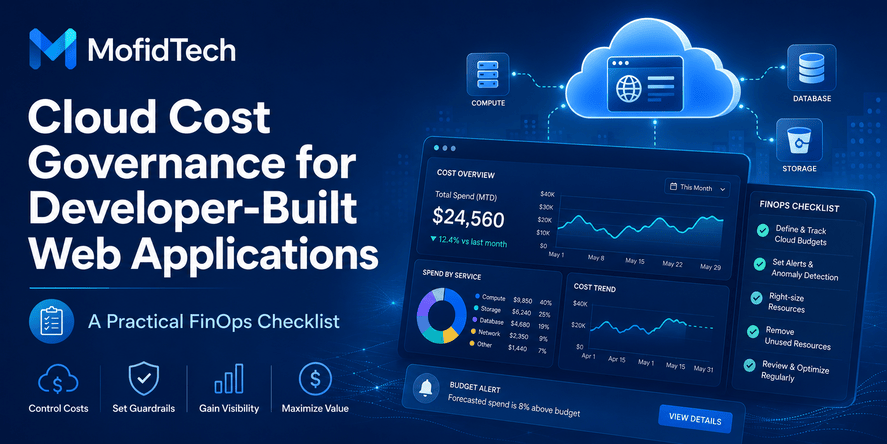
This article explains cloud cost governance from a developer’s perspective. It provides a practical FinOps checklist for web applications without focusing on provider-specific commands, configuration files, or technical snippets. The goal is to help developers, students, DevOps beginners, and engineering teams understand how to build cloud applications that are scalable, reliable, secure, and financially responsible.
Table of Contents
- What Is Cloud Cost Governance?
- Why Cloud Cost Governance Matters for Developers
- Cloud Cost Governance vs Cloud Cost Optimization vs FinOps
- Why Cloud Bills Grow Faster Than Expected
- The Developer-Focused FinOps Checklist
- Architecture Decisions That Affect Cloud Costs
- Cost Governance Before Production Deployment
- Monitoring, Alerts, and Cost Visibility
- Security and Access Control in Cloud Cost Governance
- Database and Storage Cost Considerations
- Common Cloud Cost Mistakes Developers Make
- Best Practices for Cost-Aware Development
- Practical Cloud Cost Governance Workflow
- Comparison Table: Cost-Aware vs Cost-Blind Applications
- Troubleshooting Unexpected Cloud Costs
- Cloud Cost Governance Checklist
- FAQ
- Conclusion
What Is Cloud Cost Governance?
Cloud cost governance is the process of controlling cloud spending through clear ownership, budgets, monitoring, architecture reviews, resource policies, and continuous improvement.
In simple terms, cloud cost governance answers this question:
How can a team use cloud services effectively without losing control of cost?
It is not about avoiding the cloud. It is not about choosing the cheapest option every time. It is about making cloud spending visible, explainable, intentional, and aligned with real application needs.
A good cloud cost governance strategy helps teams understand:
- Which services are being used
- Why they are being used
- Who owns them
- How much they cost
- Whether they are still necessary
- Whether they are properly sized
- Whether they create hidden financial risk
- Whether they support business and technical goals
For web applications, cloud cost governance usually includes compute resources, databases, storage, networking, monitoring, backups, development environments, staging environments, testing environments, security services, and deployment infrastructure.
Why Cost Governance Is Different from Simple Cost Cutting
Cost cutting focuses mainly on reducing the bill. Cost governance focuses on making better decisions.
A team can reduce costs by removing resources, lowering capacity, or disabling services. But if those actions harm reliability, security, performance, or user experience, the result may be worse than the original problem.
Cloud cost governance is more balanced. It asks:
- Is this cost necessary?
- Does this resource support real value?
- Is the application overprovisioned?
- Is the team paying for unused capacity?
- Is there a cheaper architecture that still meets requirements?
- Are we spending money because of bad design or real demand?
- Are we creating long-term technical debt by choosing the wrong service?
The goal is not only to spend less. The goal is to spend wisely.
Why Developers Should Care About Cloud Bills Early
Developers often make decisions that directly influence cloud costs. Even when the finance team receives the invoice, the technical team usually creates the cost.
A developer may decide:
- How logs are stored
- How many environments are needed
- How background tasks run
- How files are uploaded and retained
- How database indexes are planned
- How traffic spikes are handled
- How monitoring data is collected
- How backups are scheduled
- How application errors are retried
- How external services are integrated
Each decision can increase or reduce cost.
When developers understand cloud cost governance, they build applications that are easier to operate, easier to scale, and easier to maintain. They also help their organizations avoid painful surprises after deployment.
Why Cloud Cost Governance Matters for Web Applications
Cloud cost governance matters because modern web applications are not just code. They are complete systems made of application servers, databases, storage, networks, monitoring tools, caching layers, background workers, security services, deployment pipelines, backups, and third-party integrations.
Even a simple web application can generate many cost categories.
Web Applications Have Many Hidden Cost Sources
A web application may include:
| Area | Possible Cost Source |
|---|---|
| Compute | Application servers, containers, serverless functions, background workers |
| Database | Managed database instances, storage, replicas, backups, read scaling |
| Storage | User uploads, logs, static files, media, archives |
| Network | Data transfer, load balancing, CDN traffic |
| Monitoring | Metrics, logs, traces, alerts, retention |
| Security | Scanning, firewalls, identity controls, secrets management |
| Deployment | Build systems, test environments, staging environments |
| Backup | Snapshots, retention, disaster recovery storage |
Many teams underestimate these secondary costs. They calculate the price of the main server but forget logs, backups, traffic, storage growth, and inactive environments.
Small Mistakes Can Become Recurring Costs
Cloud platforms are usually billed continuously. A small mistake can become a monthly expense.
Examples include:
- A test database left running
- A staging environment no one uses
- Old backups never deleted
- Logs retained longer than necessary
- Oversized database resources
- Unused storage volumes
- Too many monitoring metrics
- File uploads with no lifecycle policy
- Development resources created without ownership
The problem is not only the cost of one mistake. The problem is repetition. A small monthly waste becomes a larger yearly waste.
Cost Governance Improves Engineering Discipline
Cloud cost governance forces teams to become more intentional. It improves technical discipline because every resource needs a reason, owner, and lifecycle.
This encourages better habits:
- Planning before provisioning
- Reviewing architecture before deployment
- Removing unused resources
- Monitoring real usage
- Designing realistic scaling rules
- Choosing services based on workload needs
- Documenting ownership and responsibility
Good cloud cost governance is not bureaucracy. It is engineering hygiene.
Cloud Cost Governance vs Cloud Cost Optimization vs FinOps
These terms are related, but they are not exactly the same.
| Concept | Meaning | Main Question |
|---|---|---|
| Cloud cost governance | Rules, ownership, monitoring, and decision processes for cloud spending | How do we keep cloud spending controlled and accountable? |
| Cloud cost optimization | Practical actions to reduce waste and improve efficiency | How do we reduce unnecessary cloud costs? |
| FinOps | Collaboration model between engineering, finance, and business teams | How do we maximize cloud value through shared responsibility? |
What Is FinOps?
FinOps is a cloud financial management practice that brings engineering, finance, product, and business teams together. It helps organizations understand cloud spending, make better decisions, and connect cost to value.
For developers, FinOps means cloud cost is not only someone else’s problem. It becomes a shared responsibility.
A developer does not need to become a financial expert. But they should understand:
- Which resources cost money
- How architecture affects spending
- How usage patterns affect bills
- How to avoid waste
- How to communicate technical cost drivers
- How to review cloud usage during development
Why FinOps Is Useful for Developer-Built Applications
FinOps helps developers build with cost awareness from the beginning. Instead of treating cost as an afterthought, it becomes part of the development lifecycle.
This is especially useful when:
- A team is preparing for production
- A startup is trying to control infrastructure costs
- An application is growing quickly
- A product uses cloud databases or storage heavily
- Developers create multiple environments
- Monitoring and logging costs are increasing
- AI, analytics, or background processing workloads are added
FinOps is not only for large companies. Small teams can benefit from simple FinOps habits early.
Why Cloud Bills Grow Faster Than Expected
Cloud bills often grow because teams underestimate how many technical decisions affect cost. The application may work correctly, but its architecture may be financially inefficient.
Overprovisioned Resources
Overprovisioning happens when resources are larger than necessary.
A team may choose a powerful server, a large database, or high-capacity storage because it feels safer. But if the real workload is small, the team pays for capacity that remains unused.
Overprovisioning is common when teams do not measure actual usage. Without metrics, they guess. Guessing often leads to oversized infrastructure.
Forgotten Development and Testing Environments
Development, testing, staging, demo, and temporary environments can become expensive if they run continuously.
A common mistake is treating non-production environments like production environments. Not every environment needs to run all day. Not every environment needs the same capacity as production.
Cost governance should define:
- Which environments are permanent
- Which environments are temporary
- Who owns each environment
- When environments should be reviewed
- Whether inactive environments should be paused or removed
- Whether test data should have shorter retention
Poor Monitoring and Unclear Ownership
A cloud bill becomes hard to manage when no one knows who owns each resource.
Unclear ownership creates questions such as:
- Who created this database?
- Is this storage bucket still used?
- Which team owns this environment?
- Why is this service running?
- Can this resource be removed safely?
- Why did this cost increase last week?
Without ownership, teams hesitate to delete resources. This creates cloud waste.
Scaling Without Budget Awareness
Automatic scaling is powerful, but it can also increase cost quickly. If scaling rules are poorly designed, the application may add capacity because of abnormal traffic, inefficient background jobs, retries, bots, or application errors.
Scaling should be connected to both technical metrics and budget awareness. A team should know what happens when traffic increases, what the maximum expected cost could be, and what alerts should trigger before spending becomes dangerous.
Logging and Monitoring Without Retention Rules
Monitoring is necessary, but monitoring data can become expensive.
Logs, traces, metrics, and error reports are valuable when they help teams debug, improve reliability, and understand usage. But collecting too much data without retention rules can create unnecessary cost.
Good governance asks:
- Which logs are useful?
- How long should logs be retained?
- Which metrics are essential?
- Do all environments need the same monitoring level?
- Are debug logs disabled or reduced in production?
- Are high-volume logs reviewed regularly?
Storage Growth Without Lifecycle Planning
Storage often grows slowly and silently. User uploads, reports, backups, exports, temporary files, and logs can accumulate for months.
Without lifecycle planning, old files remain forever.
A cost-aware storage strategy defines:
- What data should be kept
- What data should be archived
- What data should be deleted
- How long backups should remain
- Which files are business-critical
- Which files are temporary
- Which storage class fits each type of data
The Developer-Focused FinOps Checklist
A practical FinOps checklist helps developers make cloud cost governance part of the software lifecycle.
1. Assign Ownership for Every Cloud Resource
Every cloud resource should have an owner. Ownership does not mean one person pays the bill. It means someone is responsible for knowing why the resource exists and whether it is still needed.
For each resource, the team should know:
- Application or project name
- Responsible team or person
- Environment type
- Business purpose
- Expected lifecycle
- Criticality level
- Review frequency
Ownership prevents orphaned resources and makes cleanup safer.
2. Use Clear Naming and Tagging Standards
Naming and tagging help teams understand cloud resources quickly.
A good naming and tagging strategy should identify:
- Project
- Environment
- Owner
- Cost center
- Application component
- Data sensitivity
- Lifecycle status
- Production or non-production use
Tags are especially useful for reports. They help teams answer questions like:
- Which project costs the most?
- Which environment creates the most waste?
- Which team owns unused resources?
- How much does staging cost compared to production?
- Which services are growing fastest?
3. Define Budget Alerts Early
A budget alert is a warning system. It tells the team when spending approaches or exceeds an expected limit.
Budget alerts should be created before production, not after the first unexpected bill.
Useful alert levels include:
- Early warning level
- Review level
- Critical level
- Emergency level
The goal is not to panic when cost increases. The goal is to investigate early.
4. Review Architecture Before Deployment
Before production deployment, the team should review cost-sensitive architecture decisions.
Questions to ask:
- Is the compute capacity realistic?
- Is the database properly sized?
- Are logs and metrics controlled?
- Are backups necessary and correctly retained?
- Are development environments separated from production?
- Are storage lifecycle rules defined?
- Are scaling limits understood?
- Are traffic assumptions documented?
- Are security services included in the cost estimate?
A production readiness review should include cost governance, not only performance and security.
5. Monitor Real Usage After Launch
Pre-launch estimates are useful, but real usage matters more. After deployment, teams should compare expected usage with actual usage.
Important signals include:
- CPU and memory utilization
- Database load
- Storage growth
- Network transfer
- Error rates
- Request volume
- Background job activity
- Log volume
- Backup growth
- Monitoring data volume
Monitoring helps teams identify waste and adjust resources based on reality.
6. Separate Production and Non-Production Cost Policies
Production environments usually require reliability, redundancy, monitoring, backup, and security controls. Non-production environments usually have different needs.
A good governance policy treats them differently.
For non-production environments, teams should consider:
- Lower capacity
- Shorter data retention
- Reduced logging
- Limited operating hours
- Smaller databases
- Cleanup schedules
- Temporary resource policies
This can reduce costs without harming production reliability.
7. Review Cloud Costs Regularly
Cloud cost governance is continuous. A one-time review is not enough.
Teams should review cloud costs:
- Before production
- After launch
- After major feature releases
- After traffic changes
- After architecture changes
- Monthly or quarterly
- Whenever costs increase unexpectedly
Regular reviews make cost awareness part of engineering culture.
Architecture Decisions That Affect Cloud Costs
Cloud architecture is one of the biggest drivers of long-term cost. A design that looks simple at first can become expensive as traffic, storage, and data processing grow.
Compute Model
Compute cost depends on how the application runs.
Common compute choices include:
- Traditional virtual machines
- Containers
- Managed application platforms
- Serverless functions
- Background worker systems
- Platform-as-a-service environments
Each option has trade-offs.
| Compute Option | Cost Advantage | Cost Risk |
|---|---|---|
| Virtual machines | Predictable baseline cost | Waste if oversized or always running |
| Containers | Efficient for multiple services | Complexity can create unused capacity |
| Managed platforms | Less operational effort | Pricing may increase with scale |
| Serverless | Good for variable workloads | Expensive for high-volume or inefficient workloads |
| Background workers | Useful for async processing | Queues and retries can increase usage |
The best compute model depends on workload pattern, team skill, traffic predictability, and operational needs.
Database Choice
Databases can become one of the largest cloud costs.
Cost is affected by:
- Instance size
- Storage volume
- Backup retention
- Read replicas
- High availability
- Query efficiency
- Connection usage
- Data growth
- Indexing strategy
- Monitoring and logging
A small application may start with a modest database, but cost can grow if the database is oversized, poorly indexed, or storing unnecessary data.
Storage Design
Storage seems cheap until it grows without control.
Storage costs can come from:
- User-uploaded files
- Application-generated files
- Logs
- Backups
- Temporary exports
- Media files
- Archived reports
- Data lakes
- Static assets
- Snapshots
Cost-aware storage design includes retention rules, archive policies, and deletion workflows.
Network and Data Transfer
Network costs are often underestimated. Data transfer can increase when applications serve media files, communicate across regions, send large responses, or rely heavily on external APIs.
Developers should think about:
- Where users are located
- Where data is stored
- Whether files should be served through a CDN
- Whether services communicate across regions
- Whether API responses are too large
- Whether repeated requests could be cached
- Whether media files are optimized
Monitoring and Observability
Observability improves reliability, but it also creates cost.
Monitoring cost depends on:
- Number of metrics
- Log volume
- Trace volume
- Retention period
- Number of environments
- Alerting rules
- Dashboard frequency
- Third-party monitoring pricing
The goal is not to monitor less blindly. The goal is to monitor intelligently.
A cost-aware observability strategy collects the data needed to operate the application safely while avoiding unnecessary noise.
Cost Governance Before Production Deployment
Production deployment is the best moment to prevent future cloud waste. Once an application is live, cost problems become harder to fix because changes may affect users.
Production Cost Readiness Questions
Before launching a web application, the team should answer:
- What is the expected monthly cost?
- What is the acceptable cost range?
- What traffic level was used for estimation?
- What happens if traffic doubles?
- Which services scale automatically?
- What is the maximum expected scaling cost?
- Which resources are required for reliability?
- Which resources are optional?
- Who receives budget alerts?
- Who approves architecture changes that increase cost?
- How often will costs be reviewed?
These questions help the team avoid launching blindly.
Environment Review
A production-ready application usually has several environments, but each one should have a clear purpose.
| Environment | Cost Governance Question |
|---|---|
| Development | Does it need persistent cloud resources? |
| Testing | Can it use temporary resources? |
| Staging | Does it need production-like capacity all the time? |
| Demo | Who owns it and when should it be removed? |
| Production | Are reliability and cost balanced correctly? |
A common rule is simple: if an environment has no owner and no clear purpose, it should be reviewed.
Backup and Retention Review
Backups are important, but unlimited retention can become expensive.
Before production, define:
- What data must be backed up
- How often backups are needed
- How long backups should be retained
- Who can restore data
- How restore processes are tested
- Whether old backups should be archived or deleted
- Whether non-production backups are necessary
Backup policy should balance cost, compliance, recovery needs, and business risk.
Scaling Review
Scaling rules should be realistic. Teams should understand what triggers scaling and what cost impact scaling may create.
Important questions include:
- What metric triggers scaling?
- Is the metric reliable?
- Could an application bug trigger scaling?
- Could bot traffic trigger scaling?
- Could background jobs trigger scaling?
- What is the maximum capacity?
- Who is alerted when scaling happens?
- What happens during abnormal traffic?
Scaling without governance can turn technical problems into financial problems.
Monitoring, Alerts, and Cost Visibility
Cloud cost governance requires visibility. A team cannot control what it cannot see.
What Developers Should Monitor
Developers should monitor both technical and financial signals.
Technical signals include:
- Request volume
- Response time
- Error rate
- CPU usage
- Memory usage
- Database activity
- Queue length
- Storage growth
- Network transfer
- Background processing activity
Financial signals include:
- Daily cost
- Monthly projected cost
- Cost by service
- Cost by environment
- Cost by project
- Cost by owner
- Cost anomalies
- Unused resources
- Fast-growing resources
Combining both views helps teams understand why costs change.
Cost Anomaly Detection
A cost anomaly is an unusual increase in spending. It may happen because of real traffic growth, a misconfigured service, unexpected retries, excessive logging, or a forgotten resource.
Cost anomaly detection should answer:
- What changed?
- When did it change?
- Which service caused it?
- Which environment is affected?
- Is the increase expected?
- Is user traffic responsible?
- Is an error or retry loop responsible?
- Who owns the resource?
Fast detection reduces waste.
Dashboards for Developers and Managers
A good cost dashboard should be simple enough for non-finance users.
It should show:
- Total monthly cost
- Forecasted monthly cost
- Cost by project
- Cost by environment
- Cost by service
- Top growing services
- Unused or idle resources
- Recent anomalies
- Budget status
Developers need visibility at the level of technical services. Managers need visibility at the level of projects and business value. A good dashboard supports both.
Security and Access Control in Cloud Cost Governance
Security affects cloud cost governance because cloud resources can be created, modified, exposed, or abused through access permissions.
Poor access control can lead to both security incidents and unexpected costs.
Why Security Matters for Cost Control
A compromised account, leaked credential, or overly broad permission can allow someone to create expensive resources, extract data, abuse compute capacity, or increase traffic.
Security failures can create financial damage through:
- Unauthorized resource creation
- Cryptomining abuse
- Excessive network usage
- Data exfiltration
- Uncontrolled storage access
- Compromised automation
- Misused API keys
- Bot-driven traffic spikes
Cloud cost governance should therefore include identity and access management.
Access Control Best Practices
Teams should follow these principles:
- Give users only the permissions they need
- Avoid shared administrator accounts
- Review access regularly
- Separate production access from development access
- Protect billing and cost management permissions
- Monitor unusual resource creation
- Rotate and protect sensitive credentials
- Remove access for inactive users
- Use approval workflows for high-cost resources
Cost governance and security governance should work together.
Resource Creation Policies
Not every developer should be able to create every type of resource without review. Some resources can create large costs quickly.
Examples include:
- Large database instances
- High-capacity compute resources
- GPU resources
- Large storage volumes
- Multi-region deployments
- High-volume logging systems
- Expensive analytics services
A governance policy can define which resources require approval and which resources are safe for normal development use.
Database and Storage Cost Considerations
Databases and storage often become long-term cost centers because they grow with application usage.
Database Cost Drivers
Database costs usually increase because of:
- Larger instance sizes
- More storage
- Backup retention
- Replication
- High availability
- Heavy queries
- Poor indexing
- Excessive connections
- Unused historical data
- Monitoring and logging
Developers should review database cost during architecture planning, not only after performance problems appear.
Data Retention Strategy
A data retention strategy defines how long data should remain active.
Not all data has the same value. Some data is critical. Some is temporary. Some is useful for analytics. Some must be deleted for privacy or compliance reasons.
A practical retention strategy separates data into categories:
| Data Type | Possible Policy |
|---|---|
| User account data | Keep while account is active and legal requirements allow |
| Uploaded files | Keep according to product rules |
| Logs | Keep for debugging and security needs, then archive or delete |
| Temporary exports | Delete after short period |
| Backups | Retain according to recovery objectives |
| Analytics data | Aggregate or archive when detailed records are no longer needed |
Cost governance should not delete important data blindly. It should define clear rules.
Storage Lifecycle Planning
Storage lifecycle planning helps teams move or remove data based on age and value.
For example:
- Frequently accessed files may remain in standard storage
- Older files may move to cheaper storage
- Temporary files may be deleted automatically
- Backups may expire after a defined period
- Logs may have shorter retention in development environments
Lifecycle planning prevents silent storage growth.
Common Cloud Cost Mistakes Developers Make
Cloud cost mistakes are often not caused by lack of skill. They happen because cost is not visible during development.
Mistake 1: Treating Cloud Cost as a Finance Problem Only
The finance team sees the bill, but developers create most technical cost drivers. If developers are excluded from cost discussions, optimization becomes reactive and incomplete.
Cost governance works best when developers understand how their decisions affect spending.
Mistake 2: Leaving Temporary Resources Running
Temporary resources often become permanent by accident. A test environment created for one feature can remain active for months.
Every temporary resource should have:
- An owner
- A purpose
- A review date
- A cleanup rule
Mistake 3: Ignoring Non-Production Environments
Non-production environments can cost almost as much as production if they are not managed carefully.
Staging, testing, and demo systems should be reviewed regularly. They should not automatically copy production capacity unless necessary.
Mistake 4: Logging Too Much
Excessive logging increases storage and monitoring costs. It can also make debugging harder because useful signals are buried in noise.
A cost-aware logging strategy focuses on useful, actionable information.
Mistake 5: Choosing Managed Services Without Pricing Review
Managed services reduce operational burden, but they may have pricing models that become expensive at scale.
Before choosing a managed service, teams should understand:
- Base cost
- Usage-based cost
- Storage cost
- Network cost
- Scaling cost
- Retention cost
- Support or premium feature cost
Mistake 6: Scaling Without Limits
Automatic scaling should not be unlimited. Teams should define technical and financial boundaries.
Scaling should protect user experience, but it should also alert the team when abnormal behavior causes unusual growth.
Mistake 7: Not Reviewing Idle Resources
Idle resources are cloud resources that exist but are barely used.
Examples include:
- Unused databases
- Detached storage volumes
- Old snapshots
- Inactive load balancers
- Forgotten test servers
- Abandoned demo environments
- Unused monitoring dashboards
Regular cleanup is one of the simplest ways to reduce waste.
Mistake 8: Not Connecting Cost to Product Value
Some cloud costs are justified because they support revenue, reliability, security, or user experience. Other costs are waste.
Teams should connect spending to value. This prevents both overspending and harmful cost cutting.
Best Practices for Cost-Aware Development
Cost-aware development means developers consider cost as part of quality, reliability, and maintainability.
Include Cost in Architecture Reviews
Architecture reviews should not only discuss performance, security, and scalability. They should also discuss cost.
A cost-aware architecture review asks:
- What is the expected cost of this design?
- Which parts are most expensive?
- What happens as usage grows?
- Can we start smaller and scale later?
- Are there hidden storage or network costs?
- Is this service necessary now?
- Is there a simpler alternative?
- What is the operational cost for the team?
Start Small, Then Scale Based on Real Usage
Many applications do not need large infrastructure on day one. Starting smaller allows teams to observe real usage before increasing capacity.
This does not mean ignoring scalability. It means designing for growth without paying for unnecessary capacity too early.
Make Cost Visible to Developers
Developers need cost visibility. If cost data is hidden from engineering teams, they cannot improve it.
Useful practices include:
- Shared cost dashboards
- Monthly cost reviews
- Cost reports by project
- Alerts for unusual spending
- Cost notes in architecture decisions
- Ownership tags
- Cost impact discussions during planning
Review Logs and Metrics Regularly
Monitoring data should be reviewed like application data. If logs and metrics are not useful, they should be adjusted.
Good questions include:
- Which logs helped us solve real issues?
- Which logs are noisy?
- Which metrics are unused?
- Which alerts are ignored?
- Which environments generate unnecessary monitoring data?
- How long do we need to keep this information?
Build Cleanup Into the Workflow
Cloud cleanup should not depend on memory. It should be part of the workflow.
Teams can define cleanup rules for:
- Temporary environments
- Feature testing resources
- Old backups
- Unused storage
- Expired test data
- Demo systems
- Abandoned experiments
The best cleanup strategy is predictable and documented.
Practical Cloud Cost Governance Workflow
A simple workflow can help teams apply cloud cost governance without creating unnecessary complexity.
Step 1: Inventory Resources
Create a clear inventory of cloud resources used by the application.
The inventory should include:
- Resource name
- Resource type
- Project
- Environment
- Owner
- Purpose
- Criticality
- Estimated monthly cost
- Review date
This inventory helps teams understand what exists before making changes.
Step 2: Classify Resources
Classify resources by importance.
Possible categories:
- Production-critical
- Production-supporting
- Development
- Testing
- Temporary
- Experimental
- Unknown
Unknown resources should be investigated. If no one understands why a resource exists, it is a governance problem.
Step 3: Review Cost Drivers
Identify the services that create most of the cost.
Common cost drivers include:
- Databases
- Compute
- Storage
- Logging
- Data transfer
- Managed services
- Backup systems
- High availability features
Focus first on the largest and fastest-growing categories.
Step 4: Define Policies
Define simple policies for resource creation, ownership, tagging, budgets, backups, retention, and cleanup.
Policies should be clear enough that developers can follow them without confusion.
Step 5: Set Alerts
Create budget and anomaly alerts. Alerts should notify the right people early enough to investigate.
Step 6: Review Monthly
Monthly review keeps cost governance active. The review should answer:
- What changed this month?
- Which costs increased?
- Which costs decreased?
- Which resources are unused?
- Which teams need support?
- Which architecture decisions need review?
- Are budgets still realistic?
Step 7: Improve Continuously
Cloud cost governance is not finished after one review. It improves as the application, team, and business evolve.
Comparison Table: Cost-Aware vs Cost-Blind Applications
| Area | Cost-Aware Application | Cost-Blind Application |
|---|---|---|
| Resource ownership | Every resource has an owner | Many resources are unclear |
| Environments | Purpose and lifecycle are defined | Test and staging systems run indefinitely |
| Monitoring | Useful metrics and controlled retention | Excessive logs and ignored alerts |
| Scaling | Scaling rules have limits and alerts | Scaling can grow unexpectedly |
| Storage | Lifecycle policies are planned | Files and backups grow forever |
| Database | Capacity follows real workload | Oversized database from the start |
| Budgeting | Alerts are configured early | Costs are discovered after billing |
| Security | Access and resource creation are controlled | Broad permissions create risk |
| Reviews | Cost is part of architecture decisions | Cost is discussed only during crisis |
| Culture | Developers understand cost impact | Cost is seen as finance-only |
Troubleshooting Unexpected Cloud Costs
Unexpected cloud costs should be investigated systematically. Panic usually leads to bad decisions. A structured approach helps teams find the cause quickly.
Question 1: Which Service Increased?
Start by identifying the service responsible for the increase.
Possible categories include:
- Compute
- Database
- Storage
- Network transfer
- Logging
- Monitoring
- Backups
- Security services
- Third-party integrations
Knowing the service narrows the investigation.
Question 2: Which Environment Is Responsible?
Determine whether the cost came from production, staging, testing, development, or an unknown environment.
If a non-production environment caused the increase, the solution may involve cleanup, scheduling, or reducing capacity.
If production caused the increase, the team should check whether the increase reflects real user growth or technical inefficiency.
Question 3: Did Traffic Change?
Traffic growth can increase costs naturally. But traffic may also come from bots, abuse, retries, or external integrations.
Review:
- Request volume
- User activity
- Bot traffic
- Error rates
- Retry behavior
- Background tasks
- API usage
- File downloads
- Large responses
Question 4: Did a Recent Deployment Change Behavior?
A new feature may increase cost by adding logs, database activity, background processing, storage usage, or external API calls.
Review recent deployments and architecture changes.
Question 5: Are Logs or Metrics Growing Too Fast?
Log growth is a common hidden cost. Check whether new errors, debug logs, repeated warnings, or high-volume events are increasing monitoring costs.
Question 6: Are Old Resources Still Running?
Look for resources created for testing, demos, migrations, experiments, or temporary deployments.
Unused resources often explain unexpected bills.
Question 7: Is There a Security Issue?
If costs grow suddenly and no technical reason is obvious, security should be considered.
Possible signs include:
- Unusual resource creation
- Unexpected network traffic
- High compute usage
- Unknown users or credentials
- Strange geographic access patterns
- Abnormal API activity
Security investigation should be part of cost anomaly response.
Cloud Cost Governance Checklist
Use this checklist before and after launching a web application.
Resource Ownership Checklist
- Every resource has a named owner
- Every resource has a project or application label
- Every environment is identified
- Temporary resources have review dates
- Unknown resources are investigated
- Ownership is updated when teams change
Budget Checklist
- Monthly budget is defined
- Expected cost range is documented
- Budget alerts are configured
- Anomaly alerts are enabled
- Alert recipients are correct
- Cost reports are reviewed regularly
Architecture Checklist
- Compute capacity matches realistic workload
- Database size is justified
- Storage growth is estimated
- Network transfer is considered
- Monitoring cost is reviewed
- Backup cost is included
- Scaling limits are understood
- Managed service pricing is reviewed
Environment Checklist
- Production resources are separated from non-production resources
- Staging capacity is justified
- Testing environments have lifecycle rules
- Demo environments have owners
- Development resources are not oversized
- Unused environments are removed
Monitoring Checklist
- Essential metrics are collected
- Log retention is defined
- Debug logs are controlled
- Alerts are actionable
- Monitoring dashboards are reviewed
- High-volume logs are investigated
- Non-production monitoring is right-sized
Database Checklist
- Database capacity is reviewed
- Backup retention is defined
- Old data has a retention policy
- Query efficiency is monitored
- Replicas are justified
- Storage growth is tracked
- Non-production databases are smaller where possible
Security Checklist
- Permissions follow least privilege
- Billing access is protected
- Resource creation permissions are reviewed
- Credentials are protected
- Unusual resource creation is monitored
- Inactive users are removed
- Production access is restricted
Review Checklist
- Monthly cost review is scheduled
- Cost changes are explained
- Top cost drivers are identified
- Unused resources are cleaned
- Architecture decisions are revisited
- Cost and value are discussed together
Real-World Use Cases
Use Case 1: A Startup Launching Its First Web Application
A startup may begin with a small application and limited budget. Without cost governance, the team may overspend on oversized databases, always-running staging environments, and unnecessary managed services.
A cost-aware approach helps the startup:
- Start with realistic capacity
- Monitor usage from day one
- Avoid permanent test resources
- Set budget alerts
- Review costs monthly
- Scale only when real traffic requires it
Use Case 2: A Student Project Moving to Production
Students often learn cloud deployment by experimenting. This is valuable, but experiments can create recurring costs.
Cloud cost governance helps students:
- Understand which resources cost money
- Remove unused test resources
- Avoid keeping large databases active
- Use monitoring carefully
- Learn professional deployment habits
Use Case 3: A Developer Team Adding New Features
A new feature may increase storage, logs, database usage, or background jobs. Cost governance helps the team evaluate the financial impact before launch.
The team should ask:
- Will this feature store new data?
- Will it increase background processing?
- Will it require more monitoring?
- Will it increase database load?
- Will it increase external service usage?
- Does it need a new retention policy?
Use Case 4: A Company Experiencing Rapid Traffic Growth
When traffic grows quickly, costs may increase naturally. The key question is whether the cost increase is efficient.
A cost-aware team compares:
- Cost growth
- User growth
- Revenue growth
- Performance improvement
- Infrastructure utilization
- Error rate
- Scaling behavior
The goal is to support growth without paying for avoidable waste.
FAQ
1. What is cloud cost governance?
Cloud cost governance is the process of managing cloud spending through ownership, budgets, monitoring, policies, architecture reviews, and continuous optimization. It helps teams prevent waste and understand why cloud costs change.
2. How is cloud cost governance different from cloud cost optimization?
Cloud cost optimization focuses on reducing waste and improving efficiency. Cloud cost governance is broader. It creates the rules, visibility, ownership, and review processes that help teams control costs continuously.
3. What is FinOps?
FinOps is a cloud financial management practice that brings engineering, finance, product, and business teams together. Its goal is to maximize cloud value by making cost a shared responsibility.
4. Why should developers care about cloud costs?
Developers make many decisions that affect cloud spending, including database design, logging, storage, scaling, monitoring, and environment setup. Cost-aware developers build applications that are easier and cheaper to operate.
5. What cloud resources usually create unexpected costs?
Unexpected costs often come from oversized databases, forgotten test environments, excessive logs, storage growth, backups, data transfer, automatic scaling, and unused resources.
6. How can small teams control cloud costs?
Small teams can control costs by assigning ownership, using naming and tagging standards, setting budget alerts, reviewing resources monthly, cleaning unused environments, and choosing cloud services based on real needs.
7. Should every application use automatic scaling?
Not always. Automatic scaling is useful, but it should be configured with realistic limits, alerts, and monitoring. Poor scaling rules can increase costs because of errors, bots, retries, or abnormal traffic.
8. How often should cloud costs be reviewed?
Cloud costs should be reviewed before production, after major releases, after traffic changes, and at least monthly. Fast-growing applications may need more frequent reviews.
9. Can monitoring increase cloud costs?
Yes. Logs, metrics, traces, and alerts can increase costs if collected excessively or retained too long. Monitoring should focus on useful operational signals and clear retention rules.
10. What is the first step in cloud cost governance?
The first step is visibility. Create an inventory of cloud resources, identify owners, classify environments, and understand which services are responsible for the largest costs.
11. Is cloud cost governance only for large companies?
No. Small teams, startups, students, and individual developers can benefit from cloud cost governance. Simple habits such as budget alerts, cleanup rules, and ownership labels can prevent expensive mistakes.
12. How does security relate to cloud cost governance?
Security affects cost because compromised accounts, leaked credentials, or excessive permissions can lead to unauthorized resource creation, traffic abuse, data transfer costs, or compute misuse.
Conclusion
Cloud cost governance is not only about lowering cloud bills. It is about building better web applications with clearer ownership, stronger architecture decisions, smarter monitoring, safer access control, and more predictable operations.
For developers, cloud cost governance is a professional skill. It helps teams understand how technical decisions affect business outcomes. It also prevents small mistakes from becoming recurring expenses.
A good cloud cost governance strategy starts with simple habits:
- Know what resources exist
- Assign owners
- Use clear naming and tagging
- Set budget alerts
- Review architecture before production
- Monitor real usage
- Clean unused resources
- Control logs and storage growth
- Review costs regularly
- Connect spending to application value
Cloud computing is powerful because it gives teams flexibility. But flexibility without governance can become expensive. Developers who understand cost governance can build applications that are not only functional and scalable, but also sustainable.
For MofidTech readers, this topic is especially important because modern development is no longer limited to writing application logic. Developers now influence deployment, databases, infrastructure, monitoring, security, performance, and cost. Learning cloud cost governance helps developers become more complete technical professionals.










💬 Comments
No comments yet. Be the first to comment!
Login to comment.