Introduction
Software supply chain security is the practice of protecting everything that helps create, build, test, package, and deploy an application. It is not limited to the source code written by developers. It also includes third-party libraries, open-source packages, container images, build tools, CI/CD pipelines, secrets, registries, cloud services, and even AI coding assistants.
Modern software is rarely built from zero. A simple web application may depend on dozens or hundreds of external components. A production system may use backend frameworks, frontend packages, authentication libraries, logging tools, database drivers, container images, deployment automation, and cloud services. This makes development faster, but it also increases risk.
A secure application can still become vulnerable if one dependency is compromised, one package is abandoned, one build pipeline leaks a secret, or one deployment artifact is replaced before production. That is why software supply chain security has become one of the most important topics for developers, DevOps teams, and software companies.
This guide provides a practical software supply chain security checklist for developers. It explains what to review before production deployment, how to reduce dependency risk, why SBOMs matter, how to secure CI/CD workflows, how AI-generated code changes the risk model, and which mistakes teams should avoid.
The goal is not to make development slow or complicated. The goal is to build a repeatable security workflow that helps teams ship software faster and safer.
Table of Contents
- What is software supply chain security?
- Why software supply chain risk is growing
- Why developers should care before production deployment
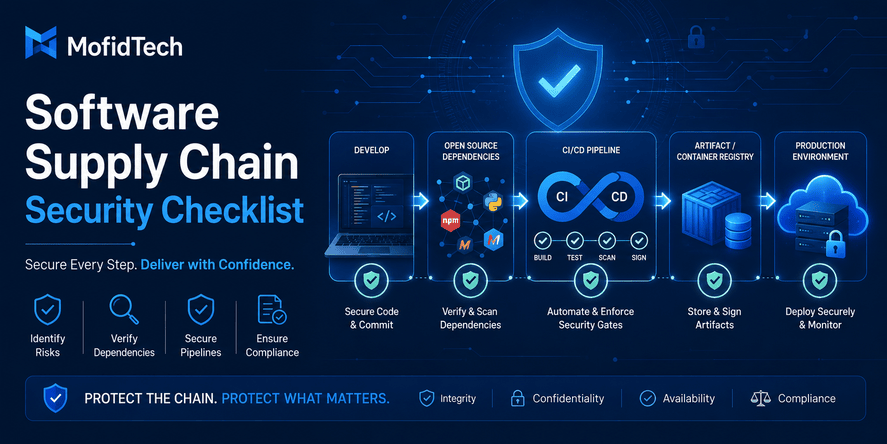
- Main parts of the software supply chain
- Complete software supply chain security checklist
- Dependency security checklist
- Package trust and open-source risk
- SBOMs explained for developers
- CI/CD pipeline security checklist
- Container and artifact security
- Secrets and credentials protection
- AI-generated code and supply chain risk
- Security considerations for small teams
- Common mistakes to avoid
- Best practices for production readiness
- Comparison table
- Practical pre-deployment checklist
- Troubleshooting supply chain security problems
- FAQ
- Conclusion
What Is Software Supply Chain Security?
Software supply chain security means protecting every component, tool, process, and service involved in delivering software from development to production.
A software product is not only the code inside your project repository. It is also the external packages you install, the frameworks you trust, the build tools you use, the container images you deploy, the CI/CD system that prepares releases, the registries where artifacts are stored, and the credentials that allow deployment.
A simple definition is:
Software supply chain security is the process of ensuring that the code, dependencies, tools, build systems, and deployment artifacts used in an application are trustworthy, verified, and protected from tampering.
This matters because attackers often look for weak points outside the main application logic. Instead of attacking your login page directly, they may try to compromise a package, steal a deployment token, poison a dependency, abuse a CI/CD workflow, or trick developers into installing a malicious tool.
Application Security vs Software Supply Chain Security
Application security focuses on vulnerabilities inside the application itself. Examples include authentication flaws, access control issues, injection vulnerabilities, insecure file uploads, and weak session management.
Software supply chain security focuses on the ecosystem that produces and delivers the application. Examples include dependency risk, package compromise, insecure build pipelines, unsigned artifacts, secret leaks, and untrusted container images.
Both are necessary. A project can have secure application logic but still be compromised through a malicious dependency. A project can use strong dependency scanning but still be vulnerable because of poor authentication design. Mature teams treat both areas as part of the same production security strategy.
Why Software Supply Chain Risk Is Growing
Software supply chain risk is growing because software development has become more connected, automated, and dependent on external components.
Developers now use package managers, container registries, cloud platforms, automated testing, continuous deployment, infrastructure tools, monitoring agents, AI coding assistants, and third-party APIs. Each part improves productivity, but each part also creates a possible attack path.
Modern Applications Depend on Many External Components
A typical web application may depend on:
| Component | Why It Matters |
|---|---|
| Open-source packages | They provide reusable functionality but may contain vulnerabilities or malicious updates. |
| Frameworks | They control important parts of application behavior and security. |
| Container images | They include operating system packages and runtime dependencies. |
| CI/CD systems | They build, test, package, and deploy the application. |
| Cloud services | They host the application and store sensitive data. |
| Secrets and tokens | They allow access to databases, APIs, registries, and production environments. |
| AI coding tools | They may suggest dependencies or patterns that need human review. |
The more components a system uses, the more important it becomes to know where they come from, who maintains them, how they are updated, and whether they are safe to use.
Attackers Target Trust
Software supply chain attacks often succeed because developers trust their tools. If a package appears popular, if an update looks normal, or if a build job runs automatically, the malicious behavior may not be noticed immediately.
Attackers may attempt to:
- Publish packages with names similar to trusted packages.
- Compromise maintainer accounts.
- Insert malicious code into a dependency update.
- Steal tokens from developer machines or CI/CD environments.
- Modify build artifacts before deployment.
- Abuse automated workflows with excessive permissions.
- Use fake developer tools to collect secrets.
The common pattern is simple: attackers exploit trust in the software delivery process.
Why Developers Should Care Before Production Deployment
Developers should care about software supply chain security because production deployment turns local decisions into real business risk.
A dependency added during development may later run in production. A secret stored incorrectly may later expose a database. A container image chosen quickly may later contain unpatched system packages. A CI/CD pipeline configured with broad permissions may later become a deployment backdoor.
Before production deployment, developers should ask:
- Do we know all important dependencies used by this application?
- Are the packages maintained and trusted?
- Are there known vulnerabilities?
- Are secrets protected?
- Is the CI/CD pipeline limited to the permissions it needs?
- Are production artifacts verified?
- Are container images safe and updated?
- Can we trace what was deployed and when?
- Do we have a rollback plan if a dependency becomes risky?
These questions are not only for large companies. Small projects and personal products can also be affected, especially when they use common open-source ecosystems, cloud services, and automated deployment.
Main Parts of the Software Supply Chain
To secure the software supply chain, developers must first understand its main parts.
Source Code
This includes the application code written by the development team. It should be reviewed, version-controlled, protected by access controls, and monitored for accidental secret exposure.
Dependencies
Dependencies are external libraries and packages used by the application. They may be direct dependencies chosen by the team or indirect dependencies required by other packages.
Development Tools
Development tools include editors, extensions, package managers, testing tools, build tools, AI coding assistants, and local scripts. A compromised tool can affect the entire project.
Build System
The build system converts source code and dependencies into deployable software. It may run tests, prepare static files, package assets, create containers, or generate release artifacts.
CI/CD Pipeline
The CI/CD pipeline automates testing, building, scanning, and deployment. Because it often has access to secrets and production environments, it must be treated as a sensitive security boundary.
Artifact Registry
An artifact registry stores build outputs, container images, packages, or release files. If attackers can replace an artifact, they may compromise production even without changing the source repository.
Deployment Environment
This includes servers, cloud services, containers, orchestration platforms, environment variables, secrets managers, networks, and production access controls.
Monitoring and Incident Response
Even strong preventive controls are not enough. Teams need monitoring, logs, alerts, and response plans to detect suspicious dependency updates, failed deployments, unauthorized changes, or unusual runtime behavior.
Complete Software Supply Chain Security Checklist
A strong software supply chain security checklist should cover the full path from dependency selection to production deployment.
1. Review All Dependencies Before Production
Before deployment, review both direct and indirect dependencies. Direct dependencies are the packages your project explicitly uses. Indirect dependencies are packages required by those direct dependencies.
Indirect dependencies are often overlooked, but they may introduce vulnerabilities, outdated components, or unexpected behavior.
A good dependency review should answer:
- Is the dependency necessary?
- Is it actively maintained?
- Does it have a history of security issues?
- Does it request unnecessary permissions?
- Does it have a large number of risky indirect dependencies?
- Is there a safer alternative?
- Is it used only for development or also in production?
The best dependency is sometimes the one you do not add. Every new package increases maintenance responsibility.
2. Check Package Reputation and Maintainer Trust
Package popularity is useful, but it is not enough. A package can be popular and still become compromised. A package can have many downloads because it is included indirectly by other packages.
Review:
- Maintainer activity
- Release frequency
- Issue history
- Security policy
- Documentation quality
- Community trust
- Sudden ownership changes
- Unusual release behavior
- Similar package names that may indicate confusion or typosquatting
A package maintained by unknown or inactive maintainers should not automatically be rejected, but it should receive closer review before being used in a production system.
3. Avoid Unnecessary Dependencies
Developers often add packages for small tasks that could be handled with existing framework features or standard platform capabilities. This creates unnecessary risk.
Before adding a dependency, ask:
- Is this package solving a real problem?
- Can the framework already do this safely?
- Will this package be maintained for the lifetime of the project?
- Does this package increase the attack surface?
- Is the benefit greater than the long-term maintenance cost?
Reducing dependency count is one of the simplest ways to reduce supply chain risk.
4. Use Dependency Locking Carefully
Dependency locking helps make builds more predictable. It records exact dependency versions so that the application does not unexpectedly install different package versions in different environments.
However, locking dependencies is not enough by itself. A locked dependency may still contain a vulnerability. Teams need both predictable versions and regular security review.
A healthy dependency strategy includes:
- Predictable versions
- Controlled updates
- Vulnerability scanning
- Testing after updates
- Clear rollback process
- Documentation for major dependency decisions
5. Scan for Known Vulnerabilities
Vulnerability scanning helps identify dependencies with publicly known security issues. It should be part of the development and deployment workflow.
Scanning should happen:
- During development
- During pull request review
- Before release
- During CI/CD builds
- On container images
- On production dependencies
- After new vulnerability disclosures
The purpose of scanning is not only to find problems. It is to create a repeatable habit of reviewing risk before production.
6. Generate and Maintain an SBOM
An SBOM, or Software Bill of Materials, is a structured inventory of software components used in an application.
For developers, an SBOM answers a simple question:
What exactly is inside this application?
An SBOM may include:
- Package names
- Versions
- Licenses
- Suppliers
- Dependency relationships
- Component identifiers
- Build metadata
SBOMs are useful because they help teams respond quickly when a vulnerability is discovered. Instead of manually searching every project, teams can check whether the affected component exists in their software inventory.
7. Secure the CI/CD Pipeline
The CI/CD pipeline is one of the most sensitive parts of the software supply chain. It may access source code, secrets, package registries, deployment credentials, production servers, and cloud infrastructure.
Security controls should include:
- Least privilege permissions
- Protected branches
- Required reviews for production changes
- Restricted access to deployment jobs
- Secret masking
- Separation between development and production credentials
- Approval gates for sensitive deployments
- Audit logs
- Protection against untrusted workflow changes
A CI/CD pipeline should not have more power than it needs. If a build job only needs to run tests, it should not have production deployment credentials.
8. Protect Secrets and Credentials
Secret leaks are one of the most common software supply chain risks. Secrets may include API keys, database passwords, cloud tokens, package registry tokens, SSH keys, webhook secrets, and deployment credentials.
Developers should avoid:
- Storing secrets in source code
- Sharing secrets in chat messages
- Keeping secrets in local files without protection
- Giving long-lived tokens to automated systems
- Using the same secret across environments
- Exposing secrets through logs
- Allowing too many users to access production credentials
A strong secret management strategy includes rotation, least privilege, auditability, and environment separation.
9. Verify Container Images
Container images are part of the software supply chain because they include runtime components, operating system packages, and application files.
Before deploying a container image, review:
- Base image trust
- Image age
- Known vulnerabilities
- Unnecessary packages
- Image size
- Runtime user permissions
- Update process
- Registry trust
- Artifact integrity
A container image should be treated as a production artifact, not just a packaging detail.
10. Sign and Verify Artifacts
Artifact signing helps prove that a build output came from a trusted process and was not modified after creation.
In practical terms, artifact verification helps answer:
- Who created this release?
- Was it built by the expected pipeline?
- Has it changed since it was created?
- Is this the same artifact that passed testing?
- Can we trust what is being deployed?
Artifact signing is especially important for teams that publish packages, container images, internal tools, or software used by other systems.
Dependency Security Checklist
Dependencies are one of the largest sources of software supply chain risk. The following checklist helps developers evaluate dependencies before production deployment.
Before Adding a New Dependency
Ask these questions:
| Question | Why It Matters |
|---|---|
| Do we really need this dependency? | Avoids unnecessary risk and maintenance. |
| Is the package actively maintained? | Reduces risk from abandoned software. |
| Does it have a clear security policy? | Shows whether maintainers handle vulnerabilities responsibly. |
| Are recent releases normal and expected? | Helps detect suspicious behavior. |
| Does it have too many indirect dependencies? | Reduces hidden attack surface. |
| Is the license compatible with the project? | Avoids legal and compliance issues. |
| Does the package require sensitive permissions? | Prevents unnecessary exposure. |
| Is there a trusted alternative? | Encourages safer design decisions. |
Before Updating Dependencies
Dependency updates are necessary, but they should not be automatic without review.
Before updating, check:
- What changed in the new version
- Whether the update fixes security issues
- Whether it introduces breaking changes
- Whether maintainers changed
- Whether new dependencies were added
- Whether the package behavior changed significantly
- Whether the update affects authentication, file handling, networking, or data processing
Security updates should be prioritized, but they still need testing.
Before Production Deployment
Before deploying, confirm:
- All critical vulnerabilities are reviewed
- High-risk dependency changes are approved
- No unnecessary development-only dependencies are included in production
- Package versions are predictable
- Dependency scan results are documented
- The team knows how to respond if a package becomes compromised
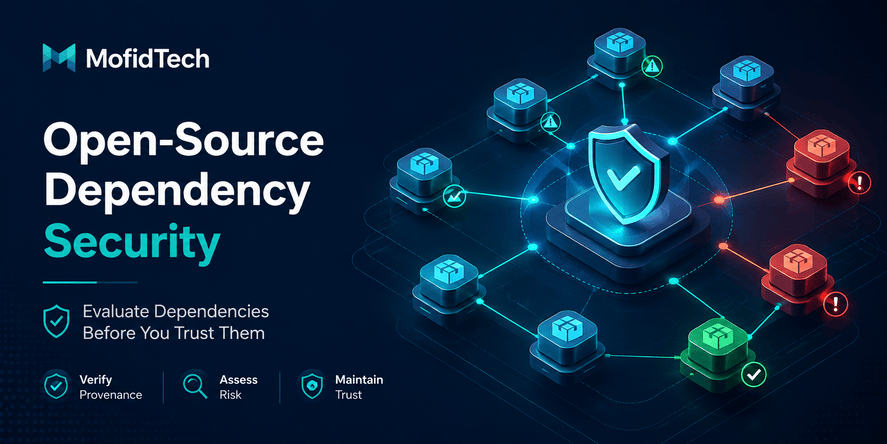
Package Trust and Open-Source Risk
Open-source software is essential to modern development. The goal is not to avoid open source. The goal is to use it responsibly.
Popularity Does Not Equal Safety
A package with many downloads may still have risks. It may be popular because it is used indirectly. It may be maintained by only one person. It may have old unresolved issues. It may have a large dependency tree.
Popularity is one signal, not a guarantee.
Maintainer Changes Require Attention
A sudden maintainer change can be normal, but it can also introduce risk. If a package changes ownership, receives unusual updates, or starts adding unexpected dependencies, developers should review the change carefully.
Small Packages Can Create Large Risk
A small package may appear harmless, but it can run during build time, access files, execute scripts, or affect production behavior. Small dependencies should still be reviewed, especially if they run during installation or build processes.
Typosquatting and Confusing Names
Attackers may publish packages with names similar to popular packages. A developer may accidentally install the wrong package because of a spelling difference, abbreviation, or naming confusion.
Teams should be careful when adding new packages manually, especially under time pressure.
SBOMs Explained for Developers
An SBOM is a Software Bill of Materials. It is similar to an ingredient list for software.
What Is an SBOM?
An SBOM lists the components used in a software product. It helps teams understand what is inside their application, which versions are used, and how components relate to each other.
Why Developers Need SBOMs
SBOMs help developers answer important questions:
- Are we using a vulnerable component?
- Which applications use a specific dependency?
- Which version is deployed in production?
- What components need urgent updates?
- Are we using software with license restrictions?
- Can we prove what was included in a release?
Without an SBOM, teams often discover dependency information too late, especially during urgent security incidents.
SBOM vs Dependency Lock File
| Item | Purpose | Limitation |
|---|---|---|
| Dependency lock file | Makes dependency versions predictable | Usually focused on one ecosystem and may not cover full runtime artifacts |
| SBOM | Provides a broader inventory of software components | Needs to be generated, stored, and updated properly |
| Vulnerability scan report | Identifies known security issues | Does not always provide a complete component inventory |
A dependency lock file is useful, but it is not the same as an SBOM. A strong workflow may use both.
CI/CD Pipeline Security Checklist
CI/CD security is critical because automated pipelines often have access to powerful credentials.
Protect Production Deployment Workflows
Production deployment should be protected by strict rules. Not every workflow should be able to deploy to production.
Recommended controls include:
- Require review before production deployment
- Limit who can approve deployment
- Use separate credentials for each environment
- Prevent unreviewed workflow changes from accessing secrets
- Keep deployment logs
- Alert on unusual deployment behavior
Use Least Privilege
Each pipeline job should only have the permissions it needs.
For example:
| Pipeline Task | Required Access |
|---|---|
| Running tests | Usually no production access |
| Building artifacts | Access to source and build dependencies |
| Publishing artifacts | Access to registry with limited scope |
| Deploying to staging | Staging credentials only |
| Deploying to production | Production credentials with approval |
Over-permissioned pipelines are dangerous because one compromised workflow can affect the entire system.
Separate Build and Deployment Responsibilities
A good pipeline separates responsibilities:
- Testing validates quality.
- Building creates artifacts.
- Scanning checks risk.
- Approval confirms release readiness.
- Deployment pushes to environment.
- Monitoring verifies post-release health.
This separation helps prevent one weak step from compromising the entire delivery process.
Container and Artifact Security
Containers and release artifacts are what often reach production. They must be protected.
Use Trusted Base Images
A container base image should come from a trusted source and be maintained regularly. Old base images may include vulnerable operating system packages.
When choosing a base image, consider:
- Source trust
- Update frequency
- Security support
- Image size
- Included packages
- Compatibility with the application
Avoid Bloated Images
Large images often include unnecessary tools and packages. More components mean more possible vulnerabilities.
A smaller, focused image is usually easier to secure, scan, transfer, and maintain.
Scan Container Images
Container images should be scanned before deployment. The scan should review operating system packages, application dependencies, and known vulnerabilities.
Scanning should not be a one-time activity. A container image that was safe last month may become risky when new vulnerabilities are disclosed.
Protect Artifact Registries
Artifact registries should be protected with:
- Strong authentication
- Limited publishing permissions
- Audit logs
- Retention policies
- Access control by environment
- Artifact signing or verification
- Separate repositories for development and production artifacts
A registry compromise can become a production compromise.
Secrets and Credentials Protection
Secrets are a major supply chain risk because they connect development tools to sensitive systems.
Common Places Where Secrets Leak
Secrets may leak through:
- Source code repositories
- Build logs
- Error messages
- Local development files
- Chat messages
- Issue trackers
- Screenshots
- CI/CD environment variables
- Browser history
- Misconfigured storage buckets
- Container image layers
Developers should assume that any secret copied into an unsafe location may eventually be exposed.
Use Environment Separation
Development, staging, and production should not share the same secrets.
If a development secret leaks, it should not provide access to production systems. Environment separation limits damage.
Rotate Secrets Regularly
Secret rotation reduces the impact of accidental exposure. Teams should rotate:
- API keys
- Database passwords
- Cloud tokens
- Deployment credentials
- Registry tokens
- Webhook secrets
Rotation should be planned, documented, and tested. A team that cannot rotate secrets safely is not fully prepared for incidents.
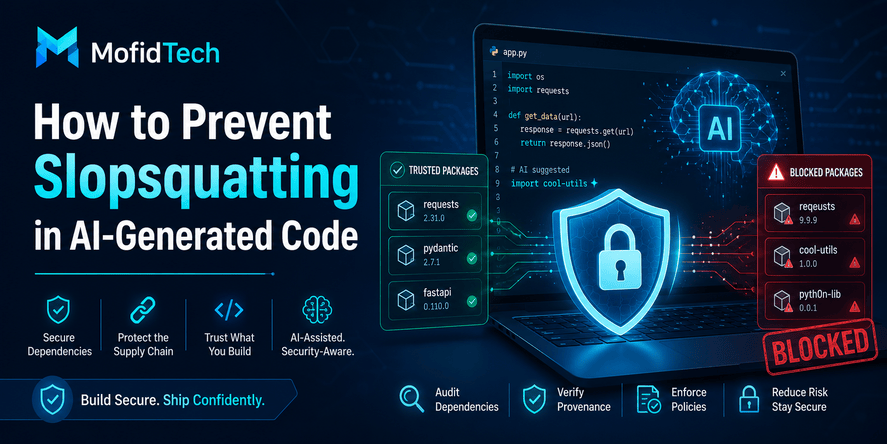
AI-Generated Code and Software Supply Chain Risk
AI coding assistants can improve productivity, but they can also introduce supply chain risks when developers accept suggestions without review.
How AI Tools Can Affect Supply Chain Security
AI tools may suggest:
- Unknown packages
- Outdated libraries
- Insecure design patterns
- Overly broad permissions
- Unnecessary dependencies
- Deprecated tools
- Risky authentication flows
- Weak validation logic
The main risk is not that AI tools are always wrong. The risk is that developers may trust AI suggestions too quickly.
Review AI-Suggested Dependencies
When an AI tool suggests a package, developers should review it as carefully as any dependency found manually.
Ask:
- Does this package actually exist?
- Is the name correct?
- Is it maintained?
- Is it trusted by the community?
- Is it necessary?
- Are there safer alternatives?
- Does the official documentation recommend it?
- Does it introduce indirect dependencies?
AI suggestions should be treated as drafts, not final decisions.
Avoid Copying AI Output Directly Into Production
Even when AI-generated code appears correct, teams should review:
- Security assumptions
- Dependency choices
- Error handling
- Authentication logic
- Data validation
- Permission boundaries
- Logging behavior
- Performance impact
- Maintainability
AI can accelerate work, but it does not replace engineering judgment.
Security Considerations for Small Teams
Small teams often believe software supply chain security is only for large companies. That is a mistake.
Small teams may have fewer resources, but they also have advantages. They can create simple rules, avoid unnecessary complexity, and review changes quickly.
Lightweight Supply Chain Security for Small Teams
A small team can start with:
- Reviewing new dependencies before adding them
- Using dependency scanning
- Keeping secrets out of source control
- Protecting production deployment credentials
- Using separate development and production environments
- Scanning container images
- Documenting critical dependencies
- Reviewing AI-generated dependency suggestions
- Creating a simple pre-deployment checklist
This does not require a large security department. It requires discipline and repeatability.
Do Not Wait Until the Project Is Big
Security becomes harder when a project grows. It is easier to build good habits early than to fix years of dependency chaos later.
Common Software Supply Chain Security Mistakes
Mistake 1: Trusting All Open-Source Packages Automatically
Open source is powerful, but not every package is equally safe. Developers should review package health, maintenance, and necessity.
Mistake 2: Ignoring Transitive Dependencies
A project may have only a few direct dependencies but hundreds of indirect dependencies. Attackers may target indirect components because they are less visible.
Mistake 3: Treating CI/CD as a Simple Automation Tool
CI/CD is not just automation. It is a privileged system that may access production. It must be secured like any other critical infrastructure.
Mistake 4: Storing Secrets in Unsafe Places
Secrets should not be stored in source code, documentation, chat, screenshots, or unprotected local files.
Mistake 5: Deploying Unverified Artifacts
Teams should know what they are deploying and where it came from. Deploying unverified artifacts creates unnecessary risk.
Mistake 6: Depending on Scanning Alone
Scanning is useful, but it is not enough. Teams also need reviews, access controls, signing, secret management, and monitoring.
Mistake 7: Ignoring Build-Time Dependencies
Some dependencies are used only during installation or build time, but they can still be dangerous. Build-time tools may access source code, environment variables, and generated artifacts.
Mistake 8: Accepting AI-Suggested Packages Without Review
AI tools may suggest packages that are outdated, unnecessary, insecure, or simply unsuitable. Human review remains essential.
Best Practices for Production Readiness
Create a Dependency Approval Process
A dependency approval process does not need to be complex. It can simply require developers to explain why a new dependency is needed and confirm that it is maintained and safe.
Use a Pre-Deployment Security Checklist
A checklist reduces mistakes under pressure. Before production deployment, teams should review dependencies, secrets, CI/CD permissions, artifact integrity, container images, and rollback readiness.
Keep Production Credentials Limited
Production credentials should be used only where needed. Developers and pipelines should not receive broad production access by default.
Document Critical Components
Every project should document:
- Critical dependencies
- External services
- Deployment process
- Secret locations
- Artifact registry
- CI/CD workflows
- Security scanning process
- Rollback process
Documentation helps during incidents, onboarding, and maintenance.
Monitor After Deployment
Security does not end at deployment. Teams should monitor:
- Unusual application behavior
- Unexpected network activity
- Failed authentication attempts
- Dependency vulnerability alerts
- Registry changes
- CI/CD workflow changes
- Production deployment history
Comparison Table: Key Supply Chain Security Controls
| Control | What It Does | Best For | Limitation |
|---|---|---|---|
| Dependency review | Evaluates package necessity and trust | Preventing risky package adoption | Requires developer judgment |
| Vulnerability scanning | Detects known security issues | Finding known vulnerable components | May miss unknown or malicious behavior |
| SBOM | Lists software components | Incident response and transparency | Must be kept updated |
| Artifact signing | Verifies build integrity | Preventing tampered releases | Requires process discipline |
| CI/CD access control | Limits pipeline permissions | Reducing deployment abuse | Needs careful configuration |
| Secret management | Protects sensitive credentials | Preventing credential leaks | Requires rotation and monitoring |
| Container scanning | Finds vulnerable runtime components | Safer deployments | Needs continuous scanning |
| AI output review | Checks AI-suggested code and packages | Safer AI-assisted development | Requires human expertise |
Practical Pre-Deployment Checklist
Use this checklist before deploying software to production.
Dependency Checklist
- All direct dependencies are necessary.
- Critical indirect dependencies are reviewed.
- Dependency versions are predictable.
- Known vulnerabilities are reviewed.
- High-risk updates are tested.
- Unused dependencies are removed.
- Development-only dependencies are not included unnecessarily in production.
- AI-suggested packages are manually verified.
SBOM Checklist
- A software component inventory exists.
- Dependency versions are documented.
- Critical components are easy to identify.
- The team can check whether a vulnerable component is present.
- The SBOM is updated with releases.
CI/CD Checklist
- Production deployment requires approval.
- Pipeline permissions follow least privilege.
- Secrets are not exposed in logs.
- Untrusted workflow changes cannot access sensitive credentials.
- Build and deployment jobs are separated.
- Deployment history is auditable.
- Rollback process is known.
Container Checklist
- Base image is trusted.
- Image is updated.
- Unnecessary packages are minimized.
- Container image is scanned.
- Runtime permissions are limited.
- Registry access is protected.
- Production images are separated from development images.
Secrets Checklist
- No secrets are stored in source code.
- Secrets are separated by environment.
- Production secrets are limited.
- Secrets can be rotated.
- Old secrets are removed.
- Logs do not expose credentials.
- Access to secrets is auditable.
Production Release Checklist
- Artifact is generated by the expected build process.
- Artifact integrity is verified.
- Security scan results are reviewed.
- Deployment changes are approved.
- Monitoring is ready.
- Rollback plan exists.
- Incident contact path is known.
Troubleshooting Software Supply Chain Security Problems
Problem: Too Many Vulnerability Alerts
Many teams receive too many alerts and do not know which ones matter.
Practical Approach
Prioritize based on:
- Severity
- Whether the vulnerable component is used in production
- Whether the vulnerable function is actually reachable
- Whether exploitation is realistic
- Whether a fix is available
- Whether compensating controls exist
Not every alert is equally urgent, but every critical production-relevant issue deserves review.
Problem: Developers Add Packages Too Quickly
Fast development often leads to dependency sprawl.
Practical Approach
Create a lightweight dependency review rule. For example, every new production dependency should have a clear reason, a maintenance check, and a risk review.
Problem: CI/CD Has Too Many Permissions
Pipelines often grow over time and accumulate broad access.
Practical Approach
Review each job and ask what it truly needs. Remove production permissions from jobs that only test or build. Use separate credentials for staging and production.
Problem: Secrets Are Spread Across Too Many Places
Secrets often appear in environment files, local machines, old deployment systems, and CI/CD settings.
Practical Approach
Create a secret inventory. Identify where secrets are stored, who can access them, when they were last rotated, and which systems depend on them.
Problem: The Team Does Not Know What Is Deployed
This happens when releases are informal or artifacts are not tracked.
Practical Approach
Connect each production release to a source version, build artifact, dependency state, and deployment record. The team should be able to answer what changed in each release.
FAQ
1. What is software supply chain security?
Software supply chain security is the process of protecting everything involved in building and deploying software, including source code, dependencies, packages, build tools, CI/CD pipelines, container images, secrets, artifact registries, and production deployment systems.
2. Why is software supply chain security important for developers?
It is important because modern applications depend on many external components. A single compromised package, leaked secret, insecure pipeline, or tampered artifact can affect production even if the application code itself appears secure.
3. What is an SBOM?
An SBOM, or Software Bill of Materials, is a structured list of software components used in an application. It helps teams understand which packages and versions are included in their software and respond quickly when vulnerabilities are discovered.
4. Is dependency scanning enough to secure an application?
No. Dependency scanning is useful, but it is only one part of software supply chain security. Teams also need dependency review, secret protection, CI/CD security, artifact verification, container scanning, access control, and monitoring.
5. What are transitive dependencies?
Transitive dependencies are packages required by your direct dependencies. Even if you do not install them manually, they may still become part of your application and introduce security risk.
6. How can developers reduce dependency risk?
Developers can reduce dependency risk by avoiding unnecessary packages, reviewing package trust, checking maintainer activity, scanning for vulnerabilities, locking versions, testing updates, and documenting critical dependencies.
7. How does CI/CD create supply chain risk?
CI/CD systems can create risk because they often access source code, secrets, registries, and deployment environments. If a pipeline is misconfigured or compromised, attackers may be able to modify builds, steal credentials, or deploy malicious artifacts.
8. Can AI-generated code introduce supply chain security risks?
Yes. AI-generated code can suggest unknown packages, outdated libraries, insecure patterns, or unnecessary dependencies. Developers should review AI suggestions carefully before adding them to production projects.
9. Do small projects need software supply chain security?
Yes. Small projects also use dependencies, deployment tools, secrets, and hosting platforms. A lightweight checklist is often enough to reduce major risks without slowing development.
10. What should be checked before production deployment?
Before production deployment, teams should review dependencies, known vulnerabilities, secrets, CI/CD permissions, container images, artifact integrity, SBOM availability, monitoring, and rollback readiness.
Conclusion
Software supply chain security is now a core part of responsible software development. Developers cannot focus only on the code they write. They must also understand the packages they install, the tools they use, the pipelines they trust, the containers they deploy, and the credentials that connect everything together.
A strong software supply chain security process does not need to be complicated. It should be practical, repeatable, and adapted to the team’s size. Start with dependency review, vulnerability scanning, secret protection, CI/CD permission control, container image checks, and production release verification.
For modern teams, the most important mindset is simple:
Do not deploy software unless you understand what it contains, where it came from, how it was built, and who can change it.
That mindset helps developers build safer applications, reduce production risk, and create more trustworthy software systems.










💬 Comments
No comments yet. Be the first to comment!
Login to comment.