Introduction
Hybrid search has become one of the most important architecture decisions in modern AI applications. A few years ago, many applications only needed traditional keyword search. Users typed exact words, the system searched matching text, and results were ranked by relevance. Today, AI-powered applications need something more advanced.
A documentation assistant must understand a question even when the user does not use the exact words from the document. A product search system must find relevant items even when the customer describes an idea instead of a product name. A retrieval-augmented generation system must retrieve accurate context before a language model can generate a useful answer. An internal knowledge base must combine semantic meaning, permissions, freshness, metadata, and exact matching.
This is where hybrid search becomes important.
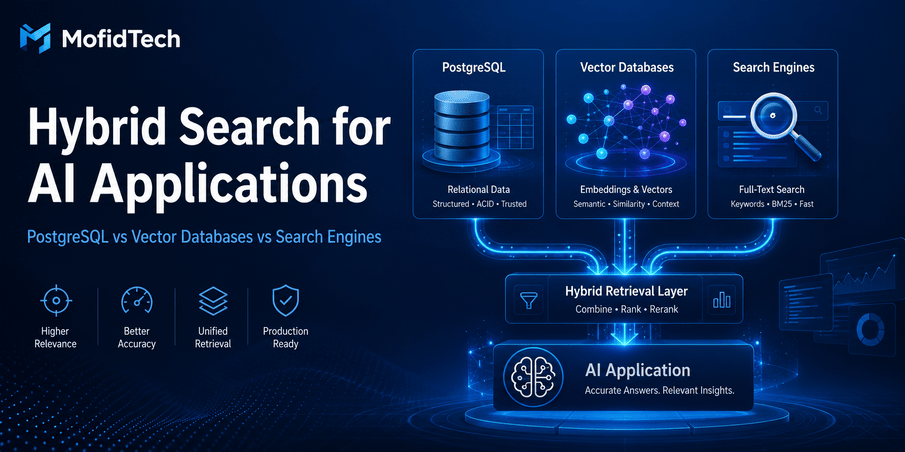
Hybrid search combines traditional keyword search with semantic search. Keyword search is strong when users search for exact terms, product codes, names, error messages, acronyms, or technical identifiers. Semantic search is strong when users search by meaning, intent, or natural language. A hybrid system uses both approaches together to produce better results than either method alone.
This article explains how to design hybrid search for AI applications using PostgreSQL, vector databases, and dedicated search engines. It does not include code, commands, configuration files, or copy-paste snippets, following the MofidTech no-code article strategy described in your content brief.
The goal is to help developers and technical teams choose the right architecture before they overbuild, overspend, or create a search system that works in a demo but fails in production.
Table of Contents
- What Is Hybrid Search?
- Why AI Applications Need Hybrid Search
- Keyword Search vs Semantic Search
- How Hybrid Search Works
- PostgreSQL for Hybrid Search
- Vector Databases for AI Applications
- Traditional Search Engines
- PostgreSQL vs Vector Database vs Search Engine
- How to Choose the Right Architecture
- Hybrid Search for RAG Systems
- Security and Privacy Considerations
- Performance and Scalability Considerations
- Common Mistakes
- Best Practices
- Troubleshooting Search Quality Problems
- Practical Use Cases
- AI Search Optimization Strategy
- FAQ
- Conclusion
What Is Hybrid Search?
Hybrid search is a search approach that combines two or more retrieval methods to improve result quality. In most AI applications, hybrid search usually means combining keyword-based search with semantic vector search.
Keyword search finds documents that contain exact or closely related words. Semantic search finds documents that are conceptually similar to the user’s query, even if the words are different. Hybrid search brings these two signals together into one ranked result list.
Elasticsearch describes hybrid search as the combination of lexical search, often based on BM25, and semantic search into one ranked list. OpenSearch also defines hybrid search as a combination of keyword and semantic search to improve relevance.
In simple terms:
Hybrid search helps an application understand both what the user typed and what the user meant.
This matters because real users do not always search in clean, predictable ways. One user may search for “reset password email not received”. Another may search for “I cannot access my account”. A third may type an error message exactly as it appeared on screen. A strong search system should handle all of these cases.
Why AI Applications Need Hybrid Search
AI applications depend heavily on retrieval quality. If the application retrieves the wrong documents, the AI answer will likely be incomplete, misleading, or irrelevant. This is especially important in retrieval-augmented generation, often called RAG.
A RAG system works by retrieving relevant information from a knowledge source and giving that information to a language model so it can generate a grounded answer. The language model may be powerful, but it still depends on the quality of the retrieved context. If retrieval fails, the answer fails.
Hybrid search is valuable because AI applications often need to handle different types of queries:
| Query Type | Best Retrieval Signal |
|---|---|
| Exact product name | Keyword search |
| Error code | Keyword search |
| Natural language question | Semantic search |
| Conceptual explanation | Semantic search |
| Technical documentation search | Hybrid search |
| Internal knowledge base search | Hybrid search |
| RAG context retrieval | Hybrid search |
| E-commerce product discovery | Hybrid search |
A pure vector search system may understand meaning but miss exact terms. A pure keyword search system may match words but miss intent. Hybrid search reduces this weakness by using both.
Keyword Search vs Semantic Search
What Is Keyword Search?
Keyword search retrieves documents based on words, phrases, and text matching. Traditional search engines use techniques such as inverted indexes and ranking algorithms to determine which documents are most relevant.
Keyword search is excellent when precision matters. It performs well for:
- Product names
- Error messages
- Legal terms
- Technical identifiers
- API names
- Function names
- Acronyms
- Serial numbers
- Exact documentation terms
- Brand names
- Database table names
- Security vulnerability names
For example, if a developer searches for a specific error message, exact matching can be more useful than semantic similarity. The search system should not replace a precise technical query with a vague conceptual match.
What Is Semantic Search?
Semantic search retrieves results based on meaning. It usually depends on embeddings, which are numerical representations of text, images, audio, or other data. Similar items are placed closer together in vector space.
For example, a semantic search system may understand that “improve page speed” is related to “optimize website performance,” even though the exact words are different.
Semantic search is useful for:
- Natural language questions
- Conceptual search
- AI assistants
- Knowledge base search
- Similar document discovery
- Recommendation systems
- Product discovery
- Support center search
- Research assistants
Why One Method Is Not Enough
Keyword search can miss relevant content if the user uses different words from the document. Semantic search can miss exact matches or return conceptually related but practically wrong results.
A developer searching for a specific configuration error does not want a general article about deployment strategy. A customer searching for “USB-C 65W charger” does not want a broad semantic result about laptop accessories. A lawyer searching for a specific legal clause does not want a similar but different legal concept.
Hybrid search improves this by combining exactness and meaning.
How Hybrid Search Works
A hybrid search system usually follows a few major steps.
First, the user submits a query. The system may process the query for spelling, normalization, language detection, intent, or filtering. Then, the query is sent through two retrieval paths: a keyword path and a semantic path.
The keyword path searches for exact or lexical matches. The semantic path converts the query into an embedding and searches for similar vectors. After both retrieval methods return results, the system combines them into a unified ranking.
One common method for combining result sets is Reciprocal Rank Fusion, often shortened to RRF. Elasticsearch describes RRF as a method for combining multiple result sets with different relevance indicators into a single result set. OpenSearch also uses search pipelines to normalize and combine scores for hybrid search.
A simplified hybrid search flow looks like this:
| Step | What Happens |
|---|---|
| Query understanding | The system receives and prepares the user query |
| Keyword retrieval | The system finds exact or lexical matches |
| Semantic retrieval | The system finds conceptually similar content |
| Filtering | The system applies metadata, permissions, date, category, or tenant filters |
| Fusion | The system combines keyword and semantic results |
| Reranking | Optional ranking improves final relevance |
| Response | The application displays results or gives context to an AI model |
The most important point is that hybrid search is not only a database feature. It is an architecture decision. It affects storage, indexing, ranking, security, cost, monitoring, and user experience.
PostgreSQL for Hybrid Search
PostgreSQL is often the best starting point for hybrid search, especially for small and medium-sized applications. Many teams already store their application data in PostgreSQL. Keeping search close to the primary data can reduce complexity.
PostgreSQL can support traditional search features and, with extensions such as pgvector, vector similarity search. pgvector is an open-source PostgreSQL extension for vector similarity search. Its official repository describes support for exact and approximate nearest neighbor search, including index types such as HNSW and IVFFlat. PostgreSQL also announced pgvector 0.8.0 in 2024, noting improvements related to filtering and HNSW index performance.
When PostgreSQL Is Enough
PostgreSQL is often enough when:
- Your dataset is small or medium-sized
- You already use PostgreSQL as your main database
- You need strong relational filtering
- You want simple deployment
- You do not have a dedicated search engineering team
- Your search traffic is moderate
- You want to avoid operating several specialized systems
- Your AI application is still in early or mid-stage development
For many teams, PostgreSQL plus vector search can support the first serious version of an AI application. This is especially true for internal tools, admin dashboards, small RAG systems, technical documentation portals, and company knowledge bases.
Strengths of PostgreSQL for Hybrid Search
PostgreSQL offers important advantages:
| Strength | Why It Matters |
|---|---|
| Simplicity | One main database is easier to operate than multiple systems |
| Relational filtering | Metadata, permissions, users, teams, and categories are easy to model |
| Transactions | Data consistency is easier to manage |
| Backups and recovery | Mature database operations are already available |
| Lower operational complexity | Fewer moving parts reduce maintenance burden |
| Good enough performance | Many applications do not need specialized infrastructure at first |
Limits of PostgreSQL for Hybrid Search
PostgreSQL is powerful, but it is not always the best tool for every search workload.
Possible limitations include:
- Very large vector collections
- Heavy search traffic
- Complex ranking needs
- Advanced faceted search
- Multi-region search requirements
- Extremely low-latency similarity search at scale
- Complex search analytics
- Large-scale product discovery
- Search-heavy applications where retrieval is the core business feature
PostgreSQL can be a strong foundation, but teams should monitor when search requirements begin to exceed what is comfortable inside the primary database.
Vector Databases for AI Applications
Vector databases are specialized systems designed to store, index, and search vector embeddings. They are often used in AI applications, recommendation systems, semantic search platforms, and RAG systems.
A vector database becomes attractive when semantic similarity search is central to the product. This does not mean every AI application needs a vector database from day one. It means a vector database should be considered when vector search becomes large, complex, performance-sensitive, or strategically important.
Pinecone’s documentation describes hybrid search as a setup where dense and sparse vectors can be used together, depending on the workload. This reflects a broader trend: vector search systems are no longer only about semantic similarity. Many now support hybrid retrieval patterns that combine semantic and lexical signals.
When a Vector Database Makes Sense
A dedicated vector database may be useful when:
- You have millions or billions of embeddings
- Semantic search is a core product feature
- You need high-throughput similarity search
- You need specialized vector indexing
- You want managed scaling for vector workloads
- You need advanced metadata filtering with vector retrieval
- You have multiple AI applications sharing vector infrastructure
- You need fast experimentation with embeddings and retrieval strategies
Strengths of Vector Databases
| Strength | Why It Matters |
|---|---|
| Purpose-built vector indexing | Designed for similarity search workloads |
| Scalability | Better suited for large embedding collections |
| AI-native features | Often integrates with embedding and RAG workflows |
| Performance tuning | More options for vector retrieval optimization |
| Managed services | Can reduce infrastructure burden |
| Multi-modal potential | Can support text, image, audio, and other embeddings |
Limits of Vector Databases
Vector databases also introduce tradeoffs:
- More infrastructure complexity
- Additional cost
- Data synchronization challenges
- Possible duplication of data
- Permission filtering complexity
- Vendor lock-in concerns
- More moving parts in production
- Need for retrieval evaluation and monitoring
A vector database can solve real scaling problems, but it can also create unnecessary complexity if adopted too early.
Traditional Search Engines
Traditional search engines such as Elasticsearch and OpenSearch remain extremely important in AI application architecture. AI has not replaced keyword search. In many production systems, keyword search is still essential.
Elasticsearch positions itself as a distributed search and analytics engine built for speed, scale, and AI applications. OpenSearch documentation includes AI search methods such as semantic search, hybrid search, multimodal search, and neural sparse search.
Search engines are especially strong when applications need advanced text search behavior, ranking, filtering, aggregation, and analytics.
When a Search Engine Makes Sense
A search engine is often useful when:
- Search is a major user-facing feature
- You need advanced full-text search
- You need faceted filtering
- You need relevance tuning
- You need autocomplete or suggestions
- You need search analytics
- You need log or event search
- You need scalable document retrieval
- You need hybrid lexical and semantic ranking
Strengths of Search Engines
| Strength | Why It Matters |
|---|---|
| Full-text search | Strong lexical search for documents and product catalogs |
| Ranking control | More options for relevance tuning |
| Facets and filters | Useful for e-commerce, documentation, and dashboards |
| Search analytics | Helps understand user behavior |
| Distributed design | Can scale for search-heavy workloads |
| Hybrid search support | Modern search engines increasingly support vector and semantic search |
Limits of Search Engines
Search engines also have disadvantages:
- Separate infrastructure
- Data synchronization complexity
- Operational cost
- Index freshness challenges
- Security duplication
- More complex deployment
- More skills required to maintain quality
Search engines are excellent when search is important enough to deserve its own system. They may be unnecessary when search is a small feature inside a simple application.
PostgreSQL vs Vector Database vs Search Engine
Choosing between PostgreSQL, a vector database, and a search engine is not about choosing the “best” technology in general. It is about choosing the right technology for your application’s search requirements.
| Option | Best For | Main Strength | Main Risk |
|---|---|---|---|
| PostgreSQL | Small to medium apps, relational data, simple RAG | Simplicity and data consistency | May struggle with large search workloads |
| PostgreSQL with pgvector | AI apps that need basic or moderate vector search | Combines relational data and vector search | Can become hard to tune at scale |
| Vector Database | Large semantic search and AI workloads | Purpose-built vector retrieval | Extra cost and infrastructure |
| Search Engine | Full-text, faceted, and relevance-heavy search | Mature search capabilities | Data sync and operations complexity |
| Hybrid Multi-System Architecture | Large production AI systems | Best tool for each search layer | Highest complexity |
Decision Summary
Use PostgreSQL first when simplicity matters.
Use PostgreSQL with vector search when your data is relational and your semantic search workload is manageable.
Use a vector database when semantic similarity search is large, central, and performance-sensitive.
Use a search engine when full-text search, relevance tuning, filtering, facets, and search analytics are major requirements.
Use a multi-system hybrid architecture only when your scale and product requirements justify the complexity.
<hr>
How to Choose the Right Hybrid Search Architecture
For a Small AI Application or MVP
For a small application, start simple. PostgreSQL is often enough. If the application needs semantic search, adding vector search inside PostgreSQL can be a practical first step.
This approach keeps operations simple and allows the team to validate the product before introducing specialized infrastructure.
Best fit:
- Small RAG assistant
- Internal document search
- Admin knowledge base
- Startup prototype
- Developer tool
- Educational platform
Avoid overengineering at this stage. The goal is to learn what users search for, what results they expect, and where retrieval fails.
For an Internal Knowledge Base
An internal knowledge base needs more than semantic search. It also needs access control, freshness, ownership, document type filters, and auditability.
PostgreSQL may be enough for small organizations. A search engine or vector database may become useful when the number of documents, users, and queries grows.
Important questions:
- Can users only see documents they are allowed to access?
- Are deleted documents removed from search quickly?
- Can teams filter by department, project, date, or document type?
- Can administrators audit retrieval behavior?
- Can the system explain why a result was returned?
For internal knowledge systems, security and permissions are as important as relevance.
For Public Documentation Search
Documentation search benefits strongly from hybrid retrieval. Developers often search by exact terms, but they also ask conceptual questions.
A good documentation search system should support:
- Exact term matching
- Semantic question matching
- Version filtering
- Product filtering
- Error message search
- Synonym handling
- Popular result boosting
- Freshness control
For small documentation sites, PostgreSQL may work. For larger documentation portals, a dedicated search engine is often more appropriate.
For E-commerce or Product Discovery
E-commerce search is one of the strongest use cases for hybrid search. Customers may search with exact product names, vague descriptions, use cases, colors, specifications, or comparisons.
A product search system may need:
- Keyword matching
- Semantic matching
- Faceted filtering
- Price filtering
- Availability filtering
- Brand filters
- Category ranking
- Personalization
- Business rules
- Merchandising controls
A dedicated search engine is often valuable here because product discovery depends heavily on ranking, filters, and user behavior. Vector search can improve semantic matching, but it should not replace exact product search.
For Enterprise RAG Platforms
Enterprise RAG systems are among the most complex hybrid search use cases. They require retrieval accuracy, access control, compliance, monitoring, source attribution, and security.
A production enterprise RAG platform may need:
- Semantic search
- Keyword search
- Metadata filtering
- Tenant isolation
- Permission-aware retrieval
- Source citations
- Document freshness
- Audit logs
- Retrieval evaluation
- Human feedback loops
- Observability
- Cost controls
In this case, a multi-system architecture may be justified. PostgreSQL may manage structured application data. A vector database may handle embeddings. A search engine may handle full-text and faceted search. The application layer may combine, rank, filter, and audit results.
Hybrid Search for RAG Systems
Hybrid search is especially useful in retrieval-augmented generation because the quality of the final AI answer depends on the quality of retrieved context.
A RAG system can fail in several ways:
- It retrieves irrelevant documents
- It misses exact terms
- It retrieves outdated information
- It ignores access permissions
- It retrieves too much content
- It retrieves too little content
- It ranks weak documents above strong ones
- It gives the language model incomplete context
Hybrid search reduces some of these risks by combining exact retrieval and semantic retrieval.
Why Pure Vector Search Can Fail in RAG
Pure vector search can return documents that are semantically similar but not actually correct for the user’s question. This is especially risky when the query contains exact technical terms, version numbers, product names, security issues, or legal language.
For example, a query about a specific software version should not retrieve a similar guide for a different version just because the meaning is close. In technical systems, exact details matter.
Why Pure Keyword Search Can Fail in RAG
Pure keyword search can fail when the user asks a natural question that does not match the wording of the source document.
For example, a user may ask, “How do I stop users from accessing old files?” while the documentation uses the phrase “permission revocation and document lifecycle management.” Semantic retrieval can bridge this vocabulary gap.
Why Hybrid Retrieval Is Better
Hybrid retrieval can retrieve documents that match exact terms and documents that match meaning. It gives the system a broader and more balanced candidate set.
For RAG applications, the best retrieval system is usually not the one that returns the most documents. It is the one that returns the most useful, accurate, permission-safe, and contextually relevant documents.
Security and Privacy Considerations
Hybrid search can introduce serious security risks if it is not designed carefully. Search is not only a relevance problem. It is also an access control problem.
Permission-Aware Retrieval
A search system must never retrieve content the user is not allowed to access. This is especially important for internal knowledge bases, enterprise RAG systems, legal documents, HR documents, customer records, and private project documentation.
Permission checks should happen before results are shown or passed to an AI model. If unauthorized content reaches the language model, it may appear in the answer even if the final interface tries to hide it.
Tenant Isolation
Multi-tenant applications must ensure that one customer cannot retrieve another customer’s data. This applies to both keyword search and vector search.
Tenant isolation should be treated as a core architecture requirement, not an afterthought.
Sensitive Data Leakage
AI search systems may retrieve documents containing confidential information, personal data, credentials, internal decisions, financial records, or private customer details.
Teams should classify data before indexing it. Not every document should be searchable. Not every field should be embedded. Not every user should have the same retrieval access.
Embedding Privacy
Embeddings are not the same as raw text, but they can still represent sensitive information. Teams should avoid assuming that embeddings are automatically safe. Embedding storage, access, deletion, and retention should be governed like other sensitive data assets.
Audit Logs
Production hybrid search systems should record important events:
- Who searched
- What was searched
- Which documents were retrieved
- Which documents were used in AI answers
- Which permissions were applied
- Which results were clicked or rejected
- Which sources appeared in generated answers
Auditability becomes especially important when AI answers influence business decisions.
<hr>
Performance and Scalability Considerations
Hybrid search performance depends on data size, index design, query volume, ranking logic, filters, and infrastructure.
Latency
AI applications often combine several steps: user query processing, search retrieval, reranking, prompt construction, language model generation, and response formatting. If search is slow, the entire AI experience feels slow.
Search latency should be measured separately from language model latency. Otherwise, teams may blame the AI model when the real bottleneck is retrieval.
Index Freshness
Index freshness measures how quickly new or updated content becomes searchable. This is important for documentation, support knowledge bases, product catalogs, and enterprise documents.
If users update a document but the AI system retrieves the old version, trust declines quickly.
Filtering Performance
Metadata filtering is essential in real applications. Search results often need filters for tenant, user permissions, language, product version, category, date, status, region, or department.
A system that performs well without filters may become slow when filters are applied. This is one of the most common gaps between prototype and production search.
Cost
Search architecture affects cost in several ways:
- Storage cost
- Indexing cost
- Query cost
- Embedding generation cost
- Infrastructure cost
- Managed service cost
- Engineering maintenance cost
- Monitoring and operations cost
A dedicated vector database or search engine may improve performance, but it also adds cost. The right decision depends on whether search quality and scale justify that cost.
Scalability
A search system can scale in several dimensions:
- Number of documents
- Number of embeddings
- Number of users
- Number of queries
- Number of tenants
- Number of filters
- Number of supported languages
- Number of indexed content types
- Number of AI applications using the search layer
Teams should design for realistic growth, not imaginary scale. Overbuilding too early can slow development and increase costs.
Common Mistakes in Hybrid Search Projects
Mistake 1: Using Vector Search for Everything
Vector search is powerful, but it is not a replacement for all search. Exact terms, identifiers, error codes, and structured filters still matter.
A system that only uses semantic similarity may feel impressive in demos but fail when users need precise results.
Mistake 2: Ignoring Metadata
Metadata is essential for filtering, ranking, permissions, and user experience. Documents should include useful metadata such as category, author, date, version, language, tenant, department, product, and access level.
Without metadata, hybrid search becomes harder to control.
Mistake 3: Forgetting Access Control
A search system that retrieves unauthorized content is dangerous. Access control should be part of the retrieval design from the beginning.
This is especially important when retrieved content is passed to a language model.
Mistake 4: Overbuilding Too Early
Some teams adopt a vector database, search engine, message queue, reranking system, and complex indexing pipeline before they have enough users or data to justify it.
A simpler PostgreSQL-based design may be better at the beginning.
Mistake 5: Not Measuring Retrieval Quality
Many teams only check whether the system “seems to work.” That is not enough.
Search quality should be evaluated with real queries, expected results, failed cases, user feedback, and relevance judgments.
Mistake 6: Treating Search as a One-Time Feature
Search quality changes as content grows, users change, and new use cases appear. Hybrid search should be monitored and improved continuously.
Mistake 7: Ignoring Exact Technical Queries
Technical users often search for exact phrases. Developers search for error messages, database fields, dependency names, configuration terms, and product versions. A search system that ignores exact matching will frustrate technical audiences.
Mistake 8: Sending Too Much Context to the AI Model
Retrieving too many documents can reduce answer quality. The AI model may receive noisy, conflicting, or irrelevant context.
Good retrieval is selective. More context is not always better.
Best Practices for Production Hybrid Search
Start with the Simplest Architecture That Can Work
Do not begin with the most complex architecture. Start with the simplest system that meets your current needs and can evolve later.
For many teams, this means starting with PostgreSQL and adding specialized systems only when there is clear evidence.
Separate Search Quality from AI Answer Quality
When an AI answer is wrong, ask two separate questions:
- Did the search system retrieve the right context?
- Did the language model use the context correctly?
This distinction helps teams troubleshoot faster.
Use Metadata from the Beginning
Even if the first version is simple, store useful metadata early. Metadata makes filtering, ranking, permissions, and analytics easier later.
Design for Permission Safety
Access control should be applied before content reaches the AI model. Never rely only on final answer filtering.
Evaluate Real Queries
Use real user queries, not only artificial test queries. Real users make spelling mistakes, use vague language, mix languages, search with incomplete context, and ask unexpected questions.
Monitor Failed Searches
Track searches with no results, low-confidence results, ignored results, repeated queries, and negative feedback. These signals reveal where retrieval needs improvement.
Keep Search Explainable
Users trust search more when they understand why a result appeared. This is especially important in AI applications where results may be used to generate answers.
Plan for Index Freshness
Decide how quickly updates should appear in search. A public blog may tolerate slower indexing. A customer support system may need faster freshness. A security knowledge base may need immediate updates.
Use Hybrid Search Where It Adds Value
Not every feature needs hybrid search. Some features only need simple filters. Others need strong full-text search. Use hybrid search where user intent, meaning, and exact matching all matter.
Troubleshooting Hybrid Search Quality Problems
Problem: The Search Returns Irrelevant Results
Possible causes:
- The semantic search is too broad
- The keyword search has weak ranking
- The fusion method is poorly balanced
- Metadata filters are missing
- Documents are too large or poorly structured
- The embedding model does not fit the domain
Recommended response:
Review real failed queries. Compare keyword-only results, semantic-only results, and hybrid results. Identify which retrieval path is introducing noise.
Problem: Exact Matches Are Missing
Possible causes:
- Keyword search is underweighted
- Tokenization is poor
- Technical identifiers are not indexed correctly
- The system relies too heavily on vectors
- Exact phrase matching is not prioritized
Recommended response:
Improve lexical retrieval and ranking. Technical queries should preserve exact terms, abbreviations, identifiers, and product names.
Problem: Semantic Results Are Weak
Possible causes:
- Poor embedding model choice
- Low-quality document chunks
- Missing context in indexed content
- Wrong language handling
- Documents contain too much boilerplate
Recommended response:
Improve content preparation, chunking strategy, metadata, and embedding evaluation.
Problem: Users Get Outdated Results
Possible causes:
- Slow indexing pipeline
- Search index not updated after content changes
- Deleted documents remain searchable
- Cache invalidation problems
- Multiple systems are out of sync
Recommended response:
Define an index freshness policy and monitor update delays.
Problem: Search Is Too Slow
Possible causes:
- Large dataset without proper indexing
- Expensive filters
- Too many retrieval paths
- Slow reranking
- Search and AI generation measured together
- Infrastructure underprovisioning
Recommended response:
Measure each stage separately. Optimize retrieval before blaming the language model.
Problem: AI Answers Use the Wrong Source
Possible causes:
- Retrieval ranking is weak
- The system passes too much context
- Source attribution is missing
- Similar documents conflict
- Old documents are ranked above new documents
Recommended response:
Improve ranking, freshness, and context selection. Make source quality part of retrieval scoring.
Practical Use Cases
Use Case 1: AI Documentation Assistant
A software company wants users to ask questions about technical documentation. Some users search exact feature names. Others ask natural language questions.
Best architecture:
- PostgreSQL may store users, permissions, and document metadata
- A search layer handles keyword and semantic retrieval
- Hybrid ranking improves documentation relevance
- Source citations are shown in the answer
Key risk:
The assistant must avoid mixing documentation from different product versions.
Use Case 2: Internal Company Knowledge Base
Employees search policies, project documents, HR information, and technical notes.
Best architecture:
- Permission-aware retrieval is required
- Metadata filters are essential
- Hybrid search helps with both exact and natural language queries
- Audit logs should track retrieved sources
Key risk:
Unauthorized document retrieval can expose sensitive information.
Use Case 3: E-commerce Product Search
Customers search by brand, description, category, use case, and specifications.
Best architecture:
- Search engine for full-text search, filters, facets, and ranking
- Vector search for semantic product discovery
- Business rules for availability, popularity, and promotions
Key risk:
Semantic search may return related but unavailable or incorrect products if filters are weak.
Use Case 4: University Research Portal
Students and researchers search articles, thesis documents, projects, and technical reports.
Best architecture:
- Hybrid search for academic terminology and natural language questions
- Metadata filters for author, date, department, topic, and document type
- Semantic search for related research discovery
Key risk:
Poor metadata can make research content difficult to discover.
Use Case 5: Developer Support Center
Developers search troubleshooting guides, known issues, deployment errors, and API documentation.
Best architecture:
- Strong keyword search for exact error messages
- Semantic search for natural language troubleshooting
- Hybrid ranking for best results
- Freshness rules for version-specific content
Key risk:
If exact error messages are not prioritized, developers will lose trust in the search system.
Comparison Table: Which Architecture Should You Choose?
| Situation | Recommended Starting Point |
|---|---|
| Small app with basic search | PostgreSQL |
| Small AI app with semantic search | PostgreSQL with vector search |
| Internal RAG prototype | PostgreSQL with careful metadata |
| Large RAG system | Vector database plus permission-aware retrieval |
| Public documentation portal | Search engine with optional vector search |
| E-commerce search | Search engine plus semantic layer |
| Enterprise knowledge platform | Hybrid multi-system architecture |
| Search-heavy SaaS product | Dedicated search infrastructure |
| Cost-sensitive MVP | PostgreSQL-first approach |
| High-scale semantic search | Vector database |
Decision Framework for Developers
Before choosing a search architecture, answer these questions.
Data Questions
- How many documents do you need to search?
- How often does the data change?
- Are documents short, long, structured, or mixed?
- Do you need to search multiple languages?
- Do you need to search text, images, audio, or other media?
Query Questions
- Are users searching exact terms or asking natural questions?
- Do queries include technical identifiers?
- Do users need filters?
- Do users need autocomplete or suggestions?
- Do users expect conversational answers?
Security Questions
- Do users have different permissions?
- Is the application multi-tenant?
- Can sensitive data appear in documents?
- Do you need audit logs?
- Should some content be excluded from AI retrieval?
Performance Questions
- How fast should search results appear?
- How many searches happen per day?
- How many users search at the same time?
- How fresh must the index be?
- Can search latency affect user trust?
Business Questions
- Is search a core product feature?
- Is search quality a competitive advantage?
- What is the acceptable infrastructure cost?
- Can the team maintain specialized search systems?
- Will the architecture still make sense in one year?
FAQ
1. What is hybrid search in AI applications?
Hybrid search is a search method that combines keyword search and semantic search. Keyword search finds exact words and phrases, while semantic search finds results based on meaning. AI applications use hybrid search to retrieve more accurate context for users and language models.
2. Why is hybrid search important for RAG?
Hybrid search is important for RAG because the quality of the AI answer depends on the quality of retrieved information. If retrieval misses important documents or returns irrelevant sources, the generated answer may be wrong or incomplete.
3. Is PostgreSQL enough for vector search?
PostgreSQL can be enough for many small and medium-sized applications, especially when teams already use it as their main database. With vector search extensions, PostgreSQL can support semantic search while keeping data and metadata in one place. For very large or search-heavy workloads, a dedicated system may be better.
4. Do I need a vector database for every AI application?
No. Not every AI application needs a vector database. Many projects can start with PostgreSQL or a search engine. A vector database becomes more useful when semantic search is large, central to the product, or performance-sensitive.
5. Is semantic search better than keyword search?
Semantic search is not always better than keyword search. Semantic search is better for meaning-based queries, but keyword search is better for exact terms, names, error messages, identifiers, and technical phrases. Hybrid search uses both.
6. When should I use a traditional search engine?
Use a traditional search engine when your application needs advanced full-text search, faceted filtering, relevance tuning, autocomplete, analytics, or high-scale document search. Search engines are especially useful for documentation portals, e-commerce, logs, and content-heavy platforms.
7. What is the best architecture for hybrid search?
The best architecture depends on the application. PostgreSQL is often best for simple systems. PostgreSQL with vector search is useful for early AI applications. Vector databases are useful for large semantic workloads. Search engines are useful for advanced full-text and relevance-heavy search. Large systems may combine all three.
8. What is the biggest mistake in hybrid search projects?
The biggest mistake is treating vector search as a complete replacement for keyword search. Many real queries depend on exact terms. A strong hybrid search system respects both meaning and precision.
9. How does hybrid search improve AI answers?
Hybrid search improves AI answers by retrieving better source material. It can find documents that match exact terms and documents that match the user’s intent. This gives the AI model more accurate context for generating answers.
10. What should developers measure in hybrid search?
Developers should measure relevance, latency, failed searches, click behavior, user feedback, index freshness, permission safety, and the quality of retrieved documents. Search quality should be measured separately from AI generation quality.
Conclusion
Hybrid search is now a core architecture topic for AI applications. It is not only a feature for advanced search teams. Developers building RAG systems, documentation assistants, product discovery tools, internal knowledge bases, and AI-powered platforms must understand how keyword search, semantic search, metadata filtering, and ranking work together.
PostgreSQL is often the best starting point because it is simple, reliable, and already connected to application data. With vector search extensions, it can support many early and medium-scale AI use cases. Vector databases become valuable when semantic search grows in scale or becomes central to the product. Traditional search engines remain essential when full-text relevance, filtering, facets, analytics, and search tuning matter.
The best strategy is not to choose the most fashionable technology. The best strategy is to choose the architecture that matches your data, users, security requirements, scale, budget, and product goals.
For most teams, the right path is simple: start with the least complex architecture that can deliver reliable results, measure search quality carefully, and evolve only when the application proves that it needs more specialized infrastructure.
Hybrid search works best when it is treated as a complete system, not just a database feature. It requires good content preparation, metadata, permissions, ranking, monitoring, and continuous improvement. When designed well, it can make AI applications more accurate, trustworthy, and useful.










💬 Comments
No comments yet. Be the first to comment!
Login to comment.