Introduction
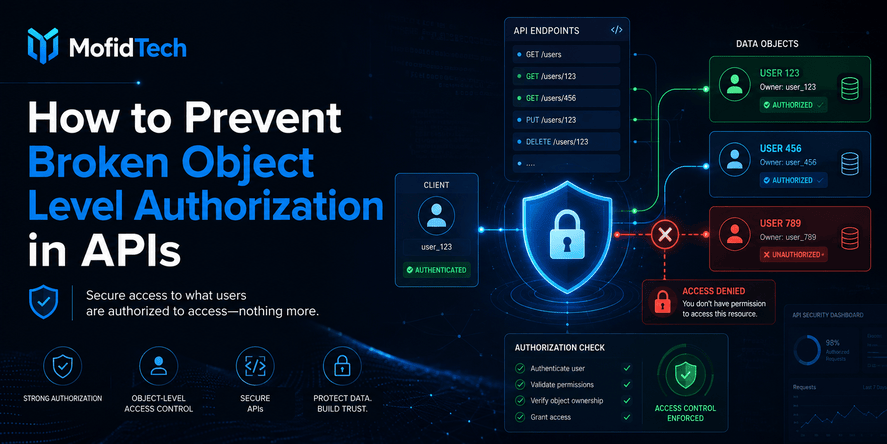
Broken Object Level Authorization, often shortened to BOLA, is one of the most dangerous access control problems in modern APIs. It happens when an API allows a user to access, view, modify, delete, approve, export, or manage an object that belongs to another user, another organization, or another permission boundary.
In simple terms, BOLA means the system knows who the user is, but it does not correctly check whether that user is allowed to access the specific object being requested.
This problem is especially important because APIs usually work with object identifiers: account IDs, invoice IDs, order IDs, file IDs, project IDs, tenant IDs, message IDs, report IDs, subscription IDs, and many other resource references. OWASP lists API1:2023 Broken Object Level Authorization as the first risk in the OWASP API Security Top 10 2023, explaining that APIs expose endpoints handling object identifiers and therefore create a wide attack surface for object-level access control issues.
For developers, the lesson is clear: authentication is not enough. A user may be logged in, verified, and using a valid session or token, but that does not automatically mean the user has permission to access every object whose identifier appears in the API.
A secure API must answer two questions every time a sensitive object is accessed:
- Who is making the request?
- Is this specific user allowed to access this specific object in this specific context?
If the second question is missing, incomplete, or applied inconsistently, the application may be vulnerable to Broken Object Level Authorization.
Table of Contents
- What Is Broken Object Level Authorization?
- Why BOLA Is So Common in APIs
- BOLA vs Authentication vs Authorization vs IDOR
- How BOLA Attacks Work
- Common API Areas Where BOLA Appears
- Why UUIDs and Hidden IDs Do Not Solve BOLA
- How to Prevent Broken Object Level Authorization
- Object Ownership and Permission Models
- BOLA in Multi-Tenant Applications
- BOLA Testing Strategy for Developers
- Common Mistakes That Create BOLA Vulnerabilities
- Security Considerations
- Performance Considerations
- Troubleshooting BOLA Problems
- Developer Checklist
- FAQ
- Conclusion
What Is Broken Object Level Authorization?
Broken Object Level Authorization is an API security flaw where the server fails to verify whether the authenticated user has permission to access a specific object.
An object can be almost anything managed by an application: a user profile, invoice, contract, appointment, document, image, order, message, support ticket, medical record, legal case, project, payment, report, or organization setting.
A BOLA vulnerability usually appears when the application receives an object reference from the client and uses it to access data without applying a proper authorization check.
OWASP explains that attackers can exploit vulnerable API endpoints by manipulating object identifiers sent in the request. These identifiers may appear in different parts of the request, including the request target, parameters, headers, or request body.
The important point is not the exact technical location of the identifier. The real issue is that the API trusts a client-provided object reference without verifying whether the current user is allowed to use it.
Simple Definition
Broken Object Level Authorization happens when:
- The user is authenticated.
- The API receives a reference to an object.
- The object exists.
- The API returns, modifies, deletes, or exposes that object.
- The API does not confirm that the user has permission for that exact object.
This is why BOLA is not simply a login problem. The user may be correctly logged in, but the authorization decision is incomplete.
Practical Example Without Code
Imagine a law firm management application. A lawyer logs in and opens a client file. The API returns the client’s information because the lawyer is assigned to that client.
Now imagine the same lawyer tries to access another client file belonging to a different lawyer. If the API only checks that the user is logged in, the request may succeed. That would be a BOLA vulnerability.
The correct behavior is different: the API must check that the logged-in lawyer is assigned to that specific client file before returning anything.
Why BOLA Is Dangerous
BOLA is dangerous because it can expose sensitive business, personal, financial, medical, legal, or operational data. In some cases, it may also allow unauthorized actions, such as changing records, approving workflows, downloading files, canceling orders, modifying invoices, or deleting resources.
A BOLA vulnerability can lead to:
- Data exposure.
- Account compromise.
- Privacy violations.
- Unauthorized business actions.
- Compliance problems.
- Loss of customer trust.
- Legal and financial risk.
- Abuse of multi-tenant platforms.
- Privilege escalation between users or organizations.
The risk becomes higher when the affected data includes legal records, healthcare data, payment information, identity documents, internal reports, private messages, or administrative resources.
Why BOLA Is So Common in APIs
BOLA is common because APIs are designed to access objects directly, and developers often check authentication without checking object-level permission.
Modern applications are API-driven. A frontend, mobile app, admin dashboard, partner integration, or external service often communicates with a backend through APIs. These APIs frequently use identifiers to select the exact object to retrieve or modify.
That design is normal. The problem starts when developers assume that because the frontend only shows allowed objects, the backend will only receive allowed requests. This assumption is unsafe.
The frontend is not a security boundary. A determined user can inspect requests, change object references, replay actions, or call API functions outside the intended user interface. API security must be enforced on the server side.
APIs Expose Many Object References
APIs commonly expose references to:
| Object Type | Example Business Context | Why It Can Be Sensitive |
|---|---|---|
| User profile | Account settings or profile page | Personal data, email, identity details |
| Invoice | Billing systems | Payment details, financial data |
| Order | E-commerce or marketplace | Customer data, purchase history |
| File | Document management | Private documents, contracts, images |
| Case | Legal or medical application | Highly sensitive professional records |
| Appointment | Healthcare, legal, consulting | Personal schedule and client relationship |
| Project | SaaS or team tool | Business operations and internal files |
| Report | Admin or analytics dashboard | Strategic, financial, or user data |
| Tenant | Multi-organization SaaS | Cross-company data exposure |
Every time an API accesses one of these objects, it must verify access rights.
Authentication Is Easier Than Authorization
Many applications have clear login logic but weak authorization logic.
Authentication asks: Who are you?
Authorization asks: What are you allowed to do?
Object-level authorization asks: Are you allowed to access this exact object?
The third question is where many vulnerabilities appear. A system may have strong passwords, multi-factor authentication, secure tokens, and encrypted communication, but still be vulnerable if object-level authorization is missing.
Business Rules Are Often Complex
BOLA prevention becomes harder when authorization depends on business context.
For example:
- A lawyer can access only clients assigned to them.
- A secretary can access clients only for lawyers they support.
- An accountant can access invoices but not confidential case notes.
- A manager can view reports for their department only.
- A tenant admin can manage users only inside their organization.
- A support agent can view account metadata but not payment details.
- A user can edit a draft but cannot edit a finalized document.
- A customer can view an invoice but cannot approve a refund.
These rules are not always simple role checks. They require careful object-level decisions.
BOLA vs Authentication vs Authorization vs IDOR
BOLA is often confused with authentication, general authorization, and IDOR. Understanding the difference helps developers design better security controls.
| Concept | Main Question | Example Failure |
|---|---|---|
| Authentication | Is the user really who they claim to be? | A user logs in with stolen credentials |
| Authorization | Is the user allowed to perform this action? | A regular user accesses an admin-only feature |
| Object-Level Authorization | Is the user allowed to access this specific object? | A user views another user’s invoice |
| IDOR | Can a user change an object reference to access something unauthorized? | A user changes a visible identifier and retrieves another record |
Is BOLA the Same as IDOR?
BOLA and IDOR are closely related, but they are not always identical.
IDOR, or Insecure Direct Object Reference, usually describes a situation where an application exposes a direct reference to an internal object and fails to check whether the user can access it.
BOLA is broader in API security. It focuses on the missing or broken authorization decision at the object level, whether the object reference is simple, complex, direct, indirect, sequential, random, encoded, or hidden.
In practice, many IDOR vulnerabilities are BOLA vulnerabilities. But BOLA is the better term when discussing modern API security because it emphasizes the real root cause: broken authorization.
Why Authentication Alone Does Not Prevent BOLA
A logged-in user is not automatically allowed to access every resource.
For example, a customer may be authenticated but should only access their own orders. A lawyer may be authenticated but should only access assigned clients. An employee may be authenticated but should only access documents for their department or role.
The API must enforce those boundaries every time.
Why Role-Based Access Control Alone May Not Prevent BOLA
Role-based access control is useful, but it may not be enough.
A role can answer questions like:
- Is this user a lawyer?
- Is this user an accountant?
- Is this user an administrator?
- Is this user a support agent?
But BOLA prevention needs more precise questions:
- Is this lawyer assigned to this client?
- Is this accountant allowed to view this invoice?
- Is this support agent allowed to access this tenant?
- Is this user a member of this organization?
- Is this file shared with this specific user?
- Is this action allowed in the current workflow state?
That is why object-level checks must complement role-based checks.
How BOLA Attacks Work
A BOLA attack usually works by changing, guessing, replaying, or reusing an object reference to access data or actions that belong to another user or organization.
The attacker does not always need advanced malware, complex exploitation, or system compromise. In many cases, they only need a valid account and the ability to observe how the application communicates with its API.
Typical BOLA Attack Flow
A common BOLA attack follows this pattern:
- The attacker logs in as a normal user.
- The attacker uses the application normally.
- The attacker observes that API responses or actions involve object references.
- The attacker changes or reuses one of those references.
- The API accepts the request.
- The API returns or modifies an object the attacker should not access.
This is why BOLA can be so damaging: the attacker may look like a normal authenticated user in many logs unless the application monitors suspicious object access patterns.
Horizontal Access Violation
A horizontal access violation happens when one user accesses another user’s objects at the same privilege level.
Examples:
- One customer views another customer’s invoice.
- One student downloads another student’s certificate.
- One lawyer views another lawyer’s client file.
- One employee reads another employee’s private document.
- One tenant member accesses resources from another tenant.
This is one of the most common forms of BOLA.
Vertical Access Violation
A vertical access violation happens when a lower-privileged user accesses objects or actions reserved for a higher-privileged user.
Examples:
- A regular user accesses an admin report.
- A staff user modifies a manager-only approval.
- A viewer deletes a resource that only an editor should control.
- A tenant member performs an action reserved for the tenant owner.
Vertical BOLA often overlaps with broken function-level authorization, but object-level checks still matter when the action targets a specific object.
Action-Level Object Abuse
BOLA is not only about reading data. It can also involve unauthorized actions.
Examples:
- Canceling another user’s booking.
- Approving another person’s request.
- Changing another tenant’s settings.
- Downloading a file owned by another user.
- Archiving another team’s project.
- Marking another customer’s invoice as paid.
- Deleting another user’s message.
- Changing the status of a case without permission.
Action-based BOLA can be more damaging than read-only exposure because it affects business integrity.
A 2026 empirical study of publicly disclosed bug bounty reports found that many confirmed BOLA cases involved unauthorized state-changing actions on another user’s objects, showing that BOLA is not limited to simple data viewing problems.
Common API Areas Where BOLA Appears
BOLA can appear anywhere an API accepts or processes an object reference. Some areas are especially risky because they combine sensitive data with complex business rules.
User Profiles and Account Settings
Profile APIs are common BOLA targets because they usually expose personal data.
Risky scenarios include:
- Viewing another user’s profile details.
- Updating another user’s contact information.
- Accessing private account preferences.
- Changing notification settings.
- Viewing identity verification status.
Even when profile data looks harmless, it can include emails, phone numbers, internal identifiers, addresses, images, or personal metadata.
Orders, Invoices, and Payments
Billing-related APIs are highly sensitive.
BOLA in this area may expose:
- Invoice amounts.
- Customer names.
- Payment status.
- Billing addresses.
- Subscription details.
- Refund information.
- Tax details.
- Transaction metadata.
An attacker may also attempt unauthorized actions such as canceling orders, changing payment status, downloading invoices, or requesting refunds.
Legal, Medical, and Professional Records
Applications for law firms, clinics, schools, insurance, HR, and public administration must be especially careful.
BOLA may expose:
- Legal case files.
- Medical records.
- Client documents.
- Appointment details.
- Internal notes.
- Identity documents.
- Professional correspondence.
- Confidential attachments.
In these systems, a single authorization mistake can have serious privacy and legal consequences.
File and Document Management
Files are often protected poorly because developers focus on database records but forget file access.
A secure application must not only protect the page that lists files. It must also protect the actual file access logic.
Risky scenarios include:
- A user downloads a file by changing a file reference.
- A user accesses a document shared with another team.
- A user previews an attachment from another case.
- A temporary file link remains usable after permissions change.
- A generated report is stored in a predictable location.
Admin Dashboards
Admin dashboards often contain powerful actions and sensitive data.
BOLA may happen when:
- Admin pages rely only on frontend filtering.
- A staff member can access objects from another department.
- A tenant admin can access another tenant’s users.
- A support agent can view too much customer data.
- A lower-level admin can perform owner-only actions.
Admin security should not be treated as one general permission. It must include object scope.
Multi-Tenant SaaS Applications
Multi-tenant applications are especially vulnerable to BOLA because many customers share the same application infrastructure.
A tenant boundary is a strong security boundary. If a user from one organization can access data from another organization, the application has a serious isolation failure.
Common mistakes include:
- Forgetting to check tenant ownership.
- Trusting tenant references from the client.
- Applying tenant filters inconsistently.
- Sharing global identifiers without server-side validation.
- Allowing support or admin features to bypass tenant checks.
- Reusing objects across tenants without clear ownership rules.
Why UUIDs and Hidden IDs Do Not Solve BOLA
UUIDs, random identifiers, and hidden object references may reduce guessing, but they do not replace authorization checks.
This is one of the most important lessons in API security.
Some teams believe that using long random identifiers prevents BOLA because attackers cannot easily guess another object’s identifier. That approach is not enough.
OWASP notes that object IDs can be sequential integers, UUIDs, or generic strings, and the data type does not remove the need for authorization.
Why Random IDs Are Not Enough
Random IDs may still be exposed through:
- Browser history.
- Shared links.
- Logs.
- Notifications.
- Referrer data.
- Frontend state.
- Mobile app storage.
- Exported files.
- Emails.
- Error messages.
- Third-party integrations.
- Analytics tools.
- Team collaboration features.
Even if an attacker cannot guess the identifier, they may obtain it through another path. Once they have it, the server must still check permission.
Security Through Obscurity Is Fragile
Hiding an object reference can be useful as an additional protection layer, but it is not a complete security model.
A secure API should assume that object references may become known. Authorization must still be enforced.
A good rule is:
Identifiers may help locate objects, but they must never prove permission.
When UUIDs Are Still Useful
UUIDs and non-sequential references can still be useful because they make mass enumeration harder. They can reduce some automated guessing attacks and make object references less predictable.
However, they should be treated as a secondary defense, not the main defense.
The main defense remains object-level authorization.
How to Prevent Broken Object Level Authorization
To prevent BOLA, enforce server-side authorization checks every time an API accesses an object using user-controlled input, including read, update, delete, export, approval, and workflow actions.
OWASP’s API Security guidance says object-level authorization checks should be considered in every function that accesses a data source using an ID from the user.
This section explains the practical prevention strategy.
1. Check Object Ownership on Every Access
The API must verify that the requested object belongs to the current user, tenant, organization, project, department, or allowed scope.
Ownership does not always mean personal ownership. It may mean:
- The object belongs to the user.
- The object belongs to the user’s organization.
- The object is assigned to the user.
- The object is shared with the user.
- The object belongs to a project where the user is a member.
- The object belongs to a tenant where the user has a valid role.
- The object is visible because of a temporary delegated permission.
The important point is that ownership must be checked on the server side.
2. Verify the Action, Not Only the Object
A user may be allowed to view an object but not modify it.
For each object, the API should evaluate both:
- Can this user access the object?
- Can this user perform this specific action on the object?
For example:
| Action | Required Check |
|---|---|
| View document | User can access this document |
| Edit document | User can modify this document |
| Delete document | User has deletion permission for this document |
| Download invoice | User can access financial records for this customer |
| Approve request | User has approval authority for this workflow |
| Export data | User can export this type of data in this scope |
BOLA prevention must consider action-level authorization, not only object visibility.
3. Do Not Trust Frontend Filtering
Frontend filtering improves user experience, but it does not enforce security.
A frontend may hide unauthorized buttons, links, menu items, or objects. That is useful, but users can still interact directly with the API through modified requests, browser tools, automation, or replayed traffic.
The backend must enforce the same or stronger authorization rules.
4. Apply Least Privilege
The principle of least privilege means users and processes should receive only the minimum access needed to perform their assigned tasks. NIST defines least privilege as restricting access privileges to the minimum necessary to accomplish assigned tasks.
For BOLA prevention, least privilege means:
- Do not give broad object access by default.
- Do not allow users to access all objects of a type.
- Do not give staff roles unnecessary cross-tenant visibility.
- Do not allow support users to access sensitive data unless required.
- Do not allow background services to bypass object boundaries without control.
- Do not allow exported files to ignore the user’s permission scope.
Least privilege must be applied to users, roles, services, admin panels, and internal tools.
5. Centralize Authorization Logic
Authorization rules should be consistent. If every developer writes object checks differently, mistakes become more likely.
A strong design usually includes:
- A clear permission model.
- A central authorization layer.
- Reusable policy decisions.
- Consistent checks across API functions.
- Explicit rules for each sensitive object type.
- Security review when new object types are added.
- Automated tests for common access boundaries.
Centralization does not mean every rule must be identical. It means authorization decisions should follow a consistent pattern that developers can understand and verify.
6. Deny by Default
A secure authorization model should deny access unless permission is proven.
This is safer than allowing access unless a restriction is found.
Deny-by-default thinking helps prevent gaps when:
- A new role is added.
- A new API function is introduced.
- A new object type is created.
- A new workflow state appears.
- A new tenant feature is launched.
- A new export or report is added.
When authorization is uncertain, the API should refuse access.
7. Protect Read and Write Operations
Some teams focus only on dangerous write actions and forget read access.
Both matter.
Read operations can expose sensitive data. Write operations can damage integrity. Export operations can create large-scale data leaks. Delete operations can cause irreversible loss. Approval operations can affect business workflows.
Every operation needs authorization.
8. Check Authorization Close to the Data Access
Authorization should happen before the object is returned, modified, deleted, exported, or used in a workflow.
A common mistake is checking permissions in one layer but allowing another path to access the object without the same check.
For example:
- The normal page checks permission, but the export function does not.
- The dashboard checks tenant access, but the report download does not.
- The web interface checks assignment, but the mobile API does not.
- The object update checks ownership, but the attachment preview does not.
- The main API checks access, but a background action does not.
The closer the check is to the actual object access, the harder it is to bypass accidentally.
Object Ownership and Permission Models
A strong BOLA prevention strategy depends on a clear permission model. Before developers can enforce object-level authorization, the team must define who can access what and under which conditions.
Personal Ownership Model
In a personal ownership model, each object belongs to one user.
Examples:
- A user’s profile.
- A customer’s order.
- A student’s certificate.
- A personal notification.
- A private message.
This model is simple, but developers must still verify ownership on every access.
Organization or Tenant Ownership Model
In a tenant model, objects belong to an organization rather than a single user.
Examples:
- Company invoices.
- Team projects.
- Organization members.
- Workspace files.
- Department dashboards.
- Tenant-level settings.
The API must verify that the current user belongs to the same tenant and has the required role or permission.
Assignment-Based Model
In an assignment model, users access objects because they are assigned to them.
Examples:
- A lawyer assigned to a client.
- A doctor assigned to a patient.
- A support agent assigned to a ticket.
- A teacher assigned to a class.
- A project manager assigned to a project.
This model requires checking assignment, not just role.
A user may have the correct role but still not be assigned to the object.
Sharing-Based Model
In a sharing model, objects can be shared with selected users, groups, teams, or external contacts.
Examples:
- Shared documents.
- Shared reports.
- Shared folders.
- Collaborative projects.
- Temporary guest access.
This model requires careful rules for expiration, revocation, inheritance, and action limits.
Workflow-Based Model
In a workflow model, permission depends on the object’s current state.
Examples:
- A draft can be edited, but a submitted document cannot.
- A pending request can be approved only by a manager.
- A closed case can be viewed but not modified.
- A paid invoice can be downloaded but not changed.
- A rejected request can be appealed but not approved by the requester.
Workflow-based permission is often where BOLA becomes subtle. Developers must check not only the user and object, but also the action and workflow state.
Combined Permission Model
Real applications often combine several models.
For example, a law firm application may use:
- Role-based access for lawyers, secretaries, accountants, and administrators.
- Assignment-based access for lawyers and clients.
- Tenant-based access for firm-level isolation.
- Workflow-based access for cases, hearings, invoices, and receipts.
- Document-level access for confidential files.
- Action-level access for approval, deletion, export, and billing operations.
This is why BOLA prevention must be planned as part of application architecture, not added as an afterthought.
BOLA in Multi-Tenant Applications
In multi-tenant applications, BOLA prevention must enforce tenant isolation before checking object-level permissions.
A multi-tenant application serves multiple organizations, customers, departments, or firms from the same software platform. This design is common in SaaS products, marketplaces, dashboards, CRM systems, law firm systems, medical platforms, learning platforms, and internal enterprise tools.
The biggest risk is cross-tenant data access.
Tenant Isolation Comes First
Before checking whether a user can access a specific object, the API should verify that the object belongs to the user’s permitted tenant scope.
A secure decision usually follows this order:
- Confirm the user is authenticated.
- Confirm the user belongs to the tenant or organization.
- Confirm the object belongs to the same tenant or allowed scope.
- Confirm the user’s role permits the action.
- Confirm any assignment, sharing, or workflow rule.
- Allow the action only if all required conditions pass.
If tenant isolation is skipped, a user may access another organization’s data even if their role appears valid.
Common Multi-Tenant BOLA Mistakes
Multi-tenant BOLA often appears when developers:
- Trust tenant identifiers from the client.
- Forget tenant filtering in one API function.
- Allow global object lookup before tenant validation.
- Give support users unrestricted tenant access.
- Reuse reports across tenants without scoped checks.
- Generate exports without tenant boundaries.
- Apply tenant checks in list views but not detail views.
- Apply tenant checks in normal actions but not admin actions.
- Allow integrations to access tenant data too broadly.
Tenant Admin Does Not Mean Global Admin
A tenant administrator should usually manage only their own organization.
This distinction is critical:
| Role | Correct Scope |
|---|---|
| Platform admin | May manage the whole platform, depending on policy |
| Tenant admin | Manages only one tenant or assigned tenants |
| Team admin | Manages only a team inside a tenant |
| Support agent | Access depends on support policy and audit controls |
| Billing manager | Accesses billing objects only within allowed scope |
Confusing tenant admins with global admins can create serious BOLA vulnerabilities.
BOLA Testing Strategy for Developers
Testing for BOLA means verifying that users cannot access objects outside their allowed ownership, assignment, tenant, role, or workflow scope.
Tools can help, but BOLA testing requires business understanding. Automated scanners may detect some patterns, but they often cannot fully understand whether a user should access a specific object in a specific business context.
Test with Multiple Users
A good BOLA test needs at least two users with different data.
For example:
- User A owns one object.
- User B owns another object.
- User A should not access User B’s object.
- User B should not access User A’s object.
For multi-tenant systems, testing should include users from different organizations.
For role-based systems, testing should include users with different roles.
For assignment-based systems, testing should include assigned and unassigned users.
Test Horizontal Access
Horizontal tests verify that users at the same privilege level cannot access each other’s objects.
Examples:
- Customer to customer.
- Lawyer to lawyer.
- Student to student.
- Employee to employee.
- Tenant member to tenant member in another tenant.
This is one of the most important BOLA test categories.
Test Vertical Access
Vertical tests verify that lower-privileged users cannot access higher-privileged objects or actions.
Examples:
- Regular user to admin-only object.
- Viewer to editor action.
- Staff to owner-level setting.
- Tenant member to tenant admin action.
- Accountant to confidential legal notes.
Vertical testing is essential for admin panels, dashboards, approval workflows, and management features.
Test Read, Write, Delete, Export, and Workflow Actions
Do not test only data retrieval.
A complete BOLA test should cover:
| Action Type | What to Verify |
|---|---|
| Read | User cannot view unauthorized objects |
| Update | User cannot modify unauthorized objects |
| Delete | User cannot delete unauthorized objects |
| Export | User cannot export unauthorized data |
| Download | User cannot download unauthorized files |
| Approve | User cannot approve objects outside their authority |
| Assign | User cannot assign objects outside their scope |
| Archive | User cannot hide or archive unauthorized objects |
| Restore | User cannot restore objects outside their permission |
| Share | User cannot share objects they do not control |
Test Hidden Paths and Secondary Features
BOLA often appears in secondary features, not the main screen.
Test areas such as:
- File previews.
- Attachments.
- Search results.
- Notifications.
- Exports.
- Reports.
- Activity logs.
- Audit logs.
- Comments.
- Admin actions.
- Bulk actions.
- Mobile APIs.
- Integrations.
- Background-generated documents.
- Public sharing links.
- Archived records.
A secure application must apply object-level authorization consistently across all access paths.
Test After Permission Changes
BOLA can appear when permissions change but old access remains active.
Test scenarios such as:
- A user is removed from a project.
- A lawyer is unassigned from a client.
- A secretary is moved to another lawyer.
- A staff member loses a role.
- A tenant member is deactivated.
- A shared document is unshared.
- A temporary permission expires.
- A case is closed.
- A document changes from draft to finalized.
The API should reflect the current permission state, not an old one.
Common Mistakes That Create BOLA Vulnerabilities
Mistake 1: Checking Only Whether the User Is Logged In
This is the most basic BOLA mistake.
A valid login proves identity. It does not prove object permission.
Every sensitive object access needs an authorization decision.
Mistake 2: Trusting the Frontend
Developers sometimes assume users cannot access unauthorized objects because the frontend does not show them.
This is unsafe. The backend must enforce authorization independently.
Mistake 3: Assuming UUIDs Fix the Problem
UUIDs can reduce guessing, but they do not prove permission. If a user obtains a valid object reference, the API must still verify access.
Mistake 4: Applying Checks Only to List Views
Many APIs correctly filter lists but forget to protect detail views.
For example, the dashboard may show only allowed invoices, but the individual invoice view may return any invoice if the user provides a reference.
Both list and detail access must be protected.
Mistake 5: Protecting Data Views but Not Actions
A user may be blocked from viewing an object but still able to perform an action on it if action-level authorization is missing.
Actions such as approve, cancel, archive, delete, restore, assign, export, or share must be checked.
Mistake 6: Forgetting File Access
Files are often handled differently from database records. That creates risk.
A secure application must verify permission before serving, previewing, downloading, exporting, or sharing files.
Mistake 7: Overusing Admin Bypass Logic
Admin bypasses are dangerous when they are too broad or poorly audited.
Even staff and support users should have clear access scopes. Not every internal user should access every object.
Mistake 8: Inconsistent Authorization Across APIs
An application may have several APIs for the same object: web, mobile, internal, partner, admin, export, and integration APIs.
If one API path is weaker, attackers will use it.
Mistake 9: Forgetting Multi-Tenant Boundaries
In SaaS systems, tenant isolation must be enforced everywhere.
A user from one organization must not access data from another organization simply because they know or obtain an object reference.
Mistake 10: No Negative Testing
Many teams test that valid users can access allowed objects, but they forget to test that invalid users cannot access forbidden objects.
BOLA prevention requires negative tests.
Security Considerations for BOLA Prevention
BOLA prevention is part of a broader secure-by-design approach. CISA’s Secure by Design guidance emphasizes that technology providers should take ownership of security outcomes rather than treating security as only an end-user responsibility.
For API teams, this means authorization must be designed into the product, not added only after a vulnerability report.
Use a Clear Access Control Matrix
An access control matrix helps teams define who can do what.
It should answer:
- Which roles exist?
- Which object types exist?
- Which actions exist?
- Which roles can perform which actions?
- Which permissions depend on ownership?
- Which permissions depend on assignment?
- Which permissions depend on tenant membership?
- Which permissions depend on workflow status?
- Which actions require extra approval?
- Which actions should be logged?
This matrix becomes a shared language between developers, security teams, product owners, and testers.
Log Sensitive Authorization Events
Logging helps detect suspicious access attempts and investigate incidents.
Useful events to log include:
- Denied object access.
- Repeated access to unauthorized objects.
- Cross-tenant access attempts.
- Failed admin actions.
- Unusual export attempts.
- Permission changes.
- Sharing changes.
- Role changes.
- Assignment changes.
- Sensitive file downloads.
Logs should be designed carefully to avoid storing unnecessary sensitive data.
Monitor for Suspicious Patterns
Monitoring can detect behavior that may indicate BOLA probing.
Examples:
- One user attempts to access many unrelated objects.
- A user repeatedly receives access denied responses.
- A user accesses objects across unusual scopes.
- A user performs many export or download actions.
- A staff account accesses tenants outside normal responsibilities.
- A new account quickly attempts many object references.
Monitoring does not replace prevention, but it improves detection and response.
Review Authorization During Code Review
Every API change that accesses sensitive objects should trigger authorization review.
Reviewers should ask:
- What object is being accessed?
- Where does the object reference come from?
- Who is allowed to access it?
- Is the permission checked on the server?
- Is tenant isolation enforced?
- Are action-level permissions checked?
- Are file or export paths protected?
- Are negative tests included?
- Could another API path bypass this rule?
This review habit can prevent many BOLA issues before deployment.
Protect Internal APIs Too
Internal APIs can also create BOLA risk.
An internal API may later be exposed to other services, admin tools, partner integrations, or automation workflows. If it lacks authorization, it can become a weak link.
Internal does not mean safe. Access control should still be explicit.
Performance Considerations
Some developers worry that object-level authorization checks will slow down the API. This concern is understandable, but skipping authorization is not an acceptable performance optimization.
The goal is to design authorization efficiently.
Authorization Should Be Efficient and Predictable
Good authorization design avoids unnecessary complexity.
The system should know:
- Where ownership is stored.
- How tenant membership is checked.
- How assignments are represented.
- How permissions are evaluated.
- Which checks are required for each action.
- Which access decisions can be reused safely.
- Which decisions must be recalculated immediately.
A clear model is usually faster and safer than scattered custom checks.
Avoid Overfetching Data Before Authorization
The API should avoid loading or exposing unnecessary object data before permission is confirmed.
A safer design checks access as early as practical and returns only the data allowed for the current user and action.
Be Careful with Caching
Caching can improve performance, but it can also create authorization risk.
Dangerous caching mistakes include:
- Returning cached data to the wrong user.
- Caching tenant-specific data without tenant separation.
- Serving outdated permissions after a user loses access.
- Reusing generated reports after permissions change.
- Caching file links longer than the permission should last.
Cache design must include user, tenant, role, and permission scope where relevant.
Batch and Bulk Actions Need Special Care
Bulk actions can create performance and security challenges.
For example, if a user selects many objects for export or deletion, the API must verify permission for every object, not only the first one.
A secure bulk action should:
- Validate every object in the request.
- Reject or skip unauthorized objects according to business policy.
- Avoid partial actions that confuse users.
- Log sensitive bulk operations.
- Apply tenant and ownership checks consistently.
Troubleshooting BOLA Problems
When a team suspects BOLA, the goal is to identify where authorization is missing, inconsistent, or incorrectly scoped.
Symptom 1: Users Can Access Objects Not Shown in the Interface
This usually means the frontend filters objects correctly, but the backend does not enforce the same restriction.
What to check:
- Detail views.
- File downloads.
- Export functions.
- Direct object access.
- Mobile API behavior.
- Admin or staff API behavior.
Symptom 2: Tenant Users Can See Another Tenant’s Data
This indicates a tenant isolation failure.
What to check:
- Whether tenant membership is verified.
- Whether object ownership includes tenant scope.
- Whether tenant references are trusted from the client.
- Whether reports and exports apply tenant filtering.
- Whether admin tools bypass tenant checks.
Symptom 3: Users Can Perform Actions They Should Not Perform
This means the API may check object visibility but not action permission.
What to check:
- Approval actions.
- Delete actions.
- Assignment actions.
- Sharing actions.
- Status changes.
- Billing actions.
- Export actions.
- Restore actions.
Symptom 4: Permissions Work in One API but Fail in Another
This suggests authorization logic is duplicated or inconsistent.
What to check:
- Web API.
- Mobile API.
- Admin API.
- Partner API.
- Internal API.
- Background tasks.
- File service.
- Reporting service.
A centralized authorization policy can reduce this problem.
Symptom 5: Former Team Members Still Have Access
This may happen when permissions are cached, duplicated, or not revoked correctly.
What to check:
- Role changes.
- Assignment removal.
- Tenant membership updates.
- Shared links.
- Temporary access.
- Active sessions.
- Cached permissions.
- Generated files.
Permission revocation should be part of the security design.
BOLA Prevention Checklist for Developers
Use this checklist before publishing or updating an API.
Design Checklist
| Question | Yes or No |
|---|---|
| Are all sensitive object types identified? | |
| Is ownership clearly defined for each object type? | |
| Are tenant boundaries clearly defined? | |
| Are role permissions documented? | |
| Are assignment-based permissions documented? | |
| Are sharing rules documented? | |
| Are workflow-based permissions documented? | |
| Are read, write, delete, export, and approval actions listed? | |
| Is the default access decision deny unless allowed? |
Development Checklist
| Question | Yes or No |
|---|---|
| Does every object access include a server-side authorization check? | |
| Are frontend restrictions treated only as user experience, not security? | |
| Are list views and detail views both protected? | |
| Are file downloads and previews protected? | |
| Are export and report functions protected? | |
| Are bulk actions checked per object? | |
| Are tenant checks applied consistently? | |
| Are admin and support functions scoped properly? | |
| Are authorization rules centralized where possible? |
Testing Checklist
| Question | Yes or No |
|---|---|
| Are tests performed with at least two users? | |
| Are tests performed across different tenants? | |
| Are horizontal access violations tested? | |
| Are vertical access violations tested? | |
| Are unauthorized read actions tested? | |
| Are unauthorized write actions tested? | |
| Are unauthorized delete actions tested? | |
| Are unauthorized export actions tested? | |
| Are file access paths tested? | |
| Are permission changes and revocation tested? |
Production Checklist
| Question | Yes or No |
|---|---|
| Are denied access attempts logged? | |
| Are suspicious object access patterns monitored? | |
| Are admin actions audited? | |
| Are support user permissions limited? | |
| Are tenant isolation failures treated as critical? | |
| Are security reviews required for new API functions? | |
| Are authorization rules reviewed before major releases? | |
| Are incident response steps defined for access control failures? |
Best Practices for Secure API Authorization
Treat Authorization as Business Logic
Authorization is not only a technical security layer. It represents the business rules of the application.
For example:
- Who owns a client?
- Who can view a legal case?
- Who can edit an invoice?
- Who can approve a request?
- Who can access a tenant dashboard?
- Who can export sensitive data?
These questions must be answered by the product and engineering team together.
Make Permission Rules Explicit
Implicit authorization rules create confusion.
Instead of assuming developers understand the intended behavior, document the rules clearly. Each sensitive object should have a defined access model.
Keep Access Rules Consistent
Different teams may build different features around the same object. Without consistency, one feature may be secure while another exposes data.
Consistency matters across:
- Main API.
- Mobile API.
- Admin dashboard.
- Reports.
- Exports.
- File previews.
- Integrations.
- Background jobs.
- Notifications.
Validate Permissions After Every Major Change
Authorization can break when teams add:
- New roles.
- New object types.
- New exports.
- New dashboards.
- New sharing features.
- New integrations.
- New billing workflows.
- New admin tools.
- New tenant features.
Security review should be part of feature development.
Use Defense in Depth
BOLA prevention should not depend on one control only.
A strong design may combine:
- Authentication.
- Object-level authorization.
- Role-based access control.
- Tenant isolation.
- Least privilege.
- Secure identifiers.
- Audit logging.
- Monitoring.
- Rate limiting.
- Secure error handling.
- Security testing.
- Code review.
- Permission revocation.
No single control is enough by itself.
Comparison Table: Weak API Authorization vs Strong API Authorization
| Area | Weak Approach | Strong Approach |
|---|---|---|
| Authentication | Checks only if user is logged in | Checks identity, role, scope, and object permission |
| Object access | Trusts object references from client | Verifies ownership or allowed scope server-side |
| Frontend | Hides unauthorized buttons only | Uses frontend for UX and backend for enforcement |
| Roles | Uses broad roles only | Combines roles with object-level permissions |
| Tenancy | Trusts tenant references | Enforces tenant isolation server-side |
| Files | Protects page but not download | Checks permission before every file access |
| Exports | Allows export if page is visible | Verifies export permission and object scope |
| Bulk actions | Checks general permission only | Checks every object in the bulk action |
| Admin tools | Gives broad access | Scopes admin access and logs sensitive actions |
| Testing | Tests only allowed actions | Tests allowed and denied actions |
Featured Snippet Answer: How Do You Prevent Broken Object Level Authorization?
To prevent Broken Object Level Authorization, verify on the server side that the authenticated user is allowed to access the specific object requested. Apply object ownership checks, tenant isolation, action-level permissions, least privilege, deny-by-default rules, consistent authorization policies, and negative testing across read, write, delete, export, file, and workflow actions.
Real-World Use Cases
SaaS Dashboard
A SaaS dashboard allows companies to manage projects, users, reports, and billing. BOLA prevention requires tenant isolation first, then role and object permissions.
A user from Company A must never access Company B’s data, even if they know a project or invoice reference.
Law Firm Management Application
A law firm application may include clients, cases, appointments, hearings, invoices, receipts, documents, and internal notes.
A lawyer should access only assigned clients and cases. A secretary should access only the lawyers they support. An accountant may access invoices and receipts but not confidential case notes. The authorization model must reflect these real business boundaries.
Medical Appointment Platform
A patient should access only their own appointments and medical documents. A doctor should access only assigned patients. A receptionist may manage scheduling but not private medical notes unless explicitly allowed.
E-Commerce Platform
Customers should access only their own orders, invoices, returns, and support messages. Store staff should access only the orders relevant to their role. Marketplace sellers should not access another seller’s customer data.
Education Platform
Students should access only their own grades, certificates, submissions, and private feedback. Teachers should access students assigned to their classes. Administrators may have broader access, but still within defined scope.
FAQ About Broken Object Level Authorization
1. What is Broken Object Level Authorization?
Broken Object Level Authorization is an API security flaw where the server fails to check whether the current user is allowed to access a specific object. The user may be logged in, but they can still access data or actions that belong to another user, tenant, organization, or permission scope.
2. Why is BOLA dangerous?
BOLA is dangerous because it can expose sensitive data or allow unauthorized actions. It may lead to privacy violations, financial damage, business process abuse, account compromise, compliance problems, and loss of user trust.
3. Is BOLA the same as IDOR?
BOLA and IDOR are closely related. IDOR usually describes insecure access through direct object references, while BOLA focuses on the broader API authorization failure. Many IDOR vulnerabilities are examples of BOLA.
4. Can UUIDs prevent BOLA?
No. UUIDs can make object references harder to guess, but they do not prove permission. If a user obtains a valid object reference, the API must still verify whether that user is allowed to access the object.
5. Is BOLA only a backend problem?
BOLA must be fixed on the backend because the backend controls access to data and actions. The frontend can hide unauthorized options for usability, but it cannot be trusted as the main security control.
6. How do developers test for BOLA?
Developers test for BOLA by using multiple users, roles, tenants, and permission scopes. They verify that one user cannot access another user’s objects and that lower-privileged users cannot perform higher-privileged actions.
7. What is the difference between authentication and object-level authorization?
Authentication confirms who the user is. Object-level authorization confirms whether that user can access a specific object. A user can be authenticated but still not authorized to access a particular resource.
8. Can API gateways prevent BOLA?
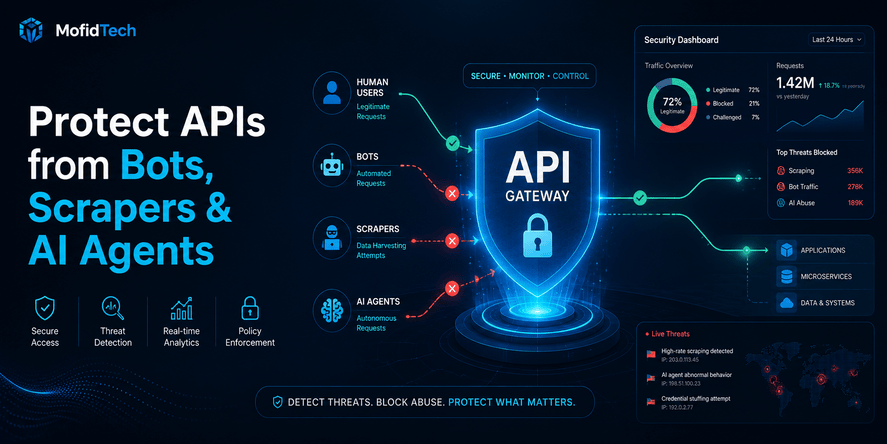
API gateways can help with authentication, rate limiting, logging, and some policy enforcement, but they usually cannot fully understand application-specific object ownership and business rules. BOLA prevention normally requires application-level authorization logic.
9. What types of objects need BOLA protection?
Any sensitive object needs protection, including profiles, invoices, orders, files, reports, documents, projects, cases, appointments, messages, payments, subscriptions, tenant settings, and admin resources.
10. Should authorization be checked for read-only actions?
Yes. Read-only actions can still expose sensitive data. Viewing, listing, downloading, previewing, and exporting data all require authorization checks.
11. How does BOLA affect multi-tenant applications?
In multi-tenant applications, BOLA can allow users from one organization to access data from another organization. This is a serious tenant isolation failure and should be treated as a critical security issue.
12. What is the best way to prevent BOLA?
The best way to prevent BOLA is to enforce server-side object-level authorization for every object access, use least privilege, deny access by default, apply tenant isolation, centralize permission logic, test negative access cases, and monitor suspicious access attempts.
Conclusion
Broken Object Level Authorization is one of the most important API security risks because it attacks a basic assumption in many applications: that a logged-in user should be trusted with object references.
That assumption is unsafe.
A secure API must verify not only who the user is, but also whether that user is allowed to access the exact object and perform the exact action requested. This requires clear ownership rules, tenant isolation, role and permission design, assignment checks, workflow awareness, negative testing, and consistent server-side enforcement.
The most important principle is simple:
Never use an object reference as proof of permission.
Object identifiers help the API find data. They do not prove that the user should access that data.
For MofidTech readers, this topic is especially practical because BOLA affects real-world applications: SaaS platforms, Django and Python backends, mobile APIs, law firm systems, e-commerce platforms, medical systems, dashboards, marketplaces, and internal business tools.
Preventing BOLA is not only a cybersecurity task. It is a software engineering discipline that connects secure coding, backend architecture, business logic, testing, DevOps, monitoring, and user trust.










💬 Comments
No comments yet. Be the first to comment!
Login to comment.