Introduction
AI coding tools have changed how developers write software. They can suggest functions, explain errors, generate tests, summarize code, and speed up repetitive work. For many developers, this feels like a major productivity improvement. Tasks that once required long manual effort can now be completed faster, especially when the developer already understands the problem clearly.
But this creates a new measurement problem.
If developers produce more code with AI, does that mean the team is more productive? If pull requests become larger, does that mean delivery improved? If tickets are closed faster, does that mean the software became better? Not always.
In the AI coding era, developer productivity is no longer just about how quickly code is written. It is about how safely, clearly, and sustainably software moves from idea to production. AI can accelerate writing, but it can also increase review burden, introduce hidden mistakes, create inconsistent architecture, and make teams overconfident in code they did not fully understand.
The most important question is no longer:
“Are developers writing more code?”
The better question is:
“Is the team delivering reliable, maintainable, secure, and valuable software with less unnecessary friction?”
This article explains how to measure developer productivity in the AI coding era without falling into misleading metrics. It provides a practical framework for evaluating speed, quality, review load, maintainability, security, developer experience, and business outcomes.
Table of Contents
- What Developer Productivity Means in the AI Coding Era
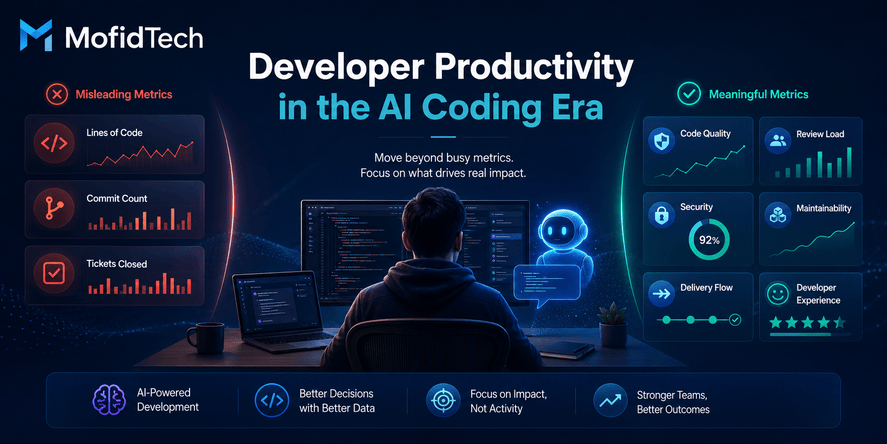
- Why Traditional Developer Productivity Metrics Are Misleading
- How AI Coding Tools Change Software Engineering Work
- The Difference Between Individual Speed and Team Productivity
- The Best Metrics to Track for AI-Assisted Development
- A Practical AI Developer Productivity Scorecard
- How to Compare Productivity Before and After AI Adoption
- How to Measure Code Quality in AI-Assisted Development
- How to Measure Review Burden and Hidden Work
- Security and Reliability Considerations
- Common Mistakes When Measuring AI Developer Productivity
- Best Practices for Engineering Leaders
- Practical Checklist for Teams
- FAQ
- Conclusion
What Is Developer Productivity in the AI Coding Era?
Developer productivity in the AI coding era is the ability of a developer or team to deliver useful, reliable, maintainable, and secure software efficiently while using AI tools responsibly.
It is not only about writing code faster. It includes the full software delivery lifecycle: understanding requirements, designing solutions, reviewing code, testing behavior, managing security risks, deploying safely, fixing bugs, maintaining systems, and improving user value.
A productive AI-assisted developer is not someone who generates the largest amount of code. A productive AI-assisted developer is someone who uses AI to reduce unnecessary effort while preserving engineering judgment.
A Better Definition of Developer Productivity
Developer productivity should be measured through a balance of:
| Dimension | What It Measures |
|---|---|
| Speed | How efficiently work moves from idea to delivery |
| Quality | How correct, readable, and reliable the output is |
| Maintainability | How easy the software is to understand and change later |
| Security | How well risks are identified and reduced |
| Review Load | How much effort is needed to validate changes |
| Developer Experience | Whether developers feel focused, supported, and confident |
| Business Value | Whether the delivered work solves meaningful problems |
This balanced view is especially important with AI because AI can increase output volume without automatically improving outcome quality.
Why Traditional Developer Productivity Metrics Are Misleading
Traditional productivity metrics often focus on visible activity. They measure what is easy to count, not necessarily what matters.
In AI-assisted development, this problem becomes more serious because AI tools can increase activity metrics very quickly. A developer may produce more lines of code, more pull requests, and more commits, but the team may also face more review work, more debugging, more inconsistency, and more technical debt.
Why Lines of Code Are a Weak Metric
Lines of code are one of the most misleading developer productivity metrics.
More code does not always mean more value. In many cases, better engineering means solving the same problem with less complexity. A developer who removes unnecessary logic, simplifies a workflow, or improves architecture may produce fewer lines of code but create more long-term value.
AI coding tools can generate large amounts of code quickly. If a team rewards line count, developers may unintentionally accept verbose or unnecessary AI-generated output.
A better question is:
“Did this change solve the problem clearly with the least reasonable complexity?”
Why Commit Count Does Not Prove Productivity
Commit count measures activity, not impact.
One developer may make many small commits because they are experimenting. Another may make fewer commits because they carefully planned the solution before implementation. Neither pattern alone proves productivity.
With AI tools, commit count can become even less useful because developers may generate, revise, and commit code faster. The number of commits may increase while the quality of decisions remains unchanged or even decreases.
A better question is:
“Did the work move smoothly through review, testing, and deployment?”
Why Ticket Velocity Can Hide Problems
Ticket velocity can be useful when interpreted carefully, but it can also be misleading.
A team may close more tickets after adopting AI tools, but those tickets may be smaller, less complex, or less thoroughly reviewed. Another team may close fewer tickets because they are solving deeper architectural problems that reduce future work.
Ticket velocity also ignores hidden work, such as:
- Reviewing AI-generated code
- Fixing unclear logic
- Rewriting low-quality suggestions
- Investigating subtle bugs
- Updating documentation
- Managing technical debt
- Supporting production issues
A better question is:
“Are completed tickets creating stable value without increasing future maintenance burden?”
How AI Coding Tools Change Software Engineering Work
AI coding tools do not simply make developers faster typists. They change the nature of software engineering work.
Before AI tools, developers spent a large part of their time manually writing implementation details. With AI tools, some of that work shifts toward prompting, reviewing, correcting, validating, and integrating generated suggestions.
This means productivity measurement must also change.
From Writing Code to Supervising Code
AI-assisted developers often act as supervisors of generated output. They must decide whether the suggestion is correct, secure, maintainable, and appropriate for the project.
This requires strong judgment.
A junior developer may generate code quickly but struggle to verify whether it fits the architecture. A senior developer may use AI more cautiously but produce safer and cleaner results. If measurement only rewards speed, the system may reward risky behavior.
Verification Becomes More Important
AI-generated output can look correct even when it is wrong. It may use outdated patterns, ignore project conventions, miss edge cases, or introduce subtle security risks.
That means verification becomes a central part of AI-assisted productivity.
Teams should measure not only how quickly code is produced, but also:
- How much correction is required
- How often AI-generated work fails review
- How often bugs appear after deployment
- How much time reviewers spend understanding generated changes
- Whether developers can explain the code they submit
Review Load Can Increase
AI can make it easier to create larger changes. Larger changes can increase the burden on reviewers.
A team may appear more productive because developers open more pull requests, but reviewers may become overloaded. If review quality drops, bugs and architectural problems may increase.
In this situation, AI improves local speed but damages team throughput.
Individual Speed vs Team Productivity
One of the biggest mistakes in measuring AI developer productivity is confusing individual speed with team productivity.
AI tools may help one developer finish a task faster. But if the output requires more review, more rework, more testing, or more production support, the total team productivity may not improve.
Individual Productivity
Individual productivity focuses on how efficiently one developer completes work. Useful signals may include:
- Time to understand a task
- Time to create a first solution
- Ability to handle repetitive work
- Quality of self-review
- Ability to explain decisions
- Reduction in unnecessary context switching
Team Productivity
Team productivity focuses on the full delivery system. Useful signals may include:
- Lead time from idea to production
- Review cycle time
- Defect rate
- Deployment stability
- Rework rate
- Team satisfaction
- Maintainability of delivered features
- Business value delivered
AI may improve individual productivity while creating team-level problems. That is why productivity measurement must include both perspectives.
The Best Metrics to Track for AI-Assisted Development
The best AI developer productivity metrics are balanced. They combine speed, quality, risk, collaboration, and outcomes.
No single metric is enough.
Delivery Flow Metrics
Delivery flow metrics show how smoothly work moves through the development process.
Useful metrics include:
| Metric | Why It Matters |
|---|---|
| Lead time | Shows how long it takes to deliver work from start to finish |
| Cycle time | Shows how long active development takes |
| Review time | Shows whether code review is becoming a bottleneck |
| Deployment frequency | Shows how often the team delivers usable changes |
| Blocked work | Shows where developers lose time |
These metrics are useful because they measure the system, not just the individual.
Quality Metrics
Quality metrics show whether faster development is producing reliable software.
Useful metrics include:
- Defects found during review
- Defects found after release
- Reopened tickets
- Regression issues
- Test failure patterns
- User-reported bugs
- Support incidents caused by recent changes
The goal is not to punish developers for bugs. The goal is to understand whether AI-assisted development is improving or damaging quality.
Review Burden Metrics
Review burden is one of the most important hidden costs of AI-assisted development.
Useful metrics include:
- Average pull request size
- Number of review rounds
- Time reviewers spend per change
- Number of comments about unclear logic
- Number of comments about architecture or maintainability
- Number of changes returned for major revision
- Reviewer satisfaction
If AI tools help developers create code faster but reviewers spend more time correcting it, productivity may not actually improve.
Maintainability Metrics
Maintainability measures whether the software remains easy to understand, modify, and extend.
Useful signals include:
- Complexity of changes
- Frequency of refactoring
- Duplicate logic
- Documentation quality
- Architectural consistency
- Ease of onboarding new developers
- Time needed to modify existing features
AI-generated code can sometimes solve a local problem while weakening long-term maintainability. This is why maintainability should be measured separately from speed.
Security Metrics
AI-generated code can introduce security risks if developers accept suggestions without review.
Useful security metrics include:
- Security issues found during review
- Vulnerability scan findings
- Authentication and authorization mistakes
- Insecure data handling patterns
- Dependency risk
- Secrets exposure incidents
- Security-related rework
Security metrics are especially important for web applications, APIs, cloud systems, and AI-integrated products.
Developer Experience Metrics
Developer experience matters because exhausted or confused developers make more mistakes.
Useful developer experience signals include:
- Perceived focus time
- Confidence in AI-generated output
- Cognitive load
- Review fatigue
- Tool satisfaction
- Time lost correcting poor suggestions
- Clarity of AI usage guidelines
- Confidence in deployment safety
Developer surveys should not replace delivery metrics, but they help explain why productivity is improving or declining.
Business Outcome Metrics
Business outcome metrics show whether engineering work creates real value.
Useful metrics include:
- User problems solved
- Feature adoption
- Customer satisfaction
- Reduced support workload
- Improved reliability
- Faster response to business needs
- Lower operational risk
A team can generate more code without improving business outcomes. That is why productivity must be connected to value.
A Practical AI Developer Productivity Scorecard
A scorecard helps teams avoid over-focusing on one metric. Instead of asking “Did AI make developers faster?”, the scorecard asks “Did AI improve the overall engineering system?”
AI Developer Productivity Scorecard
| Area | Example Questions | Healthy Signal |
|---|---|---|
| Speed | Are tasks moving faster from start to delivery? | Lead time improves without quality loss |
| Quality | Are fewer defects reaching production? | Bugs and regressions stay stable or decrease |
| Review Load | Are reviewers spending less or more effort? | Review time stays reasonable |
| Maintainability | Is the code easier to understand later? | Less rework and fewer confusing changes |
| Security | Are risky patterns caught early? | Security findings do not increase |
| Developer Experience | Do developers feel more focused and confident? | Lower frustration and clearer workflows |
| Business Value | Are users or teams receiving better outcomes? | Delivered work solves meaningful problems |
How to Use the Scorecard
Teams can review this scorecard monthly or after major AI tool adoption. The goal is not to produce a perfect numerical score. The goal is to create a balanced conversation.
A healthy AI adoption pattern may look like this:
- Development time decreases
- Review load remains stable
- Defects do not increase
- Developers feel more focused
- Architecture remains consistent
- Business outcomes improve
An unhealthy AI adoption pattern may look like this:
- Code volume increases
- Pull requests become larger
- Reviewers become overloaded
- Bugs increase after release
- Developers accept code they cannot explain
- Maintenance becomes harder
How to Compare Productivity Before and After AI Adoption
To measure AI productivity fairly, teams need a baseline.
Without a baseline, any claim about improvement is just a feeling.
Define the Baseline
Before measuring AI impact, capture the current state of the development process.
Useful baseline areas include:
- Average lead time
- Average review time
- Defect rate
- Deployment frequency
- Rework rate
- Pull request size
- Developer satisfaction
- Production incident rate
- Time spent on repetitive tasks
The baseline does not need to be perfect. It only needs to be consistent enough to compare against future results.
Compare Similar Work Types
Do not compare simple AI-assisted tasks with complex non-AI tasks.
For example, documentation updates, small UI adjustments, and simple bug fixes are not equal to complex architecture changes, security-sensitive work, or database migration planning.
A fair comparison should separate work by type:
- Small maintenance tasks
- Bug fixes
- New features
- Refactoring
- Security improvements
- Documentation
- Testing
- Production support
AI may improve some categories more than others.
Measure Over Time
Short-term productivity improvements can be misleading.
A team may move faster for a few weeks because AI helps generate code quickly. But if technical debt, defects, or review burden increase later, the real productivity gain may be smaller than expected.
Measure AI adoption over multiple cycles, not just one sprint.
Include Qualitative Feedback
Numbers do not explain everything.
Ask developers and reviewers:
- Where does AI save time?
- Where does AI create extra work?
- Which tasks are safer to automate?
- Which tasks require more caution?
- Are developers learning more or relying too heavily on suggestions?
- Are reviewers seeing more unclear code?
Qualitative feedback helps interpret the metrics.
Measuring Code Quality in AI-Assisted Development
Code quality is one of the most important dimensions of AI developer productivity.
AI-generated code can be syntactically correct but still poor quality. It may be too complex, inconsistent with project standards, difficult to test, or risky to maintain.
What Good Code Quality Means
Good code quality means the software is:
- Correct
- Readable
- Maintainable
- Secure
- Consistent
- Testable
- Appropriate for the project architecture
AI tools can help with some of these, but they cannot replace human judgment.
Quality Questions for AI-Generated Code
Before accepting AI-assisted work, developers and reviewers should ask:
| Question | Why It Matters |
|---|---|
| Can the developer explain the change clearly? | Prevents blind acceptance |
| Does the solution fit the existing architecture? | Avoids inconsistent design |
| Is the logic simple enough? | Reduces future maintenance cost |
| Are edge cases considered? | Improves reliability |
| Are security risks reviewed? | Prevents unsafe patterns |
| Is the behavior testable? | Supports long-term confidence |
| Is documentation needed? | Helps future developers understand context |
Quality Is Not Only a Reviewer Problem
Developers should self-review AI-generated work before sending it to others.
A healthy AI-assisted workflow includes:
- Understanding the suggestion
- Checking assumptions
- Simplifying unnecessary complexity
- Verifying project compatibility
- Considering security impact
- Ensuring the change is explainable
If developers submit AI-generated code without understanding it, reviewers become the safety net for everything. That is not sustainable.
Measuring Review Burden and Hidden Work
Review burden is one of the most overlooked productivity factors in AI-assisted development.
AI tools can make it easier to generate larger changes, but large changes are harder to review. Reviewers may need more time to understand whether the logic is correct, whether the architecture is appropriate, and whether the developer actually understands the code.
Signs That Review Burden Is Increasing
A team may have a review burden problem if:
- Pull requests are getting larger
- Review comments are increasing
- Reviewers ask for more explanations
- Changes require multiple review rounds
- Senior developers feel overloaded
- More defects are found after approval
- Developers submit code they cannot fully explain
Why Review Burden Matters
Code review is not just a formality. It protects:
- Quality
- Security
- Maintainability
- Knowledge sharing
- Architecture consistency
- Production stability
If AI adoption increases review burden too much, the team may become slower overall even if individual developers feel faster.
Better Review Metrics
Instead of only tracking how many pull requests are opened, track:
- Average review time
- Number of review rounds
- Size of submitted changes
- Types of review comments
- Time from first review to approval
- Percentage of changes requiring major revision
- Reviewer satisfaction
These metrics reveal whether AI is reducing or moving work from developers to reviewers.
Security Considerations in AI-Assisted Development
AI coding tools can support security work, but they can also introduce risk.
Security-sensitive code should never be accepted only because an AI tool generated it confidently. Developers must verify the behavior, understand the threat model, and follow project security standards.
Common Security Risks
AI-assisted development can increase the risk of:
- Weak authentication logic
- Missing authorization checks
- Unsafe data handling
- Insecure file upload behavior
- Poor error handling
- Excessive permissions
- Dependency risks
- Exposure of sensitive information
- Inconsistent validation
- Misconfigured access control
These risks are especially important for web applications, APIs, cloud platforms, database systems, and AI-integrated products.
Security Metrics to Track
Teams can track:
- Security issues found during review
- Security issues found after deployment
- Vulnerabilities introduced by new dependencies
- Number of security-related rework items
- Frequency of missing authorization checks
- Number of incidents caused by recent changes
- Security training needs related to AI usage
Security Best Practice
The most important rule is simple:
AI-generated code should be treated as untrusted until reviewed, tested, and understood.
This does not mean AI tools are bad. It means they should be used with the same engineering discipline applied to any external suggestion.
Performance and Reliability Considerations
AI-generated code may solve the immediate task but ignore performance or reliability constraints.
For small applications, this may not be visible immediately. For production systems, APIs, databases, and cloud workloads, performance mistakes can become expensive.
Performance Questions to Ask
Before accepting AI-assisted work, ask:
- Does this change increase unnecessary processing?
- Could it slow down common user actions?
- Does it create avoidable database or network load?
- Does it scale with realistic data volume?
- Does it add complexity to background jobs or integrations?
- Could it increase cloud cost?
Reliability Questions to Ask
Also ask:
- What happens when an external service fails?
- Are errors handled clearly?
- Is the system observable after deployment?
- Can the team troubleshoot failures?
- Does the change introduce fragile dependencies?
- Could this create hidden production risk?
Performance and reliability should be part of productivity measurement because faster delivery is not useful if the system becomes slower or less stable.
Common Mistakes When Measuring AI Developer Productivity
Mistake 1: Measuring Only Output Volume
Output volume is easy to count, but it does not prove value.
More code, more commits, and more pull requests can indicate activity, but they do not necessarily indicate better software.
Mistake 2: Ignoring Review Fatigue
If AI helps one developer move faster but creates more work for reviewers, the team may not be more productive.
Review fatigue can reduce review quality and increase production risk.
Mistake 3: Treating AI Suggestions as Correct
AI tools can generate confident but incorrect suggestions.
Teams should measure whether AI-assisted work increases rework, defects, or security findings.
Mistake 4: Comparing Different Types of Work
Do not compare simple AI-assisted tasks with complex non-AI tasks.
Measure similar work categories to avoid false conclusions.
Mistake 5: Ignoring Developer Experience
Productivity is not only output. If developers feel overloaded, distracted, or uncertain about AI-generated code, long-term productivity may decline.
Mistake 6: Rewarding Speed Without Accountability
If teams reward speed alone, developers may submit work too quickly without enough understanding or validation.
AI should accelerate responsible engineering, not replace it.
Mistake 7: Forgetting Maintenance Cost
A feature delivered quickly may become expensive if it is hard to understand or modify later.
Maintainability must be part of productivity measurement.
Best Practices for Engineering Leaders
Build an AI Usage Policy
Teams need clear expectations for AI-assisted development.
A good policy should explain:
- Which tasks are appropriate for AI assistance
- Which tasks require extra review
- How developers should validate suggestions
- What security rules must be followed
- How to handle sensitive data
- What level of explanation is expected from developers
The policy should support responsible use, not block productivity.
Measure Teams, Not Only Individuals
Individual metrics can create unhealthy behavior.
Team-level metrics are usually more useful because software delivery is collaborative. Reviewers, testers, DevOps engineers, product owners, and maintainers all contribute to productivity.
Protect Review Quality
Review quality must remain strong even when AI increases code output.
Teams should encourage:
- Smaller changes
- Clear explanations
- Better self-review
- Architecture consistency
- Security awareness
- Reviewer focus time
Create Feedback Loops
AI productivity measurement should be reviewed regularly.
Teams can discuss:
- Where AI is helping
- Where AI is creating problems
- Which metrics are improving
- Which risks are increasing
- Which guidelines need adjustment
Avoid Punitive Measurement
Metrics should improve the system, not punish developers.
If developers fear metrics, they may optimize for appearances instead of real quality. The goal is to build better workflows, not pressure people into unhealthy behavior.
Practical Checklist for Measuring AI Developer Productivity
Use this checklist when evaluating AI coding tool impact.
Speed and Flow
- Are tasks moving faster from planning to delivery?
- Is lead time improving?
- Is review time stable or improving?
- Are blockers decreasing?
- Are deployments smoother?
Quality
- Are defects stable or decreasing?
- Are fewer tickets reopened?
- Are fewer regressions reaching production?
- Is code easier to understand?
- Are edge cases handled better?
Review Load
- Are pull requests still manageable?
- Are reviewers spending less unnecessary time?
- Are review comments becoming clearer?
- Are fewer changes returned for major revision?
- Are senior developers less overloaded?
Maintainability
- Is the architecture still consistent?
- Is duplicate logic controlled?
- Is documentation improving where needed?
- Can new developers understand recent changes?
- Is future modification easier?
Security
- Are security checks part of the workflow?
- Are risky AI suggestions caught early?
- Are dependency risks reviewed?
- Are authentication and authorization changes handled carefully?
- Are sensitive data rules clear?
Developer Experience
- Do developers feel more focused?
- Do they trust the workflow?
- Are they learning while using AI?
- Do they understand the code they submit?
- Is AI reducing repetitive work without increasing confusion?
Business Value
- Are users receiving improvements faster?
- Are support issues decreasing?
- Are important features delivered more reliably?
- Is engineering work aligned with business priorities?
- Is the team solving valuable problems, not just generating more output?
Practical Framework: The Balanced Productivity Model
A useful AI productivity model has five layers.
Layer 1: Activity
Activity includes commits, pull requests, tickets, and code changes.
These are weak signals by themselves, but they can provide context.
Layer 2: Flow
Flow measures how efficiently work moves through the system.
This includes lead time, cycle time, review time, and deployment frequency.
Layer 3: Quality
Quality measures whether the work is correct, stable, and maintainable.
This includes defect rates, rework, test outcomes, and review findings.
Layer 4: Risk
Risk measures whether AI-assisted work increases security, reliability, or operational problems.
This includes vulnerabilities, incidents, fragile architecture, and unclear ownership.
Layer 5: Value
Value measures whether the software improves outcomes for users, teams, or the business.
This is the highest level of productivity.
The best measurement approach uses all five layers. Activity alone is not enough.
Troubleshooting: What If AI Productivity Looks High but Results Are Poor?
Sometimes AI adoption appears successful at first. Developers feel faster, more tickets are closed, and more code is produced. But later, the team notices more bugs, more review fatigue, and more maintenance problems.
Here is how to troubleshoot that situation.
Problem: Pull Requests Are Too Large
Possible causes:
- Developers are accepting too much generated output at once
- Tasks are not being broken into small changes
- AI makes large implementation changes feel easy
What to do:
- Encourage smaller changes
- Ask for clearer explanations
- Review design decisions before implementation
- Track review time and revision rounds
Problem: Bugs Are Increasing
Possible causes:
- AI suggestions are not being validated deeply
- Edge cases are missed
- Tests are weak
- Developers trust generated code too quickly
What to do:
- Strengthen self-review expectations
- Track defect sources
- Improve test planning
- Add security and reliability review steps for sensitive areas
Problem: Reviewers Are Overloaded
Possible causes:
- More code is reaching review faster
- Reviewers must verify unclear AI-generated logic
- Senior developers carry hidden validation work
What to do:
- Limit change size
- Require developers to explain important decisions
- Rotate review responsibilities
- Track review burden as a productivity metric
Problem: Code Is Harder to Maintain
Possible causes:
- AI-generated solutions are inconsistent
- Developers accept verbose or duplicated logic
- Architecture rules are unclear
What to do:
- Clarify architecture standards
- Review maintainability separately from correctness
- Encourage simplification
- Track rework and duplicate logic
Comparison Table: Bad Metrics vs Better Metrics
| Misleading Metric | Why It Can Mislead | Better Alternative |
|---|---|---|
| Lines of code | More code can mean more complexity | Maintainability and simplicity |
| Commit count | Measures activity, not value | Lead time and quality outcomes |
| Pull request count | More PRs do not prove impact | Review time and defect rate |
| Ticket count | Tickets vary in complexity | Business value and delivery flow |
| AI suggestion acceptance rate | Accepted suggestions may still be poor | Rework, review findings, and defects |
| Time spent coding | Coding is only one part of delivery | Full lifecycle productivity |
| Individual speed only | Can hide team bottlenecks | Team throughput and review burden |
FAQ
1. How do you measure developer productivity in the AI coding era?
Measure developer productivity by combining speed, quality, review burden, maintainability, security, developer experience, and business value. Do not rely only on lines of code, commits, tickets, or AI suggestion acceptance rates.
2. Do AI coding tools really improve developer productivity?
AI coding tools can improve productivity, especially for repetitive tasks, boilerplate work, documentation support, test planning, and learning assistance. However, productivity gains depend on how well developers validate, review, and integrate AI-generated output.
3. Why are lines of code a bad productivity metric?
Lines of code measure volume, not value. More code can increase complexity and maintenance cost. In many cases, better engineering means solving a problem with less code and clearer design.
4. What are the best metrics for AI-assisted development?
The best metrics include lead time, cycle time, review time, defect rate, rework rate, pull request size, security findings, maintainability signals, developer satisfaction, and business outcomes.
5. Should teams track AI tool usage?
Teams can track AI tool usage carefully, but it should not become the main productivity metric. The important question is not how often developers use AI, but whether AI-assisted work improves quality, flow, and outcomes.
6. Can AI coding tools increase technical debt?
Yes. AI coding tools can increase technical debt when developers accept generated code without checking architecture, duplication, maintainability, security, or long-term impact.
7. How can teams measure AI-generated code quality?
Teams can measure AI-generated code quality by tracking review comments, rework, defects, security findings, maintainability issues, test failures, and whether developers can clearly explain the submitted changes.
8. What should engineering managers measure instead of commit count?
Engineering managers should measure delivery flow, review burden, defect rate, rework, maintainability, developer experience, and business value. Commit count can provide context, but it should not be used as a primary productivity measure.
9. Why can AI make developers feel faster but not improve team productivity?
AI can help individuals create code faster, but the team may still lose time in review, debugging, correction, testing, and maintenance. True productivity must be measured across the full delivery system.
10. What is review burden in AI-assisted development?
Review burden is the amount of effort required to validate, understand, correct, and approve changes. AI can increase review burden if it produces large or unclear changes that require more human verification.
11. How should junior developers use AI coding tools productively?
Junior developers should use AI as a learning and assistance tool, not as a replacement for understanding. They should be able to explain generated code, verify assumptions, and ask for review when working on complex or security-sensitive areas.
12. What is the safest way to adopt AI coding tools in a software team?
The safest approach is to create clear usage guidelines, start with lower-risk tasks, measure quality and review impact, protect security-sensitive areas, and regularly review both developer experience and delivery outcomes.
Conclusion
Measuring developer productivity in the AI coding era requires a new mindset.
AI coding tools can help developers move faster, reduce repetitive work, and explore solutions more efficiently. But speed alone is not enough. If AI increases code volume while also increasing review burden, defects, security risks, and maintenance cost, the team may not be truly more productive.
The best approach is a balanced measurement system.
Teams should track delivery flow, code quality, review load, maintainability, security, developer experience, and business value. They should avoid shallow metrics such as lines of code, commit count, and raw ticket volume. These metrics may be easy to collect, but they can encourage the wrong behavior.
The most productive AI-assisted teams will not be the teams that generate the most code. They will be the teams that use AI responsibly to deliver better software with less unnecessary friction.
For MofidTech readers, the key lesson is clear:
AI should improve engineering judgment, not replace it.










💬 Comments
No comments yet. Be the first to comment!
Login to comment.