Introduction
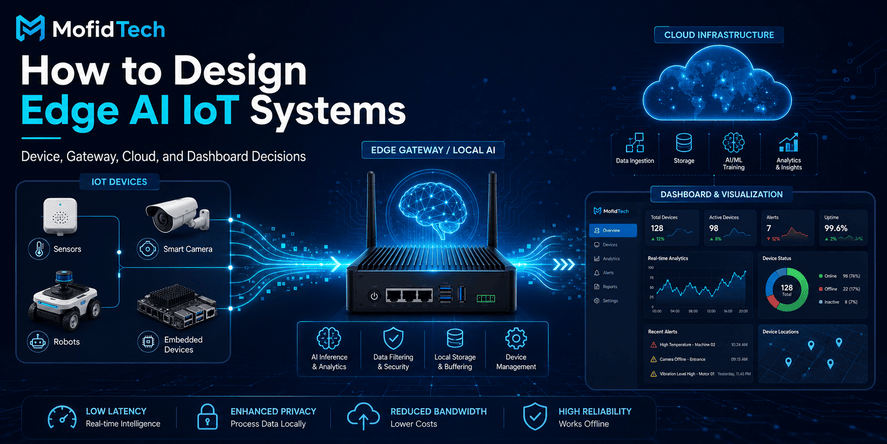
Edge AI IoT architecture is the way a connected smart system decides where data is collected, where intelligence runs, where decisions happen, and where results are stored or displayed. In a traditional IoT system, devices often send data to the cloud, and the cloud performs most processing. In an Edge AI IoT system, some intelligence moves closer to the physical world: inside sensors, embedded boards, industrial gateways, robots, cameras, or local edge servers.
The main design question is simple but important:
What should run on the device, what should run on the gateway, and what should stay in the cloud?
This question affects latency, privacy, bandwidth, reliability, energy consumption, cost, security, monitoring, and user experience. A poor architecture can create slow responses, expensive cloud bills, unstable dashboards, overloaded networks, insecure devices, and AI models that work in a demo but fail in production.
Edge AI is especially important for systems that interact with the real world: smart agriculture, industrial monitoring, predictive maintenance, robotics, smart buildings, healthcare devices, security cameras, energy systems, and connected vehicles. Modern Edge AI systems typically combine IoT devices, edge nodes, and cloud platforms so that data can be processed locally and selectively sent to the cloud when needed.
This guide explains how to design Edge AI IoT systems in a practical, production-oriented way. It focuses on architecture, trade-offs, workflows, security, monitoring, dashboards, common mistakes, and decision-making without using code or copy-paste technical snippets.
Table of Contents
- What Is Edge AI IoT Architecture?
- Why Edge AI Matters in Modern IoT Systems
- The Core Layers: Device, Gateway, Cloud, and Dashboard
- Device Layer Decisions
- Gateway Layer Decisions
- Cloud Layer Decisions
- Dashboard and User Experience Decisions
- Device vs Gateway vs Cloud: What Should Run Where?
- Data Flow in an Edge AI IoT System
- Real-World Use Cases
- Security Considerations
- Performance and Reliability Considerations
- Monitoring and Observability
- Cost and Scalability Considerations
- Common Mistakes
- Best Practices Checklist
- Troubleshooting Guide
- Comparison Tables
- FAQ
- Conclusion
What Is Edge AI IoT Architecture?
Edge AI IoT architecture is a system design approach where IoT devices collect data from the physical world, AI models analyze some of that data near the source, and cloud services handle storage, coordination, large-scale analytics, dashboards, and long-term optimization.
In simpler terms, Edge AI IoT architecture combines three ideas:
- IoT: Devices, sensors, actuators, machines, cameras, and controllers connected to a network.
- Edge computing: Processing data close to where it is generated instead of sending everything to a distant cloud.
- Artificial intelligence: Using machine learning or AI models to detect patterns, classify events, predict failures, recognize objects, or automate decisions.
The goal is not to replace the cloud completely. The goal is to use the right layer for the right task. A good Edge AI IoT architecture uses local processing when speed, privacy, reliability, or bandwidth matters, and uses the cloud when storage, global coordination, dashboards, advanced analytics, or long-term learning is needed.
Why Edge AI Matters in Modern IoT Systems
Edge AI matters because many IoT systems cannot depend only on remote cloud processing. A smart factory machine may need to stop immediately when vibration indicates danger. A robot may need local perception to avoid obstacles. A camera may need to detect events without streaming all video to the cloud. A remote agriculture sensor may need to save battery and send only meaningful alerts.
The movement toward Edge AI is also connected to the growth of real-time AI inference. AI inference often needs fast, localized decision-making, which makes edge computing a complement to cloud infrastructure rather than a replacement.
The main benefits are:
- Lower latency: Decisions can happen closer to the device.
- Reduced bandwidth: Raw data does not always need to be sent to the cloud.
- Improved privacy: Sensitive data can be processed locally.
- Better reliability: Some functions continue working when internet connectivity is weak.
- Lower cloud dependency: Cloud resources are used more selectively.
- More practical automation: Devices can respond to real-world events faster.
- Better scalability: Local filtering reduces unnecessary data volume.
However, Edge AI also introduces new challenges. Distributed devices are harder to update, monitor, secure, and troubleshoot than centralized cloud systems. Research on TinyMLOps highlights that operational challenges such as monitoring, management, model integrity, and distributed deployment are major issues for edge AI adoption.
The Core Layers of an Edge AI IoT System
A practical Edge AI IoT system usually includes four main layers:
| Layer | Main Role | Typical Responsibilities |
|---|---|---|
| Device Layer | Collect and sometimes process data locally | Sensing, actuation, simple filtering, local inference, safety actions |
| Gateway Layer | Coordinate local devices and edge processing | Aggregation, protocol translation, buffering, local analytics, security enforcement |
| Cloud Layer | Store, analyze, coordinate, and manage at scale | Long-term storage, dashboards, model management, user management, fleet management |
| Dashboard Layer | Present insights to users | Alerts, reports, device status, analytics, decisions, configuration views |
A weak architecture treats these layers as disconnected parts. A strong architecture designs them as one complete system.
Device Layer: Where the Physical World Enters the System
The device layer is where data begins. It includes sensors, microcontrollers, embedded boards, cameras, actuators, robots, machines, meters, and wearable devices. This layer interacts directly with the physical environment.
What the Device Layer Should Do
The device layer should handle tasks that are close to the physical signal. These tasks may include:
- Reading sensor values
- Detecting simple thresholds
- Filtering obvious noise
- Performing very lightweight inference
- Triggering immediate safety actions
- Sending structured data to a gateway or cloud service
- Preserving operation during temporary network loss
The device does not always need to be intelligent. In some systems, the device is simple and the gateway does most processing. In other systems, the device performs local AI inference because latency, privacy, or connectivity requires it.
When AI Should Run Directly on the Device
AI should run directly on the device when the system needs an immediate decision, when sending raw data is too expensive, or when privacy requires local processing.
Good examples include:
- A sensor detecting abnormal vibration in a machine
- A wearable identifying a safety event
- A smart camera detecting motion or objects locally
- A robot avoiding an obstacle
- A remote device that cannot depend on constant internet access
- A battery-powered system that sends only important events
Device-level AI is not always about complex intelligence. Sometimes the most valuable model is small, focused, and designed for one specific task.
Device Constraints
Devices are limited by hardware. Designers must consider:
- Processor capacity
- Memory
- Storage
- Battery life
- Sensor quality
- Connectivity options
- Environmental conditions
- Physical security
- Cost per unit
- Expected lifetime
- Update capability
A model that performs well on a laptop or cloud server may not be suitable for a small embedded device. The architecture must respect the device’s real limitations.
Gateway Layer: The Local Brain of Many IoT Systems
An IoT gateway connects devices to wider systems. It may collect data from many devices, translate protocols, apply local rules, run AI inference, buffer data during outages, and send selected information to the cloud.
IoT gateways help provide a reliable and secure flow of data between devices and cloud systems. They may also support encryption and access control between devices, users, and cloud services.
What the Gateway Layer Should Do
The gateway layer is useful when individual devices are too small, too numerous, or too limited to handle advanced logic alone. A gateway can act as a local coordination layer.
Typical gateway responsibilities include:
- Aggregating data from multiple devices
- Filtering duplicate or irrelevant data
- Performing local AI inference
- Translating between device protocols and cloud protocols
- Buffering data when the internet is unavailable
- Enforcing local security policies
- Managing local device communication
- Sending summarized data to the cloud
- Triggering local alerts
- Supporting local dashboards or maintenance screens
When AI Should Run on the Gateway
AI should run on the gateway when the model is too heavy for individual devices but still needs to operate close to the data source.
Gateway-level AI is useful when:
- Many sensors contribute to one decision
- The system needs local intelligence but devices are weak
- Internet connectivity is unreliable
- Raw data should not leave the local site
- Local staff need fast alerts
- The system needs protocol translation and processing together
- Several devices must be coordinated in real time
For example, an industrial gateway may collect vibration, temperature, pressure, and energy data from multiple machines. Instead of sending every raw reading to the cloud, it can detect anomalies locally and send only important events, summaries, and health indicators.
Gateway Benefits
A gateway can improve the architecture in several ways:
- It reduces cloud traffic.
- It improves response time.
- It makes local operation possible.
- It centralizes some security controls.
- It reduces the intelligence required on each small device.
- It creates a more manageable bridge between physical devices and cloud systems.
Cloud platforms also recognize this pattern. Microsoft’s Azure IoT Edge documentation describes how an edge hub can combine logical connections from modules or downstream devices into fewer physical cloud connections, helping reduce bandwidth usage.
Gateway Risks
The gateway can also become a critical point of failure. If the system depends too heavily on one gateway, a gateway problem may affect many devices.
To reduce this risk, designers should think about:
- Redundancy
- Local fallback behavior
- Health monitoring
- Secure updates
- Recovery procedures
- Device reconnection behavior
- Clear separation between safety-critical and non-critical functions
Cloud Layer: The System’s Long-Term Intelligence and Control Center
The cloud layer is still essential in most Edge AI IoT systems. Edge AI does not mean “no cloud.” It means the cloud is used more intelligently.
What the Cloud Layer Should Do
The cloud layer is best suited for:
- Long-term data storage
- Historical analytics
- Fleet management
- User management
- Access control
- Dashboard backends
- Reporting
- Model training
- Model version management
- Large-scale monitoring
- Business intelligence
- Integration with external systems
- System-wide configuration
- Cross-site comparisons
The cloud is also useful for tasks that are not latency-sensitive. A machine may need local anomaly detection, but long-term maintenance planning can happen in the cloud.
When Processing Should Stay in the Cloud
Cloud processing is the right choice when:
- The task requires large compute resources
- Data from many locations must be compared
- Long-term history matters
- The decision is not time-critical
- Users need centralized dashboards
- The system requires advanced analytics
- Models must be trained or evaluated at scale
- Multiple teams need shared access
Cloud systems are also easier to update and monitor than thousands of distributed devices. For this reason, the cloud often remains the best place for management, orchestration, analytics, and continuous improvement.
Dashboard Layer: Turning Edge Data into Human Decisions
A dashboard is not just a visual interface. In an IoT system, the dashboard is where users understand the state of the physical world.
A good dashboard answers practical questions:
- Which devices are online?
- Which sensors are reporting abnormal values?
- Which alerts require action?
- Which machines may fail soon?
- Which locations have weak connectivity?
- Which model version is running where?
- Which gateways need updates?
- Which events were handled locally?
- Which events were sent to the cloud?
- What should the operator do next?
Dashboard Design for Edge AI IoT
Dashboards for Edge AI IoT systems should show both device data and architecture health. It is not enough to show sensor values. The dashboard should also help users understand whether the edge system itself is working properly.
Important dashboard elements include:
- Device status
- Gateway status
- Connectivity quality
- Latest data timestamp
- Alert severity
- Local inference results
- Cloud synchronization status
- Model version
- Battery level when relevant
- Error history
- Maintenance recommendations
- Data quality indicators
Why Dashboards Must Show Confidence and Context
AI results should not be shown as mysterious decisions. Users need context.
For example, instead of only showing “machine failure predicted,” the dashboard should explain the supporting indicators in plain language. It may show that vibration increased, temperature changed, or operating behavior became abnormal. This helps operators trust and verify the result.
Device vs Gateway vs Cloud: What Should Run Where?
The most important Edge AI IoT architecture decision is workload placement.
| Task | Best Layer | Why |
|---|---|---|
| Sensor reading | Device | Data starts at the physical device |
| Emergency stop | Device or local controller | Requires immediate action |
| Simple threshold detection | Device | Low complexity and low latency |
| Local anomaly detection | Device or gateway | Depends on model size and sensor context |
| Multi-device analysis | Gateway | Needs data from several devices |
| Protocol translation | Gateway | Connects local devices to cloud systems |
| Long-term storage | Cloud | Better for history and scale |
| Model training | Cloud | Usually requires more compute and data |
| Fleet-wide reporting | Cloud | Needs centralized visibility |
| User dashboard | Cloud and dashboard layer | Requires access, visualization, and history |
| Offline operation | Device and gateway | Must work without constant cloud access |
| System-wide configuration | Cloud | Easier to manage centrally |
A Simple Decision Framework
Use this practical decision framework:
Run it on the device when:
- The action must happen immediately.
- The data is sensitive and should not leave the device.
- Connectivity is weak or expensive.
- The model is small enough.
- Battery and hardware limitations are acceptable.
- The decision depends only on local sensor data.
Run it on the gateway when:
- Several devices contribute to the decision.
- Devices are too weak for the AI workload.
- Local operation is required.
- Raw data should stay within the site.
- You need local buffering, protocol translation, or aggregation.
- You need a stronger local compute layer.
Run it in the cloud when:
- The task requires long-term storage.
- The decision is not time-critical.
- You need data from many sites.
- You need dashboards, reports, and user management.
- You need large-scale model training or evaluation.
- You need centralized configuration and fleet management.
Data Flow in an Edge AI IoT System
A well-designed Edge AI IoT data flow usually follows this pattern:
- The device collects physical data.
Sensors, cameras, or embedded systems capture information from the environment. - The device performs basic filtering or local inference.
The device may remove noise, detect simple events, or run a small AI model. - The gateway aggregates and enriches data.
It may combine information from multiple devices, add location or machine context, and decide what should be sent to the cloud. - The cloud stores and analyzes selected data.
The cloud receives meaningful events, summaries, alerts, and historical records. - The dashboard presents insights to users.
Users see alerts, trends, device health, model results, and recommendations. - The system sends configuration or model updates back.
Updates must be controlled, monitored, and reversible.
The best architecture avoids sending everything everywhere. It sends the right data to the right place at the right time.
Real-World Use Cases of Edge AI IoT Architecture
Smart Agriculture
In smart agriculture, sensors may monitor soil moisture, temperature, humidity, sunlight, water flow, and plant conditions. Edge AI can help detect irrigation needs, abnormal environmental patterns, or equipment problems.
A device may read local sensor data. A gateway may combine several field sensors. The cloud may provide long-term analytics, crop reports, and farm dashboards.
Edge processing is valuable because farms may have weak connectivity, large physical areas, and devices powered by batteries or solar energy.
Industrial Monitoring
Factories and industrial sites often use sensors to monitor vibration, temperature, pressure, current, sound, and machine behavior. Edge AI can detect early signs of machine failure.
In this use case, the gateway is often important because several sensors may contribute to one maintenance decision. The cloud remains useful for historical analytics, maintenance planning, and reporting across multiple facilities.
Predictive Maintenance
Predictive maintenance uses data to detect signs that equipment may fail soon. Edge AI is useful when immediate detection matters or when sending raw machine data continuously would be expensive.
A strong architecture may use local anomaly detection at the gateway and cloud-based analysis for long-term maintenance trends.
Smart Buildings
Smart buildings use IoT systems for energy management, air quality, lighting, occupancy, access control, and safety. Edge AI can help detect occupancy patterns, optimize energy use, and identify abnormal conditions.
The gateway can coordinate many devices in the building, while the cloud provides dashboards and building-wide reporting.
Robotics
Robots need fast perception and control. They cannot wait for a distant cloud service to decide every movement. Edge AI helps robots detect objects, avoid obstacles, interpret sensor data, and make local decisions.
The cloud may still help with fleet management, long-term learning, remote monitoring, and analytics.
Healthcare and Safety Monitoring
Healthcare and safety-related IoT systems may involve sensitive data and time-critical alerts. Edge AI can reduce the need to transmit raw sensitive information and can support faster local alerts.
However, these systems require careful attention to privacy, security, reliability, and regulatory expectations.
Smart Retail and Logistics
Edge AI can support inventory tracking, shelf monitoring, customer flow analysis, asset tracking, and warehouse automation. Processing locally can reduce bandwidth and improve response time while the cloud coordinates reporting across stores or warehouses.
Security Considerations for Edge AI IoT Systems
Security must be designed into the architecture from the beginning. IoT devices are often deployed in uncontrolled environments, connected to networks, and expected to run for years. Edge AI adds extra concerns because models, local decisions, and data pipelines must also be protected.
NIST’s IoT cybersecurity program focuses on standards, guidelines, and tools that improve the cybersecurity of IoT systems and connected products. NIST also defines a device cybersecurity capability core baseline, describing device capabilities generally needed to support common cybersecurity controls for devices, data, systems, and ecosystems.
Device Identity
Every device should have a clear identity. The system must know which device is communicating, where it belongs, what permissions it has, and whether it is trusted.
Weak identity creates serious risk. Attackers may impersonate devices, inject false data, or access systems that should be protected.
Secure Communication
Data moving between devices, gateways, cloud services, and dashboards should be protected. This includes sensor data, alerts, configuration updates, model updates, and user actions.
The architecture should prevent unauthorized access, tampering, and accidental data exposure.
Update Security
Edge AI IoT systems need a safe update strategy. Devices and gateways may need firmware updates, software updates, AI model updates, rule changes, and security patches.
A safe update process should answer:
- Who is allowed to release updates?
- How are updates verified?
- Can updates be rolled back?
- What happens if an update fails?
- How are devices updated in remote locations?
- How do operators know which version is running?
Model Protection
AI models deployed at the edge may contain intellectual property or sensitive learned behavior. Attackers may try to extract, modify, or replace models.
Model protection should consider:
- Model integrity
- Version control
- Access control
- Tamper detection
- Secure deployment
- Monitoring for abnormal model behavior
Local Attack Surface
Edge devices and gateways may be physically accessible. This makes them different from cloud servers protected inside data centers.
Designers should consider:
- Physical tampering
- Local network attacks
- Unauthorized maintenance access
- Weak default credentials
- Exposed debug interfaces
- Insecure local dashboards
- Unprotected storage
Security Monitoring
Security monitoring should not stop at the cloud. Edge systems need visibility into device behavior, gateway health, unusual traffic, failed authentication, unexpected restarts, and suspicious data patterns.
Performance Considerations
Performance in Edge AI IoT systems is not only about speed. It includes latency, data quality, model efficiency, battery life, connectivity, synchronization, and dashboard responsiveness.
Latency
Latency is the time between an event and the system’s response. If a machine is overheating, a robot is moving, or a safety event is happening, latency matters.
Low-latency decisions should happen locally. Less urgent analytics can happen in the cloud.
Bandwidth
IoT systems can generate large volumes of data, especially with cameras, audio, vibration, and high-frequency industrial sensors. Sending everything to the cloud may be expensive or impractical.
Edge processing can reduce bandwidth by sending:
- Events instead of raw streams
- Summaries instead of every measurement
- Anomalies instead of normal data
- Compressed insights instead of full sensor history
- Periodic reports instead of continuous transmission
Energy Consumption
Battery-powered devices need careful design. Running AI models locally may consume energy, but sending data continuously can also consume energy. The best design depends on the device, radio technology, data frequency, and model complexity.
Model Size and Efficiency
Edge AI models must match the hardware. A model that is too large may cause slow inference, overheating, memory problems, or poor battery life.
The goal is not to deploy the biggest model. The goal is to deploy the most suitable model for the task.
Data Quality
AI models depend on data quality. Poor sensor placement, noisy readings, missing values, calibration problems, or environmental interference can damage model performance.
Good architecture includes data validation and quality indicators.
Reliability and Offline Behavior
A production Edge AI IoT system must expect failures. Networks fail. Devices restart. Gateways lose power. Sensors drift. Cloud services may become temporarily unavailable. Updates may fail. Storage may fill up.
The architecture should define what happens when each layer has a problem.
Offline Operation
Some systems must continue working without internet access. In these systems, the device and gateway should support local operation.
Examples include:
- Industrial safety systems
- Remote agriculture
- Robotics
- Smart buildings
- Field monitoring
- Transportation systems
Offline operation should define:
- Which decisions continue locally
- Which data is buffered
- How long data can be stored locally
- What happens when storage is full
- How synchronization resumes
- How conflicts are handled
Fallback Behavior
Fallback behavior is the system’s safe mode when something goes wrong.
A fallback may include:
- Using simple rules instead of AI
- Reducing data frequency
- Keeping local alerts active
- Disabling non-critical features
- Switching to a safer operating mode
- Notifying operators
- Preserving critical logs
Fallback design is essential because AI models and networks are not perfect.
Monitoring and Observability
Observability means understanding what is happening inside the system. In Edge AI IoT, observability is harder because the system is distributed across many devices, gateways, cloud services, and dashboards.
A good monitoring strategy should answer:
- Are devices online?
- Are gateways healthy?
- Is data arriving on time?
- Are AI models producing expected results?
- Are alerts being triggered correctly?
- Are updates successful?
- Are devices using too much energy?
- Are networks unstable?
- Are sensors producing abnormal data?
- Are users seeing accurate dashboard information?
What to Monitor at the Device Layer
Important device metrics include:
- Online or offline status
- Battery level
- Sensor health
- Last communication time
- Local storage usage
- Restart frequency
- Local inference status
- Firmware or software version
- Error count
- Signal strength when relevant
What to Monitor at the Gateway Layer
Important gateway metrics include:
- Connected device count
- Data processing delay
- Buffer size
- Cloud synchronization status
- Local storage usage
- CPU and memory usage
- Model version
- Failed connections
- Security events
- Update status
What to Monitor at the Cloud Layer
Important cloud metrics include:
- Data ingestion volume
- Processing delays
- Alert delivery time
- Dashboard response time
- Device fleet status
- User access activity
- Storage growth
- Model deployment status
- Failed synchronization
- Cost indicators
What to Monitor at the AI Layer
AI monitoring should include:
- Model version
- Prediction frequency
- Confidence distribution
- Unexpected output patterns
- Drift indicators
- False alert feedback
- Missed event feedback
- Performance by device type or location
EdgeMLOps research highlights the importance of deployment, lifecycle management, optimization, and operational monitoring for machine learning models on resource-constrained edge devices.
Cost and Scalability Considerations
Edge AI IoT costs are not limited to hardware. A complete cost model includes devices, gateways, cloud services, connectivity, storage, monitoring, maintenance, updates, support, security, and human operations.
Main Cost Factors
| Cost Area | What to Consider |
|---|---|
| Device hardware | Sensor quality, compute capacity, memory, power, enclosure |
| Gateway hardware | Processing power, industrial durability, storage, connectivity |
| Connectivity | Cellular, Wi-Fi, Ethernet, satellite, low-power networks |
| Cloud storage | Raw data, processed data, logs, historical analytics |
| Cloud processing | Analytics, model management, dashboards, alerts |
| Maintenance | Field visits, replacements, calibration, support |
| Security | Identity, monitoring, updates, compliance |
| Operations | Staff training, incident response, documentation |
How Edge AI Can Reduce Costs
Edge AI can reduce cost by lowering data transfer, reducing cloud processing, preventing failures earlier, and making local decisions without constant cloud communication.
However, it can also increase cost if the architecture is too complex, hardware is oversized, updates are difficult, or monitoring is weak.
The best cost strategy is balance. Put intelligence where it creates measurable value.
Common Mistakes in Edge AI IoT Architecture
Mistake 1: Sending Too Much Raw Data to the Cloud
Sending all raw data to the cloud is simple at first, but it may become expensive and slow. It can also create privacy and bandwidth problems.
A better approach is to process data near the source and send meaningful events, summaries, and selected raw data when needed.
Mistake 2: Putting Too Much Intelligence on Weak Devices
Some teams try to run advanced AI directly on devices that are not designed for it. This can cause slow performance, overheating, memory issues, unstable behavior, or poor battery life.
The model must match the hardware.
Mistake 3: Ignoring the Gateway
A gateway can simplify many IoT systems, especially when devices are limited. Ignoring the gateway may force every device to handle too much complexity or send too much data directly to the cloud.
Mistake 4: Treating the Cloud as Optional
Edge AI does not eliminate the need for cloud services. Most production systems still need cloud-based storage, dashboards, user management, reporting, model lifecycle management, and fleet visibility.
Mistake 5: Forgetting Updates
A system that cannot be updated safely becomes risky over time. Updates are necessary for security, performance, model improvement, and bug fixes.
Mistake 6: Building a Demo Instead of a Production System
A demo may work with one device, one clean network, and one simple dashboard. Production systems require monitoring, security, recovery, scaling, maintenance, and operational procedures.
Mistake 7: Ignoring Data Quality
AI cannot fix bad sensor data automatically. Poor calibration, bad placement, noisy signals, or missing data can produce unreliable decisions.
Mistake 8: Hiding AI Decisions from Users
Users need context. A dashboard that shows AI results without explanation may reduce trust and make troubleshooting difficult.
Best Practices for Edge AI IoT Architecture
Start with the Decision, Not the Technology
Before choosing hardware, cloud services, or AI models, define the decisions the system must make.
Ask:
- What event must be detected?
- How quickly must the system respond?
- Who needs the result?
- What happens if the system is wrong?
- What happens if the internet is unavailable?
- What data is sensitive?
- What must be stored long-term?
Design Around Latency Requirements
Classify decisions by urgency:
| Decision Type | Recommended Layer |
|---|---|
| Immediate safety action | Device or local controller |
| Fast local alert | Device or gateway |
| Site-level operational decision | Gateway |
| Historical analysis | Cloud |
| Business reporting | Cloud |
| Long-term optimization | Cloud |
Keep the Device Simple When Possible
Small devices should be reliable. Do not overload them with unnecessary responsibilities.
A good device should:
- Collect accurate data
- Handle essential local logic
- Communicate reliably
- Recover from failure
- Support secure updates
- Provide health status
Use the Gateway as a Practical Middle Layer
The gateway is often the best place for moderate intelligence. It has more resources than devices but remains close to the physical environment.
Keep the Cloud for Scale and Coordination
The cloud should manage the whole system: users, dashboards, history, fleet health, analytics, and model lifecycle.
Make Monitoring a First-Class Requirement
Monitoring should be designed from the beginning, not added after deployment. A system that cannot be observed cannot be trusted.
Plan for Updates Early
Updates are part of the product, not an afterthought. The architecture should support safe, controlled, trackable updates.
Protect the Whole Data Path
Security should cover device identity, gateway communication, cloud access, dashboard authentication, model integrity, and update channels.
Edge AI IoT Architecture Checklist
Device Checklist
- The device has a clear purpose.
- Sensor data quality is validated.
- Local processing matches hardware capacity.
- Power consumption is acceptable.
- The device can recover after restart.
- The device has a secure identity.
- Updates can be managed safely.
- The device reports health status.
- Sensitive data is protected.
- Physical deployment conditions are considered.
Gateway Checklist
- The gateway has enough processing capacity.
- It can aggregate data from multiple devices.
- It can buffer data during outages.
- It can perform local rules or inference when needed.
- It supports secure communication.
- It reports health and error status.
- It has a safe update process.
- It does not become an unmanaged single point of failure.
- It can reconnect devices after network disruption.
- It supports local troubleshooting.
Cloud Checklist
- The cloud stores the right data, not unnecessary raw data.
- Dashboards are responsive and useful.
- Users and permissions are managed securely.
- Long-term analytics are supported.
- Device fleet status is visible.
- Alerts are delivered reliably.
- Model versions are tracked.
- Cloud costs are monitored.
- Data retention is defined.
- Integrations are documented.
AI Checklist
- The model solves a clear problem.
- The model fits the selected layer.
- The model is monitored after deployment.
- Model versions are tracked.
- False positives and false negatives are reviewed.
- Users understand the model output.
- Model drift is considered.
- The system can roll back a bad model.
- Sensitive training or inference data is protected.
- AI decisions are not treated as perfect.
Security Checklist
- Every device has a trusted identity.
- Communication is protected.
- Default credentials are avoided.
- Access is limited by role.
- Updates are verified.
- Logs capture important security events.
- Gateways are protected.
- Physical access risk is considered.
- Sensitive data is minimized.
- Incident response procedures exist.
Troubleshooting Edge AI IoT Systems
Problem: The Dashboard Shows Old Data
Possible causes include weak connectivity, gateway buffering problems, device sleep cycles, cloud ingestion delays, or dashboard caching.
A good troubleshooting process checks the data path layer by layer: device, gateway, cloud, dashboard. The goal is to find where the data stopped moving.
Problem: AI Alerts Are Too Frequent
Frequent alerts may mean the model is too sensitive, the sensor is noisy, thresholds are poorly tuned, or the environment changed.
The solution is not always to disable alerts. Review the data quality, operating context, model confidence, and feedback from users.
Problem: Devices Work in Testing but Fail in the Field
Field environments are different from labs. Temperature, humidity, power instability, weak networks, physical vibration, dust, and user behavior can affect reliability.
Production testing should include realistic conditions.
Problem: Cloud Costs Grow Too Quickly
Cloud costs may increase when the system sends too much raw data, stores unnecessary history, keeps excessive logs, or processes data that could be filtered locally.
Review what data is sent, how often it is sent, how long it is stored, and whether edge filtering can reduce volume.
Problem: Updates Break Devices
Update failures may happen when devices have different hardware versions, unstable connectivity, insufficient storage, or weak rollback procedures.
A safe update strategy should include staged rollout, health checks, rollback planning, and version visibility.
Problem: The Gateway Becomes a Bottleneck
A gateway may become overloaded if too many devices connect, data frequency is too high, AI models are too heavy, or local storage is insufficient.
The solution may involve load balancing, reducing data frequency, using multiple gateways, optimizing local processing, or moving some tasks to devices or cloud services.
Comparison: Cloud-Only IoT vs Edge AI IoT
| Criteria | Cloud-Only IoT | Edge AI IoT |
|---|---|---|
| Latency | Higher for real-time actions | Lower for local decisions |
| Bandwidth usage | Often higher | Often lower |
| Privacy | More raw data may leave the site | More data can stay local |
| Offline behavior | Limited | Stronger if designed well |
| Device complexity | Lower | May be higher |
| Gateway importance | Optional or simple | Often important |
| Cloud dependency | High | Balanced |
| Monitoring complexity | Lower | Higher |
| Update complexity | Lower for cloud, harder for devices | Requires strong lifecycle planning |
| Best for | Centralized analytics and simple sensors | Real-time, privacy-sensitive, distributed systems |
Comparison: Device AI vs Gateway AI vs Cloud AI
| Factor | Device AI | Gateway AI | Cloud AI |
|---|---|---|---|
| Best for | Immediate local decisions | Site-level intelligence | Large-scale analytics |
| Hardware power | Limited | Moderate to strong | Strong |
| Latency | Very low | Low | Higher |
| Privacy | Strong local control | Strong site-level control | Depends on data transfer |
| Maintenance | Harder at scale | Easier than many devices | Easiest centrally |
| Model size | Small | Medium | Large |
| Offline support | Strong | Strong | Weak without edge layers |
| Cost risk | Hardware and battery | Gateway capacity | Compute and storage |
| Example | Wearable alert | Factory anomaly detection | Fleet-wide reporting |
Practical Architecture Patterns
Pattern 1: Simple Device-to-Cloud IoT
This pattern works when devices collect simple data and decisions are not time-critical.
Best for:
- Basic environmental monitoring
- Simple dashboards
- Low-frequency sensor data
- Non-critical reporting
Limitations:
- Weak offline behavior
- Higher cloud dependency
- Less suitable for real-time AI
Pattern 2: Device with Local Intelligence
This pattern works when the device must make quick local decisions.
Best for:
- Wearables
- Smart cameras
- Robotics
- Safety sensors
- Remote monitoring
Limitations:
- Hardware constraints
- More difficult updates
- Limited model size
Pattern 3: Gateway-Centered Edge AI
This pattern works when many devices send data to a local gateway that performs intelligence and filtering.
Best for:
- Factories
- Smart buildings
- Agriculture
- Energy monitoring
- Industrial sites
Limitations:
- Gateway must be reliable
- Gateway failure can affect many devices
- Requires careful monitoring
Pattern 4: Hybrid Edge-Cloud AI
This is often the strongest production pattern. Devices and gateways handle local intelligence, while the cloud handles long-term analytics, dashboards, coordination, and model lifecycle management.
Best for:
- Scalable smart systems
- Multi-site deployments
- Predictive maintenance
- Robotics fleets
- Smart infrastructure
Limitations:
- More complex design
- Requires strong observability
- Requires clear data governance
How to Choose the Right Architecture
Use these questions before designing your system:
- Does the system need real-time response?
- What happens if internet connectivity fails?
- Is raw data sensitive?
- How much data does each device generate?
- How many devices will be deployed?
- What is the power source?
- Can the device run AI locally?
- Does the decision require data from multiple devices?
- How will models be updated?
- How will operators monitor the system?
- How long must data be stored?
- What alerts must be delivered immediately?
- Who is responsible for maintenance?
- What is the acceptable failure mode?
- What is the total cost at scale?
A strong architecture comes from answering these questions honestly.
Security-by-Design Recommendations
Security should be integrated into every layer.
At the Device Layer
- Use trusted device identity.
- Avoid default or shared credentials.
- Protect local data.
- Limit unnecessary access.
- Support secure updates.
- Log important events.
- Plan for physical exposure.
At the Gateway Layer
- Authenticate connected devices.
- Segment local networks when needed.
- Protect local dashboards.
- Monitor abnormal traffic.
- Control administrative access.
- Keep update procedures safe.
- Treat the gateway as critical infrastructure.
At the Cloud Layer
- Use strong user access control.
- Separate roles and permissions.
- Protect stored data.
- Monitor suspicious activity.
- Track model and configuration changes.
- Keep audit history.
- Define data retention policies.
At the Dashboard Layer
- Show only the data users are allowed to see.
- Make alerts clear and actionable.
- Avoid exposing sensitive technical details to unauthorized users.
- Log important user actions.
- Use role-based access for operators, administrators, and managers.
Performance-by-Design Recommendations
Reduce Data Before Sending It
Do not treat the cloud as a dumping ground. Filter, summarize, and classify data before transmission when possible.
Separate Critical and Non-Critical Workloads
Safety-critical decisions should not depend on slow dashboards or distant cloud processing.
Match AI Model Complexity to Hardware
A smaller reliable model is often better than a larger model that is slow, unstable, or difficult to maintain.
Design for Network Instability
Assume devices will disconnect. Design buffering, retry behavior, local operation, and synchronization accordingly.
Use Dashboards for Action, Not Decoration
Dashboards should help users make decisions. Avoid charts that look impressive but do not support action.
AI Search-Friendly Summary
Edge AI IoT architecture is a distributed system design where IoT devices collect data, edge devices or gateways process some data locally using AI, and cloud platforms handle storage, dashboards, analytics, model management, and fleet coordination. The device layer is best for immediate local actions, the gateway layer is best for local aggregation and site-level intelligence, and the cloud layer is best for long-term analysis and centralized management. A good architecture balances latency, privacy, bandwidth, reliability, energy use, security, cost, monitoring, and scalability.
AQ About Edge AI IoT Architecture
1. What is Edge AI in IoT?
Edge AI in IoT means running artificial intelligence close to where data is generated, such as on a sensor device, embedded board, camera, robot, gateway, or local edge server. Instead of sending all raw data to the cloud, the system processes some data locally and sends selected results or summaries.
2. Is Edge AI better than cloud AI?
Edge AI is not always better than cloud AI. It is better for low-latency decisions, privacy-sensitive data, weak connectivity, and bandwidth reduction. Cloud AI is better for large-scale training, long-term analytics, centralized dashboards, and fleet-wide optimization. Most strong systems use both.
3. What is the role of an IoT gateway?
An IoT gateway connects local devices to cloud systems and often handles data aggregation, filtering, protocol translation, buffering, local analytics, security enforcement, and local AI inference. It acts as a practical middle layer between small devices and large cloud platforms.
4. Should AI run on the device, gateway, or cloud?
AI should run on the device when immediate local decisions are required. It should run on the gateway when decisions need data from multiple devices or when devices are too limited. It should run in the cloud when the task requires large compute resources, long-term history, centralized dashboards, or data from many locations.
5. Can small IoT devices run AI models?
Yes, some small IoT devices can run lightweight AI models, especially for focused tasks such as anomaly detection, simple classification, motion detection, or pattern recognition. However, the model must match the device’s processor, memory, power, and storage limitations.
6. How does Edge AI improve privacy?
Edge AI can improve privacy by processing sensitive data locally and sending only results, alerts, or summaries to the cloud. For example, a camera may detect an event locally without continuously streaming raw video.
7. What are the biggest risks of Edge AI IoT?
The biggest risks include insecure devices, difficult updates, poor monitoring, weak model management, unreliable connectivity, hardware limitations, physical tampering, bad data quality, and unclear fallback behavior when AI or networks fail.
8. How do you monitor an Edge AI IoT system?
Monitor device health, gateway status, connectivity, data freshness, battery level, model version, prediction behavior, alert delivery, cloud synchronization, update status, and security events. Monitoring must cover the full path from the physical device to the dashboard.
9. Why is the gateway important in Edge AI IoT?
The gateway is important because it can aggregate data from multiple devices, run local intelligence, reduce bandwidth, buffer data during outages, enforce local security, and simplify communication between device networks and cloud platforms.
10. What is the difference between Edge AI and TinyML?
TinyML usually refers to machine learning on very small, resource-constrained devices such as microcontrollers. Edge AI is broader. It includes TinyML but also includes AI running on gateways, edge servers, smart cameras, industrial computers, and local infrastructure.
11. Does Edge AI reduce cloud costs?
Edge AI can reduce cloud costs by sending less raw data, reducing cloud processing, and keeping some decisions local. However, it can also increase hardware, maintenance, and monitoring costs. The total cost depends on architecture quality and deployment scale.
12. What should developers learn before building Edge AI IoT systems?
Developers should understand IoT basics, sensors, embedded constraints, networking, edge computing, cloud architecture, AI inference, data pipelines, security, monitoring, dashboards, and system design trade-offs.
Conclusion
Edge AI IoT architecture is not only about placing AI models on devices. It is about designing a complete smart system that connects the physical world to local intelligence, cloud platforms, and useful dashboards.
The most important architectural decision is where each responsibility belongs. Devices are best for sensing and immediate local actions. Gateways are best for aggregation, local intelligence, filtering, and offline resilience. Cloud platforms are best for long-term storage, dashboards, analytics, user management, and fleet coordination.
A successful Edge AI IoT system balances latency, privacy, bandwidth, reliability, security, cost, energy consumption, monitoring, and scalability. It also plans for real-world problems: weak networks, noisy sensors, failed updates, hardware limits, user confusion, and security threats.
For MofidTech readers, this topic is especially valuable because it connects artificial intelligence, IoT, embedded systems, cloud computing, cybersecurity, software architecture, and smart systems. It is a strong foundation for future articles about IoT dashboards, robotics systems, predictive maintenance, AI model deployment, secure device updates, and smart monitoring platforms.










💬 Comments
No comments yet. Be the first to comment!
Login to comment.