Introduction
Artificial intelligence applications are no longer simple chat boxes that answer isolated questions. Modern AI systems are becoming assistants, copilots, search engines, workflow automators, support agents, coding helpers, business analysts, and internal productivity tools. These systems do not only need a powerful model. They need the right information, the right permissions, the right workflow state, and the right boundaries at the right moment.
That is the purpose of context engineering.
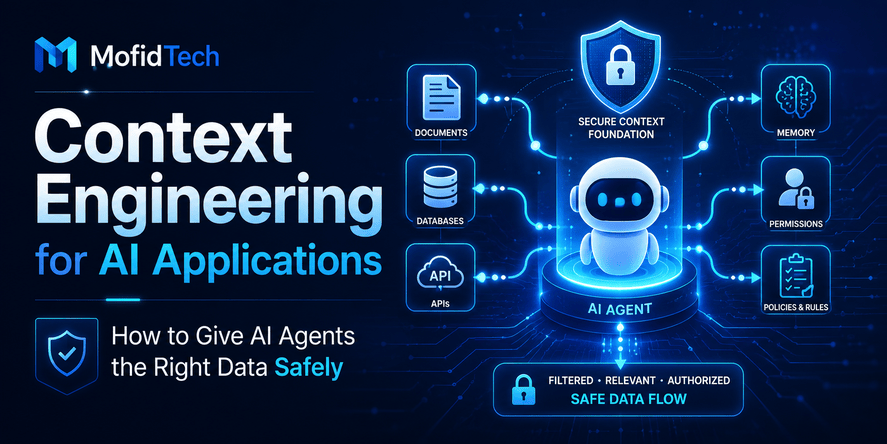
Context engineering is the practice of designing, selecting, organizing, protecting, and continuously improving the information an AI system receives before it answers a question or performs an action. It includes prompts, documents, user data, memory, permissions, tool results, application state, retrieved knowledge, previous conversation history, and security rules.
For developers, context engineering is becoming one of the most important skills in AI application development. Anthropic describes context engineering as a natural progression from prompt engineering, where developers move beyond writing better instructions and start designing the full information environment available to the model. LangChain describes context engineering for agents as the discipline of filling the context window with the right information at each step of an agent’s trajectory.
This matters because AI agents are only useful when they understand the task, the user, the available data, and the limits of what they are allowed to do. Without good context engineering, an AI application may give vague answers, expose sensitive information, misunderstand user intent, retrieve irrelevant documents, call the wrong tools, or take unsafe actions.
In other words, the quality of an AI application depends not only on the model, but also on the context architecture around the model.
This article explains context engineering in a practical, no-code way for developers and technical readers. It covers what context engineering means, how it differs from prompt engineering and RAG, how AI agents use context, what risks developers must consider, and how to design safer, more reliable AI applications.
Table of Contents
- What Is Context Engineering?
- Why Context Matters More Than the Model Alone
- Context Engineering vs Prompt Engineering vs RAG
- The Main Types of Context in AI Applications
- How AI Agents Use Context
- How to Design a Context Layer for an AI Application
- Security Risks in Context Engineering
- Context Engineering for RAG Systems
- Context Engineering for AI Agents
- Real-World Use Cases
- Best Practices for Developers
- Common Mistakes to Avoid
- Performance and Cost Considerations
- Troubleshooting Poor AI Answers
- Context Engineering Checklist
- Future of Context Engineering
- FAQ
- Conclusion
What Is Context Engineering?
Context engineering is the process of giving an AI system the right information, instructions, memory, data, permissions, and workflow state so it can produce useful, safe, and reliable results.
A simple AI prompt asks a model to respond to a user request. A context-engineered AI application goes further. It decides what the model needs to know, what it should not see, what data is trustworthy, what tools it can use, what permissions apply, what previous events matter, and how much information should be included.
In a real AI application, context can include:
| Context Type | Meaning |
|---|---|
| System instructions | The rules that define how the AI should behave |
| User request | What the user is asking right now |
| User profile | Relevant preferences, role, language, access rights, or history |
| Business data | Internal records, documents, products, policies, tickets, or reports |
| Retrieved knowledge | Information pulled from a knowledge base or search index |
| Tool outputs | Results from connected systems, applications, or APIs |
| Memory | Useful information remembered from earlier interactions |
| Security rules | Permissions, restrictions, access levels, and sensitive data controls |
| Workflow state | The current step in a process, task, or multi-step operation |
A model without context is like a talented employee with no access to the company system, no understanding of the customer, and no idea what task they are currently doing. A model with too much context is also dangerous because it may be overwhelmed, confused, expensive to run, or exposed to sensitive data it does not need.
Good context engineering is about balance. It gives the model enough information to be useful, but not so much information that the system becomes unreliable, expensive, or unsafe.
Why Context Matters More Than the Model Alone
Many developers assume that AI application quality depends mostly on choosing the strongest model. The model matters, but it is not enough.
A powerful model with poor context can still fail. It may answer based on incomplete information, misunderstand the user’s situation, or invent missing details. A smaller model with well-designed context can often perform better for a specific workflow because it receives clearer instructions, better grounding, and more relevant data.
This is especially important for AI agents. Microsoft’s recent agent-focused announcements emphasized the importance of grounding AI agents in enterprise data, workspace context, and user-controlled environments. The direction is clear: the future of AI applications is not only about bigger models, but also about better context.
Context Improves Accuracy
AI systems are more accurate when they are grounded in relevant information. For example, a customer support assistant should not guess refund rules. It should receive the correct policy, the customer’s order state, the user’s permissions, and the current workflow step.
Without that context, the model may produce a polite but wrong answer.
Context Reduces Hallucination
Hallucination happens when an AI system gives an answer that sounds confident but is not grounded in reliable information. Context engineering reduces this risk by giving the system verified knowledge and clear boundaries.
However, context does not automatically eliminate hallucination. The system must still evaluate which context is trusted, current, relevant, and allowed for the user.
Context Improves Personalization
A technical documentation assistant can answer more effectively when it knows whether the user is a beginner, a backend developer, a DevOps engineer, or a project manager. A learning assistant can adapt explanations based on the user’s level. A productivity agent can prioritize tasks based on the user’s role and workflow.
Personalization is useful, but it must be handled carefully. The AI should only use personal data when it is relevant, permitted, and beneficial.
Context Makes AI Agents Safer
AI agents can perform multi-step tasks. They may read documents, summarize content, call tools, update records, prepare emails, schedule meetings, or analyze data. This makes context safety critical.
If an agent receives the wrong context, it may take the wrong action. If it receives too much sensitive context, it may expose private information. If it reads untrusted documents without protection, it may be manipulated by prompt injection. OWASP identifies prompt injection as a major LLM application risk because crafted inputs can manipulate model behavior, cause unauthorized access, expose data, or compromise decision-making.
Context Engineering vs Prompt Engineering vs RAG
Many people confuse context engineering with prompt engineering or RAG. They are related, but they are not the same.
Prompt Engineering
Prompt engineering focuses on writing better instructions for the model. It asks questions such as:
| Prompt Engineering Question | Example |
|---|---|
| How should the instruction be written? | Use a clear role and task description |
| What tone should the model use? | Professional, concise, friendly, technical |
| What format should the answer follow? | Summary, table, checklist, explanation |
| What constraints should the model respect? | Avoid speculation, ask for missing details, cite sources |
Prompt engineering is important, but it is only one part of the system.
RAG
RAG means retrieval-augmented generation. It allows an AI system to retrieve external knowledge before generating an answer. The system may search documents, articles, manuals, policies, internal files, or a database of knowledge.
RAG helps when the model needs information that is not inside its training data or that changes over time.
However, RAG alone does not solve every problem. A RAG system still needs to know which documents to retrieve, how to rank them, which user is allowed to see them, how to handle outdated information, and how to prevent malicious content from influencing the model.
Context Engineering
Context engineering is broader. It includes prompt design and retrieval, but also covers permissions, memory, workflow state, tool access, relevance filtering, security boundaries, observability, evaluation, and continuous improvement.
| Concept | Main Focus | Limitation |
|---|---|---|
| Prompt engineering | Better instructions | Does not manage the full information environment |
| RAG | Retrieve external knowledge | Does not automatically solve permissions, safety, or workflow design |
| Context engineering | Design the complete context system | Requires architecture, testing, and governance |
A simple way to understand the difference:
Prompt engineering tells the model what to do. RAG gives the model knowledge. Context engineering decides what the model should see, remember, trust, ignore, and be allowed to use.
The Main Types of Context in AI Applications
A strong AI application usually combines several types of context. Developers should understand each type because each one has different risks and design decisions.
User Context
User context includes information about the person using the system. This may include their role, language preference, access level, organization, subscription plan, learning level, or previous interactions.
User context helps the AI answer more accurately. For example, an AI assistant for a technical website may explain Docker differently to a beginner than to a DevOps engineer.
However, user context must be limited. The AI does not need every detail about the user. It only needs information that is relevant to the current task.
Task Context
Task context describes what the user is trying to accomplish. It includes the goal, constraints, current step, expected result, and any deadline or priority.
For example, “summarize this report for a manager” requires different context than “analyze this report for a technical audit.” The source document may be the same, but the task context changes the answer.
Application Context
Application context includes information about the software environment. For example, an AI assistant inside a project management tool may need to know which project is open, which ticket is selected, which team is involved, and what workflow stage the task is in.
This is important for AI features embedded inside existing applications. Without application context, the AI may give generic advice instead of useful in-product assistance.
Business Context
Business context includes company policies, product information, customer data, internal procedures, pricing rules, documentation, legal terms, and operational knowledge.
Business context must be carefully controlled because it may include sensitive or confidential information.
Knowledge Context
Knowledge context comes from external or internal documents. It may include documentation pages, PDFs, FAQs, research papers, help center articles, policy documents, or knowledge base entries.
This is the type of context most commonly used in RAG systems.
Tool Context
Tool context tells the AI which tools are available and what those tools can do. An AI agent may have access to search, email, calendar, file systems, databases, analytics dashboards, ticketing systems, or internal applications.
Tool context is powerful but risky. The more tools an agent can use, the more important permission boundaries become.
Memory Context
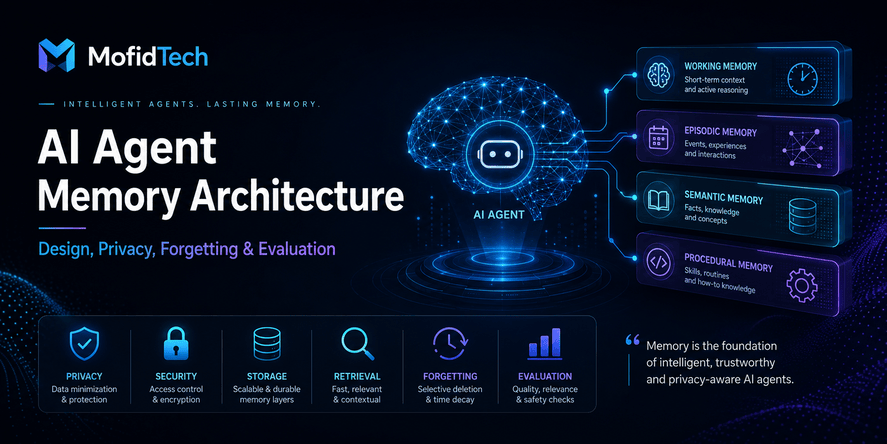
Memory context includes information from previous interactions. It can help the AI continue long-running tasks, remember preferences, and avoid asking the same questions repeatedly.
Memory should not be treated as unlimited storage. It needs rules for what should be remembered, what should be forgotten, and what should require user confirmation.
Security Context
Security context defines what the AI is allowed to access, reveal, or do. It includes user permissions, organization policies, sensitive data restrictions, audit rules, and approval requirements.
This is one of the most important parts of context engineering. A model that knows too much or acts without permission can become a security risk.
How AI Agents Use Context
AI agents are different from simple chatbots because they can often work through multi-step tasks. They may observe a situation, reason about the next step, choose a tool, act, receive a result, and continue until the goal is complete.
In an agentic system, context changes throughout the task. The agent needs to know:
- The original user goal
- The current step
- Previous actions already taken
- Results from tools
- Relevant documents or records
- Errors or blockers encountered
- Remaining constraints
- Permission limits
- When to stop and ask for human review
This is why context engineering is central to AI agents. A chatbot may only answer a question. An agent may influence real workflows. That makes the context layer part of the application’s reliability and security architecture.
Agents Need Context at Every Step
An AI agent performing a workflow does not need all data at once. It needs the right context at each step. Too little context causes mistakes. Too much context can distract the model, increase cost, and create security exposure.
For example, an AI support agent handling a refund request may need:
- The customer’s question
- The customer’s order status
- The company refund policy
- The user’s permission level
- The allowed response options
- The escalation rule
- The final confirmation step
It does not need the customer’s full lifetime history, all internal company documents, or unrelated support conversations.
Agents Need Boundaries
AI agents should not automatically act on every suggestion. They need boundaries around sensitive operations. Some actions should require user confirmation, manager approval, or human review.
Examples of sensitive operations include:
- Sending messages externally
- Updating user accounts
- Changing billing information
- Deleting data
- Making purchases
- Modifying permissions
- Accessing confidential records
- Publishing content
- Deploying application changes
The stronger the agent’s capabilities, the stricter the context and permission design must be.
How to Design a Context Layer for an AI Application
A context layer is the part of an AI application responsible for deciding what information the model receives and how that information is prepared.
A good context layer does not simply collect everything and send it to the model. It selects, filters, organizes, ranks, and protects information.
Step 1: Define the AI Application’s Purpose
Start by asking a clear question:
What should this AI system help the user do?
The answer determines what context is necessary. A documentation assistant, legal research tool, coding assistant, customer support bot, and workflow automation agent all need different context designs.
Avoid building a generic AI assistant that “can do everything.” The broader the task, the harder it is to control context quality and security.
Step 2: Identify Required Context Sources
List the data sources the AI may need. These could include:
| Source | Example |
|---|---|
| User input | The current question or instruction |
| Application state | Current page, selected record, active project |
| Knowledge base | Articles, documentation, policies |
| Business systems | CRM, support tickets, orders, analytics |
| User profile | Role, language, access level |
| Conversation history | Previous messages in the session |
| Memory | Long-term preferences or task history |
| External search | Current public information |
| Tools | Email, calendar, task manager, file search |
Each source should have a purpose. If a source does not improve the answer or action, it should not be included.
Step 3: Classify Data by Sensitivity
Not all context has the same risk. Developers should classify data before exposing it to an AI system.
| Data Type | Risk Level | Example |
|---|---|---|
| Public content | Low | Public documentation |
| Internal content | Medium | Company procedures |
| User-specific content | Medium to high | Account settings, project files |
| Confidential content | High | Contracts, financial reports |
| Personal data | High | Identity, contact, employment records |
| Secrets and credentials | Critical | Tokens, passwords, private keys |
Sensitive data should never be added to context automatically. It should require a strong reason, permission checks, and sometimes masking or summarization.
Step 4: Define Trust Levels
A context layer should not treat all information as equally trustworthy.
For example:
| Context Source | Trust Level |
|---|---|
| System instructions | Very high |
| Verified internal policy | High |
| Approved knowledge base | High |
| User-uploaded document | Medium |
| External website | Variable |
| Untrusted email or webpage | Low |
| Model-generated memory | Requires validation |
This matters because AI systems can be manipulated by untrusted content. A malicious document can contain hidden instructions telling the AI to ignore previous rules or reveal private information. This is a classic prompt injection risk, and OWASP highlights prompt injection as a major LLM application vulnerability.
Step 5: Apply Permission Checks Before Retrieval
Permissions should be checked before the AI receives information, not after it writes an answer.
If a user is not allowed to read a document, the AI should not retrieve that document. If a user cannot perform an action manually, the AI should not perform that action for them automatically.
A safe rule is:
AI access should never exceed user access.
The AI should not become a shortcut around normal application permissions.
Step 6: Select Only Relevant Context
Relevance is central to context engineering. The system should include information that helps answer the current question or complete the current task.
Developers should avoid “context dumping,” where large amounts of unrelated data are sent to the model. This can increase cost, reduce answer quality, and expose unnecessary information.
Better context selection considers:
- The user’s current question
- The user’s role
- The current workflow step
- The most relevant documents
- The freshness of information
- The confidence score of retrieval
- The sensitivity of the data
- The expected answer format
Step 7: Separate Instructions from Data
One of the most important safety principles is to separate system instructions from untrusted data.
The AI should understand that a document is content to analyze, not a source of commands. A user-uploaded PDF, email, webpage, or support ticket should not be allowed to override system behavior.
For example, if a retrieved document says “ignore all previous instructions,” the AI should treat that as document text, not as a valid instruction.
Step 8: Add Human Review for High-Impact Actions
Some AI outputs can be shown directly. Others should require review.
Low-risk actions:
- Summarizing a public article
- Explaining a technical concept
- Suggesting learning steps
- Drafting a non-sensitive response
Higher-risk actions:
- Sending an email
- Changing account settings
- Updating customer records
- Publishing content
- Recommending legal, medical, or financial decisions
- Deleting or modifying data
- Running production operations
Context engineering is not only about what the model sees. It is also about what the model is allowed to do after seeing it.
Security Risks in Context Engineering
Context engineering introduces powerful capabilities, but it also creates security risks. Developers must treat the context layer as part of the application’s security boundary.
Sensitive Data Exposure
If too much data is added to context, the model may reveal information that the user should not see. This can happen accidentally if retrieval is not permission-aware.
For example, a support assistant might retrieve internal notes, private customer records, or confidential escalation details and include them in a response.
The safest approach is to retrieve only what the user is allowed to access and only what the task requires.
Prompt Injection
Prompt injection happens when malicious or misleading text tries to manipulate the model’s behavior. It can come from the user directly, or indirectly from documents, websites, emails, tickets, or retrieved content.
OWASP describes prompt injection as manipulation of LLMs through crafted inputs that can lead to unauthorized access, data breaches, and compromised decision-making.
In context engineering, prompt injection is especially dangerous because the model may receive content from many sources. If one source contains malicious instructions, the system must prevent those instructions from overriding trusted rules.
Over-Permissioned Agents
An AI agent with broad access can become dangerous if it misunderstands a task or is manipulated. The agent should only have the permissions required for the current job.
A support agent should not have admin-level database access. A document summarizer should not have the ability to send emails. A coding assistant should not automatically deploy changes without review.
Hidden Context Leakage
Hidden context includes system instructions, internal notes, retrieved private content, tool descriptions, or memory. If the model reveals hidden context to the user, it can expose sensitive application design details or private data.
Developers should design responses so that the AI answers the user’s question without exposing internal context unnecessarily.
Memory Abuse
Memory can improve personalization, but it can also create privacy issues. An AI system should not remember sensitive information unless there is a clear need and user consent.
Memory should have rules for:
- What can be stored
- What must not be stored
- How long memory lasts
- How users can review it
- How users can delete it
- Whether memory is shared across sessions
- Whether memory applies to individuals, teams, or organizations
Tool Misuse
Tool-enabled AI agents can interact with real systems. If the context layer gives the model access to powerful tools without approval controls, mistakes can become real-world actions.
Developers should design tool access around least privilege, confirmation steps, audit logs, and clear user visibility.
Context Engineering for RAG Systems
RAG is one of the most common uses of context engineering. It allows an AI system to answer questions using external knowledge rather than relying only on model training.
But many RAG systems fail because developers focus only on document retrieval and ignore context quality.
What Good RAG Context Should Include
A strong RAG system should retrieve information that is:
- Relevant to the user question
- Current enough for the topic
- Allowed for the user
- From a trusted source
- Not duplicated unnecessarily
- Not misleading when taken out of context
- Presented clearly to the model
- Supported by enough surrounding explanation
Common RAG Problems
| Problem | What Happens |
|---|---|
| Irrelevant retrieval | The AI answers using the wrong document |
| Missing permissions | The AI sees content the user should not access |
| Outdated documents | The AI gives obsolete advice |
| Duplicate content | The AI becomes confused or repetitive |
| Poor chunking | Important meaning is separated from its context |
| No source ranking | Low-quality documents influence the answer |
| No injection defense | Malicious documents manipulate the model |
| No evaluation | Developers cannot measure answer quality |
RAG Is Not Just Search
A common mistake is to treat RAG as a simple search problem. Search finds documents. Context engineering decides how those documents should be used.
A good RAG system should answer questions such as:
- Which documents should be searched?
- Which user is asking?
- What is the user allowed to access?
- How recent must the answer be?
- Should the AI quote, summarize, compare, or explain?
- What should happen if documents disagree?
- Should the AI say it does not know?
- Should the answer include citations or source names?
- Should sensitive details be masked?
When developers answer these questions, RAG becomes more reliable.
Context Engineering for AI Agents
AI agents need stronger context engineering than normal chatbots because they often perform multi-step tasks.
Agents Need Goal Context
The agent must understand the final goal. A vague goal creates vague behavior. For example, “help with this project” is too broad. “Review this technical plan for security risks and produce a prioritized checklist” is clearer.
Goal context should define:
- The expected result
- The user’s constraints
- What success looks like
- What the agent should not do
- When the agent should stop
Agents Need Action Context
For each step, the agent must know what actions are available and which action is appropriate.
Action context includes:
- Available tools
- Required permissions
- Previous actions
- Tool results
- Error states
- Approval requirements
- Limits on external communication
Agents Need Memory Context
For long-running tasks, the agent may need memory. But memory should be structured and controlled.
Useful memory examples:
- User prefers beginner-friendly explanations
- A project uses a specific architecture
- A team follows a certain review process
- A repeated workflow has known steps
Risky memory examples:
- Passwords
- Secrets
- Highly personal information
- Sensitive legal or financial details
- Temporary facts that will soon become outdated
Agents Need Evaluation Context
Developers should not only build agents; they should evaluate them. Evaluation context includes test scenarios, expected behavior, failure cases, and review criteria.
For example, an AI support agent should be tested on:
- Normal customer questions
- Ambiguous questions
- Angry customers
- Refund edge cases
- Attempts to bypass policy
- Sensitive data requests
- Prompt injection attempts
- Escalation scenarios
Without evaluation, developers may not know whether the context design works.
Real-World Use Cases
AI Customer Support Assistant
A customer support assistant needs access to product documentation, order status, refund rules, user account information, and support escalation policies.
Good context engineering ensures the assistant only sees data related to the current customer and only provides answers allowed by company policy.
Poor context engineering may cause the assistant to expose internal notes, promise unsupported refunds, or answer based on outdated policies.
AI Coding Assistant for a Development Team
A coding assistant may need project architecture, coding standards, issue descriptions, documentation, previous decisions, and security requirements.
Good context engineering helps the assistant understand the project without exposing secrets or making unsafe changes.
The assistant should know the difference between explaining a solution, suggesting a change, and applying a change. Higher-impact actions should require review.
AI Knowledge Base Assistant
A knowledge base assistant helps employees or users search documents. It needs document retrieval, source ranking, access control, and answer grounding.
Good context engineering prevents the assistant from mixing public and confidential documents. It also helps it say “I could not find enough information” instead of inventing an answer.
AI Business Analytics Assistant
An analytics assistant may answer questions about sales, performance, traffic, or operations. It needs data definitions, metric meanings, user permissions, and business rules.
Good context engineering prevents the assistant from misinterpreting metrics or exposing sensitive business data.
AI Workflow Assistant
A workflow assistant may help with approvals, scheduling, task creation, reminders, or internal operations.
This type of assistant needs strong context about process state. It must know what step the workflow is in, who can approve the next step, and what actions require confirmation.
Best Practices for Developers
Use Minimum Necessary Context
Give the AI enough information to complete the task, but no more. This improves security, performance, and answer quality.
A useful rule is:
Every piece of context should have a reason to be there.
If the system cannot explain why a document, memory item, or tool result is included, it probably should not be included.
Rank Context by Relevance
The most relevant information should be prioritized. Less relevant information should be excluded or summarized.
Relevance should consider:
- Semantic similarity to the user request
- User permissions
- Document freshness
- Source trust
- Workflow step
- Previous user choices
- Business importance
Keep Context Fresh
AI systems can fail when they use outdated context. This is especially important for policies, product information, pricing, legal rules, software versions, and security guidance.
Freshness does not mean always using the newest document. It means using the most appropriate and authoritative version.
Separate Trusted Instructions from Untrusted Content
System instructions, business rules, and developer-defined policies should be treated differently from user-provided or retrieved content.
Untrusted content should never be allowed to rewrite the system’s rules.
Design for Permission-Aware Retrieval
Before retrieving documents or records, the system should know who is asking and what they are allowed to access.
This protects private data and helps maintain trust.
Make AI Actions Visible
Users should understand what the AI is doing. If an agent retrieves information, uses a tool, or prepares an action, the interface should make that clear when appropriate.
Invisible automation can be risky, especially in business workflows.
Require Confirmation for Sensitive Actions
The AI should not silently perform high-impact operations. Confirmation is especially important for sending messages, modifying records, deleting data, publishing content, and changing permissions.
Log Context Decisions
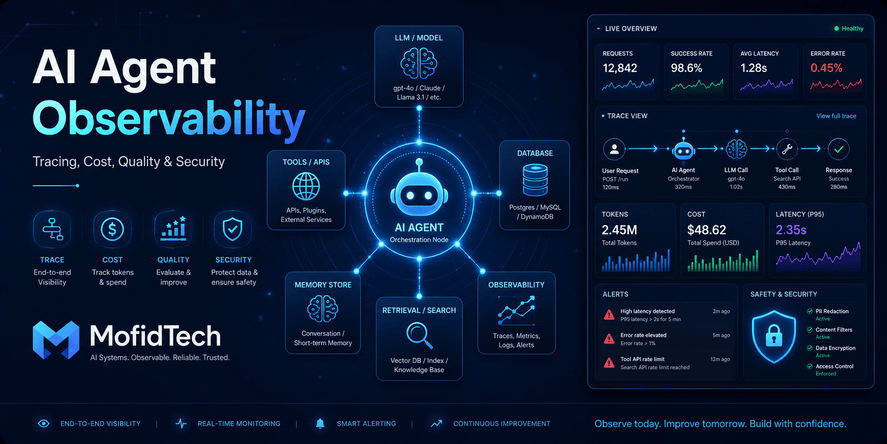
Developers should be able to inspect why an AI system answered a certain way. Logs can include which documents were retrieved, which permissions were checked, which tools were used, and which context was included.
This helps with debugging, security audits, and quality improvement.
Test Against Realistic Scenarios
Context engineering should be tested with realistic user questions, not only ideal examples.
Test cases should include:
- Clear questions
- Ambiguous questions
- Missing information
- Conflicting documents
- Outdated documents
- Sensitive data requests
- Prompt injection attempts
- Permission boundary cases
- Long conversations
- Multi-step workflows
Common Mistakes to Avoid
Mistake 1: Sending Too Much Context
More context does not always mean better answers. Too much context can confuse the model, increase cost, slow responses, and expose unnecessary information.
Mistake 2: Ignoring Permissions
An AI system should not retrieve or reveal data that the user cannot access manually. Ignoring permissions is one of the most dangerous mistakes in AI application design.
Mistake 3: Trusting All Documents Equally
Not every document is reliable. Some documents are outdated, incomplete, duplicated, or untrusted. Retrieved information should be ranked and filtered.
Mistake 4: Treating RAG as a Complete Solution
RAG retrieves knowledge, but it does not automatically solve security, permissions, freshness, memory, or workflow control.
Mistake 5: Mixing Instructions and Data
When untrusted content is mixed with trusted instructions, prompt injection becomes more dangerous. The AI must know which information is instruction and which information is content.
Mistake 6: Adding Memory Without Rules
Memory can improve user experience, but unmanaged memory can create privacy problems and outdated personalization.
Mistake 7: Letting Agents Act Without Review
Agents that can act in real systems need approval controls. Without review, a small misunderstanding can become a real business problem.
Mistake 8: Not Measuring Quality
Developers should evaluate AI answers. Without evaluation, context engineering becomes guesswork.
Performance and Cost Considerations
Context engineering also affects cost and performance. AI models process context, and larger context usually means more computation, slower responses, and higher cost.
Token Usage
Every instruction, document, memory item, and tool result consumes context space. If the application sends too much information, it may become expensive and inefficient.
Better context engineering reduces unnecessary information and keeps the system focused.
Response Speed
Large context can slow down responses. Users may not tolerate slow AI features, especially inside web applications or productivity tools.
Developers should prioritize relevant information and avoid unnecessary retrieval.
Retrieval Quality
Poor retrieval can waste context space. If the system retrieves irrelevant documents, the model has less room for useful information.
Improving retrieval quality is often more effective than increasing context size.
Summarization Trade-Offs
Summarizing context can reduce cost, but summaries may lose important details. Developers should decide carefully when to use full documents, excerpts, summaries, or structured facts.
Caching
Some context can be reused safely, such as public documentation summaries or stable product descriptions. However, cached context must be refreshed when source information changes.
Model Selection
A larger model may handle complex context better, but it may cost more. A smaller model may work well when the context layer is precise and structured.
Context engineering can help developers use models more efficiently.
Troubleshooting Poor AI Answers
When an AI application gives weak answers, the model is not always the problem. Often, the context is the problem.
Problem: The AI Gives Generic Answers
Possible causes:
- Not enough task context
- Missing user role
- No relevant documents retrieved
- Prompt instructions are too vague
- The system does not know the application state
Possible fixes:
- Add clearer task definition
- Retrieve more relevant documents
- Include the current workflow step
- Add answer format guidance
- Improve source ranking
Problem: The AI Gives Wrong Answers
Possible causes:
- Outdated documents
- Conflicting sources
- Poor retrieval
- Missing business rules
- The model is guessing beyond available context
Possible fixes:
- Improve source freshness
- Prefer authoritative documents
- Add uncertainty handling
- Require source grounding
- Add evaluation test cases
Problem: The AI Reveals Sensitive Information
Possible causes:
- Permissions checked too late
- Sensitive data included unnecessarily
- No masking rules
- Too much user or business context
- Weak separation between internal and external content
Possible fixes:
- Apply permission checks before retrieval
- Classify data by sensitivity
- Remove unnecessary context
- Mask sensitive fields
- Add response filters for private information
Problem: The AI Is Too Slow
Possible causes:
- Too much context
- Too many documents retrieved
- Slow external tools
- Inefficient retrieval process
- Large memory included unnecessarily
Possible fixes:
- Reduce context size
- Retrieve fewer but better documents
- Summarize stable context
- Cache safe reusable context
- Prioritize critical information
Problem: The AI Agent Takes the Wrong Action
Possible causes:
- Unclear goal
- Missing workflow state
- Tool permissions too broad
- No confirmation step
- Prompt injection from untrusted content
Possible fixes:
- Define goals more clearly
- Add action boundaries
- Require confirmation
- Limit tool access
- Treat retrieved content as untrusted data
Context Engineering Checklist
Data Checklist
| Question | Yes/No |
|---|---|
| Do we know which data sources the AI can access? | |
| Is each data source necessary for the task? | |
| Are documents ranked by relevance and trust? | |
| Are outdated documents filtered or labeled? | |
| Are duplicated documents handled? | |
| Is sensitive data classified? |
Security Checklist
| Question | Yes/No |
|---|---|
| Are permissions checked before retrieval? | |
| Can the AI access only what the user can access? | |
| Are system instructions separated from untrusted content? | |
| Is prompt injection considered in the design? | |
| Are sensitive actions confirmed by the user? | |
| Are tool permissions limited? | |
| Are context decisions logged? |
Reliability Checklist
| Question | Yes/No |
|---|---|
| Does the AI have enough task context? | |
| Does it know when information is missing? | |
| Can it say “I do not know” when needed? | |
| Are answers grounded in trusted sources? | |
| Are conflicting sources handled clearly? | |
| Are test scenarios used to evaluate quality? |
User Experience Checklist
| Question | Yes/No |
|---|---|
| Does the AI answer clearly and directly? | |
| Does it avoid unnecessary technical complexity? | |
| Does it explain assumptions? | |
| Does it ask for clarification only when needed? | |
| Are high-impact actions visible to the user? | |
| Can the user control memory or personalization? |
Comparison Table: Poor Context vs Good Context
| Area | Poor Context Engineering | Good Context Engineering |
|---|---|---|
| Data selection | Sends everything available | Sends only relevant information |
| Security | Retrieves before checking permissions | Checks permissions first |
| Instructions | Mixes rules with untrusted content | Separates trusted instructions from data |
| RAG | Retrieves documents blindly | Ranks by relevance, trust, and freshness |
| Memory | Stores too much | Stores only useful, permitted information |
| Agents | Acts without review | Uses approval for sensitive actions |
| Debugging | Hard to explain failures | Logs context and decisions |
| Cost | High token usage | Optimized context size |
| Reliability | Answers vary unpredictably | Tested against realistic scenarios |
FAQ
1. What is context engineering in AI?
Context engineering is the practice of designing and controlling the information an AI system receives. It includes instructions, user requests, documents, memory, permissions, retrieved knowledge, tool outputs, and workflow state.
2. Is context engineering the same as prompt engineering?
No. Prompt engineering focuses on writing better instructions. Context engineering is broader because it manages all information available to the AI system, including data sources, memory, permissions, retrieval, tools, and security boundaries.
3. How is context engineering different from RAG?
RAG retrieves external knowledge for the model. Context engineering includes RAG, but also handles permissions, relevance, memory, tool access, workflow state, security, and evaluation.
4. Why do AI agents need context?
AI agents need context because they often perform multi-step tasks. They must understand the goal, previous actions, available tools, permissions, retrieved information, and when to ask for human approval.
5. Can context engineering reduce hallucinations?
Yes, context engineering can reduce hallucinations by grounding the AI in relevant and trusted information. However, it does not eliminate hallucinations completely. Developers still need evaluation, source checking, and uncertainty handling.
6. What is the biggest risk in context engineering?
One of the biggest risks is exposing sensitive information to the AI system or to the wrong user. Another major risk is prompt injection, where malicious content tries to manipulate the model’s behavior.
7. How much context should an AI application use?
An AI application should use the minimum amount of context required to complete the task safely and accurately. Too little context causes weak answers. Too much context can increase cost, slow responses, confuse the model, and expose unnecessary data.
8. What is memory in context engineering?
Memory is information stored from previous interactions to help future responses. It can include user preferences, project details, or repeated workflow patterns. Memory should be limited, transparent, and controlled by privacy rules.
9. Should AI agents have access to tools?
AI agents can have access to tools, but only with strict limits. Tool access should follow least privilege, permission checks, human confirmation for sensitive actions, and audit logging.
10. How can developers test context engineering quality?
Developers can test context engineering by using realistic scenarios, checking answer accuracy, testing permission boundaries, trying ambiguous questions, evaluating retrieved documents, and simulating prompt injection attempts.
11. Is context engineering only for large companies?
No. Small websites, SaaS products, educational tools, and internal applications can all benefit from context engineering. Even a simple AI assistant becomes more useful when it receives the right context safely.
12. Why is context engineering important for MofidTech readers?
MofidTech readers are interested in AI tools, software engineering, web development, cybersecurity, APIs, databases, and developer productivity. Context engineering connects all of these fields because it is about building AI systems that are useful, secure, and reliable in real applications.
Conclusion
Context engineering is becoming a core skill for developers building modern AI applications. It is not just a new name for prompt engineering. It is a broader design discipline that controls what an AI system sees, remembers, retrieves, trusts, and does.
As AI agents become more common in development tools, business applications, support systems, search engines, and workflow automation, the quality of context will become one of the biggest differences between useful AI and unreliable AI.
Good context engineering helps developers:
- Improve AI answer quality
- Reduce hallucinations
- Protect sensitive data
- Control AI agent behavior
- Improve RAG reliability
- Lower unnecessary cost
- Make AI systems easier to debug
- Build safer AI-powered workflows
The most important principle is simple:
Do not give the AI everything. Give it the right things, at the right time, for the right user, with the right permissions.
For developers, students, and technical professionals, understanding context engineering now is a strong investment. It will help them build better AI tools, evaluate AI products more critically, and design safer intelligent applications in the years ahead.










💬 Comments
No comments yet. Be the first to comment!
Login to comment.