Introduction
CI/CD pipelines make software delivery faster, but they also create a powerful security risk if they are not properly controlled. A CI/CD pipeline can access source code, secrets, cloud infrastructure, deployment environments, build artifacts, package registries, and production systems. That means a weak pipeline is not only a technical inconvenience. It can become a direct path to production compromise.
A secure CI/CD pipeline protects the full software delivery process: source code, dependencies, build systems, test stages, deployment permissions, secrets, approvals, release evidence, monitoring, and rollback readiness. The goal is not to slow development. The goal is to make fast delivery safer, more predictable, and easier to audit.
CI/CD security is now part of software supply chain security. OWASP maintains a dedicated Top 10 CI/CD Security Risks project to help teams identify focus areas in CI/CD ecosystems, and OWASP’s CI/CD Security Cheat Sheet also highlights common risks that teams should understand when protecting pipelines. NIST’s Secure Software Development Framework provides recommendations for reducing software vulnerability risk across the development lifecycle, while SLSA focuses on improving software artifact integrity and protecting the supply chain from tampering.
This guide gives developers and DevOps teams a practical CI/CD security checklist before production deployment. It avoids code and focuses on concepts, decisions, checks, mistakes, and workflows that teams can apply to real projects.
Table of Contents
- What Is CI/CD Pipeline Security?
- Why CI/CD Pipelines Are a High-Value Target
- CI/CD Security Checklist Before Production Deployment
- Source Code and Branch Protection Checks
- Secrets and Credentials Security
- Dependency and Package Security
- Build Integrity and Artifact Security
- Environment Separation and Deployment Control
- Permissions, Identity, and Access Management
- Approval Gates and Release Governance
- Logging, Monitoring, and Audit Trails
- Rollback and Incident Readiness
- CI/CD Security for Small Teams
- Common CI/CD Security Mistakes
- Best Practices for Secure Software Delivery
- CI/CD Security Comparison Table
- Troubleshooting CI/CD Security Problems
- Practical Production Readiness Checklist
- FAQ
- Conclusion
What Is CI/CD Pipeline Security?
CI/CD pipeline security is the practice of protecting the automated process that builds, tests, packages, and deploys software. It covers everything from the moment a developer pushes code to the moment the application reaches production.
A CI/CD pipeline is trusted by default in many teams. It can install dependencies, read environment variables, create build artifacts, connect to cloud services, publish packages, and deploy to production. Because of this trust, attackers often see CI/CD systems as attractive targets. If an attacker controls the pipeline, they may not need to attack the application directly. They can instead manipulate what gets built or deployed.
CI/CD security focuses on four major goals:
| Goal | Meaning |
|---|---|
| Protect the pipeline | Prevent unauthorized changes to workflow, build, and deployment processes. |
| Protect secrets | Avoid exposing credentials, tokens, signing keys, cloud keys, and production variables. |
| Protect artifacts | Ensure the software built and deployed is the software the team intended to release. |
| Protect production | Make sure deployment requires proper validation, approvals, monitoring, and rollback readiness. |
A secure CI/CD pipeline should answer a simple question: Can we trust what is being deployed, who approved it, how it was built, and whether we can recover if something goes wrong?
Why CI/CD Pipelines Are a High-Value Target
CI/CD pipelines are high-value targets because they connect development activity to production infrastructure. A traditional application vulnerability may affect one system or one feature. A pipeline compromise can affect the entire release process.
CI/CD pipelines often have powerful permissions
Deployment systems usually need access to cloud environments, container registries, package registries, production servers, database migration processes, monitoring systems, and secret storage tools. If these permissions are too broad, a pipeline compromise can quickly become an infrastructure compromise.
The principle is simple: the more a pipeline can do, the more carefully it must be controlled.
CI/CD pipelines handle sensitive secrets
Secrets may include API keys, database credentials, cloud access tokens, package publishing credentials, notification tokens, signing keys, and production configuration values. If these values are exposed in logs, build output, dependency scripts, or untrusted workflow steps, attackers can reuse them outside the pipeline.
CI/CD pipelines trust many external components
Modern pipelines often depend on third-party actions, plugins, packages, base images, build tools, scanners, notification integrations, and deployment tools. Each dependency can introduce risk if it is outdated, compromised, misconfigured, or granted excessive access.
CI/CD pipelines can hide dangerous changes
A harmful change is not always inside application code. It can appear in a build step, a deployment rule, a dependency update, a package publishing process, or an environment configuration. Teams that review only application code may miss pipeline-level changes.
CI/CD pipelines affect business continuity
A broken deployment pipeline can block releases. A compromised pipeline can distribute unsafe software. A poorly designed rollback process can extend outages. Security and reliability are connected: a secure pipeline should also be predictable, observable, and recoverable.
CI/CD Security Checklist Before Production Deployment
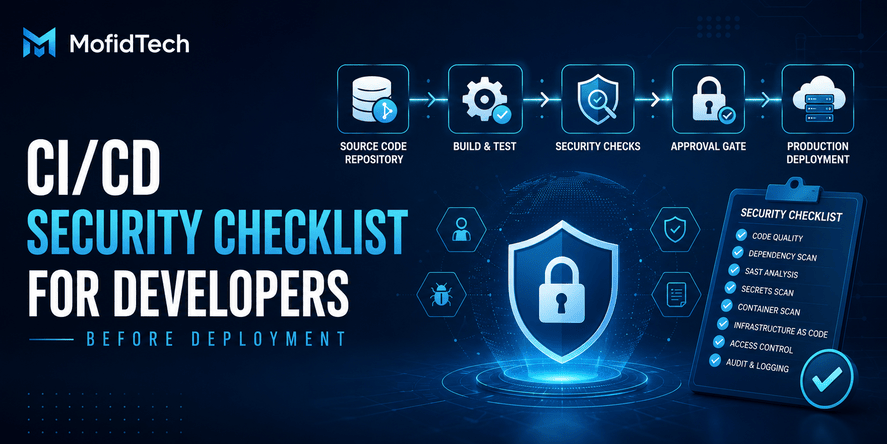
A strong CI/CD security checklist should cover the complete release path, not only the final deployment button. Before deploying to production, a team should check source control, secrets, dependencies, build integrity, environment separation, access permissions, approvals, logging, monitoring, and rollback readiness.
Here is the high-level checklist:
| Area | Key Question |
|---|---|
| Source control | Are branch protection and review rules enforced? |
| Pipeline configuration | Are pipeline changes reviewed like application code? |
| Secrets | Are credentials protected, scoped, rotated, and hidden from logs? |
| Dependencies | Are packages reviewed, updated, and scanned for risk? |
| Build integrity | Can the team trust how the artifact was built? |
| Artifacts | Are build outputs stored, versioned, and protected from tampering? |
| Environments | Are development, staging, and production clearly separated? |
| Permissions | Does the pipeline use least privilege? |
| Approvals | Are production releases reviewed and authorized? |
| Logs | Can deployment activity be audited after the fact? |
| Monitoring | Can the team detect release failures quickly? |
| Rollback | Can the team safely restore a previous version? |
The rest of this article explains each area in detail.
Source Code and Branch Protection Checks
Source code is the starting point of the delivery chain. If the repository is weakly protected, the pipeline cannot be fully trusted.
Protect important branches
Production deployment should not be triggered from unprotected branches. Main branches, release branches, and production-related branches should have strict rules. These rules usually include review requirements, status checks, restrictions on direct changes, and protection against accidental deletion.
The goal is to prevent a single careless or malicious change from flowing directly into production.
Review pipeline files like application code
Pipeline configuration is part of the product. It controls how software is tested, built, packaged, and deployed. A dangerous pipeline change can be as risky as a dangerous application change.
Teams should treat pipeline files, deployment rules, infrastructure workflow definitions, and release automation as security-sensitive assets. Any change to them should require careful review from someone who understands the deployment process.
Watch for hidden release path changes
A pull request may look harmless if the application code is small, but it may modify how the system is built or deployed. Security reviewers should check whether a change affects:
- Build steps
- Test requirements
- Deployment triggers
- Environment selection
- Secret access
- Package publishing
- Artifact storage
- Approval requirements
- Notification rules
- Rollback behavior
A safe review process asks not only “What code changed?” but also “What delivery behavior changed?”
Require meaningful reviews
A review is not secure just because someone clicked approve. Reviewers should understand what they are approving. For pipeline changes, the reviewer should check whether the change increases permissions, exposes secrets, skips validation, weakens testing, or changes production deployment behavior.
Secrets and Credentials Security
Secrets are among the most common CI/CD security risks because pipelines often require access to private systems. A secure pipeline should minimize secret exposure and reduce the damage if one secret is compromised.
What secrets exist in CI/CD pipelines?
CI/CD secrets may include:
| Secret Type | Example Use |
|---|---|
| Cloud credentials | Deploying infrastructure or applications |
| Database credentials | Running production-related tasks |
| API tokens | Connecting to external services |
| Package registry tokens | Publishing or downloading private packages |
| Container registry credentials | Pushing or pulling images |
| Signing keys | Signing artifacts or releases |
| Notification tokens | Sending release alerts |
| Monitoring credentials | Updating release markers or dashboards |
The more sensitive the secret, the more carefully it should be scoped, stored, audited, and rotated.
Store secrets in a controlled secret manager
Secrets should not live in source code, documentation, issue comments, team chat, local notes, or pipeline logs. They should be stored in a dedicated secret management system or in the secure secrets feature of the CI/CD platform.
A good secret management approach should provide access control, encryption, audit logs, rotation support, and environment-level separation.
Use short-lived credentials when possible
Long-lived credentials create long-lived risk. If a token is leaked and remains valid for months, an attacker has a large window of opportunity. Short-lived credentials reduce the usefulness of stolen secrets.
A mature pipeline should prefer temporary credentials, scoped access, and identity-based authentication where possible.
Scope secrets by environment
Development, staging, and production should not share the same credentials. A staging pipeline should not be able to access production systems unless there is a deliberate and controlled reason.
Environment-scoped secrets reduce blast radius. If a test environment is compromised, production secrets should remain protected.
Prevent secret exposure in logs
Pipeline logs are useful for troubleshooting, but they can accidentally expose sensitive data. Teams should check whether logs hide secrets, whether verbose output is safe, and whether third-party tools can print sensitive environment details.
A secure pipeline should make logs useful without turning them into a secret leak archive.
Rotate secrets after risky events
Secrets should be rotated after suspected exposure, employee departure, repository compromise, pipeline compromise, vendor compromise, or accidental publication. Rotation should be planned before an incident happens, not invented during a crisis.
Dependency and Package Security
Modern applications depend on many external packages. CI/CD pipelines often download, install, build, and package these dependencies automatically. This makes dependency security a central part of CI/CD security.
Why dependency risk matters in CI/CD
A dependency can affect the final application even if your own code is safe. Dependencies may include application libraries, build tools, testing tools, plugins, containers, deployment helpers, and third-party automation components.
A malicious or compromised dependency can run during build time, alter artifacts, steal secrets, or introduce vulnerabilities.
Review direct and indirect dependencies
Direct dependencies are the packages your team intentionally selects. Indirect dependencies are packages brought in by other packages. Both matter.
A strong dependency review process should consider:
- Is the package actively maintained?
- Is the source trustworthy?
- Is the package necessary?
- Does it have known vulnerabilities?
- Did the update introduce unexpected changes?
- Does it run during build time?
- Does it request unusual access?
- Is there a safer alternative?
Avoid automatic trust in dependency updates
Automatic updates can be helpful, but automatic deployment of unreviewed dependency changes can be risky. Dependency updates should pass tests, security checks, and human review when they affect production.
The goal is not to stop updates. Outdated dependencies are also risky. The goal is to update with visibility and control.
Protect package registries
Private package registries, container registries, and artifact repositories should require authentication, access control, and audit logs. Publishing permissions should be limited. Not every developer, pipeline, or token should be able to publish production packages.
A registry is part of the release chain. If attackers can replace or modify packages, they can influence what gets deployed.
Build Integrity and Artifact Security
Build integrity means the team can trust the process that transforms source code into deployable software. Artifact security means the built output cannot be silently changed before deployment.
SLSA describes itself as a security framework and checklist of standards and controls to prevent tampering, improve integrity, and secure packages and infrastructure. For developers, the practical idea is simple: production should receive a trustworthy artifact built by a trustworthy process.
What is a build artifact?
A build artifact is the output produced by the pipeline and deployed or distributed later. It may be an application package, container image, compiled bundle, release archive, or deployment-ready asset.
The artifact should be treated as a security-sensitive object because it is what eventually runs in production.
Do not rebuild differently for production without control
A common problem is inconsistency between what was tested and what was deployed. If the team tests one build but deploys a different build, confidence decreases.
A safer approach is to build once, test that artifact, approve it, and promote it through environments. This reduces the chance that production receives something different from what passed validation.
Protect artifact storage
Artifacts should be stored in controlled locations with access restrictions, versioning, and audit trails. The system should show who created an artifact, when it was created, what source it came from, and where it was deployed.
If artifact storage is writable by too many people or systems, an attacker may replace a valid artifact with a malicious one.
Use provenance and traceability
Provenance answers questions such as:
- What source version produced this artifact?
- Which pipeline built it?
- Which dependencies were used?
- Who approved the release?
- Which environment received it?
- When was it deployed?
This information is valuable for audits, incident response, debugging, and compliance.
Sign or verify artifacts when appropriate
For high-risk systems, artifact signing and verification can help prove that the artifact has not been modified unexpectedly. This is especially useful when artifacts move across systems, teams, registries, or deployment environments.
Environment Separation and Deployment Control
A secure CI/CD pipeline must separate environments clearly. Development, testing, staging, and production should not share the same assumptions, permissions, credentials, or approval rules.
Why environment separation matters
Environment separation limits damage. A mistake in development should not affect production. A compromised test pipeline should not automatically expose production secrets. A staging deployment should not accidentally run against production data.
Clear separation also improves troubleshooting because teams know where a change was tested and what environment it affected.
Use staging as a controlled production rehearsal
Staging should be as close as practical to production, but it should not be treated as production. It should help validate release behavior, performance expectations, configuration assumptions, and integration risks before production deployment.
A weak staging environment gives false confidence. A good staging environment helps discover issues before users are affected.
Control production deployment triggers
Production deployment should not happen accidentally. Teams should define exactly what can trigger production release:
- A merge to a protected branch
- A tagged release
- A manual approval
- A release manager action
- A scheduled release window
- A successful promotion from staging
The best choice depends on the team, but the rule should be explicit and documented.
Separate production secrets from non-production secrets
Production credentials should only be available to production deployment jobs. They should not be exposed to test jobs, preview deployments, dependency checks, or untrusted pull request workflows.
This single principle prevents many serious CI/CD failures.
Permissions, Identity, and Access Management
The CI/CD pipeline should follow least privilege. This means every user, token, runner, workflow, integration, and service account should have only the access it needs.
Avoid all-powerful pipeline accounts
A pipeline account that can modify everything is convenient but dangerous. If compromised, it can become a master key. Instead, permissions should be divided by task and environment.
For example, a test job should not need production deployment access. A dependency scan should not need database credentials. A documentation build should not need cloud administration rights.
Review permissions regularly
Permissions become risky over time. A temporary exception becomes permanent. A former integration remains active. A token created for debugging keeps working. A user changes roles but keeps old access.
Regular access reviews help remove unused permissions and reduce exposure.
Protect self-hosted runners
Self-hosted runners can be powerful because they run inside your infrastructure or network. That also makes them risky. If they execute untrusted jobs, they may expose internal systems, cached credentials, files, or network access.
Self-hosted runners should be isolated, monitored, updated, and restricted. They should not run untrusted code with access to sensitive environments.
Use separate identities for separate jobs
Different pipeline jobs should not all share the same identity. Build, test, scan, publish, deploy, and monitor tasks may require different permissions. Separate identities make it easier to understand access and contain damage.
Approval Gates and Release Governance
Approval gates are controls that prevent unsafe changes from reaching production without review. Release governance is the larger process that defines who can release, when releases happen, what evidence is required, and how exceptions are handled.
Why approval gates matter
Automation is powerful, but production deployment often needs accountability. An approval gate creates a pause where a responsible person or system verifies that the release is acceptable.
This is especially important for high-impact systems, financial applications, healthcare systems, government platforms, public APIs, SaaS platforms, and applications with sensitive user data.
What should be approved?
Approval should not be a blind click. A reviewer should understand:
- What changed
- Why it changed
- What tests passed
- What risks remain
- What dependencies changed
- Whether database or infrastructure behavior is affected
- Whether rollback is possible
- Whether monitoring is ready
- Whether the release window is appropriate
Human approval vs automated gates
Both human and automated gates are useful.
| Gate Type | Strength | Weakness |
|---|---|---|
| Automated gate | Consistent, fast, repeatable | May miss context |
| Human approval | Understands business and risk context | Can be inconsistent or rushed |
| Combined approach | Balances speed and judgment | Requires clear rules |
For most teams, the best approach is not fully manual or fully automatic. It is a controlled combination.
Define emergency release rules
Emergency releases happen. Security patches, outage fixes, and urgent business issues may require faster deployment. But emergency release does not mean no control.
Teams should define emergency release rules in advance:
- Who can approve emergency deployment?
- What checks can be shortened?
- What checks cannot be skipped?
- How is the decision documented?
- What post-release review is required?
- When should normal controls be restored?
This prevents chaos during pressure.
Logging, Monitoring, and Audit Trails
A secure CI/CD pipeline should leave evidence. When something goes wrong, the team should be able to understand what happened, when it happened, who triggered it, what changed, and what was deployed.
What should CI/CD logs show?
Useful pipeline logs should show:
- Pipeline start and end time
- Trigger source
- User or system that triggered the run
- Source version or release reference
- Environment targeted
- Approval status
- Test and scan results
- Artifact identity
- Deployment result
- Rollback action if any
- Failure reason
Logs should be detailed enough to investigate issues but not so verbose that they expose secrets.
Why audit trails matter
Audit trails help answer important questions:
- Was this deployment authorized?
- Did the release pass required checks?
- Who approved the production deployment?
- Was the same artifact tested and deployed?
- Did the pipeline access unexpected systems?
- Did the deployment happen inside the approved window?
Without audit trails, incident response becomes guesswork.
Monitor both application and pipeline health
Teams often monitor applications but forget to monitor the pipeline itself. Pipeline failures, unusual deployment frequency, unexpected job changes, failed secret access, and repeated permission errors can all signal a problem.
A secure delivery process monitors both the software and the system that delivers it.
Rollback and Incident Readiness
A deployment is not production-ready unless the team knows how to recover from it. Rollback planning is both a reliability practice and a security practice.
Why rollback matters for security
A compromised release, broken dependency, exposed secret, unsafe configuration, or failed deployment may require fast recovery. If rollback is not prepared, the team may lose time while users remain affected.
A secure release process should assume that something can go wrong.
What makes rollback difficult?
Rollback can be difficult when:
- Database changes are not reversible
- Artifacts are not versioned
- Previous releases are not available
- Environment configuration changed manually
- External services changed behavior
- Data was transformed in a one-way process
- The team does not know who can approve rollback
- Monitoring does not clearly show the failure
Rollback is not only a button. It is a planned recovery workflow.
Prepare rollback before deployment
Before production deployment, the team should know:
- What previous version is safe to restore
- Whether data changes are compatible
- Who can authorize rollback
- How users will be affected
- What monitoring signal triggers rollback
- What communication is required
- What logs must be preserved
A strong team treats rollback readiness as part of deployment approval.
CI/CD Security for Small Teams
Small teams often think CI/CD security is only for large enterprises. That is a mistake. Small teams may have fewer people, less process, and fewer security specialists, which can make practical controls even more important.
The goal for a small team is not to implement every enterprise control on day one. The goal is to create a minimum safe baseline.
Minimum practical baseline for small teams
A small team should start with:
- Protected main branch
- Required review before production changes
- Secure secret storage
- Environment separation
- Dependency review
- Limited production permissions
- Clear deployment trigger
- Basic release notes
- Basic monitoring
- Known rollback plan
This baseline is achievable without building a complex security department.
What should small teams secure first?
Small teams should prioritize the controls that reduce the most risk:
- Protect production secrets.
- Limit who and what can deploy to production.
- Review pipeline changes carefully.
- Keep dependencies visible and updated.
- Ensure deployments are logged.
- Prepare rollback before release.
These controls are practical, understandable, and high impact.
Avoid security theater
Security theater means adding controls that look serious but do not reduce real risk. For example, a checklist nobody reads is less useful than a smaller checklist that developers actually follow.
A good CI/CD security process should be simple enough to use and strong enough to matter.
Common CI/CD Security Mistakes
Many CI/CD security failures come from normal development habits that become dangerous at scale.
Mistake 1: Treating the pipeline as an internal detail
The pipeline is not just internal plumbing. It is part of the production system. It deserves review, monitoring, and security design.
Mistake 2: Giving the pipeline excessive permissions
A pipeline should not have broad access just because it is easier. Excessive permissions increase blast radius.
Mistake 3: Sharing credentials across environments
Shared credentials make environment separation meaningless. If staging and production use the same secrets, a staging compromise may become a production compromise.
Mistake 4: Ignoring third-party pipeline components
Plugins, actions, extensions, and deployment helpers can introduce supply chain risk. They should be reviewed like dependencies.
Mistake 5: Allowing untrusted code to access secrets
Pull requests, preview builds, and external contributions should be handled carefully. Untrusted code should not automatically receive sensitive secrets.
Mistake 6: Deploying without artifact traceability
If the team cannot identify exactly what was deployed, debugging and incident response become much harder.
Mistake 7: Skipping rollback planning
A release that cannot be safely rolled back carries more operational risk.
Mistake 8: Not reviewing pipeline changes
A small change to a deployment rule can weaken the entire production release process.
Mistake 9: Using logs that expose secrets
Logs should help troubleshoot. They should not become a place where sensitive credentials are stored forever.
Mistake 10: Confusing speed with maturity
Fast deployment is valuable only when it is controlled. A mature CI/CD process delivers quickly and safely.
Best Practices for Secure Software Delivery
Secure CI/CD is not one tool. It is a combination of process, architecture, permissions, validation, and culture.
Make security part of the delivery workflow
Security should not be a final obstacle before production. It should be built into normal development and deployment steps. Developers should receive useful feedback early, not vague rejection late.
Use layered controls
No single control is enough. A secure pipeline uses multiple layers:
- Source control protection
- Review requirements
- Secret management
- Dependency checks
- Build integrity controls
- Environment separation
- Least privilege
- Approval gates
- Monitoring
- Rollback planning
If one control fails, another should reduce the damage.
Keep pipeline design simple
Complex pipelines are harder to secure. If nobody understands how a release reaches production, the team cannot confidently protect it.
A secure pipeline should be readable, documented, and easy to reason about.
Document the release process
Documentation should explain:
- How changes enter the pipeline
- What checks are required
- Who can approve production
- How artifacts are promoted
- How secrets are managed
- How rollback works
- What to do during an incident
Good documentation helps new developers, auditors, security reviewers, and incident responders.
Align with secure development frameworks
NIST SSDF provides secure software development practices for reducing vulnerability risk in software development activities. Teams do not need to copy every framework perfectly, but they can use recognized frameworks to structure their own practices.
Build toward supply chain maturity gradually
SLSA can help teams think about artifact integrity, build trust, provenance, and tamper resistance. Small teams can start with basic traceability and improve over time.
CI/CD Security Comparison Table
| Area | Weak Pipeline | Secure Production Pipeline |
|---|---|---|
| Branch protection | Direct changes allowed | Protected branches with review rules |
| Pipeline changes | Reviewed casually | Reviewed as security-sensitive changes |
| Secrets | Shared and long-lived | Scoped, protected, rotated, and audited |
| Permissions | Broad access everywhere | Least privilege per job and environment |
| Dependencies | Automatically trusted | Reviewed, scanned, and monitored |
| Build process | Hard to reproduce | Traceable and controlled |
| Artifacts | Can be overwritten easily | Versioned, protected, and linked to source |
| Deployment trigger | Unclear or accidental | Explicit and documented |
| Approvals | Informal | Required for production risk |
| Logs | Missing or too verbose | Useful, secure, and searchable |
| Rollback | Improvised | Planned before release |
| Incident response | Reactive and confused | Evidence-based and prepared |
Security Considerations for CI/CD Pipelines
Security considerations should focus on reducing attack paths and limiting impact.
Protect the pipeline configuration
Pipeline configuration defines how software moves to production. It should be protected from unauthorized changes and reviewed carefully.
Control secret access by context
Secrets should only be available when the job, environment, and trigger are trusted. A job that does not need a secret should not receive it.
Avoid unnecessary network access
Build and test jobs should not automatically access internal systems unless needed. Network access should be intentional.
Review third-party integrations
Every integration increases the trust boundary. Teams should review what each integration can read, write, and trigger.
Keep human accountability
Automation does not remove responsibility. Production deployment should still have clear ownership.
Performance Considerations for Secure CI/CD
Security checks should improve safety without making the pipeline painfully slow. If security makes every release frustrating, teams may try to bypass it.
Place checks at the right stage
Fast checks should run early. Slower checks can run at scheduled times, before release, or on higher-risk changes. The goal is to provide quick feedback without ignoring deeper validation.
Avoid duplicate work
If the same scan, review, or validation runs repeatedly without new information, it wastes time. Pipelines should avoid unnecessary repetition while keeping required checks.
Use risk-based gates
Not every change carries the same risk. A text update and a production database behavior change do not need identical review depth. Risk-based gates help teams focus effort where it matters.
Keep deployment predictable
A secure pipeline should not be random or fragile. Developers should know what checks run, why they run, and what to do if they fail.
Troubleshooting CI/CD Security Problems
Security problems in CI/CD often appear as failed deployments, blocked releases, missing permissions, unexpected secret errors, or suspicious activity. Troubleshooting should be systematic.
Problem: A deployment suddenly fails because of permissions
Possible causes:
- A token expired
- A secret was rotated
- A service account lost access
- Environment permissions changed
- A deployment gate was updated
- A cloud policy became stricter
Recommended response:
- Check what changed since the last successful deployment
- Review identity and permission logs
- Confirm whether the job should still have that permission
- Avoid restoring broad access just to make the pipeline pass
- Update the access model intentionally
Problem: Secrets appear in pipeline logs
Possible causes:
- A tool printed environment details
- Debug mode exposed sensitive values
- A script or integration logged too much information
- Masking rules were incomplete
- A third-party step behaved unexpectedly
Recommended response:
- Stop sharing the exposed logs
- Rotate affected secrets
- Review log masking
- Reduce verbose output
- Check whether the secret was used outside expected systems
- Add a prevention check before future releases
Problem: Dependency updates keep breaking builds
Possible causes:
- Uncontrolled version updates
- Incompatible transitive dependencies
- Weak dependency review
- Missing staging validation
- Too much automatic trust in updates
Recommended response:
- Review update strategy
- Separate routine updates from urgent security fixes
- Test dependency changes before production
- Track dependency ownership
- Document known compatibility risks
Problem: The team cannot identify what was deployed
Possible causes:
- Missing artifact versioning
- Manual production changes
- Rebuilding during deployment
- Inconsistent release naming
- Poor audit trails
Recommended response:
- Establish artifact traceability
- Link each deployment to source, artifact, approval, and environment
- Stop relying on manual memory
- Keep release records searchable
Problem: Developers complain that security slows delivery
Possible causes:
- Too many manual gates
- Slow scans on low-risk changes
- Confusing failure messages
- Security checks added without explanation
- Lack of developer-friendly feedback
Recommended response:
- Move fast checks earlier
- Use risk-based rules
- Explain why each gate exists
- Remove duplicate checks
- Make failure messages actionable
- Involve developers in improving the process
Practical Production Readiness Checklist
Use this checklist before releasing software to production.
1. Source control readiness
- The production branch is protected.
- Direct changes to production branches are restricted.
- Required reviews are enforced.
- Pipeline configuration changes were reviewed.
- The release source is clearly identified.
- No unreviewed change can trigger production deployment.
2. Secret readiness
- Production secrets are not stored in source code.
- Secrets are scoped to the correct environment.
- Non-production jobs cannot access production secrets.
- Logs do not expose sensitive values.
- Long-lived credentials are minimized.
- Rotation steps are known if exposure happens.
3. Dependency readiness
- New dependencies were reviewed.
- Dependency updates passed tests.
- Known critical risks were evaluated.
- Third-party pipeline components were checked.
- Package publishing permissions are controlled.
- Unnecessary dependencies were avoided.
4. Build readiness
- The artifact is linked to a specific source version.
- The build process is repeatable enough for investigation.
- The tested artifact is the same artifact intended for deployment.
- Artifact storage is protected.
- The team can identify who created the artifact and when.
5. Environment readiness
- Production and staging are separated.
- Production secrets are isolated.
- Deployment targets are clearly defined.
- The release was validated in a suitable pre-production environment.
- Environment-specific configuration is understood.
6. Permission readiness
- Pipeline jobs use least privilege.
- Production deployment access is limited.
- Service accounts are reviewed.
- Old tokens and unused integrations are removed.
- Self-hosted runners are controlled and isolated.
7. Approval readiness
- Production deployment requires appropriate approval.
- The approver understands the change and risk.
- Emergency release rules are documented.
- Business impact was considered.
- Release notes are prepared.
8. Monitoring readiness
- Deployment logs are available.
- Application monitoring is active.
- Error tracking is ready.
- Performance signals are available.
- Alerts are configured for release failure indicators.
- The team knows what signals indicate rollback.
9. Rollback readiness
- A previous safe version is available.
- Rollback responsibility is clear.
- Data compatibility was considered.
- Communication steps are known.
- Post-rollback verification is planned.
- Incident evidence will be preserved.
Real-World Use Cases
Use case 1: SaaS application deployment
A SaaS company releases new features weekly. The pipeline must protect customer data, cloud credentials, and production configuration. The most important controls are branch protection, environment-scoped secrets, approval gates, artifact traceability, and monitoring.
Use case 2: Small business website with payment features
A small team deploys a web application that handles customer accounts and payments. The team may not need enterprise-level complexity, but it still needs protected deployments, secret management, dependency review, and rollback planning.
Use case 3: API platform used by mobile apps
An API platform can break many client applications if deployed incorrectly. The CI/CD pipeline should validate compatibility, protect API secrets, record release versions, and monitor errors after deployment.
Use case 4: Internal business application
Internal applications are sometimes treated as low risk, but they may contain employee data, financial data, or operational workflows. The pipeline should still enforce access control, environment separation, logging, and rollback readiness.
Use case 5: Open-source project publishing packages
For open-source maintainers, the release pipeline may publish packages used by many other developers. The most important controls are account protection, package publishing permissions, artifact integrity, dependency review, and release transparency.
How CI/CD Security Fits Into DevSecOps
DevSecOps means integrating security into development and operations instead of treating it as a separate final step. In CI/CD, DevSecOps means security checks are part of the pipeline, but they are designed to help developers deliver safely.
Shift-left and shield-right
Shift-left means finding issues earlier in the development process. Shield-right means protecting production after deployment through monitoring, detection, response, and rollback.
A mature CI/CD security process does both. It checks code, dependencies, and configuration before deployment, then watches production after deployment.
Security gates should be useful
A security gate should answer a clear question. For example:
- Is this change reviewed?
- Is this dependency risky?
- Is this artifact traceable?
- Is this deployment authorized?
- Is rollback possible?
- Are secrets protected?
If a gate cannot explain what risk it reduces, it should be improved or removed.
Developers need actionable feedback
A security check that only says “failed” is frustrating. A useful check explains what failed, why it matters, and what decision the developer should make next.
Good DevSecOps improves both security and developer productivity.
FAQ About CI/CD Pipeline Security
1. What is CI/CD security?
CI/CD security is the practice of protecting the automated process that builds, tests, packages, and deploys software. It covers source control, pipeline configuration, secrets, dependencies, artifacts, permissions, approvals, monitoring, and rollback readiness.
2. Why is CI/CD security important before production deployment?
CI/CD security is important because the pipeline often has direct access to production systems, cloud accounts, secrets, and deployment artifacts. If attackers compromise the pipeline, they may be able to change what gets deployed or steal sensitive credentials.
3. What is the biggest CI/CD security risk?
One of the biggest risks is excessive trust. Teams often trust pipeline jobs, third-party integrations, dependencies, and deployment tokens without enough review or permission control. This can expose secrets or allow unauthorized production changes.
4. How do secrets leak from CI/CD pipelines?
Secrets can leak through logs, misconfigured environment variables, third-party tools, overly verbose debug output, unsafe pull request workflows, shared credentials, or compromised pipeline components.
5. What is build integrity?
Build integrity means the team can trust the process that creates the deployable software artifact. A build with strong integrity is traceable, controlled, protected from tampering, and linked to the source version that produced it.
6. What is software provenance?
Software provenance is information about where a software artifact came from, how it was built, what source version was used, and which process produced it. Provenance helps with trust, audits, investigation, and supply chain security.
7. Should small teams care about CI/CD security?
Yes. Small teams may not need complex enterprise processes, but they should still protect secrets, production branches, deployment permissions, dependencies, logs, and rollback procedures. A simple secure baseline is better than no control.
8. What should be checked before production deployment?
Before production deployment, check source control protection, pipeline changes, secret access, dependency risk, build artifact traceability, environment separation, permissions, approvals, monitoring, audit logs, and rollback readiness.
9. How does CI/CD security relate to DevSecOps?
CI/CD security is a practical part of DevSecOps. It integrates security checks into the development and deployment process so teams can find risks earlier, release safely, and monitor production after deployment.
10. Are automated security checks enough?
No. Automated checks are important, but they are not enough by themselves. Human review, release ownership, approval gates, incident planning, and contextual risk evaluation are also necessary.
11. What is the role of rollback in CI/CD security?
Rollback helps the team recover from unsafe releases, broken deployments, compromised artifacts, or unexpected production behavior. A deployment is safer when the team knows how to restore a previous stable state.
12. How often should CI/CD permissions be reviewed?
CI/CD permissions should be reviewed regularly and after major changes such as new integrations, new team members, employee departures, secret rotation, infrastructure changes, or incidents.
Conclusion
CI/CD security is no longer optional. Modern deployment pipelines connect source code, secrets, dependencies, build systems, cloud environments, artifact storage, approval processes, and production infrastructure. If the pipeline is weak, the application release process is weak.
A secure CI/CD pipeline should protect the full path from code to production. It should enforce branch protection, review pipeline changes, protect secrets, control dependencies, preserve build integrity, separate environments, limit permissions, require meaningful approvals, maintain logs, monitor releases, and prepare rollback before deployment.
The most important lesson is that CI/CD security is not only a security team responsibility. Developers, DevOps engineers, technical leads, and product teams all play a role. Secure delivery is a shared engineering discipline.
For MofidTech readers, this topic is especially valuable because it connects practical DevOps, cybersecurity, cloud deployment, software engineering, and production readiness. It helps developers move beyond “it works on my machine” toward a safer and more professional software delivery process.










💬 Comments
No comments yet. Be the first to comment!
Login to comment.