Introduction
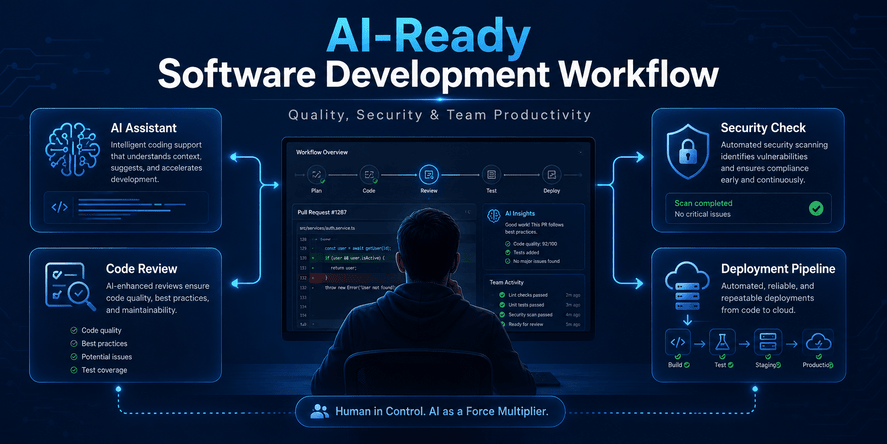
Artificial intelligence is no longer just an experimental tool for developers. It is becoming part of everyday software work: planning features, explaining errors, generating tests, reviewing code, writing documentation, and helping teams move faster. The question is no longer whether developers will use AI tools. The more important question is how they should use them safely.
The 2025 Stack Overflow Developer Survey reported that 84% of respondents are using or planning to use AI tools in their development process, with 51% using them daily. That level of adoption shows that AI-assisted development is now mainstream, not a niche trend. At the same time, the survey also highlights a trust problem: developers may use AI, but they still need to verify its output carefully.
This is why software teams need an AI-ready software development workflow. An AI-ready workflow is not a workflow where AI writes everything and humans accept everything. It is a structured process where AI helps developers move faster, but human judgment, architecture decisions, testing, security review, and deployment control remain central.
This article explains how to design that workflow. It focuses on concepts, strategy, practical decisions, risk management, quality control, review habits, security considerations, and team productivity. It does not include code examples, commands, configuration snippets, or technical copy-paste blocks. The goal is to help MofidTech readers understand how to use AI tools professionally in real software projects.
Table of Contents
- What Is an AI-Ready Software Development Workflow?
- Why AI Changes the Software Development Lifecycle
- Where AI Tools Can Help Developers
- Where AI Tools Can Become Dangerous
- The Human-in-the-Loop Principle
- How to Prepare a Project for AI-Assisted Development
- Planning Features With AI Without Losing Control
- Architecture Decisions in an AI-Ready Workflow
- Code Quality Principles for AI-Assisted Development
- Security Rules for AI-Generated Changes
- Testing Strategy for AI-Assisted Development
- Documentation and Knowledge Management
- DevOps and Deployment Safety
- Team Collaboration and Review Culture
- Common Mistakes Developers Make With AI Tools
- Best Practices Checklist
- Comparison Table: Traditional Workflow vs AI-Ready Workflow
- Real-World Use Cases
- FAQ
- Conclusion
What Is an AI-Ready Software Development Workflow?
An AI-ready software development workflow is a structured way of building software where AI tools are used intentionally, safely, and productively. It is not just about asking an AI assistant to generate code. It is about defining how AI fits into planning, implementation, review, testing, documentation, deployment, and maintenance.
A normal development workflow usually includes requirements, design, implementation, testing, review, deployment, monitoring, and maintenance. An AI-ready workflow keeps those steps, but adds a new layer: controlled AI assistance. Developers can ask AI to suggest solutions, explain trade-offs, identify risks, review logic, summarize documentation, and help with repetitive tasks. However, every important decision remains under human responsibility.
The main goal is balance. AI should reduce friction, not remove engineering discipline. It should help developers think faster, but not replace their responsibility to understand the system. It should improve productivity, but not create hidden technical debt.
The Difference Between AI-Assisted and AI-Controlled Development
AI-assisted development means the developer stays in control. The developer defines the problem, provides context, evaluates the output, checks the risks, and decides what to accept.
AI-controlled development is different. In that model, the AI tool may make broad decisions, rewrite large parts of the project, introduce new dependencies, modify architecture, or suggest deployment changes without enough human review. This can be dangerous, especially in production systems.
An AI-ready workflow should prefer assistance over blind automation. The best use of AI is not “do everything for me.” The best use is “help me think, compare options, reduce repetitive work, and identify what I might miss.”
Why Human Review Still Matters
AI tools can produce confident explanations even when the solution is incomplete, outdated, insecure, or unsuitable for the project. They can misunderstand business rules, ignore edge cases, use patterns that do not match your architecture, or suggest unnecessary complexity.
Human review matters because software is not only syntax. Software includes business logic, security boundaries, user expectations, maintainability, deployment environments, performance constraints, and long-term ownership. AI may help with many of these topics, but it does not carry responsibility for the final result. The developer and the team do.
Why AI Changes the Software Development Lifecycle
AI changes software development because it compresses the distance between idea and implementation. A developer can describe a feature and quickly receive a possible solution. A student can ask for an explanation of an error and get immediate guidance. A team lead can use AI to compare approaches. A DevOps engineer can ask for deployment risks. A security reviewer can ask for a checklist of areas to inspect.
This speed is powerful, but speed changes risk. When work becomes faster, mistakes can also spread faster. A poor suggestion can be accepted before it is understood. A risky change can be merged because it “looks correct.” A new dependency can be added without checking its maintenance status. A security-sensitive feature can be modified without enough review.
The rise of agentic AI makes this even more important. Recent developer tooling trends show a movement from passive coding assistants toward AI agents that can plan, act, and manage more complex workflows. Microsoft Build 2026 coverage, for example, highlighted agentic AI, GitHub Copilot desktop workflows, and secure workspaces for coordinating AI-driven tasks.
This does not mean developers should avoid AI. It means they need stronger workflows. The more capable the AI tool becomes, the more important it is to define boundaries, review standards, and approval rules.
Where AI Tools Can Help Developers
AI can support many parts of the software development lifecycle. The key is to use it for the right tasks.
Requirement Clarification
AI can help transform a vague idea into clearer requirements. For example, a developer building a dashboard can ask AI to identify possible user roles, key actions, error states, data flows, and validation rules. This does not replace product thinking, but it helps reveal missing questions.
AI is especially useful when a developer is starting with an incomplete request. It can propose acceptance criteria, edge cases, and user scenarios. The developer can then refine those suggestions based on the real project.
Technical Research
AI can summarize concepts, compare technologies, explain architectural patterns, and identify common trade-offs. This helps developers explore options before making decisions.
However, technical research with AI should be verified. AI may summarize outdated information, mix versions, or present uncertain recommendations as facts. For important technical decisions, developers should still check official documentation, security advisories, release notes, and trusted sources.
Architecture Exploration
AI can help compare monolithic architecture, modular monoliths, microservices, serverless systems, event-driven design, and API-first approaches. It can also help identify possible bottlenecks, integration points, and failure scenarios.
The best practice is to use AI as a discussion partner. Ask it to compare options, list risks, challenge assumptions, and explain maintenance consequences. Do not let it choose the architecture automatically.
Refactoring Support
AI can help identify duplicated logic, unclear naming, overly complex flows, missing separation of concerns, and potential simplifications. It can also explain unfamiliar parts of a codebase.
The danger is uncontrolled refactoring. AI may rewrite stable code unnecessarily, change behavior without noticing, or introduce inconsistencies. Refactoring should remain small, reviewed, and tested.
Testing Strategy
AI is useful for thinking about test coverage. It can suggest edge cases, failure paths, role-based scenarios, data validation cases, and regression risks. This is often more valuable than simply generating tests, because the developer receives a broader view of what could break.
Documentation
AI can summarize technical decisions, produce user-facing explanations, draft onboarding notes, and help maintain internal documentation. This is one of the safest and most productive uses of AI, provided that the final text is reviewed for accuracy.
Review Preparation
Before submitting a change, a developer can ask AI to act as a reviewer and identify possible risks. This can help catch missing tests, unclear assumptions, security-sensitive areas, or deployment concerns.
But AI review should not replace peer review. It should prepare the developer for better human review.
Where AI Tools Can Become Dangerous
AI tools become dangerous when they are used without boundaries, context, or verification.
Security-Sensitive Changes
Changes related to authentication, authorization, payments, personal data, admin access, file uploads, database permissions, API access, and deployment secrets require special caution. AI can suggest logic that appears reasonable but weakens security.
OWASP’s Top 10 for Large Language Model Applications highlights risks such as prompt injection, insecure output handling, training data poisoning, model denial of service, and supply chain vulnerabilities. While that list focuses on LLM applications, the broader lesson applies to AI-assisted development: AI output must be treated as untrusted until reviewed and validated.
Large Unreviewed Changes
Large AI-generated modifications are risky because they are harder to understand. A big change may include multiple hidden behavior changes, unnecessary abstractions, inconsistent naming, or fragile assumptions.
A safer workflow is to divide work into small units. Each unit should have a clear goal, a reviewable scope, and a testable result.
Architecture Drift
AI may suggest patterns that do not match the existing project. Over time, this can create architecture drift: different parts of the application follow different styles, naming conventions, validation approaches, error handling methods, and security assumptions.
Architecture drift makes the project harder to maintain. Developers should define project rules and require AI output to respect them.
Dependency Risks
AI may recommend libraries, services, packages, or tools that are outdated, unmaintained, insecure, unnecessary, or incompatible with the current project. This is a common risk because AI tools may not always have accurate real-time package context.
Any new dependency should be reviewed for maintenance, popularity, licensing, security, compatibility, and necessity.
False Confidence
One of the biggest problems with AI tools is that they can sound confident even when they are wrong. A human beginner may accept the output because it is well written. Even experienced developers may be influenced by confident explanations during busy work.
An AI-ready workflow must normalize verification. The question should not be “Does the AI sound correct?” The question should be “Can we prove this change is correct, secure, maintainable, and appropriate for our system?”
The Human-in-the-Loop Principle
The most important principle in AI-assisted development is human-in-the-loop control. This means humans remain responsible for goals, constraints, approvals, and final decisions.
AI can suggest. Humans decide.
AI can generate. Humans review.
AI can explain. Humans verify.
AI can accelerate. Humans remain accountable.
Why This Principle Matters
Software affects users, businesses, data, money, security, and reputation. When an AI-generated change causes a problem, the AI tool is not responsible for fixing production, explaining the incident, restoring backups, or communicating with users. The team is responsible.
The NIST AI Risk Management Framework emphasizes trustworthy AI and risk management across design, development, use, and evaluation. This supports the idea that AI should be governed by repeatable practices, not used casually in high-impact systems.
What Human-in-the-Loop Looks Like in Practice
A human-in-the-loop workflow includes clear review points:
The developer defines the task before asking AI.
The AI receives limited and relevant context.
The output is reviewed against project rules.
Security-sensitive changes receive extra inspection.
Tests are planned before deployment.
Documentation is updated when behavior changes.
A human approves the final result.
This workflow protects quality without blocking productivity.
How to Prepare a Project for AI-Assisted Development
Before using AI tools deeply in a project, the team should prepare the project. AI works better when the project has clear structure, consistent rules, and documented expectations.
Define Project Standards
A project should have clear standards for naming, folder structure, architecture, validation, error handling, logging, testing, security, and documentation. If these standards exist only in the minds of senior developers, AI tools will not know them.
Written standards help both humans and AI. They reduce ambiguity and make review easier.
Document the Architecture
AI tools are more useful when developers can provide architecture context. A project should have a simple architecture document explaining major components, responsibilities, data flow, external services, deployment environments, and security boundaries.
This does not need to be complicated. Even a clear overview can prevent many wrong suggestions.
Create a Risk Classification System
Not all changes have the same risk. A small text update is not the same as an authentication change. A UI improvement is not the same as a database migration. A local-only change is not the same as a production deployment change.
A simple risk classification system can help:
Low risk: content, styling, documentation, small UI changes.
Medium risk: business logic, forms, validation, non-critical APIs.
High risk: authentication, permissions, payments, user data, migrations, deployment, security settings.
Critical risk: production infrastructure, sensitive data handling, access control, payment systems, backup and recovery, public APIs with privileged access.
AI-generated changes should be reviewed according to risk level.
Keep Work Small and Traceable
AI tools are most useful when the task is specific. Instead of asking AI to “improve the project,” a developer should ask for a focused improvement with clear constraints. The output should be easy to inspect, test, and reject if needed.
Small changes create safer workflows.
Protect Secrets and Private Data
Developers should avoid sharing secrets, private keys, credentials, customer data, internal tokens, confidential business logic, or sensitive production data with AI tools unless the organization has approved controls and policies.
Even when a tool claims privacy protections, teams should follow internal data handling rules.
Planning Features With AI Without Losing Control
AI can help plan features, but feature planning must remain grounded in real user needs and project constraints.
Start With the User Problem
A good AI-ready workflow begins with a clear problem statement. What does the user need? What pain point are we solving? What action should become easier? What business rule must be respected?
AI can help refine this, but it should not invent the product strategy.
Ask AI to Identify Missing Questions
One of the most useful ways to use AI is to ask it what is missing. For example, before building a new dashboard, the team can ask AI to identify missing roles, permissions, data freshness issues, reporting needs, error states, and accessibility concerns.
This helps developers avoid jumping too quickly into implementation.
Convert Ideas Into Acceptance Criteria
AI can help turn vague requirements into acceptance criteria. These criteria should describe what must be true when the feature is complete. They help developers, testers, and reviewers understand the target.
Acceptance criteria are especially useful when AI assists with development because they provide a benchmark for evaluating the output.
Avoid AI-Driven Scope Creep
AI often suggests extra features. Some suggestions may be useful, but many can create unnecessary complexity. Developers should separate the required feature from optional improvements.
A professional workflow protects scope. The best feature is not always the largest feature. It is the feature that solves the right problem with the least unnecessary complexity.
Architecture Decisions in an AI-Ready Workflow
Architecture is one of the areas where AI can help, but also one of the areas where AI can mislead.
Use AI to Compare, Not Decide Automatically
AI can compare architectural options, but the final decision should be made by humans who understand the project. Architecture depends on team size, user volume, data model, deployment environment, budget, security requirements, and long-term maintenance.
AI may recommend trendy patterns when a simpler approach is better. For example, a small Django project may not need microservices. A simple application may not need event-driven architecture. A small team may benefit more from clarity than from complex infrastructure.
Ask for Trade-Offs
Good architecture decisions require trade-offs. AI should be asked to explain advantages, disadvantages, operational cost, maintenance impact, testing complexity, and failure modes.
A strong workflow does not ask, “What is the best architecture?” It asks, “What are the trade-offs for this specific project?”
Protect Existing Architecture
In an existing project, the best solution is often the one that fits the current structure. AI may suggest a cleaner design in isolation, but changing the architecture may create migration cost, team confusion, or compatibility problems.
Developers should ask whether a suggestion fits the current architecture before accepting it.
Document Architecture Decisions
When AI helps evaluate options, the team should document the final decision and the reasons behind it. This prevents future confusion and helps new team members understand why the system was designed that way.
Code Quality Principles for AI-Assisted Development
Even without discussing code examples, we can define strong quality principles for AI-assisted development.
Readability Comes First
AI-generated solutions should be easy for humans to understand. If a solution is clever but confusing, it may become a maintenance problem. Software is read more often than it is written, and AI-generated work is no exception.
Consistency Matters
AI output should match project conventions. Inconsistent naming, structure, error handling, or validation patterns make a project harder to maintain. A developer should reject changes that feel foreign to the codebase unless there is a strong reason to introduce a new pattern.
Avoid Unnecessary Abstraction
AI sometimes creates abstractions too early. It may introduce layers, managers, helpers, services, or generalized structures for a problem that does not need them. Abstraction should solve a real problem, not make the project look more advanced.
Prefer Clear Business Logic
Business rules should be explicit and understandable. If AI hides important behavior behind complex structures, future developers may struggle to modify the system safely.
Preserve Maintainability
A change is not good only because it works today. It should also be maintainable next month and next year. Developers should ask:
Can another developer understand this?
Is the behavior easy to test?
Does it match the project style?
Will it be easy to debug?
Does it introduce unnecessary dependencies?
Does it make future changes harder?
Security Rules for AI-Generated Changes
Security is one of the most important parts of an AI-ready workflow. AI-generated work should always be treated as untrusted until reviewed.
Review Authentication Carefully
Authentication controls who a user is. Any change related to login, registration, password reset, session handling, multi-factor authentication, OAuth, or account recovery must be reviewed carefully.
A small mistake in authentication can expose accounts or weaken the entire system.
Review Authorization Even More Carefully
Authorization controls what a user can do. Many serious security bugs happen when a user can access data or actions they should not access.
AI-generated authorization changes should be reviewed for role boundaries, ownership checks, admin access, object-level permissions, and hidden paths that bypass restrictions.
Protect User Data
Any change involving personal data, uploaded files, private messages, logs, analytics, or exports should receive privacy review. Developers should check whether the change exposes data unnecessarily, stores data longer than needed, or sends data to external systems without a clear reason.
Be Careful With File Uploads
File upload features are commonly risky. They may involve file type validation, storage permissions, size limits, scanning, naming, access control, and public exposure. AI-generated upload logic should not be accepted without careful review.
Review Third-Party Dependencies
AI may suggest adding a dependency because it solves a problem quickly. But every dependency adds supply chain risk. Developers should evaluate whether the package is maintained, trusted, necessary, compatible, and secure.
OWASP’s LLM risk guidance includes supply chain vulnerabilities as a major category for LLM applications, and the same concern applies broadly when AI suggests external components or services.
Protect Environment Variables and Secrets
AI should never be allowed to casually expose secrets, tokens, passwords, private keys, production credentials, or internal URLs. Developers should also avoid pasting sensitive environment details into AI tools.
Require Extra Review for Production Settings
Deployment, security headers, caching, database configuration, email settings, logging, storage, and reverse proxy behavior can affect the entire application. AI-generated changes in these areas should be considered high risk.
Testing Strategy for AI-Assisted Development
Testing becomes more important when AI is used because developers may accept changes faster than they fully understand them.
Test the Intended Behavior
The first question is simple: does the feature do what it was supposed to do? AI output should be tested against the original requirement, not only against whether it appears to work.
Test Edge Cases
AI often handles the happy path better than unusual cases. Developers should test empty data, invalid input, permission boundaries, expired states, duplicate actions, missing files, slow responses, and unexpected user behavior.
Test Security Boundaries
Security testing should check whether users can access only what they should access. This includes anonymous users, normal users, staff users, admins, owners, and non-owners.
Test Regression Risks
A change may fix one problem while breaking another. Regression testing checks whether existing features still work after the AI-assisted modification.
Test Deployment Behavior
Some changes work locally but fail in staging or production because of environment differences. AI-assisted changes should be tested in an environment that resembles production when the risk is medium or high.
Use Manual and Automated Testing Together
Automated testing is valuable, but manual testing remains important for user experience, workflows, visual issues, and complex business scenarios. AI-ready teams use both.
Documentation and Knowledge Management
AI can generate documentation quickly, but documentation must still be accurate.
Document the Why, Not Only the What
Good documentation explains why a decision was made. This is especially important when AI helped explore multiple options. Future developers need to understand the reasoning, not only the final result.
Keep Documentation Close to the Workflow
Documentation should be updated when behavior changes. If a feature, permission rule, deployment process, or API behavior changes, the documentation should reflect it.
Use AI to Improve Clarity
AI is useful for rewriting confusing internal notes, summarizing long discussions, and turning rough explanations into clearer documentation. However, the team should verify all technical claims.
Avoid Documentation That Hides Uncertainty
AI-generated documentation may sound polished even when the underlying decision is uncertain. Teams should clearly mark open questions, assumptions, and areas that need future review.
DevOps and Deployment Safety
AI-assisted development becomes more dangerous when it reaches deployment. A bad local change may be annoying. A bad production change may cause downtime, data loss, or security exposure.
Treat Deployment Changes as High Risk
Deployment configuration, database migrations, web server behavior, SSL, environment variables, caching, storage, queues, background workers, and monitoring should be reviewed carefully.
AI may suggest changes that work in a generic environment but do not fit your actual infrastructure.
Use Staging Environments
A staging environment helps catch problems before production. For AI-assisted changes, staging is especially valuable because it provides a safer place to test integration, environment variables, permissions, performance, and external services.
Prepare Rollback Plans
Before deploying risky changes, teams should know how to return to the previous stable state. A rollback plan should include application version, database considerations, configuration changes, and communication responsibilities.
Monitor After Deployment
Deployment does not end when the change is released. Teams should monitor logs, error rates, performance, user reports, security alerts, and business-critical workflows.
AI-generated changes should be watched especially carefully after deployment.
Team Collaboration and Review Culture
AI-ready development is not only a technical issue. It is also a team culture issue.
Create AI Usage Guidelines
Teams should define what AI tools may be used for, what data may be shared, what tasks are safe, and what tasks require approval. Guidelines prevent confusion and reduce risk.
Do Not Shame Developers for Using AI
AI use should be transparent, not hidden. If developers feel embarrassed or afraid to mention AI assistance, the team loses the chance to review properly. A healthy culture allows AI use but requires responsibility.
Require Clear Explanations
A developer should be able to explain any AI-assisted change. If the developer cannot explain it, it should not be merged.
Review the Result, Not the Tool
The team should not automatically reject a change because AI helped create it. The team should review quality, security, maintainability, and correctness. Good output can come from AI-assisted work, but it must still meet professional standards.
Train Junior Developers Carefully
AI can help junior developers learn, but it can also make them dependent. Junior developers should be encouraged to ask why, compare alternatives, and understand fundamentals. AI should support learning, not replace it.
Common Mistakes Developers Make With AI Tools
Accepting Output Without Understanding It
This is the biggest mistake. Developers should never accept a change they cannot explain. Understanding is part of ownership.
Asking AI to Modify Too Much at Once
Large uncontrolled changes are hard to review. Smaller tasks are safer and more productive.
Ignoring Security Impact
A change may seem functional but weaken security. Any feature related to users, data, permissions, files, payments, or admin access must be reviewed carefully.
Letting AI Add Dependencies Too Easily
A dependency can solve one problem while creating long-term risk. Developers should avoid adding packages unless they are clearly necessary.
Skipping Tests Because the Output Looks Correct
AI output can look polished and still be wrong. Testing is required.
Using AI as a Replacement for Architecture
AI can suggest architecture, but it does not know your full business context, team skills, budget, or production constraints unless you provide them. Architecture remains a human responsibility.
Forgetting Project Conventions
AI may produce a solution that works but does not match the project. Consistency is important for long-term maintainability.
Failing to Document AI-Assisted Decisions
If AI helped influence an architectural or security decision, the final reasoning should be documented.
Best Practices Checklist
Before Using AI
Clarify the goal.
Define the expected outcome.
Identify the risk level.
Provide only necessary context.
Avoid sharing secrets or sensitive data.
State project constraints clearly.
Specify that the solution must match existing architecture.
Before Accepting AI Output
Check whether the solution matches the requirement.
Confirm that you understand the change.
Review security impact.
Review performance impact.
Check whether it adds unnecessary complexity.
Check whether it introduces new dependencies.
Verify that it follows project conventions.
Consider edge cases.
Before Committing Changes
Review all modified files.
Confirm that changes are limited to the intended scope.
Ensure documentation is updated if needed.
Run appropriate tests.
Ask for peer review when risk is medium or high.
Check whether rollback is simple.
Before Deploying
Confirm the change was tested in the right environment.
Review database and migration risks if relevant.
Check environment-specific behavior.
Prepare a rollback plan.
Monitor after release.
Communicate with the team if the change affects users.
Comparison Table: Traditional Workflow vs AI-Ready Workflow
| Area | Traditional Workflow | AI-Ready Workflow |
|---|---|---|
| Planning | Human team defines requirements | Human team defines requirements, AI helps identify missing questions |
| Architecture | Developers compare options manually | Developers use AI for comparison, but humans decide |
| Implementation | Developers write changes directly | Developers use AI for assistance, but keep changes small and reviewable |
| Review | Peer review focuses on human-written changes | Peer review checks both human and AI-assisted assumptions |
| Security | Security review depends on team process | AI-generated security-sensitive changes receive extra review |
| Testing | Tests validate functionality | Tests validate functionality, AI assumptions, edge cases, and regressions |
| Documentation | Written after implementation | AI may help draft documentation, humans verify accuracy |
| Deployment | Standard release process | Risk-based deployment with stronger rollback and monitoring |
| Accountability | Developer/team owns the result | Developer/team still owns the result fully |
Real-World Use Cases
Use Case 1: A Django Developer Improving an Existing Feature
A Django developer wants to improve a user dashboard. AI can help identify missing dashboard metrics, suggest user experience improvements, and highlight possible performance risks. However, the developer must ensure that permissions are respected, database usage remains efficient, and the dashboard does not expose private data.
The AI-ready approach is to ask for analysis first, then make small changes, review each change, test role-based access, and confirm that performance remains acceptable.
Use Case 2: A DevOps Engineer Reviewing Deployment Risk
A DevOps engineer receives an AI suggestion for improving deployment configuration. The suggestion may look professional, but deployment environments are highly specific. The engineer should verify compatibility with the actual server, containers, web server, SSL setup, environment variables, and rollback process.
The AI-ready approach is to treat deployment changes as high risk and test them outside production first.
Use Case 3: A Student Learning Software Architecture
A student can use AI to understand architecture patterns, compare approaches, and ask for explanations. This is a valuable learning use case. But the student should not memorize AI answers blindly. They should compare explanations, ask for trade-offs, and connect concepts to real projects.
The AI-ready approach is to use AI as a tutor, not as a replacement for learning fundamentals.
Use Case 4: A Team Using AI for Code Review Preparation
A developer can ask AI to review a planned change before opening a pull request. AI may identify missing tests, risky assumptions, unclear naming, or possible security concerns. This improves the quality of the human review.
The AI-ready approach is to use AI as a first reviewer, then still require human review.
Use Case 5: A Startup Building Features Quickly
Startups often want speed. AI can help prototype quickly, but fast prototypes can become fragile production systems. The team must separate prototype speed from production quality.
The AI-ready approach is to use AI for exploration, but require stricter review before production release.
Performance Considerations
AI-assisted changes can affect performance in hidden ways.
Watch for Inefficient Data Access
AI may suggest logic that works for small data but becomes slow with real traffic. Developers should consider database queries, repeated operations, unnecessary calculations, and inefficient data loading.
Avoid Overengineering
Complex abstractions can reduce performance and increase maintenance cost. AI may generate solutions that are more complicated than necessary. Simpler designs are often faster and easier to optimize.
Consider Caching Carefully
AI may suggest caching as a general solution, but caching has trade-offs. It can create stale data, invalidation problems, and debugging complexity. Developers should use caching only when the performance problem is clear.
Monitor Real Behavior
Performance should be measured, not guessed. After deployment, teams should monitor response times, error rates, resource usage, and user experience.
Security Considerations
Security should be integrated throughout the AI-ready workflow.
Treat AI Output as Untrusted
AI-generated suggestions should be reviewed the same way as third-party input. They may be useful, but they are not automatically safe.
Protect Sensitive Context
Do not paste secrets, private credentials, user data, confidential business information, or sensitive infrastructure details into AI tools without approved controls.
Review Access Control
Every feature should be reviewed for who can access it, who can modify it, and who can see the data.
Consider AI-Specific Risks
If the project itself uses AI or LLMs, additional risks appear: prompt injection, insecure output handling, data leakage, excessive agency, and supply chain concerns. OWASP’s LLM security guidance is useful for understanding these categories.
Keep Responsibility Clear
The final responsibility belongs to the developer and organization, not the AI tool.
Troubleshooting AI-Assisted Development Problems
Problem: AI Output Does Not Match the Project
This usually happens when the AI receives too little context or when the project lacks clear standards. The solution is to provide better constraints and reject output that does not fit the architecture.
Problem: The AI Suggests Too Many Changes
Break the task into smaller parts. Ask for analysis first, then request only one specific change at a time.
Problem: The AI Introduces New Dependencies
Ask whether the dependency is necessary. Consider whether the same result can be achieved with existing project tools. Review maintenance, security, and licensing before accepting it.
Problem: The AI Fixes One Bug but Creates Another
This is a regression problem. Improve test coverage, test related workflows, and review the assumptions behind the fix.
Problem: Developers Trust AI Too Much
Create a team rule: no AI-assisted change can be merged unless the developer can explain it. Encourage peer review and risk classification.
Problem: AI Gives Outdated Advice
Check official documentation and trusted sources for version-sensitive topics. AI is useful for explanation, but current technical details must be verified.
FAQ
1. What is an AI-ready software development workflow?
It is a structured workflow where AI tools help with planning, development, review, testing, documentation, and deployment, while humans remain responsible for decisions, quality, security, and final approval.
2. Does AI replace developers?
No. AI can automate some tasks and accelerate others, but developers still need to understand requirements, architecture, security, testing, maintenance, and business logic.
3. Can AI-generated code be trusted?
AI-generated output should not be trusted automatically. It must be reviewed, tested, and verified like any other contribution.
4. What is the biggest risk of AI-assisted development?
The biggest risk is accepting confident but incorrect output without understanding it. This can introduce bugs, security weaknesses, poor architecture, or technical debt.
5. Should teams allow developers to use AI tools?
Yes, but with clear guidelines. Teams should define what data can be shared, what tasks are safe, what tasks require review, and how AI-assisted changes should be documented.
6. Is AI useful for junior developers?
Yes, AI can help junior developers learn faster, understand errors, and explore concepts. However, they should avoid blindly accepting answers. They should use AI as a tutor, not as a replacement for fundamentals.
7. What types of changes need extra review?
Authentication, authorization, payment logic, personal data, admin access, database changes, deployment configuration, file uploads, external dependencies, and production settings need extra review.
8. How can AI improve code review?
AI can help developers prepare for review by identifying possible risks, missing tests, unclear assumptions, and edge cases. However, it should not replace human peer review.
9. Can AI help with DevOps?
Yes, AI can explain deployment concepts, identify risks, and help prepare checklists. But deployment changes are high risk and must be verified in the actual environment.
10. How should a team start building an AI-ready workflow?
Start by defining AI usage rules, classifying change risk, protecting sensitive data, requiring human review, using small tasks, and creating checklists for testing and deployment.
11. Is AI-assisted development good for cybersecurity?
It can help identify risks and explain security concepts, but it can also introduce vulnerabilities. Security review remains essential.
12. What is the best mindset for using AI in software engineering?
Use AI as a powerful assistant, not an authority. Let it accelerate thinking and reduce repetitive work, but keep human judgment at the center.
Conclusion
AI-assisted development is becoming a normal part of software engineering. Developers use AI tools to plan features, understand errors, review ideas, generate documentation, explore architecture, and improve productivity. But professional software development is not only about speed. It is also about correctness, security, maintainability, testing, deployment safety, and long-term responsibility.
An AI-ready software development workflow gives teams the best of both worlds. It allows developers to benefit from AI speed while preserving human control. It encourages structured planning, small reviewable changes, security awareness, testing discipline, documentation, and careful deployment.
The future of software engineering will not belong to teams that accept AI blindly. It will belong to teams that know how to supervise AI effectively. The best developers will not be those who ask AI to do everything. They will be those who know how to ask better questions, evaluate answers critically, protect architecture, and turn AI assistance into reliable engineering output.
For MofidTech readers, this topic is especially important because it connects AI tools, software engineering, cybersecurity, DevOps, productivity, and real-world development workflows. Whether you are building a Django project, managing a deployment, studying computer science, or leading a technical team, learning how to work with AI safely is now a core professional skill.










💬 Comments
No comments yet. Be the first to comment!
Login to comment.