Introduction
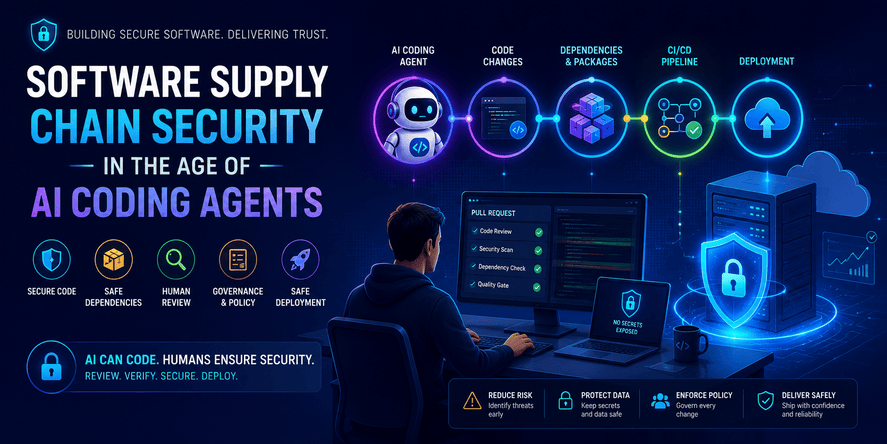
Software development is changing quickly. Developers no longer work only with editors, documentation, package managers, and deployment pipelines. They now work with AI coding assistants and increasingly powerful AI coding agents that can analyze projects, modify files, suggest dependencies, generate tests, refactor architecture, and prepare changes for review.
This creates a major productivity opportunity, but it also changes the security model of modern software development.
In the past, software supply chain security was mostly discussed in relation to open-source packages, vulnerable dependencies, build systems, and deployment pipelines. Today, AI coding agents must also be considered part of the software supply chain because they influence what code is written, which dependencies are added, how architecture decisions are made, and how fast changes move toward production.
GitHub’s Octoverse 2025 report describes AI, agents, and typed languages as major forces reshaping software development, while OWASP’s GenAI security work highlights supply chain vulnerabilities as a serious risk area for LLM and generative AI applications.
For developers, this means one thing: AI can help you build faster, but speed without governance can increase hidden risk.
This article explains software supply chain security in the age of AI coding agents. It does not include code, commands, configuration snippets, or copy-paste examples. Instead, it focuses on concepts, workflows, architecture, review practices, risks, governance, checklists, and practical decision-making.
Table of Contents
- What software supply chain security means
- Why AI coding agents change the security model
- The main risks introduced by AI-assisted development
- How dependency risk becomes more dangerous with AI
- Human review in AI-assisted development
- Secure governance for AI coding agents
- Practical review workflow before deployment
- Software supply chain security checklist
- Best practices for teams and individual developers
- Common mistakes to avoid
- Security considerations
- Performance and operational considerations
- Troubleshooting risky AI-generated changes
- Comparison tables
- FAQ
- Conclusion
What Is Software Supply Chain Security?
Software supply chain security is the practice of protecting every component, process, tool, and dependency involved in building, testing, packaging, delivering, and running software.
A modern application is rarely written entirely from scratch. Even a small web application may depend on:
- Programming languages
- Frameworks
- Third-party libraries
- Open-source packages
- Build tools
- Testing tools
- Deployment platforms
- Cloud services
- Container images
- CI/CD systems
- External APIs
- Authentication providers
- Monitoring tools
- Documentation generators
- Developer tools
- AI coding assistants
Each of these elements can introduce risk.
A secure application is not only one where the developer writes safe business logic. It is also one where dependencies are trusted, build processes are controlled, secrets are protected, deployment workflows are reviewed, and changes are traceable.
CISA’s supply chain security guidance emphasizes secure software practices, procurement, deployment, and software bills of materials, showing that software security is now a full lifecycle concern rather than only a source code concern.
The Supply Chain Is a Security Boundary
Many developers think of the application boundary as the codebase. In reality, the security boundary is much larger.
A vulnerability can enter through:
- A package added casually
- A compromised dependency
- A malicious package with a similar name to a popular one
- A build pipeline with excessive permissions
- A leaked environment variable
- A container image with outdated components
- A generated file that nobody reviewed
- A deployment step that bypasses approval
- A tool that has access to more files than necessary
- An AI agent that makes a risky architectural change
In traditional development, these risks already existed. AI coding agents make them more important because they can introduce changes faster than humans can review them carefully.
Why AI Coding Agents Change the Security Model
AI coding assistants originally helped with small suggestions. They completed lines, explained functions, or generated small examples. AI coding agents go further. They can understand project structure, make multi-file changes, propose dependency updates, create tests, modify configuration, and interact with development workflows.
Recent industry movement shows a shift toward more autonomous and agentic development tools. Microsoft and GitHub have been moving Copilot toward agent workflows, and recent Build 2026 coverage described a broader shift from passive coding assistance to agentic development environments.
This changes the risk model because AI agents are not only text generators. In practice, they can become active participants in the software supply chain.
From Assistant to Actor
A simple AI assistant gives suggestions. A coding agent may act on a task.
That difference matters.
An assistant may say: “You should add validation here.”
An agent may actually modify the validation layer, update dependencies, adjust tests, change deployment behavior, and create a pull request.
When AI moves from suggestion to action, developers need new security controls.
Speed Can Hide Risk
AI tools are valuable because they accelerate work. But speed can also reduce attention.
A developer may accept a large AI-generated change because:
- The output looks professional
- The project still runs
- The agent appears confident
- The change solves the visible problem
- The deadline is urgent
- The review diff is too large to inspect carefully
This is dangerous because many security issues are not obvious immediately. A change can work functionally while weakening authorization, increasing dependency risk, exposing sensitive data, or making deployment rollback harder.
Human Review Becomes More Important
AI does not remove the need for review. It increases the need for review.
The developer’s role changes from writing every line manually to validating intent, architecture, risk, dependencies, security impact, and operational behavior.
A good developer using AI should ask:
- What exactly changed?
- Why was this change necessary?
- Did the AI add any dependency?
- Did it affect authentication or authorization?
- Did it change user data handling?
- Did it affect deployment?
- Did it expose secrets?
- Did it increase complexity?
- Is the change testable?
- Can it be rolled back safely?
The Main Risks Introduced by AI-Assisted Development
AI-assisted development does not create entirely new categories of software risk. Instead, it amplifies existing risks and makes them easier to introduce at scale.
1. Unnecessary Dependencies
AI agents may suggest adding a new package when the same result could be achieved with existing project capabilities. Every new dependency increases the attack surface.
A dependency may introduce:
- Vulnerabilities
- Maintenance risk
- Licensing concerns
- Compatibility problems
- Performance overhead
- Transitive dependency risk
- Future upgrade complexity
The best dependency is not always the most popular one. Sometimes the safest dependency is the one you do not add.
2. Vulnerable Transitive Dependencies
A direct dependency is a package your project explicitly uses. A transitive dependency is a package required by another package.
Transitive dependencies are especially risky because developers may not notice them. AI agents may add one harmless-looking package that brings many hidden dependencies behind it.
This matters because a vulnerable transitive dependency can create real application risk even when the top-level package appears safe.
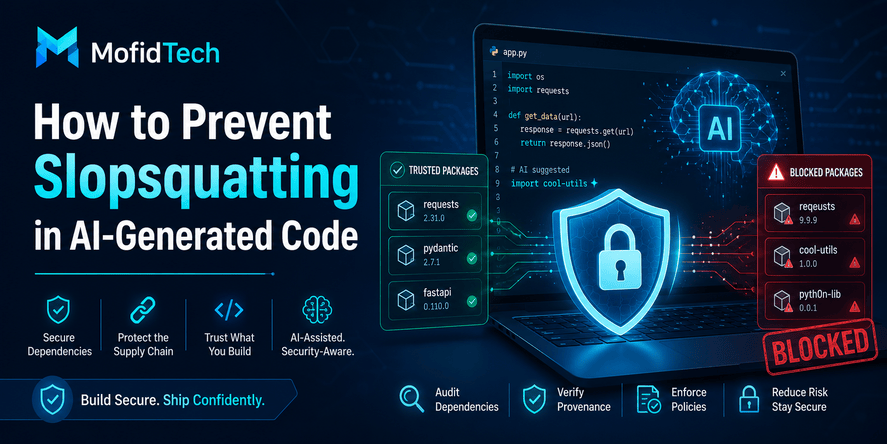
3. Package Confusion and Similar-Name Risks
Attackers sometimes create packages with names similar to trusted libraries. A developer or AI agent may accidentally suggest or add the wrong package.
This is especially risky when package names are short, misspelled, or similar to internal company packages.
4. Unsafe Generated Logic
AI-generated code may look correct but contain subtle problems. Examples include:
- Missing authorization checks
- Weak input validation
- Insecure error handling
- Excessive data exposure
- Unsafe assumptions about user roles
- Poor session handling
- Incomplete edge case coverage
- Overly broad permissions
- Weak auditability
These problems may not appear during basic manual testing.
5. Secret Leakage
AI agents may accidentally expose secrets if they read, rewrite, summarize, or move sensitive files. They may also suggest storing secrets in unsafe places.
Sensitive information includes:
- API keys
- Database credentials
- Cloud tokens
- Private keys
- Session secrets
- OAuth secrets
- Internal service credentials
- Production URLs
- Personal data
A secure workflow should treat secret exposure as a serious incident, even if the secret appears only in a development branch.
6. Build Pipeline Risk
A software supply chain attack may target the build process rather than the source code itself.
AI agents may modify files related to:
- Build behavior
- Deployment automation
- Package installation
- Container behavior
- Testing workflows
- Release steps
- Environment settings
Changes in these areas require special review because they can affect how software is created and deployed.
7. Weak Traceability
Traceability means being able to answer:
- Who made this change?
- Why was it made?
- What files were affected?
- Which dependencies changed?
- Was the change reviewed?
- Was the change tested?
- Was it deployed?
- Can it be rolled back?
AI-generated changes can weaken traceability if teams accept them without clear documentation.
8. Overtrust in AI Output
One of the biggest risks is psychological. Developers may trust AI-generated output because it is fluent, structured, and confident.
But correctness and confidence are not the same.
A secure team must treat AI output as proposed work, not verified work.
How Dependency Risk Becomes More Dangerous With AI
Dependencies are one of the most important parts of software supply chain security. AI changes how dependencies are selected because developers may ask the agent to “solve the problem,” and the agent may choose a library automatically.
Dependency Choice Is an Architectural Decision
Adding a dependency is not just a small technical action. It is an architectural decision.
A new dependency affects:
- Security
- Maintenance
- Performance
- Licensing
- Deployment
- Compatibility
- Long-term stability
- Developer onboarding
- Upgrade strategy
When AI suggests a dependency, the developer must still decide whether the dependency belongs in the project.
Questions Before Accepting a New Dependency
Before accepting an AI-suggested dependency, ask:
- Is this dependency necessary?
- Can the project already solve this problem without it?
- Is the package actively maintained?
- Is the package widely used?
- Does it have known vulnerabilities?
- Does it introduce many transitive dependencies?
- Does it match the project’s license requirements?
- Is it compatible with the current stack?
- Does it affect performance?
- Does it require access to sensitive data?
- Would removing it later be difficult?
Open-Source Security Health Matters
OpenSSF Scorecard provides automated checks that help assess open-source project security risks. It is designed to help developers evaluate security health and make better decisions when accepting risk in dependencies.
This type of evaluation is important because a dependency should not be judged only by popularity. A widely used package can still have weak maintenance, poor release hygiene, or unresolved vulnerabilities.
Human Review in AI-Assisted Development
Human review is the control layer between AI-generated changes and production systems.
A review should not only ask whether the application still works. It should ask whether the change is safe, necessary, maintainable, and reversible.
Review the Intent
Start with the purpose of the change.
Ask:
- What problem was the AI agent asked to solve?
- Did it solve only that problem?
- Did it make unrelated changes?
- Did it introduce new behavior?
- Did it change architecture beyond the request?
- Did it remove existing safeguards?
AI agents may sometimes over-solve. They may improve formatting, restructure files, rename logic, or add abstractions that were not required.
Unrelated changes make review harder and increase risk.
Review the Scope
A safe change should have a clear scope.
High-risk scope includes:
- Authentication
- Authorization
- Payments
- Admin dashboards
- User data
- File uploads
- API permissions
- Database structure
- Deployment workflows
- Environment configuration
- Security headers
- Logging
- Error handling
- Background jobs
- External integrations
If an AI agent touches any of these areas, the change deserves deeper review.
Review Dependencies
Dependency review should check whether:
- New dependencies were added
- Existing dependencies were upgraded
- Existing dependencies were removed
- Package lock or dependency metadata changed
- Transitive dependencies increased significantly
- The dependency source is trustworthy
- The dependency is still maintained
- The dependency has known security issues
Review Data Access
AI-generated changes may accidentally expand data access.
Review whether the change:
- Exposes private user information
- Weakens access control
- Changes query behavior
- Adds new data export paths
- Logs sensitive data
- Sends data to third-party services
- Stores sensitive data unnecessarily
- Changes retention or deletion behavior
Review Failure Behavior
Secure software is not only about the happy path. It is also about what happens when something fails.
Ask:
- What happens if an external service fails?
- What happens if input is invalid?
- What happens if a user has insufficient permissions?
- What happens if a background process stops?
- What happens if a deployment partially succeeds?
- What happens if a dependency is unavailable?
AI-generated changes often look good in ideal scenarios but may not handle failures safely.
Secure Governance for AI Coding Agents
Governance means defining rules for how AI tools are allowed to participate in development.
This does not mean blocking AI. It means using AI responsibly.
Define What AI Can and Cannot Change
Teams should classify project areas by sensitivity.
Low-risk areas may include:
- Documentation drafts
- Internal notes
- Non-sensitive UI copy
- Test planning
- Refactoring suggestions
- Explanations
Medium-risk areas may include:
- Business logic
- User interface behavior
- Form validation
- Non-critical background tasks
- Internal tools
High-risk areas may include:
- Authentication
- Authorization
- Payment logic
- Admin features
- Production deployment
- Secrets
- Database migrations
- Security settings
- Infrastructure configuration
- Compliance-related logic
AI agents should not freely modify high-risk areas without explicit human approval.
Use Least Privilege
AI tools should have only the access they need.
This principle applies to:
- Repository access
- File system access
- Environment access
- Secrets access
- Deployment permissions
- External service permissions
- Issue tracker permissions
- CI/CD permissions
An AI coding agent should not have production deployment access unless there is a very strong reason and strict approval process.
Require Human Approval for Sensitive Changes
Any change affecting sensitive systems should require human review.
Sensitive changes include:
- Authentication behavior
- User roles
- Permissions
- Data deletion
- Payment processing
- Security policy
- Environment variables
- Deployment automation
- Dependency files
- Public API behavior
- Admin access
Separate Experimentation From Production
AI-generated experimentation should happen in isolated branches or environments.
A secure workflow separates:
- Idea exploration
- Prototype generation
- Development branch
- Review branch
- Staging validation
- Production deployment
This reduces the chance that experimental AI output reaches production accidentally.
Keep an Audit Trail
Teams should document:
- What AI tool was used
- What task was requested
- What files changed
- What dependency changes occurred
- Who reviewed the result
- What tests were performed
- What risks were identified
- Who approved deployment
This helps with accountability and future incident analysis.
Practical Review Workflow Before Deployment
A secure AI-assisted workflow should be simple enough to use daily but strong enough to catch serious problems.
Step 1: Understand the Original Request
Before reviewing the output, understand the input.
Ask:
- What was the AI asked to do?
- Was the request specific?
- Was the request safe?
- Did it include constraints?
- Did it tell the AI not to modify sensitive areas?
A vague prompt often produces broad changes. Broad changes are harder to secure.
Step 2: Identify All Modified Areas
Group modified files or components by risk level.
For example:
- Documentation only
- User interface only
- Business logic
- Data handling
- Dependency management
- Security settings
- Deployment workflow
- Infrastructure behavior
This helps decide how deep the review should be.
Step 3: Check for Dependency Changes
Any dependency change should trigger a supply chain review.
Ask:
- Was a package added?
- Was a package upgraded?
- Was a package downgraded?
- Was a lock file changed?
- Did the change introduce many indirect dependencies?
- Is the dependency still maintained?
- Is it necessary?
Step 4: Review Security-Sensitive Logic
Focus carefully on:
- Login
- Registration
- Password changes
- Role checks
- Admin access
- API authentication
- File uploads
- Payment actions
- Data export
- Email workflows
- Webhooks
- External integrations
These areas often create real-world risk when changed incorrectly.
Step 5: Review Error Handling
Bad error handling can expose sensitive information or make attacks easier.
Check whether the change:
- Reveals internal details
- Logs sensitive data
- Gives attackers useful feedback
- Fails open instead of failing safely
- Ignores exceptions
- Hides important operational problems
Step 6: Review Data Privacy
AI-generated changes should be checked for privacy impact.
Ask:
- Is personal data collected?
- Is personal data displayed?
- Is personal data logged?
- Is personal data sent externally?
- Is access limited to authorized users?
- Is data minimized?
- Is retention considered?
Step 7: Review Deployment Risk
Before deployment, ask:
- Can this change be rolled back?
- Does it require database changes?
- Does it require environment changes?
- Does it affect background jobs?
- Does it affect cache behavior?
- Does it affect external services?
- Does it require coordination with other teams?
- Is there a staging validation path?
Step 8: Approve, Reject, or Split the Change
Not every AI-generated change should be accepted as one large update.
Sometimes the safest decision is to split it into smaller changes:
- Dependency update separately
- Refactor separately
- Security-sensitive logic separately
- UI changes separately
- Deployment changes separately
Smaller changes are easier to review and safer to deploy.
Software Supply Chain Security Checklist
Dependency Checklist
Before accepting dependency changes, verify:
- The dependency is necessary
- The dependency is actively maintained
- The dependency source is trustworthy
- The license is acceptable
- Known vulnerabilities are reviewed
- Transitive dependencies are understood
- The package name is correct
- The package is not abandoned
- The package does not require unnecessary privileges
- The package does not duplicate existing project capabilities
AI-Generated Change Checklist
Before accepting AI-generated code, verify:
- The change matches the original request
- No unrelated changes were introduced
- Sensitive files were not modified unexpectedly
- Authentication behavior remains safe
- Authorization rules remain correct
- User data remains protected
- Error handling is safe
- Logging does not expose secrets
- Dependencies are justified
- The change is understandable by humans
- The change can be maintained without the AI tool
- The change can be tested and rolled back
CI/CD Checklist
For pipeline-related changes, verify:
- Build steps are necessary
- Secrets are not exposed
- Permissions are minimal
- External actions or tools are trusted
- Deployment approval is preserved
- Production access is restricted
- Logs do not leak sensitive values
- Rollback remains possible
- The pipeline behavior is documented
Deployment Checklist
Before production deployment, verify:
- The change was reviewed by a human
- Risk level was assigned
- Staging validation was completed
- Monitoring is ready
- Rollback plan exists
- Database impact is understood
- Dependency changes are documented
- Security-sensitive behavior was tested
- User impact is understood
- The deployment window is appropriate
Best Practices for Teams and Individual Developers
Treat AI Output as a Draft
AI-generated output should be considered a draft, not a final answer.
A professional developer should review AI output the same way they would review a junior developer’s pull request: respectfully, carefully, and critically.
Keep Changes Small
Large AI-generated changes are risky because they combine many decisions into one review.
Prefer smaller tasks such as:
- Improve one feature
- Review one module
- Refactor one component
- Analyze one bug
- Suggest a test plan
- Explain one dependency risk
Small changes are easier to understand, test, and reverse.
Create AI Usage Rules
A team should define rules such as:
- AI may suggest changes but not deploy them
- AI may not access production secrets
- AI may not modify authentication without approval
- AI may not add dependencies without review
- AI may not change deployment pipelines without senior review
- AI-generated security changes require manual validation
Use Risk Levels
Classify AI-generated changes as:
| Risk Level | Description | Review Requirement |
|---|---|---|
| Low | Documentation, copy, minor UI text | Basic review |
| Medium | Business logic, validation, non-sensitive workflows | Developer review |
| High | Authentication, user data, dependencies, deployment | Senior or security review |
| Critical | Payments, secrets, production infrastructure, admin access | Formal approval and rollback plan |
Maintain a Dependency Inventory
A dependency inventory helps answer:
- What packages does the project use?
- Why are they needed?
- Who maintains them?
- Are they up to date?
- Are they vulnerable?
- Which features depend on them?
- What would happen if they were removed?
This inventory becomes even more important when AI agents can add packages quickly.
Combine Automation With Human Judgment
Automated tools can detect known vulnerabilities, outdated packages, weak configuration, and suspicious patterns. But they cannot fully understand business risk.
Human judgment is still needed for:
- Authorization decisions
- Data privacy impact
- Architecture trade-offs
- Business logic correctness
- Deployment timing
- User impact
- Legal and compliance concerns
Common Mistakes to Avoid
Mistake 1: Accepting AI Changes Because They Look Professional
AI-generated work often looks clean and organized. That does not mean it is safe.
Professional formatting can hide weak logic.
Mistake 2: Ignoring Dependency Changes
A small dependency change can introduce a large supply chain risk.
Always review dependency changes separately.
Mistake 3: Reviewing Only the Visible Feature
A feature may appear to work while introducing hidden security problems.
Review the surrounding system impact, not only the visible result.
Mistake 4: Allowing AI to Modify Sensitive Areas Without Rules
AI agents should not freely modify authentication, authorization, secrets, deployment, or infrastructure.
Sensitive changes require clear human approval.
Mistake 5: Deploying Without Rollback Planning
A change is not production-ready unless it can be reversed safely.
Rollback planning is part of secure development.
Mistake 6: Treating AI as a Security Expert by Default
AI can help explain security concepts, but it can also miss context, make wrong assumptions, or suggest outdated practices.
Security decisions require verification.
Mistake 7: Letting AI Increase Complexity
Sometimes AI solves a simple problem with unnecessary abstraction.
Complexity is a security risk because complex systems are harder to review, test, and maintain.
Mistake 8: Forgetting About Logs
AI-generated changes may log too much information.
Logs should help debugging without exposing secrets, personal data, tokens, or sensitive internal behavior.
Security Considerations
Authentication and Authorization
Authentication confirms who the user is. Authorization confirms what the user is allowed to do.
AI-generated changes must be reviewed carefully if they affect:
- Login
- Registration
- Password reset
- Session handling
- User roles
- Admin access
- API permissions
- Account recovery
- Multi-factor authentication
- Access control rules
A common security failure is adding a feature that checks whether a user is logged in but does not check whether the user is allowed to access a specific resource.
Secrets Management
Secrets should never be placed in source code, documentation, public logs, screenshots, or AI prompts.
A secure AI workflow should avoid exposing:
- Production credentials
- Private keys
- API tokens
- Database passwords
- Cloud access keys
- Internal URLs
- Sensitive customer data
Input and Output Handling
AI-generated features must handle input and output safely.
Review:
- User input validation
- File uploads
- Error messages
- Redirects
- Data formatting
- Public API responses
- Admin-only fields
- User-generated content
External Services
AI agents may suggest using external services to solve problems quickly.
Before accepting an external service, ask:
- What data will be sent?
- Is the service trusted?
- Is there a privacy impact?
- Is there a cost risk?
- What happens if the service fails?
- Can the project operate without it?
- Is there vendor lock-in?
Agent Permissions
If an AI agent can access tools, repositories, or environments, its permissions should be limited.
Avoid giving AI agents broad permissions such as:
- Production deployment
- Secret access
- Billing access
- Admin-level repository permissions
- Unrestricted file system access
- Direct database access
- Ability to merge without review
OWASP’s GenAI security materials identify supply chain vulnerabilities as a major risk area for LLM applications, including risks from third-party packages, outdated components, models, services, and data sources.
Performance and Operational Considerations
Software supply chain security is not only about preventing attacks. It is also about keeping systems stable and maintainable.
Dependency Bloat
AI agents may add packages that increase application size, startup time, build time, or memory usage.
Dependency bloat can create:
- Slower deployments
- Longer builds
- Larger containers
- More attack surface
- More upgrade work
- More compatibility issues
Build Reliability
A secure supply chain should also be reliable.
If a build depends on too many external services or unstable packages, deployments become fragile.
Monitoring
After deploying AI-assisted changes, teams should monitor:
- Error rates
- Authentication failures
- Permission errors
- API latency
- Background job failures
- Deployment logs
- Security alerts
- Dependency vulnerability alerts
- User complaints
Rollback Readiness
A rollback plan should exist before deployment.
This is especially important when changes involve:
- Dependencies
- Database structure
- Authentication
- Payment systems
- Background jobs
- Caching
- Infrastructure
- External APIs
Troubleshooting Risky AI-Generated Changes
Problem: The AI Added Too Many Files
Possible cause: The request was too broad.
Recommended response:
- Split the change into smaller parts
- Ask what each file change does
- Reject unrelated modifications
- Review sensitive files first
- Keep only changes that match the original goal
Problem: A New Dependency Appeared Unexpectedly
Possible cause: The AI chose a package without asking.
Recommended response:
- Verify why the dependency is needed
- Check whether the project already has an alternative
- Review maintenance and security status
- Check transitive dependency impact
- Remove the dependency if it is not justified
Problem: The Feature Works but Feels Too Complex
Possible cause: The AI over-engineered the solution.
Recommended response:
- Compare the solution with the simplest acceptable design
- Remove unnecessary abstraction
- Prefer clarity over cleverness
- Ask whether future developers can maintain it easily
Problem: The AI Changed Security-Sensitive Logic
Possible cause: The task touched authentication, authorization, or data access.
Recommended response:
- Stop automatic acceptance
- Perform manual review
- Check all role and permission paths
- Test negative cases
- Require senior approval before deployment
Problem: The Change Is Hard to Roll Back
Possible cause: The AI modified multiple layers at once.
Recommended response:
- Separate reversible and irreversible changes
- Document deployment impact
- Prepare rollback strategy
- Avoid production deployment until rollback is clear
Comparison Tables
Traditional Development vs AI-Assisted Development
| Area | Traditional Development | AI-Assisted Development |
|---|---|---|
| Speed | Slower but more deliberate | Faster but easier to over-accept |
| Dependency selection | Usually manual | May be suggested automatically |
| Review burden | Based on human-written changes | Requires reviewing AI assumptions |
| Risk visibility | Often clearer to author | May be hidden in generated changes |
| Traceability | Human intent is usually direct | Prompt, agent action, and human approval must be tracked |
| Governance need | Important | Essential |
Assistant vs Agent
| Type | Role | Security Concern |
|---|---|---|
| AI assistant | Suggests text or ideas | Output may be wrong or unsafe |
| AI coding agent | Performs project changes | Can modify files, dependencies, and workflows |
| Autonomous workflow agent | Acts across tools and systems | Requires strict permissions and approval |
| Production-connected agent | Can affect live systems | High-risk and should be heavily controlled |
Low-Risk vs High-Risk AI Changes
| Change Type | Risk Level | Reason |
|---|---|---|
| Documentation improvement | Low | Usually does not affect runtime behavior |
| UI text change | Low | Limited technical impact |
| Form validation adjustment | Medium | Can affect user input and data quality |
| Business logic change | Medium to High | May affect important workflows |
| Dependency addition | High | Increases supply chain risk |
| Authentication change | High | Affects account security |
| Authorization change | High | Affects access control |
| Deployment pipeline change | High | Affects production delivery |
| Secret handling change | Critical | Can expose sensitive systems |
Practical Decision Framework
Before accepting an AI-generated change, use this decision framework:
1. Necessity
Is the change necessary?
If the answer is no, reject it.
2. Scope
Is the change limited to the requested task?
If the answer is no, split it or reject unrelated parts.
3. Security
Does the change affect authentication, authorization, secrets, user data, dependencies, deployment, or infrastructure?
If yes, increase the review level.
4. Maintainability
Can a developer understand and maintain this change without relying on the AI tool?
If no, simplify it.
5. Testability
Can the change be tested with realistic positive and negative cases?
If no, it is not ready.
6. Reversibility
Can the change be rolled back safely?
If no, it needs stronger planning.
FAQ
1. What is software supply chain security?
Software supply chain security protects all components and processes involved in building and delivering software, including source code, dependencies, build systems, deployment pipelines, tools, and external services.
2. Why do AI coding agents affect supply chain security?
AI coding agents affect supply chain security because they can modify code, suggest dependencies, change project structure, affect build workflows, and accelerate changes that may not be fully reviewed.
3. Are AI coding agents dangerous?
AI coding agents are not automatically dangerous. They are powerful tools. The risk comes from using them without review, access control, dependency checks, and deployment governance.
4. Should developers stop using AI coding tools?
No. Developers should use AI tools responsibly. AI can improve productivity, documentation, testing strategy, and learning. The key is to treat AI output as proposed work that requires human validation.
5. What is the biggest risk of AI-generated code?
The biggest risk is overtrust. AI-generated code may look correct while introducing hidden problems in authorization, data handling, dependency management, error handling, or deployment behavior.
6. How should teams review AI-generated changes?
Teams should review the original task, modified files, dependency changes, security-sensitive logic, data access, error handling, deployment impact, and rollback plan.
7. Should AI agents be allowed to add dependencies?
AI agents may suggest dependencies, but humans should approve them. Every new dependency should be reviewed for necessity, maintenance, vulnerabilities, licensing, and transitive dependency impact.
8. What areas should AI agents not modify freely?
AI agents should not freely modify authentication, authorization, payments, admin access, secrets, deployment pipelines, infrastructure, database migrations, or production configuration.
9. What is a software bill of materials?
A software bill of materials is an inventory of software components used in an application. It helps organizations understand dependency risk, vulnerability exposure, and supply chain visibility.
10. How can small teams apply supply chain security?
Small teams can start with simple practices: review dependencies, keep changes small, protect secrets, require human approval for sensitive changes, document AI-generated work, and prepare rollback plans before deployment.
11. Is open-source software unsafe?
Open-source software is not inherently unsafe. Many open-source projects are highly secure and well-maintained. The risk comes from using packages without evaluating maintenance, vulnerabilities, trust, and long-term support.
12. What is the best first step for developers?
The best first step is to create a review checklist for AI-generated changes. This checklist should include dependency review, security-sensitive file review, data protection review, testing, and rollback planning.
Conclusion
AI coding agents are becoming part of modern software development. They can help developers move faster, understand complex projects, automate repetitive tasks, and improve productivity. But they also change the software supply chain.
A modern supply chain is not only about packages and build systems. It includes the tools and agents that influence what gets built. When AI agents suggest dependencies, modify files, refactor logic, or prepare deployment changes, they become part of the security conversation.
The goal is not to reject AI. The goal is to use AI with discipline.
Developers should treat AI-generated changes as drafts, not final answers. Teams should define clear rules, limit permissions, review dependency changes, protect secrets, require approval for sensitive areas, and maintain rollback plans.
The future of secure development will belong to teams that combine AI speed with human judgment, strong governance, and practical security habits.
For MofidTech readers, this topic is especially important because it connects AI tools, cybersecurity, DevOps, software engineering, open-source security, and developer productivity. It is not only a trend. It is a new reality of professional software development.










💬 Comments
No comments yet. Be the first to comment!
Login to comment.