Introduction
A multi-tenant SaaS application allows many customers, organizations, or business units to use the same software platform while keeping their data, users, settings, and permissions separated. This model is common in booking platforms, CRM systems, law firm management software, clinic applications, school portals, project management tools, accounting platforms, and marketplace applications.
The business advantage is clear: one shared application can serve many customers efficiently. The security challenge is also clear: one mistake in tenant isolation can expose one customer’s data to another customer.
In a single-tenant system, each customer may have a dedicated environment. In a multi-tenant system, many tenants share parts of the same application, database, infrastructure, or services. This makes security design more complex because every request, every database access, every file, every report, every dashboard, and every background process must respect tenant boundaries.
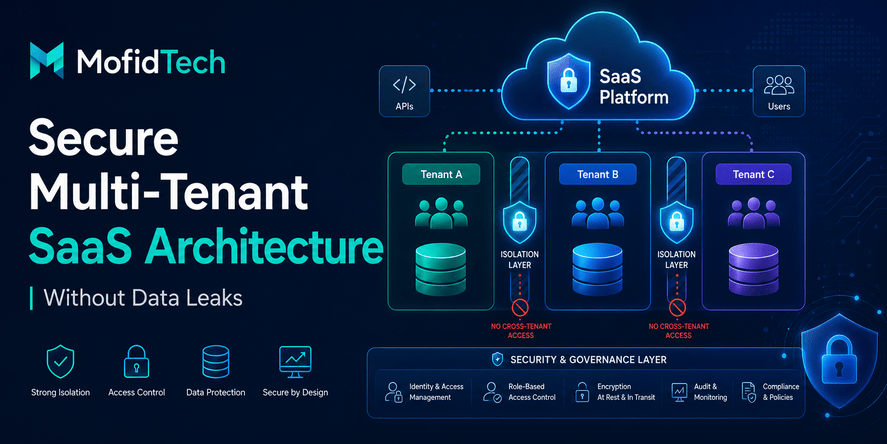
A secure multi-tenant SaaS application is not only an application with login pages and user roles. It is an application where tenant isolation is designed into the architecture from the beginning. Tenant context must be validated consistently, permissions must be enforced on the server side, data must be separated logically or physically, and every access path must be tested for cross-tenant exposure.
OWASP provides dedicated guidance for multi-tenant security, focusing on tenant isolation and prevention of cross-tenant attacks. AWS also describes tenant isolation as the use of tenant context to determine which resources a tenant can access.
This guide explains how to design secure multi-tenant SaaS applications without code examples. It focuses on architecture, security principles, database models, access control, file isolation, API protection, testing workflows, monitoring, and practical decisions that help prevent data leaks.
Table of Contents
- What Is a Multi-Tenant SaaS Application?
- Why Multi-Tenant SaaS Security Is Difficult
- What Is Tenant Isolation?
- Main Multi-Tenant Database Models
- How to Choose the Right Tenant Isolation Model
- Access Control in Multi-Tenant SaaS
- Preventing Cross-Tenant Data Leaks
- API Security for Multi-Tenant SaaS
- File and Media Isolation
- Admin Dashboards and Staff Permissions
- Audit Logging and Monitoring
- Security Testing for Tenant Isolation
- Performance Considerations
- Common Multi-Tenant SaaS Mistakes
- Best Practices Checklist
- Troubleshooting Tenant Isolation Problems
- Real-World Use Cases
- FAQ
- Conclusion
What Is a Multi-Tenant SaaS Application?
A multi-tenant SaaS application is a software platform where multiple customers use the same application while their data and settings remain separated.
A tenant can be a company, school, salon, clinic, law firm, agency, shop, organization, or team. In a salon booking platform, each salon can be a tenant. In a law firm application, each law firm can be a tenant. In a clinic management system, each clinic can be a tenant. In a project management platform, each company workspace can be a tenant.
The main idea is simple: many customers share one product, but each customer should feel like the application belongs only to them.
Single-Tenant vs Multi-Tenant Architecture
In a single-tenant architecture, each customer has a separate instance of the application or infrastructure. This can provide strong separation, but it is often more expensive to operate and harder to maintain at scale.
In a multi-tenant architecture, several tenants share application resources. The sharing can happen at different levels:
| Architecture Type | How It Works | Main Benefit | Main Risk |
|---|---|---|---|
| Single-tenant | Each customer has a dedicated application or environment | Strong separation | Higher cost and more operational complexity |
| Multi-tenant shared database | Many tenants share the same database structure | Lower cost and easier scaling | Requires very strict tenant filtering |
| Multi-tenant separate schema | Tenants share a database but use separate schemas or logical areas | Better separation than shared schema | More complex migrations and maintenance |
| Multi-tenant separate database | Each tenant has its own database | Strong data separation | More operational overhead |
| Hybrid model | Different layers use different isolation models | Flexible balance | Requires careful architecture governance |
There is no universal best model. The right model depends on customer risk, compliance requirements, budget, team maturity, expected scale, and the sensitivity of the data.
Why SaaS Platforms Use Multi-Tenancy
SaaS companies often use multi-tenancy because it helps them operate efficiently. Instead of deploying and maintaining a separate application for each customer, the provider can maintain one platform that supports many customers.
Multi-tenancy can reduce infrastructure cost, simplify updates, centralize monitoring, and make product improvements easier to release. However, the security cost is that the system must enforce tenant boundaries everywhere.
A multi-tenant SaaS application is secure only when every layer understands which tenant is acting, which resources belong to that tenant, and which actions are allowed.
Why Multi-Tenant SaaS Security Is Difficult
Multi-tenant SaaS security is difficult because the application handles many independent customer environments inside one platform. A normal authorization mistake can become a serious data breach if it allows one tenant to access another tenant’s data.
In many applications, security problems happen because developers protect pages but forget to protect objects. For example, a user may be allowed to access the appointment page, but the system may not verify whether the specific appointment belongs to the same tenant. This is a classic multi-tenant risk.
OWASP API Security Top 10 identifies broken object-level authorization as a major API risk, especially where endpoints handle object identifiers and must verify access to each object.
Cross-Tenant Data Exposure
Cross-tenant data exposure happens when a user from one tenant can view, edit, delete, export, or infer data from another tenant.
This can happen through:
- Dashboard pages
- API endpoints
- Search results
- Reports
- Export files
- Notifications
- Uploaded media
- Admin panels
- Background tasks
- Analytics pages
- Shared caches
- Logs
- Email templates
- Payment records
- Calendar events
The dangerous part is that cross-tenant data leaks are not always obvious. A page may appear secure in normal use but fail when someone changes an identifier, manipulates a URL, modifies a request, uses an old link, or accesses a forgotten endpoint.
Broken Access Control
Broken access control means the application does not correctly enforce what a user is allowed to do. In multi-tenant systems, access control must answer two questions:
- Is this user allowed to perform this action?
- Is this user allowed to perform this action on this tenant’s resource?
Many applications answer the first question but forget the second. For example, a staff member may be allowed to view appointments, but only appointments belonging to the salon where that staff member works. A lawyer may be allowed to view clients, but only clients assigned to that lawyer or law firm. A billing manager may be allowed to view invoices, but only invoices inside the correct tenant boundary.
Shared Infrastructure Risks
Multi-tenant systems often share infrastructure such as databases, caches, storage buckets, queues, logging systems, and analytics pipelines. This sharing improves efficiency, but it also creates risks.
A weak cache key can return one tenant’s data to another tenant. A shared storage folder can expose uploaded files. A background job without tenant context can process the wrong records. A log viewer can reveal sensitive information across tenants.
Security must therefore include the whole system, not only the main web pages.
Weak Tenant Context
Tenant context is the identity of the tenant connected to the current request, session, user, resource, or process. In a secure SaaS application, tenant context should be determined and validated on the server side.
A common mistake is trusting tenant identifiers sent from the browser without verifying that the current user is allowed to act for that tenant. OWASP business logic guidance warns against accepting user ID, tenant ID, or role values from editable request fields without proper privileged validation.
The safest mindset is simple: tenant identity must not be treated as a frontend choice. It must be enforced by the backend.
What Is Tenant Isolation?
Tenant isolation is the practice of ensuring that each tenant can access only its own data, users, settings, files, workflows, and resources.
Tenant isolation is not a single feature. It is a design principle that affects the database, application logic, permissions, APIs, storage, logging, monitoring, testing, and operations.
AWS describes tenant isolation as using tenant context to limit access to resources. In practical terms, this means every action must be evaluated against the current tenant.
Data Isolation
Data isolation ensures that one tenant’s records do not appear in another tenant’s views, searches, reports, exports, dashboards, or notifications.
Data isolation can be enforced through:
- Separate databases
- Separate schemas
- Tenant identifiers on shared tables
- Strict server-side filtering
- Database-level policies
- Service-level access boundaries
- Controlled reporting pipelines
The stronger the data sensitivity, the more carefully the isolation model should be chosen.
Application-Level Isolation
Application-level isolation means that business logic always respects tenant boundaries.
For example:
- A salon owner should manage only their salon.
- A staff member should see only appointments for the salons they are assigned to.
- A client should see only their own bookings.
- A lawyer should see only their assigned cases or law firm cases.
- A billing manager should see only invoices inside the correct tenant.
- A platform administrator should use special audited access, not normal tenant access.
Application logic should never assume that a user interface restriction is enough. Even if a button is hidden, the backend must still enforce the rule.
Permission-Level Isolation
Permission-level isolation combines tenant boundaries with roles.
A user may belong to a tenant, but not every user in a tenant should have the same permissions. A tenant owner, manager, staff member, accountant, support user, and customer may all belong to the same tenant, but they need different access levels.
A secure SaaS platform needs both:
- Tenant isolation: which tenant does this resource belong to?
- Role authorization: what is this user allowed to do?
Operational Isolation
Operational isolation protects tenants during maintenance, support, monitoring, backups, and incident response.
For example:
- Support staff should not freely browse customer data.
- Logs should avoid unnecessary sensitive data.
- Backups should be protected and access-controlled.
- Data exports should be tenant-scoped.
- Internal admin actions should be audited.
- Production access should be limited and monitored.
Many SaaS leaks happen not from the main application, but from operational tools that were not designed with tenant boundaries in mind.
Main Multi-Tenant Database Models
The database model is one of the most important decisions in secure multi-tenant SaaS architecture. It affects cost, performance, maintainability, compliance, backup strategy, migration complexity, and security.
There are three common models: shared database with shared schema, shared database with separate schemas, and separate database per tenant.
Shared Database and Shared Schema
In this model, all tenants share the same database tables. Each tenant’s records are identified by a tenant field or tenant relationship.
This is common for early SaaS applications because it is simple to deploy and cost-effective. It can work well when the team is disciplined and the application enforces tenant filtering consistently.
| Advantage | Explanation |
|---|---|
| Lower cost | One database structure serves many tenants |
| Easier reporting | Cross-tenant analytics are easier for platform-level administrators |
| Simpler deployment | One migration path and one shared structure |
| Good for small tenants | Efficient when each tenant has modest data volume |
| Risk | Explanation |
|---|---|
| Tenant filter mistakes | A missing tenant condition can expose data |
| Harder per-tenant backup | Restoring one tenant can be more complex |
| Noisy neighbor issues | Heavy tenants can affect others |
| Compliance limitations | Some customers may require stronger separation |
This model requires strong discipline. Every query, view, report, export, and background process must be tenant-aware.
Shared Database with Separate Schemas
In this model, tenants share the same database server, but each tenant has a separate schema or logical namespace. This creates stronger separation than a fully shared schema while still keeping tenants in one database environment.
| Advantage | Explanation |
|---|---|
| Better logical separation | Tenant data is separated by schema |
| Easier tenant-level operations | Some tenant-specific operations become clearer |
| Reduced accidental mixing | Data is less likely to be mixed in normal queries |
| Useful for medium isolation needs | Good balance for some SaaS platforms |
| Risk | Explanation |
|---|---|
| Migration complexity | Schema changes must be applied across tenants |
| Operational overhead | Many schemas can become harder to manage |
| Reporting complexity | Cross-tenant analytics may require extra design |
| Still shared infrastructure | Database server resources remain shared |
This model can be useful when tenant separation matters but a database per tenant is too expensive or complex.
Separate Database Per Tenant
In this model, each tenant has a dedicated database. This provides stronger data separation and makes tenant-level backup, export, and deletion easier.
| Advantage | Explanation |
|---|---|
| Strong separation | Each tenant’s data lives in a dedicated database |
| Easier tenant backup | Tenant-specific backup and restore are simpler |
| Better compliance support | Useful for sensitive or regulated customers |
| Easier large-tenant scaling | Big tenants can be isolated more easily |
| Risk | Explanation |
|---|---|
| Higher operational cost | More databases to manage |
| Migration overhead | Updates must be coordinated across databases |
| Monitoring complexity | More resources require more observability |
| Harder global analytics | Platform-wide reporting needs careful design |
This model is often attractive for enterprise SaaS or applications handling sensitive business, legal, financial, educational, or medical data.
Hybrid Tenant Isolation
A hybrid model combines different isolation strategies. For example, small tenants may share a database, while enterprise tenants use dedicated databases. Public configuration may be shared, while sensitive records may be isolated. Files may be separated more strongly than normal metadata.
AWS describes bridge models as hybrid approaches that apply silo or pool models where each makes sense.
Hybrid models are powerful, but they require clear architecture rules. Without governance, hybrid systems can become confusing and risky.
How to Choose the Right Tenant Isolation Model
The best tenant isolation model depends on your business model, customer type, data sensitivity, team maturity, and growth expectations.
A small booking platform for local salons may start with a shared database and strong tenant-aware access control. A legal SaaS product handling confidential case files may need stronger separation. A healthcare platform may require even stricter controls because patient data is highly sensitive.
Decision Framework
Use the following questions before choosing a model:
| Question | Why It Matters |
|---|---|
| How sensitive is tenant data? | Sensitive data needs stronger isolation |
| Are tenants small or large? | Large tenants may need dedicated resources |
| Will customers request data export? | Tenant-level export is easier with stronger separation |
| Are there legal or compliance requirements? | Some industries require stricter controls |
| How mature is the development team? | Shared models require strong discipline |
| How complex are database migrations? | Separate schemas or databases increase migration work |
| Do you need cross-tenant analytics? | Shared models simplify platform-level analytics |
| Can you monitor tenant-level performance? | SaaS platforms need visibility per tenant |
Practical Recommendation
For many early SaaS platforms, a shared database with a strong tenant model can be acceptable if the application is carefully designed and tested. However, the system should be designed so that stronger isolation can be introduced later if needed.
For platforms handling sensitive legal, medical, financial, or institutional data, stronger tenant separation should be considered earlier. Waiting until after the product grows can make migration expensive and risky.
The most important principle is not the database model alone. The most important principle is consistent tenant enforcement across every layer.
Access Control in Multi-Tenant SaaS
Access control is the system that decides what a user can see and do. In multi-tenant SaaS, access control must be both role-aware and tenant-aware.
A normal role system is not enough. A user may have permission to view invoices, but only invoices inside the tenant they belong to. A staff member may have permission to edit appointments, but only for the salon where they work. A secretary may manage clients, but only for lawyers they are assigned to.
Role-Based Access Control
Role-based access control assigns permissions based on roles. Common roles in SaaS platforms include:
| Role | Typical Access |
|---|---|
| Platform administrator | Manages the whole platform with audited privileges |
| Tenant owner | Manages tenant settings, users, billing, and configuration |
| Tenant manager | Manages daily operations inside one tenant |
| Staff member | Uses limited operational features |
| Billing manager | Handles invoices, payments, and financial reports |
| Customer or client | Accesses personal records or bookings |
| Support user | Helps tenants under strict audit and approval rules |
Role-based access control is useful, but roles must be scoped to tenants. A manager in one tenant should not become a manager in all tenants.
Tenant-Aware Permissions
Tenant-aware permissions combine user role, tenant membership, and resource ownership.
A secure permission decision should consider:
- Who is the user?
- Which tenant does the user belong to?
- Which tenant owns the resource?
- What role does the user have inside that tenant?
- Is the user assigned to this specific resource?
- Is the action allowed for this role?
- Is the request coming through an approved workflow?
- Should the action be logged or require additional approval?
This is especially important for applications with internal staff assignments. For example, a secretary assigned to two lawyers should not automatically access every lawyer’s clients. A staff member assigned to one salon branch should not see all branches unless explicitly allowed.
Horizontal Privilege Escalation
Horizontal privilege escalation happens when a user accesses another user’s or tenant’s data at the same privilege level.
For example:
- A salon owner views another salon’s appointment by changing an identifier.
- A client downloads another client’s invoice.
- A staff member opens a report from another branch.
- A lawyer accesses a case belonging to another law firm.
- A tenant manager modifies another tenant’s settings.
This type of vulnerability can be more dangerous than a missing login page because the attacker may already be authenticated. The application must therefore verify object-level access, not just authentication.
Server-Side Enforcement
Access control must be enforced on the server side. The user interface can improve usability by hiding unavailable buttons, but hidden buttons are not security controls.
Every protected action should be checked by the backend. This includes page views, form submissions, API requests, exports, file downloads, calendar actions, billing pages, and administrative workflows.
Preventing Cross-Tenant Data Leaks
Preventing cross-tenant data leaks requires a defense-in-depth approach. No single control is enough. A secure SaaS application should combine tenant-aware data access, strong authorization, secure APIs, isolated storage, audit logs, testing, and monitoring.
Use a Reliable Tenant Context
Every request should have a trusted tenant context. This tenant context should come from a secure server-side source, such as the authenticated user’s tenant membership, validated subdomain mapping, or verified session context.
Avoid trusting tenant identifiers submitted directly by users unless the system verifies that the user is allowed to act for that tenant.
For example, if a user selects a salon from a dashboard, the backend should still verify that the user is assigned to that salon. The browser selection alone should never be enough.
Apply Tenant Boundaries Everywhere
Tenant boundaries must be applied in every data access path:
- List pages
- Detail pages
- Search results
- Filters
- Reports
- Dashboards
- Calendar views
- Exports
- Notifications
- Background jobs
- File downloads
- Admin tools
- API endpoints
- Billing pages
- Audit logs
A common mistake is protecting normal pages but forgetting reports, exports, or background tasks.
Validate Resource Ownership
Before showing or modifying any resource, the application should verify that the resource belongs to the current tenant or is explicitly shared with that tenant through a valid business rule.
This applies to:
- Appointments
- Clients
- Invoices
- Cases
- Documents
- Products
- Orders
- Messages
- Files
- Comments
- Notifications
- Settings
- Staff assignments
The rule should be simple: a user cannot access a resource only because they know its identifier.
Secure Search and Filtering
Search features are frequent sources of tenant leaks. A global search bar may accidentally search across all tenants if tenant scoping is missing. Filters can also leak data if they allow users to select tenant values they are not allowed to access.
Search should always be tenant-scoped by default. Platform-wide search should be available only to trusted platform administrators and should be logged.
Secure Reports and Exports
Reports and exports are high-risk because they often contain large amounts of data. A small tenant isolation bug in a report can expose hundreds or thousands of records.
Every report should be tenant-aware. Every export should be generated for the current tenant only unless a platform administrator is intentionally performing a global export through an audited workflow.
Reports should also respect role permissions. A staff member may need operational appointment data, while a billing manager may need financial data, and a tenant owner may need both. Access should match real business responsibilities.
API Security for Multi-Tenant SaaS
APIs are especially important in multi-tenant SaaS because they often expose object identifiers, power dashboards, support mobile apps, handle integrations, and connect frontend components to backend data.
OWASP API Security Top 10 lists broken object-level authorization as a major API risk because APIs commonly expose endpoints that handle object identifiers. This risk is directly relevant to multi-tenant SaaS.
API Authentication Is Not Enough
Authentication answers the question: “Who is the user?”
Authorization answers the question: “What is this user allowed to do?”
Tenant isolation answers the question: “Does this resource belong to the tenant this user is allowed to access?”
A secure API needs all three.
An authenticated user should not automatically be allowed to access every object. The API must verify the tenant boundary and the user’s role before returning data or accepting changes.
Protect Object-Level Access
Every API action that loads a resource by identifier should check object-level authorization. This includes viewing, updating, deleting, exporting, assigning, approving, canceling, or downloading a related file.
In SaaS applications, object-level authorization must include tenant ownership. The API should not only check whether the user is logged in. It should check whether the user is allowed to access that exact object inside that exact tenant.
Avoid Overexposing Object Properties
APIs can leak data even when they return the correct object. The response may include fields the current user should not see.
OWASP also identifies broken object property-level authorization as a risk where an API exposes sensitive object properties to users who should not access them.
In multi-tenant SaaS, this means API responses should be designed according to role and tenant context. A staff member may need a client’s appointment time, but not sensitive billing details. A billing manager may need invoice information, but not private internal notes. A customer may need their own booking status, but not staff-only operational metadata.
Secure API Integrations
Many SaaS platforms provide integrations with external tools. These integrations may use API tokens, webhooks, automation platforms, or third-party services.
For secure multi-tenant integrations:
- API tokens should be scoped to a tenant.
- Tokens should have limited permissions.
- Webhooks should include only tenant-authorized data.
- Integration logs should avoid unnecessary sensitive content.
- A tenant should be able to revoke integration access.
- Shared integration systems should not mix tenant payloads.
- Background processing should preserve tenant context.
Integrations often become security gaps because they are added after the main product is built. They should be designed with the same tenant isolation rules as the core application.
File and Media Isolation
Files are often forgotten in multi-tenant security design. Yet uploaded files can contain contracts, identity documents, invoices, medical records, legal documents, profile images, business documents, or private attachments.
A secure SaaS application must isolate files just as carefully as database records.
File Ownership
Every uploaded file should have clear ownership:
- Which tenant owns this file?
- Which user uploaded it?
- Which object is it connected to?
- Which roles can access it?
- Can it be shared?
- Can it be downloaded?
- Should access be logged?
- Should it expire?
- Should it be deleted with the tenant?
Without file ownership rules, media storage can become a serious data leak risk.
Avoid Public Access to Sensitive Files
Not all files should be publicly accessible. Profile images or product images may be public in some applications, but contracts, invoices, attachments, client documents, legal files, and medical documents should usually require authorization before access.
The application should not assume that a file path is secret. If a file URL can be guessed, shared, indexed, or reused, it can become a leak.
Separate Tenant Storage Paths
Even when using the same storage service, files should be organized with tenant-aware paths or metadata. This helps with access control, auditing, deletion, backups, and incident response.
However, paths alone are not enough. The backend must still verify permission before serving sensitive files.
Secure File Previews and Thumbnails
File previews, thumbnails, and generated documents must also respect tenant boundaries. A system may protect the original file but accidentally expose the preview. This is common in document-heavy applications.
Every derived file should inherit the same tenant and permission rules as the original.
Admin Dashboards and Staff Permissions
Admin dashboards are powerful and risky. In multi-tenant SaaS, there are usually two types of admin access:
- Platform administration
- Tenant administration
These must be separated clearly.
Platform Administrators
Platform administrators manage the SaaS product itself. They may manage tenants, subscriptions, system settings, support operations, abuse reports, infrastructure settings, and platform-level analytics.
Because this role can be extremely powerful, platform admin access should be limited, audited, and protected by strong authentication. Platform administrators should not use broad data access casually.
Tenant Administrators
Tenant administrators manage one tenant. For example, a salon owner manages their salon, a law firm owner manages their firm, and a clinic administrator manages their clinic.
Tenant administrators should not access other tenants. Their dashboard should show only tenant-scoped users, settings, reports, billing information, appointments, clients, products, or files.
Staff Members
Staff members usually need limited operational access. They may create appointments, manage clients, update statuses, view assigned tasks, or communicate with customers.
The system should avoid giving staff members broad access only because they belong to a tenant. Access should match their actual responsibilities.
Support Access
Support access requires special care. SaaS teams often need to help customers, but support access can become a privacy risk.
Good support access practices include:
- Require explicit tenant permission when possible.
- Limit support access to necessary data.
- Log support actions.
- Display when support access occurred.
- Avoid permanent unrestricted support accounts.
- Use time-limited elevated access for sensitive operations.
- Separate support actions from normal tenant actions.
Support workflows should be designed as security-sensitive workflows, not shortcuts.
Audit Logging and Monitoring
Audit logging helps answer what happened, who did it, when it happened, and which tenant was affected. In multi-tenant SaaS, audit logs are essential for security, accountability, troubleshooting, and customer trust.
What to Log
A secure SaaS platform should log important actions such as:
- Login attempts
- Failed authentication attempts
- Password changes
- Role changes
- Tenant membership changes
- Data exports
- File downloads
- Invoice changes
- Permission changes
- Admin access
- Support access
- API token creation and revocation
- Integration changes
- Bulk operations
- Suspicious access attempts
- Cross-tenant access denials
Logs should include tenant context, acting user, action type, affected resource, timestamp, and result.
What Not to Log
Logs should not become a second database of sensitive information. Avoid logging unnecessary personal data, secret tokens, passwords, full payment details, private documents, or sensitive message content.
The goal is to log enough to investigate security events without creating new privacy risks.
Tenant-Level Monitoring
Multi-tenant SaaS platforms should monitor activity by tenant. This helps identify unusual behavior, performance problems, abuse, and suspicious access patterns.
Useful signals include:
- Sudden increase in failed access attempts
- Large export activity
- Repeated denied access to other tenant resources
- Unusual file download volume
- New API tokens followed by heavy activity
- Administrative changes outside normal patterns
- Unexpected spikes in database or storage usage
Monitoring should help detect both attacks and mistakes.
Security Testing for Tenant Isolation
Tenant isolation should be tested intentionally. It is not enough to click through the application as a normal user. Testers must actively try to cross tenant boundaries.
Create Test Tenants
A good testing environment should include at least two or three tenants with different users, roles, and data.
For example:
- Tenant A: salon owner, manager, staff, clients, appointments, invoices
- Tenant B: different salon owner, staff, clients, appointments, invoices
- Tenant C: tenant with limited subscription or special configuration
This setup allows testers to verify that users from one tenant cannot access another tenant’s data.
Test Every Access Path
Tenant isolation testing should cover:
- List pages
- Detail pages
- Create actions
- Update actions
- Delete actions
- Search
- Filters
- Calendar views
- Reports
- Exports
- File downloads
- API endpoints
- Notifications
- Admin dashboards
- Background jobs
- Integrations
- Public links
- Shared links
- Archived records
Many leaks appear in secondary features, not the main dashboard.
Test Role Combinations
Testing should include different roles:
- Tenant owner
- Tenant manager
- Staff member
- Customer
- Billing manager
- Support user
- Platform administrator
- Suspended user
- Former tenant member
- User assigned to multiple tenants
Users with multiple roles or multiple tenant memberships are especially important to test because they create complex permission scenarios.
Test Negative Scenarios
Security testing should include attempts that should fail.
For example:
- Tenant A user tries to open Tenant B resource.
- Staff member tries to access owner-only settings.
- Client tries to access another client’s invoice.
- Suspended user tries to access old links.
- Former staff member tries to access files.
- User changes tenant selection in the request.
- User opens an old export link after permission changes.
- User tries to download a file from another tenant.
A secure application should deny these actions consistently and log suspicious attempts when appropriate.
Performance Considerations
Security and performance are connected in multi-tenant SaaS. Tenant isolation should not make the application slow, but performance optimization should never bypass tenant boundaries.
Tenant-Aware Indexing
In shared database models, tenant-aware indexing is important. If the application frequently loads data by tenant, the database should be designed to support that access pattern efficiently.
Without tenant-aware performance design, large tenants can slow down dashboards, reports, and searches.
Noisy Neighbor Problems
A noisy neighbor is a tenant whose heavy usage affects other tenants. This can happen when one tenant imports large data sets, runs heavy reports, uploads many files, or uses integrations heavily.
To reduce noisy neighbor problems:
- Monitor resource usage per tenant.
- Limit expensive operations where appropriate.
- Queue heavy jobs safely.
- Use fair usage policies.
- Separate large enterprise tenants if needed.
- Design reports carefully.
- Avoid global operations during normal user requests.
Caching Risks
Caching improves performance, but it can be dangerous in multi-tenant systems. A cache entry that does not include tenant context can leak data.
Every cached item should be scoped correctly. Dashboard data, permissions, search results, counts, reports, settings, and user-specific data should never be shared across tenants accidentally.
Background Jobs
Background jobs must preserve tenant context. If a job sends reminders, generates reports, processes invoices, or syncs integrations, it must know which tenant it is working for.
A background process without tenant context can create cross-tenant emails, wrong reports, incorrect invoices, or mixed analytics.
Common Multi-Tenant SaaS Mistakes
Multi-tenant data leaks often come from predictable mistakes. Avoiding these mistakes can significantly improve security.
Mistake 1: Trusting the Frontend
Hiding buttons, disabling menus, or filtering dropdowns in the browser is useful for user experience, but it is not security. Attackers can interact directly with backend endpoints.
The backend must enforce permissions.
Mistake 2: Missing Tenant Filters
In shared database models, missing tenant filtering is one of the most serious risks. A single unscoped list, detail view, report, or export can expose data.
Tenant scoping should be centralized where possible and tested everywhere.
Mistake 3: Confusing Role Access with Tenant Access
A user with the role “manager” should not automatically manage all tenants. Roles must be scoped to tenant membership.
Mistake 4: Weak File Protection
Files are sometimes stored publicly or served through predictable links. Sensitive files should require authorization checks before access.
Mistake 5: Unsafe Admin Panels
Admin panels may show all records by default. In a multi-tenant SaaS application, internal admin tools should be carefully restricted and audited.
Mistake 6: Ignoring Background Tasks
Background jobs can leak data if they generate reports, emails, or notifications without tenant context.
Mistake 7: Poor Testing with Only One Tenant
Testing with only one tenant hides tenant isolation bugs. A multi-tenant application should be tested with multiple tenants and multiple roles.
Mistake 8: Logging Sensitive Data
Logs are useful, but they can leak private data if they contain sensitive fields, files, tokens, or personal information.
Mistake 9: No Audit Trail
Without audit logs, it becomes difficult to investigate suspicious activity, customer complaints, accidental exposure, or internal misuse.
Mistake 10: Designing Isolation Too Late
Tenant isolation is hard to add after the application is already large. It should be part of the architecture from the beginning.
Best Practices Checklist
Use this checklist before launching or updating a multi-tenant SaaS application.
Tenant Isolation Checklist
- Every user is linked to one or more tenants through a clear membership model.
- Every tenant-owned resource has a clear tenant relationship.
- Every list page is tenant-scoped.
- Every detail page validates resource ownership.
- Every create, update, and delete action checks tenant permissions.
- Every report is tenant-scoped.
- Every export is tenant-scoped.
- Every file is linked to a tenant or tenant-owned resource.
- Every background job has tenant context.
- Every integration token is tenant-scoped.
- Every cache key includes the correct tenant context where needed.
- Tenant boundaries are tested with multiple tenants.
Access Control Checklist
- Roles are scoped to tenants.
- Staff users have limited access based on responsibility.
- Tenant owners cannot access other tenants.
- Platform administrators are separated from tenant administrators.
- Support access is logged and limited.
- Suspended users lose access immediately.
- Former staff members cannot access old tenant resources.
- Sensitive actions require stronger controls.
- Permission changes are audited.
API Security Checklist
- Authentication is required for protected APIs.
- Object-level authorization is enforced.
- Object properties are filtered by role.
- API tokens are tenant-scoped.
- Webhooks are tenant-scoped.
- API errors do not reveal private data.
- Rate limits protect expensive operations.
- API logs avoid sensitive payloads.
- Integration access can be revoked.
- API endpoints are tested for cross-tenant access.
File Security Checklist
- Sensitive files are not publicly accessible.
- File access requires authorization.
- File ownership is recorded.
- Thumbnails and previews inherit permissions.
- Temporary links expire when appropriate.
- Deleted tenant data includes related files.
- File downloads are logged for sensitive resources.
- Storage paths or metadata include tenant context.
- Support users cannot browse files without reason.
Monitoring Checklist
- Security events include tenant context.
- Suspicious denied access attempts are monitored.
- Large exports are logged.
- Admin actions are audited.
- Support access is visible in logs.
- Unusual API activity is detected.
- Tenant-level usage is monitored.
- Noisy neighbor behavior is tracked.
- Incident response plans include tenant impact analysis.
Troubleshooting Tenant Isolation Problems
Tenant isolation problems can be difficult to diagnose because they may appear only in certain roles, endpoints, reports, or edge cases.
Problem: A User Can Access Another Tenant’s Detail Page
This usually means the detail page checks authentication but does not verify resource ownership.
The solution is to verify that the requested object belongs to the current tenant or is explicitly accessible through a valid assignment rule.
Problem: Search Shows Records from Other Tenants
This usually means search logic is not tenant-scoped. Search should always apply tenant boundaries before returning results.
Platform-wide search should be restricted to audited administrative workflows.
Problem: Reports Include Mixed Tenant Data
This often happens when reports are built separately from normal application views. Reporting logic must follow the same tenant isolation rules as the main application.
Reports should be tested with multiple tenants and realistic data.
Problem: Staff Members See Too Much Data
This usually means the application has tenant-level access but not assignment-level access. Staff permissions should reflect business responsibilities.
For example, a staff member may belong to a salon but should only see their own appointments or assigned services unless the tenant owner grants broader access.
Problem: Old Links Still Work After Permission Changes
This usually means the application checks access only when the link is created, not when it is used.
Access should be verified at the time of use. If a user loses permission, old links should stop working.
Problem: Files Are Protected in the App but Accessible by URL
This means file storage is bypassing application authorization. Sensitive files should not be served as public static resources.
Access to sensitive files should go through an authorization decision.
Problem: Tenant Data Appears in Cache Incorrectly
This usually means cache keys are not tenant-aware. Cached data should include tenant context when the response depends on tenant identity.
Problem: Background Jobs Send Wrong Notifications
This usually means the job does not store or validate tenant context. Jobs should process tenant-specific records and preserve the correct tenant boundary throughout the workflow.
Real-World Use Cases
Salon Booking SaaS
In a salon booking platform, each salon is a tenant. A salon owner should manage only their salon’s services, staff, clients, appointments, images, promotions, and reports.
Important tenant isolation rules include:
- Staff members should access only assigned salon data.
- Clients should see only their own appointments.
- Salon images should belong to the correct salon.
- Appointment calendars should not mix salons.
- Financial reports should be tenant-scoped.
- Platform administrators should manage salons through audited access.
This model is especially important when one website allows bookings for many salons.
Law Firm Management SaaS
In a law firm management platform, each law firm is a tenant. Lawyers, secretaries, accountants, and firm administrators may have different permissions.
Important rules include:
- A lawyer should see only assigned clients, cases, hearings, appointments, and documents.
- A secretary should see only the lawyers and clients they are assigned to manage.
- A billing manager should see financial information but not necessarily confidential legal notes.
- Legal documents should be strongly protected.
- Support access should be limited and audited.
Because legal data is sensitive, tenant isolation must be strict.
Clinic or Medical Appointment SaaS
In a clinic platform, each clinic is a tenant. Medical data is highly sensitive, so tenant isolation should be designed carefully.
Important rules include:
- Patients should access only their own records.
- Doctors should access only assigned patients.
- Secretaries should access scheduling information without unnecessary medical details.
- Files and prescriptions should require authorization.
- Audit logs should record access to sensitive records.
- Exports should be tightly controlled.
Marketplace SaaS
In a marketplace platform, vendors may act as tenants. Each vendor should manage only their own products, orders, customers, images, and reports.
Important rules include:
- Vendors should not see another vendor’s private sales data.
- Product images should be correctly linked to vendors.
- Orders should be vendor-scoped.
- Platform administrators should have separate audited access.
- Customers should see only their own orders and messages.
Education SaaS
In an educational SaaS platform, each school, institution, or department may be a tenant.
Important rules include:
- Students should see only their own records.
- Teachers should access only assigned classes.
- Administrators should manage only their institution.
- Reports should not mix institutions.
- Files and transcripts should be protected.
- Data exports should be tenant-scoped.
Security Considerations
Security in multi-tenant SaaS should be proactive, not reactive. It is much cheaper to design tenant isolation early than to repair data leakage after customers are already using the platform.
Authentication
Strong authentication protects accounts from unauthorized access. Multi-factor authentication should be considered for tenant owners, administrators, billing managers, and platform staff.
Authorization
Authorization should be centralized, consistent, and tested. Every protected action should verify role, tenant, and resource access.
Session Security
Sessions should be protected from hijacking and misuse. Sensitive actions may require re-authentication or additional checks.
Data Protection
Sensitive data should be protected at rest and in transit. Access should be minimized according to role and business need.
Least Privilege
Users should receive only the access they need. This applies to tenant users, platform administrators, support staff, services, integrations, and background jobs.
Secure Defaults
New tenants, new users, new roles, and new features should start with safe default permissions. Access can be expanded intentionally, but it should not be open by default.
Incident Response
A SaaS provider should be able to answer:
- Which tenants were affected?
- Which users accessed the data?
- Which resources were exposed?
- When did the issue start?
- Was data downloaded or modified?
- Which logs confirm the event?
- What controls prevented wider exposure?
- What changes are needed to prevent recurrence?
Tenant-aware logs are essential for answering these questions.
FAQ
1. What is tenant isolation in SaaS?
Tenant isolation is the practice of ensuring that each tenant in a SaaS application can access only its own data, users, settings, files, and resources. It prevents one customer or organization from viewing or modifying another customer’s information.
Tenant isolation should be enforced in the database, application logic, APIs, file storage, background jobs, reports, and administrative tools.
2. What is the main risk of multi-tenant SaaS architecture?
The main risk is cross-tenant data exposure. This happens when a user from one tenant can access data belonging to another tenant.
This can occur through weak access control, missing tenant filters, unsafe APIs, public file links, insecure reports, shared caches, or poorly designed admin tools.
3. Is a shared database safe for multi-tenant SaaS?
A shared database can be safe if tenant boundaries are designed and enforced carefully. However, it requires strong discipline because a missing tenant filter can expose data.
For sensitive applications, separate schemas, separate databases, or hybrid isolation models may be more appropriate.
4. Which database model is best for multi-tenant SaaS?
There is no single best model for every SaaS application. A shared database is cost-effective and simple, separate schemas provide stronger logical separation, and separate databases provide stronger data isolation.
The best choice depends on data sensitivity, customer requirements, compliance needs, expected scale, cost, and operational maturity.
5. How do you prevent cross-tenant data leaks?
To prevent cross-tenant data leaks, enforce tenant-aware authorization on every request, validate resource ownership, scope searches and reports by tenant, protect files, use tenant-aware caching, audit administrative actions, and test with multiple tenants.
The most important rule is that users should never access a resource only because they know its identifier.
6. Why is object-level authorization important in SaaS?
Object-level authorization is important because SaaS applications often expose individual resources such as appointments, invoices, documents, clients, products, or cases.
The application must verify that the current user has permission to access the specific object, not just the page or endpoint.
7. Should platform administrators access tenant data?
Platform administrators may need limited access for support, compliance, or incident response, but this access should be controlled and audited.
A secure SaaS platform should separate normal tenant access from platform administration and should log sensitive admin actions.
8. How should staff permissions work in a multi-tenant application?
Staff permissions should be based on tenant membership, role, and assignment. A staff member should not automatically access all tenant data unless their role requires it.
For example, a salon staff member may see assigned appointments, while a billing manager may see invoices, and a tenant owner may manage settings.
9. How do you test tenant isolation?
Tenant isolation should be tested with multiple tenants, multiple roles, and realistic data. Testers should try to access another tenant’s records, files, reports, API endpoints, search results, and exports.
Testing should include negative scenarios where access must be denied.
10. Are files part of tenant isolation?
Yes. Files are part of tenant isolation. Uploaded documents, images, invoices, contracts, and attachments should have tenant ownership and access control.
Sensitive files should not be publicly accessible through predictable links.
11. What is a noisy neighbor in SaaS?
A noisy neighbor is a tenant whose heavy usage affects the performance of other tenants. This can happen through large imports, reports, exports, file uploads, or integration activity.
Monitoring tenant-level resource usage helps detect and manage noisy neighbor problems.
12. When should a SaaS application use separate databases per tenant?
A SaaS application should consider separate databases per tenant when data sensitivity is high, customers require strong separation, compliance demands it, enterprise tenants need dedicated resources, or tenant-level backup and restore are important.
This model provides stronger separation but increases operational complexity.
Conclusion
Secure multi-tenant SaaS architecture is about more than adding user roles or hiding buttons in the interface. It requires a complete tenant isolation strategy across the application, database, APIs, files, reports, admin tools, background jobs, logs, and infrastructure.
The central rule is simple: every action must be evaluated in tenant context. A user should access only the resources that belong to their tenant and match their role or assignment.
For small SaaS platforms, a shared database can work when the team applies strong tenant-aware authorization and testing. For sensitive applications such as legal, medical, financial, institutional, or enterprise systems, stronger isolation models may be necessary.
The best time to design tenant isolation is before the application grows. Once customers, data, files, reports, and integrations are already in production, fixing weak tenant boundaries becomes much harder.
A secure multi-tenant SaaS platform should include:
- Clear tenant ownership
- Tenant-aware access control
- Strong object-level authorization
- Secure API design
- Protected file access
- Tenant-scoped reports and exports
- Audited admin access
- Tenant-aware caching and background jobs
- Monitoring and logs with tenant context
- Security testing with multiple tenants and roles
If your SaaS application serves many organizations from one platform, tenant isolation is not optional. It is one of the foundations of customer trust.










💬 Comments
No comments yet. Be the first to comment!
Login to comment.