Introduction
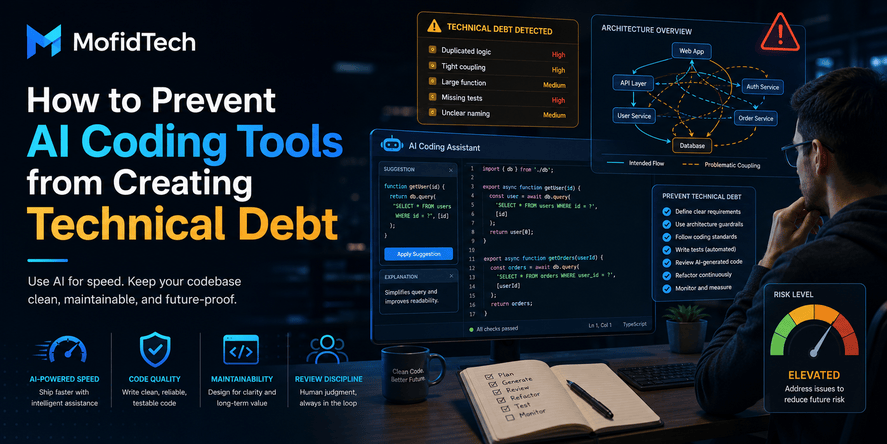
AI coding tools are changing software development. They can help developers generate ideas, explain unfamiliar logic, write drafts, refactor existing work, create tests, and move faster through repetitive tasks. For many teams, AI-assisted development is no longer experimental. It is becoming part of daily engineering work.
But speed is not the same as sustainability.
The biggest risk of AI coding tools is not only that they may produce incorrect output. The deeper risk is that they can create technical debt that looks acceptable today but becomes expensive tomorrow. This debt may appear as unclear logic, weak tests, duplicated functionality, inconsistent architecture, missing documentation, hidden security flaws, or code that nobody on the team fully understands.
Recent research has started to examine this problem in real software repositories. One large-scale study analyzed more than 304,000 verified AI-authored commits across more than 6,000 GitHub repositories and found that AI-generated code can introduce long-term maintenance costs when issues are not detected and removed early. Other industry discussions now describe AI-generated technical debt as a growing software engineering concern, especially when teams measure only short-term output and ignore long-term maintainability.
This does not mean developers should avoid AI coding tools. It means they should use them with discipline.
AI can improve productivity, but only when developers keep control of architecture, review, testing, documentation, and ownership. The goal is not to reject AI-generated code automatically. The goal is to prevent AI-assisted work from becoming a hidden maintenance burden.
This article explains what AI coding technical debt is, why it happens, how it differs from traditional technical debt, and how developers and teams can prevent it before it grows.
Table of Contents
- What Is AI Coding Technical Debt?
- Why AI Coding Tools Create Technical Debt
- How AI Technical Debt Differs from Traditional Technical Debt
- The Main Types of Debt Created by AI Coding Tools
- The AI Coding Technical Debt Lifecycle
- How to Review AI-Generated Code Before Accepting It
- Practical Checklist to Prevent AI Coding Technical Debt
- How Teams Should Govern AI-Assisted Development
- Security Considerations for AI-Generated Code
- Performance and Scalability Considerations
- Common Mistakes Developers Should Avoid
- Best Practices for Sustainable AI-Assisted Coding
- Troubleshooting: Signs That AI Debt Is Already Growing
- Comparison Tables
- FAQ
- Conclusion
What Is AI Coding Technical Debt?
AI coding technical debt is the long-term maintenance cost created when AI-assisted code is accepted without enough understanding, review, testing, documentation, architectural alignment, or ownership.
In simple terms, it happens when a developer or team uses AI to move faster today but leaves behind problems that will slow the project later.
AI coding technical debt can appear in many forms. It may be a function that works for one scenario but fails in edge cases. It may be duplicated logic that conflicts with an existing module. It may be a security-sensitive change that looks harmless but weakens validation. It may be a generated implementation that nobody on the team can confidently explain. It may also be a test suite that gives false confidence because it checks only the easiest path.
The key issue is not that AI wrote the code. The key issue is that the team accepted the output without enough engineering judgment.
A concise definition
AI coding technical debt is the future cost of maintaining, fixing, securing, explaining, or replacing AI-assisted software changes that were merged too quickly or without proper validation.
Why the term matters
Traditional technical debt is often created by human shortcuts. AI technical debt can be created by speed, overconfidence, and lack of comprehension. The tool may generate something that appears complete, but the developer may not fully understand why it works, whether it fits the architecture, or what hidden assumptions it contains.
This creates a new challenge for software teams: the bottleneck moves from writing code to verifying code.
Why AI Coding Tools Create Technical Debt
AI coding tools do not create technical debt because they are useless. They create technical debt because they are powerful, fast, and convincing.
A weak answer from an AI assistant may still look polished. A generated implementation may be syntactically clean. A proposed solution may sound reasonable. But software quality depends on context, constraints, architecture, security, performance, maintainability, and business rules. AI tools do not always understand these factors deeply.
AI tools optimize for plausible output
AI coding assistants are designed to produce helpful responses based on patterns, instructions, and context. They are often good at generating common structures, explaining known concepts, and drafting solutions. However, plausible output is not the same as correct output.
A generated solution may look professional while still being incomplete, fragile, or inconsistent with the existing system.
This is dangerous because developers may spend less time questioning the output when it appears polished.
AI tools may miss project-specific context
Every real project has hidden knowledge. There are naming conventions, historical decisions, business rules, user expectations, deployment constraints, data assumptions, performance requirements, and security policies.
AI tools may not know these details unless they are explicitly provided. Even when they can access part of a codebase, they may still miss the design intent behind the code.
This can lead to changes that work locally but conflict with the broader system.
AI tools can encourage fast acceptance
When AI tools generate code quickly, developers may feel pressure to accept changes quickly. This can shorten the review cycle and reduce critical thinking.
The result is not always visible immediately. The code may pass basic checks, but future developers may struggle to modify it, debug it, or connect it with new features.
AI tools can produce duplicate or unnecessary logic
One common form of AI-generated debt is duplication. If the tool does not understand existing abstractions, it may create new logic instead of reusing what already exists.
This creates multiple versions of the same behavior. Over time, the project becomes harder to maintain because a bug fix must be applied in more than one place.
AI tools may create testing blind spots
AI can help generate tests, but generated tests are not automatically meaningful. They may confirm the implementation instead of challenging it. They may test obvious cases while ignoring failure paths, permissions, concurrency, invalid input, or integration boundaries.
This creates testing debt: the project appears tested but remains fragile.
How AI Technical Debt Differs from Traditional Technical Debt
Traditional technical debt usually comes from conscious trade-offs. A team may choose a quick implementation because of a deadline, prototype, migration, or urgent bug fix. The debt is often known, even if it is not always documented.
AI coding technical debt is different because it may be accidental and invisible. Developers may not realize they have accepted debt because the generated output looks clean.
| Area | Traditional Technical Debt | AI Coding Technical Debt |
|---|---|---|
| Main cause | Human shortcut or time pressure | Fast acceptance of generated output |
| Visibility | Often known by the team | Often hidden until maintenance |
| Risk | Poor structure, missing tests, rushed design | Poor structure, missing context, weak understanding |
| Review challenge | Reviewing human decisions | Reviewing generated decisions and assumptions |
| Ownership | Usually tied to a developer or team | Ownership may be unclear |
| Documentation | Often skipped due to speed | Often absent because the reasoning was generated externally |
| Long-term effect | Slower maintenance | Slower maintenance plus lower comprehension |
The most important difference is comprehension. In traditional debt, a developer may know why a shortcut was taken. In AI technical debt, the team may not know why a certain solution exists at all.
This creates comprehension debt: the gap between the software that exists and the team’s understanding of that software. A 2026 study on GenAI-assisted software engineering projects describes comprehension debt as a socio-cognitive risk where teams know less about their codebase than they need to maintain it effectively.
The Main Types of Debt Created by AI Coding Tools
AI coding technical debt is not one single problem. It is a group of related risks. Understanding the different types helps developers review AI-assisted changes more effectively.
Code quality debt
Code quality debt appears when the generated solution is hard to read, inconsistent, overly complex, duplicated, poorly named, or difficult to modify.
This kind of debt may not break the application immediately. It becomes painful when the team needs to extend the feature, fix a bug, or onboard a new developer.
Common signs include:
- Logic that is longer than necessary
- Unclear names or vague responsibilities
- Repeated patterns that already exist elsewhere
- Mixed concerns inside the same component
- Generated structure that does not match the project style
- Workarounds that solve symptoms but not root causes
Architecture debt
Architecture debt appears when an AI-generated change does not respect the system’s design.
For example, a project may have clear boundaries between application layers, but the AI output may mix business rules, data access, interface logic, and validation in one place. The change may work, but it weakens the architecture.
Architecture debt is expensive because it spreads. Once one part of the system breaks the design, future changes may copy the same pattern.
Testing debt
Testing debt appears when AI-assisted changes are merged without meaningful validation.
This can happen in two ways. First, the developer may accept generated code without adding enough tests. Second, the developer may accept AI-generated tests that are too shallow.
A weak test suite can be worse than no test suite because it creates false confidence.
Strong tests should verify important behavior, edge cases, failure modes, permissions, data integrity, and integration boundaries. They should not merely confirm that the current implementation behaves as written.
Security debt
Security debt appears when generated code introduces weaknesses that are not immediately visible.
AI tools may suggest insecure patterns when they do not fully understand the threat model. They may also miss project-specific security requirements, such as authentication rules, authorization boundaries, privacy constraints, audit requirements, or safe handling of sensitive data.
Security debt is especially dangerous because it can remain hidden until an incident occurs.
Documentation debt
Documentation debt appears when a change is accepted without explaining why it exists, what assumptions it makes, and how future developers should maintain it.
AI tools can generate documentation, but that documentation may describe what the code does without explaining why the design is correct.
Good documentation should clarify intent, constraints, decisions, limitations, and operational impact.
Verification debt
Verification debt appears when the team has not done enough work to prove that an AI-assisted change is correct.
This is one of the most important concepts in AI-assisted development. As AI tools generate more implementation work, developers must spend more effort validating the result. If the team skips that effort, verification debt accumulates.
Verification debt can include missing review, missing tests, weak manual testing, ignored edge cases, poor security checks, or lack of production monitoring.
Ownership debt
Ownership debt appears when nobody feels responsible for the AI-generated change.
A developer may think, “The tool generated it.” A reviewer may think, “The author checked it.” A team lead may think, “The tests passed.” But when a problem appears later, someone must understand and fix the change.
AI-generated code must have human ownership. If no human can explain it, the team should not merge it.
The AI Coding Technical Debt Lifecycle
AI technical debt often follows a predictable lifecycle.
Stage 1: Fast generation
The developer asks an AI tool to solve a problem. The tool quickly produces a solution. The output appears complete and professional.
At this stage, the productivity gain feels clear.
Stage 2: Light review
The developer scans the output, makes small adjustments, and checks whether the obvious behavior works.
The change may seem acceptable because it does not immediately fail.
Stage 3: Merge or deployment
The change enters the main codebase. The team moves on to the next task.
If there are automated checks, they may catch some issues, but they may not detect architectural mismatch, weak domain understanding, or future maintenance cost.
Stage 4: Hidden accumulation
More AI-assisted changes are added. Some duplicate existing logic. Some introduce inconsistent patterns. Some weaken tests. Some remain poorly documented.
The project still works, but complexity grows.
Stage 5: Maintenance slowdown
A future developer tries to modify the feature and discovers that the implementation is hard to understand. The original reasoning is unclear. Tests do not cover important behavior. Documentation is missing.
The productivity gained earlier is now paid back as maintenance cost.
Stage 6: Refactoring or incident
The team must refactor, rewrite, debug, secure, or replace the problematic area. In serious cases, the debt may contribute to production incidents, security exposure, or delayed releases.
The best time to stop this lifecycle is before the AI-assisted change is accepted.
How to Review AI-Generated Code Before Accepting It
The most important rule is simple: do not review AI-generated code only for whether it works. Review it for whether it should exist in that form.
A good AI code review should answer six questions.
1. Do I understand the change?
Before accepting an AI-generated solution, the developer should be able to explain it clearly.
A simple test is this: if you cannot explain the change to another developer without reading the AI conversation, you are not ready to merge it.
Understanding includes:
- What problem the change solves
- What assumptions it makes
- What parts of the system it affects
- What behavior it changes
- What risks it introduces
- What alternatives were considered
2. Does it fit the existing architecture?
AI output should not create a parallel architecture. It should respect the system’s existing design.
Reviewers should check whether the change follows the project’s established boundaries, naming conventions, responsibility separation, data flow, error-handling approach, and security model.
If the generated solution creates a new pattern, the team should ask whether that pattern is intentional or accidental.
3. Does it duplicate existing functionality?
AI tools may recreate logic that already exists. This is especially common in large projects where the tool has limited context.
Before accepting a generated solution, developers should search conceptually for similar behavior in the project. The question is not only “Does this code work?” but “Do we already have a place where this responsibility belongs?”
Duplication is one of the fastest ways technical debt grows.
4. Are the tests meaningful?
Tests should validate behavior, not simply mirror implementation.
Reviewers should ask:
- Do the tests cover normal behavior?
- Do they cover invalid input?
- Do they cover permissions and access rules?
- Do they cover failure cases?
- Do they protect against regression?
- Do they reflect business expectations?
- Would the tests fail if the implementation were wrong?
If the answer is no, the change may contain testing debt.
5. Are security and privacy risks addressed?
AI-generated changes should be reviewed against the project’s threat model.
This is especially important when the change touches authentication, authorization, user data, file uploads, payment flows, API endpoints, logging, external services, database access, background tasks, or administrative features.
Security review should not be skipped just because the change is small.
6. Can the team maintain this later?
A change is not complete when it works today. It is complete when future developers can understand, modify, test, and safely operate it.
Maintainability is the real measure of quality.
Practical Checklist to Prevent AI Coding Technical Debt
Use this checklist before accepting AI-assisted changes into a real project.
Understanding checklist
- Can a human developer explain the change clearly?
- Is the purpose of the change obvious?
- Are the assumptions known?
- Are the limitations understood?
- Does the team know why this approach was chosen?
- Is the change understandable without the AI conversation?
- Would a new developer understand it later?
Architecture checklist
- Does the change respect existing project structure?
- Does it avoid mixing unrelated responsibilities?
- Does it reuse existing patterns?
- Does it avoid creating unnecessary new abstractions?
- Does it avoid bypassing established layers?
- Does it fit the long-term direction of the application?
- Does it keep business logic in the correct place?
Code quality checklist
- Is the solution simple enough?
- Are names clear and consistent?
- Is there unnecessary duplication?
- Is the logic easy to follow?
- Are edge cases considered?
- Is error handling consistent with the project?
- Does the change avoid hidden side effects?
Testing checklist
- Are important scenarios covered?
- Are failure cases covered?
- Are permissions and roles tested where relevant?
- Are boundary cases considered?
- Are integration points validated?
- Do tests verify business behavior?
- Are generated tests reviewed by a human?
Security checklist
- Does the change affect user input?
- Does it affect authentication or authorization?
- Does it expose sensitive data?
- Does it change file handling?
- Does it introduce external dependencies?
- Does it affect logs, tokens, sessions, or secrets?
- Does it follow the project’s security requirements?
Documentation checklist
- Is the reason for the change clear?
- Are important decisions documented?
- Are limitations explained?
- Are operational impacts noted?
- Are future maintainers given enough context?
- Is documentation accurate, not just generated text?
Ownership checklist
- Who is responsible for the change?
- Who can explain it?
- Who reviewed it?
- Who will maintain it?
- Is the AI contribution treated as a draft rather than an authority?
- Has a human accepted responsibility for production behavior?
How Teams Should Govern AI-Assisted Development
Individual discipline is important, but team governance matters even more. If every developer uses AI differently, technical debt becomes harder to control.
A team should create clear rules for AI-assisted development.
Define acceptable AI usage
Teams should clarify where AI tools are encouraged, where they require caution, and where they are restricted.
For example, AI may be useful for:
- Explaining unfamiliar concepts
- Drafting documentation
- Suggesting test scenarios
- Reviewing repetitive patterns
- Summarizing existing logic
- Supporting refactoring plans
- Helping with learning and brainstorming
AI may require stricter review for:
- Security-sensitive code
- Authentication and authorization
- Payment or billing logic
- Data migration
- Privacy-related features
- Infrastructure and deployment changes
- Critical business rules
- Performance-sensitive areas
The goal is not to block AI use. The goal is to match review effort to risk.
Track AI-assisted changes
Teams should consider marking or documenting when a change was significantly AI-assisted, especially in high-risk areas.
This does not need to become bureaucracy. The purpose is accountability. If a change was generated with AI, reviewers should know that they may need to pay extra attention to assumptions, duplication, and comprehension.
Require human explanation in review
A developer should be able to explain the change in their own words. Reviewers should not accept “the AI suggested it” as a reason.
Good review comments should focus on intent:
- Why was this approach chosen?
- What alternatives were considered?
- How does this fit the architecture?
- What edge cases were checked?
- What risks remain?
This creates a culture where AI is useful, but human judgment remains central.
Create review rules based on risk
Not every AI-assisted change needs the same level of review. A documentation draft is different from a security-sensitive backend change.
Teams can define review levels:
| Risk Level | Example Change | Review Expectation |
|---|---|---|
| Low | Documentation improvement, naming suggestion, simple explanation | Normal review |
| Medium | Refactoring, test generation, UI behavior, internal logic | Careful human review and meaningful tests |
| High | Authentication, authorization, payments, data privacy, migrations, production infrastructure | Senior review, security review, strong validation |
| Critical | Access control, sensitive data, compliance, high-scale performance, destructive operations | Formal design review and strict approval |
Add AI debt reviews to retrospectives
Teams should discuss AI-assisted changes during retrospectives.
Useful questions include:
- Did AI help us move faster?
- Did it create rework?
- Did reviewers understand the changes?
- Did generated tests catch real risks?
- Did any AI-assisted change cause confusion?
- What patterns should we avoid next time?
This turns AI use into a learning process instead of an uncontrolled habit.
Security Considerations for AI-Generated Code
Security is one of the most important areas where AI-generated technical debt can become dangerous.
AI tools may suggest patterns that appear to solve a feature request but weaken security. They may also generate logic that handles normal cases but ignores adversarial behavior.
Treat AI output as untrusted input
AI-generated code should be treated like code from an unknown external contributor. It may be useful, but it must be reviewed.
This is especially important for:
- User authentication
- Role-based access control
- File uploads
- Password reset flows
- Payment workflows
- Admin dashboards
- API endpoints
- External integrations
- Logging and monitoring
- Data exports
- Background processing
- Sensitive configuration
Check authorization, not only authentication
A common security mistake is to verify that a user is logged in but fail to verify what that user is allowed to access.
AI tools may generate logic that checks identity but misses permission boundaries. This can create serious vulnerabilities, especially in multi-user systems, dashboards, SaaS platforms, booking systems, law firm applications, medical systems, school platforms, and marketplaces.
Every AI-assisted change should answer:
- Who can access this?
- Who can modify this?
- Who can delete this?
- Who can see this data?
- What happens if a user changes an identifier?
- What happens if a user belongs to a different organization, tenant, salon, lawyer, team, or role?
Watch for insecure defaults
AI-generated code may use convenient defaults that are not safe for production.
Examples include weak validation, excessive permissions, overly broad error messages, unsafe file handling, missing rate limits, insufficient logging, or storing sensitive information in places where it should not be stored.
The safest habit is to review every generated change with a production mindset.
Do not let AI hide security complexity
Security is not only a checklist. It requires understanding the business context.
For example, a booking application may need different permissions for clients, salon owners, staff members, and administrators. A law firm application may need strict separation between lawyers, secretaries, clients, invoices, hearings, and confidential documents. A university application may need careful validation of student and staff data.
AI can help draft logic, but humans must define the security model.
Performance and Scalability Considerations
AI-generated code may work on a small dataset but fail under real usage.
Performance debt is created when a solution is accepted without considering scale, data size, traffic patterns, caching, database access, background work, or external service limits.
Look beyond the happy path
A generated solution may perform well in a simple test but become slow in production.
Developers should ask:
- What happens when there are thousands or millions of records?
- What happens when many users use this feature at the same time?
- Does this logic repeat expensive operations?
- Does it rely on unnecessary external calls?
- Does it process data in an inefficient way?
- Does it block user-facing actions?
- Does it increase database load?
- Does it create hidden scaling limits?
Avoid unnecessary complexity
AI tools sometimes produce complex solutions for simple problems. Complexity can hurt performance, maintainability, and debugging.
A good engineering review should prefer simple solutions that fit the project’s actual needs.
Validate data-heavy changes carefully
AI-generated logic that touches databases, reports, imports, exports, search, filtering, analytics, or migrations should receive extra attention.
Data-heavy problems often require understanding indexes, data quality, duplication, missing values, encoding issues, date formats, and long-running operations. AI can suggest an approach, but the developer must verify whether it fits the real dataset.
Common Mistakes Developers Should Avoid
Mistake 1: Accepting code without understanding it
This is the most dangerous mistake.
If developers accept AI-generated code they do not understand, they create comprehension debt. The team may move faster today, but maintenance becomes harder later.
A developer should never merge a change they cannot explain.
Mistake 2: Treating AI as a senior architect
AI tools can suggest architecture, but they do not own the product, the business rules, the deployment environment, or the long-term maintenance cost.
Architecture decisions should remain human-led.
Mistake 3: Using AI to bypass learning
AI can help junior developers learn faster, but it can also prevent learning if used passively.
The best use of AI is not “give me the answer.” It is “help me understand the problem, compare approaches, identify risks, and review my reasoning.”
Mistake 4: Trusting AI-generated tests blindly
Generated tests may be useful, but they need review. They may check the obvious path and ignore the real risk.
A test suite should challenge the implementation, not simply confirm it.
Mistake 5: Ignoring existing project patterns
AI-generated code often looks generic. Real projects are specific.
Before accepting a generated change, developers should check whether the solution follows the project’s conventions, architecture, terminology, and user roles.
Mistake 6: Measuring productivity only by output volume
AI can increase the amount of code produced. But more code is not always better.
A team should measure productivity by useful, maintainable, secure, and tested software, not by how many lines or files were generated.
Mistake 7: Letting AI create silent duplication
Duplication often looks harmless at first. Later, it becomes one of the hardest forms of debt to remove.
Developers should actively check whether AI-generated logic already exists elsewhere in the project.
Mistake 8: Skipping documentation because the AI can explain it later
This is a risky assumption. Future explanations may be wrong, incomplete, or disconnected from the original decision.
Important decisions should be documented when the change is made.
Best Practices for Sustainable AI-Assisted Coding
Use AI as a drafting assistant, not an authority
AI should help produce drafts, options, explanations, and review ideas. It should not replace engineering judgment.
The developer remains responsible for the final change.
Start with the problem, not the prompt
Before asking an AI tool to generate a solution, define the problem clearly.
A good request should include:
- The goal of the change
- The relevant constraints
- The expected behavior
- The project context
- The security requirements
- The performance expectations
- The areas that should not be changed
When developers start with a vague prompt, they often receive a generic solution.
Ask AI for risks, not only solutions
A useful practice is to ask the tool to identify possible risks, edge cases, missing tests, and maintenance problems.
AI can be helpful as a second reviewer, but its review should also be checked by a human.
Keep changes small
Large AI-generated changes are harder to review. Small changes are easier to understand, test, and correct.
Teams should prefer small, focused AI-assisted changes rather than massive generated updates.
Separate exploration from implementation
AI is useful for exploring possible solutions. But exploration should not be merged directly into production.
Developers should separate brainstorming from final implementation. The final version should be intentionally designed, reviewed, and tested.
Document important decisions
When an AI-assisted change introduces a new pattern, design decision, or trade-off, document why it was accepted.
Future maintainers need reasoning, not just output.
Use AI to improve maintainability
AI does not only create debt. It can also help reduce debt when used correctly.
It can help identify confusing areas, summarize legacy logic, propose refactoring plans, suggest test cases, generate documentation drafts, and compare design alternatives.
The difference is discipline. AI should support maintainability, not bypass it.
Troubleshooting: Signs That AI Debt Is Already Growing
AI technical debt is often invisible at first. Here are signs that it may already be growing in your project.
Developers cannot explain recent changes
If the team frequently says, “The AI generated it,” but cannot explain the reasoning, comprehension debt is accumulating.
Similar logic appears in multiple places
Repeated patterns may indicate that AI-generated code is duplicating existing functionality instead of reusing project abstractions.
Tests pass but bugs keep appearing
This can indicate that tests are shallow, implementation-focused, or missing important scenarios.
Reviewers feel overwhelmed
AI can produce large changes quickly. If reviewers cannot keep up, the project may accumulate unverified code.
Documentation no longer matches behavior
If generated changes are not documented properly, the system becomes harder to understand over time.
Small changes become unexpectedly difficult
When simple modifications require too much investigation, technical debt is already affecting productivity.
Security rules become inconsistent
If different features handle roles, permissions, validation, or sensitive data differently, AI-assisted changes may have weakened consistency.
Refactoring becomes risky
If the team fears changing AI-generated areas because nobody fully understands them, the debt has moved from technical debt to organizational risk.
Comparison: Bad vs Good AI-Assisted Development
| Practice | Risky AI-Assisted Development | Sustainable AI-Assisted Development |
|---|---|---|
| Prompting | Ask for quick output | Define goals, constraints, and context |
| Review | Check if it appears to work | Check correctness, architecture, security, and maintainability |
| Testing | Accept generated tests as enough | Review test quality and add meaningful scenarios |
| Documentation | Skip because the code is “clear” | Explain intent, assumptions, and decisions |
| Ownership | Treat output as AI responsibility | Assign human ownership |
| Security | Trust generated validation | Review against threat model |
| Architecture | Accept generic patterns | Align with project design |
| Productivity | Measure speed only | Measure sustainable delivery |
Comparison: Human-Written Debt vs AI-Generated Debt
| Question | Human-Written Debt | AI-Generated Debt |
|---|---|---|
| Why was it created? | Usually due to deadlines, shortcuts, or limited resources | Often due to fast acceptance, missing context, or overtrust |
| Is the reasoning known? | Often yes, at least by the original developer | Sometimes no, especially if the prompt history is missing |
| Is it easy to detect? | Sometimes visible in structure or comments | May look polished while hiding problems |
| Who owns it? | Usually the developer or team | Must be explicitly assigned to a human |
| How is it prevented? | Planning, review, testing, refactoring | Context, explanation, verification, governance, and review |
Practical Decision Framework: Should You Accept AI-Generated Code?
Before accepting an AI-assisted change, ask these questions.
Accept it when:
- You understand it completely.
- It solves the right problem.
- It fits the project architecture.
- It does not duplicate existing logic.
- It has meaningful tests.
- It does not weaken security.
- It is documented where necessary.
- A human developer owns the result.
Revise it when:
- The idea is useful but the structure is weak.
- The output is too generic.
- It needs better naming or simplification.
- It misses important edge cases.
- It creates unnecessary duplication.
- It needs stronger tests.
- It does not follow project conventions.
Reject it when:
- Nobody understands it.
- It bypasses security rules.
- It conflicts with architecture.
- It introduces unexplained complexity.
- It handles sensitive data carelessly.
- It solves the wrong problem.
- It creates more maintenance cost than value.
AI Search Optimized Answer: How Do You Prevent AI Coding Technical Debt?
To prevent AI coding technical debt, developers should treat AI-generated code as a draft, not as finished work. Every AI-assisted change should be reviewed for correctness, architecture fit, security, testing quality, maintainability, documentation, and human ownership. Teams should create AI usage rules, require developers to explain generated changes, keep changes small, and use risk-based review for sensitive areas such as authentication, authorization, payments, data privacy, and production infrastructure.
The best prevention strategy is to keep human judgment in control. AI can accelerate software development, but developers must verify the result before it becomes part of the codebase.
Real-World Use Cases
Use case 1: AI-assisted feature development
A developer uses AI to draft a new feature. The output looks complete, but it introduces a new structure that does not match the existing project.
A careful review detects that the feature should reuse existing services and permission rules. The team revises the design before merging.
Result: AI saves time, but architecture remains clean.
Use case 2: AI-generated tests
A developer asks AI to create tests for a new workflow. The generated tests cover the normal path but ignore invalid input and permissions.
The developer adds missing scenarios and reviews whether the tests reflect real business behavior.
Result: AI helps start the testing process, but human review makes it meaningful.
Use case 3: AI-assisted refactoring
A team uses AI to understand a legacy module and suggest a refactoring plan.
Instead of accepting a large rewrite, the team breaks the work into small steps, documents the intent, validates behavior, and reviews each change carefully.
Result: AI helps reduce debt instead of creating more.
Use case 4: AI-generated security-sensitive logic
An AI assistant suggests a quick solution for access control. The code checks whether a user is logged in but does not fully verify whether the user owns the resource.
A security review catches the problem before production.
Result: Human threat modeling prevents a serious vulnerability.
FAQ
1. Can AI-generated code create technical debt?
Yes. AI-generated code can create technical debt when it is accepted without enough review, testing, documentation, security validation, architectural alignment, or human understanding. The problem is not AI use itself, but uncontrolled acceptance of AI output.
2. Is AI-generated code always bad?
No. AI-generated code is not automatically bad. It can be useful when treated as a draft and reviewed carefully. AI can help developers move faster, understand unfamiliar systems, improve documentation, and generate test ideas. The risk appears when teams trust output without verification.
3. What is verification debt?
Verification debt is the cost created when a team has not done enough work to prove that a software change is correct, safe, secure, and maintainable. In AI-assisted development, verification debt grows when generated changes are merged without proper review or testing.
4. What is comprehension debt?
Comprehension debt is the gap between what a team needs to understand about a codebase and what it actually understands. AI tools can increase comprehension debt when developers accept generated code without learning how it works or why it fits the system.
5. How should developers review AI-generated code?
Developers should review AI-generated code for purpose, correctness, architecture, duplication, security, performance, tests, documentation, and maintainability. They should also be able to explain the change without relying on the AI conversation.
6. Should companies ban AI coding tools?
In most cases, banning AI coding tools is not the best solution. A better approach is to create clear AI usage policies, define high-risk areas, require human review, and train developers to use AI responsibly.
7. Can AI help reduce technical debt?
Yes. AI can help reduce technical debt by explaining legacy code, suggesting refactoring plans, identifying duplication, drafting documentation, proposing test scenarios, and helping developers understand complex areas. However, its suggestions must still be reviewed.
8. What is the biggest risk of AI-assisted development?
The biggest risk is not simply incorrect code. The bigger risk is accepting code that nobody fully understands, cannot maintain, or cannot safely modify later. This creates long-term maintenance and security problems.
9. How can junior developers use AI safely?
Junior developers should use AI as a learning assistant, not as a replacement for understanding. They should ask for explanations, compare alternatives, review assumptions, and discuss generated solutions with experienced developers before accepting them.
10. What should teams include in an AI coding policy?
An AI coding policy should define acceptable use, restricted areas, review requirements, security expectations, documentation rules, ownership expectations, and how AI-assisted changes should be handled in code review.
Conclusion
AI coding tools can make developers faster, but they can also make technical debt grow faster.
The solution is not to reject AI. The solution is to use it with engineering discipline. AI-generated code should be treated as a draft that requires human understanding, architectural review, meaningful testing, security validation, documentation, and ownership.
The teams that benefit most from AI will not be the teams that generate the most code. They will be the teams that combine AI speed with strong software engineering judgment.
Preventing AI coding technical debt requires a simple mindset: AI can help write, explain, and suggest, but humans must decide, verify, maintain, and own.
When developers follow this principle, AI becomes a productivity tool instead of a debt generator.










💬 Comments
No comments yet. Be the first to comment!
Login to comment.