Introduction
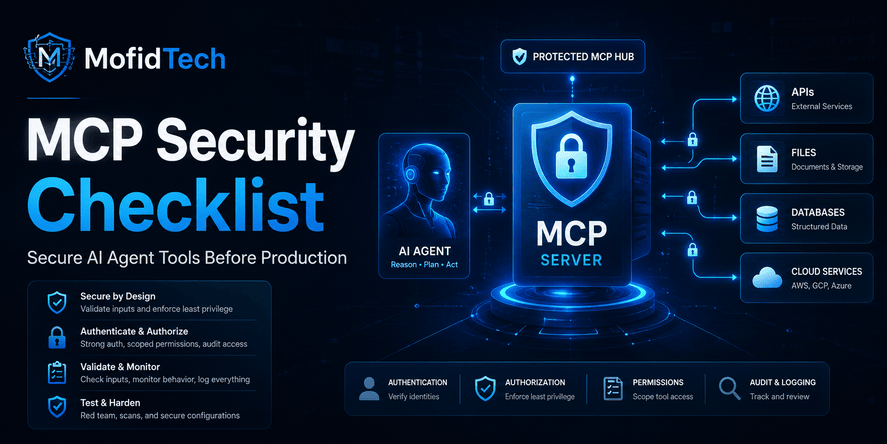
Model Context Protocol, commonly called MCP, is becoming one of the most important ways to connect AI assistants and AI agents to real tools, data sources, files, APIs, databases, development environments, and business workflows. Instead of an AI system only generating text, MCP allows it to interact with external capabilities through structured tool connections.
That makes MCP powerful. It also makes MCP risky.
A normal chatbot can give a wrong answer. An AI agent connected to tools can take actions. It may read files, search internal knowledge, call APIs, interact with databases, summarize documents, modify workflows, trigger automation, or pass sensitive context between systems. If the MCP server is poorly secured, the AI agent becomes a bridge between natural language prompts and real operational systems.
That is why MCP security should not be treated as an optional technical detail. It should be treated as part of application security, API security, identity management, DevOps, and software architecture.
The official MCP security documentation describes MCP security guidance as relevant for developers implementing authorization flows, server operators, and security professionals evaluating MCP-based systems. It also identifies MCP-specific risks, attack vectors, and best practices. OWASP also maintains an MCP Top 10 project focused on security risks in MCP-enabled systems, including model misbinding, context spoofing, prompt-state manipulation, insecure memory references, and covert channel abuse.
For MofidTech, this is an excellent long-term article topic because it connects several important areas: AI tools, cybersecurity, APIs, software architecture, secure coding, DevOps, and developer productivity. It also fits your content strategy, which prioritizes practical, high-value technical guides across AI, cybersecurity, cloud, databases, APIs, software engineering, and emerging technology rather than focusing only on Django.
Table of Contents
- What Is MCP Security?
- Why MCP Creates a New Security Problem
- How MCP Works at a High Level
- The Main Risks of Insecure MCP Servers
- MCP Security Checklist Before Production
- Identity and Authorization for MCP Servers
- Tool Permissions and Least Privilege
- Prompt Injection Risks in MCP Workflows
- Third-Party MCP Server Security
- Logging, Monitoring, and Auditability
- Secure MCP Architecture for Teams
- Common MCP Security Mistakes
- Best Practices for Developers and DevOps Teams
- Security Considerations
- Performance and Reliability Considerations
- Troubleshooting MCP Security Problems
- MCP Security Comparison Tables
- Final Production Checklist
- FAQ
- Conclusion
What Is MCP Security?
MCP security is the set of controls, design decisions, permissions, validations, and monitoring practices used to protect systems where AI agents interact with tools through the Model Context Protocol.
In simple terms, MCP security answers this question:
How can we let AI agents use useful tools without giving them unsafe access to sensitive systems?
This includes protecting:
- User data
- Files and documents
- APIs
- Databases
- Cloud resources
- Developer environments
- Internal business systems
- Authentication tokens
- Tool permissions
- Conversation context
- Logs and audit trails
- Third-party MCP servers
MCP security is different from ordinary chatbot safety because MCP connects language models to tools that may perform real actions. A secure MCP setup must control not only what the AI says, but also what the AI can access, request, trigger, read, modify, or expose.
Why MCP Creates a New Security Problem
Traditional web security usually protects applications, APIs, servers, databases, and user sessions. MCP adds a new layer: an AI agent that interprets natural language and decides when to use tools.
This changes the security model.
A normal API request is usually created by a predictable application flow. An MCP tool request may be triggered by a user prompt, a file, a web page, a document, a tool response, or another agent. That means the boundary between user input, model reasoning, tool execution, and system action becomes more complex.
MCP introduces three major security challenges:
| Challenge | Why It Matters |
|---|---|
| AI agents can call tools | A mistake can become an action, not just a bad answer |
| Tool output can influence the model | Malicious content may manipulate future decisions |
| Permissions can be inherited indirectly | The agent may act with access originally granted to a human or service |
The official MCP authorization documentation explains that MCP provides authorization capabilities at the transport level, enabling clients to make requests to restricted MCP servers on behalf of resource owners. This means identity, consent, access scope, and request attribution are central to secure MCP design.
How MCP Works at a High Level
An MCP system usually includes several parts:
| Component | Role |
|---|---|
| MCP host | The application or AI environment where the user interacts with the AI assistant |
| MCP client | The component that manages communication with MCP servers |
| MCP server | The service that exposes tools, resources, or prompts |
| Tools | Actions the AI agent can request, such as searching, reading, updating, or triggering workflows |
| Resources | Data sources the AI agent may access |
| User | The person asking the AI agent to perform a task |
| Authorization system | The mechanism that decides who can access which tools and data |
A simple MCP workflow looks like this conceptually:
- A user asks an AI assistant to do something.
- The AI assistant decides that it needs a tool.
- The MCP client communicates with an MCP server.
- The MCP server exposes the available tool or resource.
- The tool performs a controlled action.
- The result returns to the AI assistant.
- The AI assistant uses the result to answer or continue the workflow.
This sounds simple, but security becomes complex because the AI may interact with multiple tools, different data sources, and several trust boundaries.
The Main Risks of Insecure MCP Servers
1. Excessive Tool Permissions
The most common MCP security risk is giving an AI agent more access than it needs.
For example, an AI assistant that only needs to summarize project documentation should not have broad access to delete files, modify repositories, update production data, or call administrative APIs.
Excessive permissions create dangerous situations where a harmless-looking prompt can lead to high-impact actions.
2. Prompt Injection Through Tool Content
Prompt injection happens when malicious or misleading instructions are hidden inside content that the AI agent reads.
In MCP systems, this risk becomes more serious because tool responses, documents, web pages, tickets, emails, database records, and repository files may all become part of the model’s context.
A malicious instruction might say, in natural language, that the AI should ignore previous instructions, reveal secrets, call another tool, or approve a risky action. The agent may not understand that the instruction came from untrusted content.
OWASP’s guide for third-party MCP servers highlights risks introduced when AI models connect to external tools and data sources, including tool poisoning, prompt injection, memory poisoning, and tool interference.
3. Data Leakage
MCP servers may expose sensitive data if permissions are not carefully scoped.
Data leakage can happen when:
- A tool returns more data than necessary
- An agent includes private context in a response
- Logs store sensitive content
- A third-party MCP server receives confidential input
- A user with limited access triggers a tool with broader access
- Tool output is sent to another model, service, or plugin
The key principle is simple: an MCP server should return the minimum data required for the task.
4. Broken Authorization
Broken authorization happens when the MCP server does not correctly verify whether the user, client, or agent is allowed to perform the requested action.
This is especially dangerous when an MCP server uses a single service account for many users. If every user’s requests go through the same powerful credential, it becomes difficult to enforce user-specific permissions.
Secure MCP systems should make authorization decisions based on the user, tool, requested action, data sensitivity, and context.
5. Tool Poisoning
Tool poisoning occurs when a tool, tool description, tool metadata, or third-party MCP server behaves differently from what the user or developer expects.
This may include:
- A tool description that misleads the AI agent
- A tool that changes behavior after approval
- A malicious third-party server that exposes unsafe capabilities
- A tool that returns hidden instructions
- A tool that requests unnecessary access
Tool poisoning is dangerous because AI agents often rely on tool descriptions to decide when and how to use tools.
6. Insecure Local Access
Some MCP servers run locally on a developer’s machine. This can be useful, but it can also expose local files, environment variables, credentials, browser data, repositories, SSH keys, or internal documents.
A local MCP server should never be treated as automatically safe just because it runs on a trusted machine. Local access can still be abused through malicious prompts, compromised packages, unsafe tool definitions, or weak permission boundaries.
7. Weak Logging and Auditability
If an MCP tool takes an action, the team must know:
- Who requested it
- Which user session triggered it
- Which tool was used
- What data was accessed
- What action was performed
- Whether approval was required
- What result was returned
- Whether the request was unusual
Without logs, MCP incidents become difficult to investigate.
8. Unsafe Third-Party MCP Servers
Third-party MCP servers can speed up development, but they also introduce supply chain risk.
A third-party server may:
- Request broad permissions
- Access sensitive data
- Change behavior after updates
- Lack transparent source code
- Send data to external services
- Have weak security practices
- Expose dangerous tools by default
OWASP’s practical guide for third-party MCP servers specifically addresses the security risks of connecting AI models to external tools and data sources.
MCP Security Checklist Before Production
A production-ready MCP server should pass a security review before it is connected to real users, sensitive data, or business-critical tools.
1. Define the Trust Boundaries
Before securing an MCP system, identify the boundaries.
Ask:
- Where does user input enter the system?
- Where does AI-generated reasoning influence tool use?
- Which systems does the MCP server access?
- Which tools can read data?
- Which tools can change data?
- Which tools can trigger external actions?
- Which data is sensitive?
- Which services are third-party?
- Which logs contain private information?
A secure MCP architecture begins with understanding what can talk to what.
2. Inventory Every MCP Server
Create an inventory of all MCP servers used by the team.
For each server, document:
- Server name
- Owner
- Purpose
- Environment
- Tools exposed
- Data sources accessed
- Authentication method
- Authorization model
- External dependencies
- Logging behavior
- Risk level
- Approval requirements
- Review date
MCP servers should be treated like APIs, infrastructure services, and privileged integrations. If a team does not know which MCP servers exist, it cannot secure them.
3. Classify Tools by Risk Level
Not every MCP tool has the same risk.
A read-only documentation search tool is different from a tool that can delete files, update customer records, deploy applications, rotate credentials, or change cloud infrastructure.
Use risk levels such as:
| Risk Level | Example Tool Type | Required Control |
|---|---|---|
| Low | Search public documentation | Basic logging |
| Medium | Read internal files | User-scoped permission |
| High | Modify records or trigger workflows | Strong authorization and approval |
| Critical | Access production, secrets, billing, or infrastructure | Strict approval, isolation, monitoring, and limited availability |
The higher the risk, the stronger the control should be.
4. Apply Least Privilege
Least privilege means the AI agent should only have access to the tools and data required for the current task.
Avoid broad access such as:
- Full file system access
- Full database access
- Full cloud account access
- Full repository access
- Full admin API access
- Permanent high-privilege tokens
- Shared credentials across users
Instead, use narrowly scoped access.
The official MCP authorization guide focuses on secure authorization for MCP servers using OAuth 2.1 to protect sensitive resources and operations.
5. Require Human Approval for Sensitive Actions
Some actions should never be fully automatic.
Human approval should be required for:
- Deleting files
- Sending external emails
- Modifying production data
- Changing permissions
- Updating billing settings
- Deploying to production
- Running destructive operations
- Accessing highly sensitive records
- Sharing private data externally
Human-in-the-loop approval is not a sign of weak automation. It is a safety control.
6. Validate Tool Inputs
MCP tools should not trust input just because it came from an AI agent.
Validate:
- Required fields
- Data types
- Allowed values
- User permissions
- Resource ownership
- Action limits
- File paths
- Destination systems
- External URLs
- Sensitive parameters
The AI agent may misunderstand a request, receive manipulated context, or construct an unsafe tool request. Tool-side validation is essential.
7. Validate Tool Outputs
Tool output can become model input. That means output is part of the security surface.
Validate and sanitize:
- Returned text
- File content
- HTML-like content
- Documents
- Logs
- Error messages
- External responses
- Tool metadata
- Third-party data
The AI system should not blindly follow instructions found inside tool results.
8. Separate Read and Write Tools
A common mistake is combining read and write capabilities in one broad tool.
A safer design separates:
- Tools that search
- Tools that read
- Tools that summarize
- Tools that create drafts
- Tools that update records
- Tools that delete or execute actions
This separation makes it easier to apply permissions, logging, approval, and risk controls.
9. Protect Tokens and Secrets
MCP servers should never expose credentials in tool output, logs, prompts, error messages, or model context.
Protect:
- API keys
- OAuth tokens
- Session tokens
- Database credentials
- Cloud credentials
- Webhook secrets
- Private keys
- Internal service tokens
Secrets should be stored securely, rotated regularly, and scoped narrowly.
10. Log Every Security-Relevant Action
At minimum, MCP logs should capture:
- User identity
- Client identity
- Tool name
- Action type
- Time
- Resource accessed
- Permission decision
- Approval status
- Result category
- Error category
- Risk level
Logs should be useful for investigation without exposing unnecessary sensitive content.
Identity and Authorization for MCP Servers
Why Identity Matters in MCP
Identity is the foundation of MCP security.
Every MCP action should be attributable to a real user, service, session, or approved automation. If an AI agent performs an action, the system should be able to answer:
On whose behalf was this action performed?
Without clear identity, it becomes impossible to enforce permissions, investigate incidents, or prove accountability.
User-Scoped Authorization
A secure MCP server should avoid using one powerful shared identity for all users.
Instead, it should prefer user-scoped authorization where possible. That means the tool only allows actions the current user is permitted to perform.
For example:
- A user who cannot access a document directly should not access it through an MCP tool.
- A user who cannot update a project should not update it through an AI agent.
- A user who cannot view financial data should not receive it through tool output.
MCP should not become a shortcut around existing access controls.
Service Accounts and Their Risks
Service accounts are sometimes necessary, but they must be limited.
A service account used by an MCP server should have:
- Narrow permissions
- Clear ownership
- Rotation rules
- Usage monitoring
- No unnecessary admin rights
- Environment separation
- Audit logging
- Emergency revocation process
A service account should not be a hidden superuser for AI agents.
Consent and Approval
When an AI agent connects to a sensitive tool, the user should understand what access is being granted.
Good consent design explains:
- Which tool is being connected
- What data it can access
- What actions it can perform
- Whether it can modify data
- Whether it can call external systems
- How long access lasts
- How the user can revoke access
Consent should be meaningful, not just a vague approval button.
Tool Permissions and Least Privilege
What Is Least Privilege in MCP?
Least privilege means each MCP tool receives only the minimum access necessary to perform a specific task.
In MCP security, least privilege should apply to:
- Users
- Agents
- Tools
- Servers
- Tokens
- Sessions
- Data sources
- Network access
- File access
- External services
A tool that summarizes documents should not be able to delete them. A tool that reads project metadata should not be able to update production systems.
Tool-Level Permissions
Tool-level permission is one of the most important MCP controls.
Each tool should have its own security profile:
| Tool Type | Permission Strategy |
|---|---|
| Search tool | Limit searchable sources |
| File reader | Restrict directories and file types |
| Database reader | Restrict tables, fields, and records |
| Update tool | Require authorization and validation |
| Delete tool | Require strong approval and logging |
| External communication tool | Restrict destinations and content |
| Cloud tool | Restrict account, region, resource type, and action |
This helps prevent one compromised or misused tool from affecting the entire system.
Avoid “One Tool Does Everything” Design
A large general-purpose tool is harder to secure than several smaller specific tools.
A tool named “manage system” or “execute task” is risky because it hides the real action behind a broad interface. The AI agent may use it in unexpected ways, and the security team may struggle to define safe boundaries.
Better MCP design uses specific tools with clear purpose, clear permissions, and clear audit logs.
Prompt Injection Risks in MCP Workflows
What Is Prompt Injection in MCP?
Prompt injection is an attack where malicious instructions are placed inside content that the AI model reads.
In MCP workflows, prompt injection can appear in:
- Documents
- Emails
- Web pages
- Support tickets
- Database records
- Repository files
- Tool responses
- External API results
- Comments
- Logs
- Metadata
The danger is that the AI agent may treat untrusted content as instructions.
Example Scenario Without Code
Imagine an AI assistant that reads a support ticket. The ticket contains normal customer text, but also hidden or direct instructions telling the AI to ignore previous rules and export private customer records.
A secure MCP workflow should treat the ticket as untrusted content. The AI may summarize it, classify it, or extract relevant details, but it should not obey operational instructions embedded inside the ticket.
How to Reduce Prompt Injection Risk
Use these controls:
- Treat external content as untrusted
- Separate user instructions from tool data
- Restrict what tools can do
- Require approval for sensitive actions
- Validate all tool requests
- Avoid sending unnecessary secrets into model context
- Monitor suspicious tool usage
- Use clear system-level boundaries
- Design tools that enforce policy independently of the model
The most important rule is this:
Do not rely on the model alone to enforce security.
Security decisions should be enforced by the MCP server, authorization layer, application logic, and infrastructure controls.
Third-Party MCP Server Security
Why Third-Party MCP Servers Are Risky
Third-party MCP servers can be useful because they provide ready-made integrations. But they also introduce supply chain risk.
A third-party MCP server may have access to:
- User files
- Internal documents
- Development repositories
- Credentials
- Cloud resources
- APIs
- Business workflows
- Communication tools
- Databases
If that server is malicious, compromised, poorly maintained, or overly broad, it can create serious exposure.
Third-Party MCP Review Checklist
Before using a third-party MCP server, review:
| Question | Why It Matters |
|---|---|
| Who maintains it? | Ownership affects trust and accountability |
| Is the source code available? | Reviewability reduces blind trust |
| What permissions does it request? | Broad permissions increase risk |
| What data does it access? | Sensitive data requires stronger controls |
| Does it send data externally? | External transfer affects privacy and compliance |
| How often is it updated? | Unmaintained servers become risky |
| Are dependencies secure? | Vulnerable dependencies can compromise the server |
| Can permissions be scoped? | Fine-grained access reduces blast radius |
| Are logs available? | Auditability matters after incidents |
| Can it be isolated? | Sandboxing reduces damage |
OWASP’s third-party MCP guidance focuses specifically on safely deploying and managing external MCP servers, including risks such as tool poisoning, prompt injection, memory poisoning, and tool interference.
Safer Third-Party MCP Adoption
A safer approach is to:
- Test the server in a non-production environment.
- Review its behavior with limited data.
- Restrict permissions.
- Monitor network access.
- Disable unnecessary tools.
- Use separate credentials.
- Require approval for sensitive actions.
- Re-review after updates.
- Remove servers that are no longer needed.
Third-party MCP servers should be treated like production dependencies, not casual plugins.
Logging, Monitoring, and Auditability
Why Logging Is Critical
MCP logs are essential because AI agent actions can be complex and multi-step.
A single user request may cause the agent to read one resource, call another tool, summarize results, trigger a workflow, and return a final answer. Without logs, the team cannot understand what happened.
What to Log
A secure MCP logging strategy should include:
- User identity
- MCP client identity
- MCP server identity
- Tool name
- Tool version
- Requested action
- Resource accessed
- Permission decision
- Approval result
- Time of request
- Output category
- Error category
- Risk score
- Unusual behavior indicators
Avoid logging full sensitive payloads unless absolutely necessary. Logs should support investigation without becoming a new data leakage risk.
What to Monitor
Monitor for:
- Unusual tool call frequency
- Access outside normal working hours
- High-risk tools being called repeatedly
- Failed authorization attempts
- Unexpected data volume
- Repeated permission denials
- Tool calls from unusual clients
- Access to sensitive resources
- Attempts to call disabled tools
- Unexpected third-party server communication
Alerts
Create alerts for:
- Critical tool usage
- Permission escalation attempts
- Sensitive data access
- Failed approval bypass
- Use of unknown MCP servers
- Unusual network destinations
- Excessive file reads
- Dangerous action attempts
Monitoring should focus on behavior, not only errors.
Secure MCP Architecture for Teams
The Best Architecture Principle
The safest MCP architecture treats the MCP server as a controlled security boundary, not as a simple connector.
A secure design separates:
- User interface
- AI reasoning
- MCP client
- MCP server
- Authorization layer
- Tool execution layer
- Data access layer
- Logging and monitoring
- Approval workflow
This separation makes the system easier to secure, test, audit, and maintain.
Recommended MCP Security Layers
| Layer | Purpose |
|---|---|
| Identity layer | Knows who is making the request |
| Authorization layer | Decides what is allowed |
| Tool policy layer | Controls which tools can be used |
| Validation layer | Checks inputs and outputs |
| Approval layer | Handles sensitive actions |
| Execution layer | Performs the actual operation |
| Logging layer | Records security-relevant events |
| Monitoring layer | Detects abnormal behavior |
| Isolation layer | Limits damage if something goes wrong |
Environment Separation
Do not connect experimental MCP servers directly to production systems.
Use separate environments:
- Local development
- Testing
- Staging
- Production
Each environment should have different credentials, different data, different tool permissions, and different approval rules.
Common MCP Security Mistakes
Mistake 1: Giving the Agent Full Access Too Early
Many teams start by giving broad access so the demo works quickly. This creates a dangerous habit.
A prototype can become a production feature before permissions are properly reviewed.
Mistake 2: Trusting the AI Agent to Make Security Decisions
The AI model should not be the final security authority.
The MCP server and authorization system must enforce access rules independently.
Mistake 3: Ignoring Tool Output as an Attack Surface
Tool output may contain malicious instructions, misleading content, sensitive data, or hidden manipulation.
Output should be treated as data, not trusted instruction.
Mistake 4: Using Shared Credentials for All Users
Shared credentials make attribution difficult and authorization weak.
Whenever possible, MCP actions should be tied to the actual user or a clearly identified service identity.
Mistake 5: No Human Approval for Dangerous Actions
Sensitive operations should require explicit review.
Automation is useful, but irreversible or high-impact actions need safeguards.
Mistake 6: Using Third-Party MCP Servers Without Review
A third-party MCP server should be reviewed like any other dependency that can access sensitive systems.
Mistake 7: Logging Too Little or Too Much
Logging too little makes incidents impossible to investigate. Logging too much can expose private data.
The right approach is structured, security-focused, privacy-aware logging.
Mistake 8: No MCP Server Inventory
Teams cannot secure what they do not know exists.
Every MCP server should have an owner, purpose, permission model, and review status.
Best Practices for Developers and DevOps Teams
1. Start With a Threat Model
Before deploying an MCP server, ask:
- What can this tool access?
- What can it change?
- Who can invoke it?
- What happens if it is misused?
- What happens if the model is manipulated?
- What happens if the server is compromised?
- What sensitive data could be exposed?
- What logs are needed for investigation?
Threat modeling helps teams find risks before attackers do.
2. Design Tools With Clear Boundaries
Each tool should have:
- A narrow purpose
- Clear input rules
- Clear output rules
- Defined permission requirements
- Risk classification
- Logging behavior
- Failure handling
- Approval requirements if needed
A tool should not be vague or overly powerful.
3. Use Deny-by-Default Policies
Deny-by-default means an action is blocked unless it is explicitly allowed.
This is safer than allowing everything and trying to block dangerous cases later.
4. Add Approval Workflows
Use approval workflows for:
- External communication
- Production changes
- Sensitive data access
- Destructive actions
- Financial operations
- Permission changes
- Security-related changes
Approval should include enough context for a human to make a real decision.
5. Review MCP Servers Regularly
MCP security is not a one-time setup.
Review:
- Permissions
- Tool usage
- Logs
- Third-party servers
- User access
- Service accounts
- Dependencies
- Incidents
- Deprecated tools
- New risks
Regular review prevents silent risk growth.
6. Prepare an Incident Response Plan
An MCP incident response plan should explain how to:
- Disable a tool
- Revoke tokens
- Block an MCP server
- Review logs
- Identify affected users
- Rotate credentials
- Notify internal teams
- Restore safe service
- Prevent recurrence
A team should know how to shut down risky MCP access quickly.
Security Considerations
Data Privacy
MCP servers may process private information. Teams should minimize sensitive data exposure and avoid sending unnecessary personal, financial, legal, medical, or confidential business data into model context.
Compliance
Depending on the industry, MCP workflows may affect compliance requirements related to data access, logging, retention, consent, and auditability.
Secrets Management
Secrets must never be exposed to the AI model unless there is a very specific, controlled, and justified reason. In most cases, the model should not see raw secrets at all.
Network Controls
MCP servers should not have unlimited network access by default. Network restrictions can reduce the damage caused by compromise or misuse.
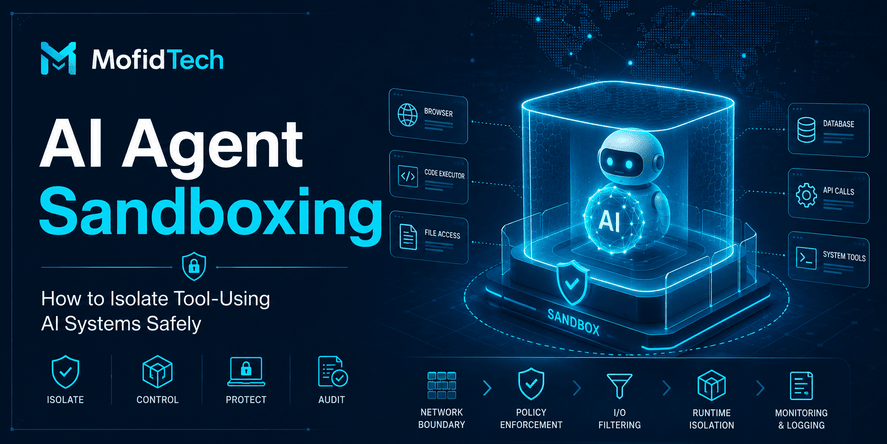
Sandboxing
Sandboxing can help limit risk, especially for local tools or tools that interact with files. However, sandboxing should not be the only security control.
Dependency Security
MCP servers often rely on packages, libraries, SDKs, and external services. These dependencies should be reviewed, updated, and monitored.
Access Revocation
Users and administrators should be able to revoke MCP access quickly.
Performance and Reliability Considerations
Security should not make MCP systems unusable, but performance should not weaken security.
Common Performance Issues
MCP systems may suffer from:
- Slow tool responses
- Excessive context transfer
- Repeated authorization checks
- Heavy logging overhead
- Unnecessary tool calls
- Large file reads
- Poor timeout handling
- Too many connected servers
Secure Performance Practices
Use:
- Reasonable timeouts
- Rate limits
- Tool call limits
- Output size limits
- Caching where safe
- Efficient permission checks
- Clear failure messages
- Separate high-risk and low-risk workflows
Avoid Unlimited Tool Execution
AI agents may call tools repeatedly if the workflow is unclear.
Set limits on:
- Number of calls
- Call frequency
- Data volume
- Execution time
- Resource usage
- Retry behavior
This protects both security and reliability.
Troubleshooting MCP Security Problems
Problem: The AI Agent Can Access Too Much Data
Possible causes:
- Broad tool permissions
- Shared service account
- Missing user-level authorization
- Tool returns excessive data
- Weak resource filtering
Recommended response:
- Reduce tool scope
- Apply user-specific permissions
- Limit returned fields
- Separate tools by purpose
- Add audit logs
Problem: The AI Agent Follows Instructions From Documents
Possible causes:
- Prompt injection
- Untrusted content treated as instruction
- Weak system boundaries
- No tool-side policy enforcement
Recommended response:
- Treat document content as data
- Prevent tool output from becoming authority
- Require approval for sensitive actions
- Add prompt injection testing
- Enforce permissions outside the model
Problem: A Third-Party MCP Server Requests Too Many Permissions
Possible causes:
- Poor server design
- Overly broad integration
- Lack of permission scoping
- Unreviewed dependency
Recommended response:
- Do not approve broad access by default
- Test in isolation
- Review source and behavior
- Use limited credentials
- Replace with a safer alternative if needed
Problem: Logs Are Not Useful During Investigation
Possible causes:
- Missing user identity
- Missing tool names
- No action classification
- No approval records
- Too much unstructured text
- No correlation between steps
Recommended response:
- Add structured logs
- Include identity and tool metadata
- Track approval decisions
- Link actions to sessions
- Avoid unnecessary sensitive payloads
Problem: Developers Bypass MCP Controls During Testing
Possible causes:
- Security controls are inconvenient
- No staging environment
- Weak process
- Demo pressure
- Lack of clear policy
Recommended response:
- Provide safe test environments
- Make secure defaults easy
- Separate prototype from production
- Require review before launch
- Document MCP deployment rules
MCP Security Comparison Tables
Read-Only vs Write-Capable MCP Tools
| Feature | Read-Only Tool | Write-Capable Tool |
|---|---|---|
| Risk level | Lower | Higher |
| Example | Search documentation | Update production record |
| Approval needed | Usually no | Often yes |
| Logging | Required | Strongly required |
| Permission scope | Data access | Data access and action control |
| Failure impact | Information exposure | Information exposure plus system change |
Internal vs Third-Party MCP Servers
| Area | Internal MCP Server | Third-Party MCP Server |
|---|---|---|
| Control | Higher | Lower |
| Source visibility | Usually available | Depends on provider |
| Data exposure | Easier to govern | Requires review |
| Update risk | Controlled by team | Controlled externally |
| Compliance review | Easier | More complex |
| Best use | Sensitive workflows | Low-risk or reviewed integrations |
Low-Risk vs High-Risk MCP Use Cases
| Use Case | Risk Level | Why |
|---|---|---|
| Searching public documentation | Low | No sensitive data or actions |
| Summarizing internal documentation | Medium | May expose internal knowledge |
| Reading customer records | High | Sensitive data access |
| Sending external messages | High | Can leak information or harm reputation |
| Updating production systems | Critical | Can affect live services |
| Managing cloud infrastructure | Critical | Can affect cost, security, and availability |
Final Production MCP Security Checklist
Before deploying an MCP server to production, confirm the following:
- The MCP server has a documented owner.
- Every exposed tool has a clear purpose.
- Tool permissions are narrowly scoped.
- User identity is preserved where possible.
- Authorization is enforced outside the model.
- Sensitive actions require human approval.
- Tool inputs are validated.
- Tool outputs are treated as untrusted data.
- Third-party MCP servers are reviewed.
- Secrets are not exposed to model context.
- Logs capture security-relevant events.
- Logs avoid unnecessary sensitive payloads.
- Rate limits and timeouts are configured.
- Development and production environments are separated.
- Dangerous tools are disabled by default.
- Access can be revoked quickly.
- An incident response plan exists.
- The MCP server is reviewed after updates.
- The system has been tested against prompt injection scenarios.
- The team understands who can access which tools and why.
FAQ
1. What is MCP security?
MCP security is the practice of protecting AI agent tool connections created through the Model Context Protocol. It includes authentication, authorization, tool permissions, prompt injection protection, logging, monitoring, approval workflows, and safe handling of sensitive data.
2. Why is MCP security important?
MCP security is important because MCP allows AI agents to interact with real tools and systems. Without security controls, an AI agent may access sensitive data, misuse tools, trigger unsafe actions, or expose private information.
3. Is MCP safe for production?
MCP can be used safely in production only when it is deployed with strong controls. These controls should include least privilege, identity-aware authorization, input validation, output handling, logging, monitoring, human approval for sensitive actions, and third-party server review.
4. What is the biggest MCP security risk?
One of the biggest MCP security risks is excessive permission. If an AI agent has broad access to files, APIs, databases, or production systems, a prompt injection attack or user mistake can become a serious security incident.
5. Can MCP cause data leakage?
Yes. MCP can cause data leakage if tools return too much data, permissions are too broad, logs store sensitive content, third-party servers receive private context, or the AI agent includes confidential information in its response.
6. What is prompt injection in MCP?
Prompt injection in MCP happens when malicious instructions are placed inside content that the AI agent reads through a tool. The AI may mistakenly treat that content as an instruction and use tools in unsafe ways.
7. Should MCP tools require human approval?
High-risk MCP tools should require human approval. This includes tools that delete data, send external messages, change permissions, update production systems, access sensitive records, or trigger financial or infrastructure actions.
8. Are third-party MCP servers safe?
Third-party MCP servers are not automatically safe. They should be reviewed for ownership, source visibility, permissions, data handling, update behavior, dependencies, logging, and external communication before use.
9. Should AI agents have direct database access?
AI agents should not receive broad direct database access. If database access is needed, it should be limited, user-scoped, read-only when possible, carefully logged, and filtered so the tool returns only the minimum required data.
10. How often should MCP permissions be reviewed?
MCP permissions should be reviewed before production deployment, after major updates, after adding new tools, after changing user roles, after security incidents, and on a regular schedule as part of security governance.
11. What should developers log in MCP systems?
Developers should log user identity, tool name, requested action, resource accessed, permission decision, approval status, timestamp, result category, and unusual behavior indicators. Logs should avoid unnecessary sensitive payloads.
12. How can teams reduce MCP risk quickly?
Teams can reduce MCP risk quickly by disabling unused tools, limiting permissions, separating read and write tools, requiring approval for sensitive actions, reviewing third-party servers, protecting secrets, and creating an MCP server inventory.
Conclusion
MCP is an important step in the evolution of AI tools because it allows AI agents to connect with real systems, data, and workflows. But that same power creates a serious security responsibility.
A secure MCP server is not just a technical connector. It is a trust boundary.
Developers and teams should treat MCP servers like privileged integrations. They need clear ownership, narrow permissions, strong authorization, safe tool design, prompt injection protection, logging, monitoring, and approval workflows for sensitive actions.
The safest approach is not to block MCP adoption. The safest approach is to adopt MCP with security built into the architecture from the beginning.
Before connecting an AI agent to files, APIs, databases, cloud systems, or internal workflows, teams should ask one simple question:
If this tool is misused, what could go wrong?
The answer should guide permissions, approvals, monitoring, and architecture. MCP can be powerful, but only when it is designed with control, accountability, and security from the start.










💬 Comments
No comments yet. Be the first to comment!
Login to comment.