Introduction
AI coding agents are quickly moving from simple autocomplete tools to active development collaborators. They can read issues, inspect repositories, suggest changes, create pull requests, update tests, explain architecture, and sometimes operate across multiple tools. This creates a major opportunity for developer productivity, but it also introduces a serious engineering question:
How much should an AI coding agent be allowed to do without human approval?
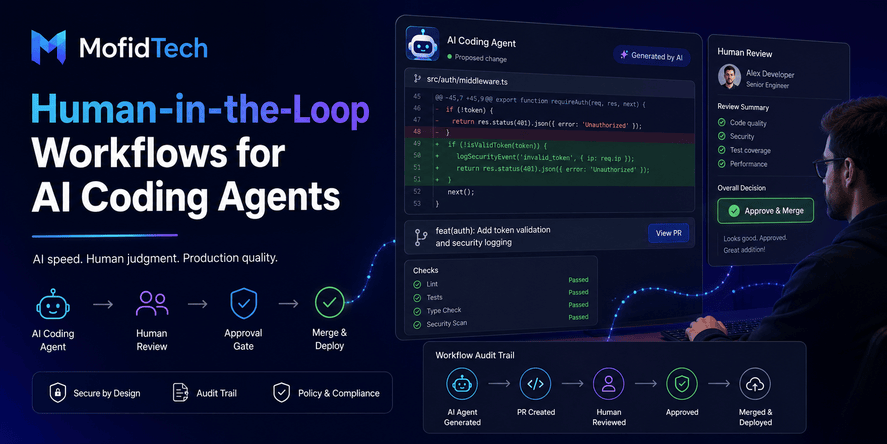
A human-in-the-loop workflow answers this question. It defines where automation is useful, where review is required, who approves high-risk actions, and how every AI-assisted change is tracked before it reaches users.
This matters because AI agents are not just passive tools. Modern agentic systems can plan, act, call tools, and make decisions across workflows. OWASP’s Top 10 for Agentic Applications 2026 focuses specifically on risks in autonomous and agentic AI systems that can plan and act across complex environments. Microsoft’s agentic AI maturity guidance also emphasizes identity, data access, compliance controls, observability, logs, review mechanisms, and clearly defined human oversight for each agent class.
For software teams, the solution is not to reject AI coding agents. The solution is to design workflows where AI accelerates development while humans remain accountable for security, architecture, product quality, and production safety.
Table of Contents
- What Is a Human-in-the-Loop Workflow for AI Coding Agents?
- Why AI Coding Agents Need Approval Boundaries
- The Difference Between AI Assistants and AI Coding Agents
- What AI Coding Agents Can Do Without Approval
- What Should Always Require Human Approval
- Designing a Risk-Based Approval Matrix
- Building a Safe AI Coding Agent Workflow
- Approval Roles for Engineering Teams
- Security Considerations
- Performance and Reliability Considerations
- Audit Trails and Accountability
- Human-in-the-Loop vs Fully Autonomous Development
- Common Mistakes
- Practical Checklist
- Troubleshooting AI Coding Agent Workflows
- FAQ
- Conclusion
What Is a Human-in-the-Loop Workflow for AI Coding Agents?
A human-in-the-loop workflow for AI coding agents is a development process where AI agents can assist, propose, analyze, and sometimes prepare changes, but important actions require human review before they are accepted, merged, deployed, or trusted.
In simple terms, the AI can help move the work forward, but humans decide whether the work is safe, correct, maintainable, and ready for production.
A strong human-in-the-loop workflow usually defines:
| Workflow Area | What It Controls |
|---|---|
| Agent permissions | What the AI can read, change, or trigger |
| Approval gates | Which actions require human review |
| Risk levels | How dangerous each type of change is |
| Reviewer roles | Who must approve different changes |
| Audit trails | What the agent did and why |
| Rollback planning | How the team can recover if something fails |
| Deployment control | Whether AI-assisted changes can reach production |
The goal is not to slow down developers. The goal is to allow AI coding agents to be useful without turning them into uncontrolled contributors.
Microsoft’s documentation for human-in-the-loop agent workflows describes HITL as a request-and-response mechanism where a workflow can pause, request input from a human or external system, and continue only after receiving a response. In software development, this same idea becomes an approval system for code, architecture, security, and release decisions.
Why AI Coding Agents Need Approval Boundaries
AI coding agents need approval boundaries because they can make confident mistakes, misunderstand business context, introduce security weaknesses, or change parts of a system that have consequences beyond the visible code.
A human developer usually understands organizational context: which customers depend on a feature, which modules are fragile, which migrations are risky, which legacy behavior must not change, and which security rules are non-negotiable. An AI coding agent may not fully understand these hidden constraints unless the team deliberately builds them into the workflow.
Approval boundaries are especially important when the AI agent can:
- Modify production code
- Open or update pull requests
- Suggest dependency changes
- Touch authentication or authorization logic
- Modify database-related behavior
- Change CI/CD workflows
- Access secrets or environment details
- Interact with cloud resources
- Generate deployment-related changes
- Act across multiple tools
Recent security discussions around agentic AI emphasize that autonomous agents can become operational actors with identities, permissions, and audit needs. A recent report on the OpenClaw vulnerability described how an autonomous agent with broad workstation access could become a serious enterprise risk when compromised, highlighting the danger of unmanaged agents and excessive privileges.
For developers, the lesson is clear: an AI coding agent should not be treated like a harmless text generator once it can act inside a repository or development environment. It should be treated like a powerful collaborator with controlled permissions.
The Difference Between AI Assistants and AI Coding Agents
Not every AI tool creates the same level of risk. A simple AI assistant that answers questions is very different from an AI coding agent that can inspect files, modify code, create pull requests, and interact with development systems.
| Type | Typical Behavior | Risk Level |
|---|---|---|
| AI autocomplete | Suggests small code completions while a developer types | Low to medium |
| AI chat assistant | Explains concepts, reviews snippets, suggests approaches | Low to medium |
| AI code reviewer | Comments on pull requests or identifies possible issues | Medium |
| AI coding agent | Performs multi-step tasks and proposes repository changes | Medium to high |
| Autonomous engineering agent | Plans, modifies, tests, opens PRs, and may trigger workflows | High |
The more an AI system can act independently, the more governance it needs.
GitHub’s documentation notes that Copilot code review comments do not count as required pull request approvals and do not block merges. This is an important pattern: AI can assist review, but teams should not confuse AI feedback with human accountability.
What AI Coding Agents Can Do Without Approval
Not every AI action requires a formal approval process. If every small suggestion needs a meeting or manager review, the workflow becomes useless. The key is to allow low-risk automation while protecting high-risk decisions.
Low-Risk Tasks That Usually Do Not Need Approval
AI coding agents can often perform these actions with minimal friction:
- Explain how a feature works
- Summarize a pull request
- Identify possible missing tests
- Suggest documentation improvements
- Draft issue descriptions
- Organize technical notes
- Propose refactoring ideas without applying them
- Compare alternative design approaches
- Summarize error messages
- Help create review checklists
- Identify files that may be related to a task
These actions are useful because they support thinking without directly changing the system.
Safe AI Assistance Is Usually Advisory
A low-risk AI action usually has three characteristics:
- It does not change source code directly.
- It does not expose sensitive data.
- It does not trigger deployment, infrastructure, or database operations.
When AI acts as an assistant, the risk is lower. When AI becomes an actor, the risk increases.
What Should Always Require Human Approval
Some actions should always require human review, even if the AI agent appears confident and the change looks small.
Production Code Changes
Any AI-generated change that modifies application behavior should be reviewed by a human developer. This includes bug fixes, feature changes, refactoring, validation logic, and business rules.
Even small changes can alter user experience, data handling, or security assumptions.
Authentication and Authorization Changes
Authentication and authorization are high-risk areas. AI agents should not independently modify login flows, password reset behavior, role checks, permission logic, session handling, token behavior, or account recovery workflows.
A small mistake in these areas can create account takeover risks or unauthorized data access.
Payment, Billing, and Subscription Logic
Payment workflows involve money, trust, compliance, and customer support risk. AI-generated changes in billing logic should require product, engineering, and sometimes legal or finance review.
Database and Data Migration Changes
Database-related changes can affect data integrity, performance, and recovery. Human approval is essential when AI touches schemas, relationships, deletion behavior, import workflows, normalization rules, or data transformation logic.
Dependency and Package Changes
AI agents may suggest updating dependencies without fully understanding breaking changes, licensing concerns, transitive dependencies, or supply chain risks. Dependency changes should be reviewed carefully.
CI/CD and Deployment Changes
CI/CD pipelines control how software moves from development to production. AI-generated changes to deployment workflows, build steps, release conditions, environment handling, or secrets access should always require approval.
Security-Sensitive Files and Policies
Anything related to security headers, access control, secrets, infrastructure rules, encryption, logging of sensitive data, or administrative access should require human review.
Designing a Risk-Based Approval Matrix
A risk-based approval matrix helps teams decide which AI actions can proceed automatically and which need review.
Example AI Coding Agent Approval Matrix
| AI Action | Risk Level | Approval Needed |
|---|---|---|
| Summarize an issue | Low | No formal approval |
| Suggest documentation changes | Low | Developer review if published |
| Draft a pull request description | Low | PR author review |
| Suggest tests | Low to medium | Developer review |
| Modify frontend text | Medium | Developer or product review |
| Refactor internal code | Medium | Developer review |
| Change business logic | High | Senior developer review |
| Modify authentication | High | Security and developer review |
| Change database behavior | High | Developer and database review |
| Update dependencies | High | Developer and security review |
| Modify deployment workflow | Critical | DevOps and security review |
| Access production data | Critical | Strict approval and logging |
| Trigger production deployment | Critical | Release owner approval |
This matrix should not be static. Teams should update it as their systems, risks, and agent capabilities change.
How to Classify AI Agent Risk
A simple way to classify risk is to ask five questions:
- Can this action affect real users?
- Can it expose, modify, or delete data?
- Can it weaken security controls?
- Can it affect deployment or infrastructure?
- Would rollback be difficult if the change is wrong?
If the answer to any of these is yes, the action needs human approval.
Building a Safe AI Coding Agent Workflow
A safe workflow gives AI coding agents a useful role without allowing them to bypass engineering discipline.
Step 1: Define the Agent’s Role
Before using an AI coding agent, define what it is allowed to do.
Examples of clear roles include:
- Documentation assistant
- Test suggestion assistant
- Refactoring proposer
- Pull request summarizer
- Bug investigation assistant
- Code review assistant
- Migration planning assistant
- Security checklist assistant
Avoid vague roles like “general developer agent” unless your approval system is mature.
Step 2: Limit Repository Access
Agents should only access the repositories, branches, and files needed for their task. Broad access creates unnecessary risk.
A good access model follows the principle of least privilege: give the agent enough access to help, but not enough access to damage unrelated systems.
Step 3: Separate Suggestion from Execution
The safest workflow separates AI recommendations from actual changes.
For example, the AI can:
- Explain what should be changed
- Identify impacted areas
- Suggest a plan
- Draft a review checklist
- Prepare a proposed change
But humans should approve the actual merge and deployment.
Step 4: Require Pull Request Review
AI-generated changes should move through the same pull request process as human changes. They should not bypass review just because they were produced quickly.
A pull request should clearly identify:
- What the AI changed
- Why the change was made
- What files were affected
- What risks exist
- What tests or checks were considered
- What human review is required
Recent research has studied how AI coding agents create pull requests and how human reviewers respond to them, showing that AI-generated PRs are becoming a real part of software collaboration rather than a theoretical future.
Step 5: Add Security Review for Sensitive Areas
Some changes should automatically trigger security review. These include authentication, authorization, dependency updates, data handling, encryption, logging, and deployment behavior.
The workflow should not rely on the AI to decide whether a change is security-sensitive. The team should define those rules.
Step 6: Keep an Audit Trail
Every AI-assisted change should be traceable. Teams should know:
- Which agent was used
- Who initiated the task
- What prompt or instruction was given
- What files were changed
- What approvals were required
- Who approved the change
- When the change was merged
- Whether the change reached production
Auditability is central to agent governance. Microsoft’s security guidance for AI agents emphasizes centralized, consistent, and auditable authorization decisions, with approval workflows serving as runtime controls for high-impact actions.
Step 7: Prepare Rollback Before Deployment
AI-assisted changes should not be deployed without a rollback plan. This is especially important for database changes, dependency updates, infrastructure modifications, and authentication logic.
A rollback plan should explain:
- What could go wrong
- How the team will detect failure
- Who owns rollback decisions
- What data could be affected
- How users will be protected
- How the incident will be reviewed afterward
Approval Roles for Engineering Teams
A human-in-the-loop workflow works best when responsibilities are clear.
Developer Reviewer
The developer reviewer checks correctness, maintainability, readability, and alignment with existing architecture. This person asks: “Does this change solve the right problem in the right way?”
Security Reviewer
The security reviewer checks access control, data protection, dependency risk, injection risk, sensitive logging, secrets handling, and abuse scenarios. This person asks: “Could this change create a vulnerability?”
DevOps or Platform Reviewer
The DevOps reviewer checks deployment risk, environment impact, performance, infrastructure behavior, observability, and rollback feasibility. This person asks: “Can this be released safely?”
Product or Business Reviewer
The product reviewer checks whether the change matches user expectations, business rules, support requirements, and compliance needs. This person asks: “Does this behavior make sense for users and the organization?”
Release Owner
The release owner decides whether the change is ready to move forward. This person asks: “Is the team comfortable accepting the risk of this change?”
Security Considerations for AI Coding Agents
AI coding agents create new security questions because they combine language understanding, tool access, repository context, and action-taking ability.
Treat AI Agents as Digital Identities
If an AI agent can access systems, repositories, tools, or data, it should have an identity. That identity should have permissions, logs, and lifecycle controls.
Recent reporting on Microsoft’s approach notes the idea that AI agents should be managed with identities, permissions, and audits, similar to employees or service accounts.
Avoid Excessive Permissions
AI agents should not have broad access by default. Excessive access increases the impact of mistakes, prompt injection, compromised tools, and unintended behavior.
Protect Secrets
Agents should not be able to read secrets unless there is a strong reason and strict control. They should not paste secrets into logs, issue comments, pull request descriptions, or generated documentation.
Watch for Prompt Injection
Prompt injection can occur when an AI agent reads untrusted content that tries to manipulate its behavior. This can come from comments, issue descriptions, documentation, external webpages, or files inside a repository.
Human review is especially important when agents interact with untrusted text.
Require Review for Security-Sensitive Changes
Security-sensitive changes should never be merged only because the AI explanation sounds reasonable. AI can describe insecure changes convincingly.
Monitor Agent Behavior
Agent activity should be observable. Teams should monitor unusual file access, unexpected tool calls, repeated failed attempts, suspicious dependency changes, and unexpected modifications to security-sensitive areas.
Performance and Reliability Considerations
AI-generated changes may be functionally correct but inefficient, fragile, or difficult to maintain.
Performance Risk
An AI coding agent may suggest a solution that works for small inputs but performs poorly at scale. Developers should review algorithmic complexity, database access patterns, caching implications, and resource usage.
Reliability Risk
AI-generated changes can miss edge cases. They may handle the obvious scenario but fail under unusual inputs, partial failures, network issues, concurrency, or data inconsistency.
Maintainability Risk
AI agents may produce changes that solve the immediate problem while making the system harder to understand. A human reviewer should check whether the change fits the project’s architecture and naming conventions.
Operational Risk
Some changes affect monitoring, logging, alerting, deployment, or rollback behavior. These should be reviewed by someone who understands production operations.
Audit Trails and Accountability
A strong human-in-the-loop workflow creates accountability without blaming AI for decisions humans should own.
AI should not be the final accountable party. Humans remain responsible for approving, merging, and deploying software.
What an Audit Trail Should Capture
| Audit Field | Why It Matters |
|---|---|
| Agent name or tool | Identifies which AI system was used |
| Human requester | Shows who initiated the work |
| Task description | Explains the intended goal |
| Files affected | Helps with review and incident analysis |
| Risk level | Shows why approvals were required |
| Human approvers | Establishes accountability |
| Test and review evidence | Supports release confidence |
| Deployment status | Tracks whether change reached users |
| Rollback notes | Helps recovery if problems appear |
Audit trails are not only useful for compliance. They also help teams learn which AI workflows are reliable and which need better boundaries.
Human-in-the-Loop vs Fully Autonomous AI Development
Fully autonomous AI development sounds attractive, but it is risky for most real-world teams.
| Approach | Benefits | Risks | Best Use |
|---|---|---|---|
| Human-only development | Strong accountability and context | Slower for repetitive work | Critical architecture and high-risk changes |
| AI-assisted development | Faster analysis and drafting | Requires review discipline | Most modern development teams |
| Human-in-the-loop agents | Productivity with approval control | Needs workflow design | Professional engineering teams |
| Fully autonomous agents | Maximum automation | High security and quality risk | Limited experiments and low-risk environments |
The best current model for serious teams is usually not full autonomy. It is controlled autonomy: allow agents to help deeply, but require humans at important decision points.
Common Mistakes When Using AI Coding Agents
Mistake 1: Giving Too Much Access Too Early
Teams sometimes connect AI agents to repositories, documentation, issue trackers, and development tools before defining permission boundaries. This creates unnecessary risk.
Mistake 2: Treating AI Output as Reviewed Work
AI-generated code is not automatically reviewed code. It is proposed work. It still needs human judgment.
Mistake 3: Letting AI Modify High-Risk Areas Without Review
Authentication, authorization, database behavior, deployment workflows, and dependency updates should never be treated as routine AI tasks.
Mistake 4: Ignoring Business Context
AI may not understand why a system behaves a certain way. What looks like legacy complexity may actually protect a business rule, legal requirement, or customer workflow.
Mistake 5: Skipping Rollback Planning
Fast AI-generated changes can create a false sense of safety. If the change affects production, rollback should be considered before deployment.
Mistake 6: Not Labeling AI-Generated Contributions
Teams should identify AI-assisted pull requests or changes. This helps reviewers apply the right level of scrutiny and improves future process analysis.
Mistake 7: Using AI Review as a Replacement for Human Review
AI review can help, but it should not replace required human approval. GitHub’s documentation explicitly states that Copilot reviews do not count toward required pull request approvals.
Practical Checklist for Human-in-the-Loop AI Coding Agents
Before Using the Agent
- Define the agent’s role
- Limit repository access
- Decide what the agent can read
- Decide what the agent can modify
- Identify high-risk areas
- Define approval rules
- Choose human reviewers
- Create logging and audit expectations
- Prepare rollback expectations for production changes
Before Accepting an AI-Generated Change
- Confirm the change solves the right problem
- Check whether the affected files are appropriate
- Review business logic carefully
- Review security-sensitive behavior
- Check for unnecessary complexity
- Verify that edge cases were considered
- Confirm that documentation or tests are aligned
- Ensure the pull request description is accurate
Before Deployment
- Confirm required approvals are complete
- Review production impact
- Confirm monitoring is sufficient
- Confirm rollback plan
- Check whether users or support teams need communication
- Confirm no secrets or sensitive information were exposed
- Review dependency and infrastructure implications
- Document final release decision
Troubleshooting Human-in-the-Loop AI Coding Workflows
Problem: The AI Agent Creates Too Many Low-Quality Pull Requests
This usually means the task definition is too broad. Give the agent smaller, more specific tasks. Require it to explain the intended change before preparing modifications.
Problem: Reviewers Do Not Trust AI-Generated Changes
Improve transparency. Require pull request summaries, affected file lists, risk notes, and clear explanations of why the change was made.
Problem: AI Changes Touch Too Many Files
Limit scope. The agent should be instructed to work within a defined area and avoid unrelated cleanup.
Problem: Security Review Becomes a Bottleneck
Use risk classification. Not every change needs security review, but sensitive categories should trigger it automatically.
Problem: AI Agents Repeat the Same Mistakes
Create a feedback loop. Document recurring issues and update team guidelines, prompts, review checklists, or permission boundaries.
Problem: The Team Cannot Tell What the AI Actually Did
Improve audit trails. Every AI task should be linked to a human requester, task description, affected files, and review outcome.
Comparison: Weak vs Strong AI Coding Agent Workflow
| Area | Weak Workflow | Strong Workflow |
|---|---|---|
| Permissions | Broad access by default | Least privilege access |
| Review | Informal or skipped | Risk-based approval gates |
| Security | Reviewed only after problems | Security-sensitive changes flagged early |
| Auditability | Hard to trace actions | Clear logs and ownership |
| Deployment | AI changes treated like normal changes | AI-assisted changes reviewed before release |
| Rollback | Considered after failure | Planned before deployment |
| Accountability | Blame is unclear | Human approvers are defined |
| Productivity | Fast but risky | Fast with controlled risk |
Best Practices for Teams
Start With Low-Risk Use Cases
Begin with documentation, pull request summaries, test suggestions, and issue analysis before giving agents permission to modify code.
Use Risk-Based Rules
Do not create one rule for all AI actions. Match approval requirements to the potential impact of the change.
Keep Humans Accountable
AI can assist, but humans should approve important engineering decisions.
Make Agent Activity Visible
Developers should be able to see what the AI did, why it did it, and what changed.
Protect Critical Areas
Authentication, authorization, payments, database logic, deployment pipelines, and dependencies deserve stricter controls.
Review AI Changes Like Junior Developer Contributions
AI-generated changes should be reviewed carefully, especially when they look polished. Confidence in the explanation does not guarantee correctness.
Update the Workflow Over Time
As the team learns which AI tasks are safe and useful, the approval matrix should evolve.
Real-World Use Cases
Use Case 1: AI Pull Request Summarization
An AI agent summarizes the purpose of a pull request, lists changed areas, and identifies possible review points. This is low risk and improves reviewer speed.
Use Case 2: AI Test Gap Analysis
An AI agent reviews a proposed change and suggests missing test scenarios. The developer decides which suggestions are relevant.
Use Case 3: AI Refactoring Proposal
An AI agent proposes a refactoring plan, but the developer approves the plan before changes are made.
Use Case 4: AI Security Review Assistant
An AI agent flags possible security concerns in authentication, authorization, or data handling. A human security reviewer makes the final decision.
Use Case 5: AI Migration Planning Assistant
An AI agent helps identify migration risks, affected data areas, and rollback concerns. A database-aware developer reviews the plan before implementation.
Use Case 6: AI Release Readiness Assistant
An AI agent checks whether release notes, monitoring, rollback planning, and approvals are complete. The release owner remains responsible for deployment.
FAQ: Human-in-the-Loop AI Coding Agents
1. What is a human-in-the-loop AI coding workflow?
A human-in-the-loop AI coding workflow is a software development process where AI agents can assist with analysis, suggestions, and proposed changes, but humans approve important actions before they are merged, deployed, or trusted.
2. Should AI coding agents be allowed to commit code?
AI coding agents can prepare proposed changes, but direct commits to important branches should require human review. For professional teams, AI-generated changes should usually go through pull requests.
3. Can AI coding agents safely review their own code?
No. AI self-review can help identify obvious issues, but it should not replace human review. An AI agent may miss the same context it misunderstood when creating the change.
4. What changes should always require human approval?
Authentication, authorization, database behavior, dependency updates, deployment workflows, payment logic, security-sensitive files, and production-impacting changes should always require human approval.
5. Are AI coding agents dangerous?
AI coding agents are not automatically dangerous, but they become risky when they have excessive permissions, weak review processes, poor audit trails, or access to sensitive systems without governance.
6. How can teams reduce AI coding agent risk?
Teams can reduce risk by limiting permissions, using pull request reviews, defining approval gates, monitoring agent behavior, protecting secrets, requiring security review for sensitive changes, and maintaining rollback plans.
7. Should AI-generated pull requests be labeled?
Yes. Labeling AI-generated or AI-assisted pull requests helps reviewers understand the origin of the change and apply the right level of scrutiny.
8. Can AI coding agents improve developer productivity?
Yes. AI coding agents can reduce repetitive work, summarize context, suggest tests, explain code, draft documentation, and help with review preparation. The productivity gain is strongest when the workflow is controlled and well-designed.
9. What is the biggest mistake teams make with AI coding agents?
The biggest mistake is giving agents broad access before defining approval rules, review responsibilities, and security boundaries.
10. Is human-in-the-loop AI only for large companies?
No. Small teams also need approval workflows. A small team may use a simpler process, but it should still define what the AI can do, what humans must review, and what should never be automated without approval.
Conclusion
AI coding agents can make software teams faster, but speed without control creates risk. The safest approach is not to block AI adoption. The safest approach is to design human-in-the-loop workflows that give AI agents useful responsibilities while keeping humans accountable for important decisions.
A good workflow defines permissions, approval gates, risk levels, reviewer roles, audit trails, and rollback expectations. It allows AI to assist with research, summaries, test suggestions, refactoring plans, and pull request preparation, while requiring human approval for production code, security-sensitive logic, database behavior, dependencies, and deployment changes.
For MofidTech readers, the practical lesson is simple: treat AI coding agents as powerful engineering collaborators, not magic developers. They can accelerate work, but they need boundaries, oversight, and clear accountability.
Teams that build these workflows early will gain the benefits of AI-assisted development without sacrificing security, reliability, or professional engineering discipline.










💬 Comments
No comments yet. Be the first to comment!
Login to comment.