Introduction
AI agents are becoming one of the most important shifts in modern software development. A normal chatbot answers questions. An AI agent can go further: it can plan tasks, use tools, read documents, search systems, call APIs, interact with databases, prepare reports, trigger workflows, and sometimes make decisions on behalf of a user or organization.
That difference changes the security model completely.
When an AI system can only generate text, the main risk is usually misleading, incorrect, or unsafe output. But when an AI agent can take action, the risk becomes operational. A poorly secured agent can expose sensitive data, misuse tools, modify records, trigger external actions, access private files, or follow malicious instructions hidden inside emails, documents, web pages, tickets, logs, repositories, or user-generated content.
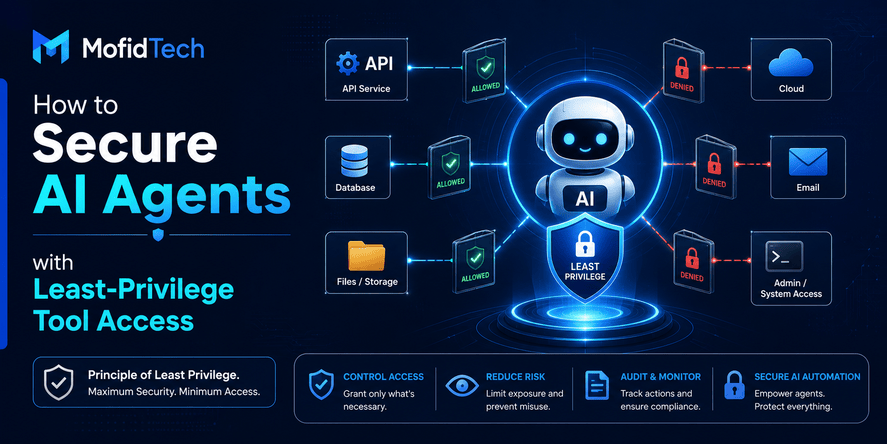
This is why least-privilege tool access is becoming a core principle of AI agent security.
Least privilege means that an AI agent should receive only the minimum permissions required to complete a specific task, for a limited time, under controlled conditions, with monitoring and auditability. The agent should not automatically inherit the full permissions of the user, the developer, the server, the application, or the organization.
This topic is no longer theoretical. OWASP has published security guidance for agentic applications, including risks such as agent behavior hijacking, tool misuse, identity and privilege abuse, supply chain vulnerabilities, memory poisoning, insecure inter-agent communication, cascading failures, and rogue agents. OWASP also describes agentic skills as reusable behaviors that may include planning, tool orchestration, file access, network access, safety guardrails, and persistent memory.
For developers, this means one thing clearly: securing AI agents is not only about better prompts. It is about architecture, permissions, identity, runtime monitoring, governance, and safe system design.
This article explains how to secure AI agents with least-privilege tool access, how to design permission boundaries, what risks to avoid, and how to build safer AI-powered applications without slowing down innovation.
Table of Contents
- What Is AI Agent Security?
- Why AI Agents Need a Different Security Model
- What Least Privilege Means for AI Agents
- Main Security Risks of AI Agents
- How Tool Access Changes the Threat Model
- How to Design Least-Privilege Tool Access
- AI Agent Permission Models Compared
- Human Approval and Risk-Based Controls
- Monitoring, Logging, and Audit Trails
- Secure Memory and Context Management
- Prompt Injection and Indirect Prompt Injection
- Security Considerations for Production AI Agents
- Performance and Reliability Considerations
- Common Mistakes Developers Make
- Best Practices Checklist
- Troubleshooting AI Agent Security Problems
- Real-World Use Cases
- FAQ
- Conclusion
What Is AI Agent Security?
AI agent security is the practice of protecting AI systems that can reason, plan, use tools, access data, interact with external systems, and perform tasks with some level of autonomy.
A simple AI assistant may only generate text. An AI agent may perform actions. That action layer creates new risks.
An AI agent may be connected to:
| Agent Capability | Example Risk |
|---|---|
| File access | Reading confidential files that are not needed for the task |
| Email access | Exposing private communication or following malicious instructions |
| API access | Calling sensitive endpoints without proper authorization |
| Database access | Viewing or modifying records beyond the user’s intent |
| Cloud access | Changing infrastructure or exposing secrets |
| Browser access | Following hidden instructions from untrusted web pages |
| Developer tools | Modifying projects or executing unsafe workflows |
| Memory | Retaining sensitive data longer than necessary |
AI agent security focuses on making sure the agent can do useful work without receiving unsafe levels of trust.
A secure AI agent should answer three questions before every action:
- Is this action allowed?
- Is this action necessary?
- Is this action safe in the current context?
If the answer is unclear, the agent should stop, ask for approval, or escalate to a human-controlled workflow.
Why AI Agents Need a Different Security Model
Traditional application security is built around users, roles, sessions, permissions, input validation, authentication, authorization, logging, and secure infrastructure. These principles still matter, but AI agents add a new layer of complexity.
AI agents are not normal users. They interpret language, summarize information, make plans, choose tools, and may act based on incomplete or manipulated context. They can also combine information from many sources in ways that traditional applications do not.
A traditional application usually follows predictable logic. An AI agent may follow a dynamic plan.
A traditional user interface usually limits what a user can click. An AI agent may decide which tool to use next.
A traditional backend usually receives structured input. An AI agent may receive natural language from users, documents, emails, websites, logs, and third-party systems.
A traditional permission check usually evaluates a direct user action. An AI agent may perform an action because an instruction appeared inside untrusted content.
This is why agentic AI requires a security model based on:
- Least privilege
- Strong identity boundaries
- Tool-level authorization
- Human approval for sensitive actions
- Runtime monitoring
- Context isolation
- Output validation
- Memory control
- Auditability
- Zero-trust assumptions
NIST’s AI Risk Management Framework emphasizes managing AI risks across the lifecycle and improving trustworthy AI characteristics such as safety, security, resilience, transparency, accountability, and reliability. These principles are especially relevant when AI systems move from answering questions to taking actions.
What Least Privilege Means for AI Agents
Least privilege means giving an AI agent only the permissions it needs to complete a specific task, and nothing more.
For AI agents, least privilege should be applied at several levels:
| Level | Least-Privilege Question |
|---|---|
| User level | What is the user allowed to request? |
| Agent level | What is this agent allowed to do? |
| Tool level | Which tools can the agent access? |
| Action level | Can the agent read, write, update, delete, publish, send, or deploy? |
| Data level | Which records, files, or fields can the agent see? |
| Time level | How long should access remain valid? |
| Context level | What information should the agent be allowed to observe? |
| Environment level | Can the agent touch production systems or only safe environments? |
The most important idea is this: an AI agent should not automatically inherit broad permissions simply because the user, application, or server has them.
For example, an employee may have access to many documents, but an AI agent summarizing one document should not receive access to the entire document archive. A developer may have access to production infrastructure, but an AI coding assistant reviewing a pull request should not receive permission to modify production services. A support agent may need to read a customer ticket, but it should not automatically be allowed to refund payments, delete accounts, or send external emails.
Least privilege is not only a security rule. It is also a product design rule. It forces teams to define what an agent is actually supposed to do.
The Core Principle: Permissions Should Match the Task, Not the Model
A common mistake is to design AI agent permissions around the model’s capability.
Teams may think: “This model is powerful, so let us connect it to everything.”
That is dangerous.
Permissions should be based on the task, not the intelligence of the model. A stronger model does not need broader access by default. In many cases, a stronger model should be placed behind stricter controls because it can combine tools, data, and reasoning more effectively.
A secure design asks:
- What is the business task?
- What data is required?
- What tools are required?
- What actions are safe?
- What actions need approval?
- What actions should never be allowed?
- What should be logged?
- What should be reversible?
- What should be isolated?
This approach prevents the agent from becoming an uncontrolled automation layer.
Main Security Risks of AI Agents
AI agents create several categories of risk. Some are familiar from traditional application security, while others are specific to agentic behavior.
1. Prompt Injection
Prompt injection happens when malicious instructions influence the AI system’s behavior. In simple chatbots, this may cause the model to ignore instructions or reveal information. In AI agents, prompt injection can be more dangerous because the agent may use tools or take actions based on the malicious instruction.
2. Indirect Prompt Injection
Indirect prompt injection occurs when the malicious instruction is hidden inside external content that the agent reads. This could be an email, web page, PDF, support ticket, comment, document, repository file, database record, or calendar invitation.
The user may not be malicious. The agent may be tricked by untrusted content.
Recent research has focused heavily on indirect prompt injection in AI agents, arguing that system-level defenses are needed because agent behavior depends on dynamic context, tool use, and external information.
3. Excessive Agency
Excessive agency means the AI system has too much ability to act without proper limits. OWASP’s LLM security guidance identifies excessive agency as a major risk when LLM-based systems can take actions with insufficient constraints.
For AI agents, excessive agency may include:
- Sending messages without review
- Modifying records without confirmation
- Calling sensitive APIs
- Making financial or legal decisions
- Deleting content
- Changing security settings
- Triggering deployments
- Accessing private data unnecessarily
4. Tool Misuse
Tool misuse happens when an agent uses an allowed tool in an unsafe or unintended way.
A tool may be safe for one task but dangerous in another. For example, a file-reading tool may be appropriate for summarizing a selected document, but unsafe if the agent can browse every file available to the application. A messaging tool may be useful for drafting a response, but risky if the agent can send messages externally without approval.
OWASP’s agentic application guidance explicitly highlights tool misuse and exploitation as a core agentic AI risk.
5. Identity and Privilege Abuse
Identity and privilege abuse occurs when an agent uses permissions that are too broad, unclear, or poorly separated from the user’s identity.
An AI agent should not become a shadow administrator. If it acts through a privileged account, it may perform actions that no normal user should be able to perform in that context.
6. Sensitive Data Exposure
AI agents may process private data from many sources. If the agent has broad access, it can unintentionally expose customer data, internal documents, credentials, business plans, personal information, or confidential messages.
The risk is higher when the agent can summarize, transform, send, or store data in another system.
7. Memory and Context Poisoning
Some agents use memory to remember past user preferences, project details, or workflow history. This can improve user experience, but it can also create risks.
Memory poisoning happens when malicious or incorrect information is stored and later reused as trusted context. A poisoned memory can influence future decisions, recommendations, or actions.
8. Weak Auditability
If an AI agent performs actions but the system does not log why, when, how, and under which permission boundary, debugging and incident response become difficult.
For production AI agents, every important tool call should be traceable.
9. Human Overtrust
Users may trust AI agents more than they should, especially when the agent sounds confident. Human-agent trust exploitation is recognized in agentic AI risk discussions because people may approve unsafe actions, ignore warnings, or assume the agent has verified something when it has not.
10. Rogue or Misconfigured Agents
A rogue agent is an agent that behaves outside its intended scope. This may happen because of misconfiguration, poor access control, unsafe memory, compromised tools, weak governance, or unclear operational boundaries.
How Tool Access Changes the Threat Model
Tool access is the point where AI becomes operational.
Without tools, an AI model can suggest actions. With tools, it can perform actions.
This is why tool access must be treated as a security boundary.
An agent connected to tools may be able to:
- Read internal knowledge bases
- Search private documents
- Access customer records
- Send emails or messages
- Create tickets
- Modify project management tasks
- Query business data
- Trigger workflows
- Interact with payment systems
- Access cloud services
- Manage repositories
- Create or update content
- Call internal APIs
Each tool creates a new attack surface.
The agent may use the wrong tool, use the right tool with wrong parameters, use the tool at the wrong time, expose the tool output to the wrong user, or combine multiple safe actions into an unsafe sequence.
This is why developers should avoid thinking of tool access as a simple “enabled or disabled” setting. Tool access should be designed with scopes, policies, approvals, logs, and context-aware rules.
How to Design Least-Privilege Tool Access
A secure AI agent should not have one large permission set. It should have narrow capabilities that match the specific task.
Start with a Tool Inventory
Before connecting an AI agent to tools, create a clear inventory of what the agent can access.
For each tool, document:
| Question | Why It Matters |
|---|---|
| What does this tool do? | Clarifies the tool’s real-world impact |
| Can it read data? | Defines confidentiality risk |
| Can it modify data? | Defines integrity risk |
| Can it delete data? | Defines destructive risk |
| Can it communicate externally? | Defines leakage and reputation risk |
| Can it trigger financial, legal, or security actions? | Defines high-impact risk |
| Can it access production systems? | Defines operational risk |
| Is the action reversible? | Defines recovery difficulty |
| Is human approval required? | Defines governance level |
This inventory helps teams classify tools before giving agents access.
Separate Read, Write, Delete, and External Action Permissions
Do not treat tool access as a single permission.
A secure agent design separates action types:
| Permission Type | Risk Level | Example Control |
|---|---|---|
| Read-only | Low to medium | Limit records, fields, and sources |
| Draft | Medium | Agent can prepare but not send or publish |
| Write/update | Medium to high | Require validation and logging |
| Delete | High | Require human approval or block entirely |
| External send | High | Require review before sending |
| Financial action | Very high | Require explicit approval and policy checks |
| Security change | Very high | Restrict to authorized workflows |
| Production change | Very high | Use strict approval and rollback planning |
This separation is essential. An agent that can read a ticket is very different from an agent that can close it, refund a customer, email the client, and update billing records.
Use Scoped Permissions
Scoped permissions limit what an agent can do within a tool.
For example, an agent may be allowed to:
- Read only selected documents
- Access only records owned by the current user
- View only non-sensitive fields
- Draft messages but not send them
- Create reports but not export raw data
- Suggest database changes but not apply them
- Open support tickets but not close them
- Analyze logs but not modify infrastructure
The goal is to make misuse less damaging.
Use Time-Limited Access
AI agent permissions should not last forever.
For sensitive tasks, access should be temporary. A short-lived permission reduces damage if the agent is compromised, misled, or misused.
Time-limited access is especially useful for:
- Administrative tasks
- Customer support investigations
- Data exports
- Incident analysis
- Temporary project access
- One-time workflow automation
- Internal research tasks
When the task ends, the permission should expire.
Use Context-Aware Authorization
Context-aware authorization evaluates the situation before allowing an action.
The system can consider:
- Who requested the action
- What role the user has
- What tool the agent wants to use
- What data the tool will access
- Whether the data is sensitive
- Whether the action is reversible
- Whether the output will leave the organization
- Whether the request came from trusted or untrusted content
- Whether the action is unusual
- Whether similar actions were recently blocked
This is important because the same tool call may be safe in one context and dangerous in another.
Block Dangerous Actions by Default
Some actions should be blocked unless there is a strong reason to allow them.
Examples include:
- Deleting records
- Changing security settings
- Accessing secrets
- Sending external messages without review
- Modifying production infrastructure
- Exporting large datasets
- Accessing private user data unrelated to the task
- Running high-impact automation
- Changing payment, billing, or legal records
- Disabling monitoring or logs
A safe default is simple: the agent can suggest high-risk actions, but it cannot perform them automatically.
AI Agent Permission Models Compared
Different systems use different authorization models. AI agents often need a combination of them.
| Permission Model | How It Works | Strength | Limitation |
|---|---|---|---|
| Role-Based Access Control | Permissions are assigned by role | Simple and familiar | Too broad for dynamic agent actions |
| Attribute-Based Access Control | Decisions depend on attributes such as user, resource, sensitivity, and context | More flexible | Requires careful policy design |
| Policy-Based Access Control | Central policies decide what is allowed | Strong governance | Can become complex |
| Just-in-Time Access | Permissions are granted temporarily for a task | Reduces long-term exposure | Requires workflow discipline |
| Human-in-the-Loop Authorization | Humans approve sensitive actions | Good for high-risk tasks | Can slow automation |
| Risk-Based Authorization | Higher-risk actions require stronger controls | Practical for production | Requires risk classification |
| Environment-Based Access | Permissions differ between development, staging, and production | Reduces operational damage | Must be consistently enforced |
The best approach for production AI agents is usually a layered model.
For example:
- Role-based access defines what the user is generally allowed to do.
- Tool-level scopes define what the agent can access.
- Context-aware policies decide whether the current action is safe.
- Human approval is required for high-risk actions.
- Logs record every important step.
Human Approval and Risk-Based Controls
Human approval is not a failure of automation. It is a security control.
A well-designed AI agent should know when to act independently and when to ask for confirmation.
Low-Risk Actions
Low-risk actions may be automated if properly logged.
Examples:
- Summarizing a selected document
- Categorizing a support ticket
- Drafting a response
- Suggesting next steps
- Organizing information
- Explaining an error message
- Creating a non-public draft
- Generating a checklist
Medium-Risk Actions
Medium-risk actions may require user confirmation or policy checks.
Examples:
- Updating a non-critical record
- Creating an internal ticket
- Sending a message to an internal team
- Preparing a report from limited data
- Changing a workflow status
- Scheduling a meeting
- Assigning a task
High-Risk Actions
High-risk actions should require explicit approval.
Examples:
- Sending external emails
- Publishing public content
- Exporting sensitive data
- Changing permissions
- Modifying customer records
- Processing refunds
- Triggering production workflows
- Deleting content
- Accessing regulated data
- Performing legal, financial, or security-sensitive actions
Very High-Risk Actions
Very high-risk actions may need multi-step approval, separation of duties, or complete blocking.
Examples:
- Deleting production data
- Changing authentication settings
- Disabling security controls
- Accessing secrets
- Modifying payment systems
- Changing legal documents
- Deploying critical infrastructure changes
- Sending mass communications
- Performing irreversible operations
The key is to classify actions before deployment, not after an incident.
Monitoring, Logging, and Audit Trails
AI agents need strong observability. If an agent can act, the organization must be able to understand what happened.
A useful audit log should capture:
| Log Element | Why It Matters |
|---|---|
| User request | Shows the original intent |
| Agent plan | Shows how the agent interpreted the task |
| Tool selected | Shows what capability was used |
| Permission check result | Shows whether authorization was enforced |
| Data accessed | Shows potential exposure |
| Action performed | Shows operational impact |
| Approval status | Shows human involvement |
| Output generated | Shows what the agent returned or sent |
| Timestamp | Supports investigation |
| Agent identity | Separates agent action from human action |
| Policy version | Helps explain why an action was allowed |
| Error or refusal reason | Supports troubleshooting |
Logs should be protected from tampering. If an agent can modify or delete its own logs, the audit trail becomes unreliable.
Why Agent Logs Are Different from Normal Application Logs
Traditional logs often show direct application behavior. AI agent logs must also show reasoning-related context, tool choices, and decision boundaries.
The purpose is not to expose private model reasoning. The purpose is to make the system accountable.
A production team should be able to answer:
- What did the user ask?
- What did the agent decide to do?
- Which tools did it use?
- What data did it access?
- Which action was blocked or approved?
- Who approved it?
- What was the final result?
- Was the action consistent with policy?
Without these answers, AI agent incidents become difficult to investigate.
Secure Memory and Context Management
Memory is useful, but it must be controlled.
AI agents may use short-term context during a task and long-term memory across sessions. Both can create security concerns.
Short-Term Context Risks
Short-term context may include:
- User instructions
- Retrieved documents
- Tool outputs
- Conversation history
- Search results
- Internal notes
- System messages
- Temporary files
The risk is that untrusted content may influence the agent’s next action.
Long-Term Memory Risks
Long-term memory may include:
- User preferences
- Project details
- Past decisions
- Organizational context
- Workflow history
- Personal information
- Reusable instructions
The risk is that sensitive, incorrect, or malicious information may persist and affect future sessions.
Best Practices for Agent Memory
Secure memory design should include:
- Clear separation between trusted and untrusted content
- Expiration rules for temporary context
- User control over stored preferences
- Avoidance of unnecessary sensitive data retention
- Review mechanisms for important memory
- Protection against memory poisoning
- Logging of memory updates
- Data minimization
- Permission-aware retrieval
An AI agent should not treat all remembered information as equally trusted.
Prompt Injection and Indirect Prompt Injection
Prompt injection is one of the most important AI agent security risks because agents often operate on natural language.
A malicious instruction may appear inside:
- A web page
- A document
- A PDF
- An email
- A support ticket
- A repository file
- A customer message
- A calendar invite
- A chat message
- A database record
- A project note
- A public comment
The agent may read this content and confuse it with legitimate instructions.
Why Prompt Injection Is Hard to Eliminate
Prompt injection is difficult because AI agents must interpret language. They often need to read untrusted content to complete useful tasks.
A support agent must read customer messages. A research agent must read web pages. A coding assistant must read project files. A document assistant must read uploaded files.
The problem is not only that malicious text exists. The problem is that the agent may treat that text as an instruction.
Some recent research argues that prompt injection remains a deep challenge for AI agents because attackers can manipulate context in ways that make unsafe information flows appear legitimate.
Practical Defenses Against Prompt Injection
Prompt injection cannot be solved by one prompt. It requires system-level controls.
Useful defenses include:
- Treat external content as untrusted
- Separate user instructions from retrieved content
- Limit what tools can do after reading untrusted data
- Require approval before sensitive actions
- Use policy checks outside the model
- Restrict access to sensitive data
- Validate tool inputs and outputs
- Monitor unusual tool sequences
- Avoid exposing secrets to the agent
- Use safe defaults for unknown instructions
- Log blocked and suspicious actions
The most important principle is simple: the model should not be the only security boundary.
Security Considerations for Production AI Agents
Production AI agents need more than a good prompt and a useful model. They need a secure architecture.
Identity Separation
The agent should have its own identity.
This helps distinguish between:
- The human user
- The application
- The AI agent
- The tool service
- The backend system
- The approval authority
If the agent uses the same identity as an administrator, developer, or service account, it becomes difficult to enforce least privilege or investigate actions.
Tool Isolation
Tools should be isolated by function and risk level.
A low-risk summarization tool should not share the same access level as a tool that modifies production records. A reporting tool should not automatically access secrets. A support tool should not automatically control billing.
Environment Separation
AI agents should have different permissions in different environments.
A development environment can allow experimentation. A staging environment can support testing. A production environment should enforce stricter policies, approvals, and logging.
Data Minimization
The agent should receive only the data needed for the current task.
Avoid giving the agent full datasets when a small subset is enough. Avoid exposing sensitive fields when summary fields are sufficient. Avoid sending private information to the model when the task can be completed without it.
Secrets Protection
AI agents should not have direct access to secrets unless absolutely necessary.
Secrets include:
- API keys
- Passwords
- Private tokens
- Database credentials
- Cloud credentials
- Signing keys
- Internal access tokens
- Production configuration secrets
Even if the agent is trusted, untrusted content may influence its behavior. Secrets should be kept outside the agent’s visible context whenever possible.
Output Control
The agent’s output should be reviewed when it affects external users, public content, legal records, financial data, or security decisions.
Output control may include:
- Human review
- Policy validation
- Sensitive data detection
- Formatting checks
- Factual verification
- Compliance review
- Approval workflows
Performance and Reliability Considerations
Security controls should not make AI agents unusable. The goal is safe productivity.
However, poorly designed controls can create latency, user frustration, or false positives. A good system balances security and usability.
Avoid Overloading Every Action with Approval
Not every action needs human approval. If every small task requires confirmation, users will ignore the agent or approve actions automatically without thinking.
Use risk-based approval instead.
Keep Permission Checks Fast
Authorization should be efficient. Slow permission checks can make agents feel unreliable.
Design policies clearly and avoid unnecessary complexity for low-risk actions.
Use Caching Carefully
Caching can improve performance, but it must not bypass permissions. Cached data should respect user permissions, agent scopes, data sensitivity, and expiration rules.
Plan for Failure
AI agents should fail safely.
If a permission check fails, the agent should explain what it cannot do and suggest a safe alternative. If a tool is unavailable, the agent should not invent results. If an action is blocked, it should not try to bypass the policy.
Rate Limit Tool Use
Agents can sometimes enter loops or call tools repeatedly. Rate limits help prevent excessive cost, accidental abuse, and cascading failures.
Common Mistakes Developers Make
Mistake 1: Giving the Agent Full User Access
Many teams let an agent act with the full permissions of the current user. This feels convenient, but it can be unsafe.
The agent should receive task-specific delegated access, not unlimited user access.
Mistake 2: Trusting Prompt Engineering as the Only Defense
Prompts are useful, but they are not enough. A prompt that says “do not reveal secrets” is weaker than an architecture where the agent cannot access secrets in the first place.
Mistake 3: Allowing Tools Without Action Boundaries
A tool should not be simply enabled or disabled. The system should define what the agent can do with that tool.
Read, draft, update, delete, send, export, and publish are different actions with different risks.
Mistake 4: No Human Approval for High-Risk Actions
Automation is valuable, but sensitive actions need review. Human approval should be built into the workflow before deployment.
Mistake 5: No Audit Trail
If the team cannot reconstruct what the agent did, the system is not ready for serious production use.
Mistake 6: Mixing Trusted and Untrusted Context
External content should not be treated like developer instructions or system policy. The agent must distinguish between instructions from the user and content it is merely analyzing.
Mistake 7: Giving Agents Access to Secrets
An agent should not see secrets unless the use case truly requires it. In many cases, the backend can use secrets without exposing them to the model.
Mistake 8: Ignoring Memory Risks
Long-term memory can improve personalization, but it can also store sensitive or manipulated information. Memory must be governed.
Mistake 9: No Testing Against Adversarial Scenarios
AI agents should be tested against prompt injection, malicious documents, unsafe tool sequences, unusual user requests, and permission bypass attempts.
MITRE ATLAS provides a knowledge base of adversary tactics and techniques against AI-enabled systems, based on real-world observations and realistic demonstrations. Such resources can help teams think more systematically about AI-specific threats.
Mistake 10: Treating Agent Security as Only an AI Team Problem
AI agent security involves developers, security engineers, DevOps teams, product managers, legal teams, data owners, and business stakeholders. The model is only one part of the system.
Best Practices Checklist for Securing AI Agents
Before Deployment
- Define the agent’s purpose clearly.
- Identify all tools the agent can access.
- Classify each tool by risk level.
- Separate read, write, delete, send, export, and publish permissions.
- Apply least privilege at the tool and data level.
- Avoid direct access to secrets.
- Separate trusted instructions from untrusted content.
- Create approval workflows for high-risk actions.
- Define logging requirements.
- Test prompt injection scenarios.
- Test permission bypass attempts.
- Review privacy and compliance requirements.
- Prepare rollback and incident response procedures.
- Document what the agent is allowed and not allowed to do.
During Runtime
- Monitor tool calls.
- Enforce permission checks outside the model.
- Log important decisions and actions.
- Rate limit sensitive tools.
- Detect unusual behavior.
- Require approval for high-risk actions.
- Block actions that violate policy.
- Protect audit logs.
- Limit access to sensitive data.
- Expire temporary permissions.
- Notify users when the agent cannot perform an action safely.
After Incidents or Suspicious Behavior
- Review the original user request.
- Review retrieved content that influenced the agent.
- Review tool calls and outputs.
- Check permission decisions.
- Identify whether untrusted content affected behavior.
- Verify whether sensitive data was exposed.
- Rotate credentials if needed.
- Update policies.
- Improve testing scenarios.
- Document lessons learned.
Troubleshooting AI Agent Security Problems
Problem: The Agent Tries to Use a Tool It Should Not Use
This usually means the tool policy is too broad or unclear.
Recommended response:
- Review the agent’s tool list.
- Remove unnecessary tools.
- Separate similar tools by risk level.
- Add explicit policy checks.
- Require approval for sensitive tools.
- Improve logging to understand why the tool was selected.
Problem: The Agent Accesses Too Much Data
This usually indicates weak data scoping.
Recommended response:
- Limit data retrieval to the current task.
- Restrict fields and records.
- Use filtered access instead of full access.
- Avoid exposing raw datasets when summaries are enough.
- Apply user and agent permissions together.
Problem: The Agent Follows Instructions from a Document or Web Page
This is likely indirect prompt injection.
Recommended response:
- Treat external content as untrusted.
- Prevent retrieved content from issuing instructions.
- Block sensitive actions after reading untrusted content.
- Require confirmation before tool use.
- Add warnings when content appears to contain instructions to the agent.
Problem: The Agent Sends or Publishes Unsafe Content
This indicates weak output control.
Recommended response:
- Require human review for external communication.
- Add policy validation before sending.
- Use sensitive data checks.
- Separate draft permission from send permission.
- Keep a clear approval trail.
Problem: The Agent Performs Too Many Tool Calls
This may indicate poor planning, loops, or tool misuse.
Recommended response:
- Add tool rate limits.
- Define maximum action steps.
- Require reauthorization after repeated failures.
- Monitor tool call patterns.
- Stop the agent when behavior becomes abnormal.
Problem: The Team Cannot Explain What the Agent Did
This indicates poor observability.
Recommended response:
- Improve audit logs.
- Record tool calls and permission decisions.
- Track user requests and approvals.
- Save policy versions.
- Keep agent identity separate from human identity.
Real-World Use Cases
Use Case 1: AI Customer Support Agent
A customer support AI agent may read support tickets, summarize customer issues, suggest replies, and update ticket status.
A least-privilege design should allow the agent to read only assigned tickets, draft replies, and suggest status changes. Sending external replies, issuing refunds, modifying account details, or closing escalated cases should require approval.
Use Case 2: AI Coding Assistant
An AI coding assistant may review files, explain errors, propose changes, and help developers understand a project.
A secure design should restrict the assistant to the relevant project workspace, avoid unnecessary access to secrets, and require approval before modifying important files or interacting with deployment systems.
Recent reporting about agentic coding tool exploitation shows why developers should be careful when AI tools interpret project files or troubleshooting instructions from untrusted repositories.
Use Case 3: AI Data Analyst
An AI data analyst may generate summaries, explain trends, and answer business questions.
A least-privilege design should restrict access to approved datasets, avoid sensitive personal fields unless necessary, prevent raw exports by default, and log every dataset accessed.
Use Case 4: AI DevOps Assistant
An AI DevOps assistant may analyze logs, summarize incidents, detect anomalies, and suggest remediation steps.
A secure design should allow read-only observability access by default. Production changes, infrastructure modifications, security setting changes, and deployment actions should require strict approval.
Use Case 5: AI Content Assistant
An AI content assistant may draft articles, generate summaries, prepare social posts, and optimize metadata.
A least-privilege design should allow drafting and editing but require human approval before publishing public content, sending newsletters, or modifying SEO settings on important pages.
Use Case 6: AI Email Assistant
An AI email assistant may summarize inbox messages, draft replies, and organize tasks.
A secure design should limit mailbox access by purpose, avoid exposing unrelated emails, distinguish between reading and sending, and require approval before sending external messages.
AI Agent Security Decision Framework
Before giving an AI agent a new tool, ask these questions:
| Question | Safe Answer |
|---|---|
| Does the agent truly need this tool? | Yes, for a defined task |
| Can the tool access sensitive data? | Only limited, necessary data |
| Can the tool modify or delete information? | Only with controls or approval |
| Can the tool communicate externally? | Draft-only unless approved |
| Can the tool trigger financial, legal, or security actions? | Human approval required |
| Is the action reversible? | Prefer reversible actions |
| Is the tool output logged? | Yes |
| Is the permission temporary? | Yes, when possible |
| Can the agent access secrets? | No, unless absolutely necessary |
| Can untrusted content influence the action? | Controls must exist |
| Is there a clear owner for this tool? | Yes |
| Is there an incident response plan? | Yes |
If the team cannot answer these questions, the agent is not ready for that tool.
Comparison: Insecure vs Secure AI Agent Design
| Area | Insecure Design | Secure Design |
|---|---|---|
| Tool access | All tools enabled | Only task-specific tools allowed |
| Permissions | Agent inherits full user access | Agent receives scoped delegated access |
| Data | Broad access to all available data | Minimal data needed for the task |
| Actions | Agent can act automatically | Risk-based approval required |
| Secrets | Exposed to the agent | Kept outside model context |
| Logging | Limited or unclear logs | Detailed audit trail |
| Memory | Stores information freely | Memory is governed and reviewed |
| External content | Treated as trusted | Treated as untrusted |
| Production systems | Direct access allowed | Strict isolation and approval |
| Failure behavior | Agent improvises | Agent fails safely |
Practical Architecture Principles
Principle 1: The Model Should Recommend, the System Should Authorize
The AI model can interpret intent and propose actions, but authorization should be enforced by the surrounding system.
The model should not decide alone whether it is allowed to access sensitive data or perform high-risk actions.
Principle 2: Tools Should Be Designed as Secure Capabilities
Each tool should have a clear purpose, limited scope, validation rules, and logging.
A tool should not expose broad backend power to the agent.
Principle 3: Sensitive Actions Need Friction
Security friction is acceptable when the action is risky.
Approval, review, confirmation, and policy checks protect users and organizations from irreversible mistakes.
Principle 4: External Content Is Data, Not Authority
A document, email, web page, or ticket may contain instructions, but those instructions should not override the user, system policy, or security rules.
Principle 5: The Agent Should Be Observable
Every important action should leave a trace.
Observability makes debugging, trust, compliance, and incident response possible.
Principle 6: Security Should Be Designed Before Integration
Do not connect an agent to powerful tools first and add controls later. The security model should be part of the agent design from the beginning.
FAQ
1. What is AI agent security?
AI agent security is the practice of protecting AI systems that can use tools, access data, call APIs, interact with software, or perform actions. It focuses on permissions, identity, approval workflows, monitoring, prompt injection defense, memory safety, and auditability.
2. What is least privilege for AI agents?
Least privilege for AI agents means giving the agent only the minimum access required for a specific task. The agent should not automatically receive full user permissions, administrator access, broad database access, production access, or unrestricted tool access.
3. Why is tool access risky for AI agents?
Tool access is risky because it allows the agent to move from generating text to performing real actions. If the agent is tricked, misconfigured, or over-permissioned, it may expose data, modify records, send messages, trigger workflows, or misuse internal systems.
4. Should AI agents have access to production systems?
AI agents should not have broad direct access to production systems. If production access is necessary, it should be read-only by default, tightly scoped, monitored, logged, and protected by human approval for high-risk actions.
5. How can developers prevent prompt injection in AI agents?
Developers can reduce prompt injection risk by treating external content as untrusted, separating user instructions from retrieved content, limiting tool access, enforcing policies outside the model, requiring approval for sensitive actions, validating outputs, and logging suspicious behavior.
6. Can AI agents access databases safely?
AI agents can access databases more safely when access is limited to specific tasks, records, fields, and read-only views where possible. They should not receive unrestricted database access, and sensitive queries, exports, updates, or deletions should require strong controls.
7. Should AI agents be allowed to delete data?
In most production systems, AI agents should not delete data automatically. Deletion is usually a high-risk action that should require explicit human approval, strong authorization, audit logging, and preferably a recovery mechanism.
8. What is the difference between an AI chatbot and an AI agent?
A chatbot mainly responds with text. An AI agent can plan, use tools, access information, and perform actions. Because agents can affect real systems, they require stronger security controls than ordinary chatbots.
9. What should be logged when an AI agent uses a tool?
A useful log should record the user request, selected tool, permission decision, data accessed, action performed, approval status, timestamp, agent identity, output, and policy version. This helps with debugging, accountability, and incident response.
10. How do approval gates improve AI agent security?
Approval gates prevent agents from performing sensitive actions without human review. They are especially important for external communication, data exports, financial actions, production changes, permission changes, and destructive operations.
11. Can prompt engineering alone secure an AI agent?
No. Prompt engineering can guide behavior, but it should not be the only defense. Secure AI agents need system-level authorization, scoped tool access, monitoring, data minimization, approval workflows, and audit logs.
12. What is the safest default for a new AI agent?
The safest default is read-only, task-specific, time-limited access with no direct access to secrets, no automatic external actions, no deletion ability, and human approval for anything sensitive or irreversible.
Conclusion
AI agents can improve productivity, automate workflows, and help developers build more intelligent applications. But once an AI system can use tools and take actions, it must be treated as part of the application security architecture.
The most important principle is least privilege.
An AI agent should only access the tools, data, and actions needed for the task. It should not inherit broad permissions. It should not access secrets unnecessarily. It should not perform high-risk actions without approval. It should not treat untrusted content as authority. It should not operate without logs.
Securing AI agents is not only about writing better prompts. It is about building safer systems.
For developers and engineering teams, the practical path is clear:
- Define what the agent is allowed to do.
- Limit tool access.
- Separate read, write, delete, send, and publish permissions.
- Require approval for sensitive actions.
- Monitor every important tool call.
- Protect memory and context.
- Treat external content as untrusted.
- Keep audit logs.
- Test against prompt injection and misuse.
- Improve policies continuously.
AI agents will become more common in web applications, developer tools, business systems, cybersecurity workflows, and cloud platforms. Teams that learn to secure them early will be better prepared for the next generation of software.
Least-privilege tool access is not a limitation on AI. It is what makes AI agents safe enough to use in real systems.










💬 Comments
No comments yet. Be the first to comment!
Login to comment.